How To Work
Reason
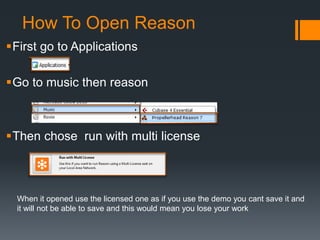
How To Open Reason
First go to Applications
Go to music then reason
Then chose run with multi license
When it opened use the licensed one as if you use the demo you cant save it and
it will not be able to save and this would mean you lose your work
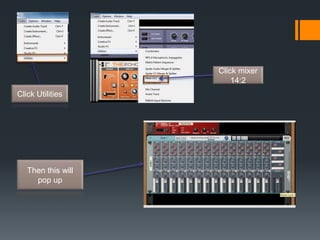
Click Utilities
Click mixer
14:2
Then this will
pop up
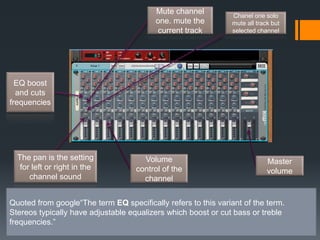
The pan is the setting
for left or right in the
channel sound
Volume
control of the
channel
EQ boost
and cuts
frequencies
Master
volume
Mute channel
one. mute the
current track
Chanel one solo
mute all track but
selected channel
Quoted from google“The term EQ specifically refers to this variant of the term.
Stereos typically have adjustable equalizers which boost or cut bass or treble
frequencies.”
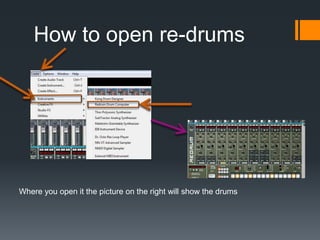
How to open re-drums
Where you open it the picture on the right will show the drums
drums
The divisible beat buttons are where you add in a base drum for example and
then add where u want to place the note.
Divisible
beat buttons
Base drum
Click
instruments
Click
instruments
Click
instruments
• Click instruments then click
NN-XT Advanced
Click on the pen and
draw the notes
Click this arrow to
reveal the piano
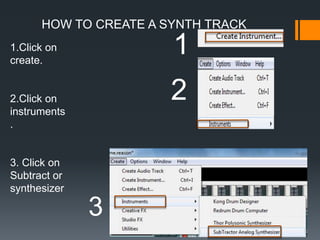
HOW TO CREATE A SYNTH TRACK
1.Click on
create.
2.Click on
instruments
.
3. Click on
Subtract or
synthesizer
1
2
3
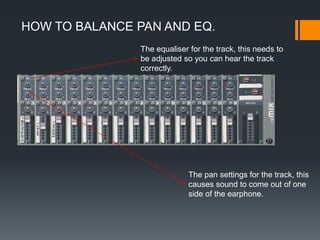
HOW TO BALANCE PAN AND EQ.
The equaliser for the track, this needs to
be adjusted so you can hear the track
correctly.
The pan settings for the track, this
causes sound to come out of one
side of the earphone.
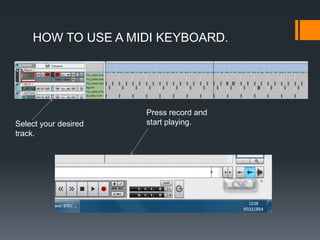
HOW TO USE A MIDI KEYBOARD.
Select your desired
track.
Press record and
start playing.
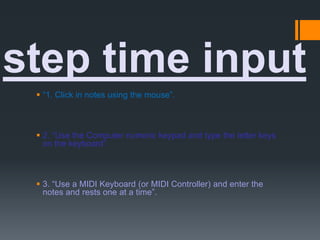
 “1. Click in notes using the mouse”.
 2. “Use the Computer numeric keypad and type the letter keys
on the keyboard”.
 3. “Use a MIDI Keyboard (or MIDI Controller) and enter the
notes and rests one at a time”.
step time input
It terns it to a mp3
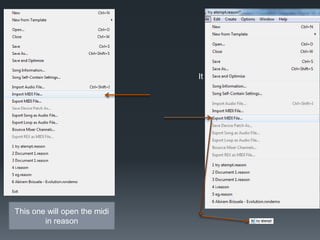
This one will open the midi
in reason
Thanks for watching

How to work reason

  • 1.
  • 2.
    How To OpenReason First go to Applications Go to music then reason Then chose run with multi license When it opened use the licensed one as if you use the demo you cant save it and it will not be able to save and this would mean you lose your work
  • 3.
  • 4.
    The pan isthe setting for left or right in the channel sound Volume control of the channel EQ boost and cuts frequencies Master volume Mute channel one. mute the current track Chanel one solo mute all track but selected channel Quoted from google“The term EQ specifically refers to this variant of the term. Stereos typically have adjustable equalizers which boost or cut bass or treble frequencies.”
  • 5.
    How to openre-drums Where you open it the picture on the right will show the drums
  • 6.
    drums The divisible beatbuttons are where you add in a base drum for example and then add where u want to place the note. Divisible beat buttons Base drum
  • 7.
  • 8.
    • Click instrumentsthen click NN-XT Advanced Click on the pen and draw the notes Click this arrow to reveal the piano
  • 9.
    HOW TO CREATEA SYNTH TRACK 1.Click on create. 2.Click on instruments . 3. Click on Subtract or synthesizer 1 2 3
  • 10.
    HOW TO BALANCEPAN AND EQ. The equaliser for the track, this needs to be adjusted so you can hear the track correctly. The pan settings for the track, this causes sound to come out of one side of the earphone.
  • 11.
    HOW TO USEA MIDI KEYBOARD. Select your desired track. Press record and start playing.
  • 12.
     “1. Clickin notes using the mouse”.  2. “Use the Computer numeric keypad and type the letter keys on the keyboard”.  3. “Use a MIDI Keyboard (or MIDI Controller) and enter the notes and rests one at a time”. step time input
  • 13.
    It terns itto a mp3 This one will open the midi in reason
  • 14.