GUIDE TO REASON 
By William Mclellan
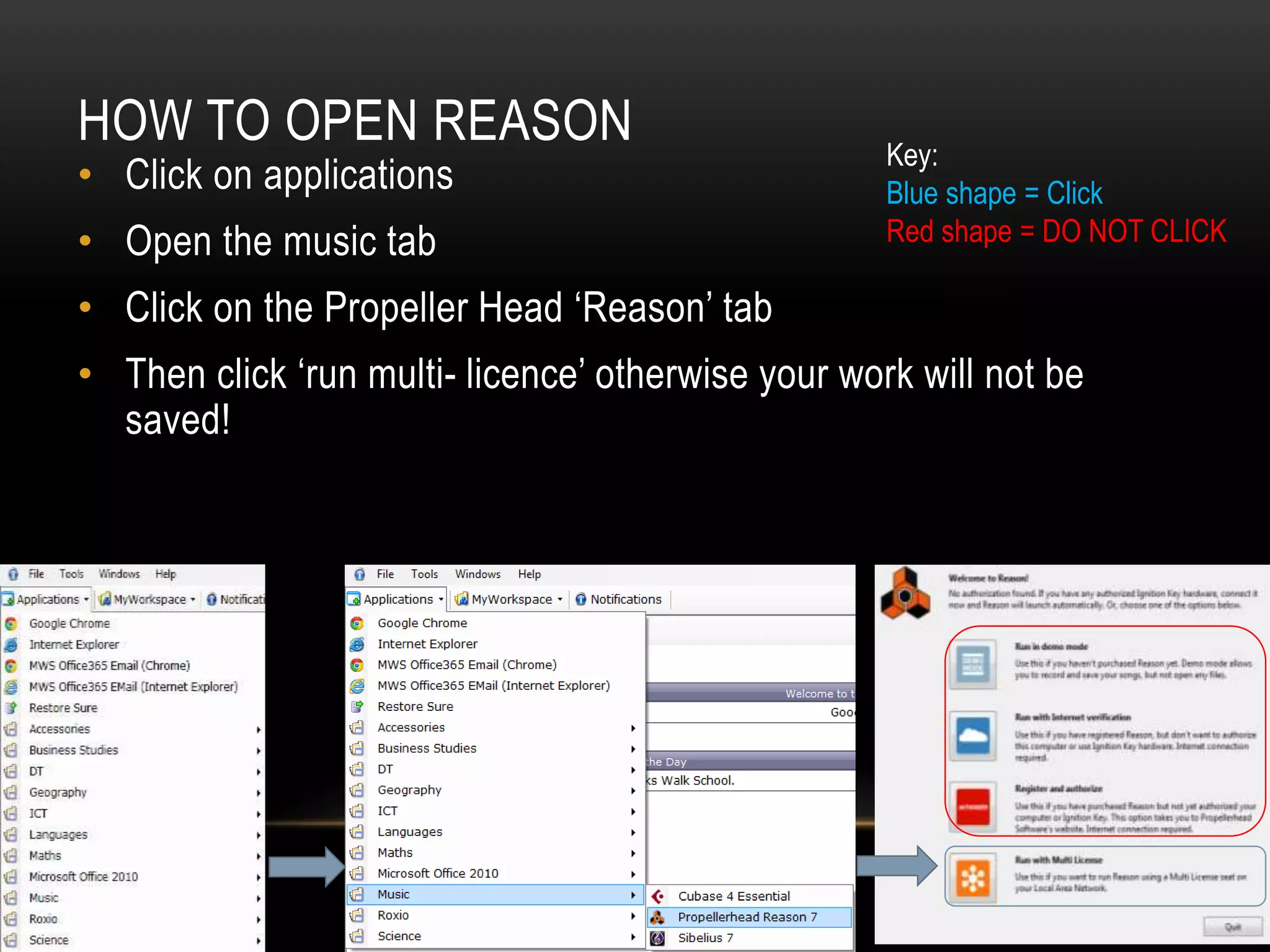
HOW TO OPEN REASON 
• Click on applications 
• Open the music tab 
• Click on the Propeller Head ‘Reason’ tab 
• Then click ‘run multi- licence’ otherwise your work will not be 
saved! 
Key: 
Blue shape = Click 
Red shape = DO NOT CLICK
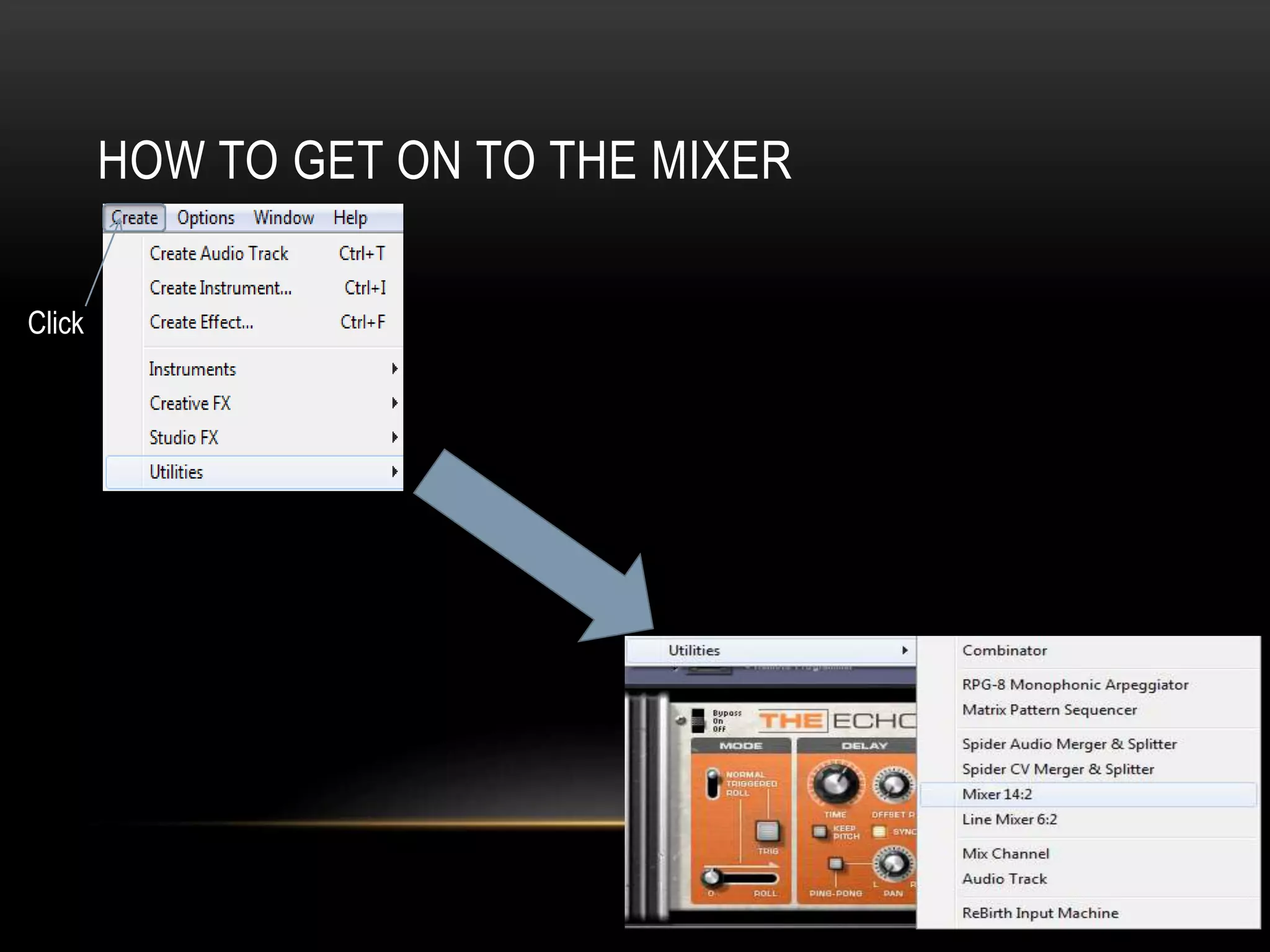
HOW TO GET ON TO THE MIXER 
Click
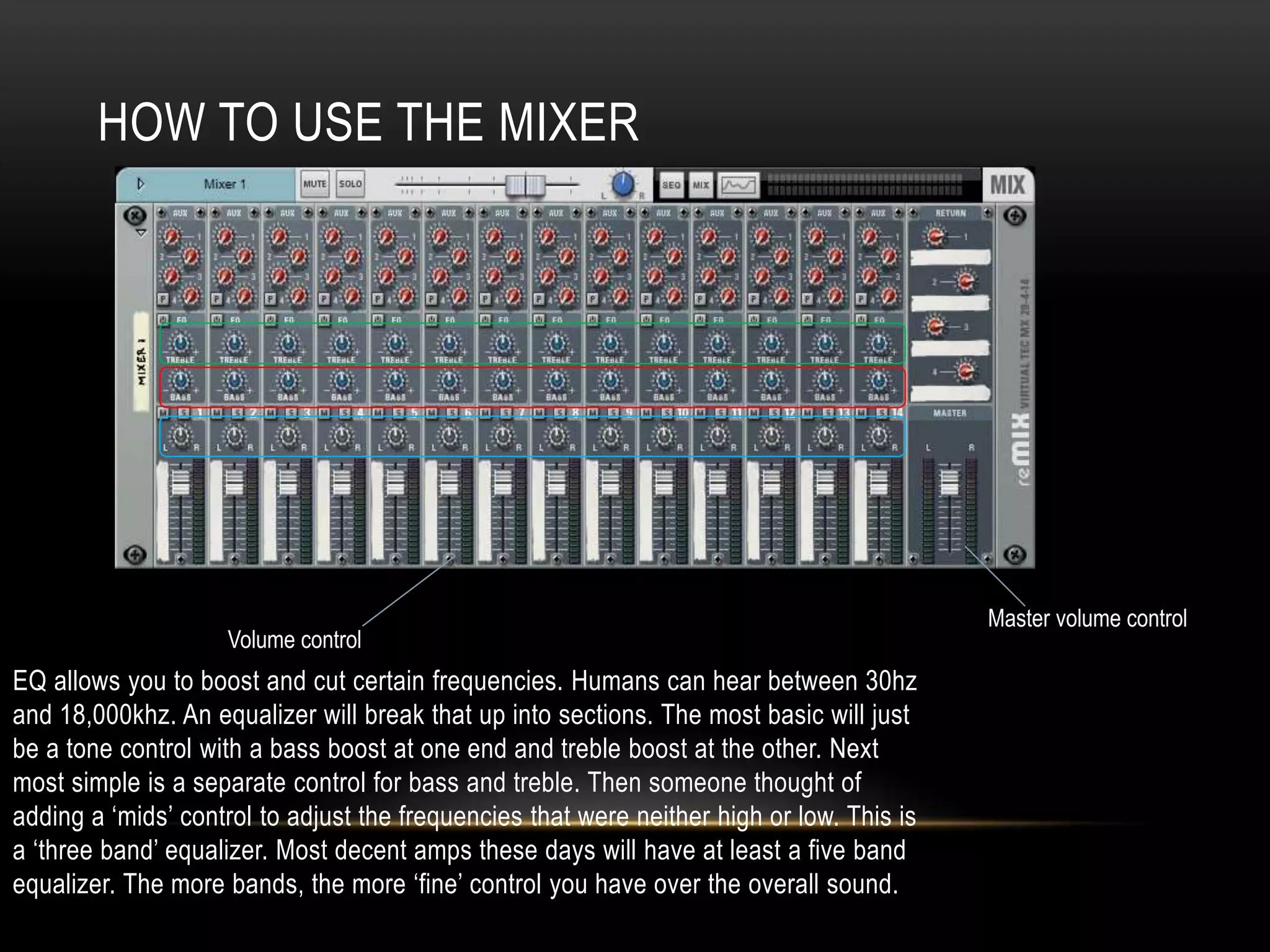
HOW TO USE THE MIXER 
EQ allows you to boost and cut certain frequencies. Humans can hear between 30hz 
and 18,000khz. An equalizer will break that up into sections. The most basic will just 
be a tone control with a bass boost at one end and treble boost at the other. Next 
most simple is a separate control for bass and treble. Then someone thought of 
adding a ‘mids’ control to adjust the frequencies that were neither high or low. This is 
a ‘three band’ equalizer. Most decent amps these days will have at least a five band 
equalizer. The more bands, the more ‘fine’ control you have over the overall sound. 
Master volume control 
Volume control
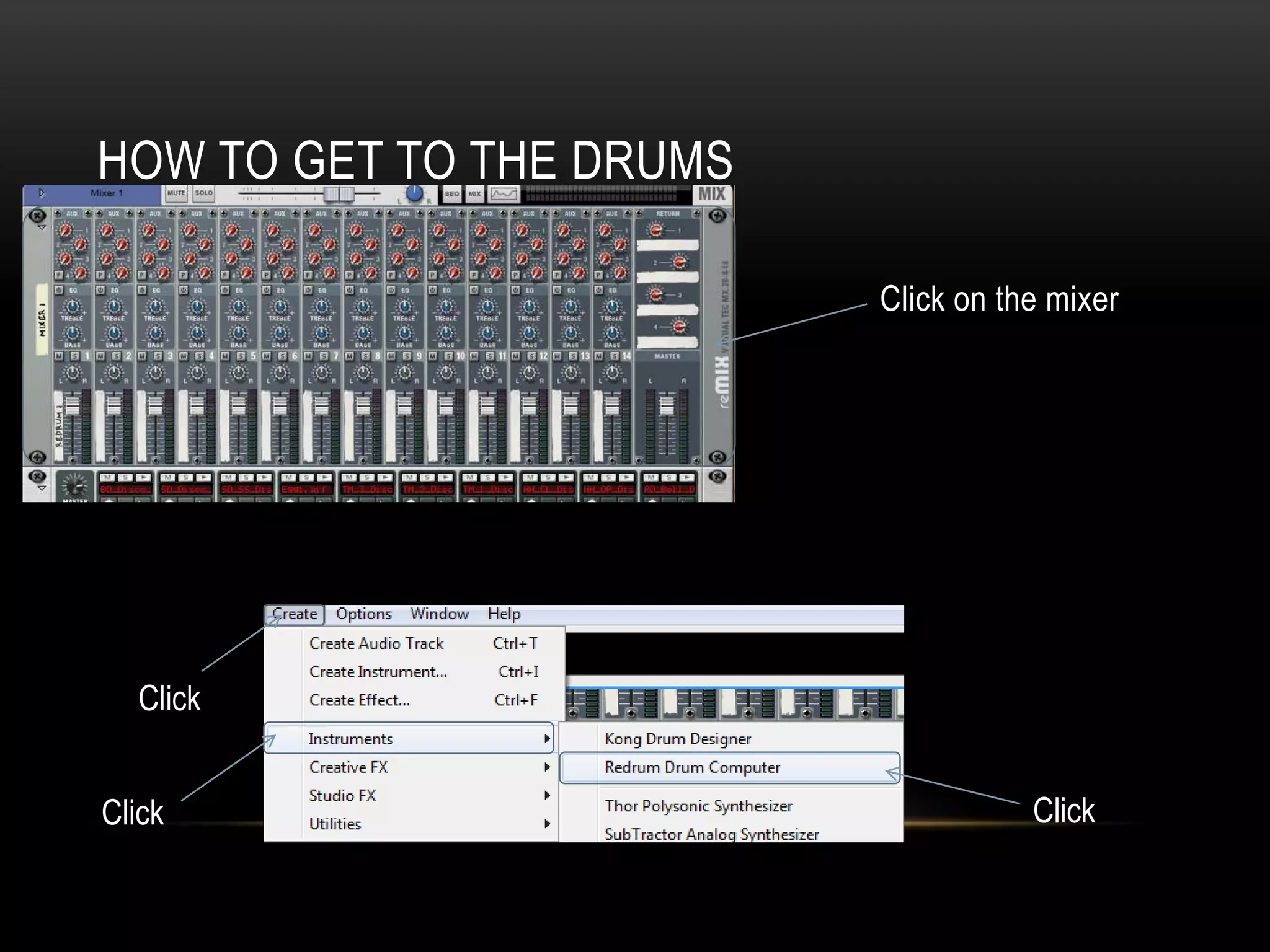
HOW TO GET TO THE DRUMS 
Click on the mixer 
Click 
Click Click
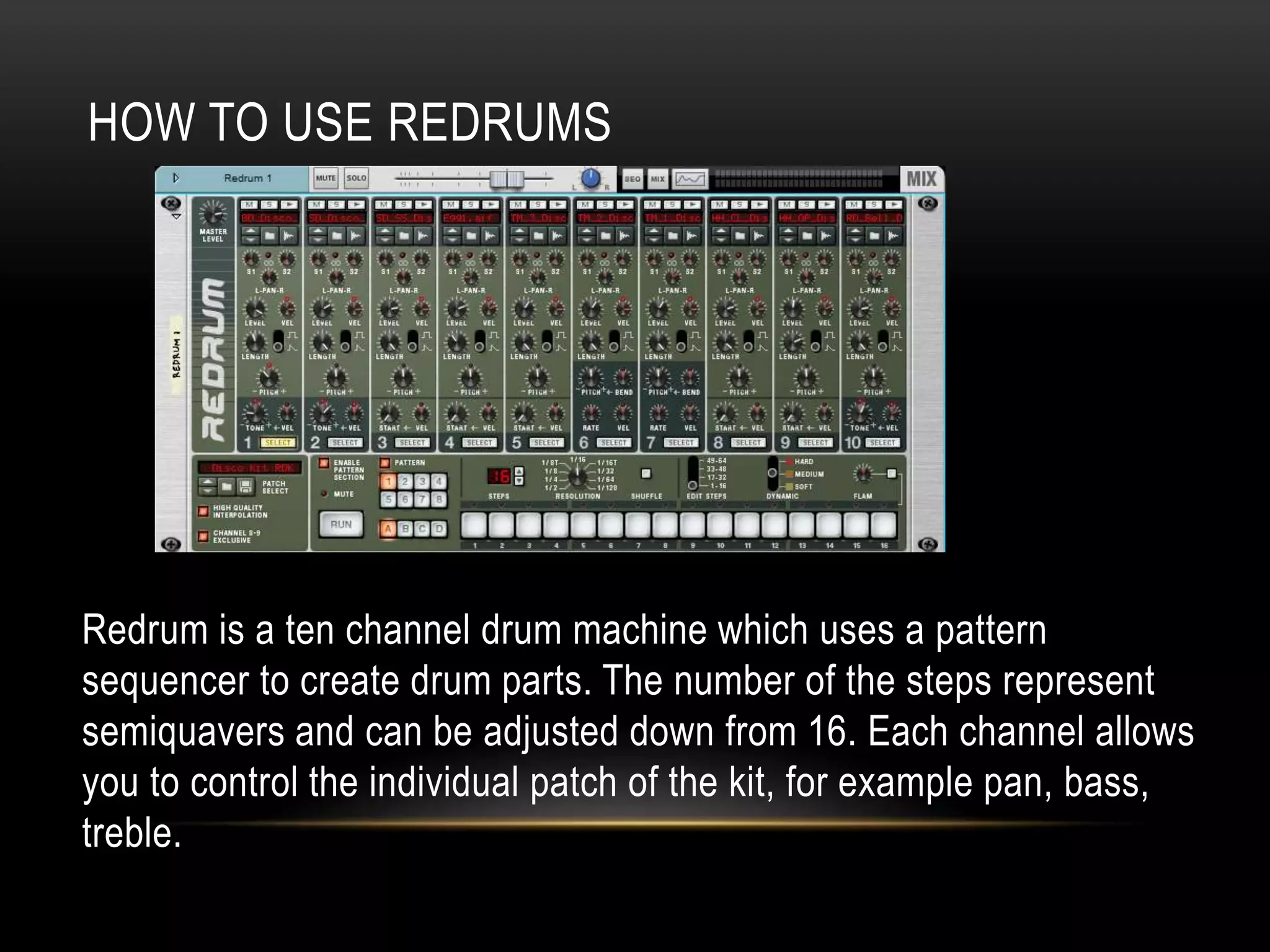
HOW TO USE REDRUMS 
Redrum is a ten channel drum machine which uses a pattern 
sequencer to create drum parts. The number of the steps represent 
semiquavers and can be adjusted down from 16. Each channel allows 
you to control the individual patch of the kit, for example pan, bass, 
treble.
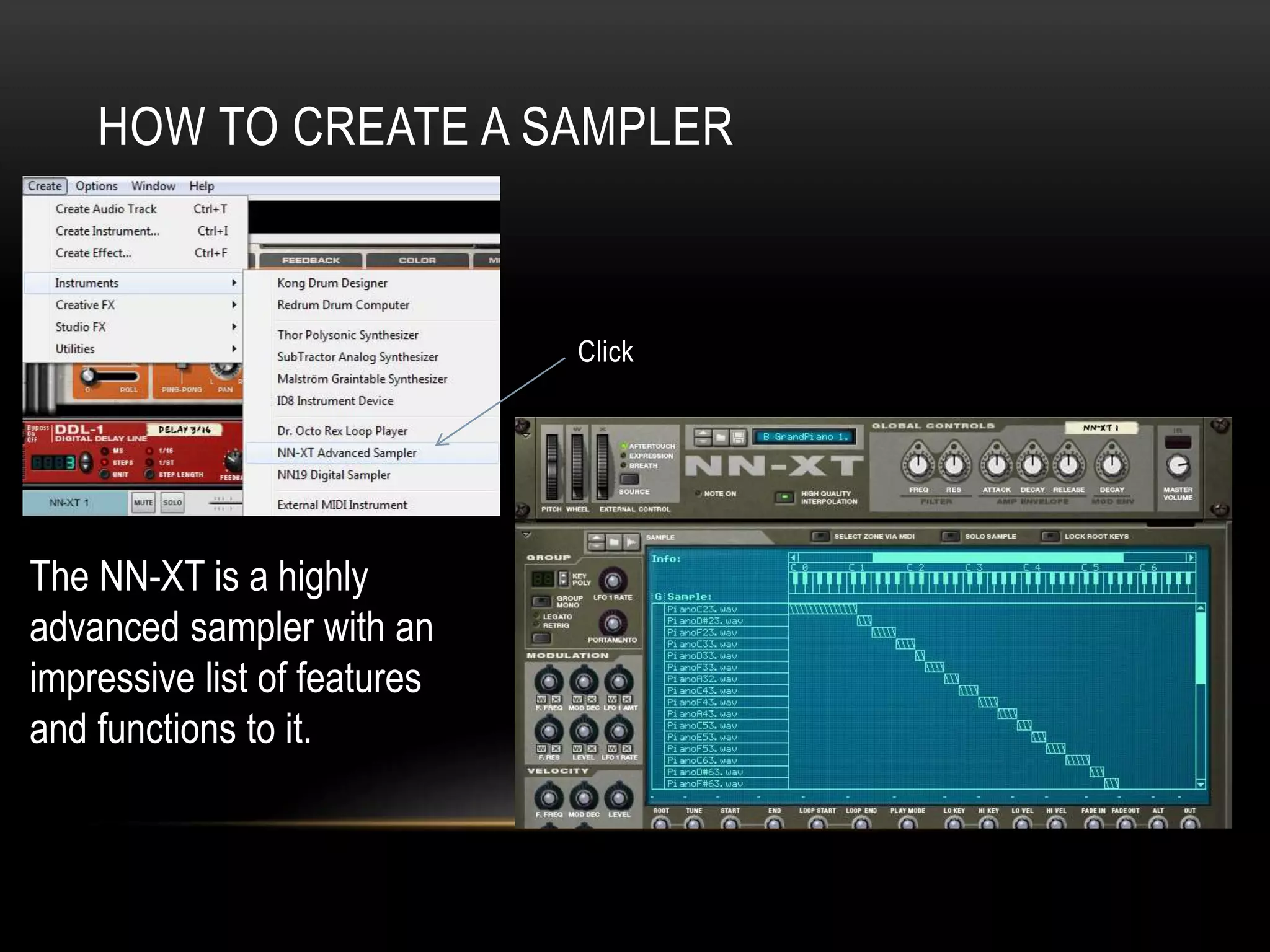
HOW TO CREATE A SAMPLER 
Click 
The NN-XT is a highly 
advanced sampler with an 
impressive list of features 
and functions to it.
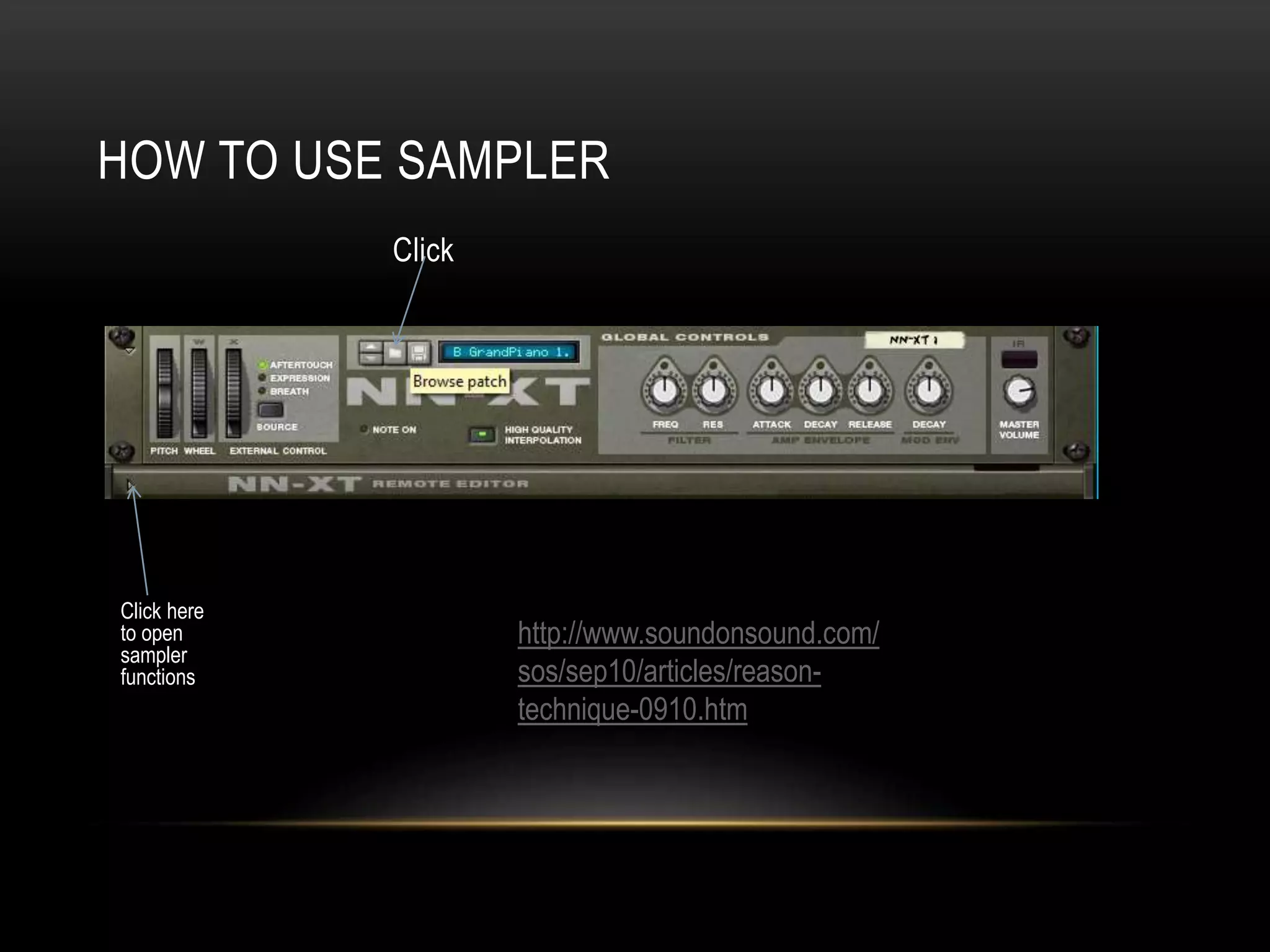
HOW TO USE SAMPLER 
Click 
Click here 
to open 
sampler 
functions 
http://www.soundonsound.com/ 
sos/sep10/articles/reason-technique- 
0910.htm
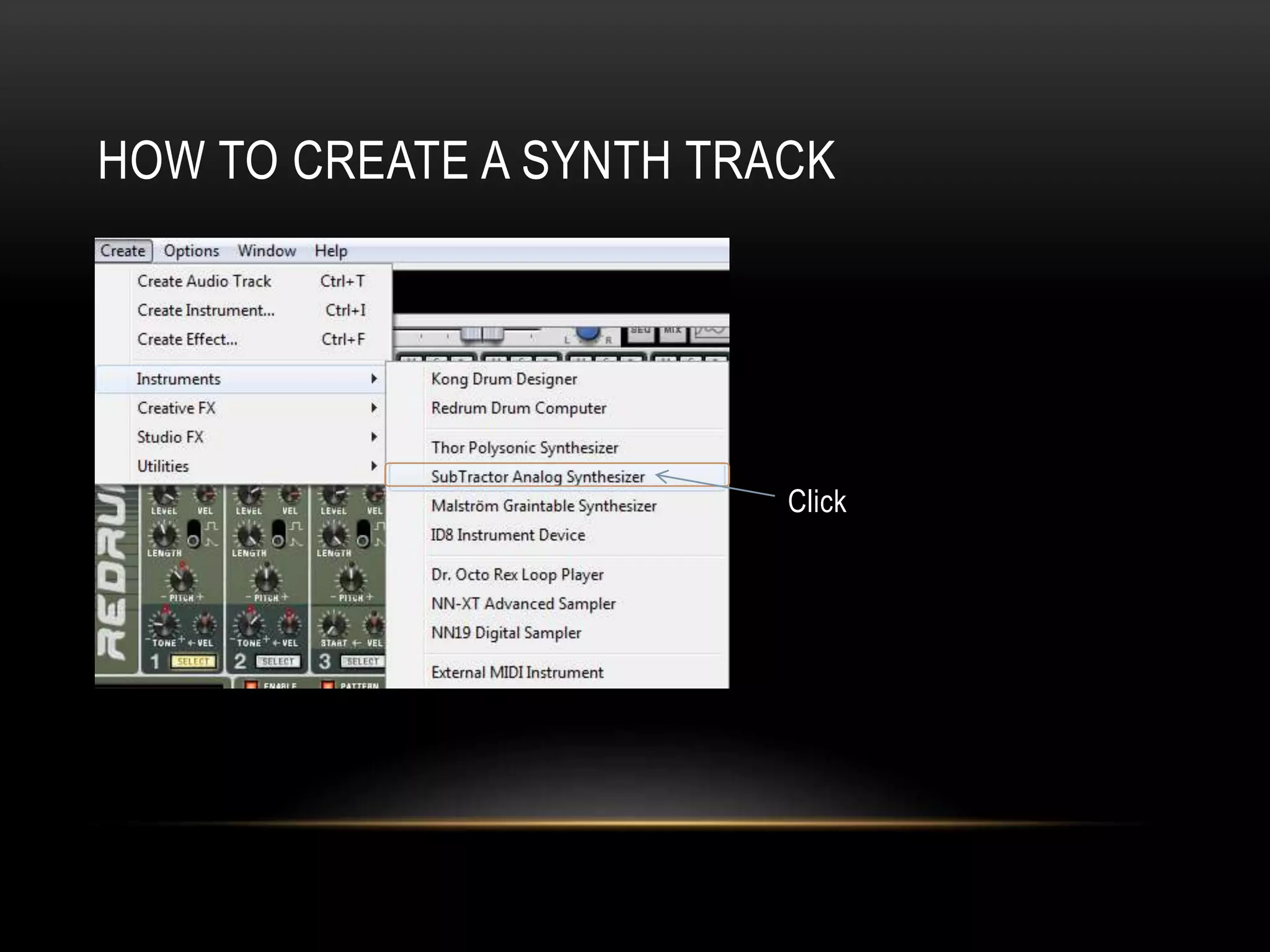
HOW TO CREATE A SYNTH TRACK 
Click
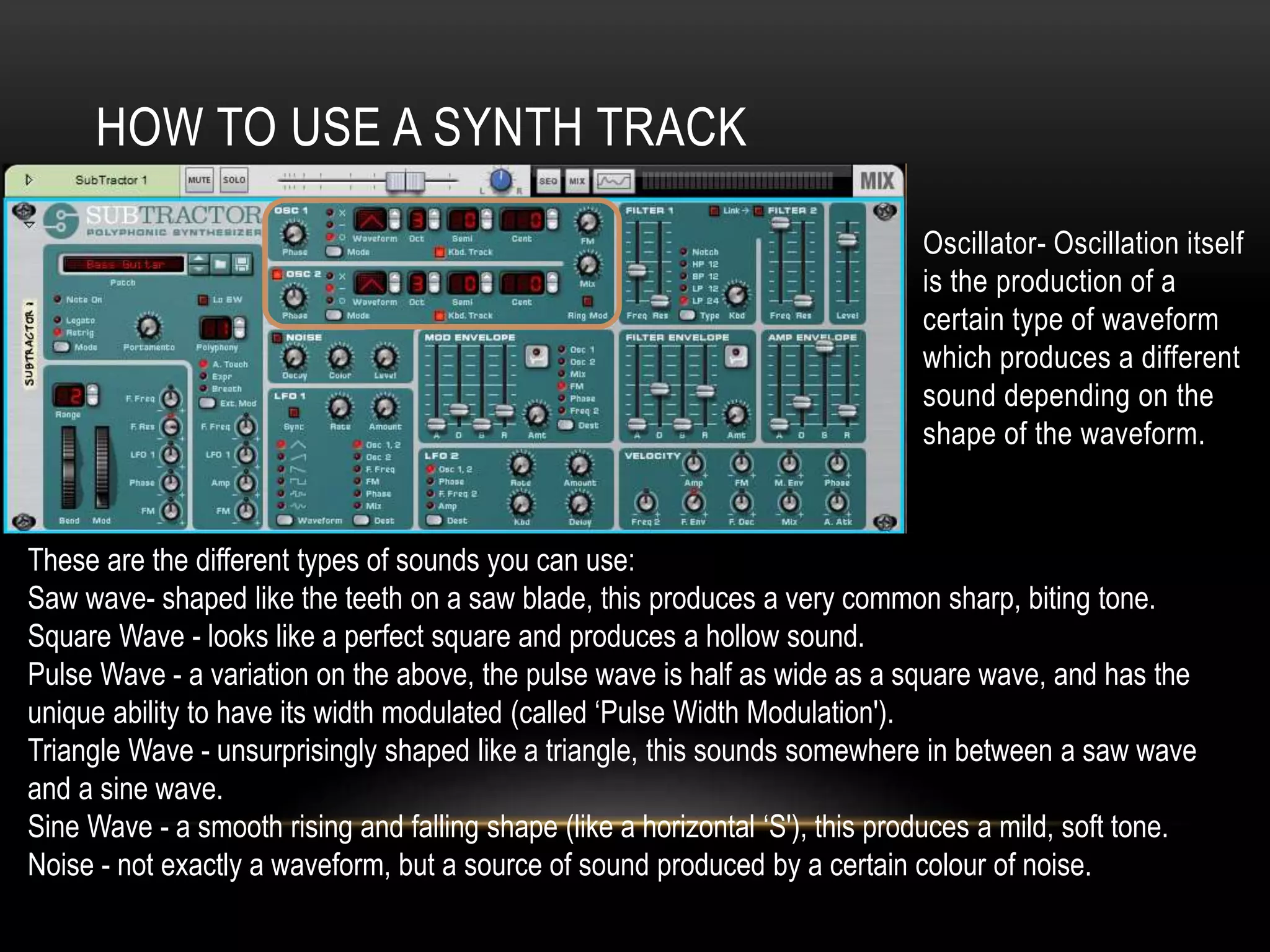
HOW TO USE A SYNTH TRACK 
Oscillator- Oscillation itself 
is the production of a 
certain type of waveform 
which produces a different 
sound depending on the 
shape of the waveform. 
These are the different types of sounds you can use: 
Saw wave- shaped like the teeth on a saw blade, this produces a very common sharp, biting tone. 
Square Wave - looks like a perfect square and produces a hollow sound. 
Pulse Wave - a variation on the above, the pulse wave is half as wide as a square wave, and has the 
unique ability to have its width modulated (called ‘Pulse Width Modulation'). 
Triangle Wave - unsurprisingly shaped like a triangle, this sounds somewhere in between a saw wave 
and a sine wave. 
Sine Wave - a smooth rising and falling shape (like a horizontal ‘S'), this produces a mild, soft tone. 
Noise - not exactly a waveform, but a source of sound produced by a certain colour of noise.
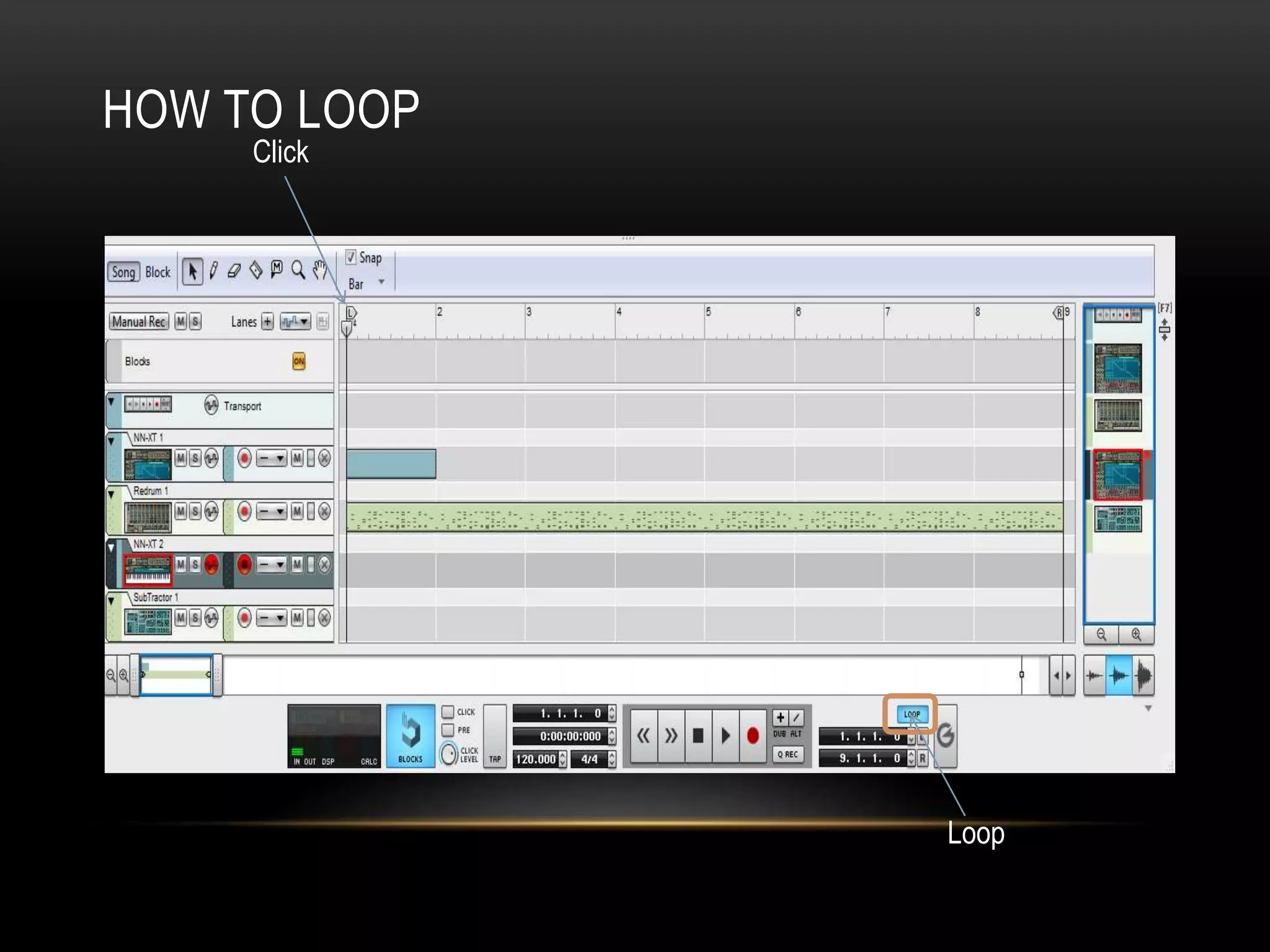
HOW TO LOOP 
Loop 
Click
STEP TIME 
1. Click in notes using the mouse. 
2. Use the Computer numeric keypad and type the letter keys on the keyboard 
3. Use a MIDI Keyboard (or MIDI Controller) and enter the notes and rests one 
at a time.

Guide to Reason

  • 1.
    GUIDE TO REASON By William Mclellan
  • 2.
    HOW TO OPENREASON • Click on applications • Open the music tab • Click on the Propeller Head ‘Reason’ tab • Then click ‘run multi- licence’ otherwise your work will not be saved! Key: Blue shape = Click Red shape = DO NOT CLICK
  • 3.
    HOW TO GETON TO THE MIXER Click
  • 4.
    HOW TO USETHE MIXER EQ allows you to boost and cut certain frequencies. Humans can hear between 30hz and 18,000khz. An equalizer will break that up into sections. The most basic will just be a tone control with a bass boost at one end and treble boost at the other. Next most simple is a separate control for bass and treble. Then someone thought of adding a ‘mids’ control to adjust the frequencies that were neither high or low. This is a ‘three band’ equalizer. Most decent amps these days will have at least a five band equalizer. The more bands, the more ‘fine’ control you have over the overall sound. Master volume control Volume control
  • 5.
    HOW TO GETTO THE DRUMS Click on the mixer Click Click Click
  • 6.
    HOW TO USEREDRUMS Redrum is a ten channel drum machine which uses a pattern sequencer to create drum parts. The number of the steps represent semiquavers and can be adjusted down from 16. Each channel allows you to control the individual patch of the kit, for example pan, bass, treble.
  • 7.
    HOW TO CREATEA SAMPLER Click The NN-XT is a highly advanced sampler with an impressive list of features and functions to it.
  • 8.
    HOW TO USESAMPLER Click Click here to open sampler functions http://www.soundonsound.com/ sos/sep10/articles/reason-technique- 0910.htm
  • 9.
    HOW TO CREATEA SYNTH TRACK Click
  • 10.
    HOW TO USEA SYNTH TRACK Oscillator- Oscillation itself is the production of a certain type of waveform which produces a different sound depending on the shape of the waveform. These are the different types of sounds you can use: Saw wave- shaped like the teeth on a saw blade, this produces a very common sharp, biting tone. Square Wave - looks like a perfect square and produces a hollow sound. Pulse Wave - a variation on the above, the pulse wave is half as wide as a square wave, and has the unique ability to have its width modulated (called ‘Pulse Width Modulation'). Triangle Wave - unsurprisingly shaped like a triangle, this sounds somewhere in between a saw wave and a sine wave. Sine Wave - a smooth rising and falling shape (like a horizontal ‘S'), this produces a mild, soft tone. Noise - not exactly a waveform, but a source of sound produced by a certain colour of noise.
  • 11.
    HOW TO LOOP Loop Click
  • 12.
    STEP TIME 1.Click in notes using the mouse. 2. Use the Computer numeric keypad and type the letter keys on the keyboard 3. Use a MIDI Keyboard (or MIDI Controller) and enter the notes and rests one at a time.