How to protect your computer Presenter : Adnan ILS English
Purpose of this Presentation To provide to you an overview of how to protect computers: * Preventive Maintenance Techniques * Disk Management * Security
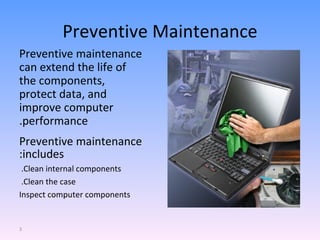
Preventive Maintenance Preventive maintenance can extend the life of the components, protect data, and improve computer performance. Preventive maintenance includes: Clean internal components.  Clean the case.  Inspect computer components
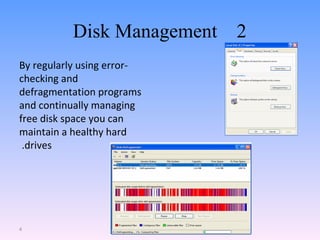
2  Disk Management   By regularly using error-checking and defragmentation programs and continually managing free disk space you can maintain a healthy hard drives.
Security Types of attacks to computer security: Physical:  Theft, damage, or destruction to computer equipment. Data: Removal, corruption, denial of access, unauthorized access, or theft of information.
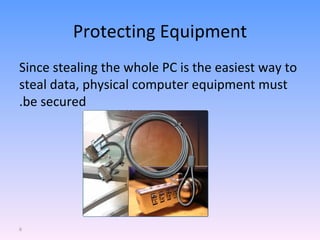
Protecting Equipment Since stealing the whole PC is the easiest way to steal data, physical computer equipment must be secured.
Viruses, Worms, and Trojan Horses A computer  virus  is software code that is deliberately created by an attacker. Viruses may collect sensitive information or may alter or destroy information. A  worm  is a self-replicating program that uses the network to duplicate its code to the hosts on the network. At a minimum, worms consume bandwidth in a network. A  Trojan   horse  is technically a worm and is named for its method of getting past computer defenses by pretending to be something useful.
Web Security ActiveX , Java ,JavaScript Adware  displays advertising, usually in a popup window. Grayware  or malware is a file or program other than a virus that is potentially harmful. Many grayware attacks are phishing attacks that try to persuade the reader to unknowingly provide attackers with access to personal information. Spyware , a type of grayware, is distributed without any user intervention of knowledge. Spyware monitors computer activity then sends the information back to the organization responsible for launching the spyware. Phishing  is a form of social engineering where the attacker pretends to represent a legitimate outside organization. The attacker might ask for verification of information, such as a password or username, to supposedly prevent some terrible consequence from occurring. Spam  is unsolicited email that can be used to send harmful links or deceptive content. Popups  are windows that automatically open and are designed to capture your attention and lead you to advertising sites. Anti-virus software is designed to detect, disable, and remove before they infect a computer. Also an options in e-mail software, popup blockers, and common indications of spam to combat these.
Summary -  Regularly use the  Preventive Maintenance Techniques and the disk management tools. -  Use anti-virus software, options in e-mail software, popup blockers, and common indications of spam to combat these. - Update your OS and anti-virus every day .
Q and A Thank you

How To Protect Your Computer

  • 1.
    How to protectyour computer Presenter : Adnan ILS English
  • 2.
    Purpose of thisPresentation To provide to you an overview of how to protect computers: * Preventive Maintenance Techniques * Disk Management * Security
  • 3.
    Preventive Maintenance Preventivemaintenance can extend the life of the components, protect data, and improve computer performance. Preventive maintenance includes: Clean internal components. Clean the case. Inspect computer components
  • 4.
    2 DiskManagement By regularly using error-checking and defragmentation programs and continually managing free disk space you can maintain a healthy hard drives.
  • 5.
    Security Types ofattacks to computer security: Physical: Theft, damage, or destruction to computer equipment. Data: Removal, corruption, denial of access, unauthorized access, or theft of information.
  • 6.
    Protecting Equipment Sincestealing the whole PC is the easiest way to steal data, physical computer equipment must be secured.
  • 7.
    Viruses, Worms, andTrojan Horses A computer virus is software code that is deliberately created by an attacker. Viruses may collect sensitive information or may alter or destroy information. A worm is a self-replicating program that uses the network to duplicate its code to the hosts on the network. At a minimum, worms consume bandwidth in a network. A Trojan horse is technically a worm and is named for its method of getting past computer defenses by pretending to be something useful.
  • 8.
    Web Security ActiveX, Java ,JavaScript Adware displays advertising, usually in a popup window. Grayware or malware is a file or program other than a virus that is potentially harmful. Many grayware attacks are phishing attacks that try to persuade the reader to unknowingly provide attackers with access to personal information. Spyware , a type of grayware, is distributed without any user intervention of knowledge. Spyware monitors computer activity then sends the information back to the organization responsible for launching the spyware. Phishing is a form of social engineering where the attacker pretends to represent a legitimate outside organization. The attacker might ask for verification of information, such as a password or username, to supposedly prevent some terrible consequence from occurring. Spam is unsolicited email that can be used to send harmful links or deceptive content. Popups are windows that automatically open and are designed to capture your attention and lead you to advertising sites. Anti-virus software is designed to detect, disable, and remove before they infect a computer. Also an options in e-mail software, popup blockers, and common indications of spam to combat these.
  • 9.
    Summary - Regularly use the Preventive Maintenance Techniques and the disk management tools. - Use anti-virus software, options in e-mail software, popup blockers, and common indications of spam to combat these. - Update your OS and anti-virus every day .
  • 10.
    Q and AThank you