Your Host
Markus Ehlers Thomas Kopowski
Welcome
DECT IP specialisation
partner.gigasetpro.com
Specialisation

IP PBX systems
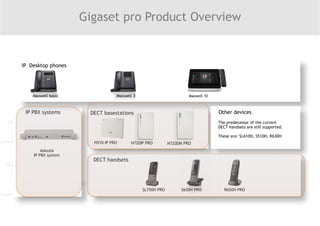
Gigaset pro Product Overview
DECT basestations
DECT handsets
Other devices
N510 IP PRO N720IP PRO N720DM PRO
SL750H PRO R650H PRO
Maxwell 10
S650H PRO
Maxwell basic Maxwell 3
The predecessor of the current
DECT handsets are still supported.
These are: SL610H, S510H, R630H
Askozia
IP PBX system
IP Desktop phones
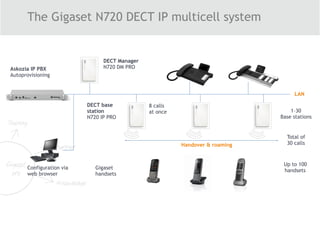
The Gigaset N720 DECT IP multicell system
Handover & roaming
LAN
Configuration via 

web browser
8 calls 

at once

Total of

30 calls
Askozia IP PBX
Autoprovisioning
DECT Manager

N720 DM PRO

DECT base 

station 

N720 IP PRO
1–30

Base stations
Up to 100 

handsets
Gigaset 

handsets
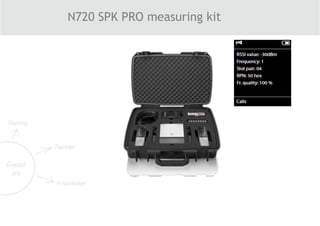
N720 SPK PRO measuring kit
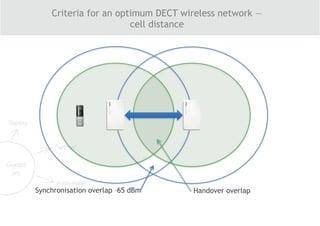
Criteria for an optimum DECT wireless network — 

cell distance
Synchronisation overlap –65 dBm Handover overlap
3 2
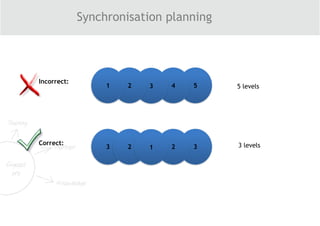
Synchronisation planning
54321
Incorrect:
321
Correct:
5 levels
3 levels
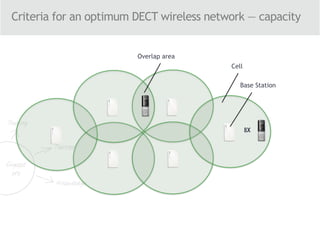
Criteria for an optimum DECT wireless network — capacity
8X
Base Station
Cell
Overlap area
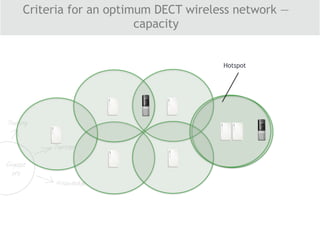
Hotspot
Criteria for an optimum DECT wireless network —
capacity
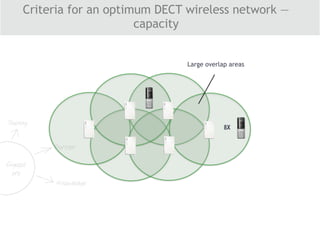
8X
Large overlap areas
Criteria for an optimum DECT wireless network —
capacity
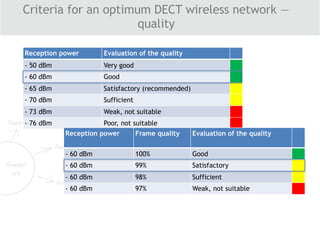
Reception power Evaluation of the quality
- 50 dBm Very good
- 60 dBm Good
- 65 dBm Satisfactory (recommended)
- 70 dBm Sufficient
- 73 dBm Weak, not suitable
- 76 dBm Poor, not suitable
Reception power Frame quality Evaluation of the quality
- 60 dBm 100% Good
- 60 dBm 99% Satisfactory
- 60 dBm 98% Sufficient
- 60 dBm 97% Weak, not suitable
Criteria for an optimum DECT wireless network —
quality
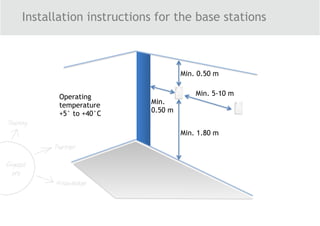
Installation instructions for the base stations
Min. 1.80 m
Min. 0.50 m
Min.
0.50 m
Min. 5-10 mOperating
temperature
+5° to +40°C
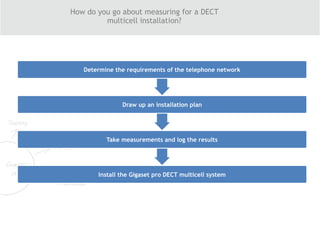
How do you go about measuring for a DECT 

multicell installation?
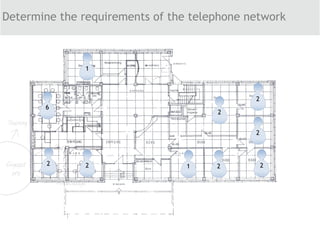
Determine the requirements of the telephone network
Draw up an installation plan
Take measurements and log the results
Install the Gigaset pro DECT multicell system
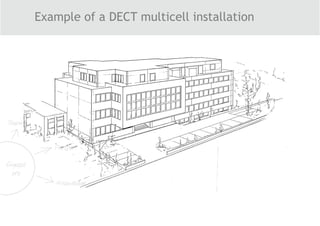
Example of a DECT multicell installation
Determine the requirements of the telephone network
2
6
2
2
2222
1
1
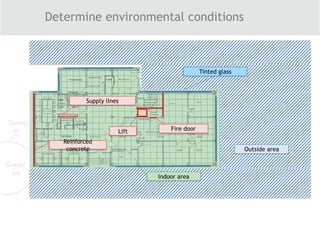
Determine environmental conditions
Reinforced
concrete
Lift
Supply lines
Fire door
Indoor area
Outside area
Tinted glass
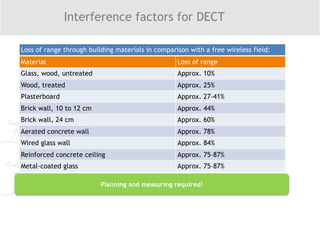
Interference factors for DECT
Planning and measuring required!
Loss of range through building materials in comparison with a free wireless field:
Material Loss of range
Glass, wood, untreated Approx. 10%
Wood, treated Approx. 25%
Plasterboard Approx. 27–41%
Brick wall, 10 to 12 cm Approx. 44%
Brick wall, 24 cm Approx. 60%
Aerated concrete wall Approx. 78%
Wired glass wall Approx. 84%
Reinforced concrete ceiling Approx. 75–87%
Metal-coated glass Approx. 75–87%
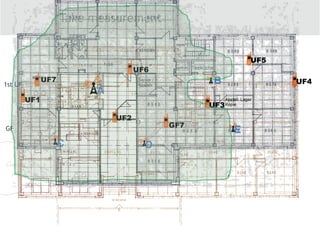
Take measurement
GF
1st UF
A
B
C D
E
GF7
UF1
UF2
UF3
UF4
UF5
UF6
UF7
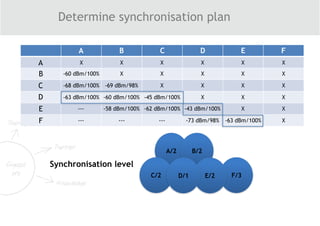
Determine synchronisation plan
A B C D E F
A X X X X X X
B -60 dBm/100% X X X X X
C -68 dBm/100% -69 dBm/98% X X X X
D -63 dBm/100% -60 dBm/100% -45 dBm/100% X X X
E --- -58 dBm/100% -62 dBm/100% -43 dBm/100% X X
F --- --- --- -73 dBm/98% -63 dBm/100% X
A/2
C/2 F/3
B/2
E/2D/1
Synchronisation level
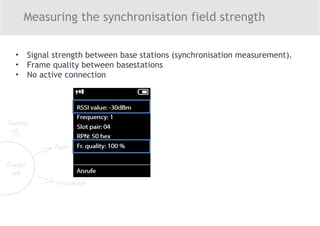
Measuring the synchronisation field strength
• Signal strength between base stations (synchronisation measurement).
• Frame quality between basestations
• No active connection
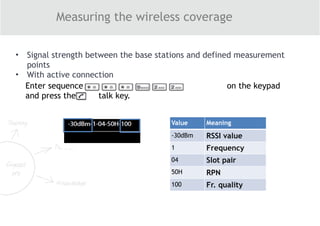
Measuring the wireless coverage
• Signal strength between the base stations and defined measurement
points
• With active connection
Value Meaning
-30dBm RSSI value
1 Frequency
04 Slot pair
50H RPN
100 Fr. quality
Enter sequence on the keypad
and press the talk key.
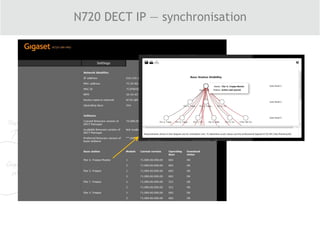
N720 DECT IP — synchronisation
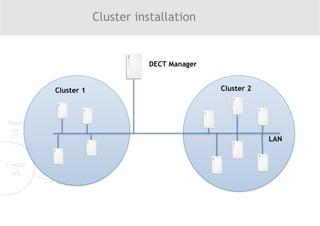
Cluster installation
DECT Manager
Cluster 2Cluster 1
LAN
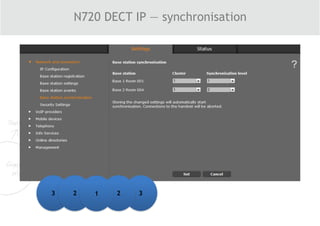
N720 DECT IP — synchronisation
3 2 321
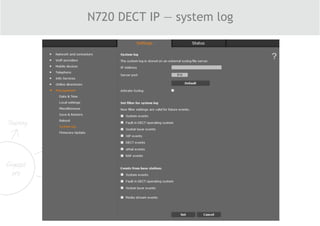
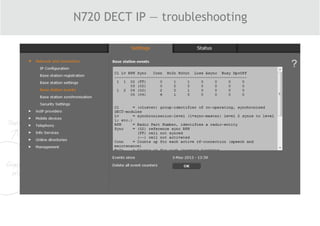
N720 DECT IP — system log
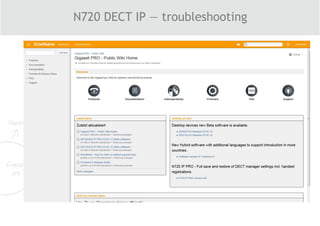
N720 DECT IP — troubleshooting
Gigaset pro Wiki pages
N720 DECT IP — troubleshooting
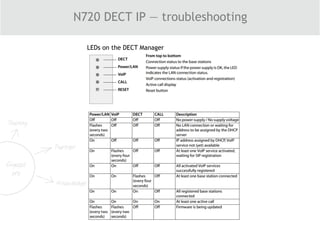
LEDs on the DECT Manager
N720 DECT IP — troubleshooting
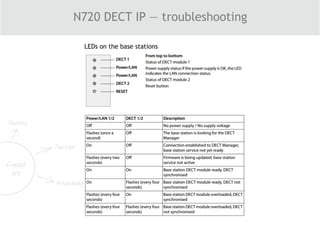
LEDs on the base stations
N720 DECT IP — troubleshooting
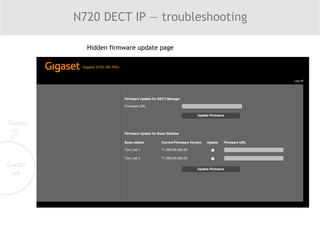
Hidden firmware update page
N720 DECT IP — troubleshooting
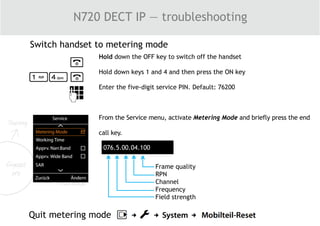
Switch handset to metering mode
Hold down the OFF key to switch off the handset
Hold down keys 1 and 4 and then press the ON key
Enter the five-digit service PIN. Default: 76200
From the Service menu, activate Metering Mode and briefly press the end
call key.
076.5.00.04.100
Frame quality
RPN
Channel
Frequency
Field strength
Quit metering mode
Thank you for your attention
Questions?
Time to wake up!

How to prepare a DECT installation - webinar 2016, English

  • 2.
    Your Host Markus EhlersThomas Kopowski
  • 3.
  • 4.
  • 5.
    IP PBX systems Gigasetpro Product Overview DECT basestations DECT handsets Other devices N510 IP PRO N720IP PRO N720DM PRO SL750H PRO R650H PRO Maxwell 10 S650H PRO Maxwell basic Maxwell 3 The predecessor of the current DECT handsets are still supported. These are: SL610H, S510H, R630H Askozia IP PBX system IP Desktop phones
  • 6.
    The Gigaset N720DECT IP multicell system Handover & roaming LAN Configuration via 
 web browser 8 calls 
 at once
 Total of
 30 calls Askozia IP PBX Autoprovisioning DECT Manager
 N720 DM PRO
 DECT base 
 station 
 N720 IP PRO 1–30
 Base stations Up to 100 
 handsets Gigaset 
 handsets
  • 7.
    N720 SPK PROmeasuring kit
  • 8.
    Criteria for anoptimum DECT wireless network — 
 cell distance Synchronisation overlap –65 dBm Handover overlap
  • 9.
  • 10.
    Criteria for anoptimum DECT wireless network — capacity 8X Base Station Cell Overlap area
  • 11.
    Hotspot Criteria for anoptimum DECT wireless network — capacity
  • 12.
    8X Large overlap areas Criteriafor an optimum DECT wireless network — capacity
  • 13.
    Reception power Evaluationof the quality - 50 dBm Very good - 60 dBm Good - 65 dBm Satisfactory (recommended) - 70 dBm Sufficient - 73 dBm Weak, not suitable - 76 dBm Poor, not suitable Reception power Frame quality Evaluation of the quality - 60 dBm 100% Good - 60 dBm 99% Satisfactory - 60 dBm 98% Sufficient - 60 dBm 97% Weak, not suitable Criteria for an optimum DECT wireless network — quality
  • 14.
    Installation instructions forthe base stations Min. 1.80 m Min. 0.50 m Min. 0.50 m Min. 5-10 mOperating temperature +5° to +40°C
  • 15.
    How do yougo about measuring for a DECT 
 multicell installation? Determine the requirements of the telephone network Draw up an installation plan Take measurements and log the results Install the Gigaset pro DECT multicell system
  • 16.
    Example of aDECT multicell installation
  • 17.
    Determine the requirementsof the telephone network 2 6 2 2 2222 1 1
  • 18.
    Determine environmental conditions Reinforced concrete Lift Supplylines Fire door Indoor area Outside area Tinted glass
  • 19.
    Interference factors forDECT Planning and measuring required! Loss of range through building materials in comparison with a free wireless field: Material Loss of range Glass, wood, untreated Approx. 10% Wood, treated Approx. 25% Plasterboard Approx. 27–41% Brick wall, 10 to 12 cm Approx. 44% Brick wall, 24 cm Approx. 60% Aerated concrete wall Approx. 78% Wired glass wall Approx. 84% Reinforced concrete ceiling Approx. 75–87% Metal-coated glass Approx. 75–87%
  • 20.
    Take measurement GF 1st UF A B CD E GF7 UF1 UF2 UF3 UF4 UF5 UF6 UF7
  • 21.
    Determine synchronisation plan AB C D E F A X X X X X X B -60 dBm/100% X X X X X C -68 dBm/100% -69 dBm/98% X X X X D -63 dBm/100% -60 dBm/100% -45 dBm/100% X X X E --- -58 dBm/100% -62 dBm/100% -43 dBm/100% X X F --- --- --- -73 dBm/98% -63 dBm/100% X A/2 C/2 F/3 B/2 E/2D/1 Synchronisation level
  • 22.
    Measuring the synchronisationfield strength • Signal strength between base stations (synchronisation measurement). • Frame quality between basestations • No active connection
  • 23.
    Measuring the wirelesscoverage • Signal strength between the base stations and defined measurement points • With active connection Value Meaning -30dBm RSSI value 1 Frequency 04 Slot pair 50H RPN 100 Fr. quality Enter sequence on the keypad and press the talk key.
  • 24.
    N720 DECT IP— synchronisation
  • 25.
  • 26.
    N720 DECT IP— synchronisation 3 2 321
  • 27.
    N720 DECT IP— system log
  • 28.
    N720 DECT IP— troubleshooting Gigaset pro Wiki pages
  • 29.
    N720 DECT IP— troubleshooting LEDs on the DECT Manager
  • 30.
    N720 DECT IP— troubleshooting LEDs on the base stations
  • 31.
    N720 DECT IP— troubleshooting Hidden firmware update page
  • 32.
    N720 DECT IP— troubleshooting
  • 33.
    N720 DECT IP— troubleshooting Switch handset to metering mode Hold down the OFF key to switch off the handset Hold down keys 1 and 4 and then press the ON key Enter the five-digit service PIN. Default: 76200 From the Service menu, activate Metering Mode and briefly press the end call key. 076.5.00.04.100 Frame quality RPN Channel Frequency Field strength Quit metering mode
  • 34.
    Thank you foryour attention
  • 35.