NoodleTools

Jane Ellen Innes
Director, University Libraries
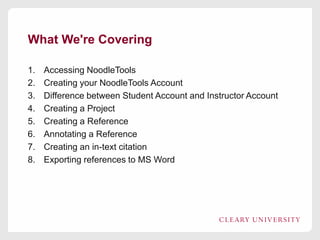
What We're Covering
1.
2.
3.
4.
5.
6.
7.
8.

Accessing NoodleTools
Creating your NoodleTools Account
Difference between Student Account and Instructor Account
Creating a Project
Creating a Reference
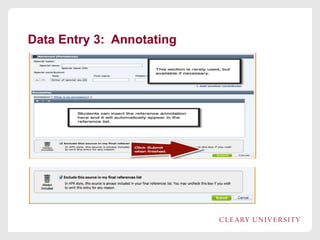
Annotating a Reference
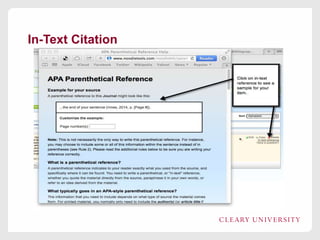
Creating an in-text citation
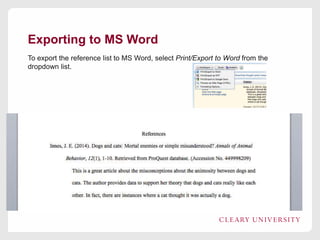
Exporting references to MS Word
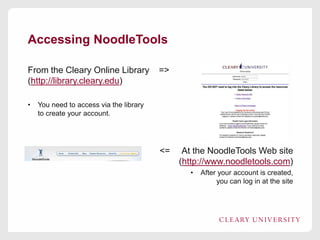
Accessing NoodleTools
From the Cleary Online Library
(http://library.cleary.edu)
•

=>

You need to access via the library
to create your account.

<=

At the NoodleTools Web site
(http://www.noodletools.com)
•

After your account is created,
you can log in at the site
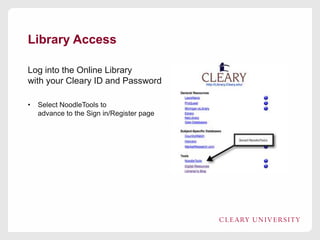
Library Access
Log into the Online Library
with your Cleary ID and Password
•

Select NoodleTools to
advance to the Sign in/Register page
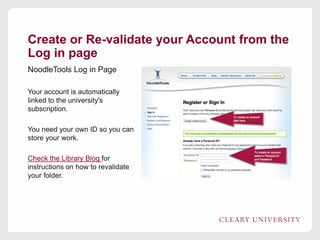
Create or Re-validate your Account from the
Log in page
NoodleTools Log in Page
Your account is automatically
linked to the university's
subscription.
You need your own ID so you can
store your work.
Check the Library Blog for
instructions on how to revalidate
your folder.
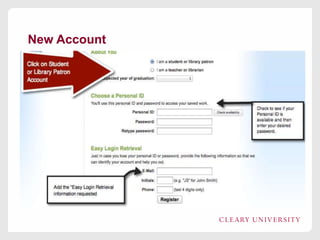
New Account
Benefits of Using NoodleTools
1. Step-by-step instructions for creating APA formatted citations
(Capstone Milestone #2)
2. Examples of correctly formatted in-text citations
3. Provides place for annotations (Capstone Milestone #4 in
many courses)
4. Extensive knowledgebase
5. As students become more familiar with NoodleTools, advanced
functions (annotating, outlining) can be used.

Next you'll see how a citation is created.
Creating a Project
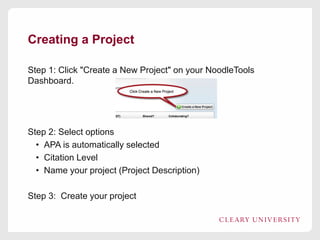
Step 1: Click "Create a New Project" on your NoodleTools
Dashboard.

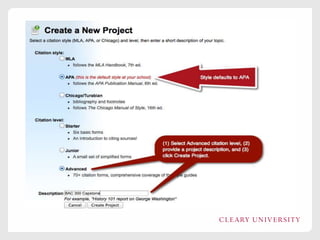
Step 2: Select options
• APA is automatically selected
• Citation Level
• Name your project (Project Description)
Step 3: Create your project
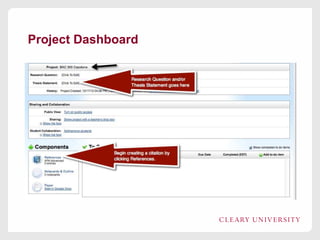
Project Dashboard
Creating a Reference
NoodleTools provides step-by-step instructions for creating a
correctly formatted reference
• Caveat: The reference is correctly formatted if the user reads
the instructions and provides the correct information.
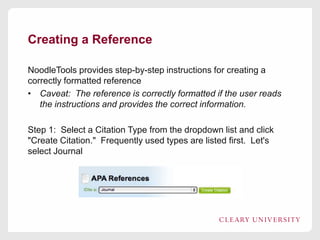
Step 1: Select a Citation Type from the dropdown list and click
"Create Citation." Frequently used types are listed first. Let's
select Journal
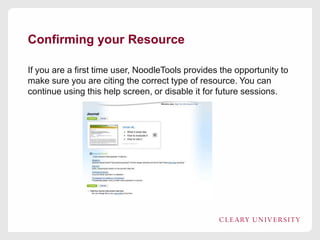
Confirming your Resource
If you are a first time user, NoodleTools provides the opportunity to
make sure you are citing the correct type of resource. You can
continue using this help screen, or disable it for future sessions.
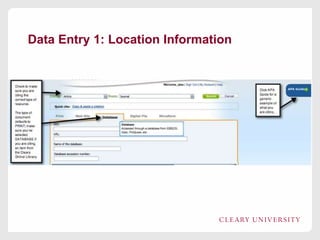
Data Entry 1: Location Information
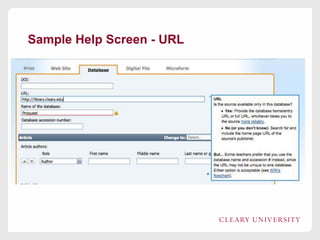
Sample Help Screen - URL
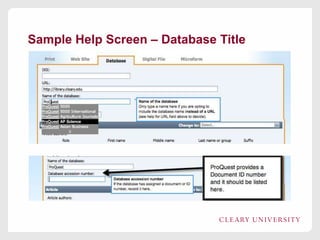
Sample Help Screen – Database Title
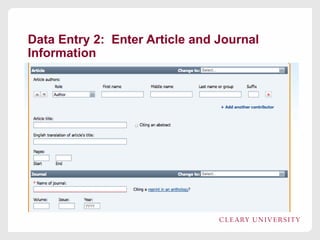
Data Entry 2: Enter Article and Journal
Information
Data Entry 3: Annotating
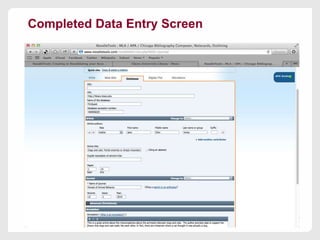
Completed Data Entry Screen
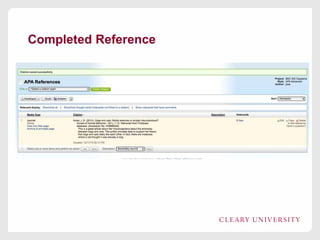
Completed Reference
In-Text Citation
Exporting to MS Word
To export the reference list to MS Word, select Print/Export to Word from the
dropdown list.
Review
• NoodleTools provides step-by-step guidance for creating APA
formatted citations.
• End product is only as good as the data NoodleTools receives
• Provides in-text citation examples
• Exports list to Word (copy and paste into paper)
• Can include or exclude citation annotations.
Questions Later?
jeinnes@cleary.edu

Jane Ellen Innes
Director, University Libraries

How NoodleTools Works

  • 1.
  • 2.
    What We're Covering 1. 2. 3. 4. 5. 6. 7. 8. AccessingNoodleTools Creating your NoodleTools Account Difference between Student Account and Instructor Account Creating a Project Creating a Reference Annotating a Reference Creating an in-text citation Exporting references to MS Word
  • 3.
    Accessing NoodleTools From theCleary Online Library (http://library.cleary.edu) • => You need to access via the library to create your account. <= At the NoodleTools Web site (http://www.noodletools.com) • After your account is created, you can log in at the site
  • 4.
    Library Access Log intothe Online Library with your Cleary ID and Password • Select NoodleTools to advance to the Sign in/Register page
  • 5.
    Create or Re-validateyour Account from the Log in page NoodleTools Log in Page Your account is automatically linked to the university's subscription. You need your own ID so you can store your work. Check the Library Blog for instructions on how to revalidate your folder.
  • 6.
  • 7.
    Benefits of UsingNoodleTools 1. Step-by-step instructions for creating APA formatted citations (Capstone Milestone #2) 2. Examples of correctly formatted in-text citations 3. Provides place for annotations (Capstone Milestone #4 in many courses) 4. Extensive knowledgebase 5. As students become more familiar with NoodleTools, advanced functions (annotating, outlining) can be used. Next you'll see how a citation is created.
  • 8.
    Creating a Project Step1: Click "Create a New Project" on your NoodleTools Dashboard. Step 2: Select options • APA is automatically selected • Citation Level • Name your project (Project Description) Step 3: Create your project
  • 10.
  • 11.
    Creating a Reference NoodleToolsprovides step-by-step instructions for creating a correctly formatted reference • Caveat: The reference is correctly formatted if the user reads the instructions and provides the correct information. Step 1: Select a Citation Type from the dropdown list and click "Create Citation." Frequently used types are listed first. Let's select Journal
  • 12.
    Confirming your Resource Ifyou are a first time user, NoodleTools provides the opportunity to make sure you are citing the correct type of resource. You can continue using this help screen, or disable it for future sessions.
  • 13.
    Data Entry 1:Location Information
  • 14.
  • 15.
    Sample Help Screen– Database Title
  • 16.
    Data Entry 2:Enter Article and Journal Information
  • 17.
    Data Entry 3:Annotating
  • 18.
  • 19.
  • 20.
  • 21.
    Exporting to MSWord To export the reference list to MS Word, select Print/Export to Word from the dropdown list.
  • 22.
    Review • NoodleTools providesstep-by-step guidance for creating APA formatted citations. • End product is only as good as the data NoodleTools receives • Provides in-text citation examples • Exports list to Word (copy and paste into paper) • Can include or exclude citation annotations.
  • 23.
    Questions Later? jeinnes@cleary.edu Jane EllenInnes Director, University Libraries

Editor's Notes

  • #3 NoodleTools provides a variety of resources related to formatting and citing in APA format. This session focuses on creating an account, creating a project, and creating APA formatted citations. Feel free to explore other capabilities, but this session focuses on the basics.