





EndNote in 90 Minutes (X4)


                  Lissa Lord
                  llord@ku.edu
                  Summer 2011
                  The NoNonsenseVersion
Begin research with
                   EndNote
• Use EndNote for bibliographies and citations
• EndNote organizes citations from journals,
  books, government sources, websites and
  databases
• EndNote is keyword searchable
• Free: Graduate students, faculty and staff at KU
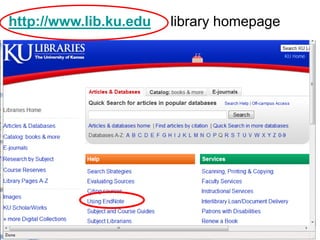
http://www.lib.ku.edu   library homepage
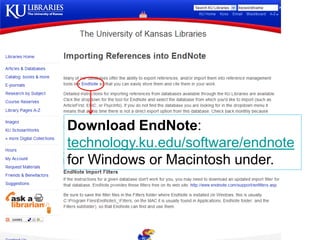
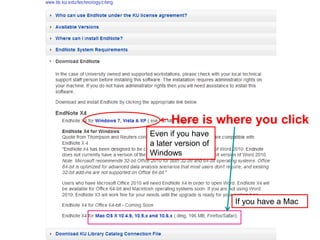
Download EndNote:
technology.ku.edu/software/endnote
for Windows or Macintosh under.
Here is where you click
Even if you have
a later version of
Windows


                     If you have a Mac
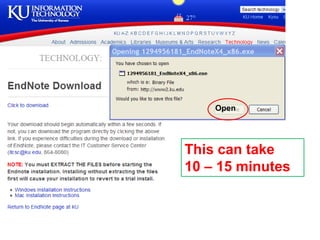
Open


This can take
10 – 15 minutes
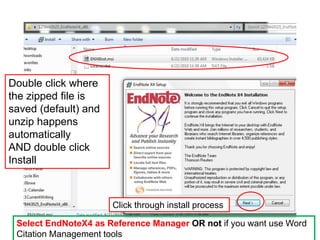
Double click where
the zipped file is
saved (default) and
unzip happens
automatically
AND double click
Install


                      Click through install process

 Select EndNoteX4 as Reference Manager OR not if you want use Word
 Citation Management tools
http://www.endnote.com/training/
Trouble with the EndNote installation?
The IT helpdesk helped me out, big time!

IT Customer Service Center
itcsc@ku.edu
864-8080)
Using Endnote
for the first time
After EndNote installs, restart your computer and
then find the EndNote program by clicking the
Start menu

Start All Programs

Click EndNote Program to launch EndNote.
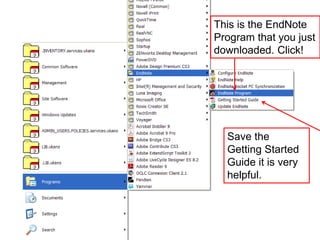
This is the EndNote
Program that you just
downloaded. Click!


  Save the
  Getting Started
  Guide it is very
  helpful.
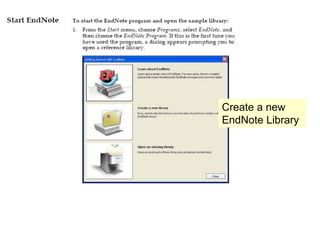
Create a new
EndNote Library
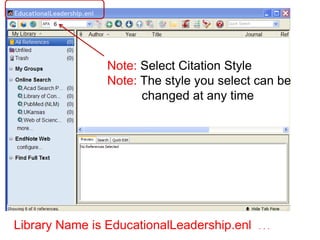
6


                Note: Select Citation Style
                Note: The style you select can be
                      changed at any time


Library Name is EducationalLeadership.enl   ...
Importing References
 from Database Search
        Results
1. Open EndNote library
2. Go to KU Libraries Homepage
   http://www.lib.ku.edu
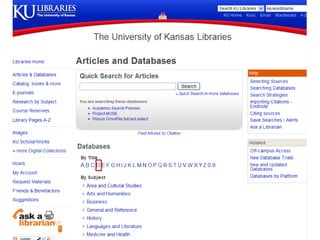
3. Click Articles and Databases from the
   index in the left hand column
4. Select an individual database that fits
   your research needs
Note: if you would like a refresher on literature searches, send me
      an email and we’ll make an appointment. llord@ku.edu
Dissertations & theses @ University of Kansas

Contains citations and abstracts of
dissertations and theses submitted by the
University of Kansas and published in UMI's
Dissertations Abstracts database, and full text
of KU dissertations published after 1996 and
KU theses published after 2005.
What to Remember:
1. Open EndNote and Your EndNote Library

2. Search for articles in a database

3. Mark the articles you want to use

4. Export the citations to EndNote Library
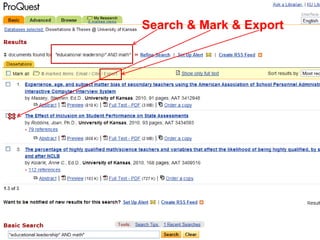
Search & Mark & Export
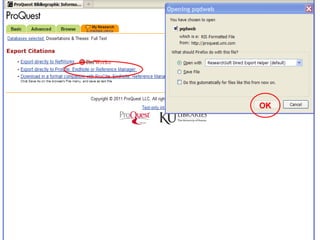
OK
These citations can

be used as your initial bibliography

be inserted into a Word document

be saved as part of your growing research
 library to use for academic work
Exported Citations
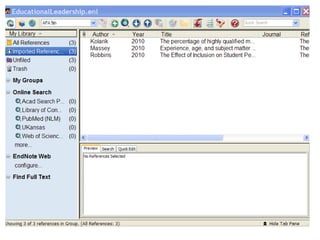
• Click on References from Endnote and
  select Show All which will put all your
  citations into one list
Wilson OmniFile
A second database to search that
is helpful for multidisciplinary
research. Provides indexing,
abstracting and full-text content
to journal articles in a variety of
disciplines.
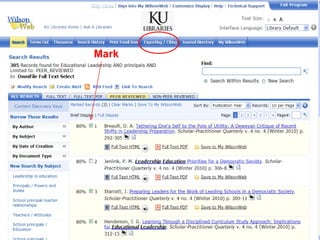
Mark
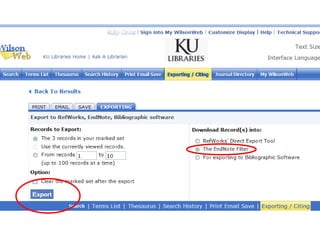
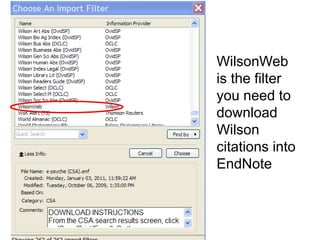
WilsonWeb
is the filter
you need to
download
Wilson
citations into
EndNote
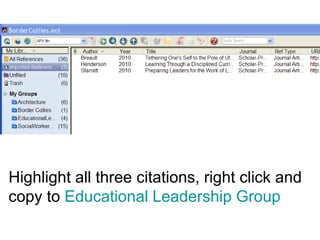
Highlight all three citations, right click and
copy to Educational Leadership Group
Ready for easy?
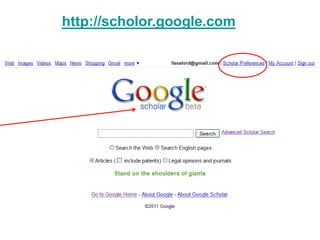
http://scholor.google.com
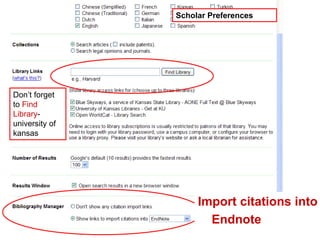
Scholar Preferences


Don’t forget
to Find
Library-
university of
kansas


                     Import citations into
                       Endnote
3 Ways to get references
     into your EndNote Library
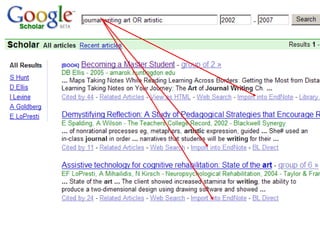
• From a Database (Proquest; Wilson; Google Scholar)
  1) search 2) mark 3) export references to EndNote

• Manually enter information into EndNote (adding non-
  electronic sources to EndNote: print, interviews, exhibits,
  your notes, etc.)

• From EndNote connect to library catalog or databases:
  1) search 2) mark 3) import references into EndNote
  (Caveat: this method does NOT work as well as searching,
  marking and exporting from a database into EndNote)
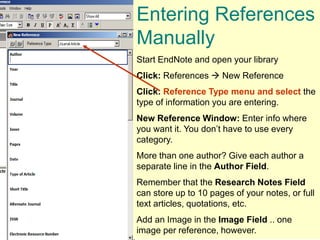
Entering References
Manually
Start EndNote and open your library
Click: References  New Reference
Click: Reference Type menu and select the
type of information you are entering.
New Reference Window: Enter info where
you want it. You don’t have to use every
category.
More than one author? Give each author a
separate line in the Author Field.
Remember that the Research Notes Field
can store up to 10 pages of your notes, or full
text articles, quotations, etc.
Add an Image in the Image Field .. one
image per reference, however.
The Best Tip
• Detailed guide sheets for importing
  references from databases are
  available online here
  http://www.lib.ku.edu/technology/citing/import/


• Print out the instruction sheets for the
  databases you use most often
Using EndNote
     with Word
Cite While You Write
      (CWYW)
1. Open Word
2. Open EndNote
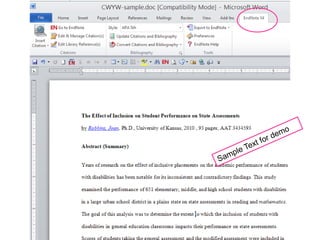
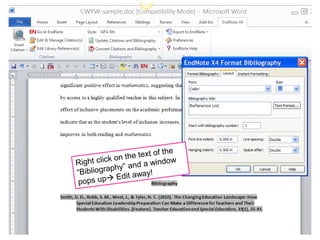
3. EndNote toolbar for Word
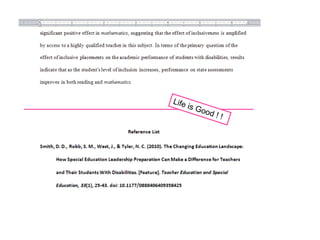
Inserting an EndNote reference citation
into a Word document (using APA citation style)
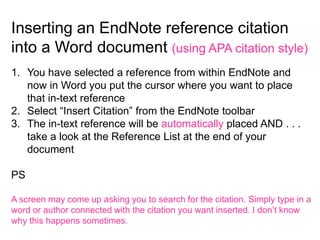
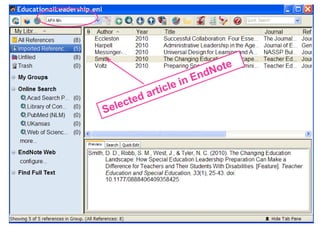
1. You have selected a reference from within EndNote and
   now in Word you put the cursor where you want to place
   that in-text reference
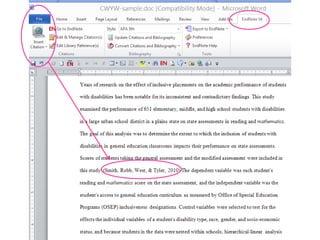
2. Select “Insert Citation” from the EndNote toolbar
3. The in-text reference will be automatically placed AND . . .
   take a look at the Reference List at the end of your
   document

PS

A screen may come up asking you to search for the citation. Simply type in a
word or author connected with the citation you want inserted. I don’t know
why this happens sometimes.
Edit from Word to EndNote or from EndNote
to Word.

It is worth the effort of a sharp but short
learning curve.

This system is flexible and adaptable AND
you’re going to love it !
Questions?
Ask the librarian
      Lissa Lord
  llord@ku.edu

EndNote X4 (Beginning)

  • 1.
    EndNote in 90Minutes (X4) Lissa Lord llord@ku.edu Summer 2011 The NoNonsenseVersion
  • 2.
    Begin research with EndNote • Use EndNote for bibliographies and citations • EndNote organizes citations from journals, books, government sources, websites and databases • EndNote is keyword searchable • Free: Graduate students, faculty and staff at KU
  • 3.
    http://www.lib.ku.edu library homepage
  • 4.
  • 5.
    Here is whereyou click Even if you have a later version of Windows If you have a Mac
  • 7.
    Open This can take 10– 15 minutes
  • 8.
    Double click where thezipped file is saved (default) and unzip happens automatically AND double click Install Click through install process Select EndNoteX4 as Reference Manager OR not if you want use Word Citation Management tools
  • 9.
  • 10.
    Trouble with theEndNote installation? The IT helpdesk helped me out, big time! IT Customer Service Center itcsc@ku.edu 864-8080)
  • 11.
  • 12.
    After EndNote installs,restart your computer and then find the EndNote program by clicking the Start menu Start All Programs Click EndNote Program to launch EndNote.
  • 13.
    This is theEndNote Program that you just downloaded. Click! Save the Getting Started Guide it is very helpful.
  • 14.
  • 15.
    6 Note: Select Citation Style Note: The style you select can be changed at any time Library Name is EducationalLeadership.enl ...
  • 16.
    Importing References fromDatabase Search Results
  • 17.
    1. Open EndNotelibrary 2. Go to KU Libraries Homepage http://www.lib.ku.edu 3. Click Articles and Databases from the index in the left hand column 4. Select an individual database that fits your research needs Note: if you would like a refresher on literature searches, send me an email and we’ll make an appointment. llord@ku.edu
  • 19.
    Dissertations & theses@ University of Kansas Contains citations and abstracts of dissertations and theses submitted by the University of Kansas and published in UMI's Dissertations Abstracts database, and full text of KU dissertations published after 1996 and KU theses published after 2005.
  • 20.
    What to Remember: 1.Open EndNote and Your EndNote Library 2. Search for articles in a database 3. Mark the articles you want to use 4. Export the citations to EndNote Library
  • 21.
    Search & Mark& Export
  • 23.
  • 25.
    These citations can beused as your initial bibliography be inserted into a Word document be saved as part of your growing research library to use for academic work
  • 26.
    Exported Citations • Clickon References from Endnote and select Show All which will put all your citations into one list
  • 27.
    Wilson OmniFile A seconddatabase to search that is helpful for multidisciplinary research. Provides indexing, abstracting and full-text content to journal articles in a variety of disciplines.
  • 28.
  • 30.
    WilsonWeb is the filter youneed to download Wilson citations into EndNote
  • 31.
    Highlight all threecitations, right click and copy to Educational Leadership Group
  • 32.
  • 33.
  • 34.
    Scholar Preferences Don’t forget toFind Library- university of kansas Import citations into Endnote
  • 36.
    3 Ways toget references into your EndNote Library • From a Database (Proquest; Wilson; Google Scholar) 1) search 2) mark 3) export references to EndNote • Manually enter information into EndNote (adding non- electronic sources to EndNote: print, interviews, exhibits, your notes, etc.) • From EndNote connect to library catalog or databases: 1) search 2) mark 3) import references into EndNote (Caveat: this method does NOT work as well as searching, marking and exporting from a database into EndNote)
  • 37.
    Entering References Manually Start EndNoteand open your library Click: References  New Reference Click: Reference Type menu and select the type of information you are entering. New Reference Window: Enter info where you want it. You don’t have to use every category. More than one author? Give each author a separate line in the Author Field. Remember that the Research Notes Field can store up to 10 pages of your notes, or full text articles, quotations, etc. Add an Image in the Image Field .. one image per reference, however.
  • 38.
    The Best Tip •Detailed guide sheets for importing references from databases are available online here http://www.lib.ku.edu/technology/citing/import/ • Print out the instruction sheets for the databases you use most often
  • 39.
    Using EndNote with Word Cite While You Write (CWYW)
  • 40.
    1. Open Word 2.Open EndNote 3. EndNote toolbar for Word
  • 42.
    Inserting an EndNotereference citation into a Word document (using APA citation style) 1. You have selected a reference from within EndNote and now in Word you put the cursor where you want to place that in-text reference 2. Select “Insert Citation” from the EndNote toolbar 3. The in-text reference will be automatically placed AND . . . take a look at the Reference List at the end of your document PS A screen may come up asking you to search for the citation. Simply type in a word or author connected with the citation you want inserted. I don’t know why this happens sometimes.
  • 47.
    Edit from Wordto EndNote or from EndNote to Word. It is worth the effort of a sharp but short learning curve. This system is flexible and adaptable AND you’re going to love it !
  • 49.
    Questions? Ask the librarian Lissa Lord llord@ku.edu

Editor's Notes

  • #6 Where to get a copy of EndNote? http://www.lib.ku.edu  Using EndNote
  • #7 Download EndNote: http://technology.ku.edu/software/endnote Yes, do delete an older version you may have downloaded before. I’d save the EndNote Libraries you have collected to a thumb-drive just to be on the safe side.
  • #10 You must login to KU before you download EndNote software so the system knows you are connected with the university (free software) and then you can download EndNote software to the computers where you will use EndNote.
  • #11 Save Run Extract to Desktop On my computer, I installed by default: MyComputer / Program Files (x86) But I think I could have saved it anywhere Extract to Desktop
  • #12 Double click on the download icon for EndNoteX4_x86.exe Choose Run when asked Choose Extract when asked If you downloaded the EndNote installer: Double click the installer file to start the EndNote Setup program.
  • #14 Next Accept Next Next Typical installation Selection Destination . . . Usually the default is fine In general, click through the options of the Installation process.
  • #15 For some reason unknown to me, this procedure is ALWAYS a headache. Don’t let that happen to you because I’m figuring it out. llord@ku.edu
  • #16 Save file in the C:\\Program Files\\EndnoteX4\\ Connections folder for PC. For the MAC save it in the EndNote X4 Connections folder found in Applications folder
  • #26 These are All References (29) that I have downloaded into EndNote. See My Groups (Architecture, Border Collies, SocialWorker). Now I want to add a new group.
  • #28 Right click on My Groups and then click on Create Group. My new group is called EducationalLeadership and now I want to download new citations of sources I will find by searching the library databases.
  • #34 "educational leadership" AND dissertation And changed to the subject selection of educational leadership and principals