How Much UX?

  PMI SD 2011
 Sean Van Tyne
Base on the article
Winning in the Marketplace: How Much User
 Experience Effort Does It Take?
 UX Matters, November 22, 2010

http://www.uxmatters.com/mt/archives/2010/11/w
Put Your Customers First!
• User experience encompasses all aspects
  of your users’ interactions with your
  company, its services, and its products
• Prioritizing user advocacy from the
  beginning of your product design process
  ensures their needs are foremost in all
  design decisions.
Deliver on Your Promise
To meet your customers’ needs and deliver
  simple, elegant solutions that are a joy to use,
  you must:
   – Deliver more than a checklist of features
   – Have a deep understanding of your target users
   – Have business objectives that provide clear metrics
     for your product’s design
   – Know what motivates your users and manage their
     expectations
   – Consistently representing your organization’s brand
     and message
Today’s Marketplace
• Solutions need to be easy to use
• Technology is ubiquitous or invisible
• Solutions increase customer effectiveness
  and efficiency and reduce the need for
  training and support
• Solutions increase customer adoption and
  retention and increased market share and
  revenue
How Much?
• But how much research, design, and
  usability testing does it take to ensure your
  product wins in the marketplace and
  meets your business objectives?
• Every company has different needs,
  depending on its size, the maturity of its
  market, and the lifecycles of particular
  products.
Large Companies
• Many large technology companies like Apple have
  invested heavily in user experience for many years
• Successful companies have well-established UX
  departments and have set the standard for ease of use
• Such companies have defined many aspects of the user-
  centered design process we follow today
• These companies have the capital to make big
  investments in user experience and reap the benefits.
  They can attract the best talent, invest in resources, and
  take as much time as they need to develop elegant
  solutions
Small-to-Medium Businesses
• Must balance your user experience investment against
  other company needs
• Some companies have made user experience a part of
  their core corporate strategy and it has paid off for them.
  But you need to answer these questions:
   – Where does user experience fit in your corporate strategy?
   – Where does it belong in your organization?
   – How does user experience integrate with your product’s overall
     lifecycle?
• You must ask yourself: Is our marketplace mature,
  commoditized, and moving at the speed of large
  institutions, or is it new, innovative, and moving at the
  speed of the Internet?
Mature Markets
• Technology solutions in mature markets become
  commodities
• Consumers take such products’ basic features and
  performance for granted and look at price, value,
  appearance, and convenience as distinguishing factors
• Winning in mature markets requires a company to view
  user experience as a distinct and important corporate
  competence
• To win in a mature marketplace, you must get the basics
  right—the right price, value, and convenience—along
  with providing an elegant solution that is effective,
  efficient, and exceeds customers’ expectations
New Markets
• New markets are fast and innovative
• You must be agile and adapt to rapid
  changes in your market space
• This is where having a strong
  understanding of your product’s market
  and the needs of its target users are
  essential for you to have a chance at
  success
Understand Your Market,
     Customers, and End-users
The first step in developing solutions that are easy-
  to-use is to understand your customers’ and
  users’ needs in context of your market and
  competition:
   – Define the problem your product must solve and
     design an optimal solution
   – Understand the strengths and weaknesses of
     competitors’ solutions in comparison to your own
   – Determine how various customers’ workflows and
     users’ tasks are similar and different from one another
Short and Long-Term Product
           Strategies
• For mature markets, you have more time to consider
  your strategy
• In fast-moving, new markets you execute to your short-
  term strategy as it evolves
• Companies who have been in a market for a while—and
  may have several offerings in their product portfolio—
  should consider several factors when defining their
  strategy:
   – Is this a first-to-market product?
   – Is it a major release for a mature product?
   – Is your goal just to gain a foothold in the market with your current
     product, then replace it with your next version or even make it a
     component of a larger solution?
   – Will your new product cannibalize another product in your portfolio?
User Research
• User research may include:
   – surveying customers and users
   – interviewing customers and users
   – observing users using their current solution

• Develop diagrams of various users’ workflows,
  noting where they are similar or different
• Based on your findings, group your customer
  and user types by similar roles, and create
  profiles or personas that synthesize users’ skills,
  patterns, and goals to better understand their
  needs
User Research for Mature and
          New Markets
• Companies in mature markets may not need to conduct
  user research to better understand their users. They may
  already have a good understanding of them
   – However, when they do conduct this type of research, they
     typically can take their time, be thorough, and use the data they
     obtain to create a roadmap for many years ahead
• Companies in new markets must be more agile,
  conducting just enough generative research to come up
  with good design concepts and get their product
  solutions to market quickly. They should understand that
  their market data will most likely change, perhaps
  requiring them to take measures to rapidly modify their
  design solutions during product development
Design
• Developing prototypes and reviewing them with
  target customers and users is key to designing
  easy-to-use solutions
• You must spend some time validating workflow,
  navigation, information grouping, information
  hierarchy, terminology, labels, and interactions
  to ensure they meet the needs of the market and
  your users
• Your understanding of various customers’
  needs, users’ workflows, and content overlaps
  and differences determines your design direction
Involve Engineers Early
• Share user research with the technology
  architects and engineers on your product team
• Confirm the feasibility of your user interface
  prototypes with Engineering as early as possible
  to enable them to provide the best technical
  solution. Many times, engineers know of
  components or pieces of technology that can
  reduce or eliminate the need to develop a new
  component or screen—enhancing a workflow’s
  ease of use.
Low-Fidelity Prototypes and
    Information Architecture
• Develop low-fidelity prototypes such as paper
  prototypes or wireframes to facilitate content
  layout
• Their focus should be on a product’s information
  architecture and information design—
  determining the correct labels, content
  groupings, hierarchies, and navigation
• These early, rapid prototypes should be devoid
  of graphics and color to narrow the focus to
  information design
Visual Design and
           Interaction Design
• Once you’ve completed the information design,
  add visual elements such as color, fonts, icons,
  buttons, and other graphic elements, creating
  medium-fidelity prototypes to explore your
  solution’s interaction design
• Interaction Design defines the behavior of how
  your customers and users interact with your
  solution. Interaction design is focused on making
  products more useful, usable, and desirable
Rapid Prototyping with
        Customers and Users
• Work with your customers and users to conduct reviews
  of your prototypes to obtain their feedback
• If you are in a mature market, with a longer product
  release cycle, you can wash, rinse, and repeat as
  necessary
• But if you need to move quickly through your
  development cycle, do as much as you can to facilitate
  development, and do as much as you can in parallel for
  the next release
• There is always a next release, and you have the
  opportunity to learn things now that you can apply to
  later releases.
Usability Evaluation
• Usability evaluation assesses the degree to which users
  can operate a system and their efficiency and
  satisfaction
• Such evaluations validate that tasks are easy to
  complete—and test an application’s ease of use, not the
  intelligence of users
• If tasks are difficult or impossible to complete, a system
  is not easy to use
• Large companies in mature markets may have several
  usability labs and teams of specialists who are constantly
  testing design solutions with users
• Smaller, more agile companies may have someone who
  is doing usability testing, but not with the same rigor or
  formality as a larger, well-established company would
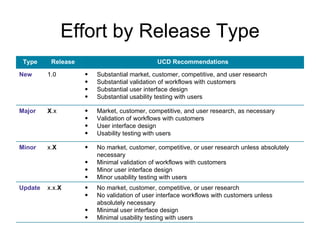
Effort by Release Type
 Type     Release                            UCD Recommendations

New      1.0        •   Substantial market, customer, competitive, and user research
                    •   Substantial validation of workflows with customers
                    •   Substantial user interface design
                    •   Substantial usability testing with users

Major    X.x        •   Market, customer, competitive, and user research, as necessary
                    •   Validation of workflows with customers
                    •   User interface design
                    •   Usability testing with users

Minor    x.X        •   No market, customer, competitive, or user research unless absolutely
                        necessary
                    •   Minimal validation of workflows with customers
                    •   Minor user interface design
                    •   Minor usability testing with users
Update   x.x.X      •   No market, customer, competitive, or user research
                    •   No validation of user interface workflows with customers unless
                        absolutely necessary
                    •   Minimal user interface design
                    •   Minimal usability testing with users
Website/Blog:
       www.SeanVanTyne.com

                  Twitter:
  http://twitter.com/Sean_Van_Tyne

               Linkedin:
http://www.linkedin.com/in/seanvantyne

How Much UX?

  • 1.
    How Much UX? PMI SD 2011 Sean Van Tyne
  • 2.
    Base on thearticle Winning in the Marketplace: How Much User Experience Effort Does It Take? UX Matters, November 22, 2010 http://www.uxmatters.com/mt/archives/2010/11/w
  • 3.
    Put Your CustomersFirst! • User experience encompasses all aspects of your users’ interactions with your company, its services, and its products • Prioritizing user advocacy from the beginning of your product design process ensures their needs are foremost in all design decisions.
  • 4.
    Deliver on YourPromise To meet your customers’ needs and deliver simple, elegant solutions that are a joy to use, you must: – Deliver more than a checklist of features – Have a deep understanding of your target users – Have business objectives that provide clear metrics for your product’s design – Know what motivates your users and manage their expectations – Consistently representing your organization’s brand and message
  • 5.
    Today’s Marketplace • Solutionsneed to be easy to use • Technology is ubiquitous or invisible • Solutions increase customer effectiveness and efficiency and reduce the need for training and support • Solutions increase customer adoption and retention and increased market share and revenue
  • 6.
    How Much? • Buthow much research, design, and usability testing does it take to ensure your product wins in the marketplace and meets your business objectives? • Every company has different needs, depending on its size, the maturity of its market, and the lifecycles of particular products.
  • 7.
    Large Companies • Manylarge technology companies like Apple have invested heavily in user experience for many years • Successful companies have well-established UX departments and have set the standard for ease of use • Such companies have defined many aspects of the user- centered design process we follow today • These companies have the capital to make big investments in user experience and reap the benefits. They can attract the best talent, invest in resources, and take as much time as they need to develop elegant solutions
  • 8.
    Small-to-Medium Businesses • Mustbalance your user experience investment against other company needs • Some companies have made user experience a part of their core corporate strategy and it has paid off for them. But you need to answer these questions: – Where does user experience fit in your corporate strategy? – Where does it belong in your organization? – How does user experience integrate with your product’s overall lifecycle? • You must ask yourself: Is our marketplace mature, commoditized, and moving at the speed of large institutions, or is it new, innovative, and moving at the speed of the Internet?
  • 9.
    Mature Markets • Technologysolutions in mature markets become commodities • Consumers take such products’ basic features and performance for granted and look at price, value, appearance, and convenience as distinguishing factors • Winning in mature markets requires a company to view user experience as a distinct and important corporate competence • To win in a mature marketplace, you must get the basics right—the right price, value, and convenience—along with providing an elegant solution that is effective, efficient, and exceeds customers’ expectations
  • 10.
    New Markets • Newmarkets are fast and innovative • You must be agile and adapt to rapid changes in your market space • This is where having a strong understanding of your product’s market and the needs of its target users are essential for you to have a chance at success
  • 11.
    Understand Your Market, Customers, and End-users The first step in developing solutions that are easy- to-use is to understand your customers’ and users’ needs in context of your market and competition: – Define the problem your product must solve and design an optimal solution – Understand the strengths and weaknesses of competitors’ solutions in comparison to your own – Determine how various customers’ workflows and users’ tasks are similar and different from one another
  • 12.
    Short and Long-TermProduct Strategies • For mature markets, you have more time to consider your strategy • In fast-moving, new markets you execute to your short- term strategy as it evolves • Companies who have been in a market for a while—and may have several offerings in their product portfolio— should consider several factors when defining their strategy: – Is this a first-to-market product? – Is it a major release for a mature product? – Is your goal just to gain a foothold in the market with your current product, then replace it with your next version or even make it a component of a larger solution? – Will your new product cannibalize another product in your portfolio?
  • 13.
    User Research • Userresearch may include: – surveying customers and users – interviewing customers and users – observing users using their current solution • Develop diagrams of various users’ workflows, noting where they are similar or different • Based on your findings, group your customer and user types by similar roles, and create profiles or personas that synthesize users’ skills, patterns, and goals to better understand their needs
  • 14.
    User Research forMature and New Markets • Companies in mature markets may not need to conduct user research to better understand their users. They may already have a good understanding of them – However, when they do conduct this type of research, they typically can take their time, be thorough, and use the data they obtain to create a roadmap for many years ahead • Companies in new markets must be more agile, conducting just enough generative research to come up with good design concepts and get their product solutions to market quickly. They should understand that their market data will most likely change, perhaps requiring them to take measures to rapidly modify their design solutions during product development
  • 15.
    Design • Developing prototypesand reviewing them with target customers and users is key to designing easy-to-use solutions • You must spend some time validating workflow, navigation, information grouping, information hierarchy, terminology, labels, and interactions to ensure they meet the needs of the market and your users • Your understanding of various customers’ needs, users’ workflows, and content overlaps and differences determines your design direction
  • 16.
    Involve Engineers Early •Share user research with the technology architects and engineers on your product team • Confirm the feasibility of your user interface prototypes with Engineering as early as possible to enable them to provide the best technical solution. Many times, engineers know of components or pieces of technology that can reduce or eliminate the need to develop a new component or screen—enhancing a workflow’s ease of use.
  • 17.
    Low-Fidelity Prototypes and Information Architecture • Develop low-fidelity prototypes such as paper prototypes or wireframes to facilitate content layout • Their focus should be on a product’s information architecture and information design— determining the correct labels, content groupings, hierarchies, and navigation • These early, rapid prototypes should be devoid of graphics and color to narrow the focus to information design
  • 18.
    Visual Design and Interaction Design • Once you’ve completed the information design, add visual elements such as color, fonts, icons, buttons, and other graphic elements, creating medium-fidelity prototypes to explore your solution’s interaction design • Interaction Design defines the behavior of how your customers and users interact with your solution. Interaction design is focused on making products more useful, usable, and desirable
  • 19.
    Rapid Prototyping with Customers and Users • Work with your customers and users to conduct reviews of your prototypes to obtain their feedback • If you are in a mature market, with a longer product release cycle, you can wash, rinse, and repeat as necessary • But if you need to move quickly through your development cycle, do as much as you can to facilitate development, and do as much as you can in parallel for the next release • There is always a next release, and you have the opportunity to learn things now that you can apply to later releases.
  • 20.
    Usability Evaluation • Usabilityevaluation assesses the degree to which users can operate a system and their efficiency and satisfaction • Such evaluations validate that tasks are easy to complete—and test an application’s ease of use, not the intelligence of users • If tasks are difficult or impossible to complete, a system is not easy to use • Large companies in mature markets may have several usability labs and teams of specialists who are constantly testing design solutions with users • Smaller, more agile companies may have someone who is doing usability testing, but not with the same rigor or formality as a larger, well-established company would
  • 21.
    Effort by ReleaseType Type Release UCD Recommendations New 1.0 • Substantial market, customer, competitive, and user research • Substantial validation of workflows with customers • Substantial user interface design • Substantial usability testing with users Major X.x • Market, customer, competitive, and user research, as necessary • Validation of workflows with customers • User interface design • Usability testing with users Minor x.X • No market, customer, competitive, or user research unless absolutely necessary • Minimal validation of workflows with customers • Minor user interface design • Minor usability testing with users Update x.x.X • No market, customer, competitive, or user research • No validation of user interface workflows with customers unless absolutely necessary • Minimal user interface design • Minimal usability testing with users
  • 22.
    Website/Blog: www.SeanVanTyne.com Twitter: http://twitter.com/Sean_Van_Tyne Linkedin: http://www.linkedin.com/in/seanvantyne