Venkaiah Chowdary Koneru
  Fazreil Amreen Abdul Jalil
Agenda
• Maven

• Repository

• Complete Build solution
What’s the Problem?
• Manual handling of external Jars

• Inter-project dependencies

• Running tests
What is Maven ?
• A build tool

• Uniform build system

• Provides quality project information

• Transparent migration to new features

• Guidelines for best practices development
Conceptual Model
• Maven maintains model of a project

• Unique set of coordinates to a project

• Almost zero effort

• Encourages modular design
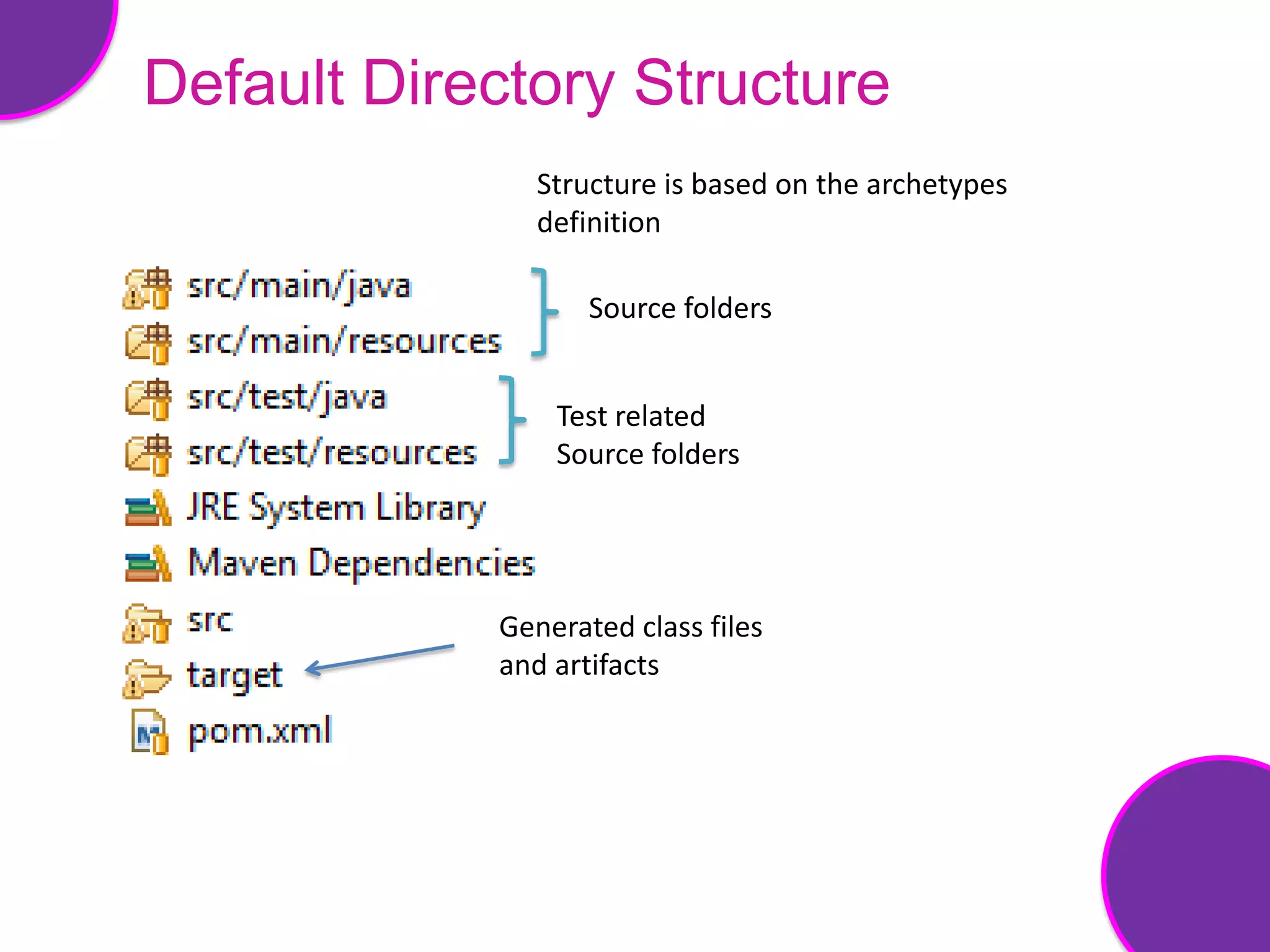
Default Directory Structure
               Structure is based on the archetypes
               definition

                   Source folders


                Test related
                Source folders


            Generated class files
            and artifacts
POM
• Fundamental unit of work in maven

• An XML file

• Consists
  – Project information
  – Project relationships
  – Build settings
  – Build environment
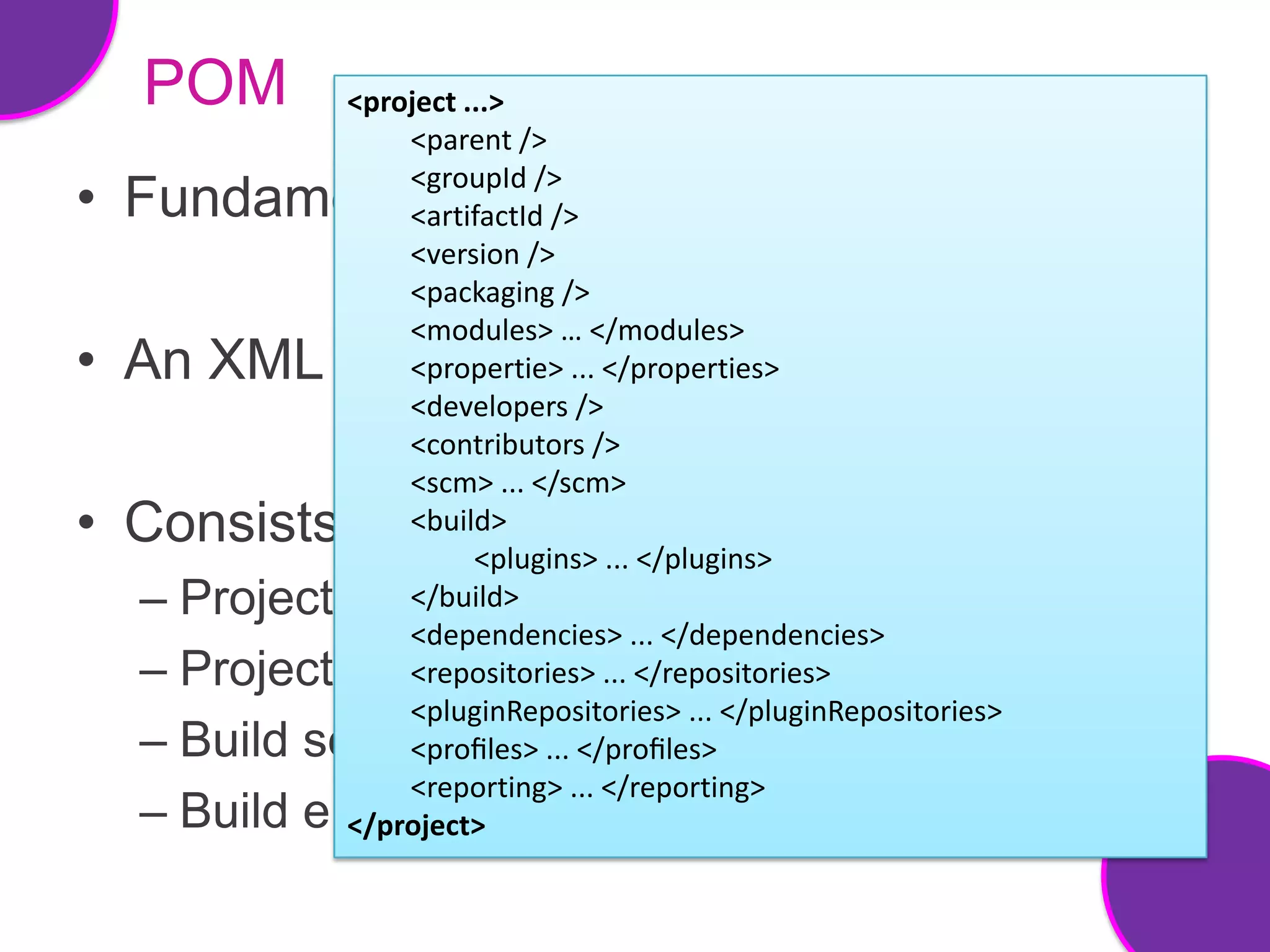
POM         <project ...>
                  <parent />
                  <groupId />
• Fundamental unit of work in maven
                  <artifactId />
                  <version />
                  <packaging />
                  <modules> … </modules>
• An XML file     <propertie> ... </properties>
                  <developers />
                  <contributors />
                  <scm> ... </scm>
• Consists        <build>
                        <plugins> ... </plugins>
  –   Project information
                  </build>
                  <dependencies> ... </dependencies>
  –   Project relationships </repositories>
                  <repositories> ...
                  <pluginRepositories> ... </pluginRepositories>
  –   Build settings ... </profiles>
                  <profiles>
                  <reporting> ... </reporting>
  –   Build environment
              </project>
POM
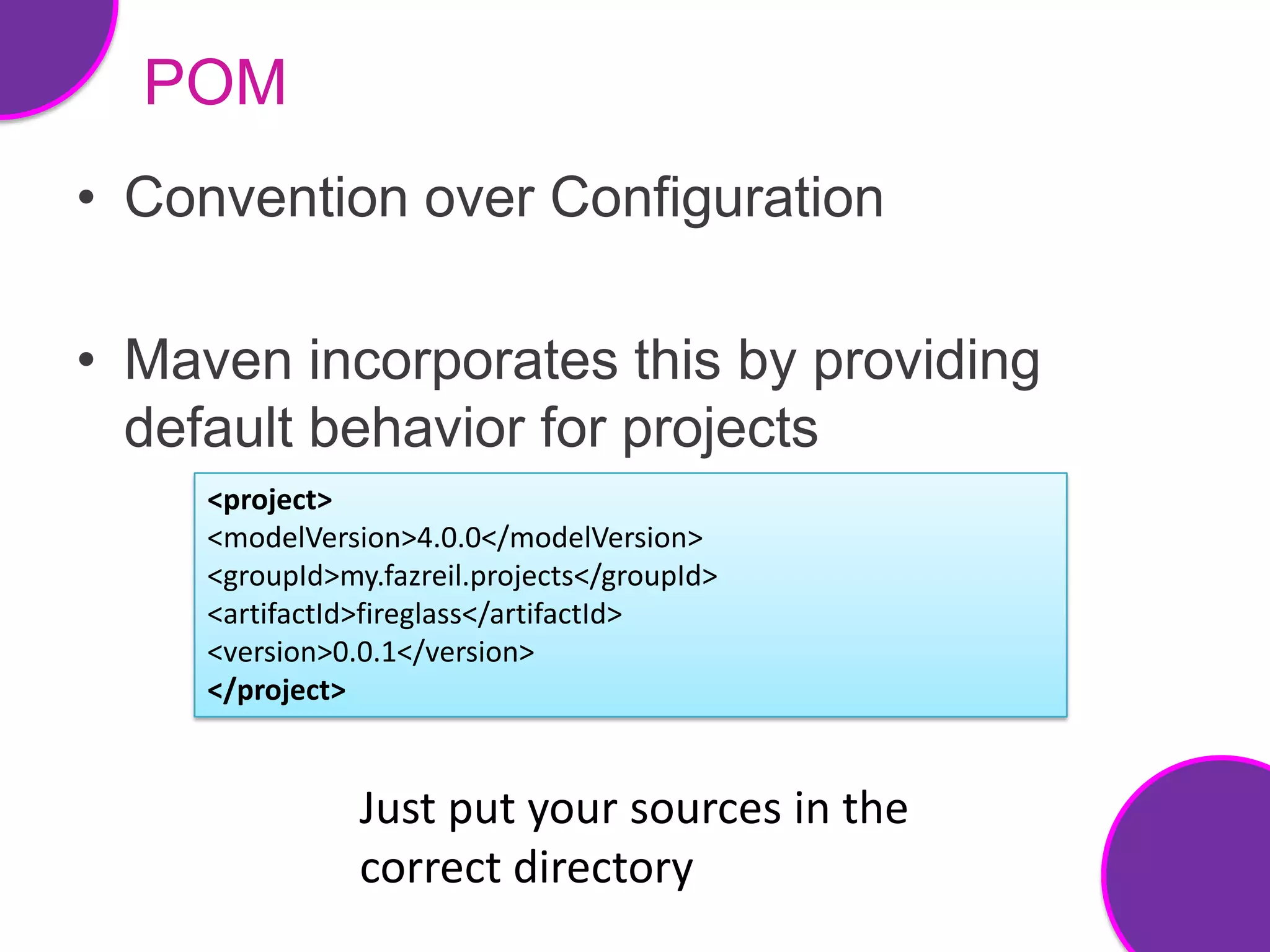
• Convention over Configuration

• Maven incorporates this by providing
  default behavior for projects
     <project>
     <modelVersion>4.0.0</modelVersion>
     <groupId>my.fazreil.projects</groupId>
     <artifactId>fireglass</artifactId>
     <version>0.0.1</version>
     </project>


                Just put your sources in the
                correct directory
Life Cycle
• Contains phases in specific order

• Phase is made up of goals

• 3 built-in life cycles
  – default
  – clean and
  – test
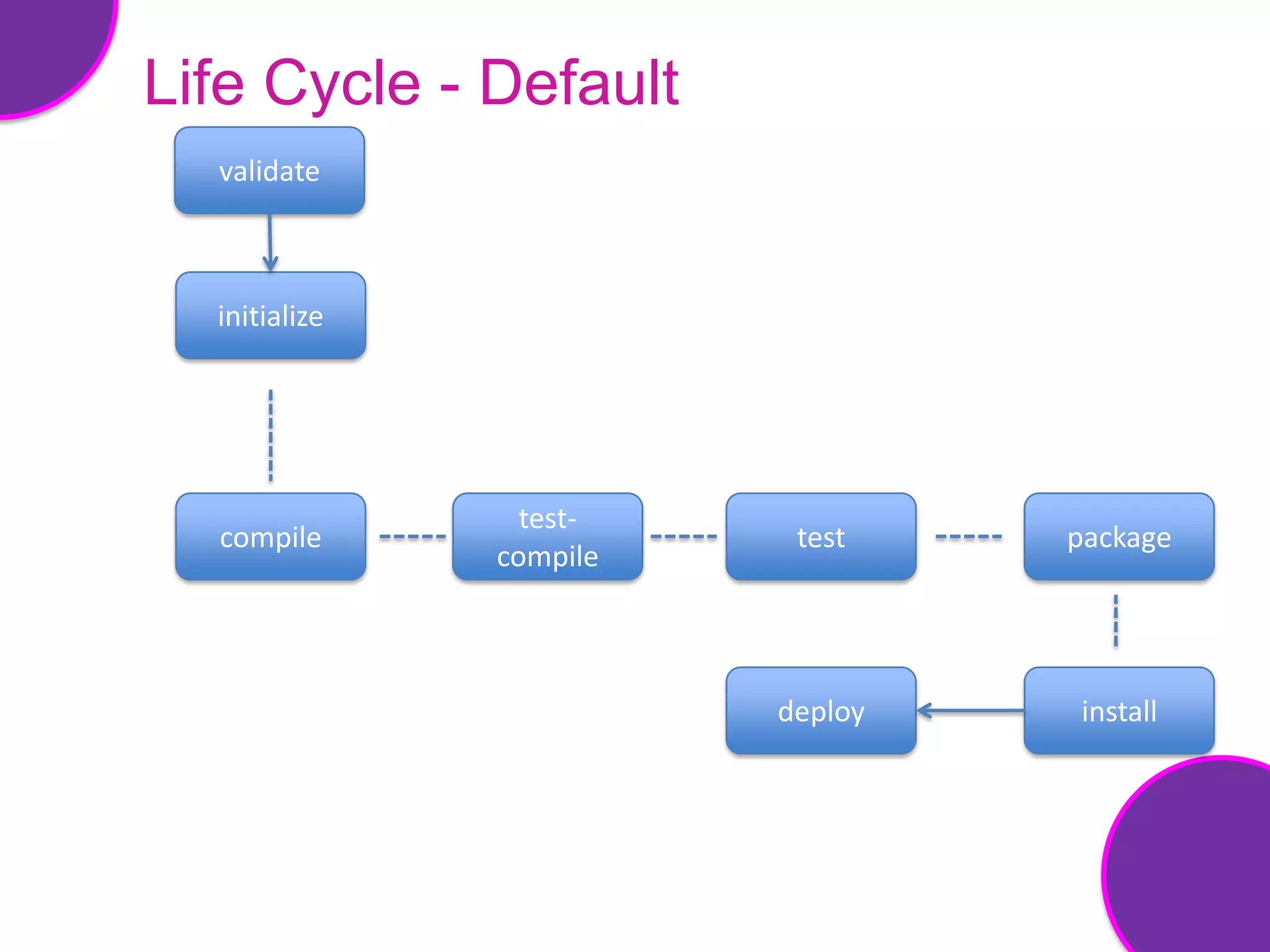
Life Cycle - Default
  validate


  initialize


                 test-
  compile                 test    package
               compile


                         deploy   install
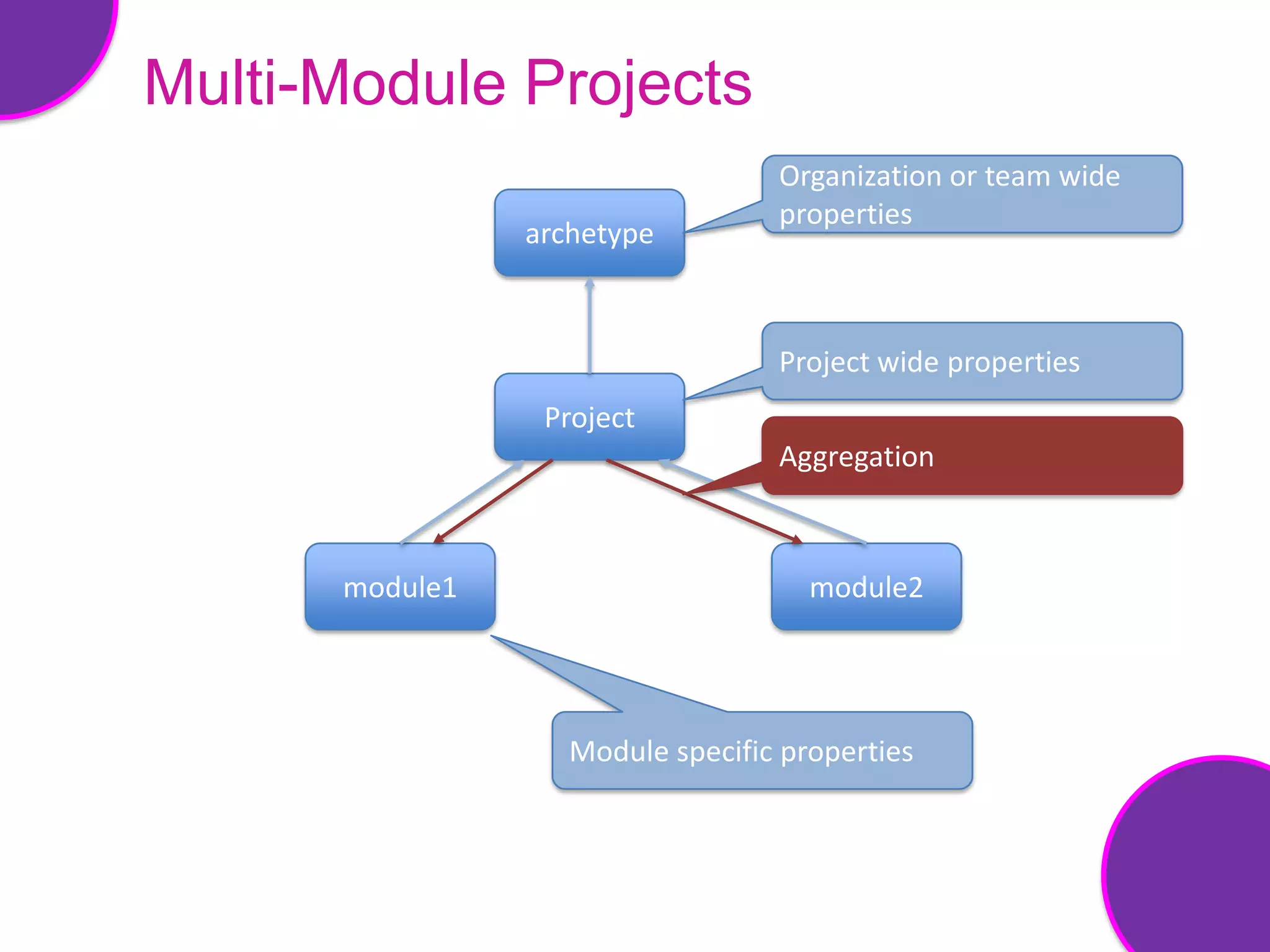
Multi-Module Projects
• Why use a modular architecture ?
  – Separation of concerns
  – Easier to test
  – Flexible


• Reusing the configuration
  – Inheritance
  – Dependencies


• Aggregation
Multi-Module Projects
                                  Organization or team wide
                                  properties
                archetype


                                  Project wide properties
                 Project
                                  Aggregation


      module1                        module2


                   Module specific properties
Multi-Module Projects
• Organize your builds

• Speed up builds

• Speedup test process
Maven Repository
• Holds the build artifacts and dependencies

• Two types of repositories
  – Local
  – Remote
Local Repository
• Local cache for artifacts

• Can erase it completely

• Useful for offline builds

• Resides in User home’s .m2/ folder
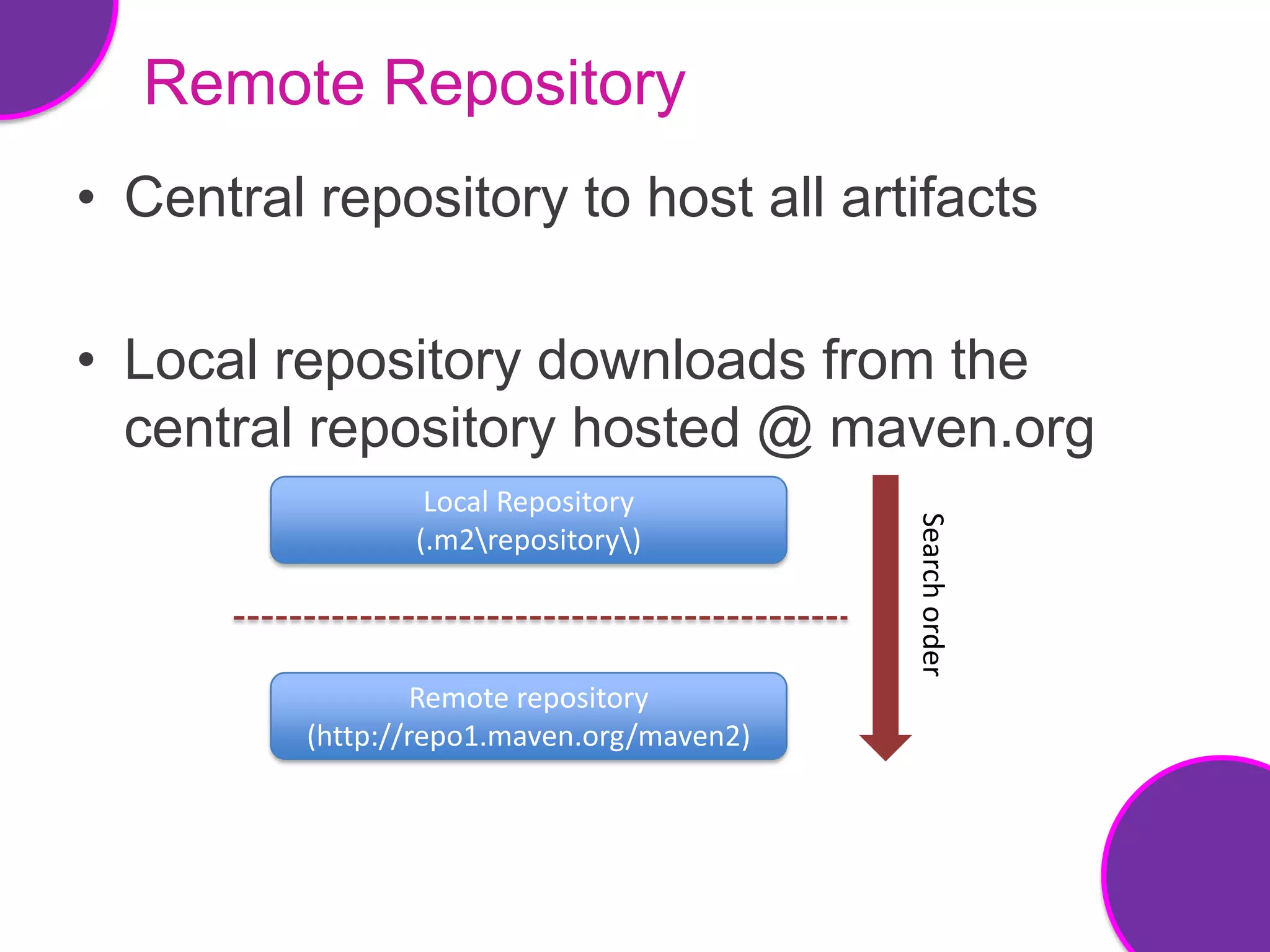
Remote Repository
• Central repository to host all artifacts

• Local repository downloads from the
  central repository hosted @ maven.org
                  Local Repository


                                            Search order
                 (.m2repository)


                   Remote repository
          (http://repo1.maven.org/maven2)
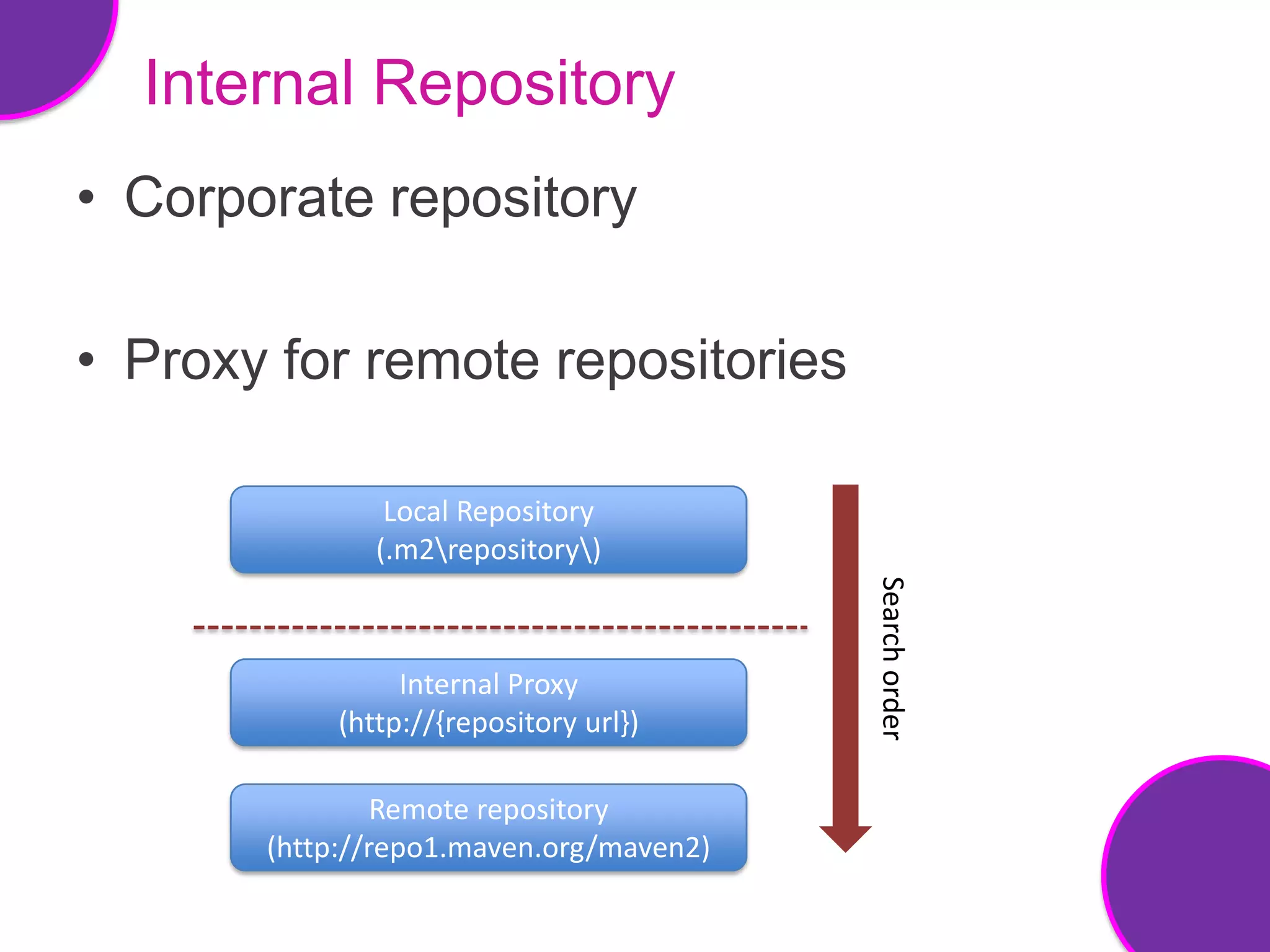
Internal Repository
• Corporate repository

• Proxy for remote repositories

                Local Repository
               (.m2repository)


                                         Search order
                 Internal Proxy
            (http://{repository url})

                Remote repository
       (http://repo1.maven.org/maven2)
What is Artifactory?
• It is a MAVEN repository

• Think of it as the ‘SVN’ for libraries.

• It is the place to obtain this information:

  <dependency>
    <groupId>my.fazreil.project</groupId>
    <artifactId>fireglass</artifactId>
    <version>0.0.1</version>
  </dependency>
Do we need our own maven
  repo?
• Because we want to host our own
  libraries.

• And we would like to make our libraries
  available to the local network

• Yes, we can control the access.
Extra notes
• Artifactory acts as a proxy to the outside
  repository.

• Dependencies requested to Artifactory will
  be cached in Artifactory for quick retrieval.
Build solution
• Complete end-to-end solution

• 5 open source projects
  – Maven
  – Subversion
  – Hudson
  – Artifactory
  – Sonar
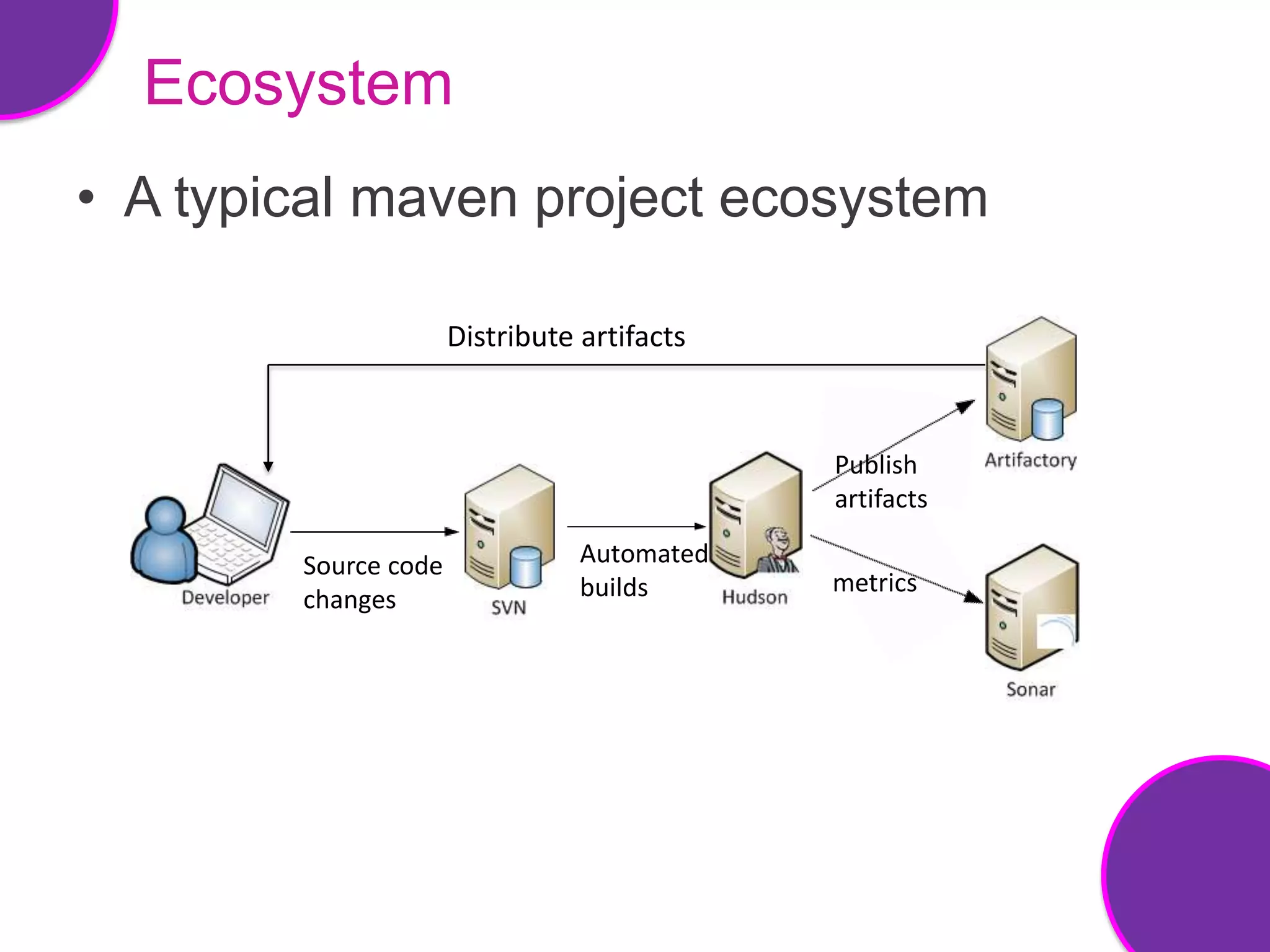
Ecosystem
• A typical maven project ecosystem

                      Distribute artifacts


                                             Publish
                                             artifacts

        Source code              Automated
                                 builds      metrics
        changes
Maven Release Cycle
• Develop against snapshot versions

• Release stable versions

• Automated releases
  – Update version numbers to next SNAPSHOT
    versions

How maven makes your development group look like a bunch of professionals.

  • 1.
    Venkaiah Chowdary Koneru Fazreil Amreen Abdul Jalil
  • 2.
    Agenda • Maven • Repository •Complete Build solution
  • 3.
    What’s the Problem? •Manual handling of external Jars • Inter-project dependencies • Running tests
  • 4.
    What is Maven? • A build tool • Uniform build system • Provides quality project information • Transparent migration to new features • Guidelines for best practices development
  • 5.
    Conceptual Model • Mavenmaintains model of a project • Unique set of coordinates to a project • Almost zero effort • Encourages modular design
  • 6.
    Default Directory Structure Structure is based on the archetypes definition Source folders Test related Source folders Generated class files and artifacts
  • 7.
    POM • Fundamental unitof work in maven • An XML file • Consists – Project information – Project relationships – Build settings – Build environment
  • 8.
    POM <project ...> <parent /> <groupId /> • Fundamental unit of work in maven <artifactId /> <version /> <packaging /> <modules> … </modules> • An XML file <propertie> ... </properties> <developers /> <contributors /> <scm> ... </scm> • Consists <build> <plugins> ... </plugins> – Project information </build> <dependencies> ... </dependencies> – Project relationships </repositories> <repositories> ... <pluginRepositories> ... </pluginRepositories> – Build settings ... </profiles> <profiles> <reporting> ... </reporting> – Build environment </project>
  • 9.
    POM • Convention overConfiguration • Maven incorporates this by providing default behavior for projects <project> <modelVersion>4.0.0</modelVersion> <groupId>my.fazreil.projects</groupId> <artifactId>fireglass</artifactId> <version>0.0.1</version> </project> Just put your sources in the correct directory
  • 10.
    Life Cycle • Containsphases in specific order • Phase is made up of goals • 3 built-in life cycles – default – clean and – test
  • 11.
    Life Cycle -Default validate initialize test- compile test package compile deploy install
  • 12.
    Multi-Module Projects • Whyuse a modular architecture ? – Separation of concerns – Easier to test – Flexible • Reusing the configuration – Inheritance – Dependencies • Aggregation
  • 13.
    Multi-Module Projects Organization or team wide properties archetype Project wide properties Project Aggregation module1 module2 Module specific properties
  • 14.
    Multi-Module Projects • Organizeyour builds • Speed up builds • Speedup test process
  • 15.
    Maven Repository • Holdsthe build artifacts and dependencies • Two types of repositories – Local – Remote
  • 16.
    Local Repository • Localcache for artifacts • Can erase it completely • Useful for offline builds • Resides in User home’s .m2/ folder
  • 17.
    Remote Repository • Centralrepository to host all artifacts • Local repository downloads from the central repository hosted @ maven.org Local Repository Search order (.m2repository) Remote repository (http://repo1.maven.org/maven2)
  • 18.
    Internal Repository • Corporaterepository • Proxy for remote repositories Local Repository (.m2repository) Search order Internal Proxy (http://{repository url}) Remote repository (http://repo1.maven.org/maven2)
  • 19.
    What is Artifactory? •It is a MAVEN repository • Think of it as the ‘SVN’ for libraries. • It is the place to obtain this information: <dependency> <groupId>my.fazreil.project</groupId> <artifactId>fireglass</artifactId> <version>0.0.1</version> </dependency>
  • 20.
    Do we needour own maven repo? • Because we want to host our own libraries. • And we would like to make our libraries available to the local network • Yes, we can control the access.
  • 21.
    Extra notes • Artifactoryacts as a proxy to the outside repository. • Dependencies requested to Artifactory will be cached in Artifactory for quick retrieval.
  • 22.
    Build solution • Completeend-to-end solution • 5 open source projects – Maven – Subversion – Hudson – Artifactory – Sonar
  • 23.
    Ecosystem • A typicalmaven project ecosystem Distribute artifacts Publish artifacts Source code Automated builds metrics changes
  • 24.
    Maven Release Cycle •Develop against snapshot versions • Release stable versions • Automated releases – Update version numbers to next SNAPSHOT versions

Editor's Notes

  • #2 Teaming as a way of life!!
  • #3 Maven IntroductionWhat is maven ?why ?Maven vs AntBasicsDependenciesMaven customizationIDE integrationMulti-module projects - creating multi module projects - naming conventions - Group id, artifact id
  • #4 External jarsWhere to store themWhat versionDependency on other jarsRunning test - developers don’t have time or forget tests before commit
  • #5 Majorityof the maven users call maven as a “build tool” – A tool used to build deployable artifacts from source code.Build tool such as Ant is focused solely on preprocessing, compilation, packaging, testing and distribution.Uniform build system (POM)this definition of a model for every project enables features such asDependency managementRemote repositoriesUniversal reuse of build logicTool portability / integrationLife CycleCompiling source codeExecuting test casesPackaging distributionAnd many others
  • #6 Model – Provides default behavior for projectsZERO effortPut sources in source directoryDefine relationships between modulesModularDefine the relationship between modulesInherit properties and behavior from parent projectsOrganize build with multi-module projects
  • #7 Archetype is a Maven project templating toolkit.An archetype is defined as an original pattern or model from which all other things of the same kind are made. 
  • #8 POMIt is what makes your project a maven project
  • #9 POMIt is what makes your project a maven project
  • #10 Convention over configurationSystems, libraries, and frameworks should assume reasonable defaults.Source, resources, test, classes and etc…Defined life cycle and a set of common pluginsSet of common plugin’s knows how to build and assemble the software …
  • #11 Maven 2.0 is based around the central concept of a build lifecycle. What this means is that the process for building and distributing a particular artifact (project) is clearly defined.Phase represents a specific stageGoal represents a specific taskDefault : handles your project deploymentClean: project cleaningSite: project’s site documentation
  • #13 WHY?Separation of concernsEasier to testFlexibleDependenciesDefine the relationships between modules InheritanceInherit properties and behaviour from parent projectsAggregationOrganize builds with multi-module projects
  • #14 Inheritance in actionSuper POM is always the base parent like Object in java
  • #15 Organize : - coordinates builds and stage build process (build pipelines)Test process:Not only unit tests.Integration test, parallelize long running integration tests
  • #16 Why not store JAR’s in CVS ?Maven tries to promote the notion of a user local repository where JARs, or any project artifacts, can be stored and used for any number of builds.Uses less storageMakes checking of a project quicker
  • #20 It is a MAVEN repositoryThink of it as the ‘SVN’ for libraries.It is the place to obtain this information:&lt;dependency&gt; &lt;groupId&gt;my.mimos.util&lt;/groupId&gt; &lt;artifactId&gt;dbutil&lt;/artifactId&gt; &lt;version&gt;0.1&lt;/version&gt;&lt;/dependency&gt;
  • #21 Because we want to host our own libraries.And we would like to make our libraries available to the whole MIMOS networkYes, we can control the access.
  • #22 Artifactory acts as a proxy to the outside repository.Dependencies requested to Artifactory will be cached in Artifactory for quick retrieval.Log in using MIMOS AD Login.
  • #23 Maven:Describe project, generate artifacts, artifact versioningSubversion:To collectively own code and integrate often, source code repository is necessaryCI server:After check-in, a CI server will check the code out, compile and run all the unit tests.Artifactory:It enables both release and snapshot artifacts. It is valuable to keep metrics about source code (code quality).
  • #25 To automate, needMaven release plugin and scm details in POM xmlEach release produces a new time-stamped artifactSnapshot versions are identified by the SNAPSHOT keywordStable, tested releaseEach artifact is unique