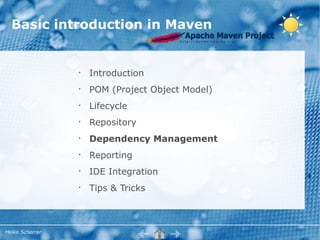

Basic introduction in Maven


                 •
                     Introduction
                 •
                     POM (Project Object Model)
                 •
                     Lifecycle
                 •
                     Repository
                 •
                     Dependency Management
                 •
                     Reporting
                 •
                     IDE Integration
                 •
                     Tips & Tricks


Heiko Scherrer
What is Maven?


       •
           A build tool like Apache Ant but:
             ●
                 Configure your build, don't script it
             ●
                 Define what you build, not how!
       •
           A dependency management tool
             ●
                 Coherent organization of dependencies
       •
           A project management tool
      Take back control!


Heiko Scherrer
What is Maven?


  •
      Currently using Maven2.
      Maven3 is almost backward compatible
  •
      Benefit of a wide range of plugins to
      setup your build and reporting
  •
      Maven repository server, e.g. Sonatype's
      Nexus


Heiko Scherrer
Maven vs. Ant – Why not Ant?


         •
             “Convention over Configuration”
         •
             Appreciate for building complex
             modularized applications
         •
             Based on a repository to store and
             resolve artifacts
         •
             Maven doesn't have to know about
             directory structures (use defaults)


Heiko Scherrer
Downside of Maven


         •
             “Convention over Configuration”
         •
             Exceptions are less meaningful and
             configuration errors hard to find
         •
             Plugins are less documented


Heiko Scherrer
Basic introduction in Maven


                 •
                     Introduction
                 •
                     POM (Project Object Model)
                 •
                     Lifecycle
                 •
                     Repository
                 •
                     Dependency Management
                 •
                     Reporting
                 •
                     IDE Integration
                 •
                     Tips & Tricks


Heiko Scherrer
What represents a project ?


  •
      Each project has a project descriptor
      (pom.xml)
  •
      A project is determined using Maven
      coordinates
      groupId:artifactId:version:classifier:type
  •
      Project Object Model (POM) files support
      inheritance


Heiko Scherrer
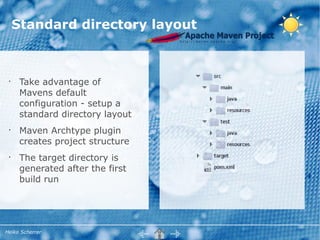
Standard directory layout


 •
      Take advantage of
      Mavens default
      configuration - setup a
      standard directory layout
 •
      Maven Archtype plugin
      creates project structure
 •
      The target directory is
      generated after the first
      build run


Heiko Scherrer
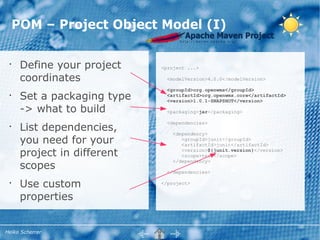
POM – Project Object Model (I)

 •
      Define your project    <project ...>

      coordinates              <modelVersion>4.0.0</modelVersion>

                               <groupId>org.openwms</groupId>
 •
      Set a packaging type     <artifactId>org.openwms.core</artifactId>
                               <version>1.0.1-SNAPSHOT</version>

      -> what to build         <packaging>jar</packaging>


      List dependencies,
                               <dependencies>
 •
                                 <dependency>
      you need for your             <groupId>junit</groupId>
                                    <artifactId>junit</artifactId>

      project in different          <version>${junit.version}</version>
                                    <scope>test</scope>

      scopes
                                 </dependency>

                               </dependencies>

 •
      Use custom             </project>


      properties


Heiko Scherrer
POM - Scopes

    •
        COMPILE
        Included in compilation, packaged and delivered
    •
        PROVIDED
        Included in compilation, but not packaged. Expected to be
        provided at runtime
    •
        RUNTIME
        Not included in compilation classpath, but expected at runtime
        (Class.forName...)
    •
        TEST
        Only included in test classpath and test phase; not delivered
    •
        SYSTEM
        Like provided, but must be referenced directly. Used for non
        Maven artifacts


Heiko Scherrer
POM Inheritance

       •
           A super POM comes with your local Maven
           installation (maven2.jar#pom-4.0.0.xml)
       •
           POM files inherit configuration from a parent
           project
       •
           Common used dependencies or configuration
           snippets shall be moved to a parent project
       •
           That way it is possible to build complex
           inheritance strategies
       •
           Find the effective POM:
           mvn help:effective-pom


Heiko Scherrer
Grouping & Inheritance


   •
       Building modules to group projects
   •   Use the packaging type pom and define
       submodules
   •
       Group modules and configure build with
       Profiles
   •
       Use inheritance to follow DRY principle


Heiko Scherrer
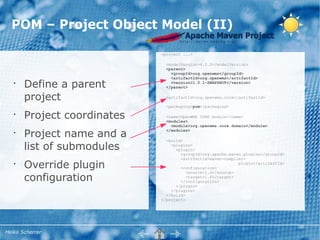
POM – Project Object Model (II)

                             <project ...>

                               <modelVersion>4.0.0</modelVersion>
                               <parent>
                                 <groupId>org.openwms</groupId>
                                 <artifactId>org.openwms</artifactId>
   •
       Define a parent           <version>1.0.1-SNAPSHOT</version>
                               </parent>

       project                 <artifactId>org.openwms.core</artifactId>

                               <packaging>pom</packaging>

   •
       Project coordinates     <name>OpenWMS CORE module</name>
                               <modules>
                                 <module>org.openwms.core.domain</module>

       Project name and a
                               </modules>
   •
                               <build>
       list of submodules        <plugins>
                                   <plugin>
                                     <groupId>org.apache.maven.plugins</groupId>
                                     <artifactId>maven-compiler-
   •
       Override plugin               <configuration>
                                                             plugin</artifactId>

                                        <source>1.6</source>
       configuration                    <target>1.6</target>
                                     </configuration>
                                   </plugin>
                                 </plugins>
                               </build>
                             </project>


Heiko Scherrer
Basic introduction in Maven


                 •
                     Introduction
                 •
                     POM (Project Object Model)
                 •
                     Lifecycle
                 •
                     Repository
                 •
                     Dependency Management
                 •
                     Reporting
                 •
                     IDE Integration
                 •
                     Tips & Tricks


Heiko Scherrer
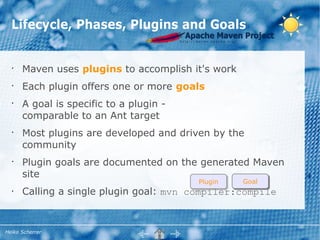
Lifecycle, Phases, Plugins and Goals


  •
      Maven uses plugins to accomplish it's work
  •
      Each plugin offers one or more goals
  •
      A goal is specific to a plugin -
      comparable to an Ant target
  •
      Most plugins are developed and driven by the
      community
  •
      Plugin goals are documented on the generated Maven
      site
                                         Plugin    Goal
  •   Calling a single plugin goal: mvn compiler:compile


Heiko Scherrer
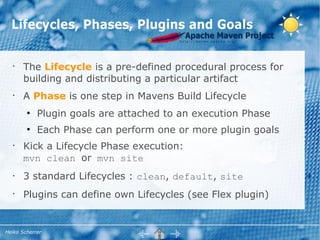
Lifecycles, Phases, Plugins and Goals


   •
       The Lifecycle is a pre-defined procedural process for
       building and distributing a particular artifact
   •
       A Phase is one step in Mavens Build Lifecycle
        ●
            Plugin goals are attached to an execution Phase
        ●
            Each Phase can perform one or more plugin goals
   •
       Kick a Lifecycle Phase execution:
       mvn clean or mvn site
   •   3 standard Lifecycles : clean, default, site
   •
       Plugins can define own Lifecycles (see Flex plugin)


Heiko Scherrer
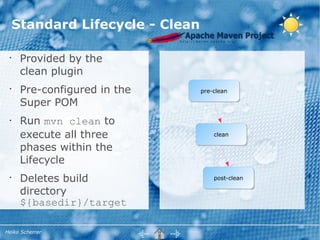
Standard Lifecycle - Clean

 •
      Provided by the
      clean plugin
 •
      Pre-configured in the       pre-clean

      Super POM
 •    Run mvn clean to
      execute all three               clean

      phases within the
      Lifecycle
 •
      Deletes build                   post-clean

      directory
      ${basedir}/target

Heiko Scherrer
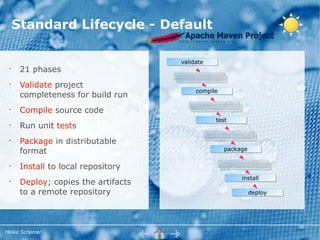
Standard Lifecycle - Default

                                     validate
 •
      21 phases
 •
      Validate project
                                          compile
      completeness for build run
 •
      Compile source code
                                                test
 •
      Run unit tests
 •
      Package in distributable
      format                                        package

 •
      Install to local repository
                                                         install
 •
      Deploy; copies the artifacts
      to a remote repository                                  deploy


Heiko Scherrer
Basic introduction in Maven


                 •
                     Introduction
                 •
                     POM (Project Object Model)
                 •
                     Lifecycle
                 •
                     Repository
                 •
                     Dependency Management
                 •
                     Reporting
                 •
                     IDE Integration
                 •
                     Tips & Tricks


Heiko Scherrer
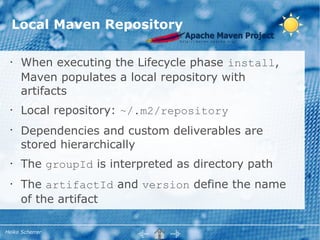
Local Maven Repository

  •   When executing the Lifecycle phase install,
      Maven populates a local repository with
      artifacts
  •   Local repository: ~/.m2/repository
  •
      Dependencies and custom deliverables are
      stored hierarchically
  •   The groupId is interpreted as directory path
  •   The artifactId and version define the name
      of the artifact

Heiko Scherrer
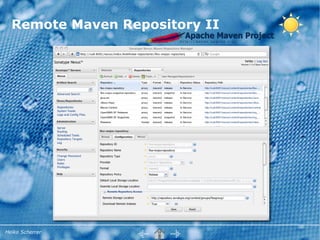
Remote Maven Repository

     •
         A Remote repository is a central, company-
         wide storage for build artifacts
     •
         Serves as
           ●
                 a Proxy (to minimize bandwidth)
           ●
                 a storage for own project artifacts
                 (accessible by Maven or web UI)
     •
         Sonatype Nexus Repository Manager is
         OpenSource (comm. version available)
     •   Copy to central repo: mvn deploy

Heiko Scherrer
Remote Maven Repository II


Heiko Scherrer
Remote Maven Repository III


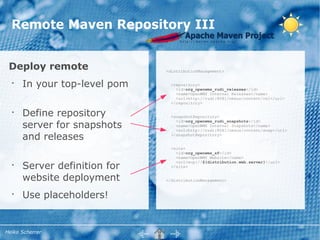
 Deploy remote                <distributionManagement>


  •
      In your top-level pom     <repository>
                                  <id>org_openwms_rudi_releases</id>
                                  <name>OpenWMS Internal Releases</name>
                                  <url>http://rudi:8081/nexus/content/rel</url>
                                </repository>

  •
      Define repository         <snapshotRepository>

      server for snapshots
                                  <id>org_openwms_rudi_snapshots</id>
                                  <name>OpenWMS Internal Snapshots</name>
                                  <url>http://rudi:8081/nexus/content/snap</url>

      and releases              </snapshotRepository>


                                <site>
                                  <id>org_openwms_sf</id>
                                  <name>OpenWMS Website</name>

      Server definition for
                                  <url>scp://${distribution.web.server}</url>
  •                             </site>


      website deployment      </distributionManagement>


  •
      Use placeholders!


Heiko Scherrer
Remote Maven Repository IV


                               <settings>
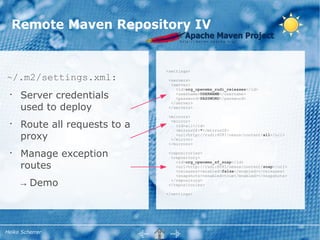
~/.m2/settings.xml:             <servers>
                                 <server>
                                   <id>org_openwms_rudi_releases</id>
 •
     Server credentials            <username>USERNAME</username>
                                   <password>PASSWORD</password>

     used to deploy
                                 </server>
                                </servers>

                                <mirrors>

     Route all requests to a
                                 <mirror>
 •                                 <id>all</id>
                                   <mirrorOf>*</mirrorOf>
     proxy                         <url>http://rudi:8081/nexus/content/all</url>
                                 </mirror>
                                </mirrors>

 •
     Manage exception           <repositories>
                                 <repository>

     routes
                                   <id>org_openwms_sf_snap</id>
                                   <url>http://rudi:8081/nexus/content/snap</url>
                                   <releases><enabled>false</enabled></releases>
                                   <snapshots><enabled>true</enabled></snapshots>

     → Demo                      </repository>
                                </repositories>

                               </settings>


Heiko Scherrer
Basic introduction in Maven


                 •
                     Introduction
                 •
                     POM (Project Object Model)
                 •
                     Lifecycle
                 •
                     Repository
                 •
                     Dependency Management
                 •
                     Reporting
                 •
                     IDE Integration
                 •
                     Tips & Tricks


Heiko Scherrer
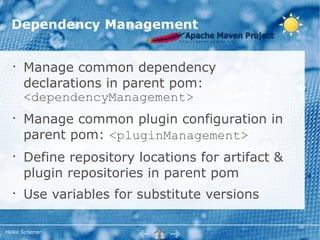
Dependency Management


   •
       Manage common dependency
       declarations in parent pom:
       <dependencyManagement>
   •
       Manage common plugin configuration in
       parent pom: <pluginManagement>
   •
       Define repository locations for artifact &
       plugin repositories in parent pom
   •
       Use variables for substitute versions

Heiko Scherrer
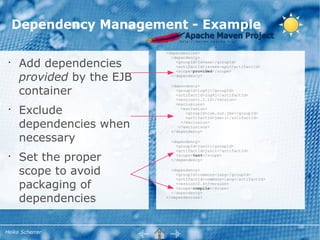
Dependency Management - Example
                           <dependencies>
                             <dependency>
 •
     Add dependencies          <groupId>javaee</groupId>
                               <artifactId>javaee-api</artifactId>
                               <scope>provided</scope>

     provided by the EJB     </dependency>


     container
                             <dependency>
                               <groupId>log4j</groupId>
                               <artifactId>log4j</artifactId>
                               <version>1.2.12</version>
                               <exclusions>
 •
     Exclude                     <exclusion>
                                   <groupId>com.sun.jmx</groupId>
                                   <artifactId>jmxri</artifactId>

     dependencies when           </exclusion>
                                </exclusions>
                             </dependency>

     necessary               <dependency>
                               <groupId>junit</groupId>
                               <artifactId>junit</artifactId>
 •
     Set the proper            <scope>test</scope>
                             </dependency>


     scope to avoid          <dependency>
                               <groupId>commons-lang</groupId>


     packaging of
                               <artifactId>commons-lang</artifactId>
                               <version>2.4</version>
                               <scope>compile</scope>


     dependencies
                             </dependency>
                           </dependencies>


Heiko Scherrer
Worth to mention


                 •
                     Resource filtering
                 •
                     Profiles
                 •
                     Classifiers


Heiko Scherrer
Basic introduction in Maven


                 •
                     Introduction
                 •
                     POM (Project Object Model)
                 •
                     Lifecycle
                 •
                     Repository
                 •
                     Dependency Management
                 •
                     Reporting
                 •
                     IDE Integration
                 •
                     Tips & Tricks


Heiko Scherrer
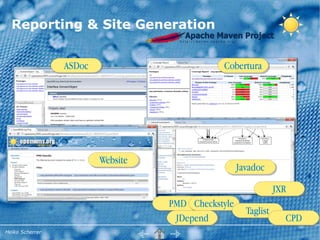
Reporting & Site Generation


                 ASDoc                        Cobertura


                         Website
                                                    Javadoc

                                                                JXR
                                   PMD Checkstyle
                                                      Taglist
                                    JDepend                       CPD
Heiko Scherrer
Reporting & Site Generation


       •   Run site generation: mvn site
       •
           Maven-site-plugin
       •   Site content: ${basedir}/src/site
       •
           Accepted formats: apt, fml, xdoc,
           DocBook, …


Heiko Scherrer
Reporting & Site Generation


            •
                 Report generation is part of site
            •
                 Site customization is done within
                 <reporting> section
            •
                 Useful plugins:
                 maven-project-info-reports-plugin,
                 dashboard-maven-plugin,
                 cobertura-maven-plugin,
                 maven-surefire-report-plugin,
                 maven-javadoc-plugin

            •
                 → Demo

Heiko Scherrer
Basic introduction in Maven


                 •
                     Introduction
                 •
                     POM (Project Object Model)
                 •
                     Lifecycle
                 •
                     Repository
                 •
                     Dependency Management
                 •
                     Reporting
                 •
                     IDE Integration
                 •
                     Tips & Tricks


Heiko Scherrer
IDE Integration (Eclipse)


   •
       Usually each IDE has its own project setting files
   •
       Avoid sharing platform specific files within your
       VCS
   •   Import pom.xml as Maven project → Eclipse demo
   •   Use maven-eclipse-plugin to add particular
       project facets: mvn eclipse:eclipse
   •
       Use the IDE to develop – not to build.
       → Keep Maven out of development process


Heiko Scherrer
IDE Integration II (Eclipse)


   •
       Install m2eclipse:
       http://m2eclipse.sonatype.org/sites/m2e
   •
       m2eclipse comes with Maven3 beta, change
       manually to local Maven2 installation
   •
       In addition to the local and remote repository,
       m2eclipse uses the workspace as 1st. Repository
   •
       Use favorite Run Configurations to run Maven


Heiko Scherrer
Basic introduction in Maven


                 •
                     Introduction
                 •
                     POM (Project Object Model)
                 •
                     Lifecycle
                 •
                     Repository
                 •
                     Dependency Management
                 •
                     Reporting
                 •
                     IDE Integration
                 •
                     Tips & Tricks


Heiko Scherrer
Tips & Tricks


 •    Download sources mvn dependency:sources
 •    Define <server> in your settings.xml to store your
      credentials
 •    Add -DskipTests to bypass test phase
 •    Add -U to update snapshot dependencies manually
 •
      m2e: Nested projects lead to artifact resolving
      errors


Heiko Scherrer
Tips & Tricks II


    •
        Aggregate common config in top-level pom
    •
        SVN ignore IDE specific files and use pom as
        project descriptor at all
    •
        Don't commit binaries or generated files to VCS


Heiko Scherrer
Q&A


Heiko Scherrer
Document History


      •
          Initial svn rev. [1472];
      •
          Updated svn rev. [1475];2011-01-16


Heiko Scherrer

Introduction in Apache Maven2

  • 1.
    Basic introduction inMaven • Introduction • POM (Project Object Model) • Lifecycle • Repository • Dependency Management • Reporting • IDE Integration • Tips & Tricks Heiko Scherrer
  • 2.
    What is Maven? • A build tool like Apache Ant but: ● Configure your build, don't script it ● Define what you build, not how! • A dependency management tool ● Coherent organization of dependencies • A project management tool Take back control! Heiko Scherrer
  • 3.
    What is Maven? • Currently using Maven2. Maven3 is almost backward compatible • Benefit of a wide range of plugins to setup your build and reporting • Maven repository server, e.g. Sonatype's Nexus Heiko Scherrer
  • 4.
    Maven vs. Ant– Why not Ant? • “Convention over Configuration” • Appreciate for building complex modularized applications • Based on a repository to store and resolve artifacts • Maven doesn't have to know about directory structures (use defaults) Heiko Scherrer
  • 5.
    Downside of Maven • “Convention over Configuration” • Exceptions are less meaningful and configuration errors hard to find • Plugins are less documented Heiko Scherrer
  • 6.
    Basic introduction inMaven • Introduction • POM (Project Object Model) • Lifecycle • Repository • Dependency Management • Reporting • IDE Integration • Tips & Tricks Heiko Scherrer
  • 7.
    What represents aproject ? • Each project has a project descriptor (pom.xml) • A project is determined using Maven coordinates groupId:artifactId:version:classifier:type • Project Object Model (POM) files support inheritance Heiko Scherrer
  • 8.
    Standard directory layout • Take advantage of Mavens default configuration - setup a standard directory layout • Maven Archtype plugin creates project structure • The target directory is generated after the first build run Heiko Scherrer
  • 9.
    POM – ProjectObject Model (I) • Define your project <project ...> coordinates <modelVersion>4.0.0</modelVersion> <groupId>org.openwms</groupId> • Set a packaging type <artifactId>org.openwms.core</artifactId> <version>1.0.1-SNAPSHOT</version> -> what to build <packaging>jar</packaging> List dependencies, <dependencies> • <dependency> you need for your <groupId>junit</groupId> <artifactId>junit</artifactId> project in different <version>${junit.version}</version> <scope>test</scope> scopes </dependency> </dependencies> • Use custom </project> properties Heiko Scherrer
  • 10.
    POM - Scopes • COMPILE Included in compilation, packaged and delivered • PROVIDED Included in compilation, but not packaged. Expected to be provided at runtime • RUNTIME Not included in compilation classpath, but expected at runtime (Class.forName...) • TEST Only included in test classpath and test phase; not delivered • SYSTEM Like provided, but must be referenced directly. Used for non Maven artifacts Heiko Scherrer
  • 11.
    POM Inheritance • A super POM comes with your local Maven installation (maven2.jar#pom-4.0.0.xml) • POM files inherit configuration from a parent project • Common used dependencies or configuration snippets shall be moved to a parent project • That way it is possible to build complex inheritance strategies • Find the effective POM: mvn help:effective-pom Heiko Scherrer
  • 12.
    Grouping & Inheritance • Building modules to group projects • Use the packaging type pom and define submodules • Group modules and configure build with Profiles • Use inheritance to follow DRY principle Heiko Scherrer
  • 13.
    POM – ProjectObject Model (II) <project ...> <modelVersion>4.0.0</modelVersion> <parent> <groupId>org.openwms</groupId> <artifactId>org.openwms</artifactId> • Define a parent <version>1.0.1-SNAPSHOT</version> </parent> project <artifactId>org.openwms.core</artifactId> <packaging>pom</packaging> • Project coordinates <name>OpenWMS CORE module</name> <modules> <module>org.openwms.core.domain</module> Project name and a </modules> • <build> list of submodules <plugins> <plugin> <groupId>org.apache.maven.plugins</groupId> <artifactId>maven-compiler- • Override plugin <configuration> plugin</artifactId> <source>1.6</source> configuration <target>1.6</target> </configuration> </plugin> </plugins> </build> </project> Heiko Scherrer
  • 14.
    Basic introduction inMaven • Introduction • POM (Project Object Model) • Lifecycle • Repository • Dependency Management • Reporting • IDE Integration • Tips & Tricks Heiko Scherrer
  • 15.
    Lifecycle, Phases, Pluginsand Goals • Maven uses plugins to accomplish it's work • Each plugin offers one or more goals • A goal is specific to a plugin - comparable to an Ant target • Most plugins are developed and driven by the community • Plugin goals are documented on the generated Maven site Plugin Goal • Calling a single plugin goal: mvn compiler:compile Heiko Scherrer
  • 16.
    Lifecycles, Phases, Pluginsand Goals • The Lifecycle is a pre-defined procedural process for building and distributing a particular artifact • A Phase is one step in Mavens Build Lifecycle ● Plugin goals are attached to an execution Phase ● Each Phase can perform one or more plugin goals • Kick a Lifecycle Phase execution: mvn clean or mvn site • 3 standard Lifecycles : clean, default, site • Plugins can define own Lifecycles (see Flex plugin) Heiko Scherrer
  • 17.
    Standard Lifecycle -Clean • Provided by the clean plugin • Pre-configured in the pre-clean Super POM • Run mvn clean to execute all three clean phases within the Lifecycle • Deletes build post-clean directory ${basedir}/target Heiko Scherrer
  • 18.
    Standard Lifecycle -Default validate • 21 phases • Validate project compile completeness for build run • Compile source code test • Run unit tests • Package in distributable format package • Install to local repository install • Deploy; copies the artifacts to a remote repository deploy Heiko Scherrer
  • 19.
    Basic introduction inMaven • Introduction • POM (Project Object Model) • Lifecycle • Repository • Dependency Management • Reporting • IDE Integration • Tips & Tricks Heiko Scherrer
  • 20.
    Local Maven Repository • When executing the Lifecycle phase install, Maven populates a local repository with artifacts • Local repository: ~/.m2/repository • Dependencies and custom deliverables are stored hierarchically • The groupId is interpreted as directory path • The artifactId and version define the name of the artifact Heiko Scherrer
  • 21.
    Remote Maven Repository • A Remote repository is a central, company- wide storage for build artifacts • Serves as ● a Proxy (to minimize bandwidth) ● a storage for own project artifacts (accessible by Maven or web UI) • Sonatype Nexus Repository Manager is OpenSource (comm. version available) • Copy to central repo: mvn deploy Heiko Scherrer
  • 22.
    Remote Maven RepositoryII Heiko Scherrer
  • 23.
    Remote Maven RepositoryIII Deploy remote <distributionManagement> • In your top-level pom <repository> <id>org_openwms_rudi_releases</id> <name>OpenWMS Internal Releases</name> <url>http://rudi:8081/nexus/content/rel</url> </repository> • Define repository <snapshotRepository> server for snapshots <id>org_openwms_rudi_snapshots</id> <name>OpenWMS Internal Snapshots</name> <url>http://rudi:8081/nexus/content/snap</url> and releases </snapshotRepository> <site> <id>org_openwms_sf</id> <name>OpenWMS Website</name> Server definition for <url>scp://${distribution.web.server}</url> • </site> website deployment </distributionManagement> • Use placeholders! Heiko Scherrer
  • 24.
    Remote Maven RepositoryIV <settings> ~/.m2/settings.xml: <servers> <server> <id>org_openwms_rudi_releases</id> • Server credentials <username>USERNAME</username> <password>PASSWORD</password> used to deploy </server> </servers> <mirrors> Route all requests to a <mirror> • <id>all</id> <mirrorOf>*</mirrorOf> proxy <url>http://rudi:8081/nexus/content/all</url> </mirror> </mirrors> • Manage exception <repositories> <repository> routes <id>org_openwms_sf_snap</id> <url>http://rudi:8081/nexus/content/snap</url> <releases><enabled>false</enabled></releases> <snapshots><enabled>true</enabled></snapshots> → Demo </repository> </repositories> </settings> Heiko Scherrer
  • 25.
    Basic introduction inMaven • Introduction • POM (Project Object Model) • Lifecycle • Repository • Dependency Management • Reporting • IDE Integration • Tips & Tricks Heiko Scherrer
  • 26.
    Dependency Management • Manage common dependency declarations in parent pom: <dependencyManagement> • Manage common plugin configuration in parent pom: <pluginManagement> • Define repository locations for artifact & plugin repositories in parent pom • Use variables for substitute versions Heiko Scherrer
  • 27.
    Dependency Management -Example <dependencies> <dependency> • Add dependencies <groupId>javaee</groupId> <artifactId>javaee-api</artifactId> <scope>provided</scope> provided by the EJB </dependency> container <dependency> <groupId>log4j</groupId> <artifactId>log4j</artifactId> <version>1.2.12</version> <exclusions> • Exclude <exclusion> <groupId>com.sun.jmx</groupId> <artifactId>jmxri</artifactId> dependencies when </exclusion> </exclusions> </dependency> necessary <dependency> <groupId>junit</groupId> <artifactId>junit</artifactId> • Set the proper <scope>test</scope> </dependency> scope to avoid <dependency> <groupId>commons-lang</groupId> packaging of <artifactId>commons-lang</artifactId> <version>2.4</version> <scope>compile</scope> dependencies </dependency> </dependencies> Heiko Scherrer
  • 28.
    Worth to mention • Resource filtering • Profiles • Classifiers Heiko Scherrer
  • 29.
    Basic introduction inMaven • Introduction • POM (Project Object Model) • Lifecycle • Repository • Dependency Management • Reporting • IDE Integration • Tips & Tricks Heiko Scherrer
  • 30.
    Reporting & SiteGeneration ASDoc Cobertura Website Javadoc JXR PMD Checkstyle Taglist JDepend CPD Heiko Scherrer
  • 31.
    Reporting & SiteGeneration • Run site generation: mvn site • Maven-site-plugin • Site content: ${basedir}/src/site • Accepted formats: apt, fml, xdoc, DocBook, … Heiko Scherrer
  • 32.
    Reporting & SiteGeneration • Report generation is part of site • Site customization is done within <reporting> section • Useful plugins: maven-project-info-reports-plugin, dashboard-maven-plugin, cobertura-maven-plugin, maven-surefire-report-plugin, maven-javadoc-plugin • → Demo Heiko Scherrer
  • 33.
    Basic introduction inMaven • Introduction • POM (Project Object Model) • Lifecycle • Repository • Dependency Management • Reporting • IDE Integration • Tips & Tricks Heiko Scherrer
  • 34.
    IDE Integration (Eclipse) • Usually each IDE has its own project setting files • Avoid sharing platform specific files within your VCS • Import pom.xml as Maven project → Eclipse demo • Use maven-eclipse-plugin to add particular project facets: mvn eclipse:eclipse • Use the IDE to develop – not to build. → Keep Maven out of development process Heiko Scherrer
  • 35.
    IDE Integration II(Eclipse) • Install m2eclipse: http://m2eclipse.sonatype.org/sites/m2e • m2eclipse comes with Maven3 beta, change manually to local Maven2 installation • In addition to the local and remote repository, m2eclipse uses the workspace as 1st. Repository • Use favorite Run Configurations to run Maven Heiko Scherrer
  • 36.
    Basic introduction inMaven • Introduction • POM (Project Object Model) • Lifecycle • Repository • Dependency Management • Reporting • IDE Integration • Tips & Tricks Heiko Scherrer
  • 37.
    Tips & Tricks • Download sources mvn dependency:sources • Define <server> in your settings.xml to store your credentials • Add -DskipTests to bypass test phase • Add -U to update snapshot dependencies manually • m2e: Nested projects lead to artifact resolving errors Heiko Scherrer
  • 38.
    Tips & TricksII • Aggregate common config in top-level pom • SVN ignore IDE specific files and use pom as project descriptor at all • Don't commit binaries or generated files to VCS Heiko Scherrer
  • 39.
  • 40.
    Document History • Initial svn rev. [1472]; • Updated svn rev. [1475];2011-01-16 Heiko Scherrer