Continuous Deployment Pipeline
         with Maven
          Alan Parkinson
         @alan_parkinson
Summary


• What is the Deployment Pipeline

• How can we structure maven projects for it

• The obstructions Maven causes

• Solutions to these obstructions
The release day sum
Every 2 weeks…
                                 1 Binary for ….
                 4 Significant product versions
                 5 Different database products
                    Multi Web browsers… IE7+

                        Release day headache!
The Solution: Continuous Delivery
• Eating our own dog food
• List of available release ready candidates
• One click delivery to customers

• The Toolbox:
  – Continuous Integration (CI)
  – Automated Testing : Unit + Functional
  – Continuous Deployment
Deployment Pipeline


Compile   Integration   Acceptance   Performance   Release
Why don’t we rebuild the Artifact?

    Source Code + Configuration
        + Build Environment

            = Artifact
Maven - Love it! or Hate it!

People hate maven for several reasons….

        Convention over Configuration
              == Opinionated
Fitting everything in a Maven Project
• Each stage has a set of tests
  unit, integration, functional, performance, etc…
• Developer Requirements for the build:
  – One Project
  – Sensible Default build
  – Anyone can run any test stage
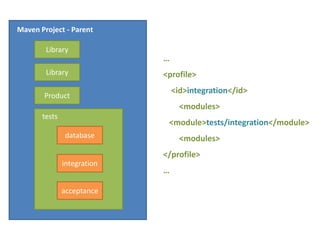
Maven Project - Parent

        Library
                             Multi Module
        Library
                             Project is our
       Product
                               friend….
       tests

               database      Each test stage
               integration
                              gets its own
                                module
               acceptance
Maven Project - Parent        Sensible Default
        Library
                             …
        Library
                             <modules>
       Product                   <module>Library1</module>
       tests                     <module>Library2</module>
               database          <module>Product</module>
                             </modules>
               integration
                             …
               acceptance
Maven Project - Parent           Run everything
        Library
                             …
        Library              <profile>
                                 <id>full</id>
       Product
                                   <modules>
       tests
                             <module>tests/database</module>
               database      <module>tests/integration</module>
                             <module>tests/acceptance</module>
               integration
                                   <modules>

               acceptance
                             </profile>
                             …
Maven Project - Parent

        Library
                             …
        Library              <profile>
                                 <id>integration</id>
       Product
                                   <modules>
       tests
                              <module>tests/integration</module>
               database            <modules>
                             </profile>
               integration
                             …

               acceptance
Developer Workstation
$ mvn install

$ mvn install -Pfull

$ mvn install -Pintegration
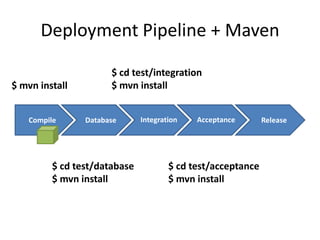
Deployment Pipeline + Maven

                      $ cd test/integration
$ mvn install         $ mvn install


   Compile      Database      Integration   Acceptance       Release


         $ cd test/database           $ cd test/acceptance
         $ mvn install                $ mvn install
Maven’s Opinion: Artifact releases
• Artifact’s have two states:
  – Released
  – SNAPSHOT


• Releases are expected to be immutable
• Snapshots are temporal
• No release candidate concept
Distributed builds and Artifacts

                                Maven
                              Repository


   Compile      Integration   Acceptance   Performance   Release


$ mvn install
$ mvn deploy
Commit: r103


  Compile      Integration   Acceptance   Performance   Release


Commit: r102

   Compile     Integration   Acceptance   Performance   Release


Commit: r101

  Compile      Integration   Acceptance   Performance   Release
Avoiding Snapshots

Each build needs a unique version
             number
Release Plugin – Part 1
mvn release:prepare
  1. Build
  2. Update POM to release version
  3. Commit and Tag release in SCM
  4. Update POM to next snapshot
     version
  5. Commit to SCM
Release Plugin – Part 2

mvn release:perform
  1. Checkout release tag from SCM
  2. Build
  3. Deploy
Maven headaches
• Can’t use the Release plugin
• Each build/release candidate should be
  release ready
• Simulate the Release Plugin
Version number rules

<Major [> . <Minor [> . <Inc ] ] > - <Build ]>

1
1.1
1.0.1
1.0.0-45
1.0-45
Sources for the Build qualifier
• What does your CI System Provide?
  – Build Numbers
  – SCM Revision Numbers

• Value with natural ordering
  – Subversion revision is good
  – GIT SHA don’t help us

• Combine values:      r2964b45
Simulating a Release
• Set a version without SNAPSHOT
• Use the handy Versions Plugin

Setting the project version can be done from the
                 command line
$ mvn versions:set
-DnewVersion=
${product.version}-${bamboo.buildNumber}

product.version = 1.0.1
bamboo.buildNumber = 45
1.0.1-45
Add to the parent POM
<plugin>
  <group>org.codehaus.mojo</group>
  <artifact>versions-maven-plugin</artifact>
  <version>1.3.1</version>
</plugin>
$ mvn set –DnewVersion=…
                    $ cd test/integration
                    $ mvn install
$ mvn set –DnewVersion=…
$ mvn deploy


   Compile    Database     Integration   Acceptance   Release


    $ mvn set –DnewVersion=…
    $ cd test/database
    $ mvn install
                           $ mvn set –DnewVersion=…
                           $ cd test/acceptance
                           $ mvn install
Summary
•   Don’t rebuild the Artifact in each stage
•   Don’t use Snapshots
•   Assign Unique Versions to each build
•   Keep the project architecture simple
Thank you

          Alan Parkinson
alan.parkinson@hindsightsoftware.co.uk
            @alan_parkinson
Continuous Deployment
• Maven weaknesses
• Cheat
  – Delegate to CI Tasks or Scripts
Maven Repositories
• Simple
  – HTTP Server + SSH/SCP access
  – Amazon S3
• Dedicated
  – Nexus
  – Artifactory

Continuous Deployment Pipeline with maven

  • 1.
    Continuous Deployment Pipeline with Maven Alan Parkinson @alan_parkinson
  • 2.
    Summary • What isthe Deployment Pipeline • How can we structure maven projects for it • The obstructions Maven causes • Solutions to these obstructions
  • 3.
    The release daysum Every 2 weeks… 1 Binary for …. 4 Significant product versions 5 Different database products Multi Web browsers… IE7+ Release day headache!
  • 4.
    The Solution: ContinuousDelivery • Eating our own dog food • List of available release ready candidates • One click delivery to customers • The Toolbox: – Continuous Integration (CI) – Automated Testing : Unit + Functional – Continuous Deployment
  • 5.
    Deployment Pipeline Compile Integration Acceptance Performance Release
  • 6.
    Why don’t werebuild the Artifact? Source Code + Configuration + Build Environment = Artifact
  • 7.
    Maven - Loveit! or Hate it! People hate maven for several reasons…. Convention over Configuration == Opinionated
  • 8.
    Fitting everything ina Maven Project • Each stage has a set of tests unit, integration, functional, performance, etc… • Developer Requirements for the build: – One Project – Sensible Default build – Anyone can run any test stage
  • 9.
    Maven Project -Parent Library Multi Module Library Project is our Product friend…. tests database Each test stage integration gets its own module acceptance
  • 10.
    Maven Project -Parent Sensible Default Library … Library <modules> Product <module>Library1</module> tests <module>Library2</module> database <module>Product</module> </modules> integration … acceptance
  • 11.
    Maven Project -Parent Run everything Library … Library <profile> <id>full</id> Product <modules> tests <module>tests/database</module> database <module>tests/integration</module> <module>tests/acceptance</module> integration <modules> acceptance </profile> …
  • 12.
    Maven Project -Parent Library … Library <profile> <id>integration</id> Product <modules> tests <module>tests/integration</module> database <modules> </profile> integration … acceptance
  • 13.
    Developer Workstation $ mvninstall $ mvn install -Pfull $ mvn install -Pintegration
  • 14.
    Deployment Pipeline +Maven $ cd test/integration $ mvn install $ mvn install Compile Database Integration Acceptance Release $ cd test/database $ cd test/acceptance $ mvn install $ mvn install
  • 15.
    Maven’s Opinion: Artifactreleases • Artifact’s have two states: – Released – SNAPSHOT • Releases are expected to be immutable • Snapshots are temporal • No release candidate concept
  • 16.
    Distributed builds andArtifacts Maven Repository Compile Integration Acceptance Performance Release $ mvn install $ mvn deploy
  • 17.
    Commit: r103 Compile Integration Acceptance Performance Release Commit: r102 Compile Integration Acceptance Performance Release Commit: r101 Compile Integration Acceptance Performance Release
  • 18.
    Avoiding Snapshots Each buildneeds a unique version number
  • 19.
    Release Plugin –Part 1 mvn release:prepare 1. Build 2. Update POM to release version 3. Commit and Tag release in SCM 4. Update POM to next snapshot version 5. Commit to SCM
  • 20.
    Release Plugin –Part 2 mvn release:perform 1. Checkout release tag from SCM 2. Build 3. Deploy
  • 21.
    Maven headaches • Can’tuse the Release plugin • Each build/release candidate should be release ready • Simulate the Release Plugin
  • 22.
    Version number rules <Major[> . <Minor [> . <Inc ] ] > - <Build ]> 1 1.1 1.0.1 1.0.0-45 1.0-45
  • 23.
    Sources for theBuild qualifier • What does your CI System Provide? – Build Numbers – SCM Revision Numbers • Value with natural ordering – Subversion revision is good – GIT SHA don’t help us • Combine values: r2964b45
  • 24.
    Simulating a Release •Set a version without SNAPSHOT • Use the handy Versions Plugin Setting the project version can be done from the command line
  • 25.
  • 26.
    Add to theparent POM <plugin> <group>org.codehaus.mojo</group> <artifact>versions-maven-plugin</artifact> <version>1.3.1</version> </plugin>
  • 27.
    $ mvn set–DnewVersion=… $ cd test/integration $ mvn install $ mvn set –DnewVersion=… $ mvn deploy Compile Database Integration Acceptance Release $ mvn set –DnewVersion=… $ cd test/database $ mvn install $ mvn set –DnewVersion=… $ cd test/acceptance $ mvn install
  • 28.
    Summary • Don’t rebuild the Artifact in each stage • Don’t use Snapshots • Assign Unique Versions to each build • Keep the project architecture simple
  • 29.
    Thank you Alan Parkinson alan.parkinson@hindsightsoftware.co.uk @alan_parkinson
  • 30.
    Continuous Deployment • Mavenweaknesses • Cheat – Delegate to CI Tasks or Scripts
  • 31.
    Maven Repositories • Simple – HTTP Server + SSH/SCP access – Amazon S3 • Dedicated – Nexus – Artifactory

Editor's Notes

  • #4 Scrum like process2 week iterationUsers stories don’t always get completed in timeBut we still release on time, but with out incomplete work1 Binary for ….4 Significant product versions – API and UI Changes 5 Different database vendors – SQL compatible and Database Upgrade Multi Web browsers… IE7+
  • #5 Pattern language for improving the process of Software DeliveryIts aims to produce Rapid, reliable and repeatable delivery of software with the minimal human intervention.It does this by leveraging existing techniques like Automated Testing, Continuous Integration and Continuous Deployment.CI Who’s already using CI?Why aren’t you using it? Don’t try Continuous DeploymentReliable and repeatable deployment of software to servers. These could be production QA staging serversCould be scripts for deploying to J2EE Containers
  • #6 Continuous Delivery Book by Jez Humble and Dave FarleyThe core concept in the CD Pattern is the Deployment Pipeline.A series of “Stages” starting at creating your Artifact at the first stage and Releasing it in the final stage.Artifact is known as a release candidateThe stages in between are quality gates, is the Artifact good enough to be releasedWe don’t rebuild the artifact, we pass it. We will discuss this in a momentTypically constructed using Continuous Integration servers like Jenkins, Hudson, Bamboo or TeamCity. Each stage could be one or CI jobs joined to together to from the pipeline.Manual Break in the pipeline – QA Staging and manual approvalReleasing in case of a SAAS product would be deploying and rolling it out live to customers.You can define what release meansOur definition is the Artifact is made available to customers for downloading and customers are notified about the release.
  • #7 Slows down the build 18 jobs – 17 minsDoes every machine produce the same artifact?Buggy compiler/JDKMaven global settings file can apply Maven profiles secretly
  • #9 I should have reason to hate maven in this caseThe release Day headache was partly caused by MavenI had to find the correct commit within GIT that we wanted to releaseThen run the release plugin on it. This violated my earlier principle of rebuilding the Artifact
  • #10 Lets get on with first goal
  • #17 The SNAPSHOT extension gets converted into a timestamp when deploy to a Maven repo We can not convert a SNAPSHOT Artifact to RELEASE
  • #18 Another Example of Snapshots can’t be usedThink about distributed build setupAnd concurrent executions of the pipeline – Next slide
  • #20 Artifact build in the compile stage should be considered a “release” version in maven.
  • #21 Release Plugin a stage two processRelease:prepareRelease:perform
  • #23 Can’t use Release plugin – It redoes everythingWe don’t want to “tag” a version at the start of the pipeline, only at the end when all gates have been passedHow can we get a unique version number for our builds? Look at the rules for version numbers
  • #25 CI systems expose a number of variables in our CI Jobs which we can access using variable subsuitationBETA1, BETA2Git SHA is not a good qualifierPrefer using Build number – What happens if someone triggers the pipeline manually?
  • #29 This gives you a basic functional pipeline