Home Automation System
Basic modern connected devices home
automation system prototype
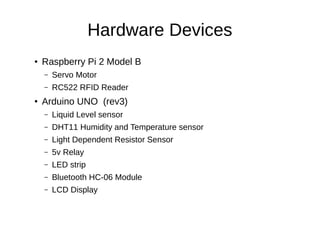
Hardware Devices
●
Raspberry Pi 2 Model B
– Servo Motor
– RC522 RFID Reader
●
Arduino UNO (rev3)
– Liquid Level sensor
– DHT11 Humidity and Temperature sensor
– Light Dependent Resistor Sensor
– 5v Relay
– LED strip
– Bluetooth HC-06 Module
– LCD Display
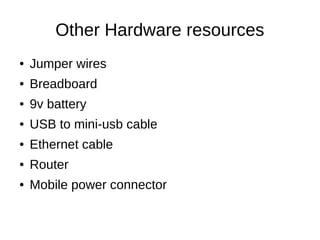
Other Hardware resources
● Jumper wires
● Breadboard
● 9v battery
● USB to mini-usb cable
● Ethernet cable
● Router
● Mobile power connector
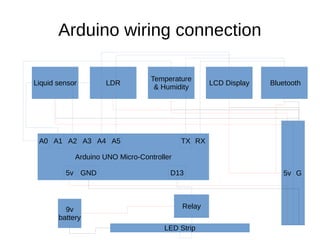
Arduino wiring connection
Liquid sensor
Temperature
& Humidity
LDR LCD Display Bluetooth
G
Arduino UNO Micro-Controller
5v
A0 A1 A2 RXTX
D135v GND
Relay
LED Strip
9v
battery
A3 A4 A5
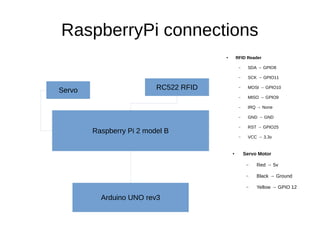
RaspberryPi connections
Raspberry Pi 2 model B
Servo RC522 RFID
● Servo Motor
– Red → 5v
– Black → Ground
– Yellow → GPIO 12
● RFID Reader
– SDA → GPIO8
– SCK → GPIO11
– MOSI → GPIO10
– MISO → GPIO9
– IRQ → None
– GND → GND
– RST → GPIO25
– VCC → 3.3v
Arduino UNO rev3
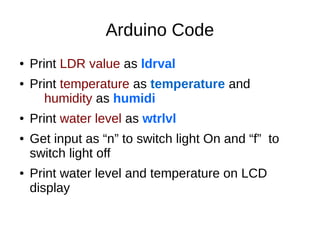
Arduino Code
● Print LDR value as ldrval
● Print temperature as temperature and
humidity as humidi
● Print water level as wtrlvl
● Get input as “n” to switch light On and “f” to
switch light off
● Print water level and temperature on LCD
display
Python Scripts
● py.py to read Arduino serial port and save
sensor values to mysql database .
● on.py to switch on lights
● Off.py to switch off lights
Bash script
● Make servoBlaster (library) executable and set
PIN to GPIO12 .
● Servo.sh to set servo motor ( gate close )
● Servoup.sh to open gate
Php script
● Port.php to check arduino serial port
– Need to run py.py
● Table.php to create database tables.
● Servoup.php to open servo gate
● Servodown.php close servo gate
● on.php to light strip on
● Off.php to light strip off
● Data.php to get json format sensor data
*All of these should be revamp to calling API formats to devices.
Thank you
ruwanranganathz@gmail.com

Home Automation System

  • 1.
    Home Automation System Basicmodern connected devices home automation system prototype
  • 2.
    Hardware Devices ● Raspberry Pi2 Model B – Servo Motor – RC522 RFID Reader ● Arduino UNO (rev3) – Liquid Level sensor – DHT11 Humidity and Temperature sensor – Light Dependent Resistor Sensor – 5v Relay – LED strip – Bluetooth HC-06 Module – LCD Display
  • 3.
    Other Hardware resources ●Jumper wires ● Breadboard ● 9v battery ● USB to mini-usb cable ● Ethernet cable ● Router ● Mobile power connector
  • 4.
    Arduino wiring connection Liquidsensor Temperature & Humidity LDR LCD Display Bluetooth G Arduino UNO Micro-Controller 5v A0 A1 A2 RXTX D135v GND Relay LED Strip 9v battery A3 A4 A5
  • 5.
    RaspberryPi connections Raspberry Pi2 model B Servo RC522 RFID ● Servo Motor – Red → 5v – Black → Ground – Yellow → GPIO 12 ● RFID Reader – SDA → GPIO8 – SCK → GPIO11 – MOSI → GPIO10 – MISO → GPIO9 – IRQ → None – GND → GND – RST → GPIO25 – VCC → 3.3v Arduino UNO rev3
  • 6.
    Arduino Code ● PrintLDR value as ldrval ● Print temperature as temperature and humidity as humidi ● Print water level as wtrlvl ● Get input as “n” to switch light On and “f” to switch light off ● Print water level and temperature on LCD display
  • 7.
    Python Scripts ● py.pyto read Arduino serial port and save sensor values to mysql database . ● on.py to switch on lights ● Off.py to switch off lights
  • 8.
    Bash script ● MakeservoBlaster (library) executable and set PIN to GPIO12 . ● Servo.sh to set servo motor ( gate close ) ● Servoup.sh to open gate
  • 9.
    Php script ● Port.phpto check arduino serial port – Need to run py.py ● Table.php to create database tables. ● Servoup.php to open servo gate ● Servodown.php close servo gate ● on.php to light strip on ● Off.php to light strip off ● Data.php to get json format sensor data *All of these should be revamp to calling API formats to devices.
  • 10.