Automating a fishtank with
python and IoT sensors
Version 2.0
Ben Chodroff, CTO – CloudOne
Why?
• I left the water running after a water change and the tank overflowed
• Solutions:
• Set a timer while filling my tank, or…
• Over engineer a solution
Over Engineering It
• Collect all data points:
• Water pH
• Water Temperature
• Water level
• Filter flow
• Light state (on/off)
• Topoff state (on/off)
• Removal state (on/off)
• Photosynthesis rate (IR sensor)
• Dosing, water changes, filter changes and other scheduled maintenance events
• Automate maintenance
• CO2 solenoid control of pH
• Chemical dosing (N, P, K, Fe, Micro)
• Water topoff and changes
• Automate alerts
• CO2 replacement (5 weeks)
• Filter replacement (8 weeks)
• Water level low/high/critical
• Water flow low/high
• Temperature low/high
• pH low/high
Demo
Platform – Raspberry Pi2
• Cheap and well supported ($30)
• Provides full Linux environment: https://www.raspberrypi.org/help/noobs-
setup/
• Easy to interface to most digital hardware sensors via GPIO pins
• Provides python environment (easier than TI LaunchPad/Arduino for
generic tasks)
• Camera integration via RaspiCam ($25):
http://www.amazon.com/Raspberry-5MP-Camera-Board-
Module/dp/B00E1GGE40
• Easy to IoT enable ($10): http://www.amazon.com/Kootek-Raspberry-Wifi-
Dongle-
Adapter/dp/B00FWMEFES/ref=sr_1_2?s=pc&ie=UTF8&qid=1439503682&s
r=1-2&keywords=raspberry+pi+wifi
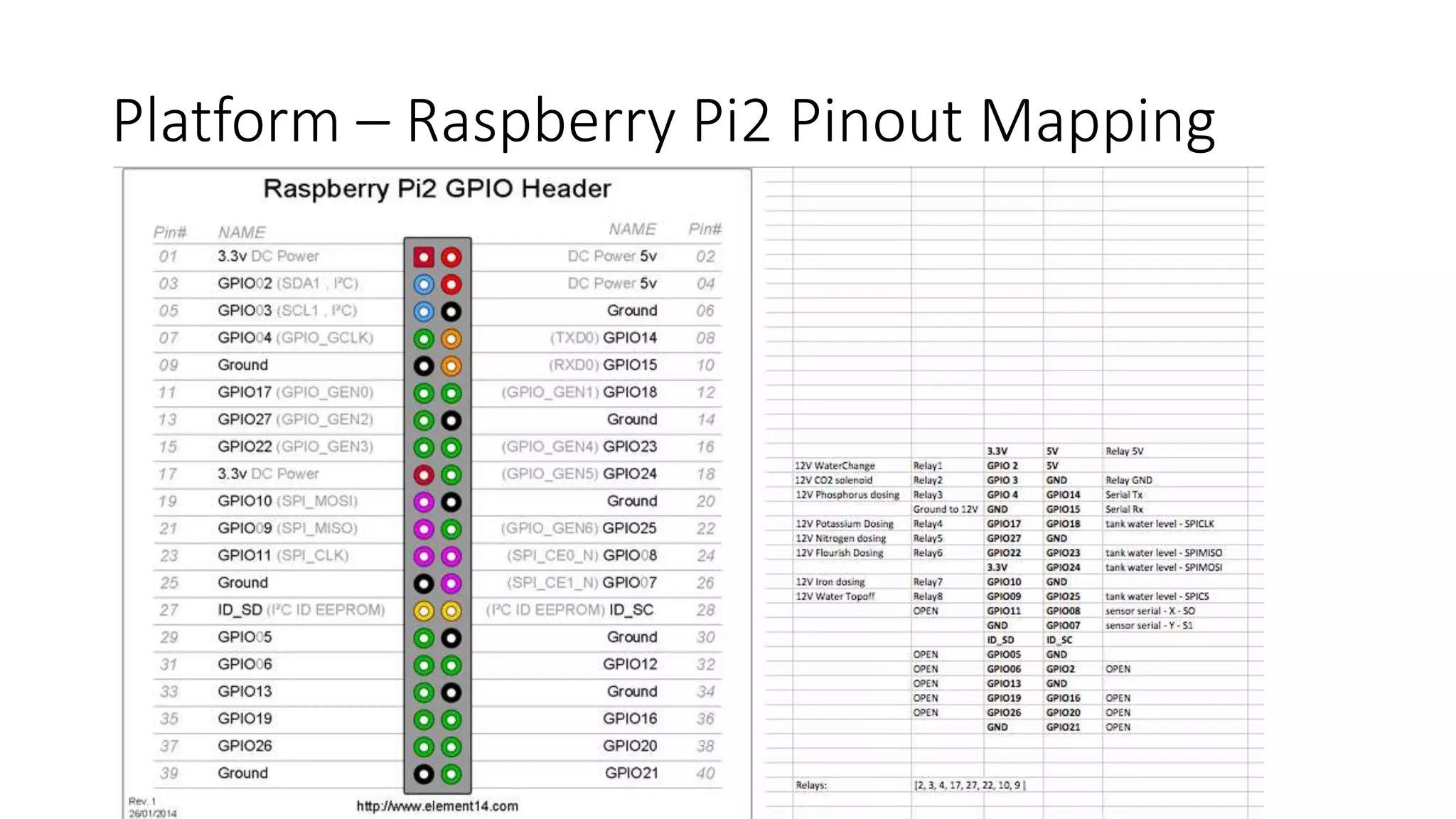
Platform – Raspberry Pi2 Pinout Mapping
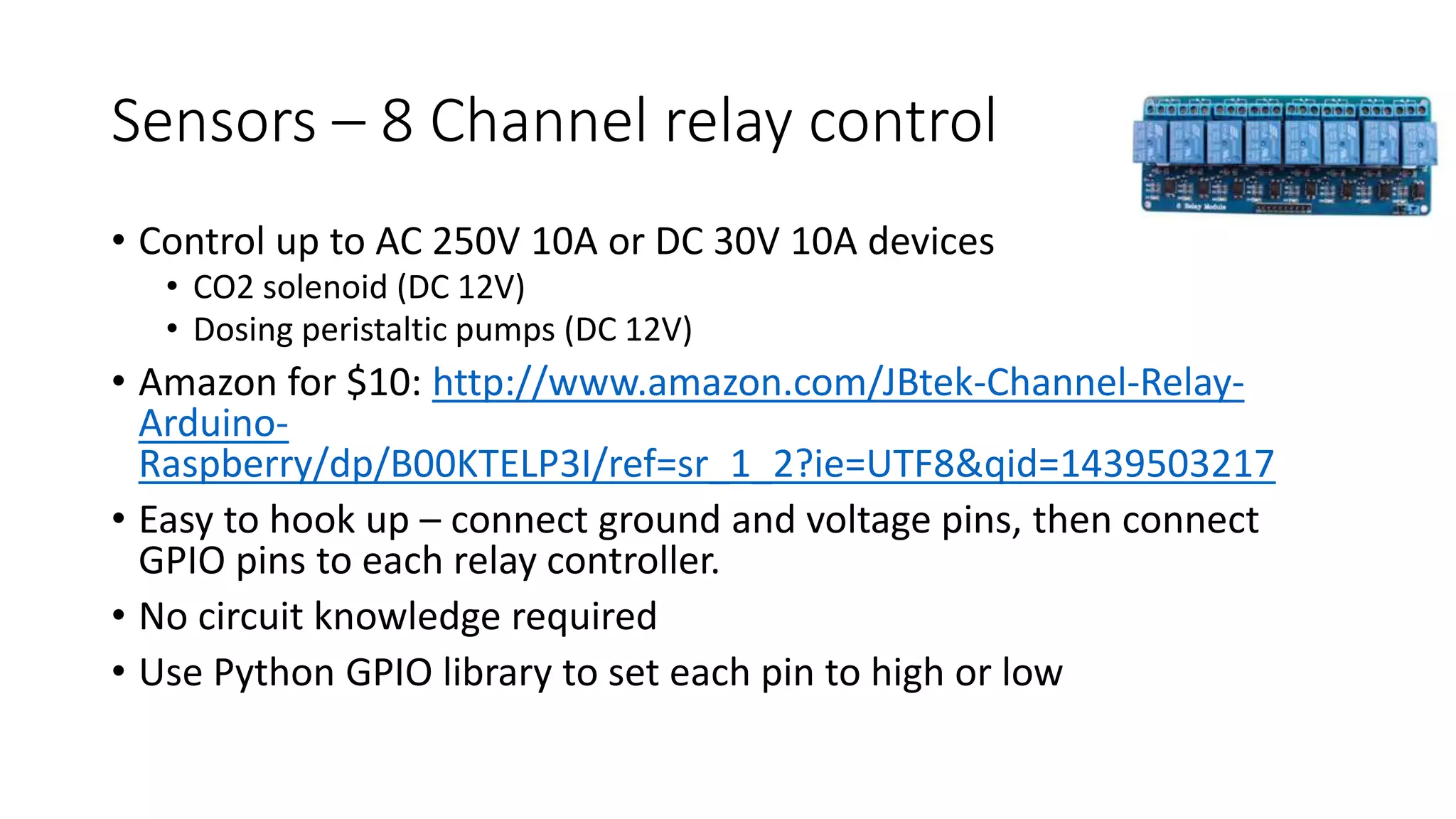
Sensors – 8 Channel relay control
• Control up to AC 250V 10A or DC 30V 10A devices
• CO2 solenoid (DC 12V)
• Dosing peristaltic pumps (DC 12V)
• Amazon for $10: http://www.amazon.com/JBtek-Channel-Relay-
Arduino-
Raspberry/dp/B00KTELP3I/ref=sr_1_2?ie=UTF8&qid=1439503217
• Easy to hook up – connect ground and voltage pins, then connect
GPIO pins to each relay controller.
• No circuit knowledge required
• Use Python GPIO library to set each pin to high or low
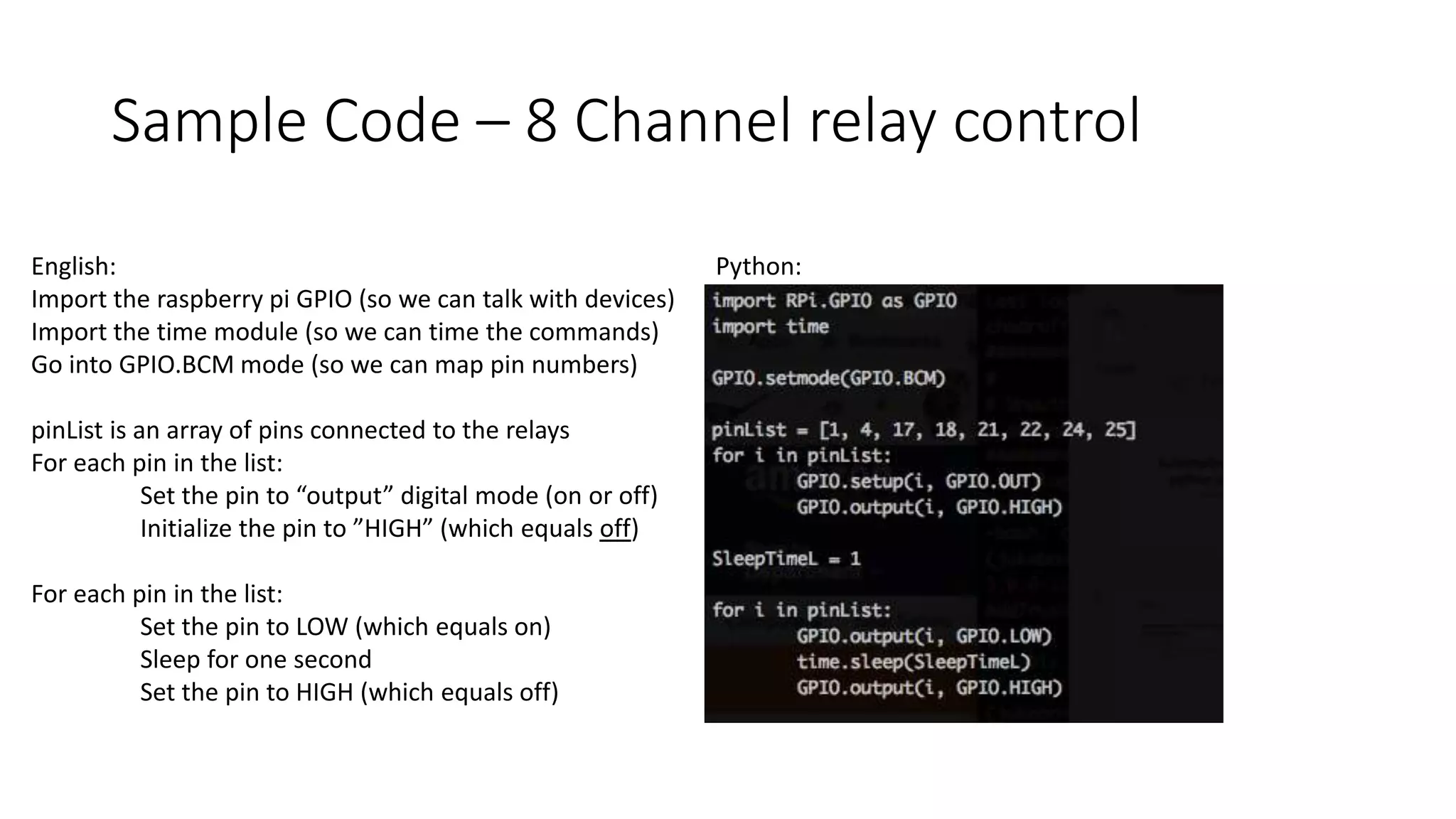
Sample Code – 8 Channel relay control
English:
Import the raspberry pi GPIO (so we can talk with devices)
Import the time module (so we can time the commands)
Go into GPIO.BCM mode (so we can map pin numbers)
pinList is an array of pins connected to the relays
For each pin in the list:
Set the pin to “output” digital mode (on or off)
Initialize the pin to ”HIGH” (which equals off)
For each pin in the list:
Set the pin to LOW (which equals on)
Sleep for one second
Set the pin to HIGH (which equals off)
Python:
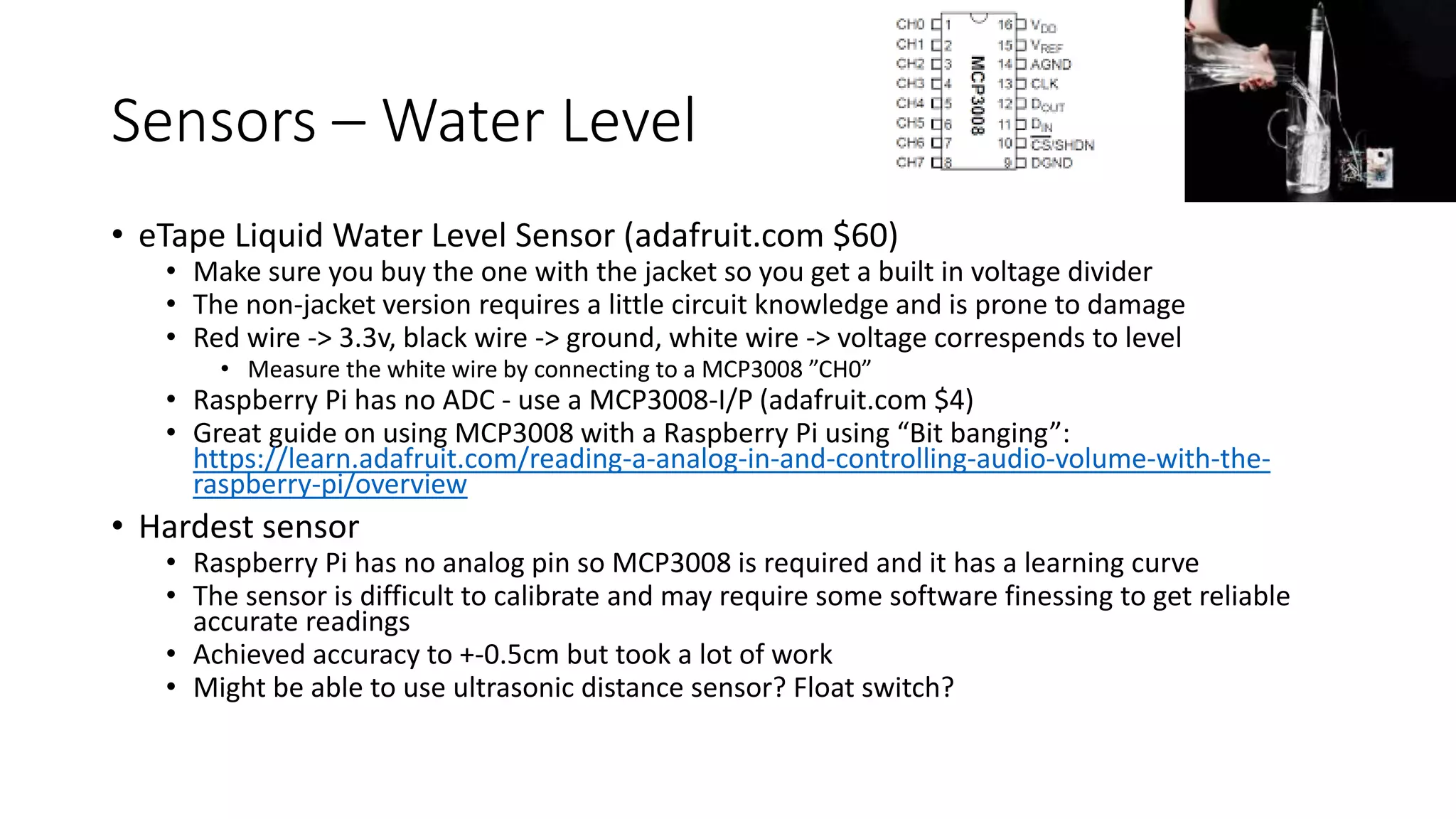
Sensors – Water Level
• eTape Liquid Water Level Sensor (adafruit.com $60)
• Make sure you buy the one with the jacket so you get a built in voltage divider
• The non-jacket version requires a little circuit knowledge and is prone to damage
• Red wire -> 3.3v, black wire -> ground, white wire -> voltage correspends to level
• Measure the white wire by connecting to a MCP3008 ”CH0”
• Raspberry Pi has no ADC - use a MCP3008-I/P (adafruit.com $4)
• Great guide on using MCP3008 with a Raspberry Pi using “Bit banging”:
https://learn.adafruit.com/reading-a-analog-in-and-controlling-audio-volume-with-the-
raspberry-pi/overview
• Hardest sensor
• Raspberry Pi has no analog pin so MCP3008 is required and it has a learning curve
• The sensor is difficult to calibrate and may require some software finessing to get reliable
accurate readings
• Achieved accuracy to +-0.5cm but took a lot of work
• Might be able to use ultrasonic distance sensor? Float switch?
Sample Code – Water Level
English:
Import time and our gpio libraries
Connect as BCM pins
Define a function “readadc” where we pass in the analog channel (0-7)
what channel to read, the clockpin, mosi pin, miso pin, and cspin:
If we are reading a channel below 0 or above 7, bomb out
Set our cspin to HIGH
Set our clock to low
Set our cspin to low
*** complicated stuff – manually advancing the clock to read a message:
read message by flicking clock on/off
Compare 12 bit response to get the channel we want
Call the readadc to retrieve CH0
Use the 10 bits to determine the level (requires calibration)
Sensors – Water Level
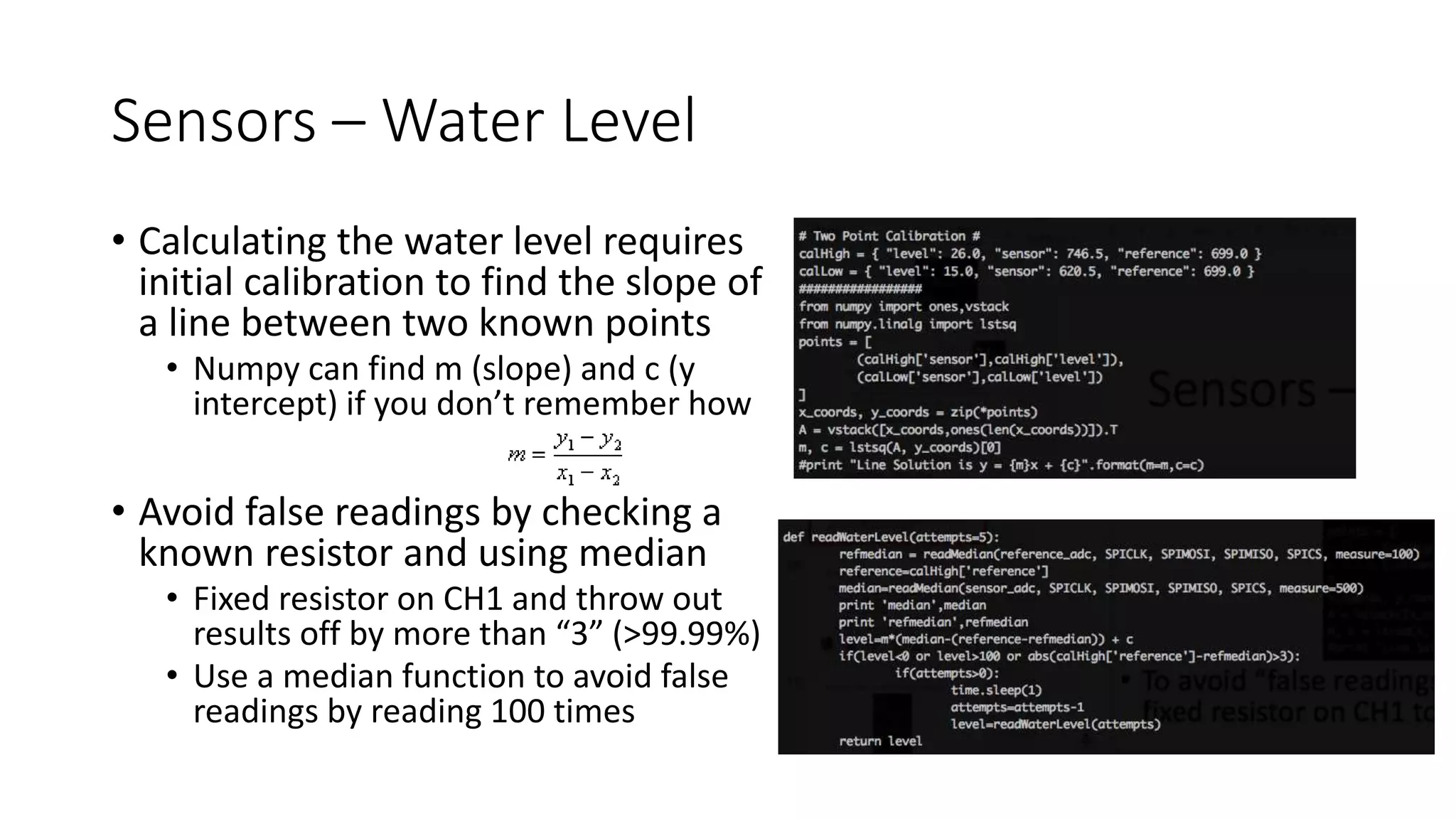
• Calculating the water level requires
initial calibration to find the slope of
a line between two known points
• Numpy can find m (slope) and c (y
intercept) if you don’t remember how
• Avoid false readings by checking a
known resistor and using median
• Fixed resistor on CH1 and throw out
results off by more than “3” (>99.99%)
• Use a median function to avoid false
readings by reading 100 times
Sensors – pH, Flow meter, and temperature
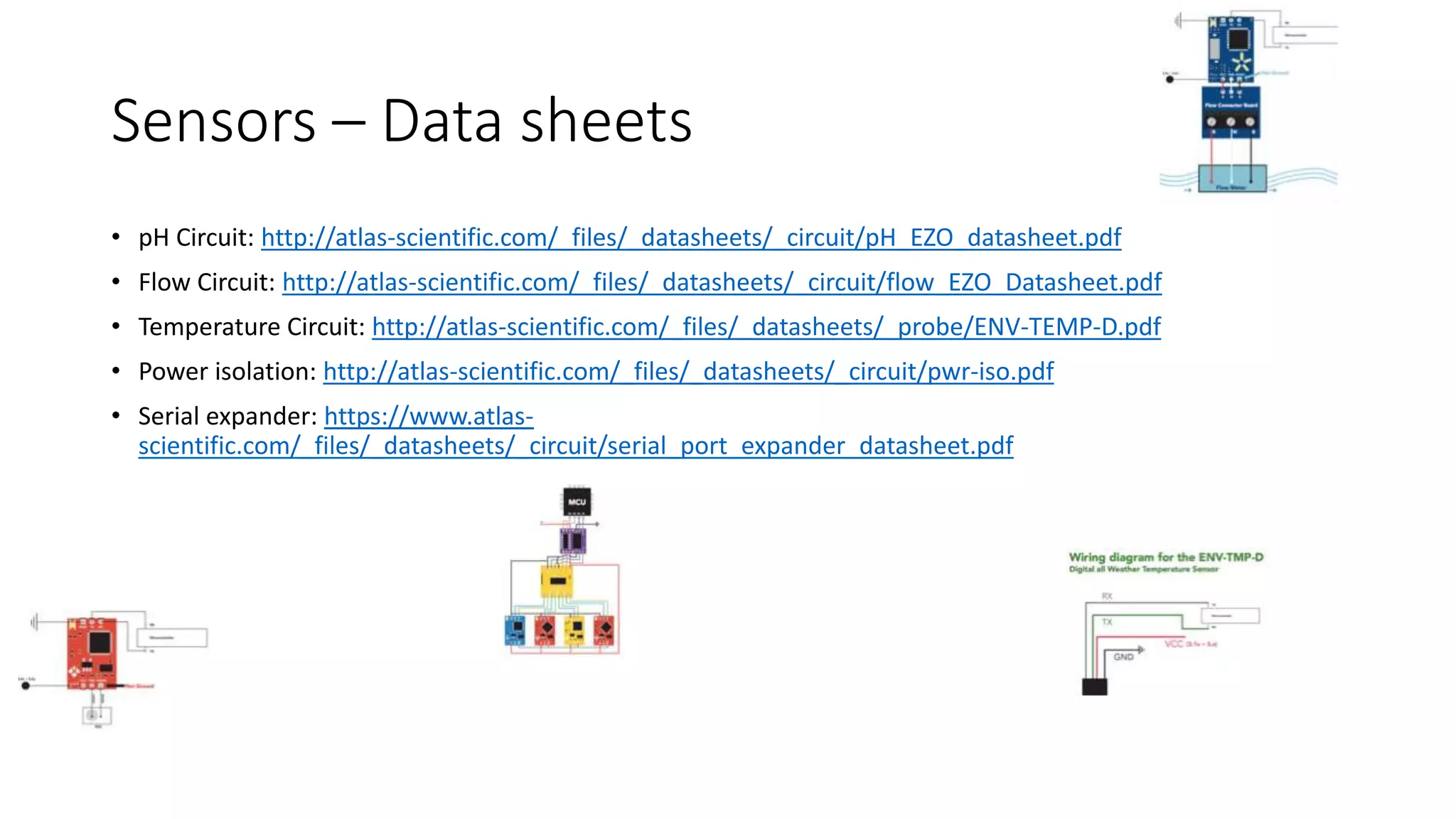
• Atlas Scientific
• Crème de la crème – worth every penny but not cheap
• Reliable, high quality, and best of all - prebuilt serial circuits [no circuit skill required]
• Use PWR-ISO module ($36) for power isolation: avoid ground loops and electrical noise
• Serial Expander ($11) – Control up to 4 separate serial devices even though your
Raspberry Pi only has one serial connection
• Digital Temperature ($25) > cheaper analog probes: easier to calibrate, easier
to integrate, high quality
• Flow Meter sensor ($38) “just works” with a cheap (adafruit $9) flow meter
• pH probe kit ($150) is high quality, easy to calibrate, easy to read
Sensors – Data sheets
• pH Circuit: http://atlas-scientific.com/_files/_datasheets/_circuit/pH_EZO_datasheet.pdf
• Flow Circuit: http://atlas-scientific.com/_files/_datasheets/_circuit/flow_EZO_Datasheet.pdf
• Temperature Circuit: http://atlas-scientific.com/_files/_datasheets/_probe/ENV-TEMP-D.pdf
• Power isolation: http://atlas-scientific.com/_files/_datasheets/_circuit/pwr-iso.pdf
• Serial expander: https://www.atlas-
scientific.com/_files/_datasheets/_circuit/serial_port_expander_datasheet.pdf
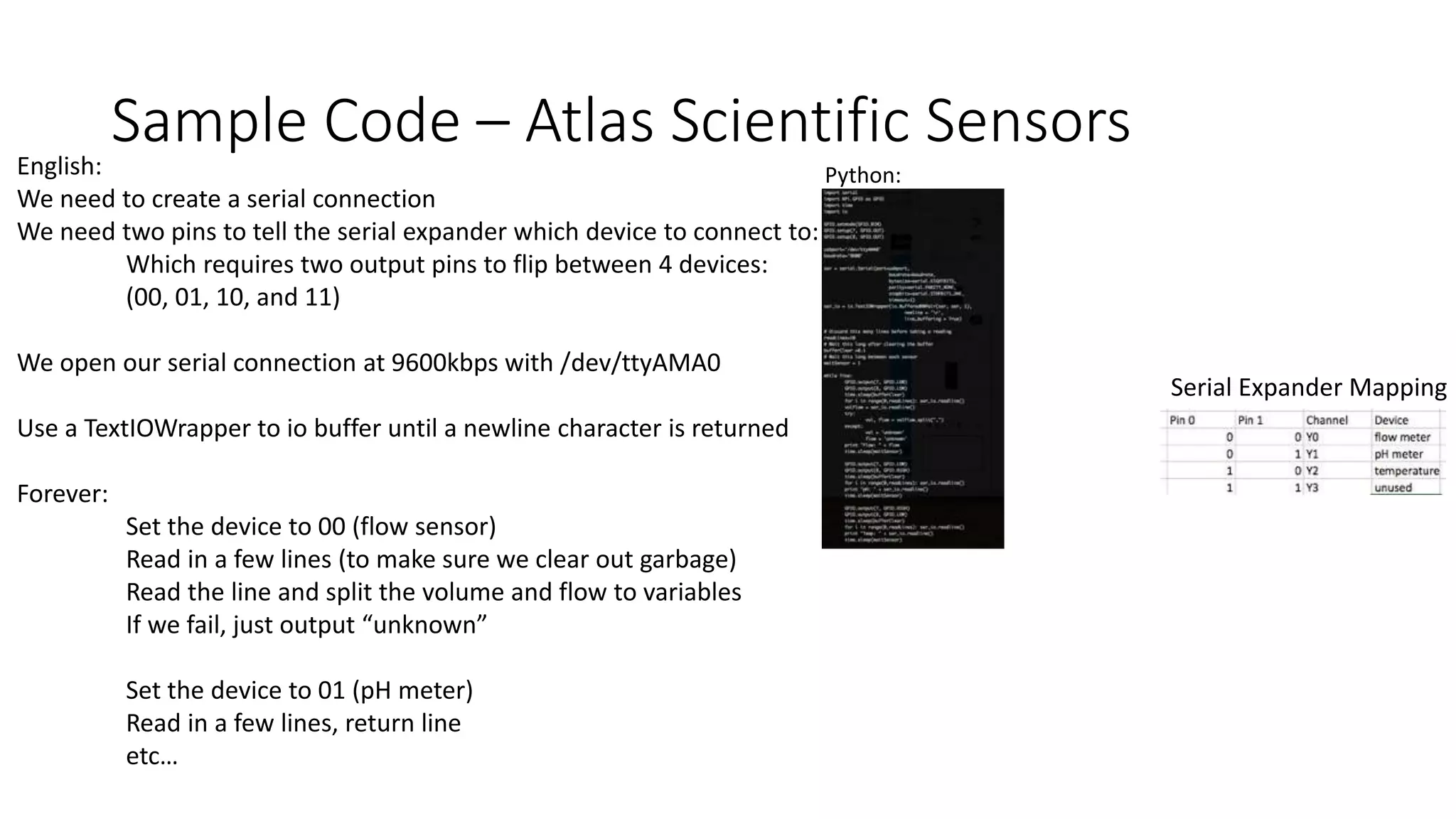
Sample Code – Atlas Scientific SensorsEnglish:
We need to create a serial connection
We need two pins to tell the serial expander which device to connect to:
Which requires two output pins to flip between 4 devices:
(00, 01, 10, and 11)
We open our serial connection at 9600kbps with /dev/ttyAMA0
Use a TextIOWrapper to io buffer until a newline character is returned
Forever:
Set the device to 00 (flow sensor)
Read in a few lines (to make sure we clear out garbage)
Read the line and split the volume and flow to variables
If we fail, just output “unknown”
Set the device to 01 (pH meter)
Read in a few lines, return line
etc…
Python:
Serial Expander Mapping
Video
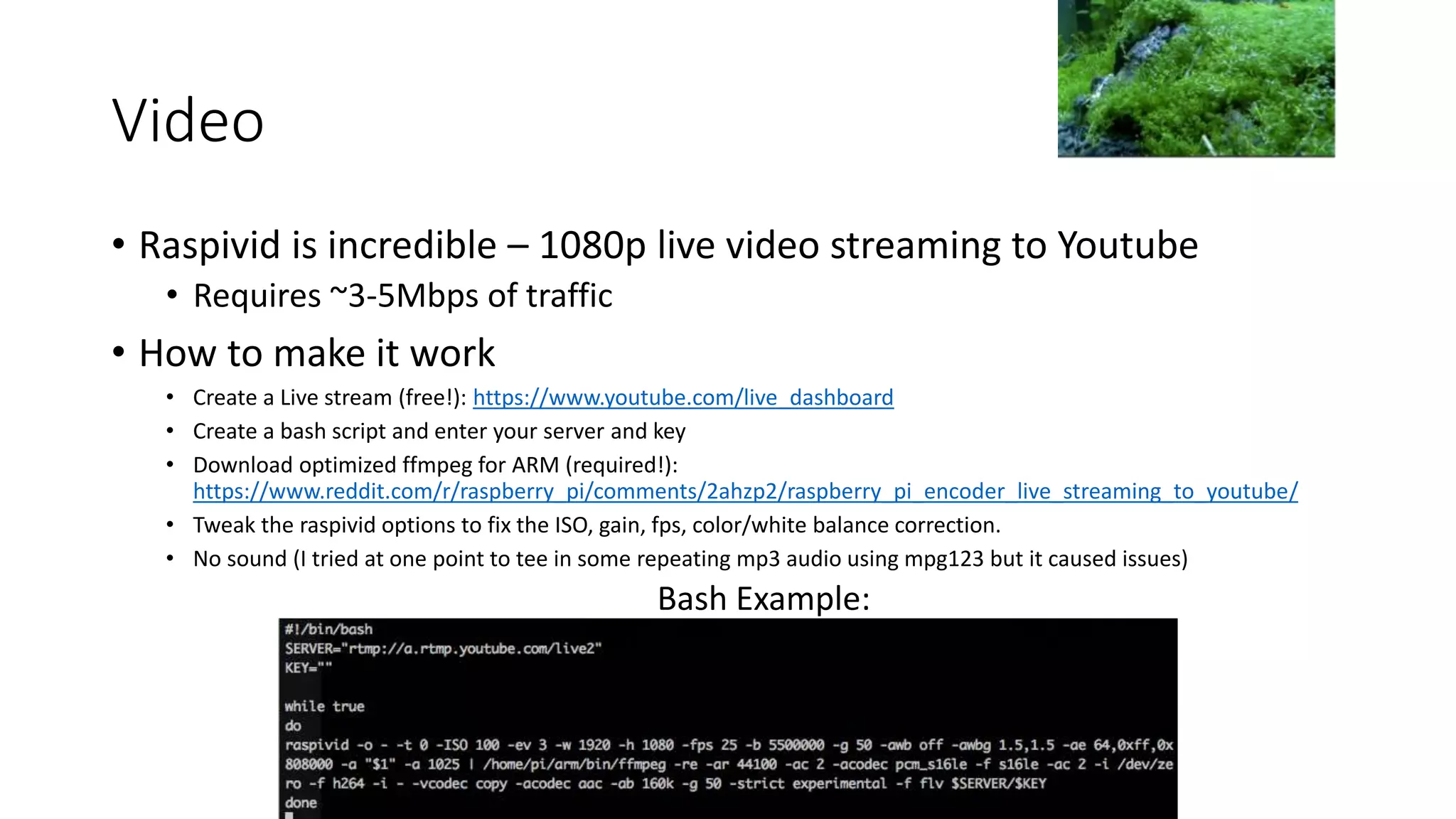
• Raspivid is incredible – 1080p live video streaming to Youtube
• Requires ~3-5Mbps of traffic
• How to make it work
• Create a Live stream (free!): https://www.youtube.com/live_dashboard
• Create a bash script and enter your server and key
• Download optimized ffmpeg for ARM (required!):
https://www.reddit.com/r/raspberry_pi/comments/2ahzp2/raspberry_pi_encoder_live_streaming_to_youtube/
• Tweak the raspivid options to fix the ISO, gain, fps, color/white balance correction.
• No sound (I tried at one point to tee in some repeating mp3 audio using mpg123 but it caused issues)
Bash Example:
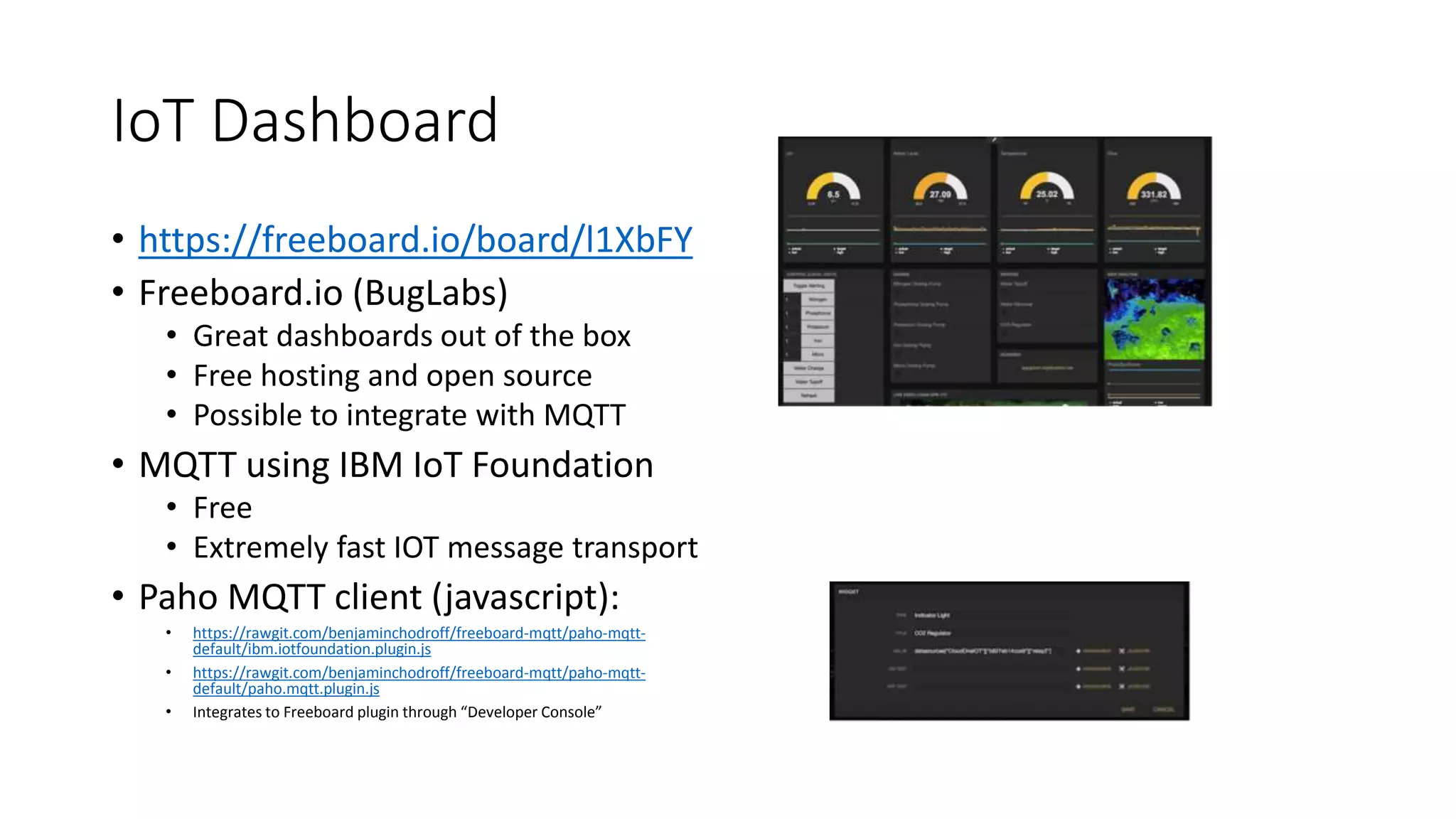
IoT Dashboard
• https://freeboard.io/board/l1XbFY
• Freeboard.io (BugLabs)
• Great dashboards out of the box
• Free hosting and open source
• Possible to integrate with MQTT
• MQTT using IBM IoT Foundation
• Free
• Extremely fast IOT message transport
• Paho MQTT client (javascript):
• https://rawgit.com/benjaminchodroff/freeboard-mqtt/paho-mqtt-
default/ibm.iotfoundation.plugin.js
• https://rawgit.com/benjaminchodroff/freeboard-mqtt/paho-mqtt-
default/paho.mqtt.plugin.js
• Integrates to Freeboard plugin through “Developer Console”
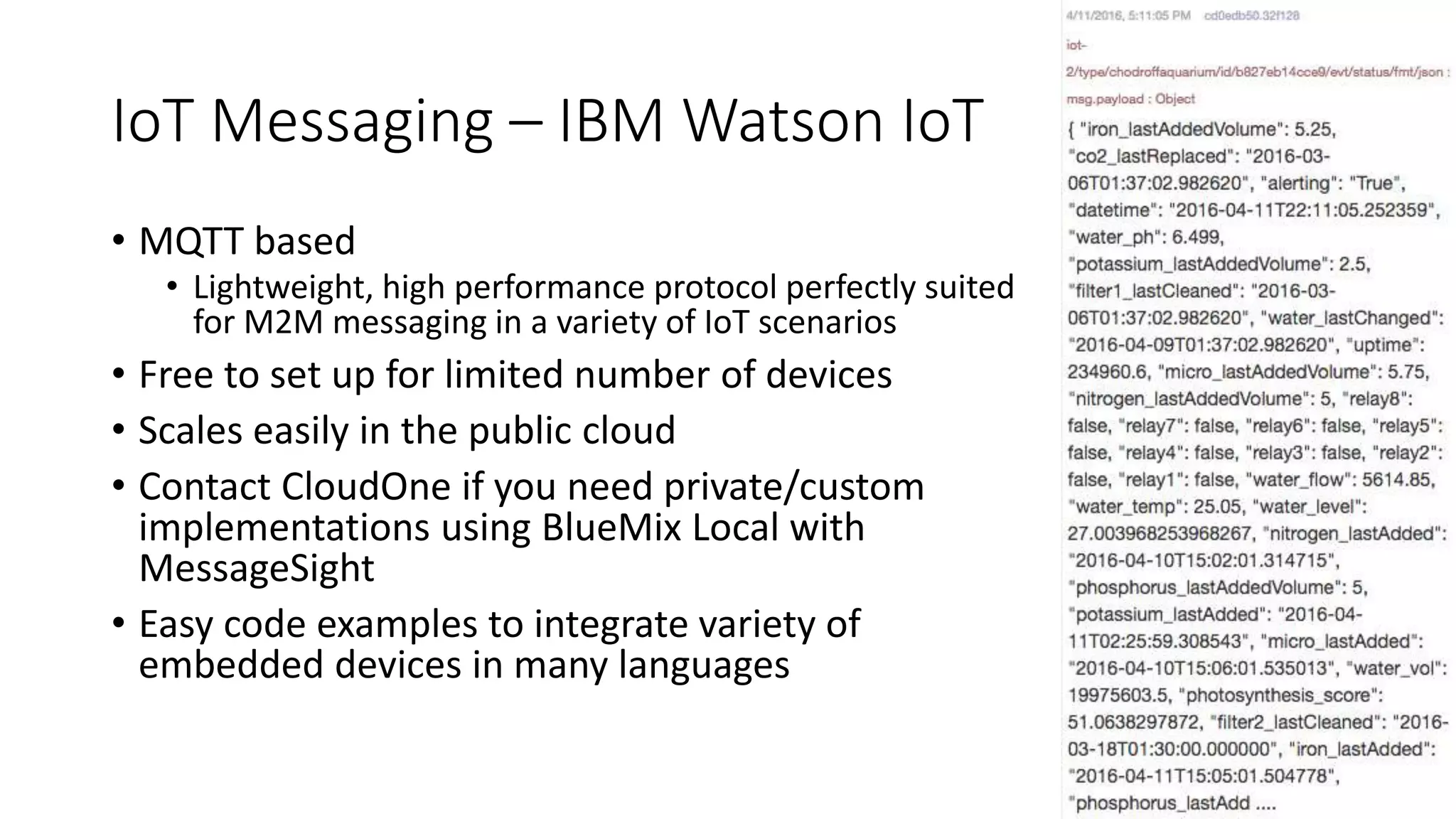
IoT Messaging – IBM Watson IoT
• MQTT based
• Lightweight, high performance protocol perfectly suited
for M2M messaging in a variety of IoT scenarios
• Free to set up for limited number of devices
• Scales easily in the public cloud
• Contact CloudOne if you need private/custom
implementations using BlueMix Local with
MessageSight
• Easy code examples to integrate variety of
embedded devices in many languages
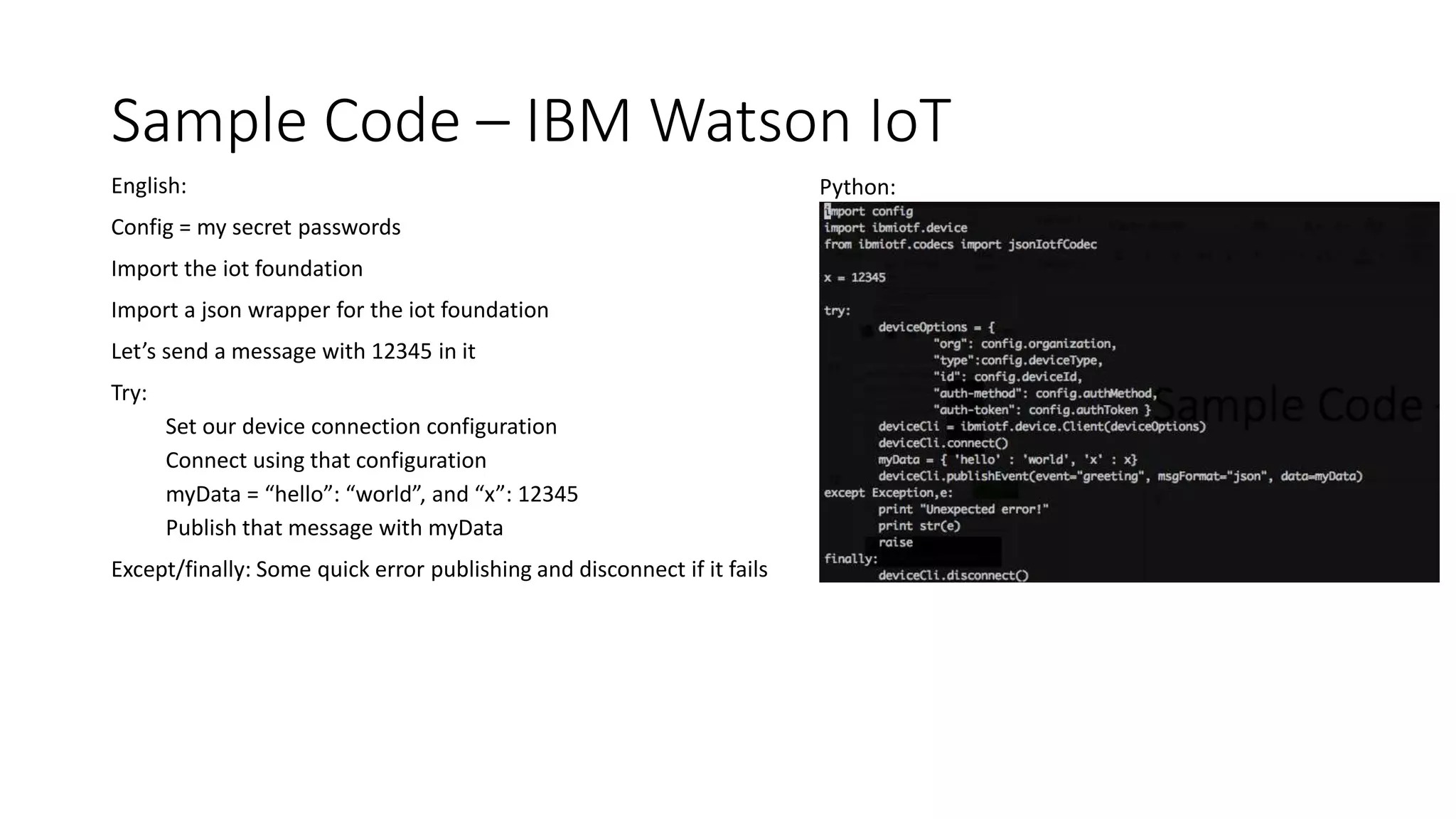
Sample Code – IBM Watson IoT
English:
Config = my secret passwords
Import the iot foundation
Import a json wrapper for the iot foundation
Let’s send a message with 12345 in it
Try:
Set our device connection configuration
Connect using that configuration
myData = “hello”: “world”, and “x”: 12345
Publish that message with myData
Except/finally: Some quick error publishing and disconnect if it fails
Python:
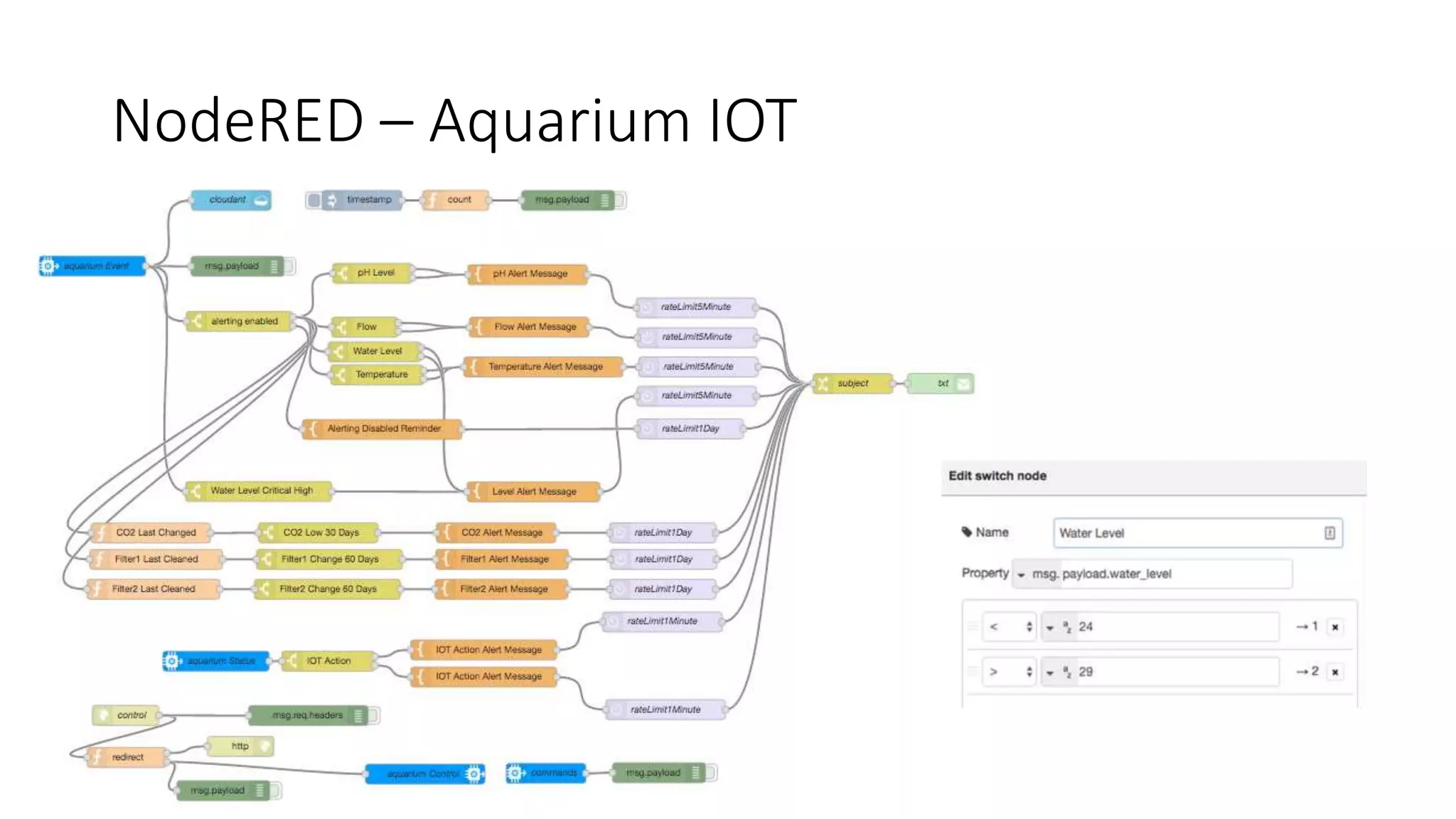
IoT Messaging – NodeRED
• Visual tool for wiring together hardware devices, APIs and online service
• Based on NodeJS
• Requires no javascript programming knowledge to use
• Can be ran in IBM BlueMix Public or Local, or on site
• Integrates easily to the IBM IoT Foundation, Twilio/SMS/Email/Twitter
• Easily construct lightweight functions to parse messages and do logical
evaluations – perfect for makers
• Why?
• Replaces 100’s of lines of python code and make it easy to visualize – great for tinkering
• Free BlueMix Public hosting allows me to monitor my aquarium remotely
• If the internet at home goes down, NodeRED knows device presence and can alert me
• Sending control messages back to the aquarium (I performed a water change while in China)
• Scales horizontally with clustering if your application requires it (I am not allowed to buy
more aquariums to test this)
NodeRED – Aquarium IOT
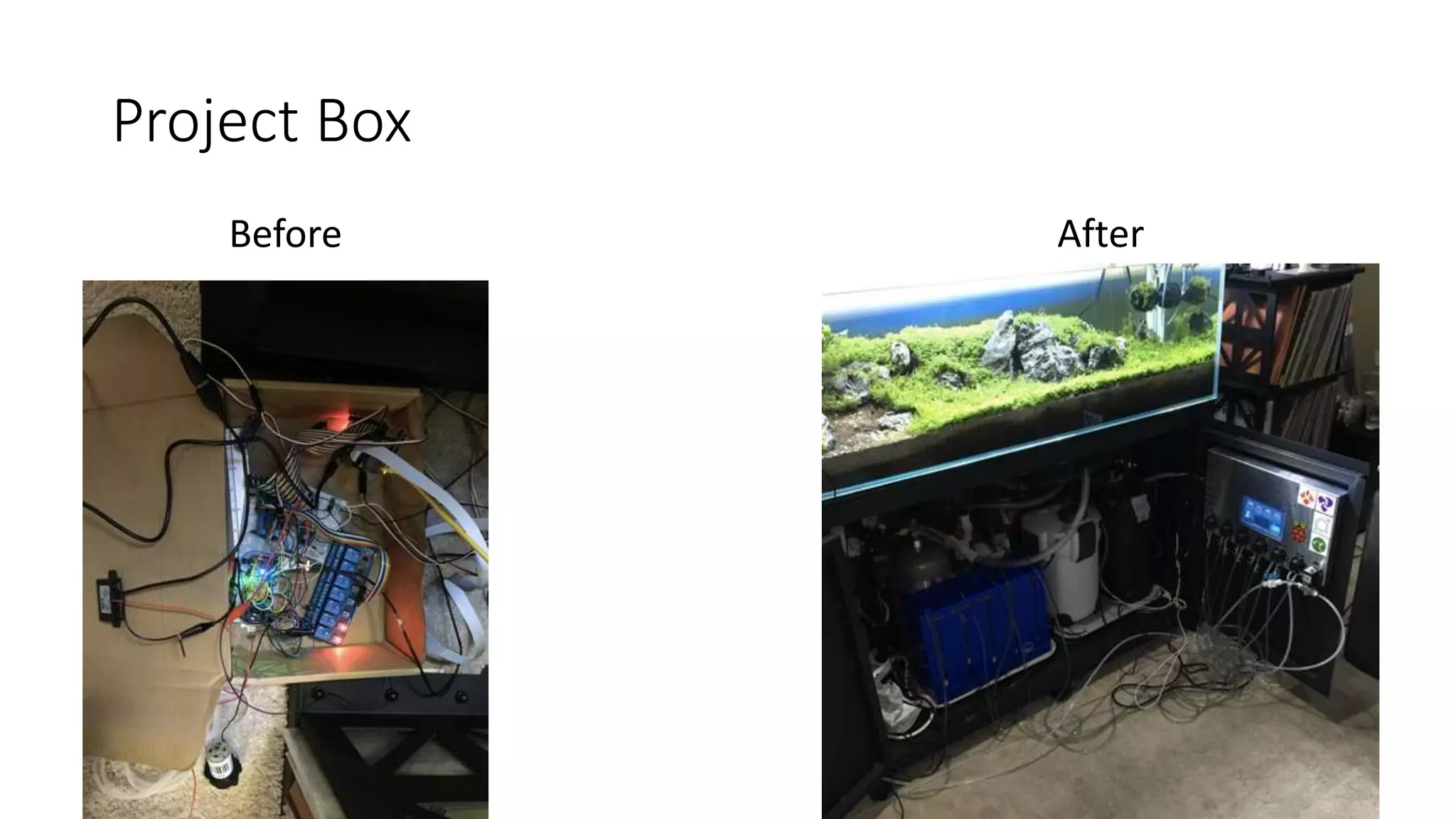
Project Box
Before After
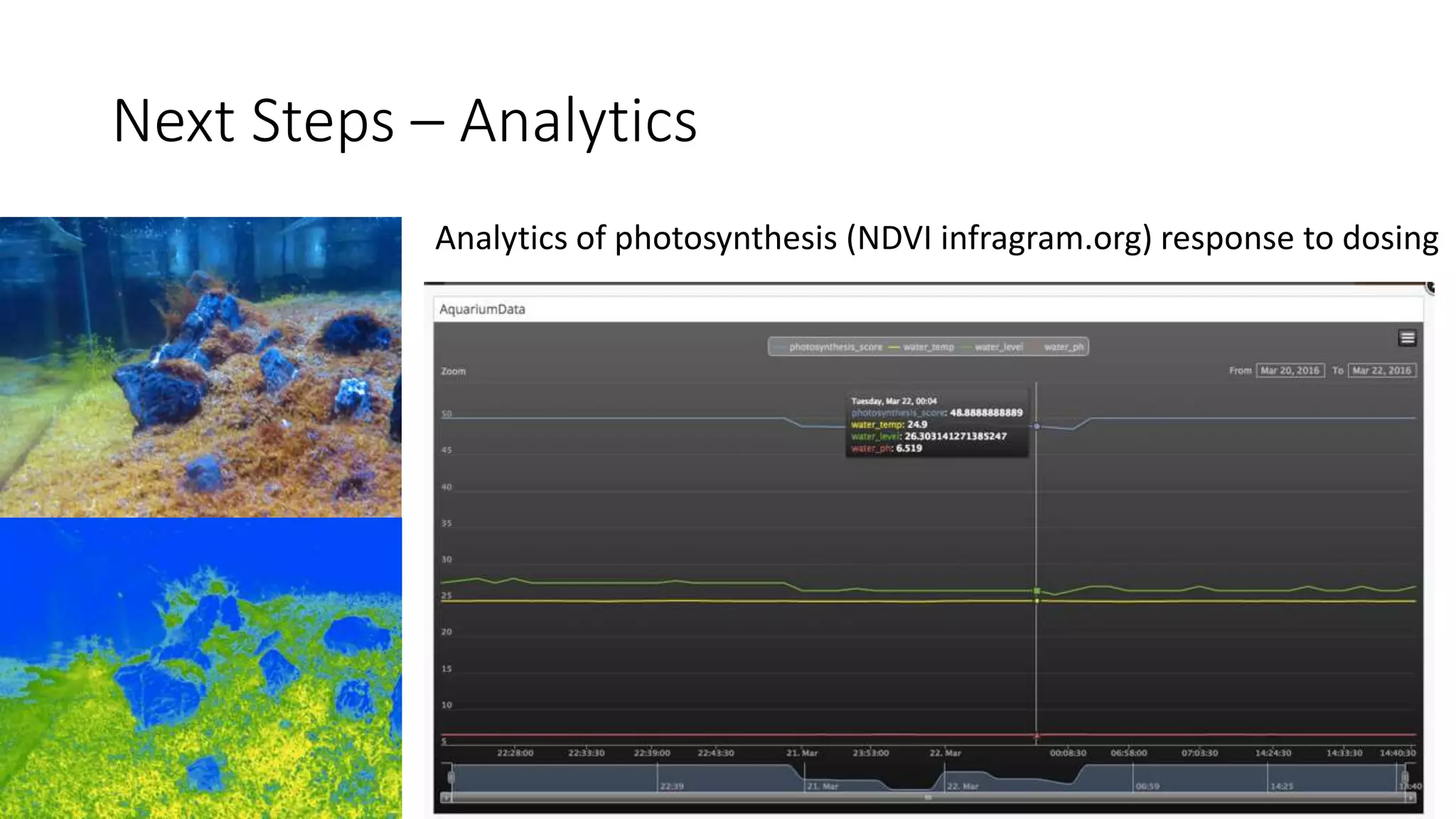
Next Steps – Analytics
Analytics of photosynthesis (NDVI infragram.org) response to dosing
Next Steps – You
• All the source code/experimentation
• https://github.com/benjaminchodroff/aquariumiot
• Think this is fun?
• CloudOne is hiring developers, data scientists, and building the future of IoT
• Contact me! Benjamin.chodroff@oncloudone.com
Extras
CO2 Levels based on kH and pH
• 6.5 is the sweet
spot at my kH 3 due
to RO water
• My tap water
comes from Lake
Michigan and has a
kH of 11+ -- too
high for my plants
Dosing Guide
One day machine imaging will be good enough
But for now this is a manual inspection
with manual adjustment
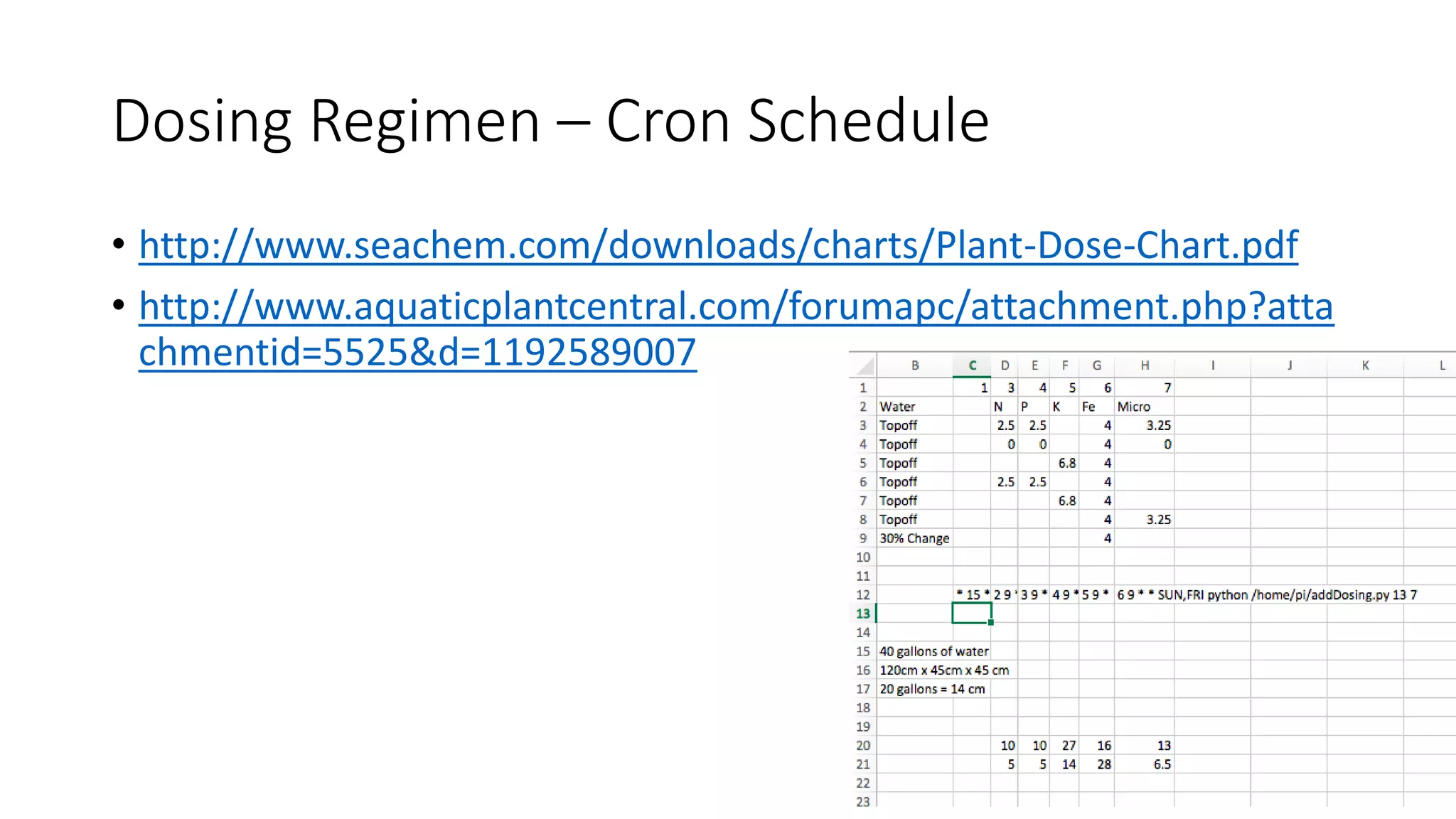
Dosing Regimen – Cron Schedule
• http://www.seachem.com/downloads/charts/Plant-Dose-Chart.pdf
• http://www.aquaticplantcentral.com/forumapc/attachment.php?atta
chmentid=5525&d=1192589007

IoT Aquarium 2

  • 1.
    Automating a fishtankwith python and IoT sensors Version 2.0 Ben Chodroff, CTO – CloudOne
  • 2.
    Why? • I leftthe water running after a water change and the tank overflowed • Solutions: • Set a timer while filling my tank, or… • Over engineer a solution
  • 3.
    Over Engineering It •Collect all data points: • Water pH • Water Temperature • Water level • Filter flow • Light state (on/off) • Topoff state (on/off) • Removal state (on/off) • Photosynthesis rate (IR sensor) • Dosing, water changes, filter changes and other scheduled maintenance events • Automate maintenance • CO2 solenoid control of pH • Chemical dosing (N, P, K, Fe, Micro) • Water topoff and changes • Automate alerts • CO2 replacement (5 weeks) • Filter replacement (8 weeks) • Water level low/high/critical • Water flow low/high • Temperature low/high • pH low/high
  • 4.
  • 5.
    Platform – RaspberryPi2 • Cheap and well supported ($30) • Provides full Linux environment: https://www.raspberrypi.org/help/noobs- setup/ • Easy to interface to most digital hardware sensors via GPIO pins • Provides python environment (easier than TI LaunchPad/Arduino for generic tasks) • Camera integration via RaspiCam ($25): http://www.amazon.com/Raspberry-5MP-Camera-Board- Module/dp/B00E1GGE40 • Easy to IoT enable ($10): http://www.amazon.com/Kootek-Raspberry-Wifi- Dongle- Adapter/dp/B00FWMEFES/ref=sr_1_2?s=pc&ie=UTF8&qid=1439503682&s r=1-2&keywords=raspberry+pi+wifi
  • 6.
    Platform – RaspberryPi2 Pinout Mapping
  • 7.
    Sensors – 8Channel relay control • Control up to AC 250V 10A or DC 30V 10A devices • CO2 solenoid (DC 12V) • Dosing peristaltic pumps (DC 12V) • Amazon for $10: http://www.amazon.com/JBtek-Channel-Relay- Arduino- Raspberry/dp/B00KTELP3I/ref=sr_1_2?ie=UTF8&qid=1439503217 • Easy to hook up – connect ground and voltage pins, then connect GPIO pins to each relay controller. • No circuit knowledge required • Use Python GPIO library to set each pin to high or low
  • 8.
    Sample Code –8 Channel relay control English: Import the raspberry pi GPIO (so we can talk with devices) Import the time module (so we can time the commands) Go into GPIO.BCM mode (so we can map pin numbers) pinList is an array of pins connected to the relays For each pin in the list: Set the pin to “output” digital mode (on or off) Initialize the pin to ”HIGH” (which equals off) For each pin in the list: Set the pin to LOW (which equals on) Sleep for one second Set the pin to HIGH (which equals off) Python:
  • 9.
    Sensors – WaterLevel • eTape Liquid Water Level Sensor (adafruit.com $60) • Make sure you buy the one with the jacket so you get a built in voltage divider • The non-jacket version requires a little circuit knowledge and is prone to damage • Red wire -> 3.3v, black wire -> ground, white wire -> voltage correspends to level • Measure the white wire by connecting to a MCP3008 ”CH0” • Raspberry Pi has no ADC - use a MCP3008-I/P (adafruit.com $4) • Great guide on using MCP3008 with a Raspberry Pi using “Bit banging”: https://learn.adafruit.com/reading-a-analog-in-and-controlling-audio-volume-with-the- raspberry-pi/overview • Hardest sensor • Raspberry Pi has no analog pin so MCP3008 is required and it has a learning curve • The sensor is difficult to calibrate and may require some software finessing to get reliable accurate readings • Achieved accuracy to +-0.5cm but took a lot of work • Might be able to use ultrasonic distance sensor? Float switch?
  • 10.
    Sample Code –Water Level English: Import time and our gpio libraries Connect as BCM pins Define a function “readadc” where we pass in the analog channel (0-7) what channel to read, the clockpin, mosi pin, miso pin, and cspin: If we are reading a channel below 0 or above 7, bomb out Set our cspin to HIGH Set our clock to low Set our cspin to low *** complicated stuff – manually advancing the clock to read a message: read message by flicking clock on/off Compare 12 bit response to get the channel we want Call the readadc to retrieve CH0 Use the 10 bits to determine the level (requires calibration)
  • 11.
    Sensors – WaterLevel • Calculating the water level requires initial calibration to find the slope of a line between two known points • Numpy can find m (slope) and c (y intercept) if you don’t remember how • Avoid false readings by checking a known resistor and using median • Fixed resistor on CH1 and throw out results off by more than “3” (>99.99%) • Use a median function to avoid false readings by reading 100 times
  • 12.
    Sensors – pH,Flow meter, and temperature • Atlas Scientific • Crème de la crème – worth every penny but not cheap • Reliable, high quality, and best of all - prebuilt serial circuits [no circuit skill required] • Use PWR-ISO module ($36) for power isolation: avoid ground loops and electrical noise • Serial Expander ($11) – Control up to 4 separate serial devices even though your Raspberry Pi only has one serial connection • Digital Temperature ($25) > cheaper analog probes: easier to calibrate, easier to integrate, high quality • Flow Meter sensor ($38) “just works” with a cheap (adafruit $9) flow meter • pH probe kit ($150) is high quality, easy to calibrate, easy to read
  • 13.
    Sensors – Datasheets • pH Circuit: http://atlas-scientific.com/_files/_datasheets/_circuit/pH_EZO_datasheet.pdf • Flow Circuit: http://atlas-scientific.com/_files/_datasheets/_circuit/flow_EZO_Datasheet.pdf • Temperature Circuit: http://atlas-scientific.com/_files/_datasheets/_probe/ENV-TEMP-D.pdf • Power isolation: http://atlas-scientific.com/_files/_datasheets/_circuit/pwr-iso.pdf • Serial expander: https://www.atlas- scientific.com/_files/_datasheets/_circuit/serial_port_expander_datasheet.pdf
  • 14.
    Sample Code –Atlas Scientific SensorsEnglish: We need to create a serial connection We need two pins to tell the serial expander which device to connect to: Which requires two output pins to flip between 4 devices: (00, 01, 10, and 11) We open our serial connection at 9600kbps with /dev/ttyAMA0 Use a TextIOWrapper to io buffer until a newline character is returned Forever: Set the device to 00 (flow sensor) Read in a few lines (to make sure we clear out garbage) Read the line and split the volume and flow to variables If we fail, just output “unknown” Set the device to 01 (pH meter) Read in a few lines, return line etc… Python: Serial Expander Mapping
  • 15.
    Video • Raspivid isincredible – 1080p live video streaming to Youtube • Requires ~3-5Mbps of traffic • How to make it work • Create a Live stream (free!): https://www.youtube.com/live_dashboard • Create a bash script and enter your server and key • Download optimized ffmpeg for ARM (required!): https://www.reddit.com/r/raspberry_pi/comments/2ahzp2/raspberry_pi_encoder_live_streaming_to_youtube/ • Tweak the raspivid options to fix the ISO, gain, fps, color/white balance correction. • No sound (I tried at one point to tee in some repeating mp3 audio using mpg123 but it caused issues) Bash Example:
  • 16.
    IoT Dashboard • https://freeboard.io/board/l1XbFY •Freeboard.io (BugLabs) • Great dashboards out of the box • Free hosting and open source • Possible to integrate with MQTT • MQTT using IBM IoT Foundation • Free • Extremely fast IOT message transport • Paho MQTT client (javascript): • https://rawgit.com/benjaminchodroff/freeboard-mqtt/paho-mqtt- default/ibm.iotfoundation.plugin.js • https://rawgit.com/benjaminchodroff/freeboard-mqtt/paho-mqtt- default/paho.mqtt.plugin.js • Integrates to Freeboard plugin through “Developer Console”
  • 17.
    IoT Messaging –IBM Watson IoT • MQTT based • Lightweight, high performance protocol perfectly suited for M2M messaging in a variety of IoT scenarios • Free to set up for limited number of devices • Scales easily in the public cloud • Contact CloudOne if you need private/custom implementations using BlueMix Local with MessageSight • Easy code examples to integrate variety of embedded devices in many languages
  • 18.
    Sample Code –IBM Watson IoT English: Config = my secret passwords Import the iot foundation Import a json wrapper for the iot foundation Let’s send a message with 12345 in it Try: Set our device connection configuration Connect using that configuration myData = “hello”: “world”, and “x”: 12345 Publish that message with myData Except/finally: Some quick error publishing and disconnect if it fails Python:
  • 19.
    IoT Messaging –NodeRED • Visual tool for wiring together hardware devices, APIs and online service • Based on NodeJS • Requires no javascript programming knowledge to use • Can be ran in IBM BlueMix Public or Local, or on site • Integrates easily to the IBM IoT Foundation, Twilio/SMS/Email/Twitter • Easily construct lightweight functions to parse messages and do logical evaluations – perfect for makers • Why? • Replaces 100’s of lines of python code and make it easy to visualize – great for tinkering • Free BlueMix Public hosting allows me to monitor my aquarium remotely • If the internet at home goes down, NodeRED knows device presence and can alert me • Sending control messages back to the aquarium (I performed a water change while in China) • Scales horizontally with clustering if your application requires it (I am not allowed to buy more aquariums to test this)
  • 20.
  • 21.
  • 22.
    Next Steps –Analytics Analytics of photosynthesis (NDVI infragram.org) response to dosing
  • 23.
    Next Steps –You • All the source code/experimentation • https://github.com/benjaminchodroff/aquariumiot • Think this is fun? • CloudOne is hiring developers, data scientists, and building the future of IoT • Contact me! Benjamin.chodroff@oncloudone.com
  • 24.
  • 25.
    CO2 Levels basedon kH and pH • 6.5 is the sweet spot at my kH 3 due to RO water • My tap water comes from Lake Michigan and has a kH of 11+ -- too high for my plants
  • 26.
    Dosing Guide One daymachine imaging will be good enough But for now this is a manual inspection with manual adjustment
  • 27.
    Dosing Regimen –Cron Schedule • http://www.seachem.com/downloads/charts/Plant-Dose-Chart.pdf • http://www.aquaticplantcentral.com/forumapc/attachment.php?atta chmentid=5525&d=1192589007