High Performance
Images in WordPress
WordCamp London
April 2016
by Keith Devon
About me
Keith Devon
‣ Born in Canada, raised in Northern Ireland, living in
Kent, UK
‣ WordPress developer for 6 years
‣ Co-founder of Highrise Digital
@keithdevon
https://highrise.digital
The problem
The problem with images
▸ Too many
▸ Too big
▸ Device pixel ratios (DPR)
The problem
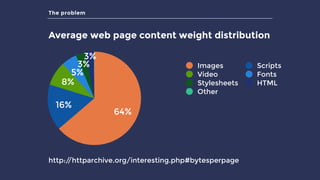
Average web page content weight distribution
3%
3%
5%
8%
16%
64%
Images Scripts
Video Fonts
Stylesheets HTML
Other
http://httparchive.org/interesting.php#bytesperpage
The solution
How can we fix our image problem?
▸ Image sprites
▸ Icon fonts
▸ Choosing the right format (.gif, .png, .jpg, SVG, etc.)
▸ Image optimisation (size and compression)
▸ Lazy loading
▸ Responsive images
The solution
How can we fix our image problem?
▸ Image sprites
▸ Icon fonts
▸ Choosing the right format (.gif, .png, .jpg, etc.)
▸ Image optimisation (size and compression)
▸ Lazy loading
▸ Responsive images
Image optimisation
Image optimisation
▸ Reduce file size of image
▸ Lossy - eliminates some pixel data
▸ Lossless - compresses pixel data
▸ No single best configuration - depends on image
▸ Online tools available
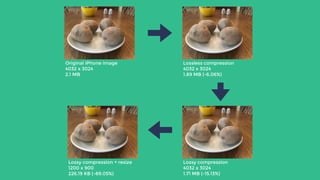
Original iPhone image

4032 x 3024

2.1 MB
Lossless compression

4032 x 3024 

1.89 MB (-6.06%)
Lossy compression + resize

1200 x 900 

226.19 KB (-89.05%)
Lossy compression

4032 x 3024 

1.71 MB (-15.13%)
Image optimisation
Kraken.io
▸ Free and paid versions
▸ Lossy or lossless options
▸ WP plugin available
Lazy loading
Lazy loading
▸ Loads images as they come into view
▸ Saves on initial page weight and HTTP requests
▸ Relies on JavaScript
▸ Lots of JS plugins available
▸ WP plugins available
Responsive images
What are responsive images?
▸ RICG
▸ <picture>
▸ srcset=“”sizes=“”
Responsive images
What are responsive images?
▸ RICG
▸ <picture>
▸ srcset=“”sizes=“”
Responsive images
srcset and sizes
▸ Used to save bandwidth
▸ Appropriate image size depending on context
▸ Browser has final control
Responsive images
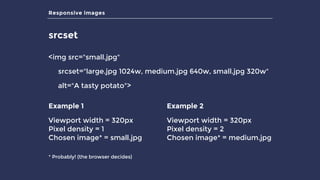
srcset
<img src="small.jpg"
srcset="large.jpg 1024w, medium.jpg 640w, small.jpg 320w"
alt="A tasty potato">
Example 1
Viewport width = 320px

Pixel density = 1

Chosen image* = small.jpg
Example 2
Viewport width = 320px

Pixel density = 2

Chosen image* = medium.jpg
* Probably! (the browser decides)
Responsive images
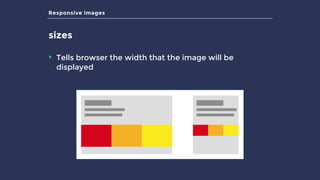
sizes
‣ Tells browser the width that the image will be
displayed
Responsive images
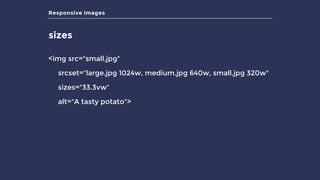
sizes
<img src="small.jpg"
srcset="large.jpg 1024w, medium.jpg 640w, small.jpg 320w"
sizes="33.3vw"
alt="A tasty potato">
Responsive images
sizes
<img src="small.jpg"
srcset="large.jpg 1024w, medium.jpg 640w, small.jpg 320w"
sizes="33.3vw"
alt="A tasty potato">
Responsive images
sizes
<img src="small.jpg"
srcset="large.jpg 1024w, medium.jpg 640w, small.jpg 320w"
sizes=“(min-width: 640px) 33.3vw,
100vw”
alt="A tasty potato">
Caniuse screenshot
http://caniuse.com/#search=srcset (02/04/16)
Responsive images
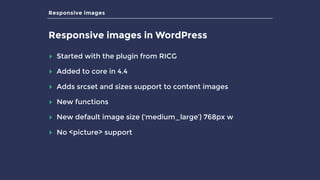
Responsive images in WordPress
▸ Started with the plugin from RICG
▸ Added to core in 4.4
▸ Adds srcset and sizes support to content images
▸ New functions
▸ New default image size (‘medium_large’) 768px w
▸ No <picture> support
Responsive images
Using responsive images in your theme
$img = get_field(‘image’); // get image from ACF field
$img_id = $img['ID'];

$img_src = $img['sizes']['archive'];

$img_meta = wp_get_attachment_metadata($img_id);
$image_html = '<img src="'.$img_src.'" alt="'.$img['alt'].'" />’;
echo wp_image_add_srcset_and_sizes ( $image_html,
$img_meta, $img_id );
Responsive images
Using responsive images in your theme
Result
<img src="http://potato-passion.com/media/potato-on-table-282x212.jpg" alt=""
srcset=“http://potato-passion.com/media/potato-on-table-300x225.jpg 300w,
http://potato-passion.com/media/potato-on-table-768x576.jpg 768w,
http://potato-passion.com/media/potato-on-table-1600x1200.jpg 1600w,
http://potato-passion.com/media/potato-on-table-770x578.jpg 770w,
http://potato-passion.com/media/potato-on-table-282x212.jpg 282w,
sizes="(max-width: 282px) 100vw, 282px">
Responsive images
Using responsive images in your theme
Other thoughts
▸ Customise the ‘sizes’ output using
wp_calculate_image_sizes() filter
▸ Default is better than nothing
Responsive images
wp-lazysizes
▸ The daddy of image plugins
▸ Lazy loading AND responsive images
▸ Works out ‘sizes’ attribute for you
▸ https://github.com/aFarkas/wp-lazysizes
▸ Caveat: I haven’t used this in production yet!
Summary
What did we learn?
▸ We have an image problem
▸ We have the tools to solve it!
▸ Optimise your images
▸ Lazy-load your images
▸ Use responsive images
THANKS!
@keithdevon

High Performance Images in WordPress

  • 1.
    High Performance Images inWordPress WordCamp London April 2016 by Keith Devon
  • 2.
    About me Keith Devon ‣Born in Canada, raised in Northern Ireland, living in Kent, UK ‣ WordPress developer for 6 years ‣ Co-founder of Highrise Digital @keithdevon https://highrise.digital
  • 3.
    The problem The problemwith images ▸ Too many ▸ Too big ▸ Device pixel ratios (DPR)
  • 4.
    The problem Average webpage content weight distribution 3% 3% 5% 8% 16% 64% Images Scripts Video Fonts Stylesheets HTML Other http://httparchive.org/interesting.php#bytesperpage
  • 5.
    The solution How canwe fix our image problem? ▸ Image sprites ▸ Icon fonts ▸ Choosing the right format (.gif, .png, .jpg, SVG, etc.) ▸ Image optimisation (size and compression) ▸ Lazy loading ▸ Responsive images
  • 6.
    The solution How canwe fix our image problem? ▸ Image sprites ▸ Icon fonts ▸ Choosing the right format (.gif, .png, .jpg, etc.) ▸ Image optimisation (size and compression) ▸ Lazy loading ▸ Responsive images
  • 7.
    Image optimisation Image optimisation ▸Reduce file size of image ▸ Lossy - eliminates some pixel data ▸ Lossless - compresses pixel data ▸ No single best configuration - depends on image ▸ Online tools available
  • 8.
    Original iPhone image
 4032x 3024
 2.1 MB Lossless compression
 4032 x 3024 
 1.89 MB (-6.06%) Lossy compression + resize
 1200 x 900 
 226.19 KB (-89.05%) Lossy compression
 4032 x 3024 
 1.71 MB (-15.13%)
  • 9.
    Image optimisation Kraken.io ▸ Freeand paid versions ▸ Lossy or lossless options ▸ WP plugin available
  • 10.
    Lazy loading Lazy loading ▸Loads images as they come into view ▸ Saves on initial page weight and HTTP requests ▸ Relies on JavaScript ▸ Lots of JS plugins available ▸ WP plugins available
  • 12.
    Responsive images What areresponsive images? ▸ RICG ▸ <picture> ▸ srcset=“”sizes=“”
  • 13.
    Responsive images What areresponsive images? ▸ RICG ▸ <picture> ▸ srcset=“”sizes=“”
  • 14.
    Responsive images srcset andsizes ▸ Used to save bandwidth ▸ Appropriate image size depending on context ▸ Browser has final control
  • 15.
    Responsive images srcset <img src="small.jpg" srcset="large.jpg1024w, medium.jpg 640w, small.jpg 320w" alt="A tasty potato"> Example 1 Viewport width = 320px
 Pixel density = 1
 Chosen image* = small.jpg Example 2 Viewport width = 320px
 Pixel density = 2
 Chosen image* = medium.jpg * Probably! (the browser decides)
  • 16.
    Responsive images sizes ‣ Tellsbrowser the width that the image will be displayed
  • 17.
    Responsive images sizes <img src="small.jpg" srcset="large.jpg1024w, medium.jpg 640w, small.jpg 320w" sizes="33.3vw" alt="A tasty potato">
  • 18.
    Responsive images sizes <img src="small.jpg" srcset="large.jpg1024w, medium.jpg 640w, small.jpg 320w" sizes="33.3vw" alt="A tasty potato">
  • 20.
    Responsive images sizes <img src="small.jpg" srcset="large.jpg1024w, medium.jpg 640w, small.jpg 320w" sizes=“(min-width: 640px) 33.3vw, 100vw” alt="A tasty potato">
  • 21.
  • 22.
    Responsive images Responsive imagesin WordPress ▸ Started with the plugin from RICG ▸ Added to core in 4.4 ▸ Adds srcset and sizes support to content images ▸ New functions ▸ New default image size (‘medium_large’) 768px w ▸ No <picture> support
  • 23.
    Responsive images Using responsiveimages in your theme $img = get_field(‘image’); // get image from ACF field $img_id = $img['ID'];
 $img_src = $img['sizes']['archive'];
 $img_meta = wp_get_attachment_metadata($img_id); $image_html = '<img src="'.$img_src.'" alt="'.$img['alt'].'" />’; echo wp_image_add_srcset_and_sizes ( $image_html, $img_meta, $img_id );
  • 24.
    Responsive images Using responsiveimages in your theme Result <img src="http://potato-passion.com/media/potato-on-table-282x212.jpg" alt="" srcset=“http://potato-passion.com/media/potato-on-table-300x225.jpg 300w, http://potato-passion.com/media/potato-on-table-768x576.jpg 768w, http://potato-passion.com/media/potato-on-table-1600x1200.jpg 1600w, http://potato-passion.com/media/potato-on-table-770x578.jpg 770w, http://potato-passion.com/media/potato-on-table-282x212.jpg 282w, sizes="(max-width: 282px) 100vw, 282px">
  • 25.
    Responsive images Using responsiveimages in your theme Other thoughts ▸ Customise the ‘sizes’ output using wp_calculate_image_sizes() filter ▸ Default is better than nothing
  • 26.
    Responsive images wp-lazysizes ▸ Thedaddy of image plugins ▸ Lazy loading AND responsive images ▸ Works out ‘sizes’ attribute for you ▸ https://github.com/aFarkas/wp-lazysizes ▸ Caveat: I haven’t used this in production yet!
  • 27.
    Summary What did welearn? ▸ We have an image problem ▸ We have the tools to solve it! ▸ Optimise your images ▸ Lazy-load your images ▸ Use responsive images
  • 28.