
High Availability Networking - Openstack
HA Option 1: Hardware gateway
• Benefits
– The dnsmasqservice can be configured to use an external gateway
insteadof acting as the gatewayfor the VMs
– This offloads HA to standard switching hardware and it has some
strong benefits
• Limitations
– the nova-network service is still responsible for floating IP natting and
DHCP, so some failover strategy needs to be employed for those
options
• Configuration
 Create a dnsmasqconfiguration file (e.g., /etc/dnsmasq-nova.conf)
that contains the IP address of the external gateway
dhcp-option=option:router,172.16.100.1
 Edit /etc/nova/nova.conf to specify the location of the dnsmasq
configuration file:
dnsmasq_config_file=/etc/dnsmasq-nova.conf
 Configure the hardware gatewayto forward metadatarequests to a
hostthat's running the nova-api service with the metadataAPI
enabled.
enabled_apis=ec2,osapi_compute,osapi_volume,metadata
 Ensure you have set up routes properly so that the subnet that you
use for virtual machines is routable.
HA Option 2: Multi-Nic
• Benefits
– Nova gained support for multi-nic. This allows us to bridge a given VM
into multiple networks. This gives us some more options for high
availability
– It is possible to set up two networks on separate vlans (or even
separate Ethernet devices on the host) and give the VMs a NIC and an
IPon each network
• Limitations
– this approach is it offloads managementof failure scenarios to the
guest.
– The guest needs to be aware of multiple networks and have a strategy
for switching between them. It also doesn't help with floating IPs.
HA Option 3: Failover
• Benefits
– The folks at NTT labs came up with a ha-linux configuration that allows
for a 4 second failover to a hot backup of the network host
• Limitation
– Not suitable for some real-time applications those having SLA less
than 4 seconds
• Configuration
– To enable this HA option, your nova.conf file mustcontain the
following option:
send_arp_for_ha=True
HA Option 4: Multi-host
• Benefits
– To eliminate the network host as a single point of failure, Compute can be configured to
allow each compute host to do all of the networking jobs for its own VMs.
– Each compute host does NAT, DHCP, and acts as a gateway for all of its own VMs. While
there is still a single point of failure in this scenario, it is the same point of failure that
applies to all virtualized systems.
• Configuration
– To run in HA mode, each compute host must run the following services:
• nova-compute
• nova-network
• nova-api-metadata or nova-api
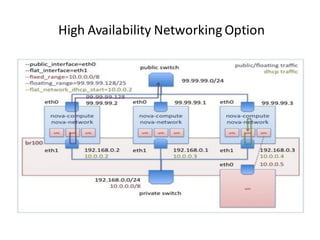
High Availability Networking Option

High availability networking openstack

  • 1.
  • 2.
    HA Option 1:Hardware gateway • Benefits – The dnsmasqservice can be configured to use an external gateway insteadof acting as the gatewayfor the VMs – This offloads HA to standard switching hardware and it has some strong benefits • Limitations – the nova-network service is still responsible for floating IP natting and DHCP, so some failover strategy needs to be employed for those options
  • 3.
    • Configuration  Createa dnsmasqconfiguration file (e.g., /etc/dnsmasq-nova.conf) that contains the IP address of the external gateway dhcp-option=option:router,172.16.100.1  Edit /etc/nova/nova.conf to specify the location of the dnsmasq configuration file: dnsmasq_config_file=/etc/dnsmasq-nova.conf  Configure the hardware gatewayto forward metadatarequests to a hostthat's running the nova-api service with the metadataAPI enabled. enabled_apis=ec2,osapi_compute,osapi_volume,metadata  Ensure you have set up routes properly so that the subnet that you use for virtual machines is routable.
  • 4.
    HA Option 2:Multi-Nic • Benefits – Nova gained support for multi-nic. This allows us to bridge a given VM into multiple networks. This gives us some more options for high availability – It is possible to set up two networks on separate vlans (or even separate Ethernet devices on the host) and give the VMs a NIC and an IPon each network • Limitations – this approach is it offloads managementof failure scenarios to the guest. – The guest needs to be aware of multiple networks and have a strategy for switching between them. It also doesn't help with floating IPs.
  • 5.
    HA Option 3:Failover • Benefits – The folks at NTT labs came up with a ha-linux configuration that allows for a 4 second failover to a hot backup of the network host • Limitation – Not suitable for some real-time applications those having SLA less than 4 seconds • Configuration – To enable this HA option, your nova.conf file mustcontain the following option: send_arp_for_ha=True
  • 6.
    HA Option 4:Multi-host • Benefits – To eliminate the network host as a single point of failure, Compute can be configured to allow each compute host to do all of the networking jobs for its own VMs. – Each compute host does NAT, DHCP, and acts as a gateway for all of its own VMs. While there is still a single point of failure in this scenario, it is the same point of failure that applies to all virtualized systems. • Configuration – To run in HA mode, each compute host must run the following services: • nova-compute • nova-network • nova-api-metadata or nova-api
  • 7.