User/Admin
Experience

Immutability

Data
Governance

eDiscovery
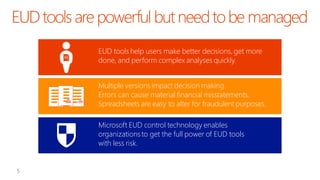
EUD tools help users make better decisions, get more
done, and perform complex analyses quickly.
Multiple versions impact decision making.
Errors can cause material financial misstatements.
Spreadsheets are easy to alter for fraudulent purposes.
Microsoft EUD control technology enables
organizations to get the full power of EUD tools
with less risk.
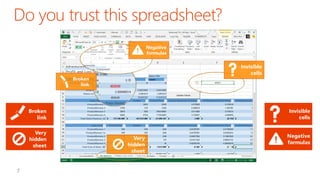
Negative
formulas

Invisible
cells

Broken
link

Invisible
cells

Broken
link
Very
hidden
sheet

Very
hidden
sheet

Negative
formulas
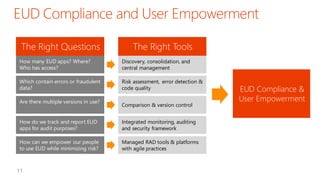
How many EUD apps? Where?
Who has access?

Discovery, consolidation, and
central management

Which contain errors or fraudulent
data?

Risk assessment, error detection &
code quality

Are there multiple versions in use?

Comparison & version control

How do we track and report EUD
apps for audit purposes?

Integrated monitoring, auditing
and security framework

How can we empower our people
to use EUD while minimizing risk?

Managed RAD tools & platforms
with agile practices
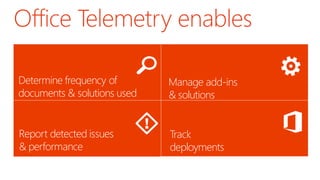
Office Telemetry enables
Determine frequency of
Document identificationused
documents & solutions

Manage add-ins
Solution management
& solutions

Report detected issues
& performance
Issue detection

Track
deployments
Deployment
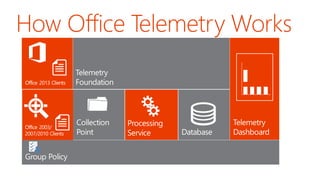
How Office Telemetry Works

Microsoft Confidential
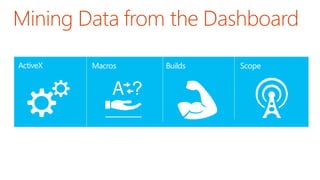
Mining Data from the Dashboard
ActiveX

Macros

Builds

Scope
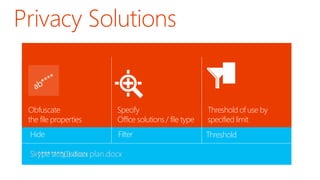
Privacy Solutions

Obfuscate
the file properties

Specify
Office solutions / file type

Threshold of use by
specified limit

Hide

Filter

Threshold

Skype acquisition plan.docx
Sk********(1).docx
Leaders & Best
Practices Emerge

2004

Technology Vendors
Up the Ante (v2.0)

Technology
Vendors Respond
with Automated
Solutions (v1.0)

PWC White Paper
on Spreadsheet
Controls & SOX

2005

Innovators

Financial Markets Collapse,
Driving Increased Scrutiny
and Regulation

Early Implementations
of Automated Controls

Early Adopters Begin
to Implement Manual
Inventory, Controls

2006

Microsoft incorporates
Spreadsheet Controls into
the new Office

Microsoft acquires the
Prodiance Corporation

2007

2008

2009

Early Adopters

2010

2011

2012

2013

Early Majority
Assess and categorize spreadsheets and
databases based on relevance, materiality,
complexity and business impact

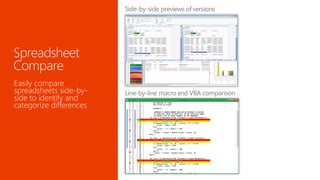
Compare spreadsheets side
by side

Nonintrusive auditing of changes made to
Excel spreadsheets and Access databases

Compare Access databases
side by side

Analyze, document,
understand and diagnose
spreadsheets
Inventory

Risk assessment

Control

Reporting

Optimization

Microsoft Reporting Services and BI tools
Microsoft Office
Discovery and
Risk Assessment

Microsoft Office
Audit and Control
Management
server

Microsoft Excel 2013
Spreadsheet Compare
Microsoft Access
Database

Microsoft Excel 2013
Spreadsheet Inquire

Microsoft Best Practices, Domain Expertise, and World-Class Support
Discover and
assesses EUCs across
file shares and
SharePoint libraries
Highlights risk,
materiality,
complexity, and
more based on
configurable criteria
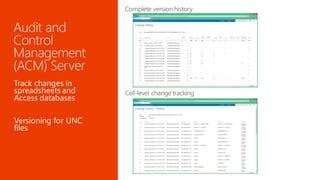
Track changes in
spreadsheets and
Access databases

Versioning for UNC
files
Easily compare
spreadsheets side-byside to identify and
categorize differences
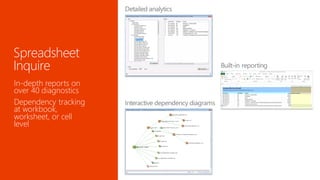
In-depth reports on
over 40 diagnostics
Dependency tracking
at workbook,
worksheet, or cell
level
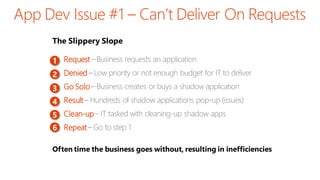
The Slippery Slope
•
1 Request
•
2 Denied
•
3 Go Solo
•
4 Result
•
5 Clean-up
•
6 Repeat

Often time the business goes without, resulting in inefficiencies
Faster

 Faster Delivery Time (if OOB)
 Lower OOB Business Fit (Change
Business to Fit)
 Narrow Scope of Available
Applications (Buy Multiple)

Lower
Buy
Packaged
Apps

Build

Slower

Custom
Applications

Scope of available applications

Higher

 Broadest Scope of Possibilities
 Slower Delivery Time
 Higher Potential Business Fit
 Resource/Time Intensive
 Difficult to Deliver Complete
Application Stack

Line of Business
Context / IP

Business IP

Business IP

Business IP

Business IP

Business IP

Business IP

User
Experience

User
Experience

User
Experience

User
Experience

User
Experience

User
Experience

User
Experience

Application &
Database
Services

Application
& Database
Services

Application
& Database
Services

Application
& Database
Services

Application
& Database
Services

Application
& Database
Services

Application
& Database
Services

Physical
Environment &
Resources

Physical
Environment
& Resources

Physical
Environment
& Resources

Physical
Environment
& Resources

Physical
Environment
& Resources

Physical
Environment
& Resources

Physical
Environment
& Resources

Most large organizations have hundreds of LOB applications
Build

Development
Tools

Development
Frameworks

Rapidly innovate
and grow your
business

Managed
RAD
Platform

Buy

Packaged
Applications

Lower total cost of
ownership (TCO)
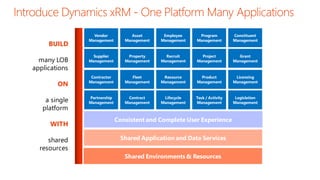
BUILD
many LOB
applications
ON

a single
platform
WITH
shared
resources

Vendor
Management

Asset
Management

Employee
Management

Program
Management

Constituent
Management

Supplier
Management

Property
Management

Recruit
Management

Project
Management

Grant
Management

Contractor
Management

Fleet
Management

Resource
Management

Product
Management

Licensing
Management

Partnership
Management

Contract
Management

Lifecycle
Management

Task / Activity
Management

Legislation
Management

Consistent and Complete User Experience
Shared Application and Data Services
Shared Environments & Resources


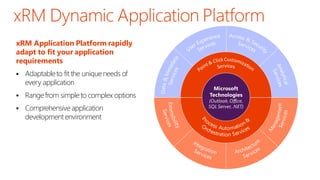
Adaptable to fit the unique needs of
every application



Range from simple to complex options



Comprehensive application
development environment

ууущщйццззййз

xRM Application Platform rapidly
adapt to fit your application
requirements

360O View
Microsoft
Technologies

(Outlook, Office,
SQL Server, .NET)

ууущщйццззййз
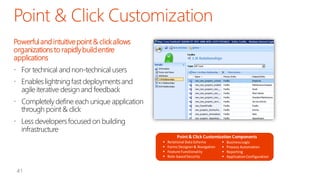
Powerful and intuitive point & click allows
organizations to rapidly build entire
applications
 For technical and non-technical users

 Enables lightning fast deployments and
agile iterative design and feedback
 Completely define each unique application
through point & click

 Less developers focused on building
infrastructure
Point & Click Customization Components





Relational Data Schema
Forms Designer & Navigation
Feature Functionality
Role-based Security






Business Logic
Process Automation
Reporting
Application Configuration
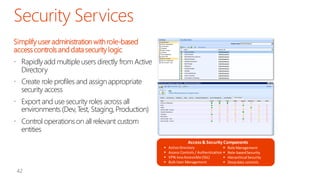
Simplify user administration with role-based
access controls and data security logic
 Rapidly add multiple users directly from Active
Directory

 Create role profiles and assign appropriate
security access
 Export and use security roles across all
environments (Dev, Test, Staging, Production)

 Control operations on all relevant custom
entities
Access & Security Components





Active Directory

Access Controls / Authentication 
VPN-less Accessible (SSL)

Bulk User Management


Role Management
Role-based Security
Hierarchical Security
Deep data controls
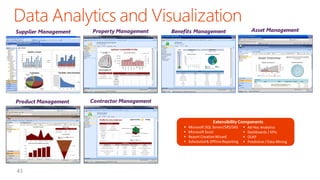
Supplier Management

Property Management

Product Management

Asset Management

Contractor Management

Benefits Management

Extensibility Components





Microsoft SQL Server/SRS/SAS
Microsoft Excel
Report Creation Wizard
Scheduled & Offline Reporting






Ad Hoc Analytics
Dashboards / KPIs
OLAP
Predictive / Data Mining
End User Development - Governance and Risk Management

End User Development - Governance and Risk Management

  • 3.
  • 5.
    EUD tools helpusers make better decisions, get more done, and perform complex analyses quickly. Multiple versions impact decision making. Errors can cause material financial misstatements. Spreadsheets are easy to alter for fraudulent purposes. Microsoft EUD control technology enables organizations to get the full power of EUD tools with less risk.
  • 7.
  • 11.
    How many EUDapps? Where? Who has access? Discovery, consolidation, and central management Which contain errors or fraudulent data? Risk assessment, error detection & code quality Are there multiple versions in use? Comparison & version control How do we track and report EUD apps for audit purposes? Integrated monitoring, auditing and security framework How can we empower our people to use EUD while minimizing risk? Managed RAD tools & platforms with agile practices
  • 13.
    Office Telemetry enables Determinefrequency of Document identificationused documents & solutions Manage add-ins Solution management & solutions Report detected issues & performance Issue detection Track deployments Deployment
  • 14.
    How Office TelemetryWorks Microsoft Confidential
  • 15.
    Mining Data fromthe Dashboard ActiveX Macros Builds Scope
  • 16.
    Privacy Solutions Obfuscate the fileproperties Specify Office solutions / file type Threshold of use by specified limit Hide Filter Threshold Skype acquisition plan.docx Sk********(1).docx
  • 18.
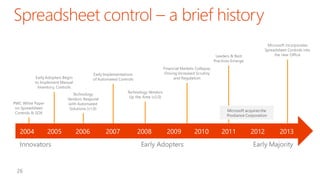
    Leaders & Best PracticesEmerge 2004 Technology Vendors Up the Ante (v2.0) Technology Vendors Respond with Automated Solutions (v1.0) PWC White Paper on Spreadsheet Controls & SOX 2005 Innovators Financial Markets Collapse, Driving Increased Scrutiny and Regulation Early Implementations of Automated Controls Early Adopters Begin to Implement Manual Inventory, Controls 2006 Microsoft incorporates Spreadsheet Controls into the new Office Microsoft acquires the Prodiance Corporation 2007 2008 2009 Early Adopters 2010 2011 2012 2013 Early Majority
  • 19.
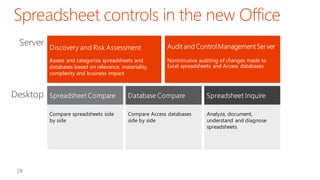
    Assess and categorizespreadsheets and databases based on relevance, materiality, complexity and business impact Compare spreadsheets side by side Nonintrusive auditing of changes made to Excel spreadsheets and Access databases Compare Access databases side by side Analyze, document, understand and diagnose spreadsheets
  • 20.
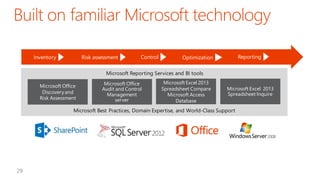
    Inventory Risk assessment Control Reporting Optimization Microsoft ReportingServices and BI tools Microsoft Office Discovery and Risk Assessment Microsoft Office Audit and Control Management server Microsoft Excel 2013 Spreadsheet Compare Microsoft Access Database Microsoft Excel 2013 Spreadsheet Inquire Microsoft Best Practices, Domain Expertise, and World-Class Support
  • 21.
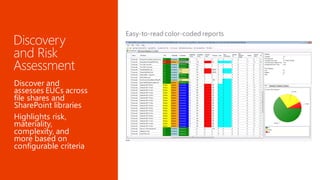
    Discover and assesses EUCsacross file shares and SharePoint libraries Highlights risk, materiality, complexity, and more based on configurable criteria
  • 22.
    Track changes in spreadsheetsand Access databases Versioning for UNC files
  • 23.
    Easily compare spreadsheets side-bysideto identify and categorize differences
  • 24.
    In-depth reports on over40 diagnostics Dependency tracking at workbook, worksheet, or cell level
  • 26.
    The Slippery Slope • 1Request • 2 Denied • 3 Go Solo • 4 Result • 5 Clean-up • 6 Repeat Often time the business goes without, resulting in inefficiencies
  • 27.
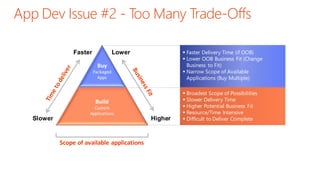
    Faster  Faster DeliveryTime (if OOB)  Lower OOB Business Fit (Change Business to Fit)  Narrow Scope of Available Applications (Buy Multiple) Lower Buy Packaged Apps Build Slower Custom Applications Scope of available applications Higher  Broadest Scope of Possibilities  Slower Delivery Time  Higher Potential Business Fit  Resource/Time Intensive  Difficult to Deliver Complete
  • 28.
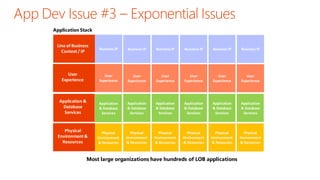
    Application Stack Line ofBusiness Context / IP Business IP Business IP Business IP Business IP Business IP Business IP User Experience User Experience User Experience User Experience User Experience User Experience User Experience Application & Database Services Application & Database Services Application & Database Services Application & Database Services Application & Database Services Application & Database Services Application & Database Services Physical Environment & Resources Physical Environment & Resources Physical Environment & Resources Physical Environment & Resources Physical Environment & Resources Physical Environment & Resources Physical Environment & Resources Most large organizations have hundreds of LOB applications
  • 29.
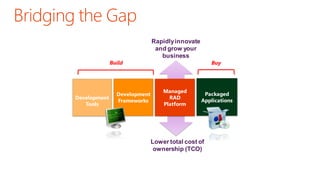
    Build Development Tools Development Frameworks Rapidly innovate and growyour business Managed RAD Platform Buy Packaged Applications Lower total cost of ownership (TCO)
  • 30.
  • 31.
     Adaptable to fitthe unique needs of every application  Range from simple to complex options  Comprehensive application development environment ууущщйццззййз xRM Application Platform rapidly adapt to fit your application requirements 360O View Microsoft Technologies (Outlook, Office, SQL Server, .NET) ууущщйццззййз
  • 32.
    Powerful and intuitivepoint & click allows organizations to rapidly build entire applications  For technical and non-technical users  Enables lightning fast deployments and agile iterative design and feedback  Completely define each unique application through point & click  Less developers focused on building infrastructure Point & Click Customization Components     Relational Data Schema Forms Designer & Navigation Feature Functionality Role-based Security     Business Logic Process Automation Reporting Application Configuration
  • 33.
    Simplify user administrationwith role-based access controls and data security logic  Rapidly add multiple users directly from Active Directory  Create role profiles and assign appropriate security access  Export and use security roles across all environments (Dev, Test, Staging, Production)  Control operations on all relevant custom entities Access & Security Components     Active Directory  Access Controls / Authentication  VPN-less Accessible (SSL)  Bulk User Management  Role Management Role-based Security Hierarchical Security Deep data controls
  • 34.
    Supplier Management Property Management ProductManagement Asset Management Contractor Management Benefits Management Extensibility Components     Microsoft SQL Server/SRS/SAS Microsoft Excel Report Creation Wizard Scheduled & Offline Reporting     Ad Hoc Analytics Dashboards / KPIs OLAP Predictive / Data Mining