COMPUTER HARDWARE
SOFTWARE & ITS
CLASSIFICATION
By: Ifra Ghaffar
Contents
What Is Computer?
Components of Computer
Hardware
‒ Types of Hardware
Software
‒ Types of Software
Conclusion
What is COMPUTER?
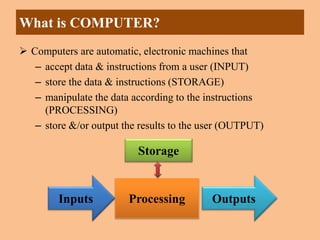
 Computers are automatic, electronic machines that
– accept data & instructions from a user (INPUT)
– store the data & instructions (STORAGE)
– manipulate the data according to the instructions
(PROCESSING)
– store &/or output the results to the user (OUTPUT)
Inputs Outputs
Processing
Storage
Its components include…
1. Input devices
2. Central Processing Unit (CPU)
3. Primary storage (Memory)
4. Secondary storage (Mass storage)
5. Output devices
 A computer system is composed
of hardware and software
Components of Computer
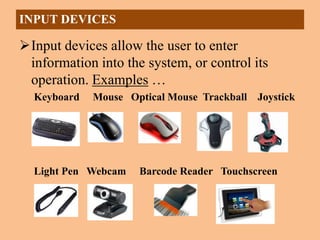
Input devices allow the user to enter
information into the system, or control its
operation. Examples …
Keyboard Mouse Optical Mouse Trackball Joystick
Light Pen Webcam Barcode Reader Touchscreen
INPUT DEVICES
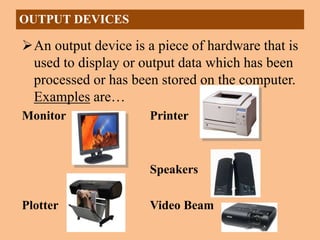
An output device is a piece of hardware that is
used to display or output data which has been
processed or has been stored on the computer.
Examples are…
Monitor Printer
Speakers
Plotter Video Beam
OUTPUT DEVICES
CENTRAL PROCESSING UNIT (CPU)
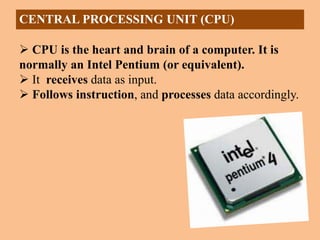
 CPU is the heart and brain of a computer. It is
normally an Intel Pentium (or equivalent).
 It receives data as input.
 Follows instruction, and processes data accordingly.
 Primary Storage also called Main Memory
– On board memory (located on the motherboard)
– Very fast, but expensive
– Two types
• RAM – Random Access Memory
• ROM – Read Only Memory
 RAM - Random Access Memory
– Read/write capability
– Contents lost when computer is turned off (volatile)
– A program must be in RAM for it to execute
PRIMARY STORAGE (MEMORY )
ROM - Read Only Memory
– Read but not write capability
– Permanent
– Stores the instructions to be executed when the
computer is turned on
PRIMARY STORAGE (MEMORY )
Secondary Storage also called Mass
Storage
–External devices (not on the
motherboard); either inside or outside
the computer
–Store programs and data permanently
–Slower, but cheaper
SECONDARY STORAGE (MASS STORAGE)
–Different sizes/styles
•Floppy Disk - 1.4MB
•Zip Drive - 100-750MB
•CD - 650MB
•Hard Disk Drive
•Tape
•Flash drives
SECONDARY STORAGE (MASS STORAGE)
HARDWARE
 Mechanical, electrical, electronic, or other physical
equipment and machinery associated with a computer
system
 Physical part of computer that can be touched
 Hardware cant perform any task without software
 It is not affected by computer viruses
 Hardware includes a central processing unit (CPU),
keyboard, and monitor.
SOFTWARE
 Programs written in a special language with a
series of instructions to a computer.
 Simply a set of instruction necessary for a
computer to accomplish required tasks.
 It can not be touched
 Software cant be executed without Hardware
 It is affected by computer viruses
A computer program is a series of instructions
– each instruction is expressed in a format
consistent with a predefined set of rules
– a computer processes data under the direction
of the instructions in a program
– there are instructions to input, process, store
and output data
– the user of a program has no need to be aware
of the details of its construction
SOFTWARE
System Software
– controls all machine activities
– Provide platform for application software to run
– Can work run independently
– User cant interact coz it run in background
– It start running automatically when computer is
on and stop when computer is off
– DOS, Windows , Unix, Linux, Mac OS
TYPES OF SOFTWARE
Application Software
– Design for specific task or to solve a specific
problem
– Provides audio video or multimedia
entertainment
– Cannot run without system software
– Cant run and work independently
– User interact with application directly
– VlC, MS Word, MS Excel, Photoshop, google
chrome.
Custome Software
– Design for particular Customer
– Cost high
– Can be change if there is need
– Student portals for school and universities
Package Software
– Developed for sale to software developers or
users for their use
– Cost is low
– Word Excel PowerPoint
TYPES OF APPLICATION SOFTWARE
Conclusion
Computer hardware refers to the physical
parts or components of a computer.
In contrast, software is untouchable.
Software exists as ideas, application,
concepts, and symbols.
A combination of hardware and software
forms a usable computing system.
THANK YOU

Hardware Software clascccccsification.pptx

  • 1.
    COMPUTER HARDWARE SOFTWARE &ITS CLASSIFICATION By: Ifra Ghaffar
  • 2.
    Contents What Is Computer? Componentsof Computer Hardware ‒ Types of Hardware Software ‒ Types of Software Conclusion
  • 3.
    What is COMPUTER? Computers are automatic, electronic machines that – accept data & instructions from a user (INPUT) – store the data & instructions (STORAGE) – manipulate the data according to the instructions (PROCESSING) – store &/or output the results to the user (OUTPUT) Inputs Outputs Processing Storage
  • 4.
    Its components include… 1.Input devices 2. Central Processing Unit (CPU) 3. Primary storage (Memory) 4. Secondary storage (Mass storage) 5. Output devices  A computer system is composed of hardware and software Components of Computer
  • 5.
    Input devices allowthe user to enter information into the system, or control its operation. Examples … Keyboard Mouse Optical Mouse Trackball Joystick Light Pen Webcam Barcode Reader Touchscreen INPUT DEVICES
  • 6.
    An output deviceis a piece of hardware that is used to display or output data which has been processed or has been stored on the computer. Examples are… Monitor Printer Speakers Plotter Video Beam OUTPUT DEVICES
  • 7.
    CENTRAL PROCESSING UNIT(CPU)  CPU is the heart and brain of a computer. It is normally an Intel Pentium (or equivalent).  It receives data as input.  Follows instruction, and processes data accordingly.
  • 8.
     Primary Storagealso called Main Memory – On board memory (located on the motherboard) – Very fast, but expensive – Two types • RAM – Random Access Memory • ROM – Read Only Memory  RAM - Random Access Memory – Read/write capability – Contents lost when computer is turned off (volatile) – A program must be in RAM for it to execute PRIMARY STORAGE (MEMORY )
  • 9.
    ROM - ReadOnly Memory – Read but not write capability – Permanent – Stores the instructions to be executed when the computer is turned on PRIMARY STORAGE (MEMORY )
  • 10.
    Secondary Storage alsocalled Mass Storage –External devices (not on the motherboard); either inside or outside the computer –Store programs and data permanently –Slower, but cheaper SECONDARY STORAGE (MASS STORAGE)
  • 11.
    –Different sizes/styles •Floppy Disk- 1.4MB •Zip Drive - 100-750MB •CD - 650MB •Hard Disk Drive •Tape •Flash drives SECONDARY STORAGE (MASS STORAGE)
  • 12.
    HARDWARE  Mechanical, electrical,electronic, or other physical equipment and machinery associated with a computer system  Physical part of computer that can be touched  Hardware cant perform any task without software  It is not affected by computer viruses  Hardware includes a central processing unit (CPU), keyboard, and monitor.
  • 13.
    SOFTWARE  Programs writtenin a special language with a series of instructions to a computer.  Simply a set of instruction necessary for a computer to accomplish required tasks.  It can not be touched  Software cant be executed without Hardware  It is affected by computer viruses
  • 14.
    A computer programis a series of instructions – each instruction is expressed in a format consistent with a predefined set of rules – a computer processes data under the direction of the instructions in a program – there are instructions to input, process, store and output data – the user of a program has no need to be aware of the details of its construction SOFTWARE
  • 15.
    System Software – controlsall machine activities – Provide platform for application software to run – Can work run independently – User cant interact coz it run in background – It start running automatically when computer is on and stop when computer is off – DOS, Windows , Unix, Linux, Mac OS TYPES OF SOFTWARE
  • 16.
    Application Software – Designfor specific task or to solve a specific problem – Provides audio video or multimedia entertainment – Cannot run without system software – Cant run and work independently – User interact with application directly – VlC, MS Word, MS Excel, Photoshop, google chrome.
  • 17.
    Custome Software – Designfor particular Customer – Cost high – Can be change if there is need – Student portals for school and universities Package Software – Developed for sale to software developers or users for their use – Cost is low – Word Excel PowerPoint TYPES OF APPLICATION SOFTWARE
  • 18.
    Conclusion Computer hardware refersto the physical parts or components of a computer. In contrast, software is untouchable. Software exists as ideas, application, concepts, and symbols. A combination of hardware and software forms a usable computing system.
  • 19.