Kernel Recipes 21th September 2012 @Paris
History

●   How to make an efficient Linux support on irc ?
●   Same question over & over :
    –   what configuration do you have ?
●   How can we know the HW configuration if the OS
    doesn't boot at all ?
●   How can I make other reporting their hardware
    configuration regardingless the Operating
    System they use ?
Concept

●   As low-level as possible
●   Collecting all-possible HW information
●   It has to be user-friendly
●   An 'expert' mode would be a nice-to-have feat.
●   Dumping the configuration should be easy
●   Sharing the configuration would be lovely
Implementation

●   Part of the Syslinux project since 2009 (3.74)
●   Regular C code built as a COM32 module
●   Uses Syslinux libs to get HW information
●   Uses Syslinux menuing system
●   Can be booted on ISO/PXE/Local
Features

●   PCI devices (bus/slot/func/ids/class/kmod)
●   DMI (board/bios/batt./chassis/cpu/ipmi/memory)
●   CPU (vendor/model/flags/cores/speed)
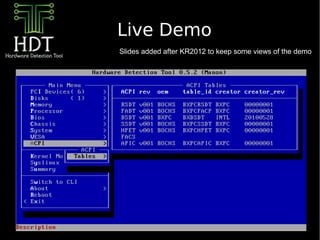
●   ACPI (tables/apic/io_apic)
●   DISK (CHS/Size/Interface/Bus/Partionning)
●   MEM (size/e820)
●   PXE (local_ip/server_ip/pci_device/gPXE)
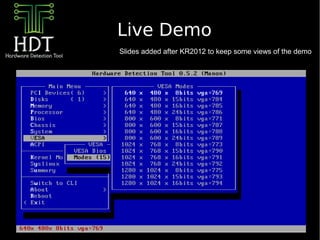
●   VESA (version/modes/linux_style[vga=])
●   VPD (Bios/Host/Motherboard)
Features

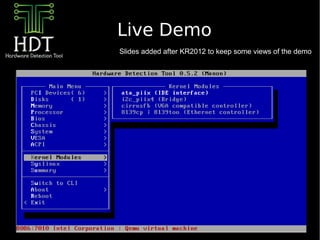
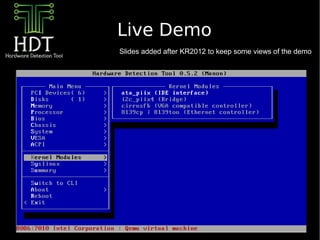
●   Kernel Modules
    –   Display all needed modules for a given Kernel
●   Command-Line Interface
●   Ncurses-like interface
●   Dumping over tftp (if PXE stack present)
    –   JSON output
    –   HTTP to come with Syslinux feat. LWIP
●   Automated commands & reporting
Enough Slides !


Live Demo !
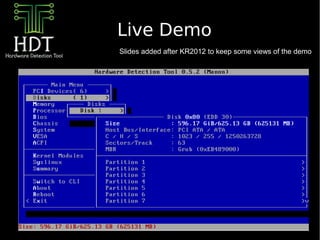
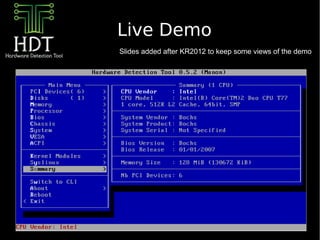
Live Demo
Slides added after KR2012 to keep some views of the demo
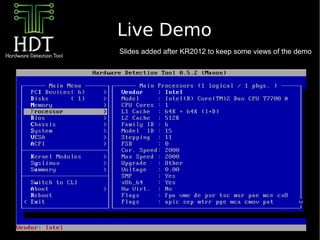
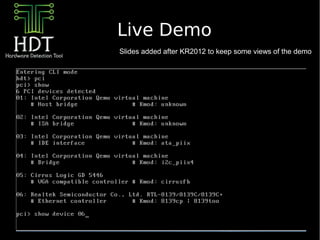
Live Demo
Slides added after KR2012 to keep some views of the demo
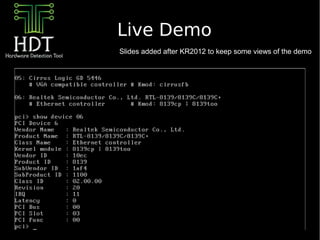
Live Demo
Slides added after KR2012 to keep some views of the demo
Live Demo
Slides added after KR2012 to keep some views of the demo
Live Demo
Slides added after KR2012 to keep some views of the demo
Live Demo
Slides added after KR2012 to keep some views of the demo
Live Demo
Slides added after KR2012 to keep some views of the demo
Live Demo
Slides added after KR2012 to keep some views of the demo
Live Demo
Slides added after KR2012 to keep some views of the demo
Live Demo
Slides added after KR2012 to keep some views of the demo
Usecases

●   Regular use to analyse a particular system
●   Helper for a support team
●   Debugging a Virtualizer
●   Discovering a prototype configuration (Lenovo)
●   Generating a description sheet (FreeGeek)
Thanks !


●   IRC : #hdt on freenode


●   Mailing List : hdt@zytor.com

Hardware Detection Tool

  • 1.
    Kernel Recipes 21thSeptember 2012 @Paris
  • 2.
    History ● How to make an efficient Linux support on irc ? ● Same question over & over : – what configuration do you have ? ● How can we know the HW configuration if the OS doesn't boot at all ? ● How can I make other reporting their hardware configuration regardingless the Operating System they use ?
  • 3.
    Concept ● As low-level as possible ● Collecting all-possible HW information ● It has to be user-friendly ● An 'expert' mode would be a nice-to-have feat. ● Dumping the configuration should be easy ● Sharing the configuration would be lovely
  • 4.
    Implementation ● Part of the Syslinux project since 2009 (3.74) ● Regular C code built as a COM32 module ● Uses Syslinux libs to get HW information ● Uses Syslinux menuing system ● Can be booted on ISO/PXE/Local
  • 5.
    Features ● PCI devices (bus/slot/func/ids/class/kmod) ● DMI (board/bios/batt./chassis/cpu/ipmi/memory) ● CPU (vendor/model/flags/cores/speed) ● ACPI (tables/apic/io_apic) ● DISK (CHS/Size/Interface/Bus/Partionning) ● MEM (size/e820) ● PXE (local_ip/server_ip/pci_device/gPXE) ● VESA (version/modes/linux_style[vga=]) ● VPD (Bios/Host/Motherboard)
  • 6.
    Features ● Kernel Modules – Display all needed modules for a given Kernel ● Command-Line Interface ● Ncurses-like interface ● Dumping over tftp (if PXE stack present) – JSON output – HTTP to come with Syslinux feat. LWIP ● Automated commands & reporting
  • 7.
  • 8.
    Live Demo Slides addedafter KR2012 to keep some views of the demo
  • 9.
    Live Demo Slides addedafter KR2012 to keep some views of the demo
  • 10.
    Live Demo Slides addedafter KR2012 to keep some views of the demo
  • 11.
    Live Demo Slides addedafter KR2012 to keep some views of the demo
  • 12.
    Live Demo Slides addedafter KR2012 to keep some views of the demo
  • 13.
    Live Demo Slides addedafter KR2012 to keep some views of the demo
  • 14.
    Live Demo Slides addedafter KR2012 to keep some views of the demo
  • 15.
    Live Demo Slides addedafter KR2012 to keep some views of the demo
  • 16.
    Live Demo Slides addedafter KR2012 to keep some views of the demo
  • 17.
    Live Demo Slides addedafter KR2012 to keep some views of the demo
  • 18.
    Usecases ● Regular use to analyse a particular system ● Helper for a support team ● Debugging a Virtualizer ● Discovering a prototype configuration (Lenovo) ● Generating a description sheet (FreeGeek)
  • 19.
    Thanks ! ● IRC : #hdt on freenode ● Mailing List : hdt@zytor.com