THINKING INSIDE THE BOX
Can Containers Solve the Package Problem?
Joe Brockmeier
Senior Evangelist, Linux Containers
2 November 2016
2
3
A Brief History of Packaging
The Problems We Face
Mistakes We’re Making (Again)
Some Solutions
WHAT WE’LL COVER
A complete treatise on software packaging in 45 minutes or less…
4
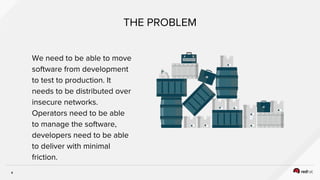
THE PROBLEM
We need to be able to move
software from development
to test to production. It
needs to be distributed over
insecure networks.
Operators need to be able
to manage the software,
developers need to be able
to deliver with minimal
friction.
5
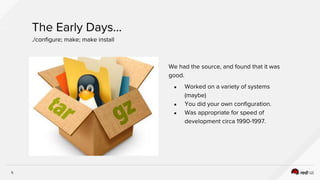
We had the source, and found that it was
good.
● Worked on a variety of systems
(maybe)
● You did your own configuration.
● Was appropriate for speed of
development circa 1990-1997.
The Early Days...
./configure; make; make install
6
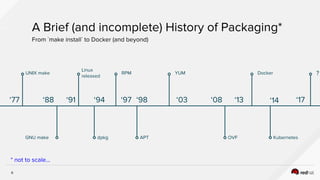
UNIX make
‘77
GNU make
‘88
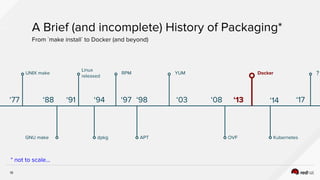
A Brief (and incomplete) History of Packaging*
From `make install` to Docker (and beyond)
* not to scale...
Linux
released
‘91
dpkg
‘94
RPM
‘97 ‘98
APT
YUM
‘03
?
‘17
OVF
‘08
Docker
‘13
Kubernetes
‘14
7
UNIX make
‘77
GNU make
‘88
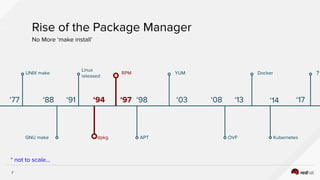
Rise of the Package Manager
No More ‘make install’
* not to scale...
Linux
released
‘91
dpkg
‘94
RPM
‘97 ‘98
APT
YUM
‘03
?
‘17
OVF
‘08
Docker
‘13
Kubernetes
‘14
8
UNIX make
‘77
GNU make
‘88
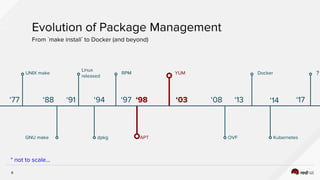
Evolution of Package Management
From `make install` to Docker (and beyond)
* not to scale...
Linux
released
‘91
dpkg
‘94
RPM
‘97 ‘98
APT
YUM
‘03
?
‘17
OVF
‘08
Docker
‘13
Kubernetes
‘14
9
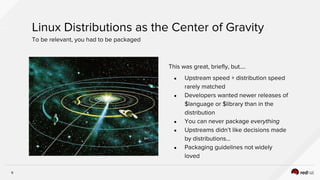
This was great, briefly, but....
● Upstream speed + distribution speed
rarely matched
● Developers wanted newer releases of
$language or $library than in the
distribution
● You can never package everything
● Upstreams didn’t like decisions made
by distributions…
● Packaging guidelines not widely
loved
Linux Distributions as the Center of Gravity
To be relevant, you had to be packaged
10
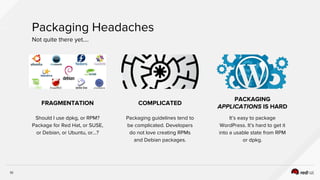
FRAGMENTATION
Should I use dpkg, or RPM?
Package for Red Hat, or SUSE,
or Debian, or Ubuntu, or…?
COMPLICATED
Packaging guidelines tend to
be complicated. Developers
do not love creating RPMs
and Debian packages.
PACKAGING
APPLICATIONS IS HARD
It’s easy to package
WordPress. It’s hard to get it
into a usable state from RPM
or dpkg.
Packaging Headaches
Not quite there yet….
11
More Packaging Thoughts
Imperfect, but still useful
Additional pros and cons for package formats…
● Forward “only” -- it’s difficult to back out packages, it’s super difficult to return to an
arbitrary state for a system.
● We have an enormous investment in tooling. We don’t want to throw that away.
● We have an enormous investment in training. We don’t want to throw that away.
● For all its flaws, standard Linux packaging has tens of thousands of hours of
accumulated wisdom that has been poured into its design + tooling. Ignore this at your
peril.
12
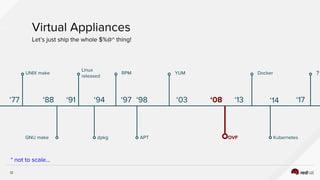
UNIX make
‘77
GNU make
‘88
Virtual Appliances
Let’s just ship the whole $%@^ thing!
* not to scale...
Linux
released
‘91
dpkg
‘94
RPM
‘97 ‘98
APT
YUM
‘03
?
‘17
OVF
‘08
Docker
‘13
Kubernetes
‘14
13
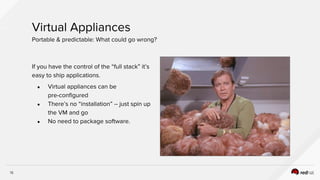
If you have the control of the “full stack” it’s
easy to ship applications.
● Virtual appliances can be
pre-configured
● There’s no “installation” -- just spin up
the VM and go
● No need to package software.
Virtual Appliances
Portable & predictable: What could go wrong?
14
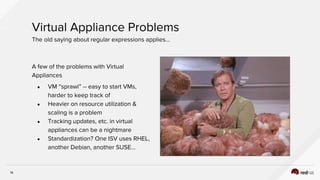
A few of the problems with Virtual
Appliances
● VM “sprawl” -- easy to start VMs,
harder to keep track of
● Heavier on resource utilization &
scaling is a problem
● Tracking updates, etc. in virtual
appliances can be a nightmare
● Standardization? One ISV uses RHEL,
another Debian, another SUSE…
Virtual Appliance Problems
The old saying about regular expressions applies…
CONTAINERS TO THE RESCUE(?)
16
UNIX make
‘77
GNU make
‘88
A Brief (and incomplete) History of Packaging*
From `make install` to Docker (and beyond)
* not to scale...
Linux
released
‘91
dpkg
‘94
RPM
‘97 ‘98
APT
YUM
‘03
?
‘17
OVF
‘08
Docker
‘13
Kubernetes
‘14
RED HAT AND CONTAINERS
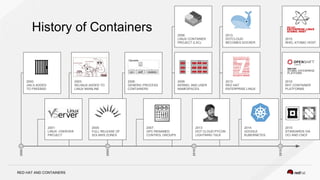
History of Containers
2000
2010
2005
2015
2000:
JAILS ADDED
TO FREEBSD
2006:
GENERIC PROCESS
CONTAINERS
2008:
KERNEL AND USER
NAMESPACES
2014:
GOOGLE
KUBERNETES
2008:
LINUX CONTAINER
PROJECT (LXC)
2015:
STANDARDS VIA
OCI AND CNCF
2013:
RED HAT
ENTERPRISE LINUX
2013:
DOTCLOUD
BECOMES DOCKER
2007:
GPC RENAMED
CONTROL GROUPS
2003:
SELINUX ADDED TO
LINUX MAINLINE
2015:
RHT CONTAINER
PLATFORMS
2015:
RHEL ATOMIC HOST
2001:
LINUX -VSERVER
PROJECT
2013:
DOT CLOUD PYCON
LIGHTNING TALK
2005:
FULL RELEASE OF
SOLARIS ZONES
18
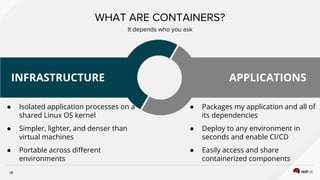
WHAT ARE CONTAINERS?
It depends who you ask
● Isolated application processes on a
shared Linux OS kernel
● Simpler, lighter, and denser than
virtual machines
● Portable across different
environments
● Packages my application and all of
its dependencies
● Deploy to any environment in
seconds and enable CI/CD
● Easily access and share
containerized components
INFRASTRUCTURE APPLICATIONS
ALL DONE, RIGHT?
EVERYBODY GO HOME
20
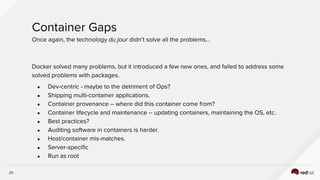
Container Gaps
Once again, the technology du jour didn’t solve all the problems...
Docker solved many problems, but it introduced a few new ones, and failed to address some
solved problems with packages.
● Dev-centric - maybe to the detriment of Ops?
● Shipping multi-container applications.
● Container provenance -- where did this container come from?
● Container lifecycle and maintenance -- updating containers, maintaining the OS, etc.
● Best practices?
● Auditing software in containers is harder.
● Host/container mis-matches.
● Server-specific
● Run as root
RED HAT AND CONTAINERS
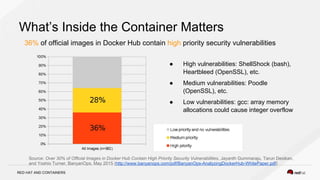
What’s Inside the Container Matters
36% of official images in Docker Hub contain high priority security vulnerabilities
● High vulnerabilities: ShellShock (bash),
Heartbleed (OpenSSL), etc.
● Medium vulnerabilities: Poodle
(OpenSSL), etc.
● Low vulnerabilities: gcc: array memory
allocations could cause integer overflow
Source: Over 30% of Official Images in Docker Hub Contain High Priority Security Vulnerabilities, Jayanth Gummaraju, Tarun Desikan,
and Yoshio Turner, BanyanOps, May 2015 (http://www.banyanops.com/pdf/BanyanOps-AnalyzingDockerHub-WhitePaper.pdf)
RED HAT AND CONTAINERS
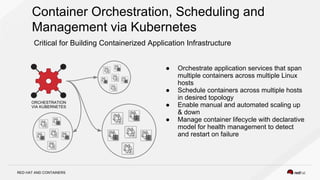
Container Orchestration, Scheduling and
Management via Kubernetes
Critical for Building Containerized Application Infrastructure
● Orchestrate application services that span
multiple containers across multiple Linux
hosts
● Schedule containers across multiple hosts
in desired topology
● Enable manual and automated scaling up
& down
● Manage container lifecycle with declarative
model for health management to detect
and restart on failure
ORCHESTRATION
VIA KUBERNETES
SOLVING PACKAGING PROBLEMS
IMPROVING THE HOST/DISTRO
INSERT DESIGNATOR, IF NEEDED28
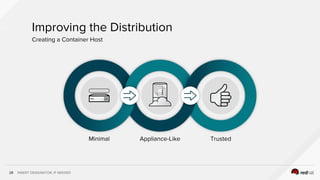
Minimal Appliance-Like Trusted
Improving the Distribution
Creating a Container Host
29
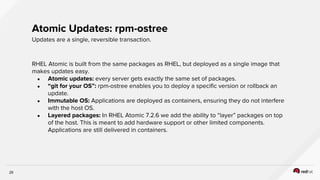
RHEL Atomic is built from the same packages as RHEL, but deployed as a single image that
makes updates easy.
● Atomic updates: every server gets exactly the same set of packages.
● “git for your OS”: rpm-ostree enables you to deploy a specific version or rollback an
update.
● Immutable OS: Applications are deployed as containers, ensuring they do not interfere
with the host OS.
● Layered packages: In RHEL Atomic 7.2.6 we add the ability to “layer” packages on top
of the host. This is meant to add hardware support or other limited components.
Applications are still delivered in containers.
Atomic Updates: rpm-ostree
Updates are a single, reversible transaction.
30
RHEL Atomic 7.3 adds support for simple
image signing.
● Images may be signed as a whole.
● Can set policy to refuse to run
unsigned images or only images with
specific signatures.
● OpenShift/Kubernetes integration are
coming soon.
Laying a foundation for a strong chain of trust for container images
SIMPLE IMAGE SIGNING
31
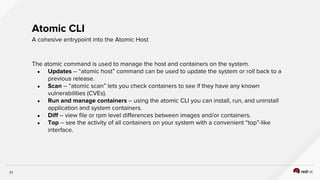
The atomic command is used to manage the host and containers on the system.
● Updates -- “atomic host” command can be used to update the system or roll back to a
previous release.
● Scan -- “atomic scan” lets you check containers to see if they have any known
vulnerabilities (CVEs).
● Run and manage containers -- using the atomic CLI you can install, run, and uninstall
application and system containers.
● Diff -- view file or rpm level differences between images and/or containers.
● Top -- see the activity of all containers on your system with a convenient “top”-like
interface.
Atomic CLI
A cohesive entrypoint into the Atomic Host
32
Atomic Host offers support for Docker-formatted containers.
● Atomic Host is streamlined and optimized to run applications comprising one or more
Docker-formatted containers.
● RHEL Atomic 7.3 offers docker 1.10 and docker-latest (1.12).
● System containers offer the ability to run services before Docker runs. This also allows
us to put fewer packages in the host OS.
● Limiting applications to containers simplifies life for operators and developers.
Linux Containers
Run applications and system services in containers.
33
WHAT ABOUT THE DESKTOP?
34
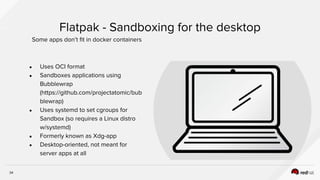
● Uses OCI format
● Sandboxes applications using
Bubblewrap
(https://github.com/projectatomic/bub
blewrap)
● Uses systemd to set cgroups for
Sandbox (so requires a Linux distro
w/systemd)
● Formerly known as Xdg-app
● Desktop-oriented, not meant for
server apps at all
Flatpak - Sandboxing for the desktop
Some apps don’t fit in docker containers
35
Flatpak Use
A quick description - see Flatpak.org for more
Using Flatpak is easy-ish, but getting easier
● Add Flatpak repos separately (e.g., GNOME Nightly)
● Install and update applications separately from the rest of your Desktop
● KDE Runtime for Flatpak in development
● “might eat your pet or firstborn”
● Can use --user to install apps without root permissions
● Still early days, but shows promise for desktop apps distribution
OCI & CRI-O
INSERT DESIGNATOR, IF NEEDED37
We need a way to distribute and run
images that everybody agrees on -- even if
the implementations differ..
● cri-o: OCI-based implementation of
Kubernetes Container Runtime
Interface
● OCI Container Format: An agreed-on
on-disk format for Linux containers
Container Standards
Can’t we all just get along?
RED HAT AND CONTAINERS
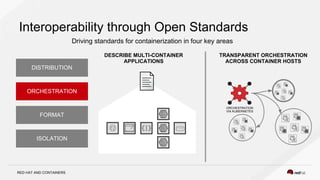
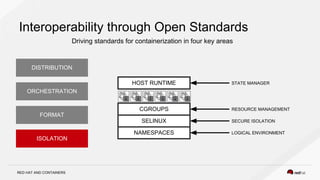
Interoperability through Open Standards
Driving standards for containerization in four key areas
ISOLATION
FORMAT
ORCHESTRATION
DISTRIBUTION
NAMESPACES
SECURE ISOLATION
LOGICAL ENVIRONMENT
STATE MANAGER
RESOURCE MANAGEMENT
SELINUX
CGROUPS
HOST RUNTIME
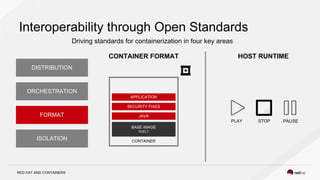
RED HAT AND CONTAINERS
Interoperability through Open Standards
Driving standards for containerization in four key areas
CONTAINER FORMAT HOST RUNTIME
CONTAINER
BASE IMAGE
RHEL7
JAVA
SECURITY FIXES
APPLICATION
PLAY STOP PAUSE
ISOLATION
FORMAT
ORCHESTRATION
DISTRIBUTION
RED HAT AND CONTAINERS
Interoperability through Open Standards
Driving standards for containerization in four key areas
DESCRIBE MULTI-CONTAINER
APPLICATIONS
TRANSPARENT ORCHESTRATION
ACROSS CONTAINER HOSTS
ORCHESTRATION
VIA KUBERNETES
ISOLATION
FORMAT
ORCHESTRATION
DISTRIBUTION
RED HAT AND CONTAINERS
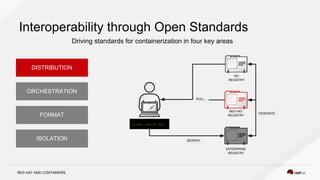
Interoperability through Open Standards
Driving standards for containerization in four key areas
ISV
REGISTRY
Docker search foo
ENTERPRISE
REGISTRY
RED HAT
REGISTRY
SEARCH
PULL
FEDERATE
ISOLATION
FORMAT
ORCHESTRATION
DISTRIBUTION
INSERT DESIGNATOR, IF NEEDED42
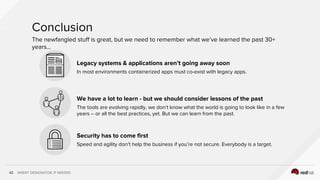
Legacy systems & applications aren’t going away soon
In most environments containerized apps must co-exist with legacy apps.
We have a lot to learn - but we should consider lessons of the past
The tools are evolving rapidly, we don’t know what the world is going to look like in a few
years -- or all the best practices, yet. But we can learn from the past.
Security has to come first
Speed and agility don’t help the business if you’re not secure. Everybody is a target.
Conclusion
The newfangled stuff is great, but we need to remember what we’ve learned the past 30+
years...
THANK YOU
plus.google.com/+RedHat
linkedin.com/company/red-hat
youtube.com/user/RedHatVideos
facebook.com/redhatinc
twitter.com/RedHatNews

Thinking inside the box (shared)

  • 1.
    THINKING INSIDE THEBOX Can Containers Solve the Package Problem? Joe Brockmeier Senior Evangelist, Linux Containers 2 November 2016
  • 2.
  • 3.
    3 A Brief Historyof Packaging The Problems We Face Mistakes We’re Making (Again) Some Solutions WHAT WE’LL COVER A complete treatise on software packaging in 45 minutes or less…
  • 4.
    4 THE PROBLEM We needto be able to move software from development to test to production. It needs to be distributed over insecure networks. Operators need to be able to manage the software, developers need to be able to deliver with minimal friction.
  • 5.
    5 We had thesource, and found that it was good. ● Worked on a variety of systems (maybe) ● You did your own configuration. ● Was appropriate for speed of development circa 1990-1997. The Early Days... ./configure; make; make install
  • 6.
    6 UNIX make ‘77 GNU make ‘88 ABrief (and incomplete) History of Packaging* From `make install` to Docker (and beyond) * not to scale... Linux released ‘91 dpkg ‘94 RPM ‘97 ‘98 APT YUM ‘03 ? ‘17 OVF ‘08 Docker ‘13 Kubernetes ‘14
  • 7.
    7 UNIX make ‘77 GNU make ‘88 Riseof the Package Manager No More ‘make install’ * not to scale... Linux released ‘91 dpkg ‘94 RPM ‘97 ‘98 APT YUM ‘03 ? ‘17 OVF ‘08 Docker ‘13 Kubernetes ‘14
  • 8.
    8 UNIX make ‘77 GNU make ‘88 Evolutionof Package Management From `make install` to Docker (and beyond) * not to scale... Linux released ‘91 dpkg ‘94 RPM ‘97 ‘98 APT YUM ‘03 ? ‘17 OVF ‘08 Docker ‘13 Kubernetes ‘14
  • 9.
    9 This was great,briefly, but.... ● Upstream speed + distribution speed rarely matched ● Developers wanted newer releases of $language or $library than in the distribution ● You can never package everything ● Upstreams didn’t like decisions made by distributions… ● Packaging guidelines not widely loved Linux Distributions as the Center of Gravity To be relevant, you had to be packaged
  • 10.
    10 FRAGMENTATION Should I usedpkg, or RPM? Package for Red Hat, or SUSE, or Debian, or Ubuntu, or…? COMPLICATED Packaging guidelines tend to be complicated. Developers do not love creating RPMs and Debian packages. PACKAGING APPLICATIONS IS HARD It’s easy to package WordPress. It’s hard to get it into a usable state from RPM or dpkg. Packaging Headaches Not quite there yet….
  • 11.
    11 More Packaging Thoughts Imperfect,but still useful Additional pros and cons for package formats… ● Forward “only” -- it’s difficult to back out packages, it’s super difficult to return to an arbitrary state for a system. ● We have an enormous investment in tooling. We don’t want to throw that away. ● We have an enormous investment in training. We don’t want to throw that away. ● For all its flaws, standard Linux packaging has tens of thousands of hours of accumulated wisdom that has been poured into its design + tooling. Ignore this at your peril.
  • 12.
    12 UNIX make ‘77 GNU make ‘88 VirtualAppliances Let’s just ship the whole $%@^ thing! * not to scale... Linux released ‘91 dpkg ‘94 RPM ‘97 ‘98 APT YUM ‘03 ? ‘17 OVF ‘08 Docker ‘13 Kubernetes ‘14
  • 13.
    13 If you havethe control of the “full stack” it’s easy to ship applications. ● Virtual appliances can be pre-configured ● There’s no “installation” -- just spin up the VM and go ● No need to package software. Virtual Appliances Portable & predictable: What could go wrong?
  • 14.
    14 A few ofthe problems with Virtual Appliances ● VM “sprawl” -- easy to start VMs, harder to keep track of ● Heavier on resource utilization & scaling is a problem ● Tracking updates, etc. in virtual appliances can be a nightmare ● Standardization? One ISV uses RHEL, another Debian, another SUSE… Virtual Appliance Problems The old saying about regular expressions applies…
  • 15.
  • 16.
    16 UNIX make ‘77 GNU make ‘88 ABrief (and incomplete) History of Packaging* From `make install` to Docker (and beyond) * not to scale... Linux released ‘91 dpkg ‘94 RPM ‘97 ‘98 APT YUM ‘03 ? ‘17 OVF ‘08 Docker ‘13 Kubernetes ‘14
  • 17.
    RED HAT ANDCONTAINERS History of Containers 2000 2010 2005 2015 2000: JAILS ADDED TO FREEBSD 2006: GENERIC PROCESS CONTAINERS 2008: KERNEL AND USER NAMESPACES 2014: GOOGLE KUBERNETES 2008: LINUX CONTAINER PROJECT (LXC) 2015: STANDARDS VIA OCI AND CNCF 2013: RED HAT ENTERPRISE LINUX 2013: DOTCLOUD BECOMES DOCKER 2007: GPC RENAMED CONTROL GROUPS 2003: SELINUX ADDED TO LINUX MAINLINE 2015: RHT CONTAINER PLATFORMS 2015: RHEL ATOMIC HOST 2001: LINUX -VSERVER PROJECT 2013: DOT CLOUD PYCON LIGHTNING TALK 2005: FULL RELEASE OF SOLARIS ZONES
  • 18.
    18 WHAT ARE CONTAINERS? Itdepends who you ask ● Isolated application processes on a shared Linux OS kernel ● Simpler, lighter, and denser than virtual machines ● Portable across different environments ● Packages my application and all of its dependencies ● Deploy to any environment in seconds and enable CI/CD ● Easily access and share containerized components INFRASTRUCTURE APPLICATIONS
  • 19.
  • 20.
    20 Container Gaps Once again,the technology du jour didn’t solve all the problems... Docker solved many problems, but it introduced a few new ones, and failed to address some solved problems with packages. ● Dev-centric - maybe to the detriment of Ops? ● Shipping multi-container applications. ● Container provenance -- where did this container come from? ● Container lifecycle and maintenance -- updating containers, maintaining the OS, etc. ● Best practices? ● Auditing software in containers is harder. ● Host/container mis-matches. ● Server-specific ● Run as root
  • 21.
    RED HAT ANDCONTAINERS What’s Inside the Container Matters 36% of official images in Docker Hub contain high priority security vulnerabilities ● High vulnerabilities: ShellShock (bash), Heartbleed (OpenSSL), etc. ● Medium vulnerabilities: Poodle (OpenSSL), etc. ● Low vulnerabilities: gcc: array memory allocations could cause integer overflow Source: Over 30% of Official Images in Docker Hub Contain High Priority Security Vulnerabilities, Jayanth Gummaraju, Tarun Desikan, and Yoshio Turner, BanyanOps, May 2015 (http://www.banyanops.com/pdf/BanyanOps-AnalyzingDockerHub-WhitePaper.pdf)
  • 22.
    RED HAT ANDCONTAINERS Container Orchestration, Scheduling and Management via Kubernetes Critical for Building Containerized Application Infrastructure ● Orchestrate application services that span multiple containers across multiple Linux hosts ● Schedule containers across multiple hosts in desired topology ● Enable manual and automated scaling up & down ● Manage container lifecycle with declarative model for health management to detect and restart on failure ORCHESTRATION VIA KUBERNETES
  • 23.
  • 27.
  • 28.
    INSERT DESIGNATOR, IFNEEDED28 Minimal Appliance-Like Trusted Improving the Distribution Creating a Container Host
  • 29.
    29 RHEL Atomic isbuilt from the same packages as RHEL, but deployed as a single image that makes updates easy. ● Atomic updates: every server gets exactly the same set of packages. ● “git for your OS”: rpm-ostree enables you to deploy a specific version or rollback an update. ● Immutable OS: Applications are deployed as containers, ensuring they do not interfere with the host OS. ● Layered packages: In RHEL Atomic 7.2.6 we add the ability to “layer” packages on top of the host. This is meant to add hardware support or other limited components. Applications are still delivered in containers. Atomic Updates: rpm-ostree Updates are a single, reversible transaction.
  • 30.
    30 RHEL Atomic 7.3adds support for simple image signing. ● Images may be signed as a whole. ● Can set policy to refuse to run unsigned images or only images with specific signatures. ● OpenShift/Kubernetes integration are coming soon. Laying a foundation for a strong chain of trust for container images SIMPLE IMAGE SIGNING
  • 31.
    31 The atomic commandis used to manage the host and containers on the system. ● Updates -- “atomic host” command can be used to update the system or roll back to a previous release. ● Scan -- “atomic scan” lets you check containers to see if they have any known vulnerabilities (CVEs). ● Run and manage containers -- using the atomic CLI you can install, run, and uninstall application and system containers. ● Diff -- view file or rpm level differences between images and/or containers. ● Top -- see the activity of all containers on your system with a convenient “top”-like interface. Atomic CLI A cohesive entrypoint into the Atomic Host
  • 32.
    32 Atomic Host offerssupport for Docker-formatted containers. ● Atomic Host is streamlined and optimized to run applications comprising one or more Docker-formatted containers. ● RHEL Atomic 7.3 offers docker 1.10 and docker-latest (1.12). ● System containers offer the ability to run services before Docker runs. This also allows us to put fewer packages in the host OS. ● Limiting applications to containers simplifies life for operators and developers. Linux Containers Run applications and system services in containers.
  • 33.
  • 34.
    34 ● Uses OCIformat ● Sandboxes applications using Bubblewrap (https://github.com/projectatomic/bub blewrap) ● Uses systemd to set cgroups for Sandbox (so requires a Linux distro w/systemd) ● Formerly known as Xdg-app ● Desktop-oriented, not meant for server apps at all Flatpak - Sandboxing for the desktop Some apps don’t fit in docker containers
  • 35.
    35 Flatpak Use A quickdescription - see Flatpak.org for more Using Flatpak is easy-ish, but getting easier ● Add Flatpak repos separately (e.g., GNOME Nightly) ● Install and update applications separately from the rest of your Desktop ● KDE Runtime for Flatpak in development ● “might eat your pet or firstborn” ● Can use --user to install apps without root permissions ● Still early days, but shows promise for desktop apps distribution
  • 36.
  • 37.
    INSERT DESIGNATOR, IFNEEDED37 We need a way to distribute and run images that everybody agrees on -- even if the implementations differ.. ● cri-o: OCI-based implementation of Kubernetes Container Runtime Interface ● OCI Container Format: An agreed-on on-disk format for Linux containers Container Standards Can’t we all just get along?
  • 38.
    RED HAT ANDCONTAINERS Interoperability through Open Standards Driving standards for containerization in four key areas ISOLATION FORMAT ORCHESTRATION DISTRIBUTION NAMESPACES SECURE ISOLATION LOGICAL ENVIRONMENT STATE MANAGER RESOURCE MANAGEMENT SELINUX CGROUPS HOST RUNTIME
  • 39.
    RED HAT ANDCONTAINERS Interoperability through Open Standards Driving standards for containerization in four key areas CONTAINER FORMAT HOST RUNTIME CONTAINER BASE IMAGE RHEL7 JAVA SECURITY FIXES APPLICATION PLAY STOP PAUSE ISOLATION FORMAT ORCHESTRATION DISTRIBUTION
  • 40.
    RED HAT ANDCONTAINERS Interoperability through Open Standards Driving standards for containerization in four key areas DESCRIBE MULTI-CONTAINER APPLICATIONS TRANSPARENT ORCHESTRATION ACROSS CONTAINER HOSTS ORCHESTRATION VIA KUBERNETES ISOLATION FORMAT ORCHESTRATION DISTRIBUTION
  • 41.
    RED HAT ANDCONTAINERS Interoperability through Open Standards Driving standards for containerization in four key areas ISV REGISTRY Docker search foo ENTERPRISE REGISTRY RED HAT REGISTRY SEARCH PULL FEDERATE ISOLATION FORMAT ORCHESTRATION DISTRIBUTION
  • 42.
    INSERT DESIGNATOR, IFNEEDED42 Legacy systems & applications aren’t going away soon In most environments containerized apps must co-exist with legacy apps. We have a lot to learn - but we should consider lessons of the past The tools are evolving rapidly, we don’t know what the world is going to look like in a few years -- or all the best practices, yet. But we can learn from the past. Security has to come first Speed and agility don’t help the business if you’re not secure. Everybody is a target. Conclusion The newfangled stuff is great, but we need to remember what we’ve learned the past 30+ years...
  • 43.