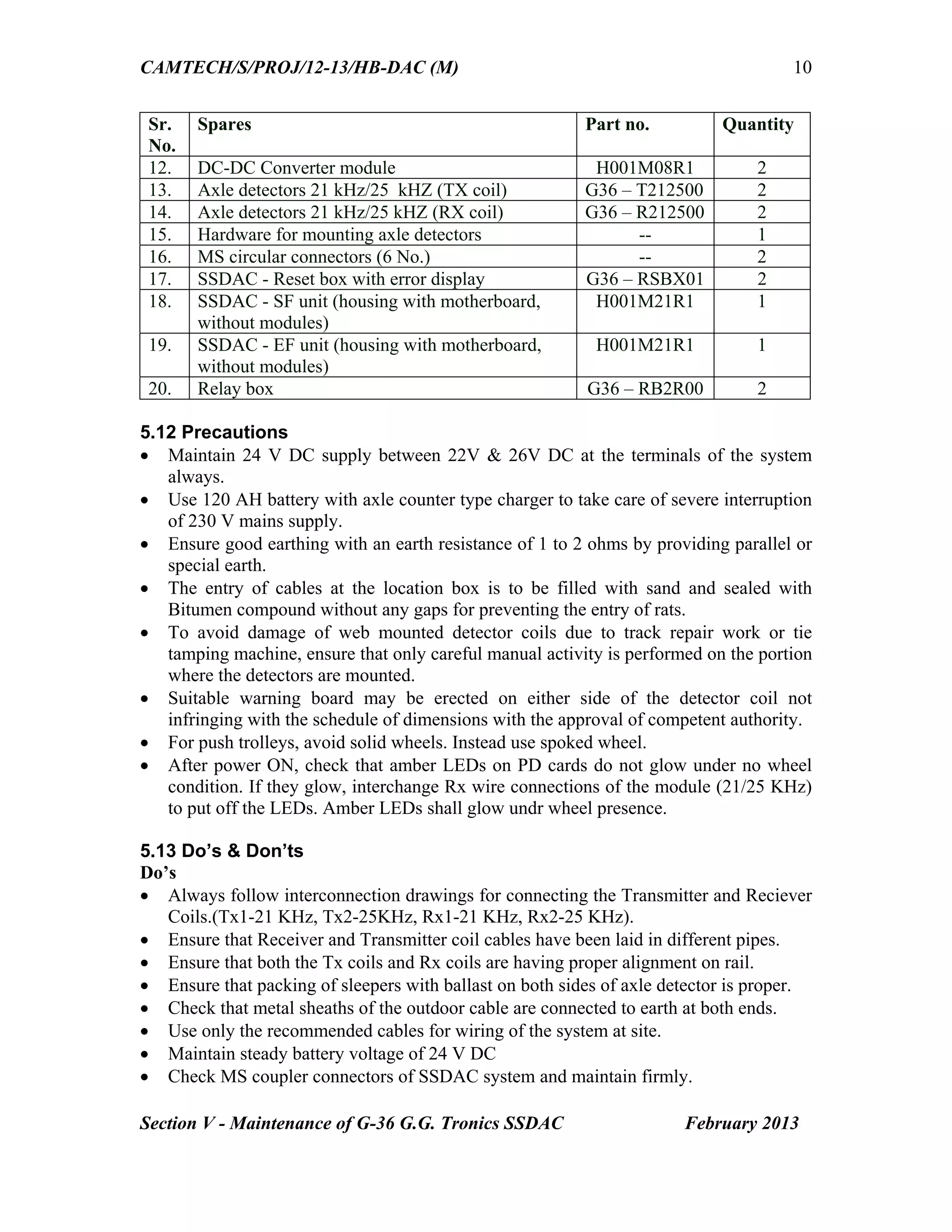
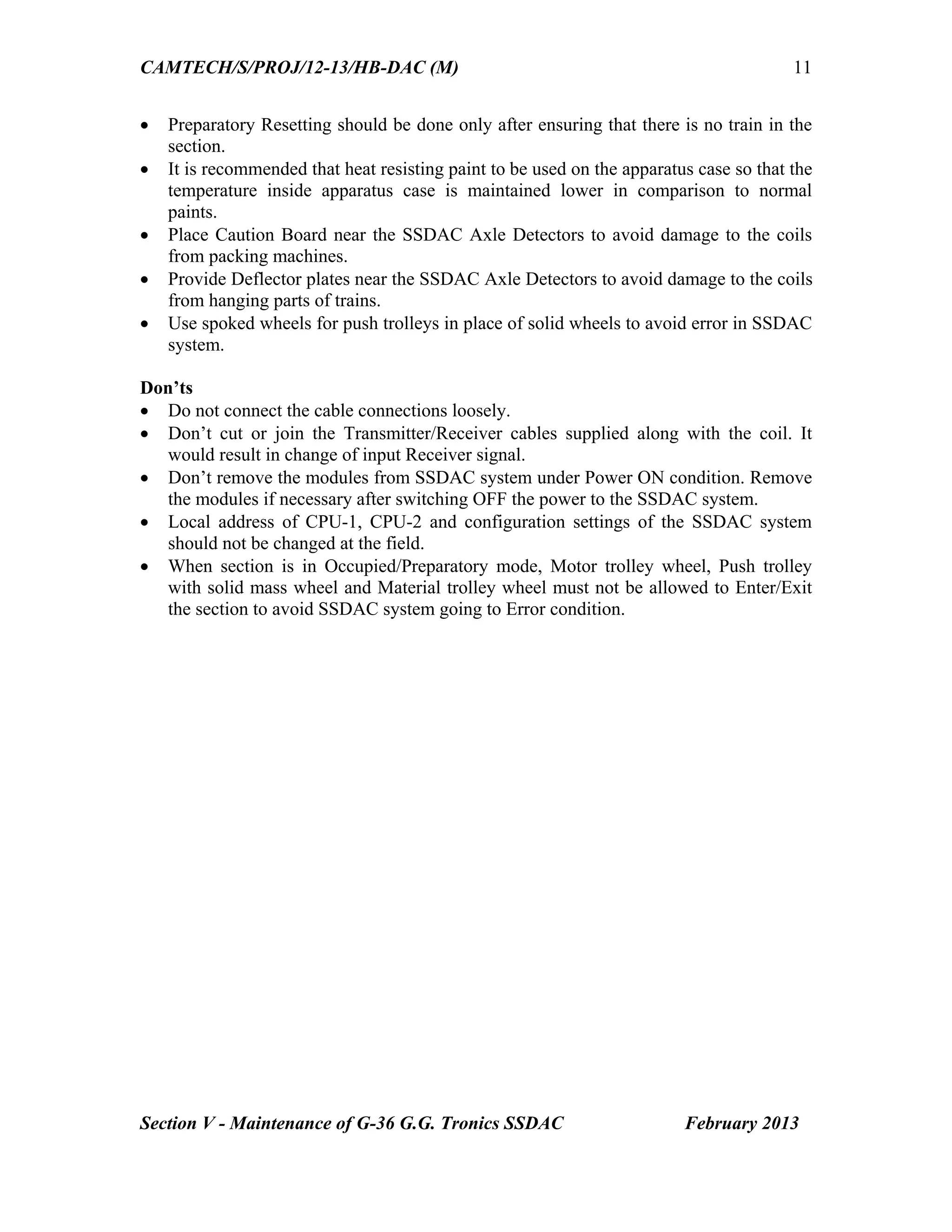
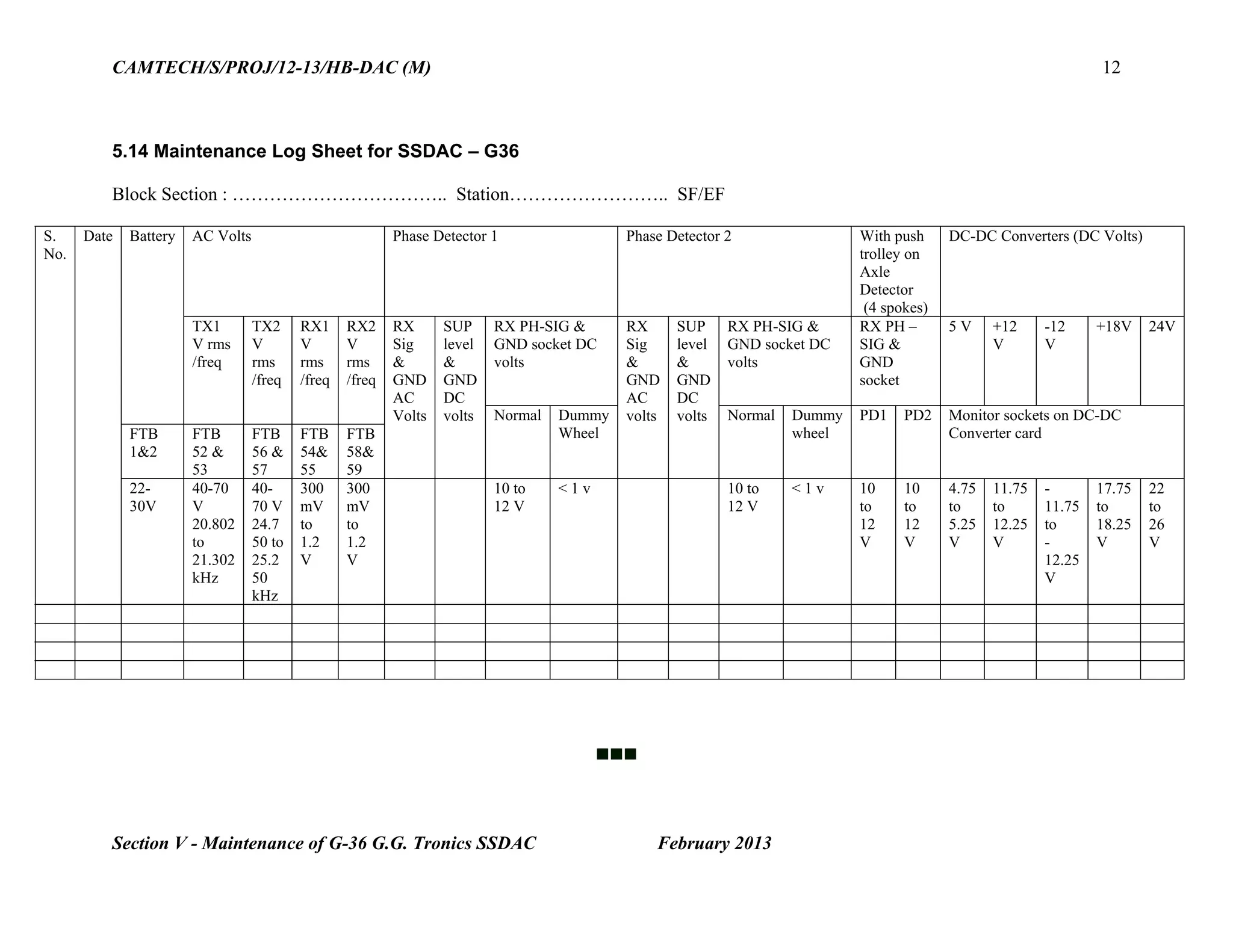
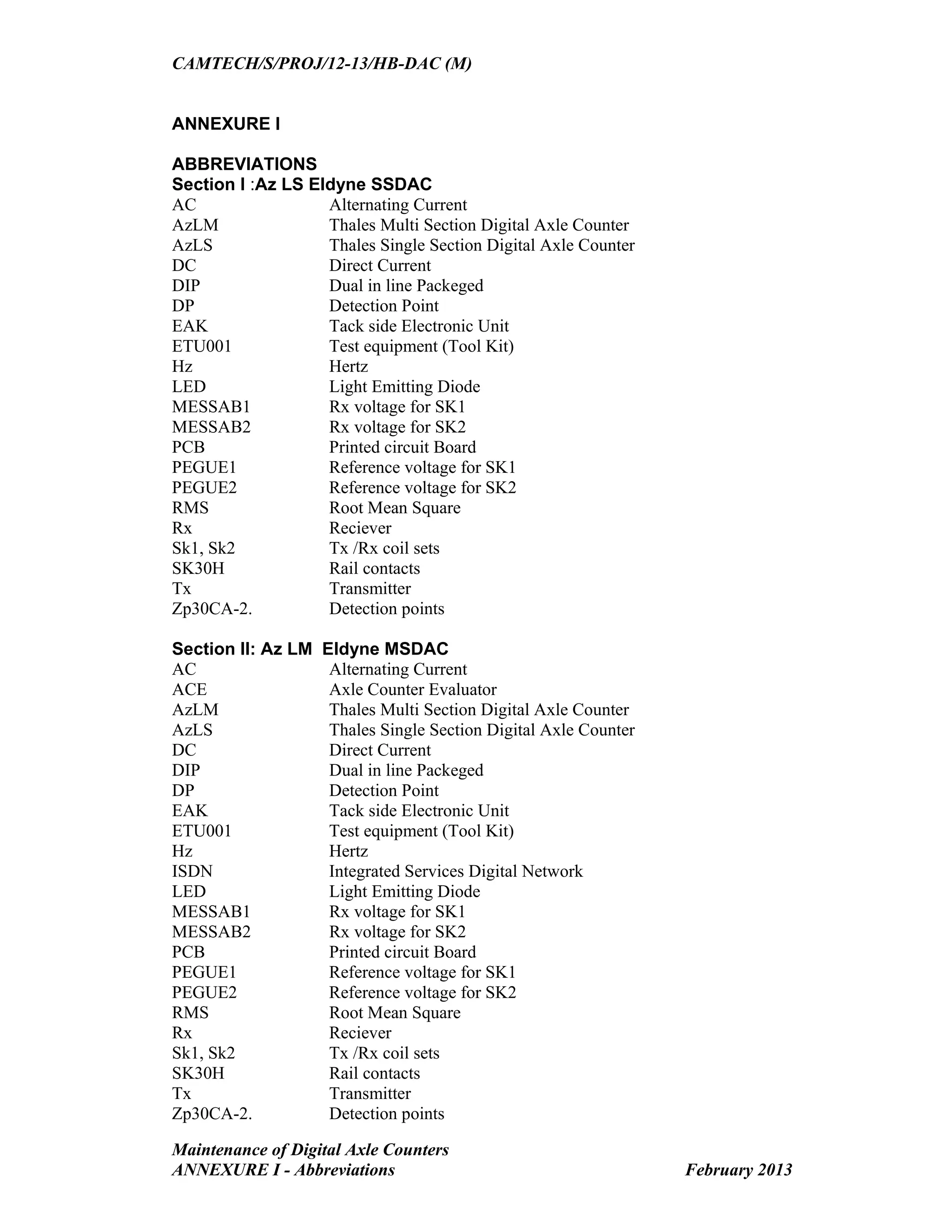
The document provides maintenance information for the Eldyne AzLS single section digital axle counter system. It details procedures for fixing track devices after rail replacement, adjusting rail contact transmit heads using a dummy wheel and test equipment, and resetting the system. Key steps include drilling mounting holes for rail contacts in the correct position, using a test kit to measure signal levels and adjust potentiometers to equalize rectified and reference voltages, and operating the reset box to initiate a reset. Proper maintenance following the guidance helps ensure trouble-free performance of the digital axle counter.
Hkkjr ljdkj &GOVERNMENTOF INDIA
jsy ea=ky;& MINISTRY OF RAILWAYS
¼dk;kZy;hu iz;ksx gsrq½& (For official use only)
Handbook on
MAINTENANCE
of
MAHARAJPUR, GWALIOR – 474 005
CAMTECH/S/PROJ/2012-13/HB-DAC (M)/1.0
February 2013
2.
FOREWORD
Track circuits andAxle counters play a vital role in railway signalling as these
detect the presence of train vehicle on a given section of track. Digital Axle Counters;
the advanced version of conventional axle counters are progressively being installed
on Indian Railways due to their enhanced safety features and reliability.
CAMTECH is continuously making efforts in documentation and upgradation of
information on advanced maintenance practices. The current handbook consisting of
maintenance information on Digital Axle Counters of RDSO approved firms is a
further step in this direction.
The information given in this handbook will help signal personnel in maintaining
the above system.
CAMTECH Gwalior A.R.Tupe
Date: 11.03.2013 Executive Director
3.
PREFACE
Conventional track circuitsand axle counters have their own limitations in
terms of its range of operation and reliability and require frequent maintenance. The
Micro-controller and software based Digital Axle Counters require less maintenance
and have added feature of diagnostics information through LEDs. Digital Axle
Counters, both Single section and Multi Section have applications in straight sections
and point zones of Station area as well as in proving of Block section.
This handbook has been prepared to help the field personnel in maintaining Digital
Axle Counters installed in their section for trouble-free performance. The handbook
has been divided into vendor specific sections; containing maintenance information on
the systems manufactured by different RDSO approved firms.
It is clarified that this handbook does not supersede any existing provisions laid
down in Signal Engineering Manual, Railway Board publications and RDSO
publications. This handbook is not statutory and instructions given in it are for the
purpose of guidance only.
We are sincerely thankful to Shri R. Meena, Sr.D.S.T.E./Agra/NC Rly., M/s
Eldyne Electrosystems Pvt. Ltd., Kolkata, M/s Central Electronics Ltd., Sahibabad,
M/s G.G.Tronics, Bangalore, M/s Siemens Ltd. Mumbai and field personnel who
helped us in preparation of the handbook.
Since technological upgradation and learning is a continuous process, you may feel
the need for some addition/modification in this handbook. If so, please give your
comments on email address dirsntcamtech@gmail.com or write to us at Indian
Railways Centre for Advanced Maintenance Technology, In front of Adityaz Hotel,
Maharajpur, Gwalior (M.P.) 474005.
CAMTECH Gwalior D.K.M.Yadav
Date: 08.03.2013 Jt .Director (S&T)
4.
Contents
Description Pages
Foreword i
Prefaceiii
Contents v
Correction Slip ix
Disclaimer & Our objective x
Section I : Maintenance of Az LS Eldyne Single Section Digital Axle Counter 1-16
Section II: Maintenance of Az LM Eldyne Multi Section Digital Axle Counter 1-9
Section III: Maintenance of Az S 350 U Siemens Multi Section Digital Axle
Counter
1-11
Section IV: Maintenance of DACF 710 A & DACF 710 P CEL Single Section
Digital Axle Counter
1-9
Section V: Maintenance of G36 GG Tronics Single Section Digital Axle Counter 1-12
Annexure I – Abbreviations
Annexure II – References
5.
ISSUE OF CORRECTIONSLIPS
The correction slips to be issued in future for this handbook will be numbered as follows:
CAMTECH/S/PROJ/2012-13/HB-DAC (M)/1.0# XX date .......
Where “XX” is the serial number of the concerned correction slip (starting from 01 onwards).
CORRECTION SLIPS ISSUED
Sr. No. of
Correction
Slip
Date of
issue
Page no. and Item
No. modified
Remarks
6.
DISCLAIMER
It is clarifiedthat the information given in this handbook does not supersede any
existing provisions laid down in the Signal Engineering Manual, Railway Board and
RDSO publications. This document is not statuary and instructions given are for the
purpose of guidance only. If at any point contradiction is observed, then SEM,
Railway Board/RDSO guidelines may be referred or prevalent Zonal Railways
instructions may be followed.
----------------------------------------------------------------------------------------------------
OUR OBJECTIVE
To upgrade Maintenance Technologies and Methodologies and achieve improvement in
Productivity and Performance of all Railway assets and manpower which inter-alia would
cover Reliability, Availability and Utilisation.
If you have any suggestion & any specific comments, please write to us:
Contact person: Director (Signal & Telecommunication)
Postal Address: Centre for Advanced Maintenance Technology, Maharajpur,
Gwalior (M.P.) Pin Code – 474 005
Phone : 0751 - 2470185
Fax : 0751 – 2470841
Email : dirsntcamtech@gmail.com
7.
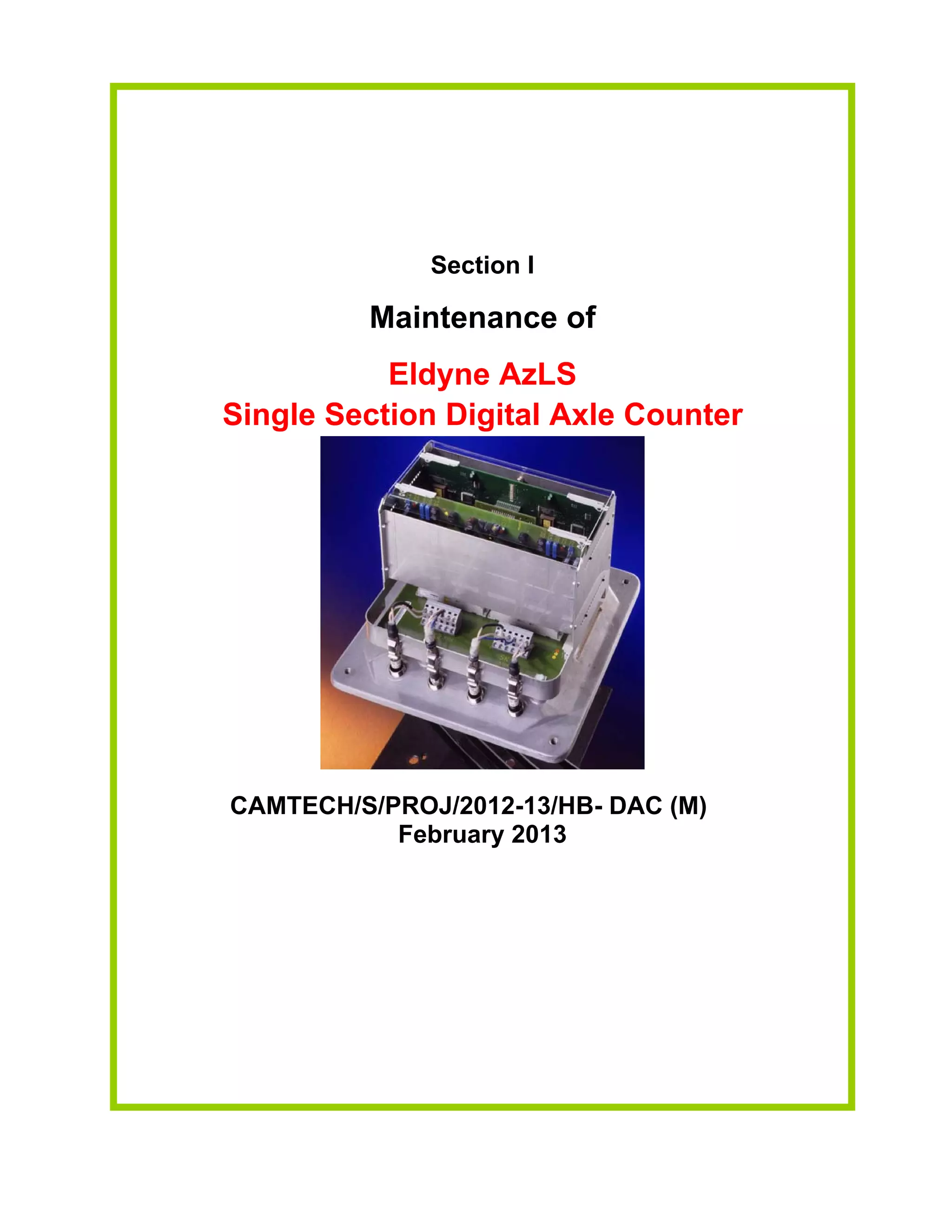
Section I
Maintenance of
EldyneAzLS
Single Section Digital Axle Counter
CAMTECH/S/PROJ/2012-13/HB- DAC (M)
February 2013
Go to Main Index
8.
Contents
Section I: Maintenanceof Az LS Eldyne Single Section Digital Axle
Counter
Sr. No. Description Page No.
1.1 Introduction 1
1.2 Fixing of track devices after replacement of rail 1
1.3 Termination details of EAK 3
1.4 Adjustment of Rail contact Tx head with Dummy
wheel and Tool Kit
5
1.5 Test equipment (Tool Kit) ETU001 6
1.6 Functions of Selector Switch in ETU 001 6
1.7 Parameters to be checked for adjustment of rail contact 7
1.8 Adjustment procedure 10
1.9 Reset Box 11
1.10 Steps to initiate a reset 11
1.11 Types of resetting for AzLS 12
1.12 Check points for maintenance 12
1.13 Do’s & Don’ts 13
1.14 Log Sheet 16
Go to Main Index
9.
CAMTECH/S/PROJ/12-13/HB-DAC (M)
Section I– Maintenance of AzLS Eldyne SSDAC February 2013
1
Section I
Maintenance of
Az LS
Eldyne Single Section Digital Axle Counter
1.1 Introduction
The AzLS system consists of at least two detection points Zp30CA-2, one at each end (entry
& exit) of the track section to be monitored. It consists of following parts:
(a) Outdoor Trackside system consisting of
(i) Rail contacts (SK30H) - It consists of two coil sets Sk1 and Sk2, both installed on the
same rail. The transmitter heads (Tx) are installed on the outside of the rail and receiver
heads (Rx) are installed on the inside of the rail directly opposite the respective Tx heads.
The two Tx coils are fed with different frequencies (approx. 30.6 kHz and 28 kHz). The
SK30H is fitted by three bolts to the web of the rail. The vertical position of the
respective mounting holes depends on the rail profile.
(ii) Track-Side Electronic Unit (EAK).
SK30H and EAK together form one detection point Zp30CA-2.
Each Tx/Rx head is equipped with fixed cables for connection to the electronic junction
box (EAK30H). (available in lengths 4m, 5.5m and 8m)
(b) Communication Link (A pair of star quad cable)
(c) Reset Relay (1000 ohm AC immunized Q series)
(d) Vital Relay (1000 Ohm AC immunized Q series 24 V 8F/8B)
1.2 Fixing of track devices after replacement of rail
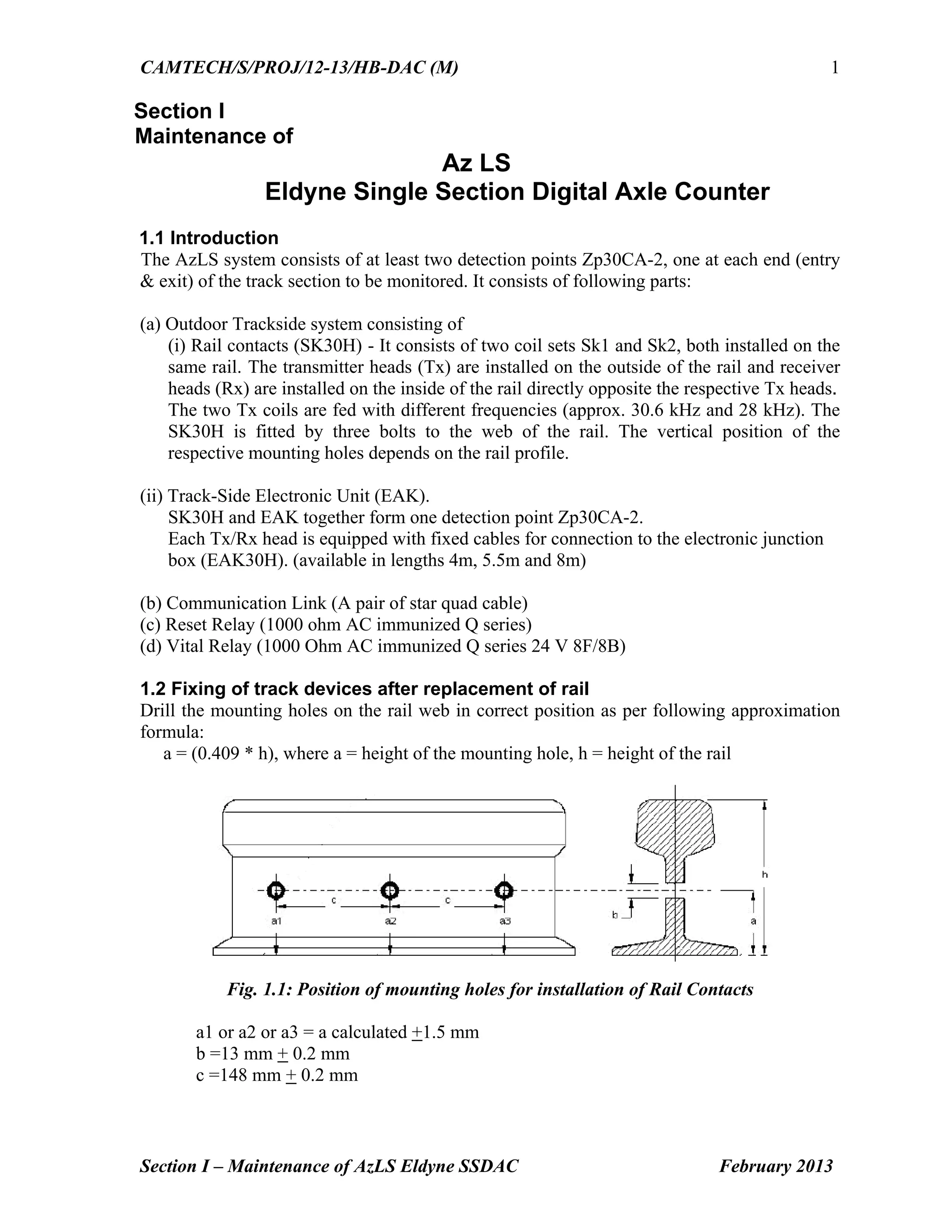
Drill the mounting holes on the rail web in correct position as per following approximation
formula:
a = (0.409 * h), where a = height of the mounting hole, h = height of the rail
Fig. 1.1: Position of mounting holes for installation of Rail Contacts
a1 or a2 or a3 = a calculated +1.5 mm
b =13 mm + 0.2 mm
c =148 mm + 0.2 mm
10.
CAMTECH/S/PROJ/12-13/HB-DAC (M)
Section I– Maintenance of AzLS Eldyne SSDAC February 2013
2
Height of mounting hole for different rail profiles is given below:
Rail Profile 90 lbs 52 Kg 60 Kg
a [mm] 56 mm 63 mm 68 mm
The final three holes of diameter 13mm are drilled on the rail web with the help of drilling
jig. consisting of:
(i) Drilling template
(ii) Mounting device for the drilling machine
(iii)Templates for the standard rail profiles
(iv)Fastening device
(v) The drilling machine
Fig.1.2: Mounting of Rail Contacts
(Tx heads on the outside and Rx heads on the inside of the rail)
Fig.1.3: EAK backplane assembly (without boards) as viewed from top
1
6a
4
5
3b¹3a¹
2¹
6b
1 Terminal for line-cable
2¹ Slot for Digital Evaluator
/ ISDN Board
3 (a/b) Address switches
5 Test equipment interface
4 Slot for analog board
6(a/b) WAGO-terminal
2² Slot for Digital Board
2²
3b²3a²
Washer
Nut
Nylon Bush
Insulating Plate
M12 bolt
M8 bolt
11.
CAMTECH/S/PROJ/12-13/HB-DAC (M)
Section I– Maintenance of AzLS Eldyne SSDAC February 2013
3
1.3 Termination details of EAK
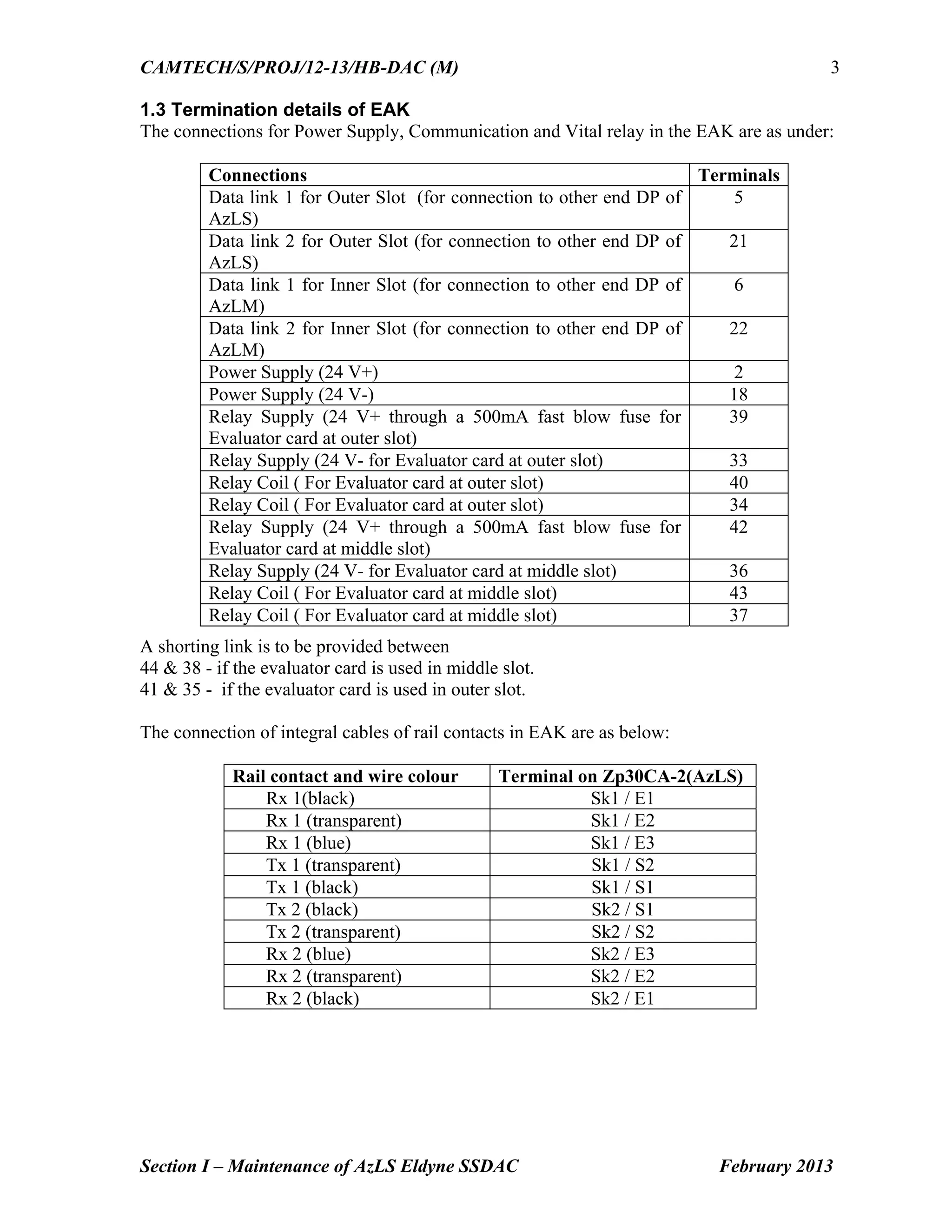
The connections for Power Supply, Communication and Vital relay in the EAK are as under:
A shorting link is to be provided between
44 & 38 - if the evaluator card is used in middle slot.
41 & 35 - if the evaluator card is used in outer slot.
The connection of integral cables of rail contacts in EAK are as below:
Rail contact and wire colour Terminal on Zp30CA-2(AzLS)
Rx 1(black) Sk1 / E1
Rx 1 (transparent) Sk1 / E2
Rx 1 (blue) Sk1 / E3
Tx 1 (transparent) Sk1 / S2
Tx 1 (black) Sk1 / S1
Tx 2 (black) Sk2 / S1
Tx 2 (transparent) Sk2 / S2
Rx 2 (blue) Sk2 / E3
Rx 2 (transparent) Sk2 / E2
Rx 2 (black) Sk2 / E1
Connections Terminals
Data link 1 for Outer Slot (for connection to other end DP of
AzLS)
5
Data link 2 for Outer Slot (for connection to other end DP of
AzLS)
21
Data link 1 for Inner Slot (for connection to other end DP of
AzLM)
6
Data link 2 for Inner Slot (for connection to other end DP of
AzLM)
22
Power Supply (24 V+) 2
Power Supply (24 V-) 18
Relay Supply (24 V+ through a 500mA fast blow fuse for
Evaluator card at outer slot)
39
Relay Supply (24 V- for Evaluator card at outer slot) 33
Relay Coil ( For Evaluator card at outer slot) 40
Relay Coil ( For Evaluator card at outer slot) 34
Relay Supply (24 V+ through a 500mA fast blow fuse for
Evaluator card at middle slot)
42
Relay Supply (24 V- for Evaluator card at middle slot) 36
Relay Coil ( For Evaluator card at middle slot) 43
Relay Coil ( For Evaluator card at middle slot) 37
12.
CAMTECH/S/PROJ/12-13/HB-DAC (M)
Section I– Maintenance of AzLS Eldyne SSDAC February 2013
4
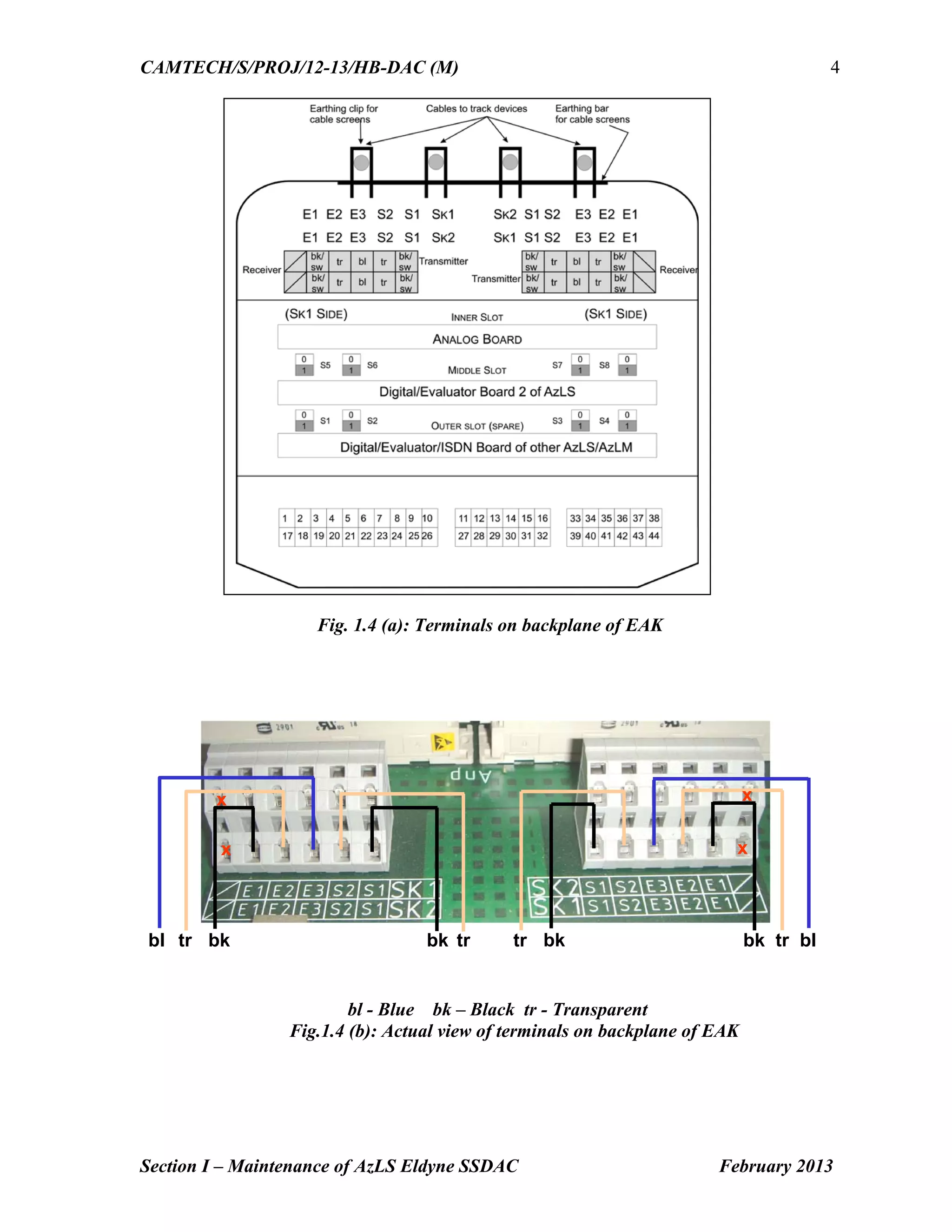
Fig. 1.4 (a): Terminals on backplane of EAK
bl - Blue bk – Black tr - Transparent
Fig.1.4 (b): Actual view of terminals on backplane of EAK
bl tr bk bk tr blbk tr tr bk
x
x x
x
13.
CAMTECH/S/PROJ/12-13/HB-DAC (M)
Section I– Maintenance of AzLS Eldyne SSDAC February 2013
5
1.4 Adjustment of Rail contact Tx head with Dummy wheel and Tool Kit
The Tx head is adjusted such that the received rectified voltage produced when a wheel is
present has the same amplitude but the opposite polarity as the voltage produced with the
wheel absent.
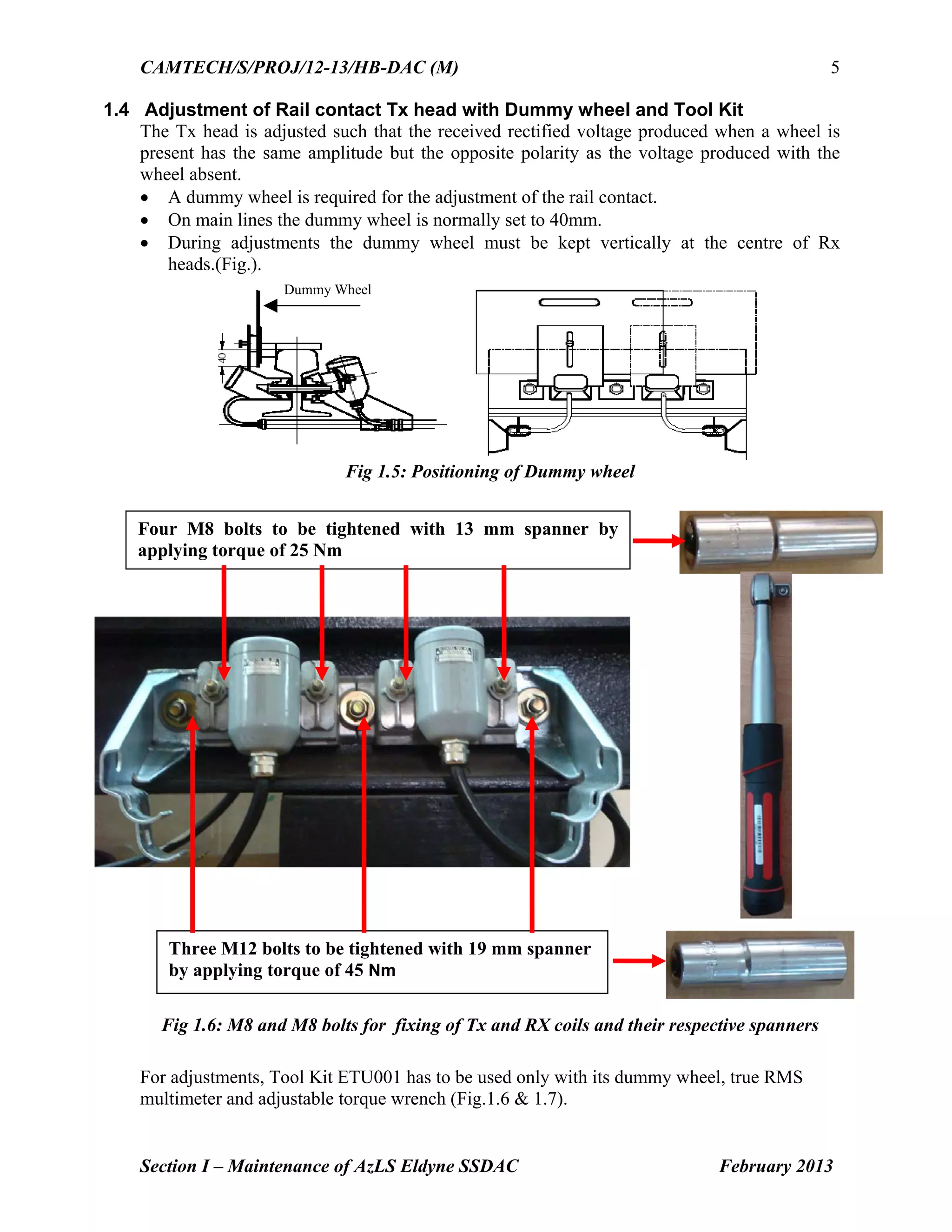
A dummy wheel is required for the adjustment of the rail contact.
On main lines the dummy wheel is normally set to 40mm.
During adjustments the dummy wheel must be kept vertically at the centre of Rx
heads.(Fig.).
Dummy Wheel
Fig 1.5: Positioning of Dummy wheel
Fig 1.6: M8 and M8 bolts for fixing of Tx and RX coils and their respective spanners
For adjustments, Tool Kit ETU001 has to be used only with its dummy wheel, true RMS
multimeter and adjustable torque wrench (Fig.1.6 & 1.7).
Four M8 bolts to be tightened with 13 mm spanner by
applying torque of 25 Nm
Three M12 bolts to be tightened with 19 mm spanner
by applying torque of 45 Nm
14.
CAMTECH/S/PROJ/12-13/HB-DAC (M)
Section I– Maintenance of AzLS Eldyne SSDAC February 2013
6
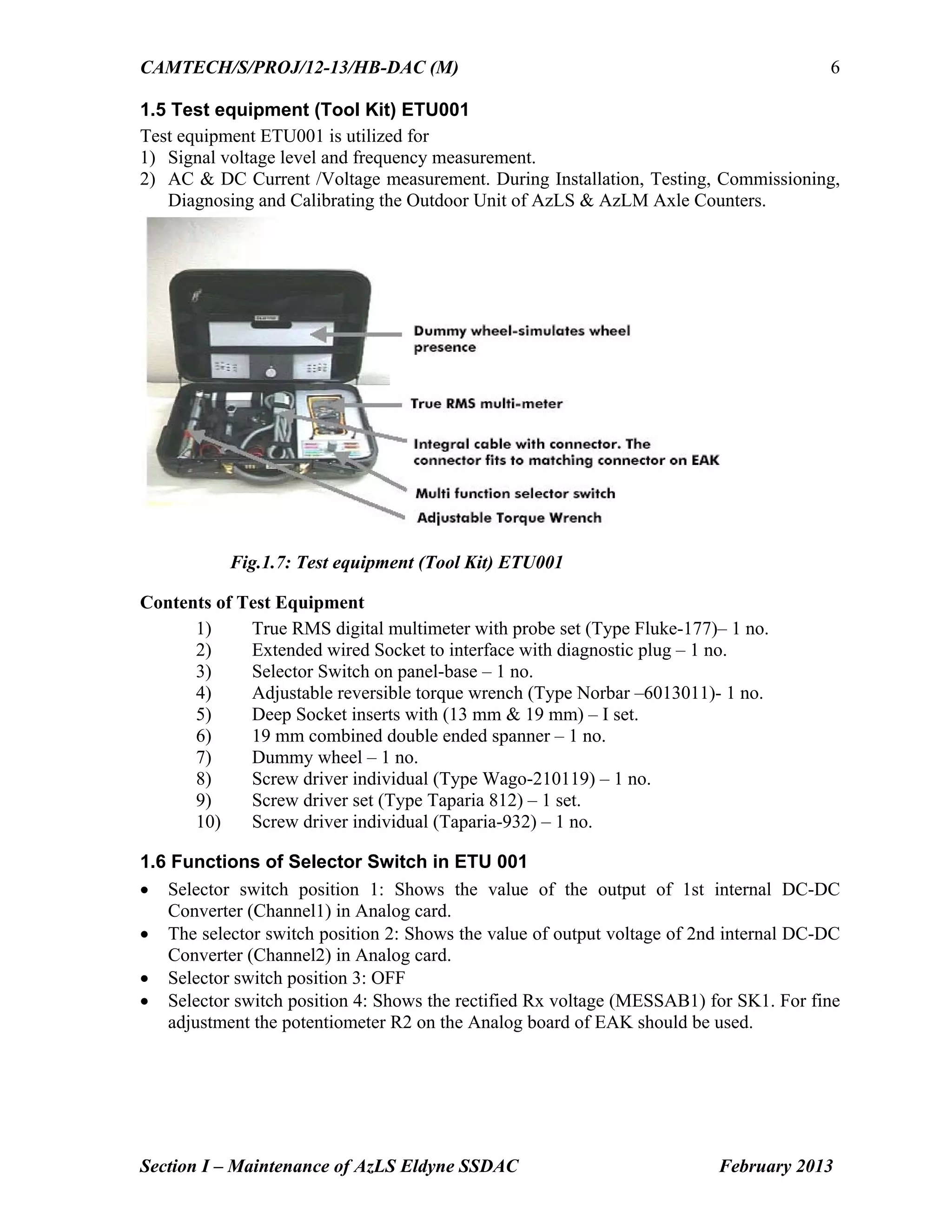
1.5 Test equipment (Tool Kit) ETU001
Test equipment ETU001 is utilized for
1) Signal voltage level and frequency measurement.
2) AC & DC Current /Voltage measurement. During Installation, Testing, Commissioning,
Diagnosing and Calibrating the Outdoor Unit of AzLS & AzLM Axle Counters.
Fig.1.7: Test equipment (Tool Kit) ETU001
Contents of Test Equipment
1) True RMS digital multimeter with probe set (Type Fluke-177)– 1 no.
2) Extended wired Socket to interface with diagnostic plug – 1 no.
3) Selector Switch on panel-base – 1 no.
4) Adjustable reversible torque wrench (Type Norbar –6013011)- 1 no.
5) Deep Socket inserts with (13 mm & 19 mm) – I set.
6) 19 mm combined double ended spanner – 1 no.
7) Dummy wheel – 1 no.
8) Screw driver individual (Type Wago-210119) – 1 no.
9) Screw driver set (Type Taparia 812) – 1 set.
10) Screw driver individual (Taparia-932) – 1 no.
1.6 Functions of Selector Switch in ETU 001
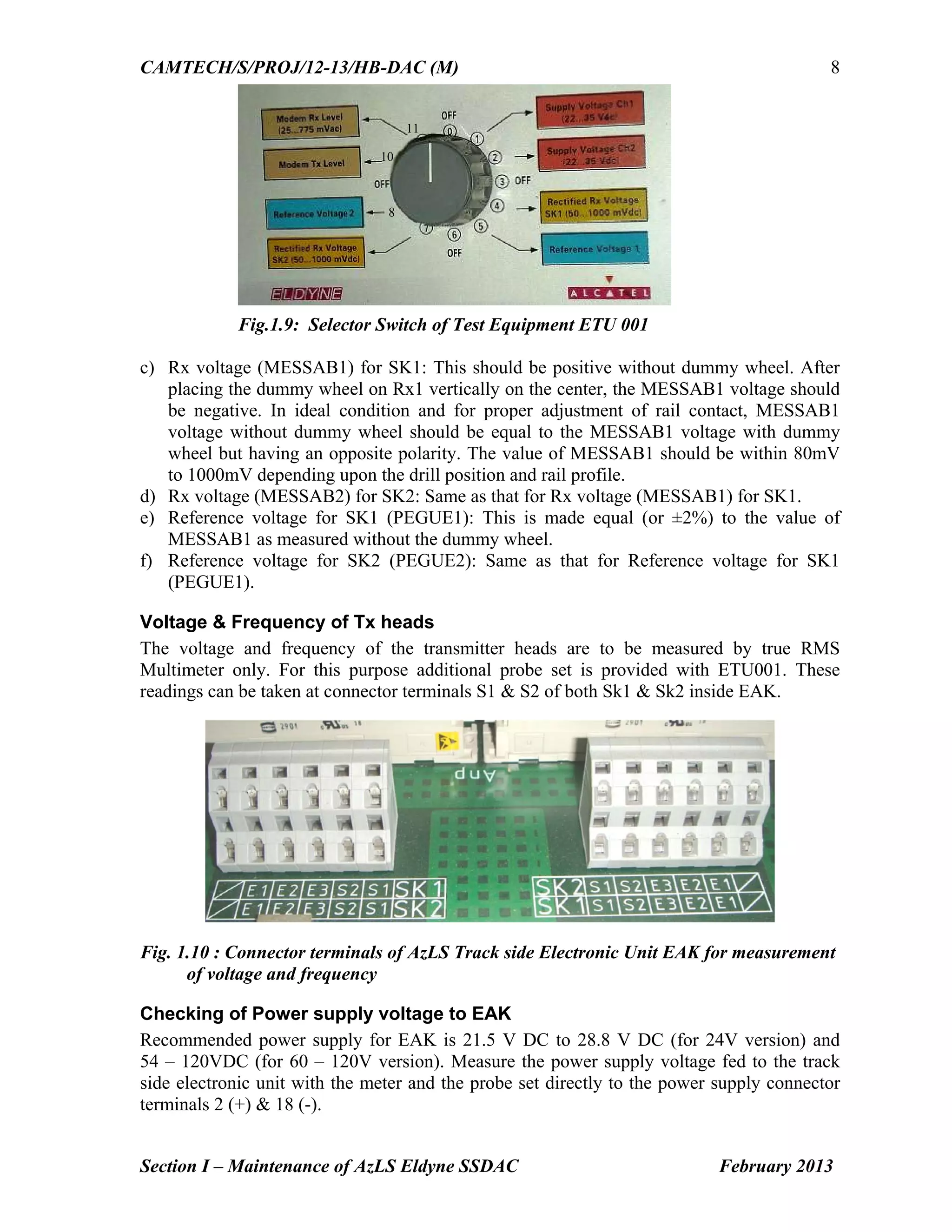
Selector switch position 1: Shows the value of the output of 1st internal DC-DC
Converter (Channel1) in Analog card.
The selector switch position 2: Shows the value of output voltage of 2nd internal DC-DC
Converter (Channel2) in Analog card.
Selector switch position 3: OFF
Selector switch position 4: Shows the rectified Rx voltage (MESSAB1) for SK1. For fine
adjustment the potentiometer R2 on the Analog board of EAK should be used.
15.
CAMTECH/S/PROJ/12-13/HB-DAC (M)
Section I– Maintenance of AzLS Eldyne SSDAC February 2013
7
Selector switch position 5: Shows the value of reference voltage for SK1 (PEGUE1).
This can be adjusted by the potentiometer R1 on the Analog board.
Selector switch position 6: OFF
Selector switch position 7: Shows the rectified Rx voltage (MESSAB2) for SK2. For fine
adjustment the potentiometer R4 on the Analog board should be used.
Selector switch position 8: Shows the reference voltage for SK2 (PEGUE2). This can be
adjusted by the potentiometer R3 on the Analog board.
Selector switch position 9: OFF
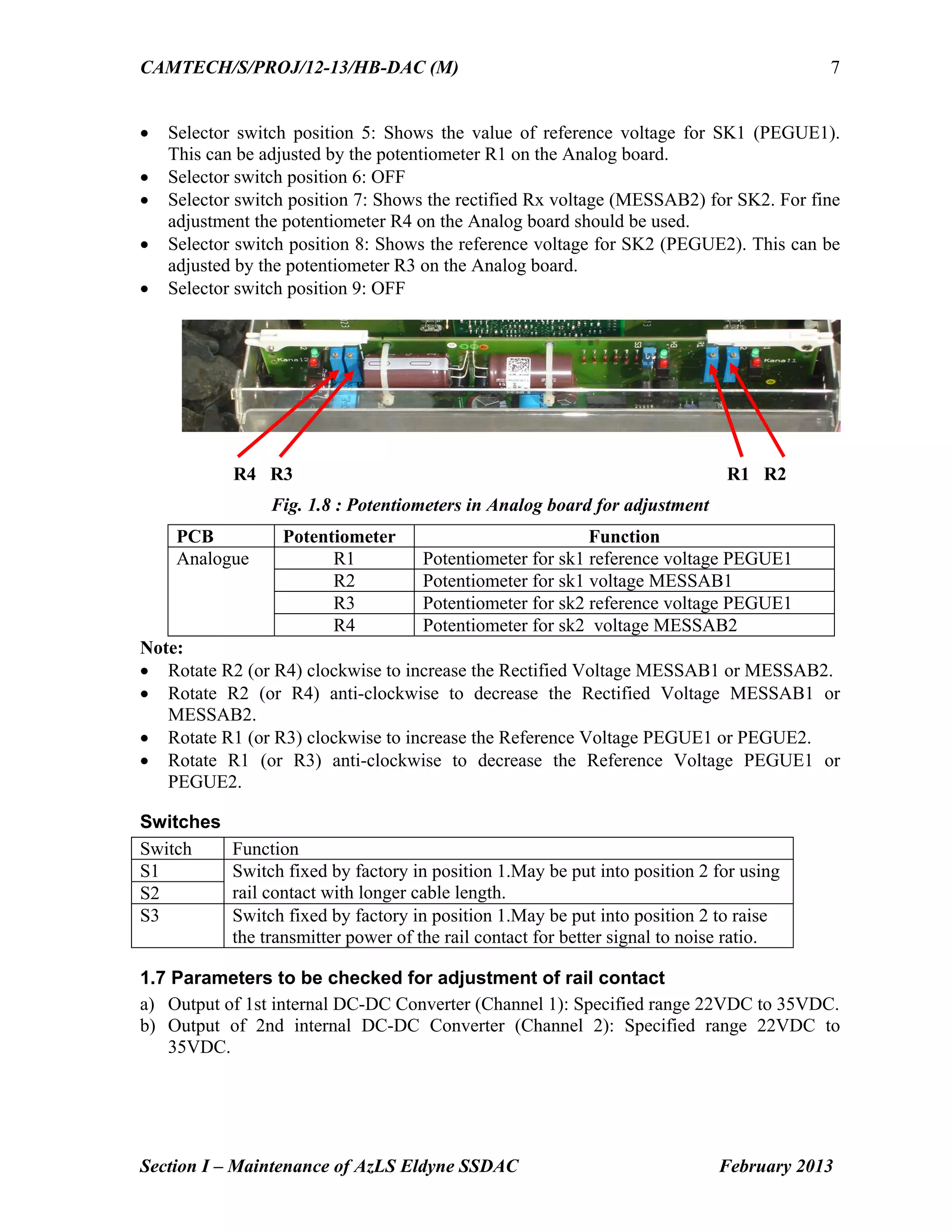
R4 R3 R1 R2
Fig. 1.8 : Potentiometers in Analog board for adjustment
PCB Potentiometer Function
Analogue R1 Potentiometer for sk1 reference voltage PEGUE1
R2 Potentiometer for sk1 voltage MESSAB1
R3 Potentiometer for sk2 reference voltage PEGUE1
R4 Potentiometer for sk2 voltage MESSAB2
Note:
Rotate R2 (or R4) clockwise to increase the Rectified Voltage MESSAB1 or MESSAB2.
Rotate R2 (or R4) anti-clockwise to decrease the Rectified Voltage MESSAB1 or
MESSAB2.
Rotate R1 (or R3) clockwise to increase the Reference Voltage PEGUE1 or PEGUE2.
Rotate R1 (or R3) anti-clockwise to decrease the Reference Voltage PEGUE1 or
PEGUE2.
Switches
Switch Function
S1 Switch fixed by factory in position 1.May be put into position 2 for using
rail contact with longer cable length.S2
S3 Switch fixed by factory in position 1.May be put into position 2 to raise
the transmitter power of the rail contact for better signal to noise ratio.
1.7 Parameters to be checked for adjustment of rail contact
a) Output of 1st internal DC-DC Converter (Channel 1): Specified range 22VDC to 35VDC.
b) Output of 2nd internal DC-DC Converter (Channel 2): Specified range 22VDC to
35VDC.
16.
CAMTECH/S/PROJ/12-13/HB-DAC (M)
Section I– Maintenance of AzLS Eldyne SSDAC February 2013
8
Fig.1.9: Selector Switch of Test Equipment ETU 001
c) Rx voltage (MESSAB1) for SK1: This should be positive without dummy wheel. After
placing the dummy wheel on Rx1 vertically on the center, the MESSAB1 voltage should
be negative. In ideal condition and for proper adjustment of rail contact, MESSAB1
voltage without dummy wheel should be equal to the MESSAB1 voltage with dummy
wheel but having an opposite polarity. The value of MESSAB1 should be within 80mV
to 1000mV depending upon the drill position and rail profile.
d) Rx voltage (MESSAB2) for SK2: Same as that for Rx voltage (MESSAB1) for SK1.
e) Reference voltage for SK1 (PEGUE1): This is made equal (or ±2%) to the value of
MESSAB1 as measured without the dummy wheel.
f) Reference voltage for SK2 (PEGUE2): Same as that for Reference voltage for SK1
(PEGUE1).
Voltage & Frequency of Tx heads
The voltage and frequency of the transmitter heads are to be measured by true RMS
Multimeter only. For this purpose additional probe set is provided with ETU001. These
readings can be taken at connector terminals S1 & S2 of both Sk1 & Sk2 inside EAK.
Fig. 1.10 : Connector terminals of AzLS Track side Electronic Unit EAK for measurement
of voltage and frequency
Checking of Power supply voltage to EAK
Recommended power supply for EAK is 21.5 V DC to 28.8 V DC (for 24V version) and
54 – 120VDC (for 60 – 120V version). Measure the power supply voltage fed to the track
side electronic unit with the meter and the probe set directly to the power supply connector
terminals 2 (+) & 18 (-).
8
10
11
17.
CAMTECH/S/PROJ/12-13/HB-DAC (M)
Section I– Maintenance of AzLS Eldyne SSDAC February 2013
9
Communication (data) between two EAK
Communication pair is connected to
Connector 5 and 21, if Digital Card is installed in outer slot
Connector 6 and 22, if Digital Card is installed in middle slot
Fig. 1.11 : Connector terminals of AzLS Track side Electronic Unit EAK for power supply
and communication (data) link
Vital Relay output
If Digital Card is installed in outer slot
Check at Connector 33 and 39, for on-board vital relay input
Check at Connector 34 and 40, for on-board vital relay output
If Digital Card is installed in middle slot
Check at Connector 36 and 42, for on-board vital relay input
Check at Connector 37 and 43, for on-board vital relay output
Voltage at relay should be more than 20 V.
MOVs – AzLS
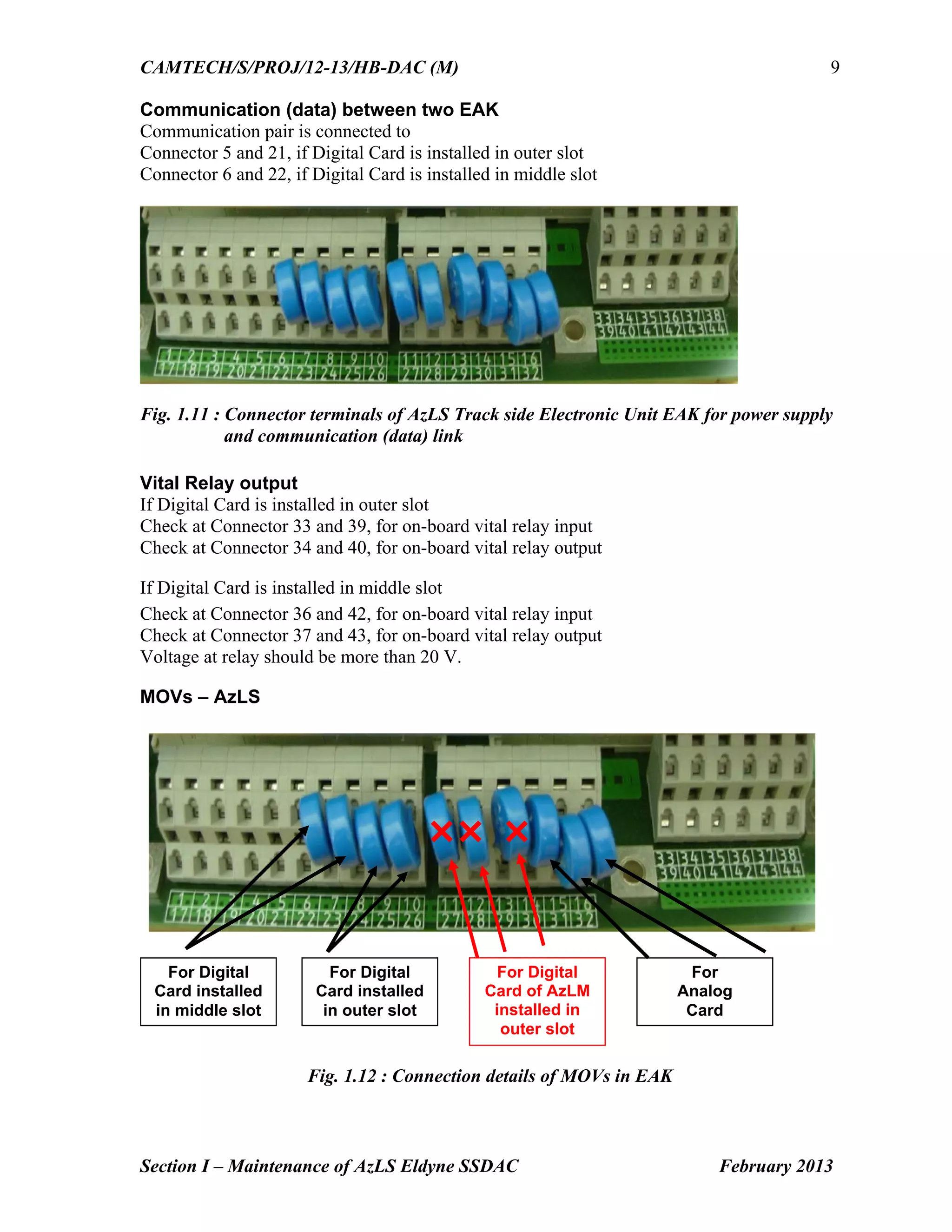
Fig. 1.12 : Connection details of MOVs in EAK
For Digital
Card installed
in middle slot
For Digital
Card installed
in outer slot
For
Analog
Card
For Digital
Card of AzLM
installed in
outer slot
18.
CAMTECH/S/PROJ/12-13/HB-DAC (M)
Section I– Maintenance of AzLS Eldyne SSDAC February 2013
10
1.8 Adjustment procedure
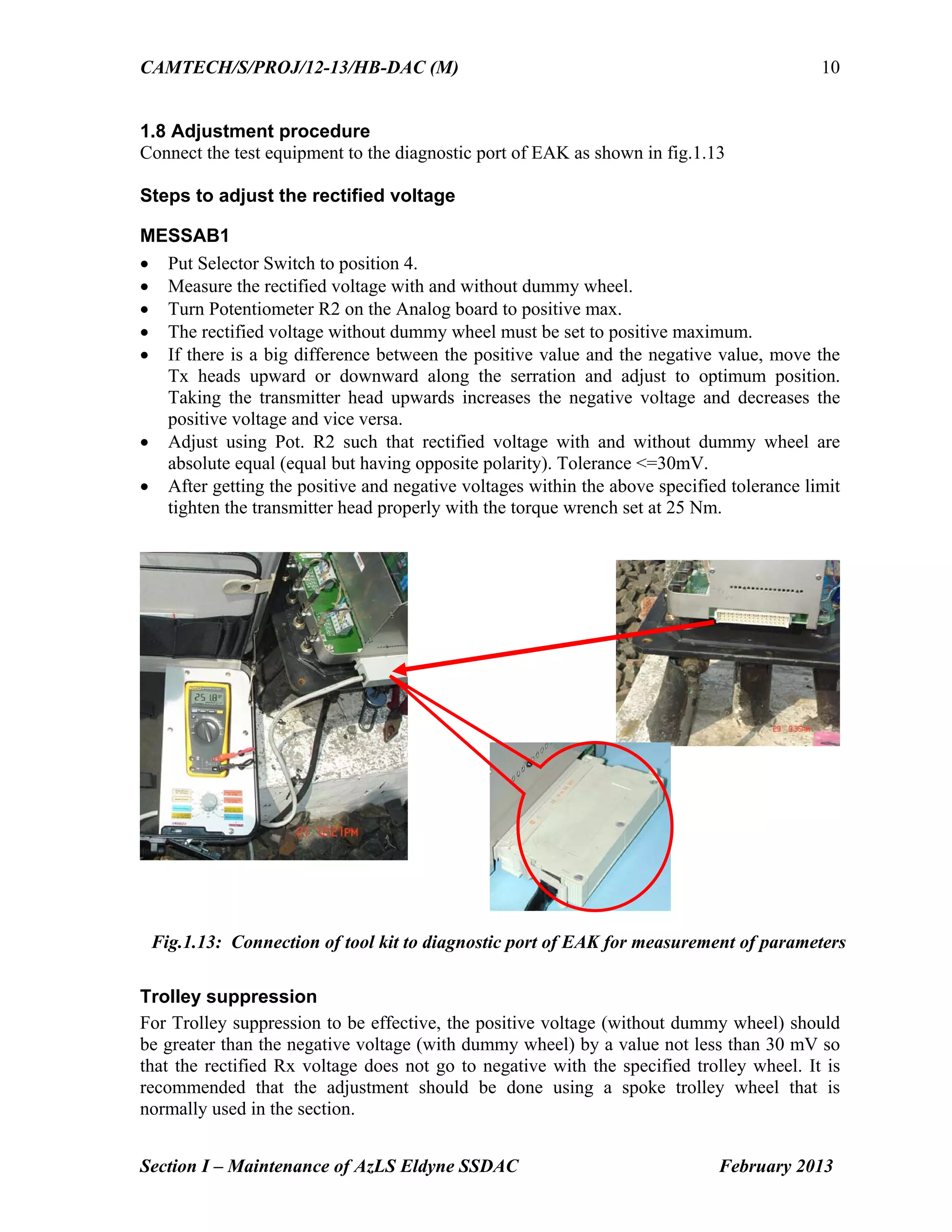
Connect the test equipment to the diagnostic port of EAK as shown in fig.1.13
Steps to adjust the rectified voltage
MESSAB1
Put Selector Switch to position 4.
Measure the rectified voltage with and without dummy wheel.
Turn Potentiometer R2 on the Analog board to positive max.
The rectified voltage without dummy wheel must be set to positive maximum.
If there is a big difference between the positive value and the negative value, move the
Tx heads upward or downward along the serration and adjust to optimum position.
Taking the transmitter head upwards increases the negative voltage and decreases the
positive voltage and vice versa.
Adjust using Pot. R2 such that rectified voltage with and without dummy wheel are
absolute equal (equal but having opposite polarity). Tolerance <=30mV.
After getting the positive and negative voltages within the above specified tolerance limit
tighten the transmitter head properly with the torque wrench set at 25 Nm.
Trolley suppression
For Trolley suppression to be effective, the positive voltage (without dummy wheel) should
be greater than the negative voltage (with dummy wheel) by a value not less than 30 mV so
that the rectified Rx voltage does not go to negative with the specified trolley wheel. It is
recommended that the adjustment should be done using a spoke trolley wheel that is
normally used in the section.
Fig.1.13: Connection of tool kit to diagnostic port of EAK for measurement of parameters
19.
CAMTECH/S/PROJ/12-13/HB-DAC (M)
Section I– Maintenance of AzLS Eldyne SSDAC February 2013
11
MESSAB2
Repeat the above procedure for MESSAB2 (using Selector Switch position 7, and
Potentiometer R4 on the Analog board).
PEGUE1
Put Selector Switch to position 5
Measure voltage
Adjust using potentiometer R1 on analog board such that PEGUE1 =
MESSAB1(without dummy wheel) Tolerance +-2%
PEGUE2
Repeat for PEGUE2 using Selector Switch position 8 and potentiometer R3 such that
PEGUE2 = MESSAB2 (without dummy wheel) Tolerance +-2%.
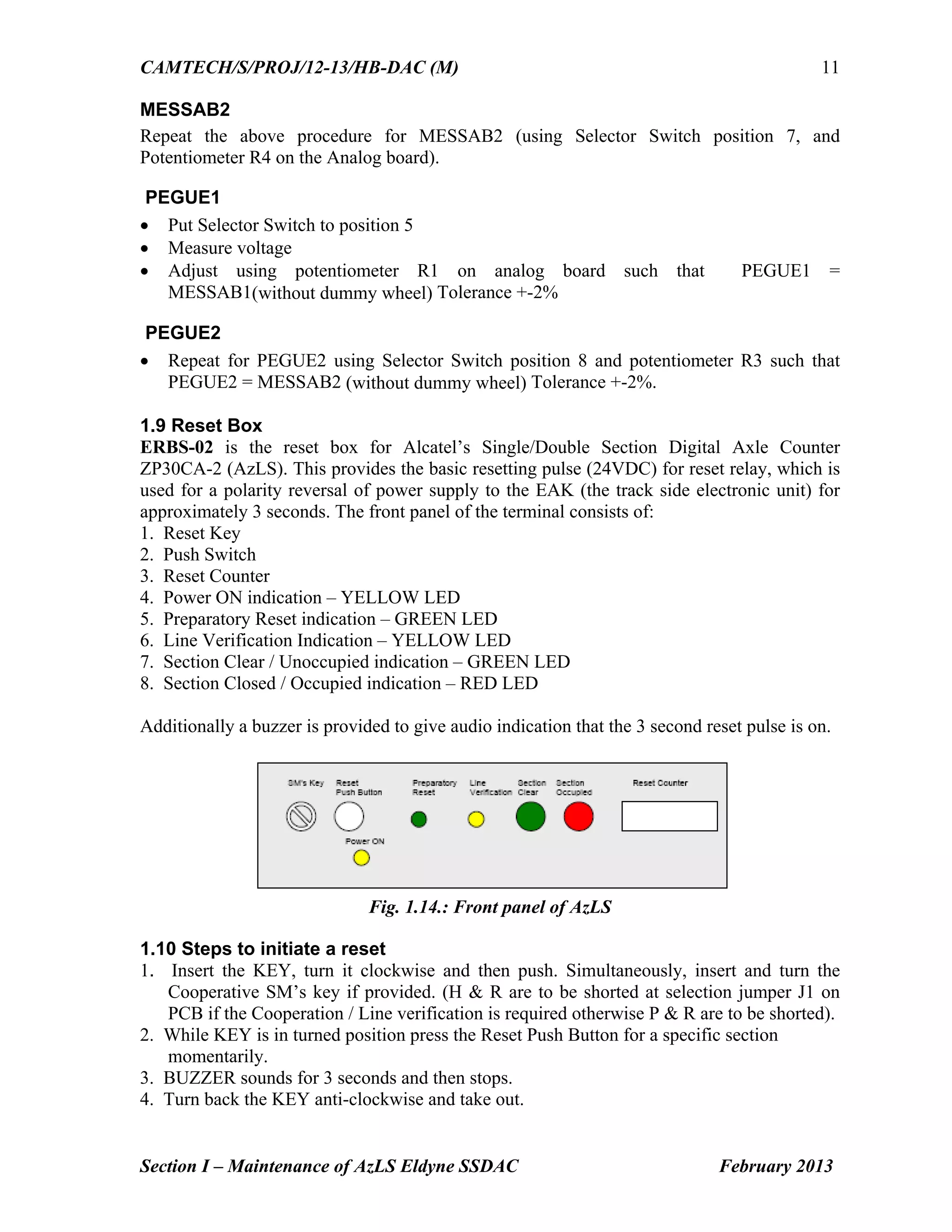
1.9 Reset Box
ERBS-02 is the reset box for Alcatel’s Single/Double Section Digital Axle Counter
ZP30CA-2 (AzLS). This provides the basic resetting pulse (24VDC) for reset relay, which is
used for a polarity reversal of power supply to the EAK (the track side electronic unit) for
approximately 3 seconds. The front panel of the terminal consists of:
1. Reset Key
2. Push Switch
3. Reset Counter
4. Power ON indication – YELLOW LED
5. Preparatory Reset indication – GREEN LED
6. Line Verification Indication – YELLOW LED
7. Section Clear / Unoccupied indication – GREEN LED
8. Section Closed / Occupied indication – RED LED
Additionally a buzzer is provided to give audio indication that the 3 second reset pulse is on.
Fig. 1.14.: Front panel of AzLS
1.10 Steps to initiate a reset
1. Insert the KEY, turn it clockwise and then push. Simultaneously, insert and turn the
Cooperative SM’s key if provided. (H & R are to be shorted at selection jumper J1 on
PCB if the Cooperation / Line verification is required otherwise P & R are to be shorted).
2. While KEY is in turned position press the Reset Push Button for a specific section
momentarily.
3. BUZZER sounds for 3 seconds and then stops.
4. Turn back the KEY anti-clockwise and take out.
20.
CAMTECH/S/PROJ/12-13/HB-DAC (M)
Section I– Maintenance of AzLS Eldyne SSDAC February 2013
12
Each reset is registered in the sealed reset COUNTER unit. The count increases by one after
each reset commanded by the operator.
1.11 Types of resetting for AzLS
AzLS V1.1 provides four types of reset:
1. Single point preparatory reset (for berthing section)
This reset does not clear the section immediately. It is sufficient that one of the detection
points of the relevant section receives a preparatory reset. After carrying out the preparatory
reset, a train must pass through the section on “caution running conditions”. Only then the
section will be cleared.
2. Two point co-operative preparatory reset (for block section)
The reset command is to be applied to both detection points within one hour. If this time
elapses, the reset command is rejected. The other conditions are same as given in clause 1
above.
3. Single point hard reset (for point zone)
It is sufficient that one of the detection points of the relevant section receives a hard reset. In
addition to this pressing and turning of verification switch is required. The hard reset clears
the section immediately.
4. Two point Co-operative hard reset
The two point hard reset is initiated through individual external relay circuits which reverse
the polarities of the supply voltages to at least two detection points of the section.
1.12 Check points for maintenance
Carry out visual inspection of trackside equipment i.e. EAK, rail contacts and integral
cables (connecting leads), earthing etc.
Check physically whether the rail contacts and cabling including earthing connections
are proper.
Ensure that Tx heads are clear of rail.
Ensure the proper size and tightness of deflectors and that these are fitted at least 250
mm away from rail contacts (Tx/Rx coils).
Ensure for proper fixing of Track side connection box (EAK) on the mushroom base
plate and all 4 nos. screws are tight.
Ensure that cable armours are properly earthed in location box.
Check for proper spacing (min. 350 mm) and packing of sleepers on which track
devices are fitted.
Check that the earthing connection of mushroom cover/apparatus case is intact and in
good condition, the earth lead wire and nut connecting earth wire etc. are not
corroded.
Check that cable pairs used are properly dressed and terminated in such a way that no
conductors remain exposed and check that no individual conductor are made spiral.
These should be twisted in pair to improve EMC.
21.
CAMTECH/S/PROJ/12-13/HB-DAC (M)
Section I– Maintenance of AzLS Eldyne SSDAC February 2013
13
Check that mushroom cover is properly fixed and there should be no possibility for
entry of rain water.
Check the input voltage at location box/EAK keeping the charger OFF for at least 15
min. Voltage at location box/EAK should not go below 21.5 V for 24 V EAK and 54
V for 60 V EAK.
Check ripple voltage of power supply at EAK, it should not exceed 10 mv peak to
peak.
Check rectified voltage (with dummy wheel) and reference voltages are within limit.
Check the cards are in proper position and both analog and digital cards are fitted
firmly in their corresponding slot.
Measure the earth resistance and paint its value on earth enclosures/nearest wall. If
required take suitable steps to improve the earth resistance. It should be less than 1
Ohm.
1.13 Do’s & Don’ts
For reduction in temperature, paint the inside and outside of mushroom cover (apparatus
case for EAK) with temperature retardant paint (white).
Note: The newly fabricated mushroom covers are supplied with a coating of paint on
inside and outside faces by the manufacturer hence painting is not required.
Always use 13mm high speed drill bit to drill holes on rail web.
Place foam packings between top of the Digital/Analog cards and dust cover to avoid
loosening due to vibrations. (As per practice in BPL division W.C.Rly.)
Tighten M8 bolts (on transmitter heads) with torque of 25Nm and M12 bolts (to fix rail
contact on rail web) with torque of 45Nm. Torque greater than specified value will break
the bolts and torque less than specified value will make the rail contact loosely fitted.
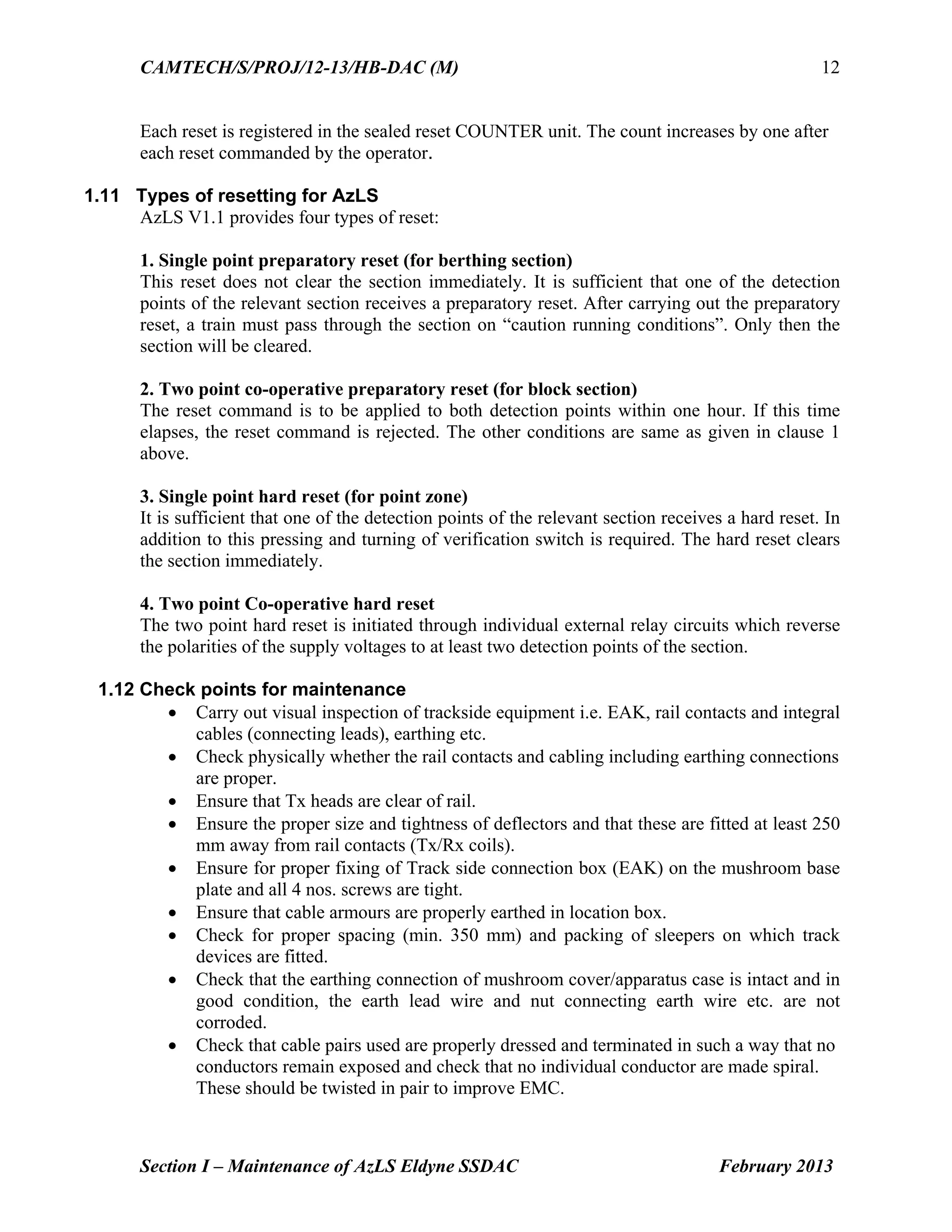
The rail contact integral cables must be free to loop near the Tx-Rx heads. Therefore the
protective hose must not be fitted up to the rail contact. Otherwise the rail contact integral
cables may get damaged by the rigid hose because of short bending radius.
Fig. 1.15.: (a) Correct installation (b) Incorrect installation with short bending radius
22.
CAMTECH/S/PROJ/12-13/HB-DAC (M)
Section I– Maintenance of AzLS Eldyne SSDAC February 2013
14
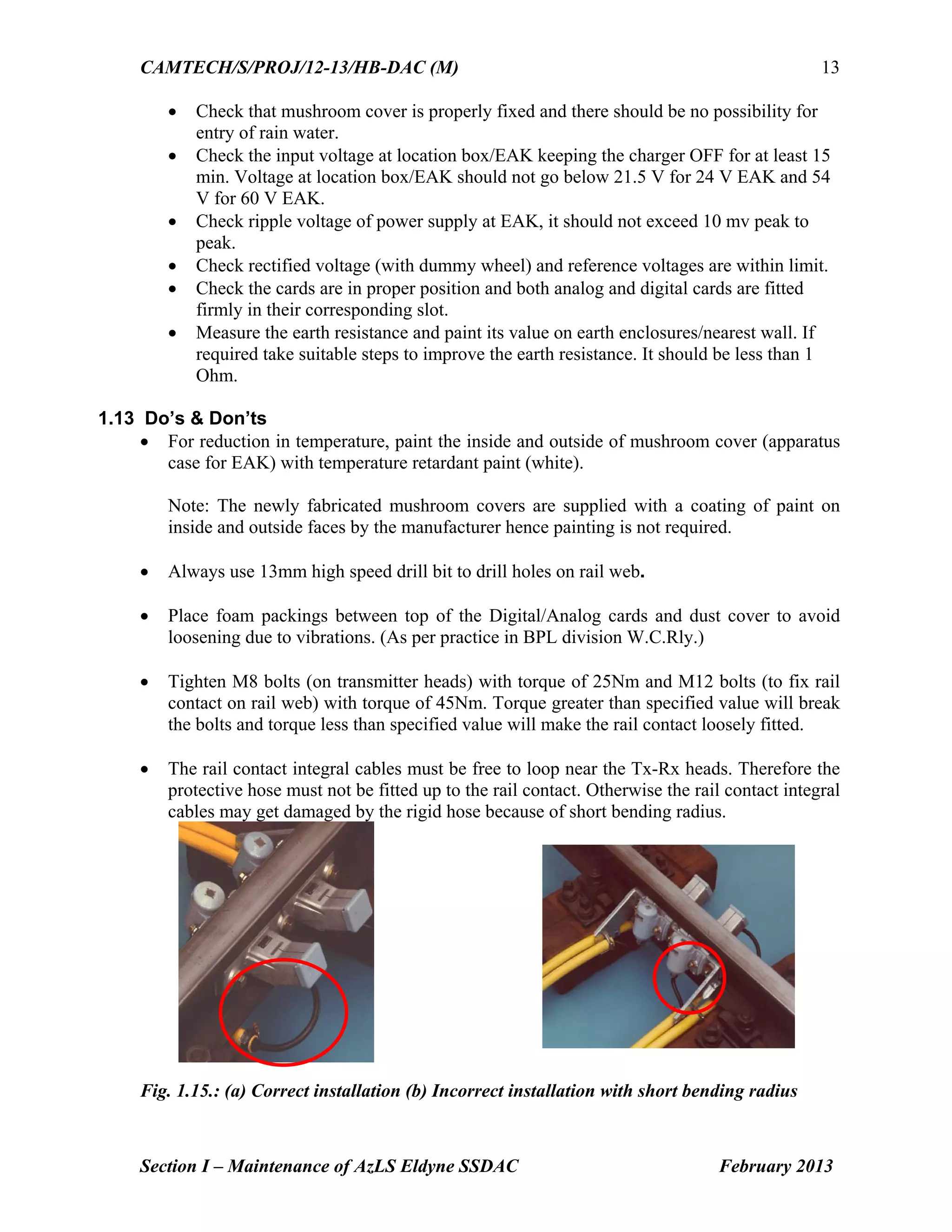
Never use any kind of hand spanner to fix the rail contact bolts. Use only torque
wrench.
To set the addresses of detection point computers, use ball-point pen – never use pencil.
During adjustment of MESSAB voltage set the corresponding potentiometers at positive
maximum. After that try to avoid using the potentiometer – adjust voltage by
repositioning the Tx heads.
Never set the addresses while the detection point is live.
Never plug in or pull out the analog card and digital/ISDN (evaluator) card while the
detection point is live.
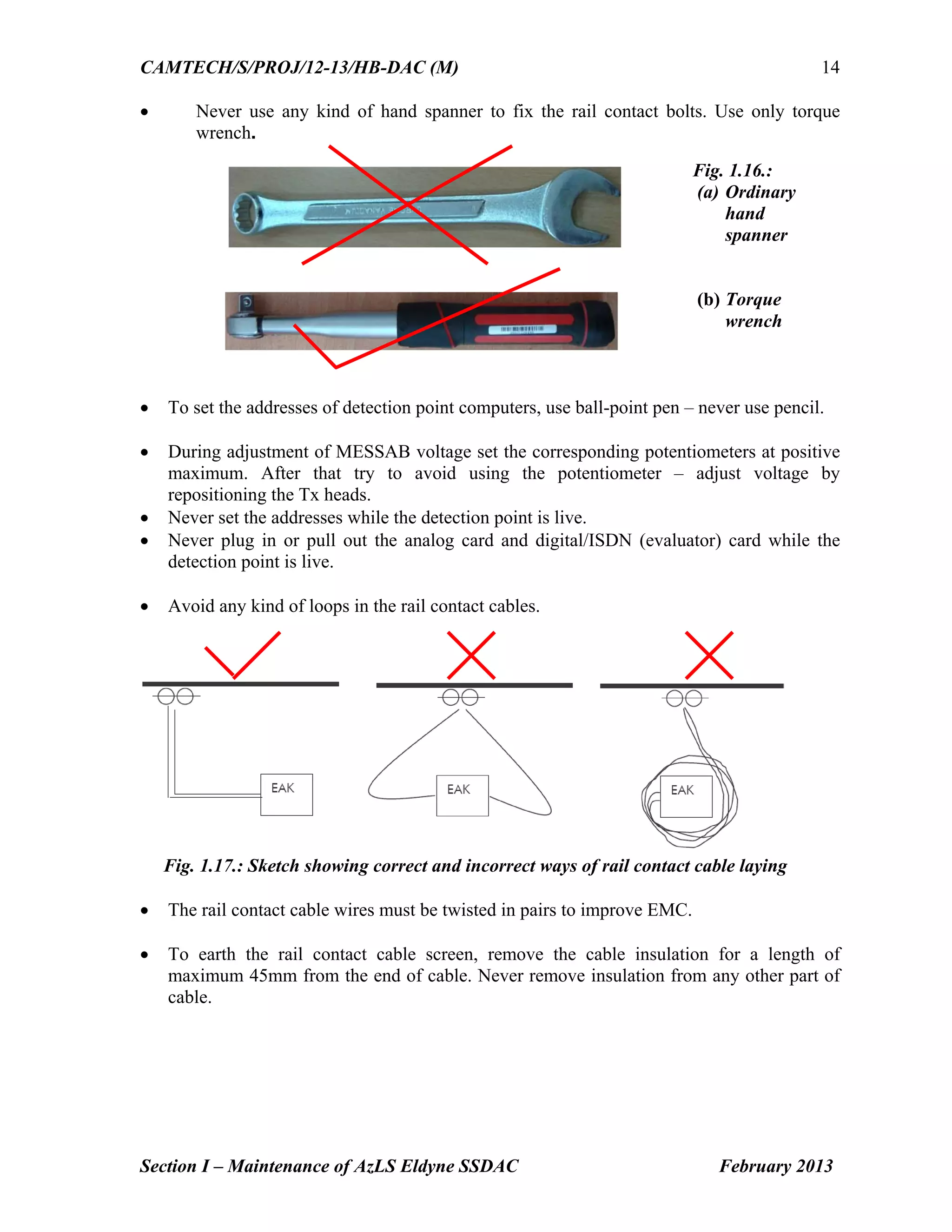
Avoid any kind of loops in the rail contact cables.
Fig. 1.17.: Sketch showing correct and incorrect ways of rail contact cable laying
The rail contact cable wires must be twisted in pairs to improve EMC.
To earth the rail contact cable screen, remove the cable insulation for a length of
maximum 45mm from the end of cable. Never remove insulation from any other part of
cable.
Fig. 1.16.:
(a) Ordinary
hand
spanner
(b) Torque
wrench
23.
CAMTECH/S/PROJ/12-13/HB-DAC (M)
Section I– Maintenance of AzLS Eldyne SSDAC February 2013
15
Fig. 1.18.: Termination of cables in EAK
Always use WAGO screwdriver to work with the WAGO connectors
Armour of quad cable connecting DP to location and location to relay room should be
earthed at relay room only.
Ensure that twisted pairs of quad cable remain twisted right upto the terminals, no
coiling to be done.
Take all the measurements whenever the DP is adjusted.
Twisted cable
Cable screens
Earthing clips
Insulation
Fig. 1.19:
WAGO
screwdriver
WAGO
connectors
24.
CAMTECH/S/PROJ/12-13/HB-DAC (M)
Section I– Maintenance of AzLS Eldyne SSDAC February 2013
16
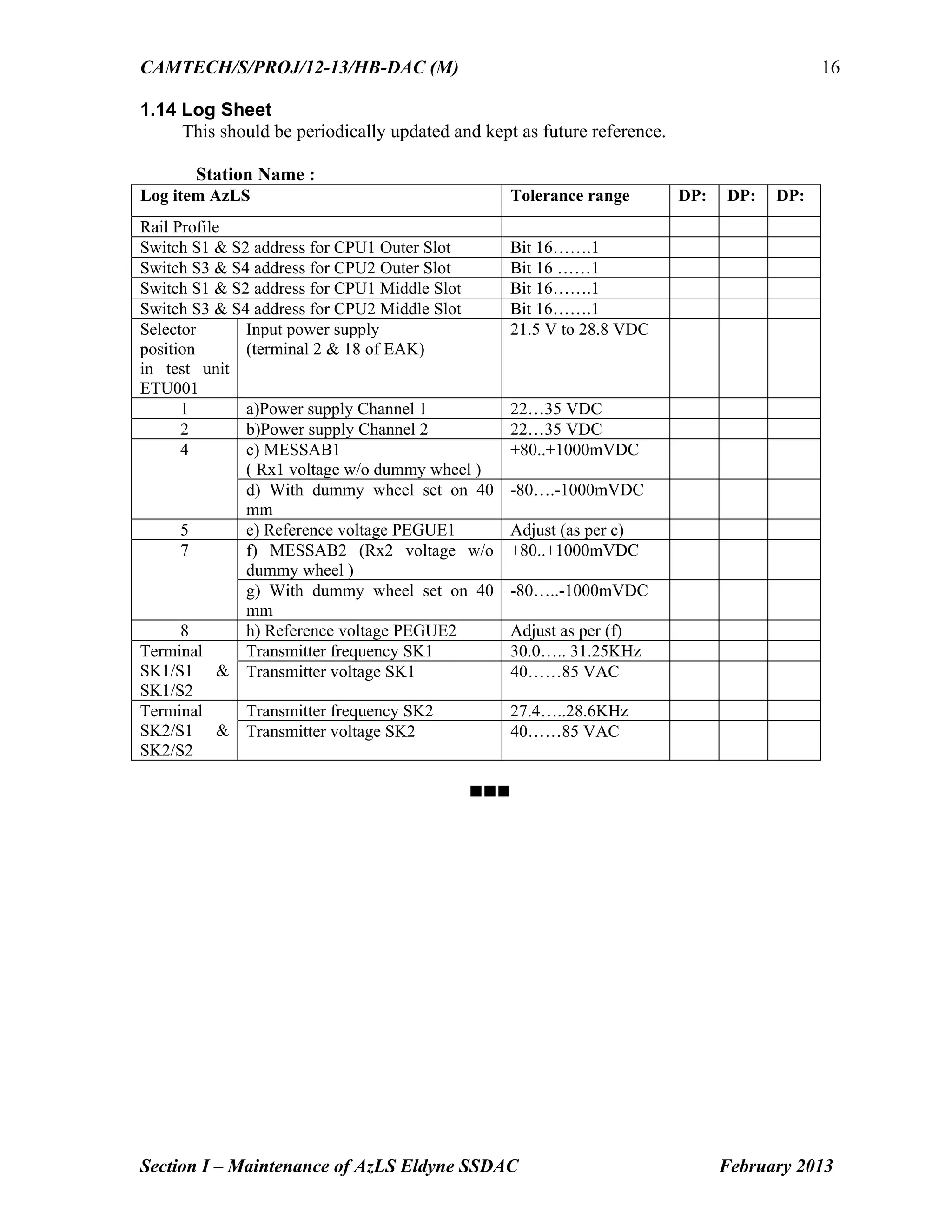
1.14 Log Sheet
This should be periodically updated and kept as future reference.
Station Name :
Log item AzLS Tolerance range DP: DP: DP:
Rail Profile
Switch S1 & S2 address for CPU1 Outer Slot Bit 16…….1
Switch S3 & S4 address for CPU2 Outer Slot Bit 16 ……1
Switch S1 & S2 address for CPU1 Middle Slot Bit 16…….1
Switch S3 & S4 address for CPU2 Middle Slot Bit 16…….1
Selector
position
in test unit
ETU001
Input power supply
(terminal 2 & 18 of EAK)
21.5 V to 28.8 VDC
1 a)Power supply Channel 1 22…35 VDC
2 b)Power supply Channel 2 22…35 VDC
4 c) MESSAB1
( Rx1 voltage w/o dummy wheel )
+80..+1000mVDC
d) With dummy wheel set on 40
mm
-80….-1000mVDC
5 e) Reference voltage PEGUE1 Adjust (as per c)
7 f) MESSAB2 (Rx2 voltage w/o
dummy wheel )
+80..+1000mVDC
g) With dummy wheel set on 40
mm
-80…..-1000mVDC
8 h) Reference voltage PEGUE2 Adjust as per (f)
Terminal
SK1/S1 &
SK1/S2
Transmitter frequency SK1 30.0….. 31.25KHz
Transmitter voltage SK1 40……85 VAC
Terminal
SK2/S1 &
SK2/S2
Transmitter frequency SK2 27.4…..28.6KHz
Transmitter voltage SK2 40……85 VAC
Go to Chapter Index
Contents
Section II: Maintenanceof Az LM Eldyne Multi Section Digital Axle Counter
Sr. No. Description Page No.
2.1 Introduction 1
2.2 Fixing of track devices after replacement of rail 2
2.3 Termination details of EAK 2
2.4 Axle Counter Eavaluator (ACE) 3
2.5 Power Data Coupling Unit (PDCU) 5
2.6 Test equipment (Tool Kit) ETU001 6
2.7 Adjustment of Rail contact Tx head with Dummy
wheel and Tool Kit
6
2.8 Functions of Selector Switch in ETU 001 6
2.9 Parameters to be checked for adjustment of rail contact 6
2.10 Adjustment procedure 7
2.11 Reset Box 7
2.12 Resetting procedure 8
2.13 Check points for maintenance 8
2.14 Do’s & Don’ts 8
2.15 Log Sheet 9
Go to Main index
27.
CAMTECH/S/PROJ/12-13/HB-DAC (M)
Section II– Maintenance of AzLM Eldyne MSDAC February 2013
1
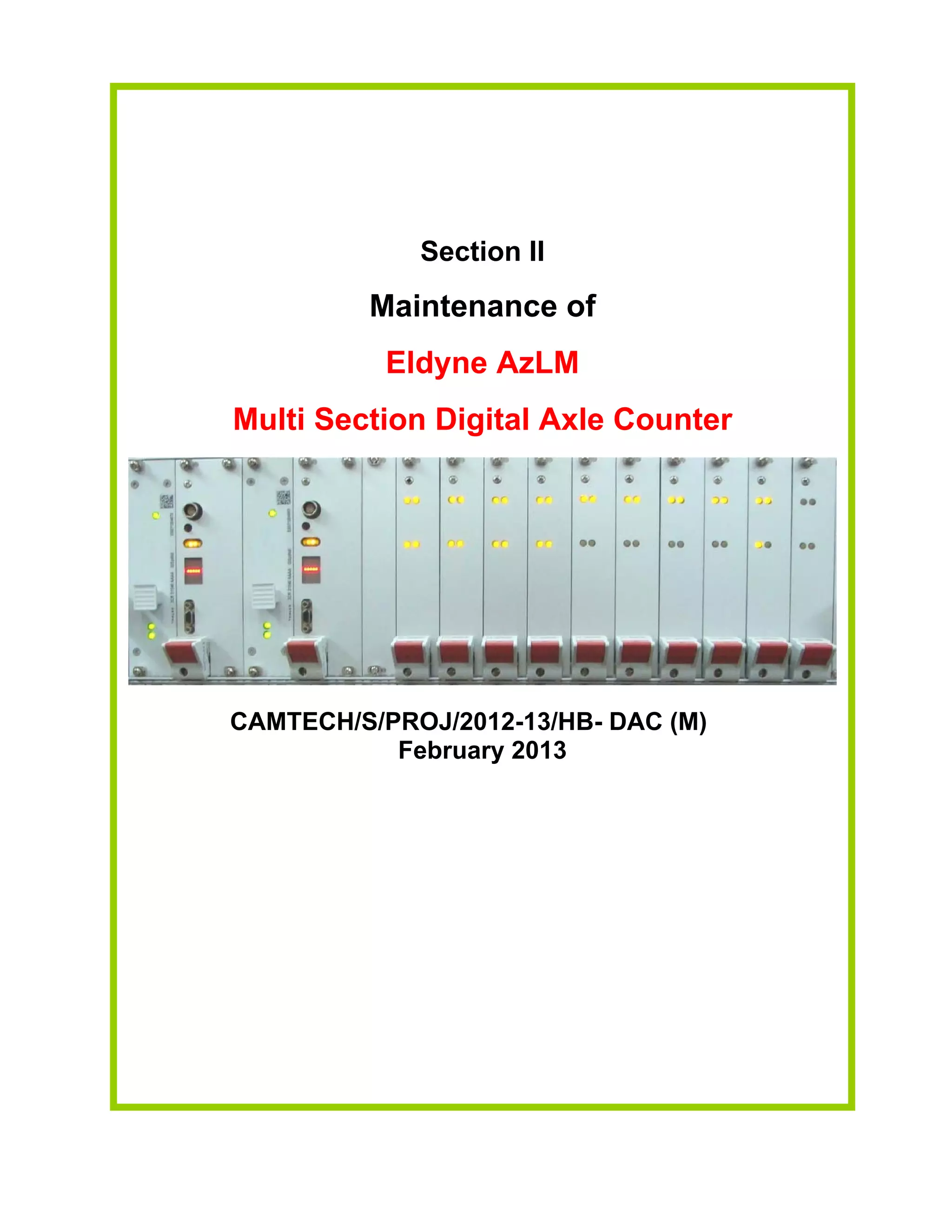
Section II
Maintenance of
Az LM
Eldyne Multi Section Digital Axle Counter
2.1 Introduction
The AzLM is a vital axle counter equipment for multiple track sections containing 2 out of 2
microcontrollers to count the axles, establish the track occupancy of a track section and to
provide this information to the block or the interlocking equipment. It consists of
Outdoor Trackside System
Double rail contact Sk30H mounted on rail consists of two coil sets Sk1 & Sk2 of
Transmitter (Tx) & Receiver (Rx) installed on the same rail. The two Tx coils are fed
with different frequencies (approx. 30.6 KHz and 28 KHz) which induce a voltage in
Rx coils.
Track side Electronic unit EAK30H contained in the trackside housing and connected
with SK30H via integral cables (available in lengths 4m, 5.5m and 8m). It consists of
Analog Card
Digital Card
Motherboard
Communication link between EAK and indoor equipment.
Indoor Equipment
Axle Counter Evaluator (ACE) installed at the station.
Reset Relay 1000 ohm AC immunized Q series
Vital Relay (QN1 8F-8B) connected externally to the Parallel Card
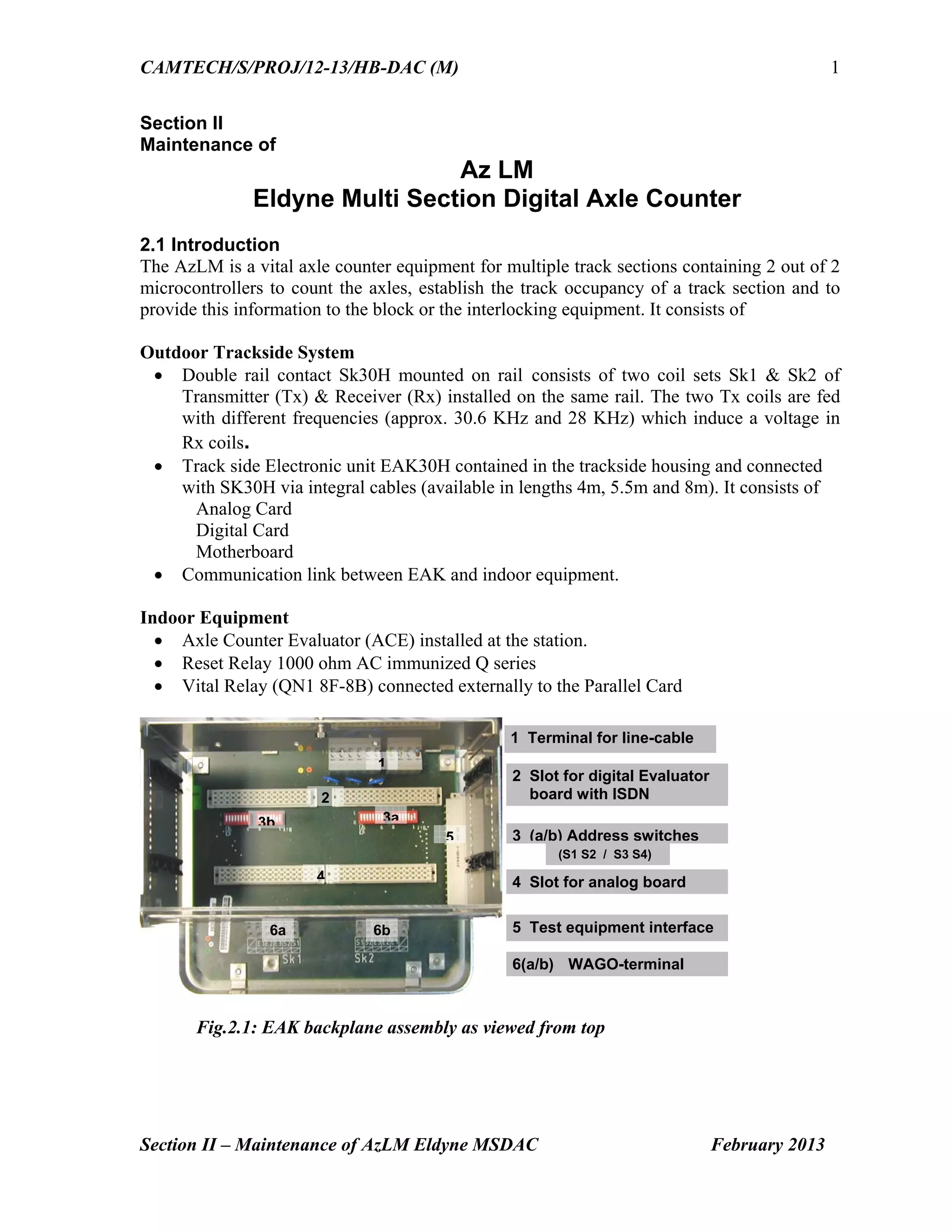
Fig.2.1: EAK backplane assembly as viewed from top
1
6a
4
5
3b 3a
2
6b
2 Slot for digital Evaluator
board with ISDN
3 (a/b) Address switches
5 Test equipment interface
4 Slot for analog board
6(a/b) WAGO-terminal
1 Terminal for line-cable
(S1 S2 / S3 S4)
28.
CAMTECH/S/PROJ/12-13/HB-DAC (M)
Section II– Maintenance of AzLM Eldyne MSDAC February 2013
2
2.2 Fixing of track devices after replacement of rail
The procedure for fixing of track devices is same as that for AzLS Eldyne SSDAC. (Please
refer Section I Para 1.7)
2.3 Termination details of EAK
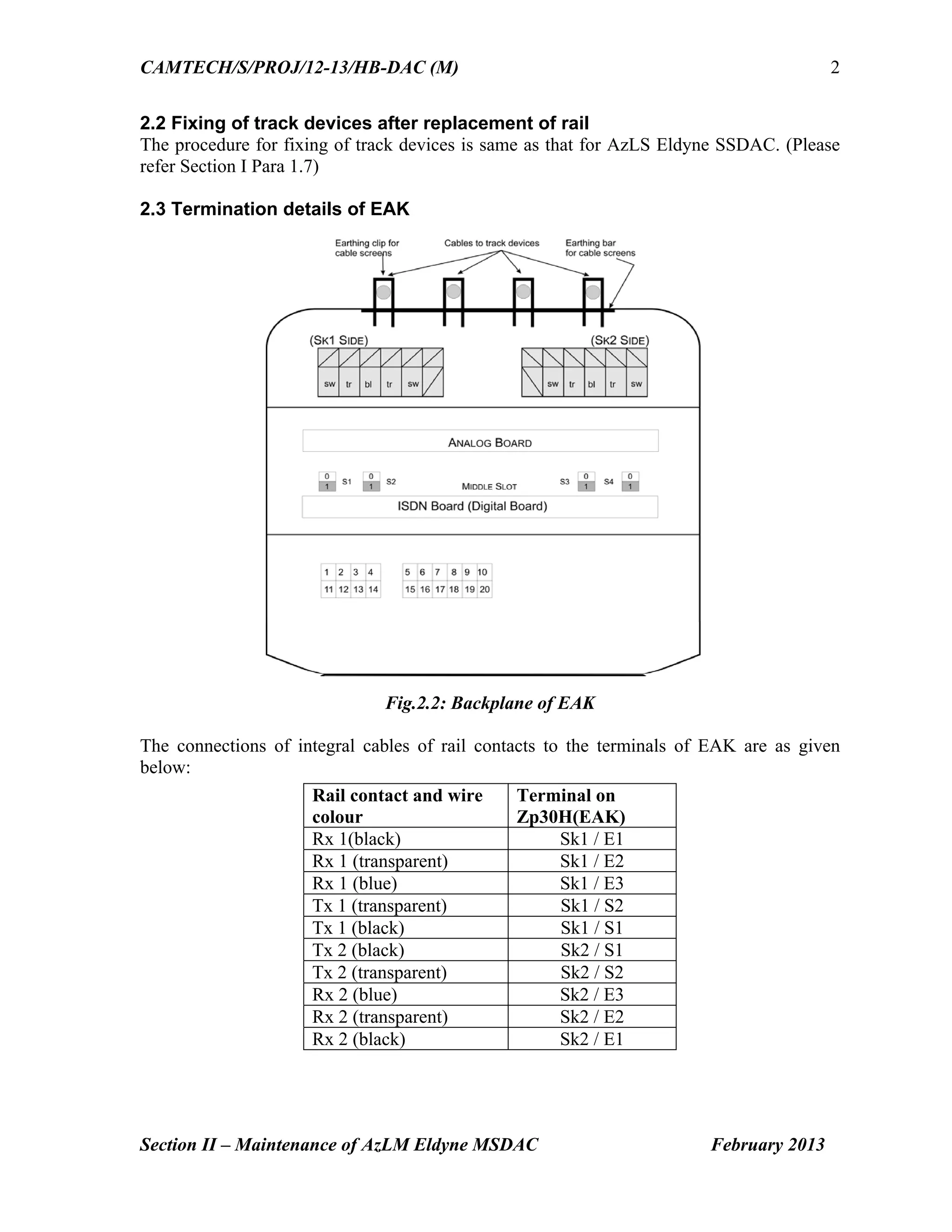
Fig.2.2: Backplane of EAK
The connections of integral cables of rail contacts to the terminals of EAK are as given
below:
Rail contact and wire
colour
Terminal on
Zp30H(EAK)
Rx 1(black) Sk1 / E1
Rx 1 (transparent) Sk1 / E2
Rx 1 (blue) Sk1 / E3
Tx 1 (transparent) Sk1 / S2
Tx 1 (black) Sk1 / S1
Tx 2 (black) Sk2 / S1
Tx 2 (transparent) Sk2 / S2
Rx 2 (blue) Sk2 / E3
Rx 2 (transparent) Sk2 / E2
Rx 2 (black) Sk2 / E1
29.
CAMTECH/S/PROJ/12-13/HB-DAC (M)
Section II– Maintenance of AzLM Eldyne MSDAC February 2013
3
The connections for Power Supply/Communication to the EAK are as under:
Connections Terminals
Superimposed Power (+) & Data Line 3
Superimposed Power (-) & Data Line 13
Provide a shorting link between terminal 2 & 1 and 12 & 11 if the same pair of conductors is
used for superimposed data and power supply to the EAK. If separate power supply is used
for installation, the communication line has to be between terminals 3 & 13 and the 60V
power supply has to be connected to terminals 1 & 11.
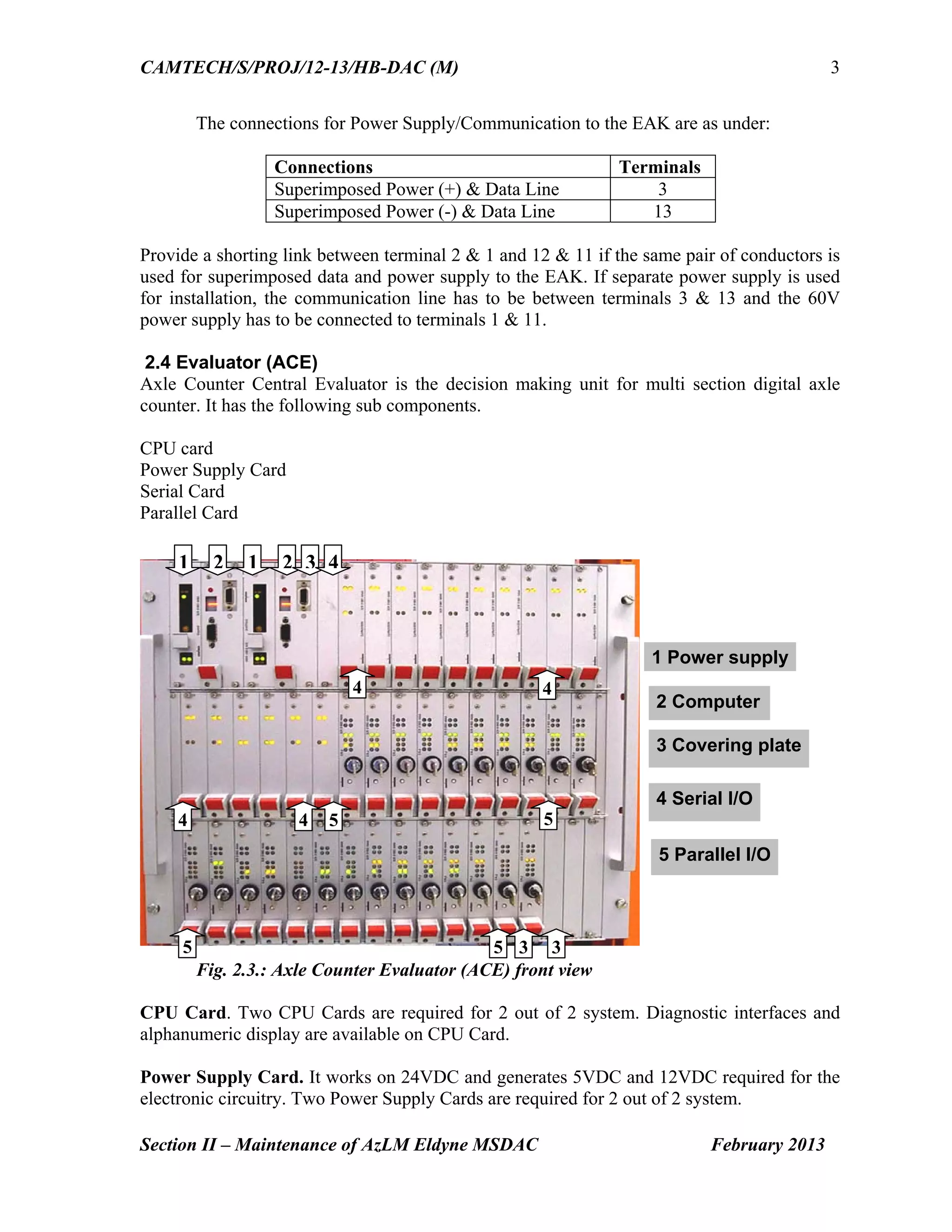
2.4 Evaluator (ACE)
Axle Counter Central Evaluator is the decision making unit for multi section digital axle
counter. It has the following sub components.
CPU card
Power Supply Card
Serial Card
Parallel Card
Fig. 2.3.: Axle Counter Evaluator (ACE) front view
CPU Card. Two CPU Cards are required for 2 out of 2 system. Diagnostic interfaces and
alphanumeric display are available on CPU Card.
Power Supply Card. It works on 24VDC and generates 5VDC and 12VDC required for the
electronic circuitry. Two Power Supply Cards are required for 2 out of 2 system.
1 2 1 2 3 4
4
5 5 3
1 Power supply
5 Parallel I/O
5
4
44 5
3
4 Serial I/O
3 Covering plate
2 Computer
30.
CAMTECH/S/PROJ/12-13/HB-DAC (M)
Section II– Maintenance of AzLM Eldyne MSDAC February 2013
4
Serial Card receives information from detection points through ISDN communication link
and provides this information to CPU Cards. One Serial Card can monitor maximum two
detection points.
Parallel Card is responsible for providing section information.
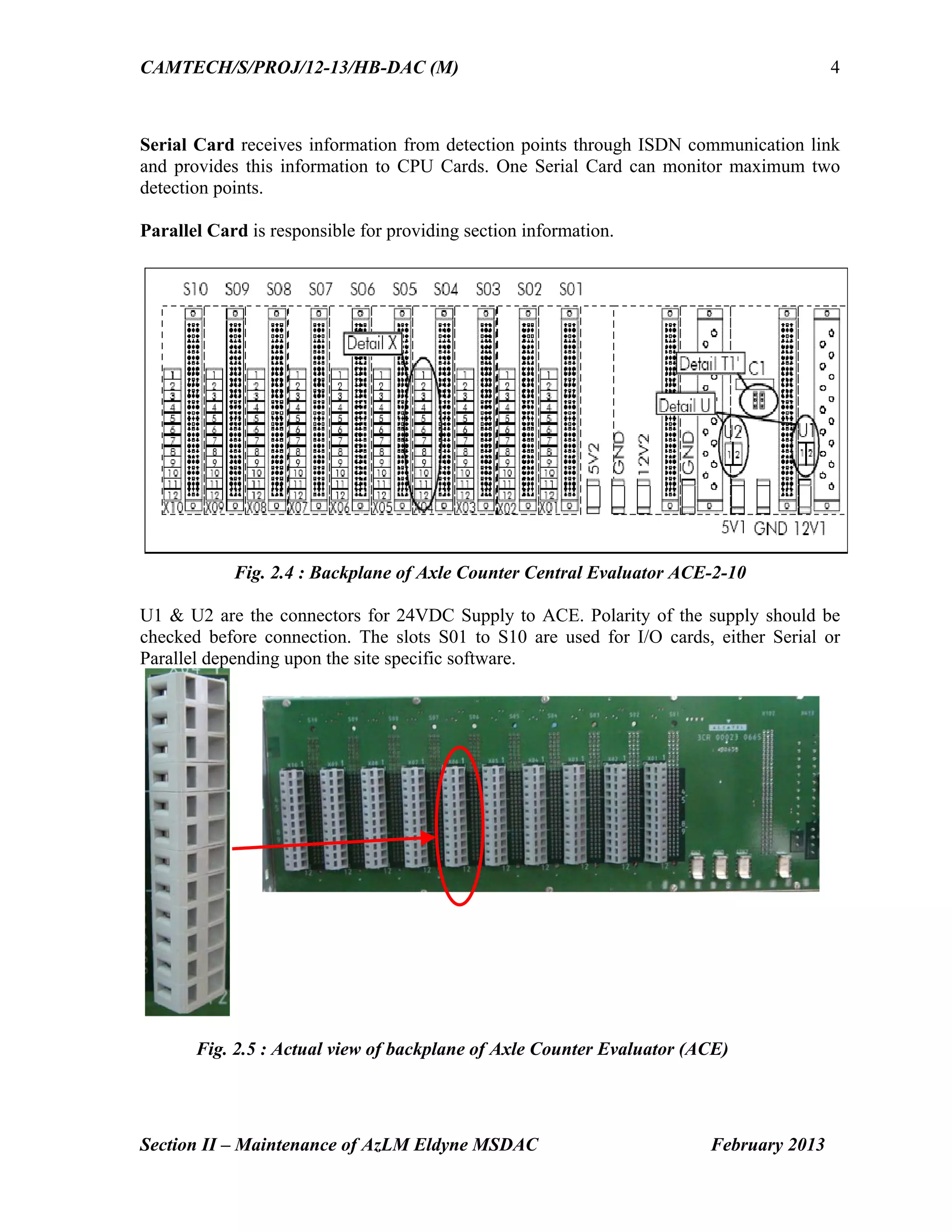
Fig. 2.4 : Backplane of Axle Counter Central Evaluator ACE-2-10
U1 & U2 are the connectors for 24VDC Supply to ACE. Polarity of the supply should be
checked before connection. The slots S01 to S10 are used for I/O cards, either Serial or
Parallel depending upon the site specific software.
Fig. 2.5 : Actual view of backplane of Axle Counter Evaluator (ACE)
31.
CAMTECH/S/PROJ/12-13/HB-DAC (M)
Section II– Maintenance of AzLM Eldyne MSDAC February 2013
5
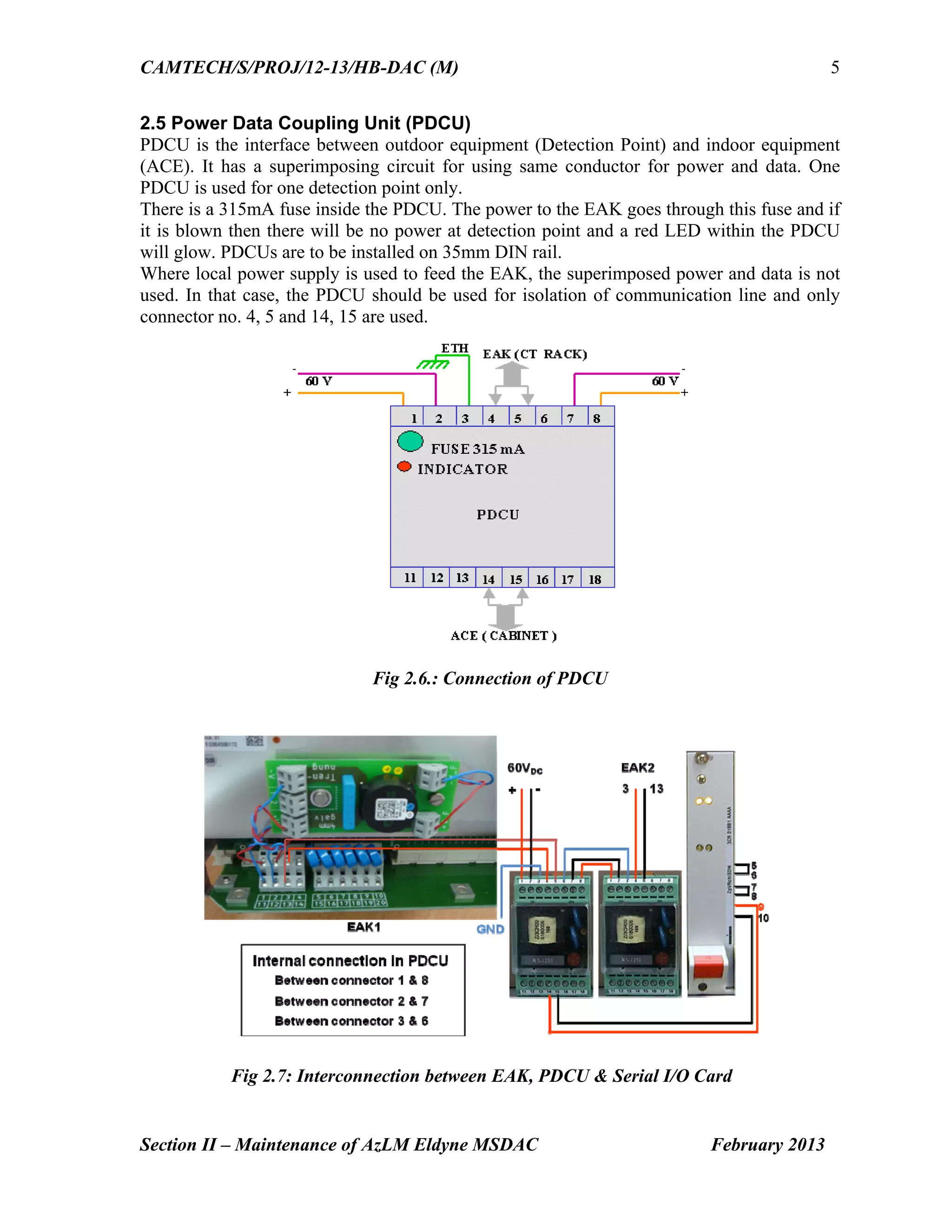
2.5 Power Data Coupling Unit (PDCU)
PDCU is the interface between outdoor equipment (Detection Point) and indoor equipment
(ACE). It has a superimposing circuit for using same conductor for power and data. One
PDCU is used for one detection point only.
There is a 315mA fuse inside the PDCU. The power to the EAK goes through this fuse and if
it is blown then there will be no power at detection point and a red LED within the PDCU
will glow. PDCUs are to be installed on 35mm DIN rail.
Where local power supply is used to feed the EAK, the superimposed power and data is not
used. In that case, the PDCU should be used for isolation of communication line and only
connector no. 4, 5 and 14, 15 are used.
Fig 2.6.: Connection of PDCU
Fig 2.7: Interconnection between EAK, PDCU & Serial I/O Card
32.
CAMTECH/S/PROJ/12-13/HB-DAC (M)
Section II– Maintenance of AzLM Eldyne MSDAC February 2013
6
2.6 Test equipment (Tool Kit) ETU001
The Test equipment ETU001 is same as that for AzLS. (Please refer Section I Para 1.6).
2.7 Adjustment of Rail contact Tx head with Dummy wheel and Tool Kit
The procedure for adjustment of TX head is same as that for AzLS (Please refer Section I
Para 1.5).
2.8 Functions of Selector Switch in ETU 001
Functions of Selector switch in ETU 001 are same as given for AzLS (Please refer Section I
Para 1.7).
2.9 Parameters to be checked for adjustment of rail contact
Outputs of DC-DC Converters, Rx Voltages MESSAB1 & MESSAB2, Reference Voltages
PEAGUE1 & PEAGUE2 are checked in the same way as per the procedure given in Section
I Para 1.8. The other parameters can be checked as follows:
(i) Axle Counter Evaluator (ACE)
Power Supply Voltage range at ACE is 21.5 – 28.8VDC which can be measured at the
connectors U1 & U2 at the backplane of the ACE. Alternatively the input voltage to the
ACE can be measured at fuse terminals on CTB.
(ii) Power Data Coupling Unit
Check outgoing voltage for trackside connection box at terminal nos. 4 & 5 of PDCU
(iii) Checking Frequency of Tx heads
The frequency of the transmitter heads are to be measured by true RMS Multimeter only. For
this purpose additional probe set is provided with Tool Kit ETU001. These readings can be
taken at connector terminals S1 & S2 of both Sk1 & Sk2 inside EAK.
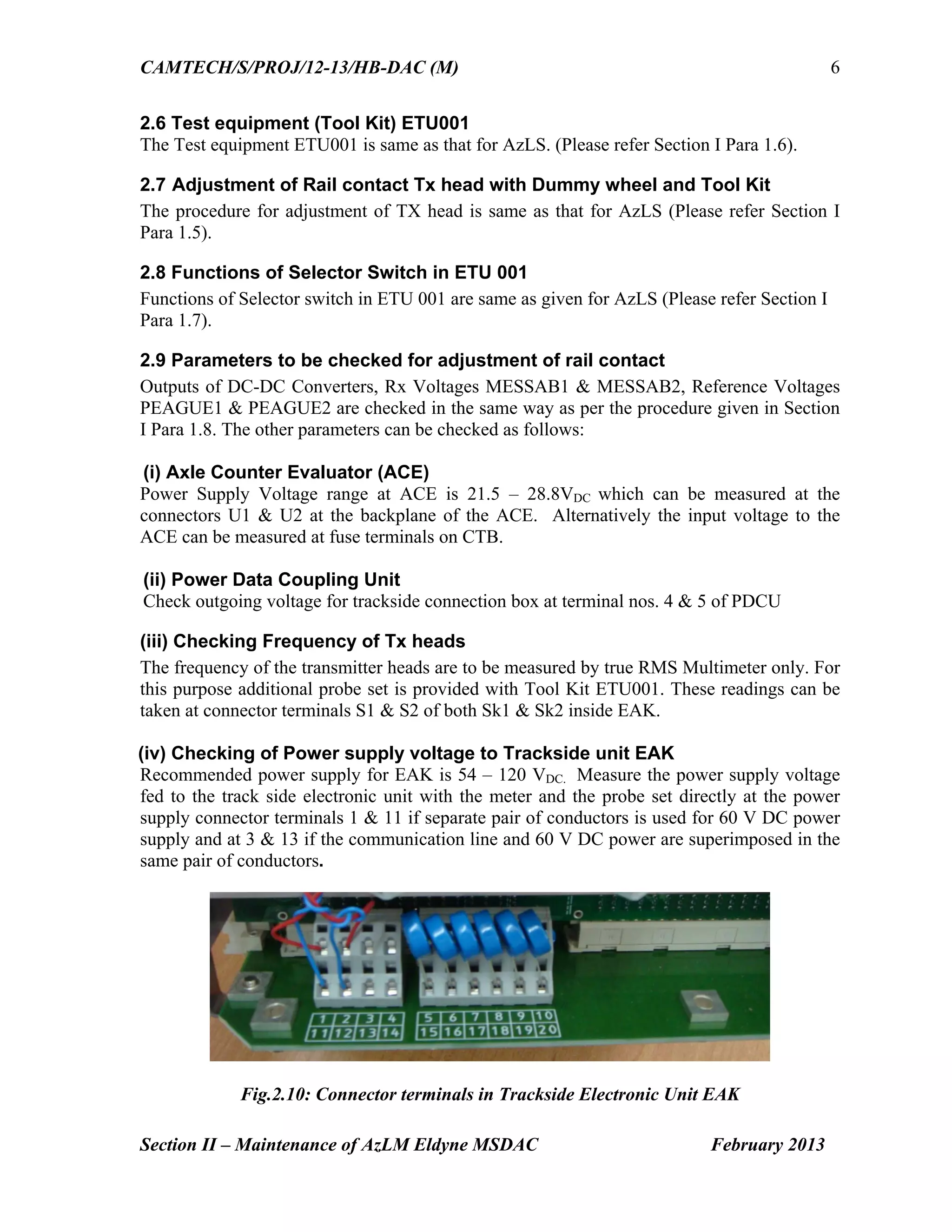
(iv) Checking of Power supply voltage to Trackside unit EAK
Recommended power supply for EAK is 54 – 120 VDC. Measure the power supply voltage
fed to the track side electronic unit with the meter and the probe set directly at the power
supply connector terminals 1 & 11 if separate pair of conductors is used for 60 V DC power
supply and at 3 & 13 if the communication line and 60 V DC power are superimposed in the
same pair of conductors.
Fig.2.10: Connector terminals in Trackside Electronic Unit EAK
33.
CAMTECH/S/PROJ/12-13/HB-DAC (M)
Section II– Maintenance of AzLM Eldyne MSDAC February 2013
7
2.10 Adjustment procedure
Adjustment procedure is same as that for AzLS.(Please refer Section I Para 1.9)
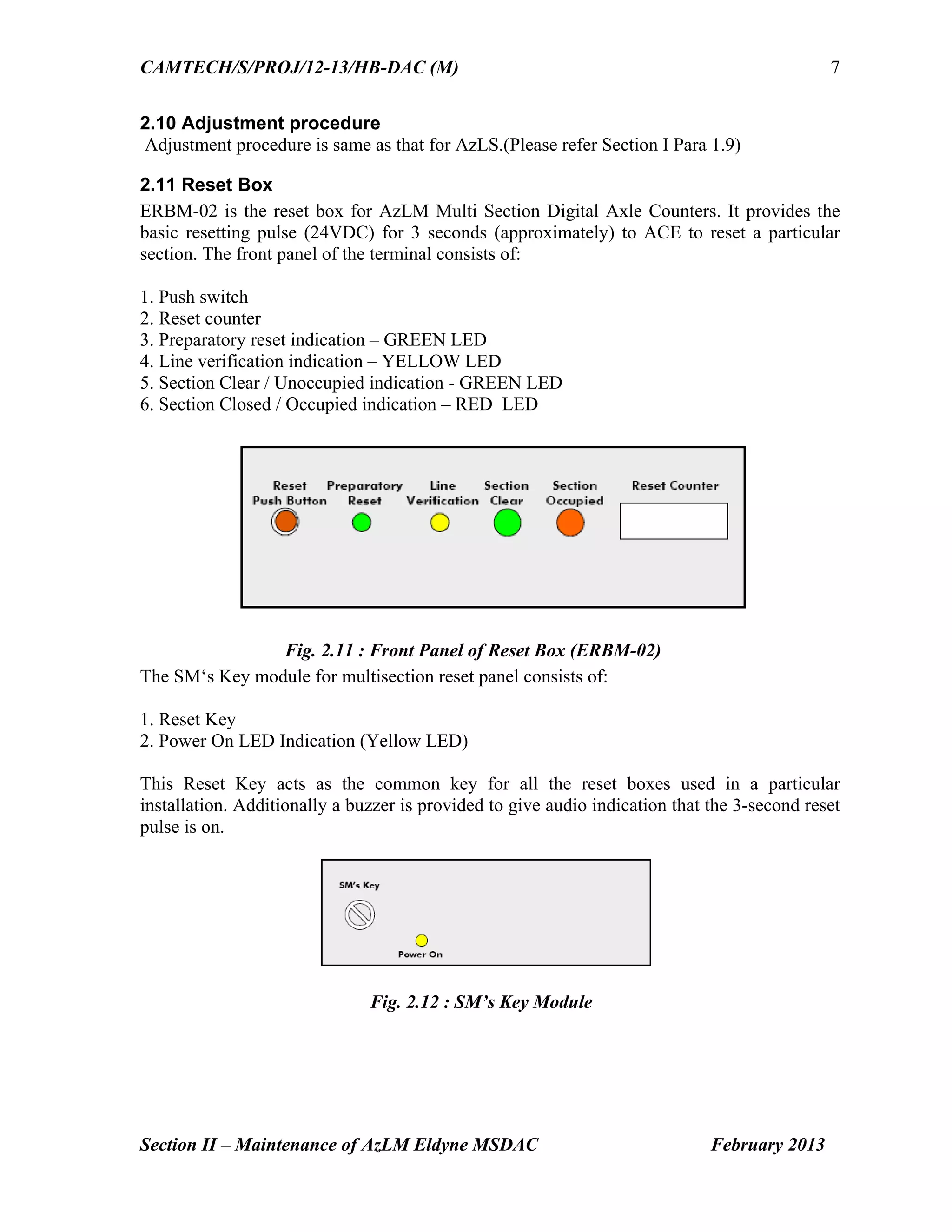
2.11 Reset Box
ERBM-02 is the reset box for AzLM Multi Section Digital Axle Counters. It provides the
basic resetting pulse (24VDC) for 3 seconds (approximately) to ACE to reset a particular
section. The front panel of the terminal consists of:
1. Push switch
2. Reset counter
3. Preparatory reset indication – GREEN LED
4. Line verification indication – YELLOW LED
5. Section Clear / Unoccupied indication - GREEN LED
6. Section Closed / Occupied indication – RED LED
Fig. 2.11 : Front Panel of Reset Box (ERBM-02)
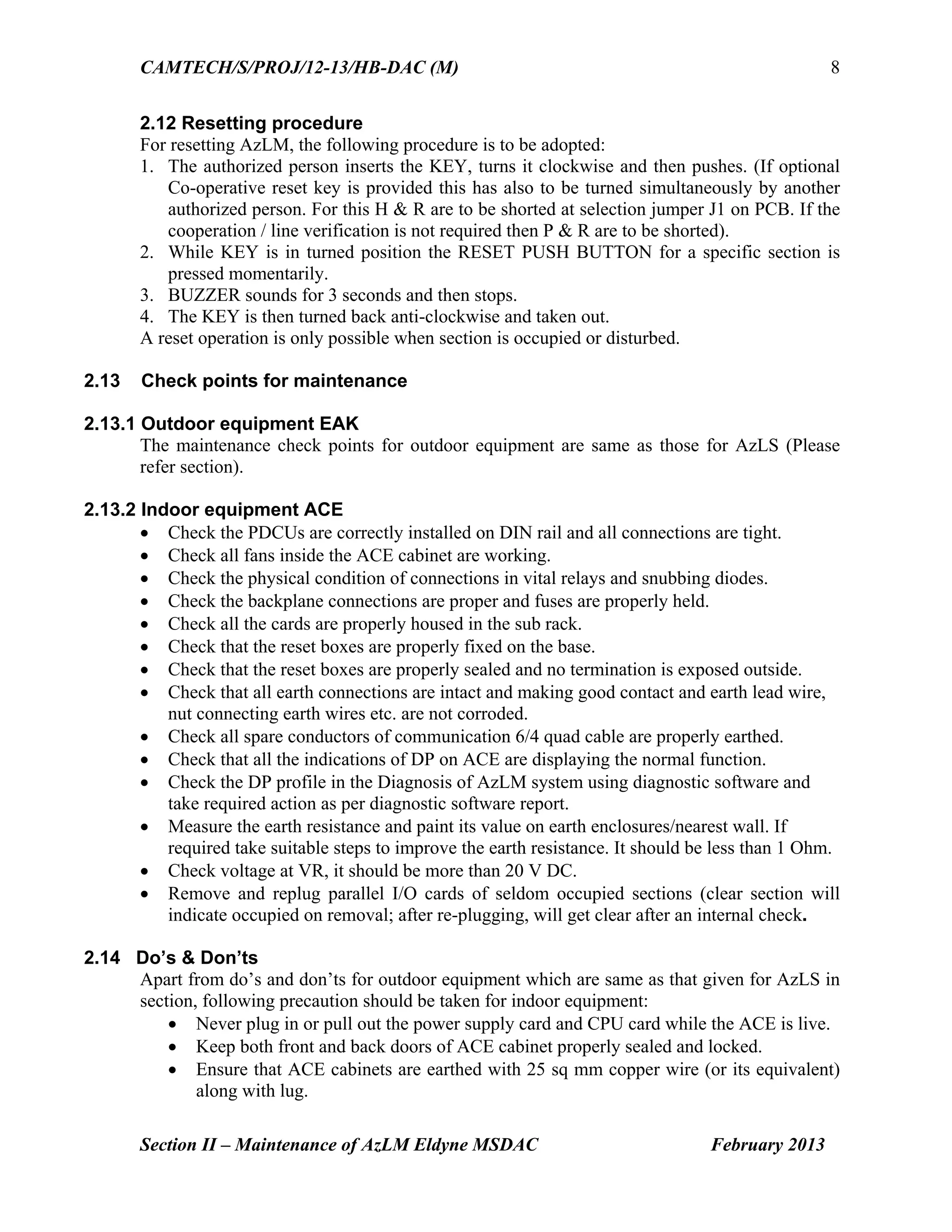
The SM‘s Key module for multisection reset panel consists of:
1. Reset Key
2. Power On LED Indication (Yellow LED)
This Reset Key acts as the common key for all the reset boxes used in a particular
installation. Additionally a buzzer is provided to give audio indication that the 3-second reset
pulse is on.
Fig. 2.12 : SM’s Key Module
34.
CAMTECH/S/PROJ/12-13/HB-DAC (M)
Section II– Maintenance of AzLM Eldyne MSDAC February 2013
8
2.12 Resetting procedure
For resetting AzLM, the following procedure is to be adopted:
1. The authorized person inserts the KEY, turns it clockwise and then pushes. (If optional
Co-operative reset key is provided this has also to be turned simultaneously by another
authorized person. For this H & R are to be shorted at selection jumper J1 on PCB. If the
cooperation / line verification is not required then P & R are to be shorted).
2. While KEY is in turned position the RESET PUSH BUTTON for a specific section is
pressed momentarily.
3. BUZZER sounds for 3 seconds and then stops.
4. The KEY is then turned back anti-clockwise and taken out.
A reset operation is only possible when section is occupied or disturbed.
2.13 Check points for maintenance
2.13.1 Outdoor equipment EAK
The maintenance check points for outdoor equipment are same as those for AzLS (Please
refer section).
2.13.2 Indoor equipment ACE
Check the PDCUs are correctly installed on DIN rail and all connections are tight.
Check all fans inside the ACE cabinet are working.
Check the physical condition of connections in vital relays and snubbing diodes.
Check the backplane connections are proper and fuses are properly held.
Check all the cards are properly housed in the sub rack.
Check that the reset boxes are properly fixed on the base.
Check that the reset boxes are properly sealed and no termination is exposed outside.
Check that all earth connections are intact and making good contact and earth lead wire,
nut connecting earth wires etc. are not corroded.
Check all spare conductors of communication 6/4 quad cable are properly earthed.
Check that all the indications of DP on ACE are displaying the normal function.
Check the DP profile in the Diagnosis of AzLM system using diagnostic software and
take required action as per diagnostic software report.
Measure the earth resistance and paint its value on earth enclosures/nearest wall. If
required take suitable steps to improve the earth resistance. It should be less than 1 Ohm.
Check voltage at VR, it should be more than 20 V DC.
Remove and replug parallel I/O cards of seldom occupied sections (clear section will
indicate occupied on removal; after re-plugging, will get clear after an internal check.
2.14 Do’s & Don’ts
Apart from do’s and don’ts for outdoor equipment which are same as that given for AzLS in
section, following precaution should be taken for indoor equipment:
Never plug in or pull out the power supply card and CPU card while the ACE is live.
Keep both front and back doors of ACE cabinet properly sealed and locked.
Ensure that ACE cabinets are earthed with 25 sq mm copper wire (or its equivalent)
along with lug.
35.
CAMTECH/S/PROJ/12-13/HB-DAC (M)
Section II– Maintenance of AzLM Eldyne MSDAC February 2013
9
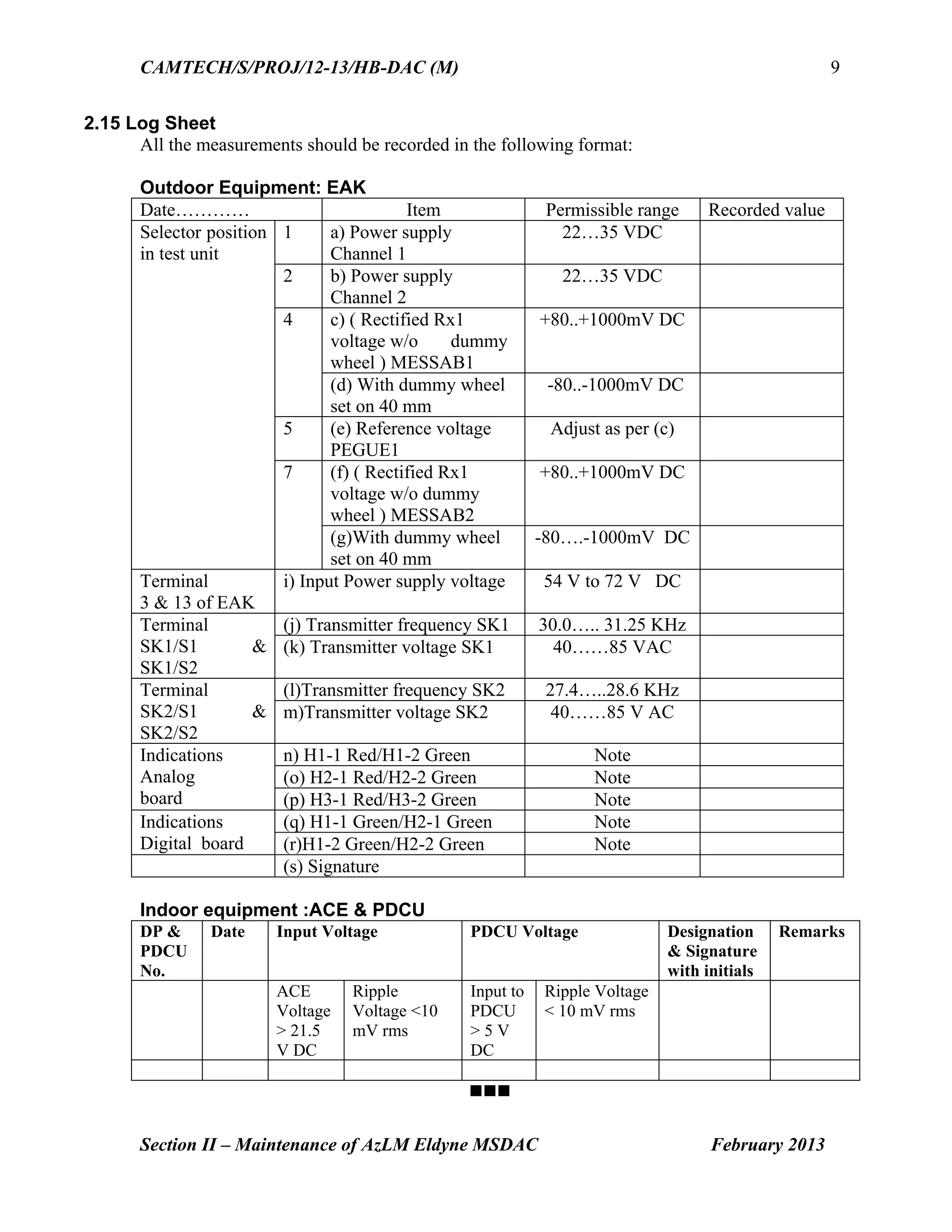
2.15 Log Sheet
All the measurements should be recorded in the following format:
Outdoor Equipment: EAK
Date………… Item Permissible range Recorded value
Selector position
in test unit
1 a) Power supply
Channel 1
22…35 VDC
2 b) Power supply
Channel 2
22…35 VDC
4 c) ( Rectified Rx1
voltage w/o dummy
wheel ) MESSAB1
+80..+1000mV DC
(d) With dummy wheel
set on 40 mm
-80..-1000mV DC
5 (e) Reference voltage
PEGUE1
Adjust as per (c)
7 (f) ( Rectified Rx1
voltage w/o dummy
wheel ) MESSAB2
+80..+1000mV DC
(g)With dummy wheel
set on 40 mm
-80….-1000mV DC
Terminal
3 & 13 of EAK
i) Input Power supply voltage 54 V to 72 V DC
Terminal
SK1/S1 &
SK1/S2
(j) Transmitter frequency SK1 30.0….. 31.25 KHz
(k) Transmitter voltage SK1 40……85 VAC
Terminal
SK2/S1 &
SK2/S2
(l)Transmitter frequency SK2 27.4…..28.6 KHz
m)Transmitter voltage SK2 40……85 V AC
Indications
Analog
board
n) H1-1 Red/H1-2 Green Note
(o) H2-1 Red/H2-2 Green Note
(p) H3-1 Red/H3-2 Green Note
Indications
Digital board
(q) H1-1 Green/H2-1 Green Note
(r)H1-2 Green/H2-2 Green Note
(s) Signature
Indoor equipment :ACE & PDCU
DP &
PDCU
No.
Date Input Voltage PDCU Voltage Designation
& Signature
with initials
Remarks
ACE
Voltage
> 21.5
V DC
Ripple
Voltage <10
mV rms
Input to
PDCU
> 5 V
DC
Ripple Voltage
< 10 mV rms
Go to Chapter index
Contents
Section III: Maintenanceof Az S 350 U Siemens Multi Section Digital Axle
Counter
Sr. No. Description Page No.
3.1 Introduction 1
3.2 Outdoor Equipment - ZP 43 Wheel Detection
Equipment
1
3.3 Indoor Equipment - Evaluation Computer 4
3.4 Power Supply 6
3.5 Reset options 6
3.6 Adjusting ZP 43 V Wheel Detection Equipment 7
3.7 Do’s & Don’ts 9
3.8 Adjustments and measurements at Evaluation
Computer
10
3.9 Switching the Evaluation Computer On and Off 10
3.10 Replacing Boards 11
Go to Main index
38.
CAMTECH/S/PROJ/2012-13/HB-DAC (M)
Section III: Maintenance of AzS350U Siemens MSDAC February 2013
1
Section III
Maintenance of
Az S 350 U
Siemens Multi Section Digital Axle Counter
3.1 Introduction
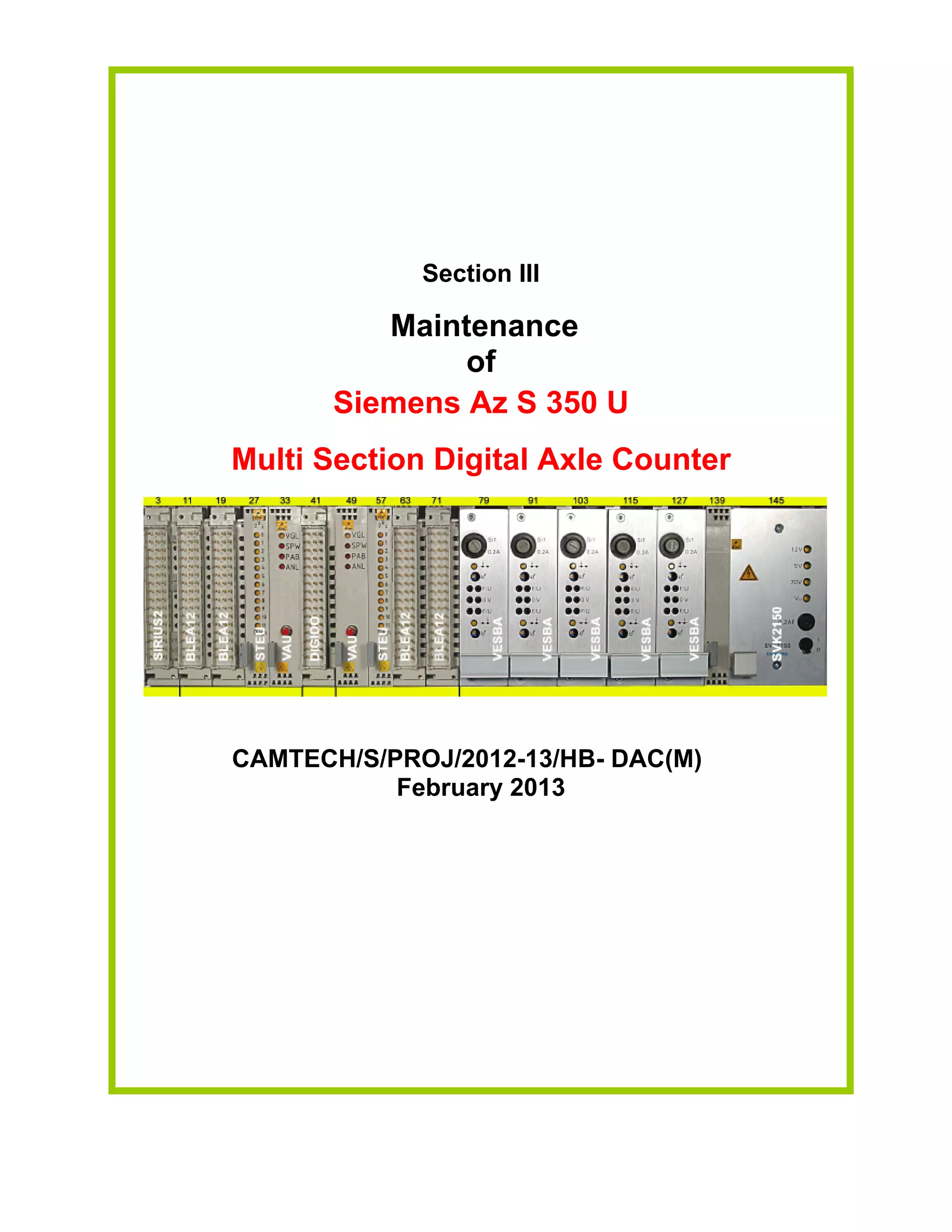
Az S 350 U consists of two main components:
Outdoor equipment
Indoor equipment
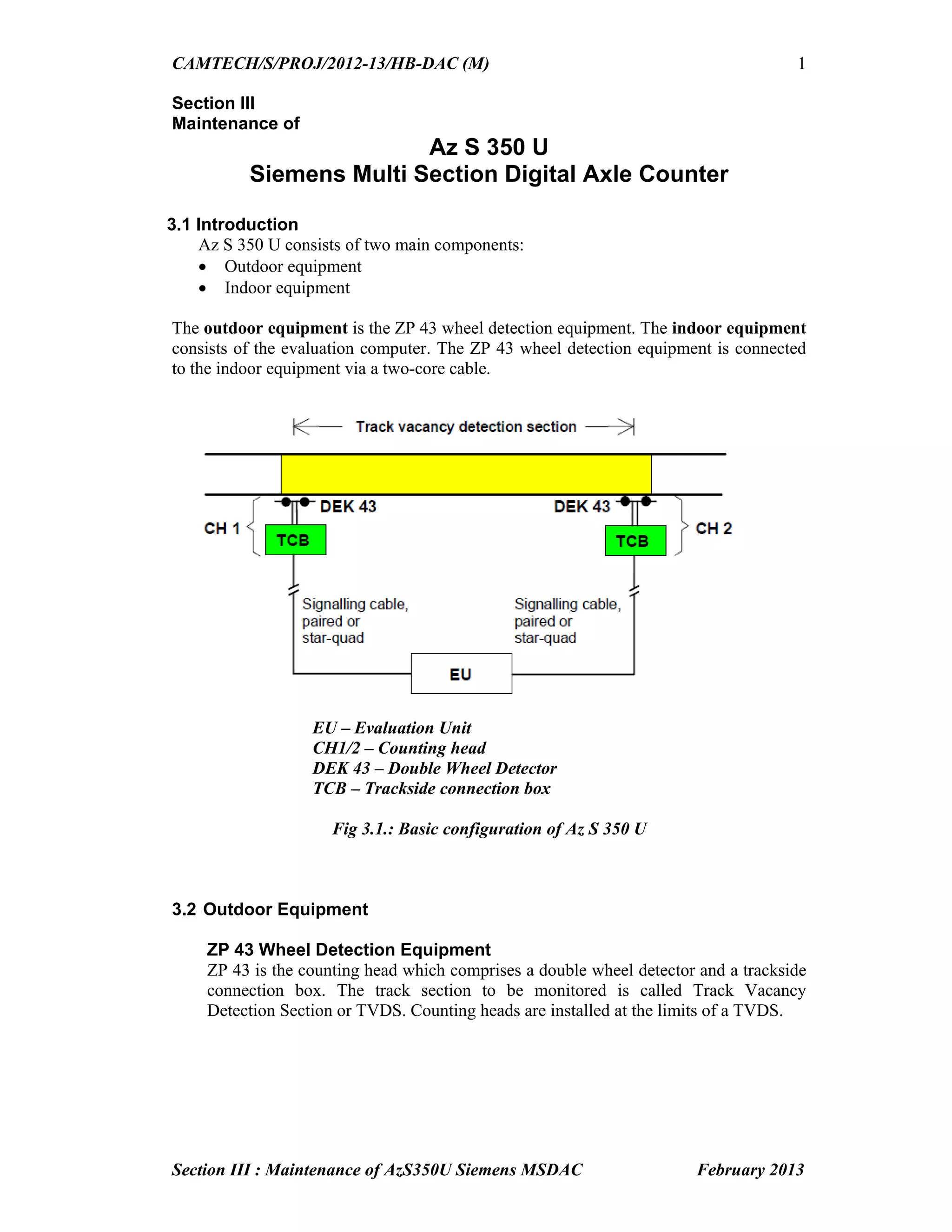
The outdoor equipment is the ZP 43 wheel detection equipment. The indoor equipment
consists of the evaluation computer. The ZP 43 wheel detection equipment is connected
to the indoor equipment via a two-core cable.
EU – Evaluation Unit
CH1/2 – Counting head
DEK 43 – Double Wheel Detector
TCB – Trackside connection box
Fig 3.1.: Basic configuration of Az S 350 U
3.2 Outdoor Equipment
ZP 43 Wheel Detection Equipment
ZP 43 is the counting head which comprises a double wheel detector and a trackside
connection box. The track section to be monitored is called Track Vacancy
Detection Section or TVDS. Counting heads are installed at the limits of a TVDS.
39.
CAMTECH/S/PROJ/2012-13/HB-DAC (M)
Section III: Maintenance of AzS350U Siemens MSDAC February 2013
2
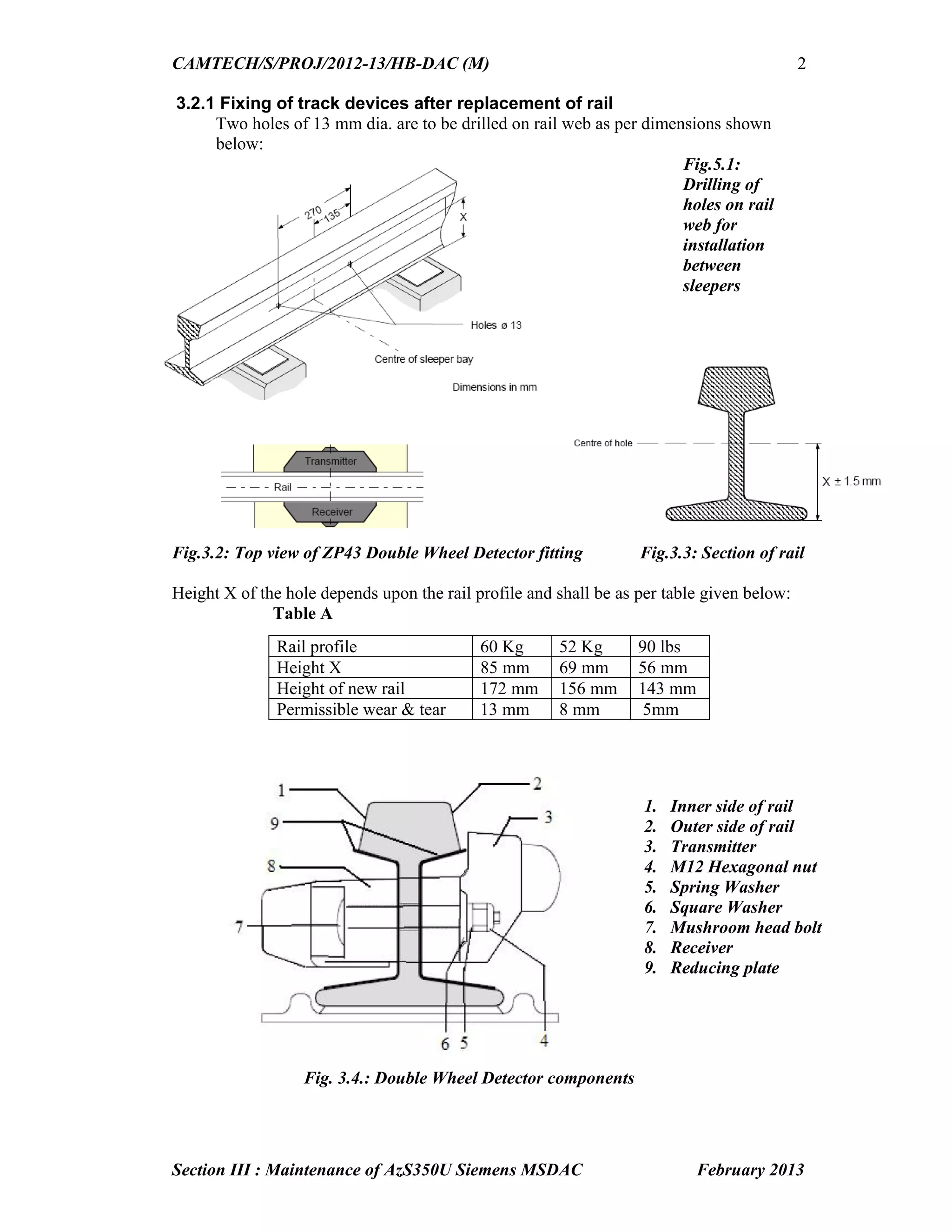
3.2.1 Fixing of track devices after replacement of rail
Two holes of 13 mm dia. are to be drilled on rail web as per dimensions shown
below:
Fig.3.2: Top view of ZP43 Double Wheel Detector fitting Fig.3.3: Section of rail
Height X of the hole depends upon the rail profile and shall be as per table given below:
Table A
Fig. 3.4.: Double Wheel Detector components
Rail profile 60 Kg 52 Kg 90 lbs
Height X 85 mm 69 mm 56 mm
Height of new rail 172 mm 156 mm 143 mm
Permissible wear & tear 13 mm 8 mm 5mm
1. Inner side of rail
2. Outer side of rail
3. Transmitter
4. M12 Hexagonal nut
5. Spring Washer
6. Square Washer
7. Mushroom head bolt
8. Receiver
9. Reducing plate
Fig.5.1:
Drilling of
holes on rail
web for
installation
between
sleepers
40.
CAMTECH/S/PROJ/2012-13/HB-DAC (M)
Section III: Maintenance of AzS350U Siemens MSDAC February 2013
3
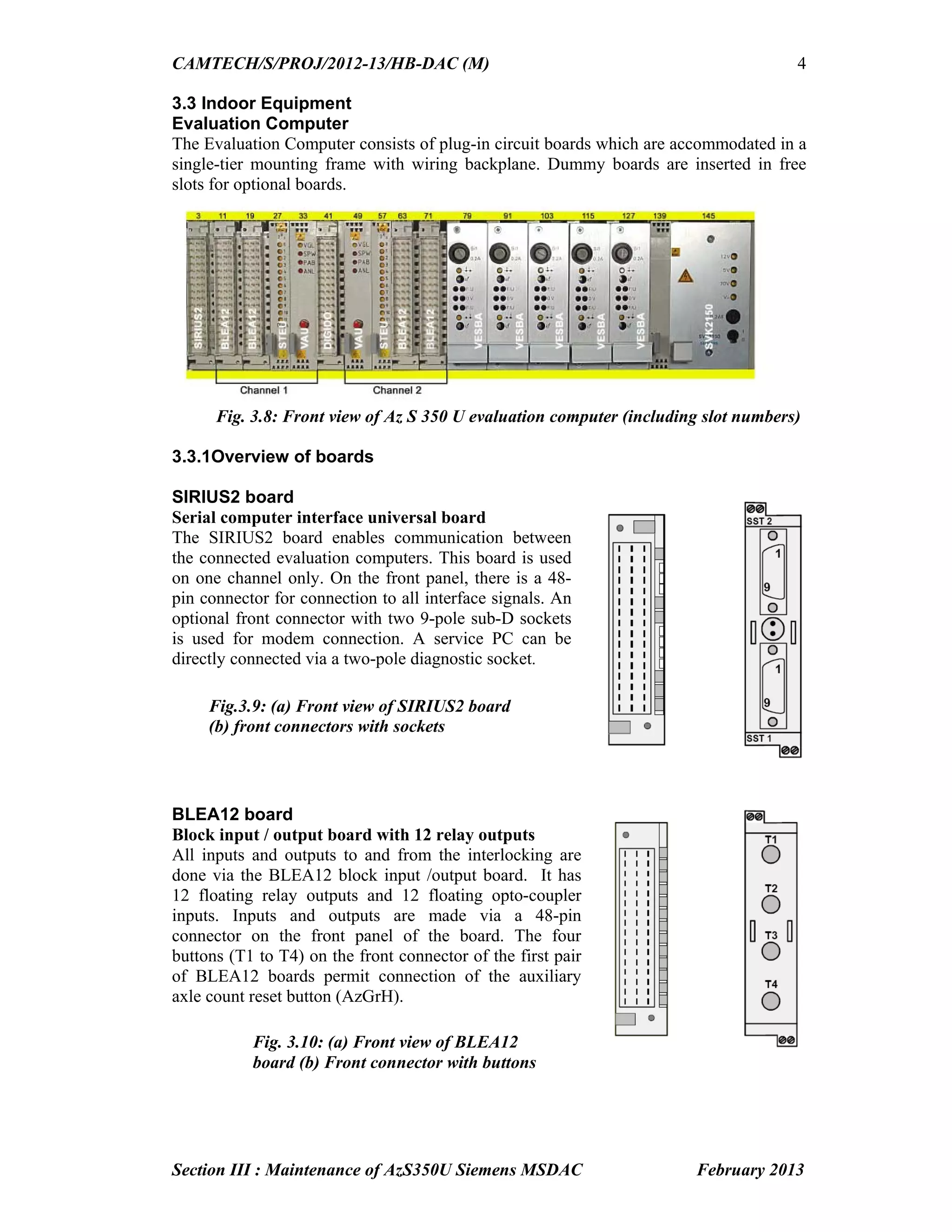
Fig. 3.6.: Terminal Assignment with lightning protection module board in the
Trackside Connection Box
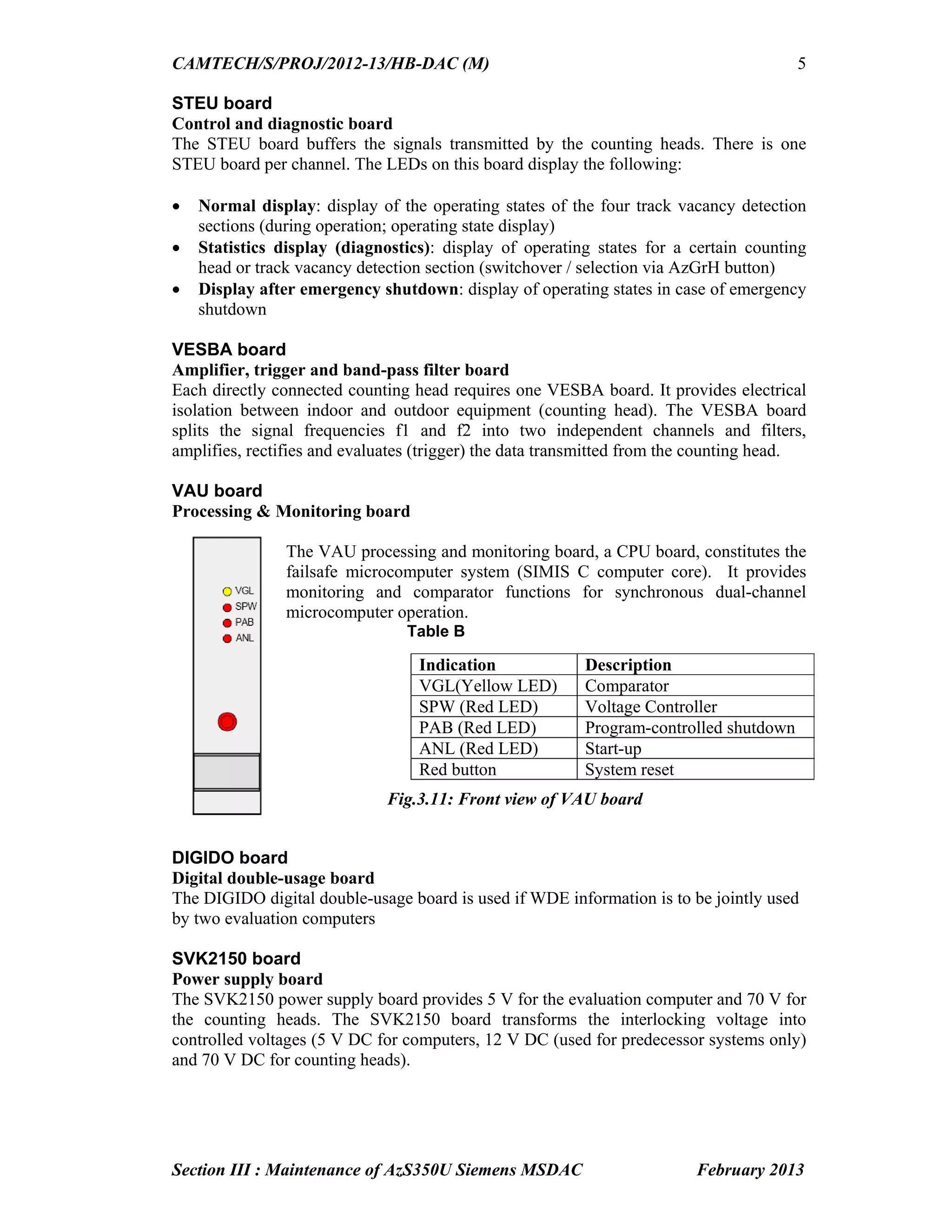
Fig.3.7: Lightning Arrester Module connected at rear side of backplane
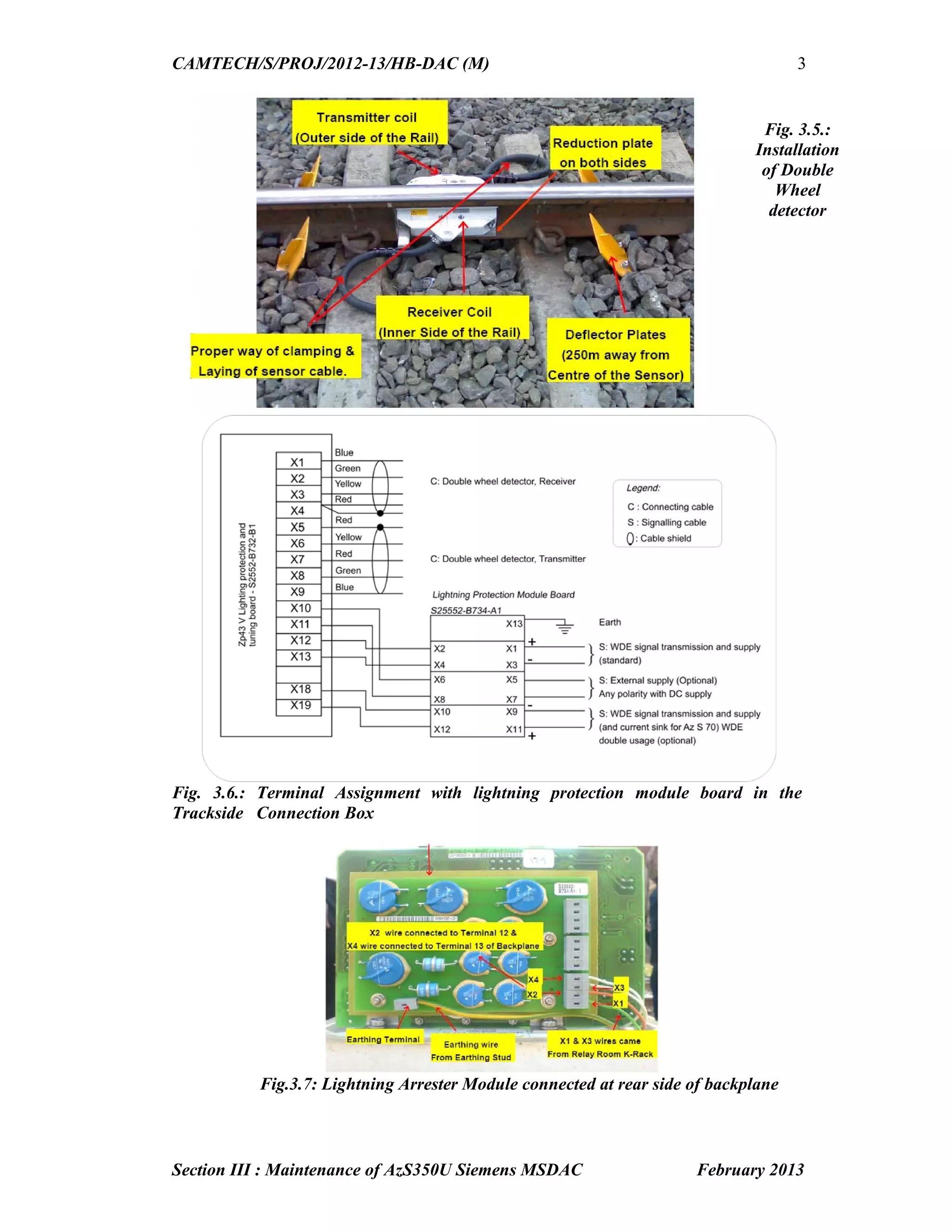
Fig. 3.5.:
Installation
of Double
Wheel
detector
41.
CAMTECH/S/PROJ/2012-13/HB-DAC (M)
Section III: Maintenance of AzS350U Siemens MSDAC February 2013
4
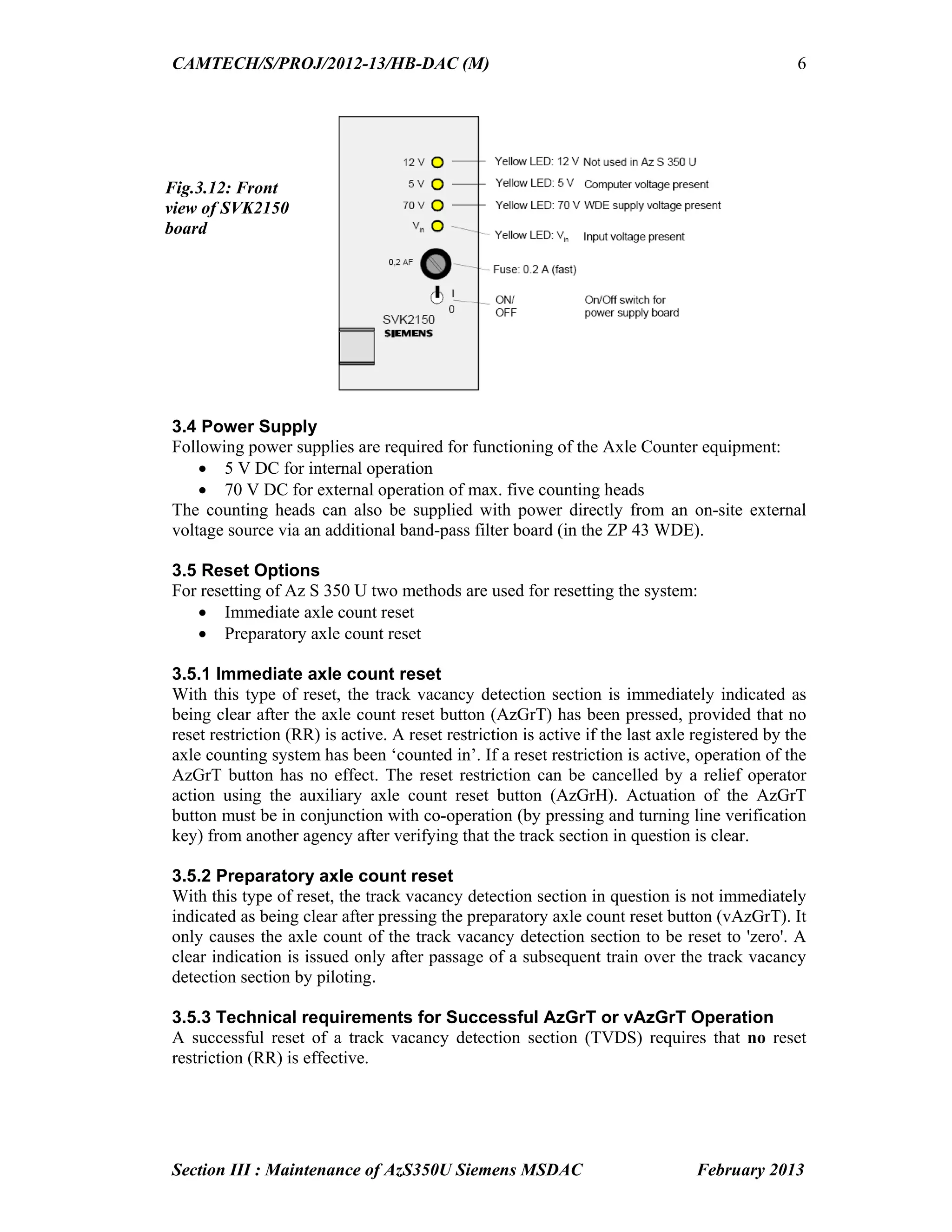
3.3 Indoor Equipment
Evaluation Computer
The Evaluation Computer consists of plug-in circuit boards which are accommodated in a
single-tier mounting frame with wiring backplane. Dummy boards are inserted in free
slots for optional boards.
Fig. 3.8: Front view of Az S 350 U evaluation computer (including slot numbers)
3.3.1Overview of boards
SIRIUS2 board
Serial computer interface universal board
The SIRIUS2 board enables communication between
the connected evaluation computers. This board is used
on one channel only. On the front panel, there is a 48-
pin connector for connection to all interface signals. An
optional front connector with two 9-pole sub-D sockets
is used for modem connection. A service PC can be
directly connected via a two-pole diagnostic socket.
BLEA12 board
Block input / output board with 12 relay outputs
All inputs and outputs to and from the interlocking are
done via the BLEA12 block input /output board. It has
12 floating relay outputs and 12 floating opto-coupler
inputs. Inputs and outputs are made via a 48-pin
connector on the front panel of the board. The four
buttons (T1 to T4) on the front connector of the first pair
of BLEA12 boards permit connection of the auxiliary
axle count reset button (AzGrH).
Fig.3.9: (a) Front view of SIRIUS2 board
(b) front connectors with sockets
Fig. 3.10: (a) Front view of BLEA12
board (b) Front connector with buttons
42.
CAMTECH/S/PROJ/2012-13/HB-DAC (M)
Section III: Maintenance of AzS350U Siemens MSDAC February 2013
5
STEU board
Control and diagnostic board
The STEU board buffers the signals transmitted by the counting heads. There is one
STEU board per channel. The LEDs on this board display the following:
Normal display: display of the operating states of the four track vacancy detection
sections (during operation; operating state display)
Statistics display (diagnostics): display of operating states for a certain counting
head or track vacancy detection section (switchover / selection via AzGrH button)
Display after emergency shutdown: display of operating states in case of emergency
shutdown
VESBA board
Amplifier, trigger and band-pass filter board
Each directly connected counting head requires one VESBA board. It provides electrical
isolation between indoor and outdoor equipment (counting head). The VESBA board
splits the signal frequencies f1 and f2 into two independent channels and filters,
amplifies, rectifies and evaluates (trigger) the data transmitted from the counting head.
VAU board
Processing & Monitoring board
The VAU processing and monitoring board, a CPU board, constitutes the
failsafe microcomputer system (SIMIS C computer core). It provides
monitoring and comparator functions for synchronous dual-channel
microcomputer operation.
Table B
Fig.3.11: Front view of VAU board
DIGIDO board
Digital double-usage board
The DIGIDO digital double-usage board is used if WDE information is to be jointly used
by two evaluation computers
SVK2150 board
Power supply board
The SVK2150 power supply board provides 5 V for the evaluation computer and 70 V for
the counting heads. The SVK2150 board transforms the interlocking voltage into
controlled voltages (5 V DC for computers, 12 V DC (used for predecessor systems only)
and 70 V DC for counting heads).
Indication Description
VGL(Yellow LED) Comparator
SPW (Red LED) Voltage Controller
PAB (Red LED) Program-controlled shutdown
ANL (Red LED) Start-up
Red button System reset
43.
CAMTECH/S/PROJ/2012-13/HB-DAC (M)
Section III: Maintenance of AzS350U Siemens MSDAC February 2013
6
3.4 Power Supply
Following power supplies are required for functioning of the Axle Counter equipment:
5 V DC for internal operation
70 V DC for external operation of max. five counting heads
The counting heads can also be supplied with power directly from an on-site external
voltage source via an additional band-pass filter board (in the ZP 43 WDE).
3.5 Reset Options
For resetting of Az S 350 U two methods are used for resetting the system:
Immediate axle count reset
Preparatory axle count reset
3.5.1 Immediate axle count reset
With this type of reset, the track vacancy detection section is immediately indicated as
being clear after the axle count reset button (AzGrT) has been pressed, provided that no
reset restriction (RR) is active. A reset restriction is active if the last axle registered by the
axle counting system has been ‘counted in’. If a reset restriction is active, operation of the
AzGrT button has no effect. The reset restriction can be cancelled by a relief operator
action using the auxiliary axle count reset button (AzGrH). Actuation of the AzGrT
button must be in conjunction with co-operation (by pressing and turning line verification
key) from another agency after verifying that the track section in question is clear.
3.5.2 Preparatory axle count reset
With this type of reset, the track vacancy detection section in question is not immediately
indicated as being clear after pressing the preparatory axle count reset button (vAzGrT). It
only causes the axle count of the track vacancy detection section to be reset to 'zero'. A
clear indication is issued only after passage of a subsequent train over the track vacancy
detection section by piloting.
3.5.3 Technical requirements for Successful AzGrT or vAzGrT Operation
A successful reset of a track vacancy detection section (TVDS) requires that no reset
restriction (RR) is effective.
Fig.3.12: Front
view of SVK2150
board
44.
CAMTECH/S/PROJ/2012-13/HB-DAC (M)
Section III: Maintenance of AzS350U Siemens MSDAC February 2013
7
3.5.4 Reset restriction
Depending on the configuration, the reset restriction is set according to different
parameters. There might be a reset restriction, if one of the following is true:
Pulse detection by a counting head belonging to the TVDS:
There is an axle on or oscillating over the double wheel detector.
The power supply of the counting heads is faulty.
The double wheel detector or double wheel detector cable connections are faulty.
Counting heads of the TVDS have been traversed within the last six seconds.
The last test of switching capability (internal software test – SOPP) of the data
channels on the VAU board has not been successful.
The axle last recorded by the evaluation computer in a track vacancy detection
section is an axle counted in.
3.6 Adjusting ZP 43 V Wheel Detection Equipment
3.6.1Tools and Test Equipment required for adjustment
Open-end, ring or box spanner, width across flats 13
Screwdriver 0.6 x 2.8 as per DIN 7437
Screwdriver 0.6 x 3.5 as per DIN 7437
Test equipment: Probe adapter board and multi-meter (Fluke-189 or equivalent)
with measuring ranges.
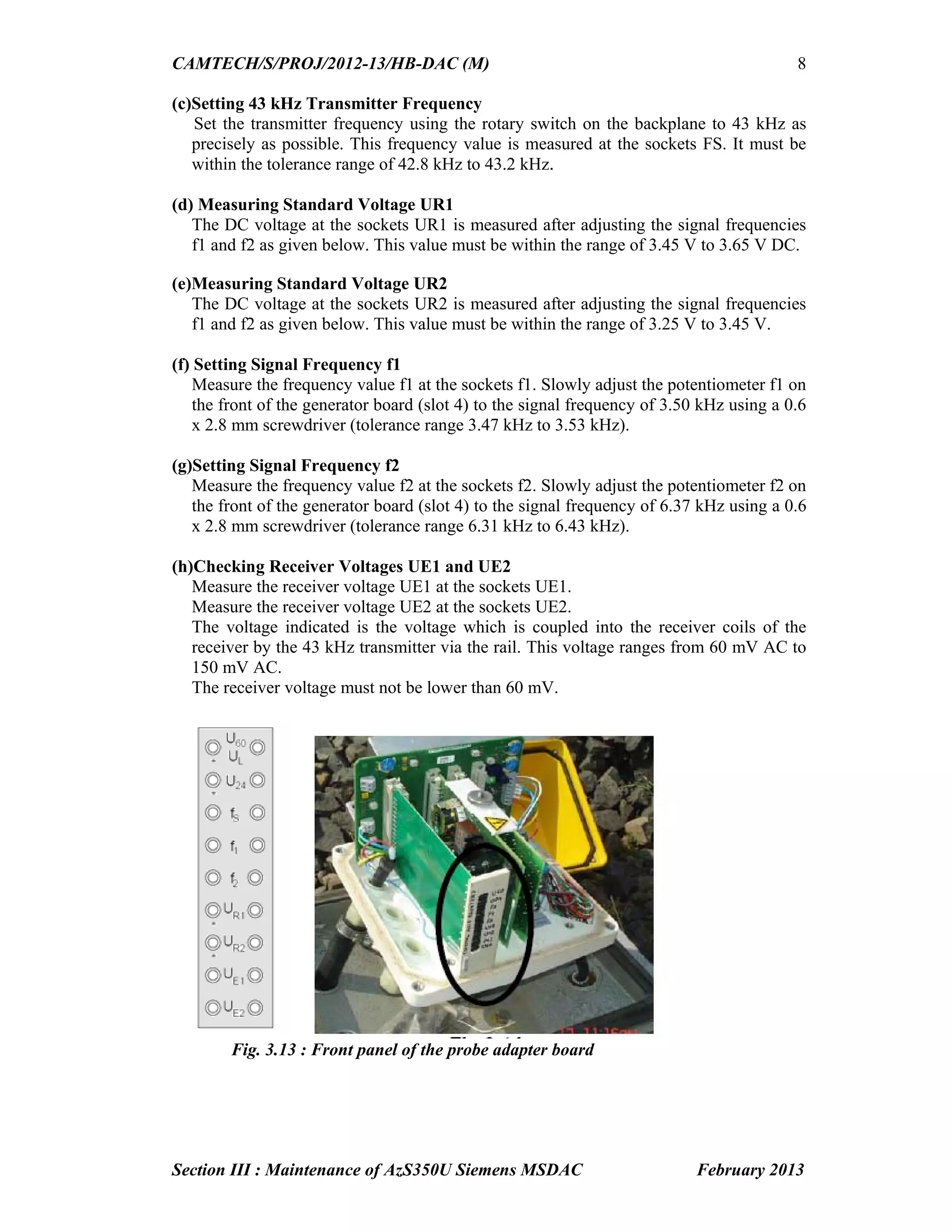
3.6.2 Probe Adapter Board
The probe adapter board SCN S25552-B43-D1 can be used during commissioning and
maintenance for testing and adjusting work on the ZP 43 V WDE. Adjusting work
(voltage and frequency measurements) can be performed using a commercially available
multi-meter. Measuring sockets arranged in pairs are provided on the front panel (Refer
Fig. 3.13 on page 8). The multi-meter is connected to these measuring sockets.
3.6.3 Multimeter Requirements
The multi-meter (Fluke-189 or equivalent) must meet the following requirements:
DC measuring range: 300 mV to 100 V
AC measuring range: 40 mV to 100 V
Frequency measuring range: 2.5 kHz to 45 kHz
3.6.4 Procedure for measurement/adjustment
Remove all stray metal parts (e.g. tools) in the vicinity of the double wheel detector.
Plug the test adapter board into the connector provided on the backplane.
Set the required AC/DC range on the multi-meter.
Connect the probes of multi-meter to the relevant measuring sockets provided on the
front panel of test adapter board.
Take the measurements and adjust the parameters if required as follows:
(a)Checking Wheel Detection Equipment Supply Voltage U60
The voltage at the measuring sockets U60 must be between 30 V DC and 72 V DC.
(b)Checking Wheel Detection Equipment Voltage U24
The voltage at the measuring sockets U24 must be between 21.3 V DC and 22.4 V
DC. This is the internal, stabilized supply voltage of the wheel detection equipment.
45.
CAMTECH/S/PROJ/2012-13/HB-DAC (M)
Section III: Maintenance of AzS350U Siemens MSDAC February 2013
8
(c)Setting 43 kHz Transmitter Frequency
Set the transmitter frequency using the rotary switch on the backplane to 43 kHz as
precisely as possible. This frequency value is measured at the sockets FS. It must be
within the tolerance range of 42.8 kHz to 43.2 kHz.
(d) Measuring Standard Voltage UR1
The DC voltage at the sockets UR1 is measured after adjusting the signal frequencies
f1 and f2 as given below. This value must be within the range of 3.45 V to 3.65 V DC.
(e)Measuring Standard Voltage UR2
The DC voltage at the sockets UR2 is measured after adjusting the signal frequencies
f1 and f2 as given below. This value must be within the range of 3.25 V to 3.45 V.
(f) Setting Signal Frequency f1
Measure the frequency value f1 at the sockets f1. Slowly adjust the potentiometer f1 on
the front of the generator board (slot 4) to the signal frequency of 3.50 kHz using a 0.6
x 2.8 mm screwdriver (tolerance range 3.47 kHz to 3.53 kHz).
(g)Setting Signal Frequency f2
Measure the frequency value f2 at the sockets f2. Slowly adjust the potentiometer f2 on
the front of the generator board (slot 4) to the signal frequency of 6.37 kHz using a 0.6
x 2.8 mm screwdriver (tolerance range 6.31 kHz to 6.43 kHz).
(h)Checking Receiver Voltages UE1 and UE2
Measure the receiver voltage UE1 at the sockets UE1.
Measure the receiver voltage UE2 at the sockets UE2.
The voltage indicated is the voltage which is coupled into the receiver coils of the
receiver by the 43 kHz transmitter via the rail. This voltage ranges from 60 mV AC to
150 mV AC.
The receiver voltage must not be lower than 60 mV.
Fig. 3.13 : Front panel of the probe adapter board
46.
CAMTECH/S/PROJ/2012-13/HB-DAC (M)
Section III: Maintenance of AzS350U Siemens MSDAC February 2013
9
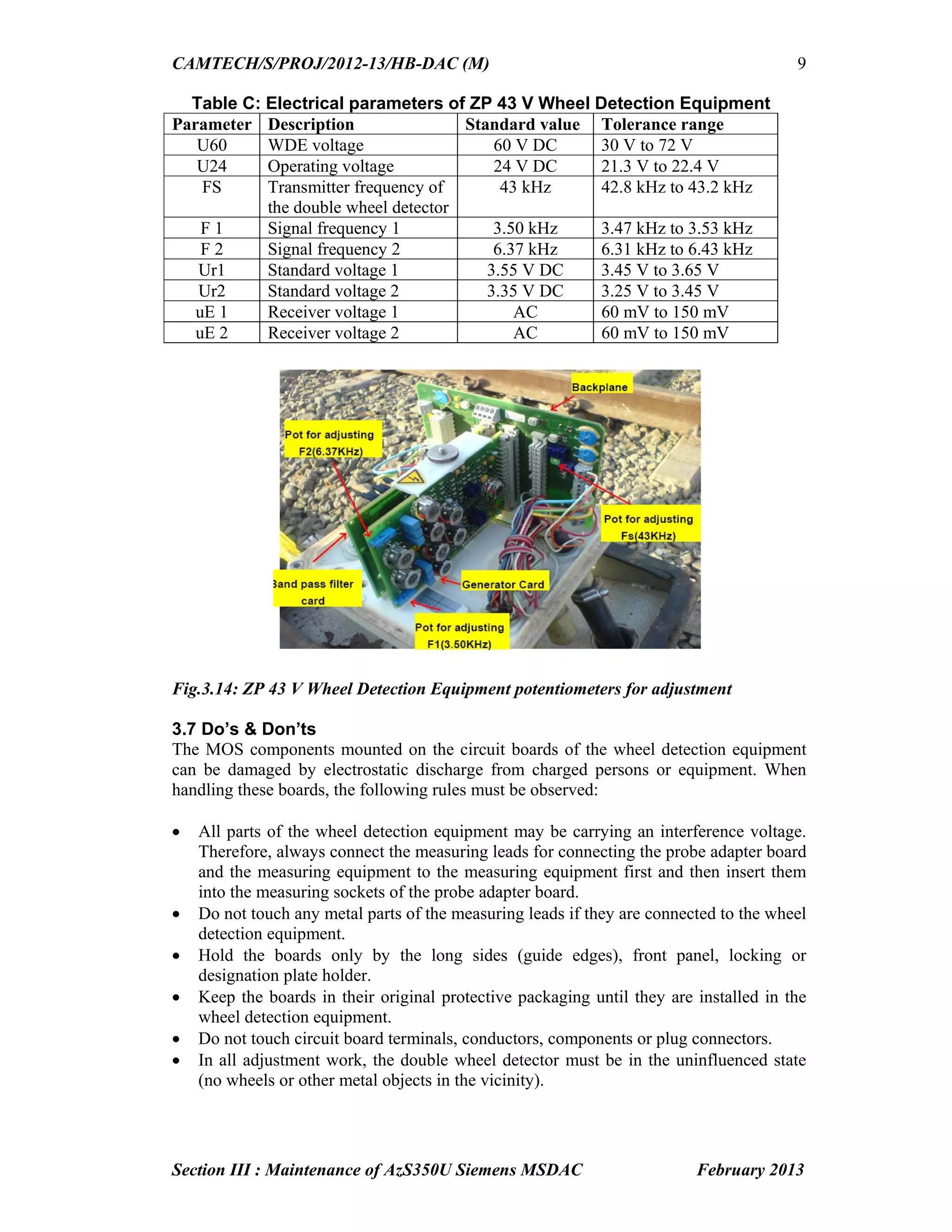
Table C: Electrical parameters of ZP 43 V Wheel Detection Equipment
Parameter Description Standard value Tolerance range
U60 WDE voltage 60 V DC 30 V to 72 V
U24 Operating voltage 24 V DC 21.3 V to 22.4 V
FS Transmitter frequency of
the double wheel detector
43 kHz 42.8 kHz to 43.2 kHz
F 1 Signal frequency 1 3.50 kHz 3.47 kHz to 3.53 kHz
F 2 Signal frequency 2 6.37 kHz 6.31 kHz to 6.43 kHz
Ur1 Standard voltage 1 3.55 V DC 3.45 V to 3.65 V
Ur2 Standard voltage 2 3.35 V DC 3.25 V to 3.45 V
uE 1 Receiver voltage 1 AC 60 mV to 150 mV
uE 2 Receiver voltage 2 AC 60 mV to 150 mV
Fig.3.14: ZP 43 V Wheel Detection Equipment potentiometers for adjustment
3.7 Do’s & Don’ts
The MOS components mounted on the circuit boards of the wheel detection equipment
can be damaged by electrostatic discharge from charged persons or equipment. When
handling these boards, the following rules must be observed:
All parts of the wheel detection equipment may be carrying an interference voltage.
Therefore, always connect the measuring leads for connecting the probe adapter board
and the measuring equipment to the measuring equipment first and then insert them
into the measuring sockets of the probe adapter board.
Do not touch any metal parts of the measuring leads if they are connected to the wheel
detection equipment.
Hold the boards only by the long sides (guide edges), front panel, locking or
designation plate holder.
Keep the boards in their original protective packaging until they are installed in the
wheel detection equipment.
Do not touch circuit board terminals, conductors, components or plug connectors.
In all adjustment work, the double wheel detector must be in the uninfluenced state
(no wheels or other metal objects in the vicinity).
47.
CAMTECH/S/PROJ/2012-13/HB-DAC (M)
Section III: Maintenance of AzS350U Siemens MSDAC February 2013
10
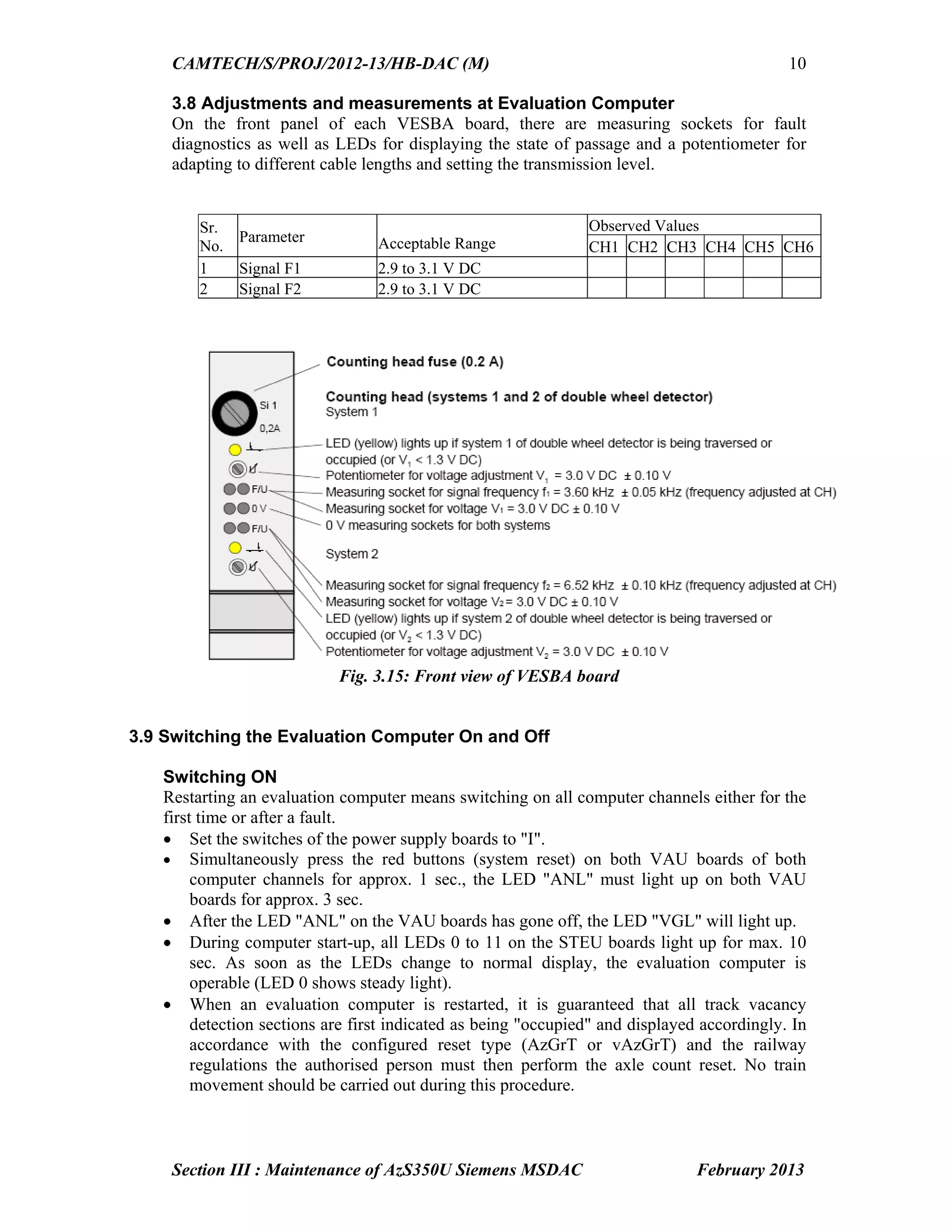
3.8 Adjustments and measurements at Evaluation Computer
On the front panel of each VESBA board, there are measuring sockets for fault
diagnostics as well as LEDs for displaying the state of passage and a potentiometer for
adapting to different cable lengths and setting the transmission level.
Sr.
No.
Parameter Acceptable Range
Observed Values
CH1 CH2 CH3 CH4 CH5 CH6
1 Signal F1 2.9 to 3.1 V DC
2 Signal F2 2.9 to 3.1 V DC
Fig. 3.15: Front view of VESBA board
3.9 Switching the Evaluation Computer On and Off
Switching ON
Restarting an evaluation computer means switching on all computer channels either for the
first time or after a fault.
Set the switches of the power supply boards to "I".
Simultaneously press the red buttons (system reset) on both VAU boards of both
computer channels for approx. 1 sec., the LED "ANL" must light up on both VAU
boards for approx. 3 sec.
After the LED "ANL" on the VAU boards has gone off, the LED "VGL" will light up.
During computer start-up, all LEDs 0 to 11 on the STEU boards light up for max. 10
sec. As soon as the LEDs change to normal display, the evaluation computer is
operable (LED 0 shows steady light).
When an evaluation computer is restarted, it is guaranteed that all track vacancy
detection sections are first indicated as being "occupied" and displayed accordingly. In
accordance with the configured reset type (AzGrT or vAzGrT) and the railway
regulations the authorised person must then perform the axle count reset. No train
movement should be carried out during this procedure.
48.
CAMTECH/S/PROJ/2012-13/HB-DAC
Section III: Maintenanceof AzS350U Siemens MSDAC February 2013
11
Switching OFF
The evaluation computer may only be switched off in consultation with the SM/
authorised person.
For switching OFF a computer for corrective maintenance or long-term shutdown
purposes:
Set the switch of the power supply board to "0".
In case of long-term computer shutdown, the supply voltage must be switched off, do
not exceed the admissible out-of-service period of. 5.5 months (only if supply voltage
is switched off immediately after channel failure).
If these times are exceeded, special safety measures must be performed. The
evaluation computer may only be put into operation again by Siemens specialist staff.
3.10 Replacing Boards
Only remove or insert boards and front connectors when the computer is in the de-
energized state. Removing and inserting boards in the energized state may damage or
destroy boards or computer.
Removing Boards
To remove boards, proceed as follows:
Loosen the knurled screws at the upper
and lower locking bars of the mounting
frame (if present).
Remove both locking bars.
Loosen front connectors (if present).
If the board is supplied with a handle, pull
at the handle to remove the board. Remove
boards without a handle using the
extraction tool. Pull out the board
completely.
Fig. 3.16 : Extraction tool for boards
Inserting Boards
To insert boards, proceed as follows:
Slightly press up the upper locking bar and insert the board into the mounting frame
according to the location diagram.
Plug in front connectors (if present) previously prepared and tighten them.
Tighten the knurled screws of the locking bars.
The VAU board must always be replaced in pairs
Go to Chapter index
49.
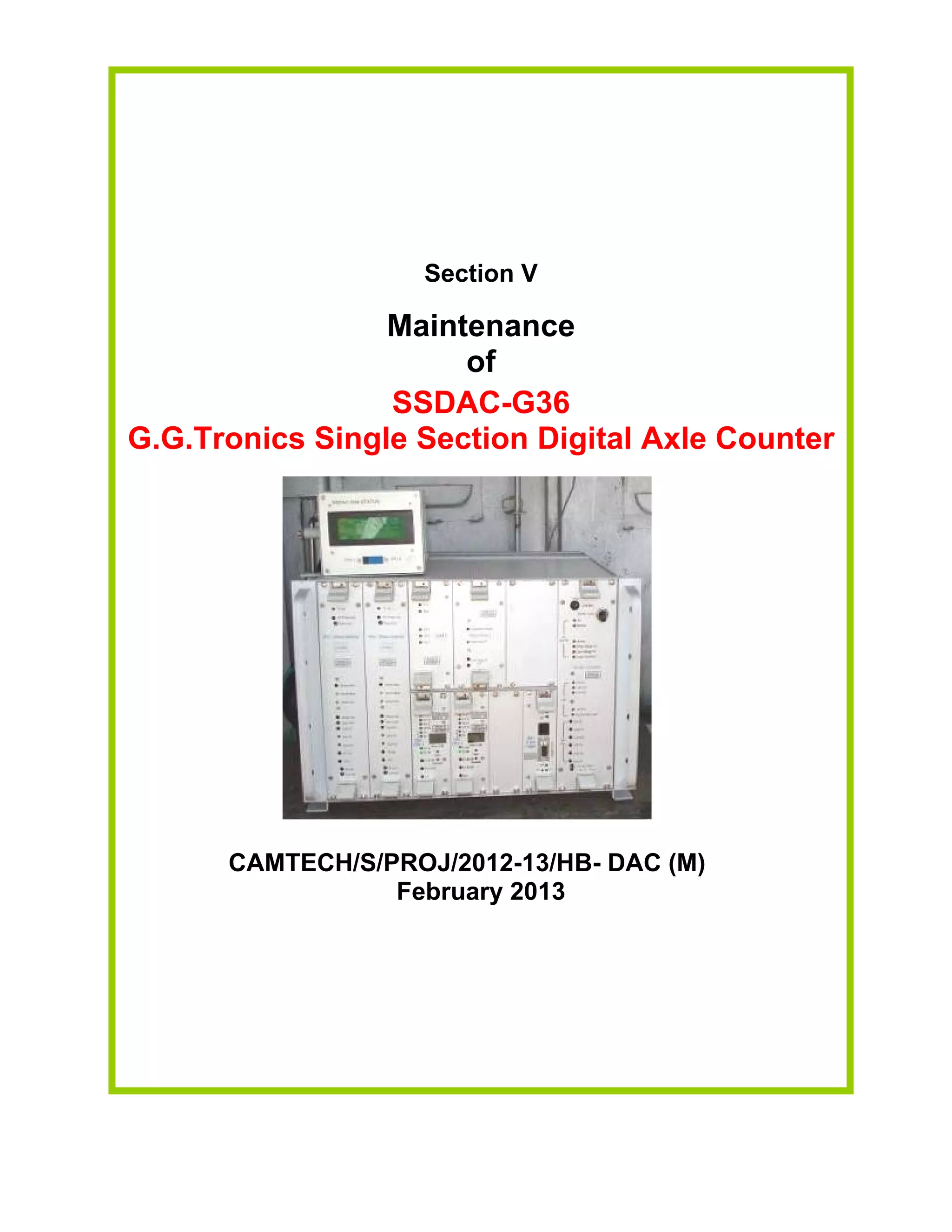
Section IV
Maintenance of
CEL
DACF710 A & DACF 710 P
Single Section Digital Axle Counter
CAMTECH/S/PROJ/2012-13/HB- DAC(M)
February 2013
50.
Contents
Section IV: Maintenanceof DACF 710 A & DACF 710 P CEL Single Section
Digital Axle Counter
Sr. No. Description Page No.
4.1 Introduction 1
4.2 Components of DACF 1
4.3 Vital Relay box 1
4.4 SM’s Reset box 2
4.5 Surge Voltage Protection Device 2
4.6 Installation of Tx and Rx coils after replacement of rail 2
4.7 LED indications on SSDAC unit 3
4.8 Maintenance 4
4.9 Resetting procedure 8
4.10 Tools & Spares 10
4.11 Do’s & Don’ts 11
Go to Main index
51.
CAMTECH/S/PROJ/12-13/HB-DAC (M)
Section IV:Maintenance of DACF 710 A/P CEL SSDAC February 2013
1
Section IV
Maintenance of
DACF 710 A & DACF 710 P
CEL Single Section Digital Axle Counter
4.1 Introduction
The system comprises of trackside counting units, installed at both ends near the
detection points on the track. No separate evaluator is required. Two versions available
(i) DACF 710 P (Phase reversal type)
The DACF 710 P is not affected by the push trolleys having 4 spoke and 8 spoke wheels;
and rail dolly. Trolley suppression track circuit is not required. It counts the following
push trolleys: (a) Push trolley with perforated wheel; (b) Dip lorry and (c) Motor trolley.
(ii) DACF 710 A (Amplitude Modulation type) The SSDAC remains unaffected with all
types of insulated push trolleys but goes into disturbed state (ERROR condition) for non
insulated trolleys. Trolley suppression track circuit is required.
4.2 Components of DACF
The CEL DACF system consists of following units
Axle detectors
Transmitter (TX) coils – 2Nos. fed with 21 kHz and 23 kHz carrier signals
Receiver (RX) coils – 2 Nos. to receive the transmitter signal
The Rx signal is phase modulated with each train wheel passing over the detection point.
Trackside electronic unit (SSDAC)
The SSDAC unit comprises total 8 cards namely:
Card No.1 & 2 - Signal Conditioning Card
Card No.3 & 4 - Micro controller logic blocks (2 Micro controllers)
Card No. 5 - Event Logger Card
Card No. 6 - Modem Card
Card No. 7 - Relay Driver Card
Card No. 8 - Power Supply Module (DC-DC converter)
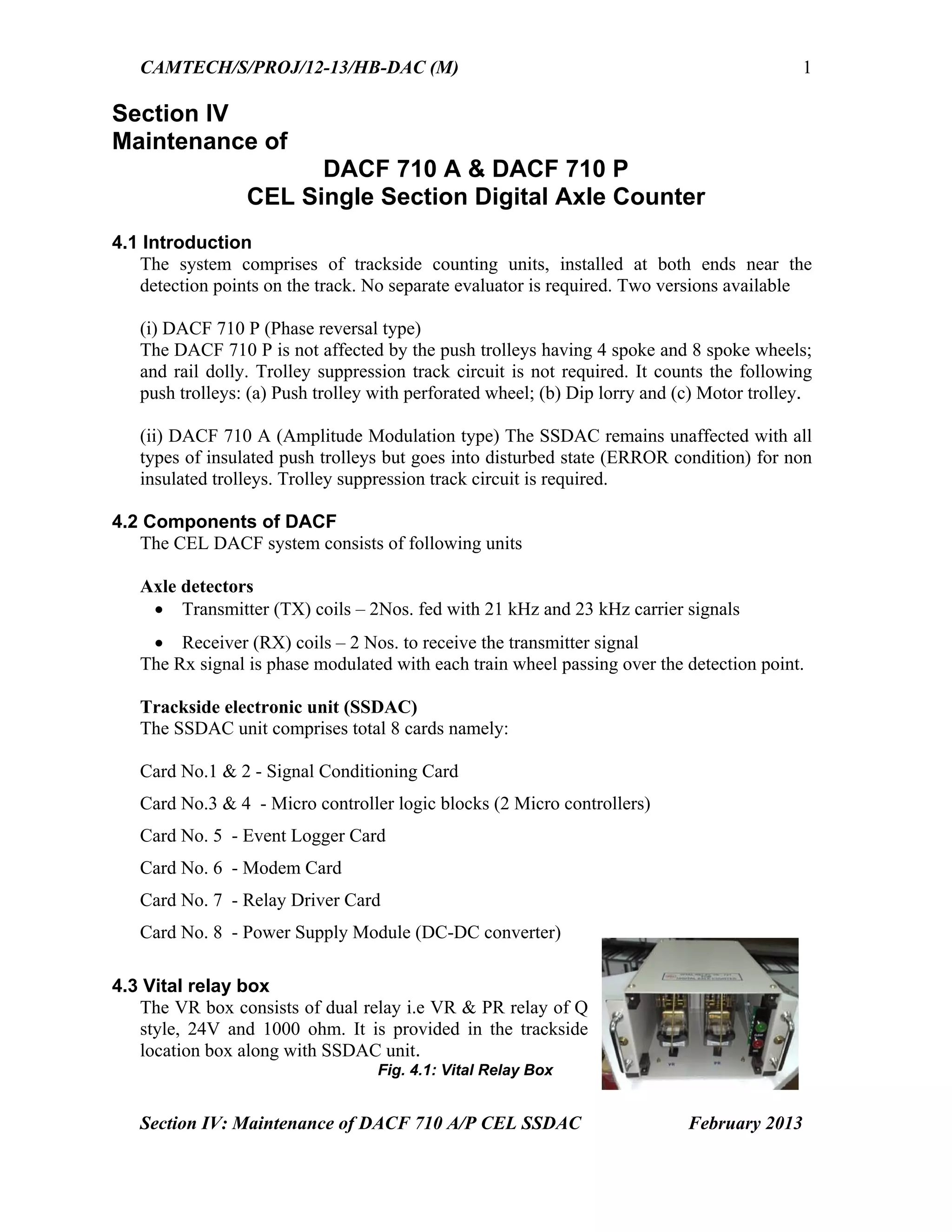
4.3 Vital relay box
The VR box consists of dual relay i.e VR & PR relay of Q
style, 24V and 1000 ohm. It is provided in the trackside
location box along with SSDAC unit.
Fig. 4.1: Vital Relay Box
52.
CAMTECH/S/PROJ/12-13/HB-DAC (M)
Section IV:Maintenance of DACF 710 A/P CEL SSDAC February 2013
2
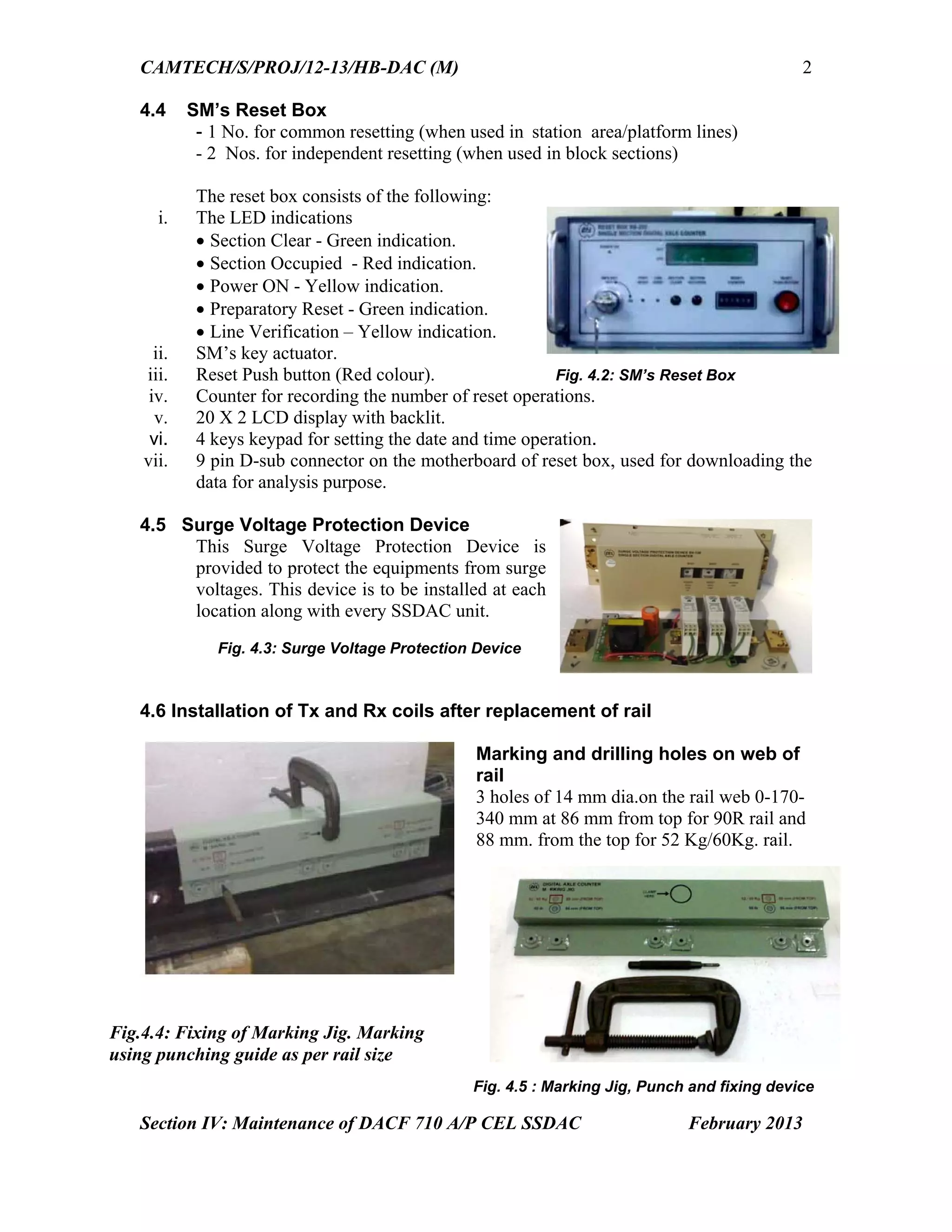
4.4 SM’s Reset Box
- 1 No. for common resetting (when used in station area/platform lines)
- 2 Nos. for independent resetting (when used in block sections)
The reset box consists of the following:
i. The LED indications
Section Clear - Green indication.
Section Occupied - Red indication.
Power ON - Yellow indication.
Preparatory Reset - Green indication.
Line Verification – Yellow indication.
ii. SM’s key actuator.
iii. Reset Push button (Red colour). Fig. 4.2: SM’s Reset Box
iv. Counter for recording the number of reset operations.
v. 20 X 2 LCD display with backlit.
vi. 4 keys keypad for setting the date and time operation.
vii. 9 pin D-sub connector on the motherboard of reset box, used for downloading the
data for analysis purpose.
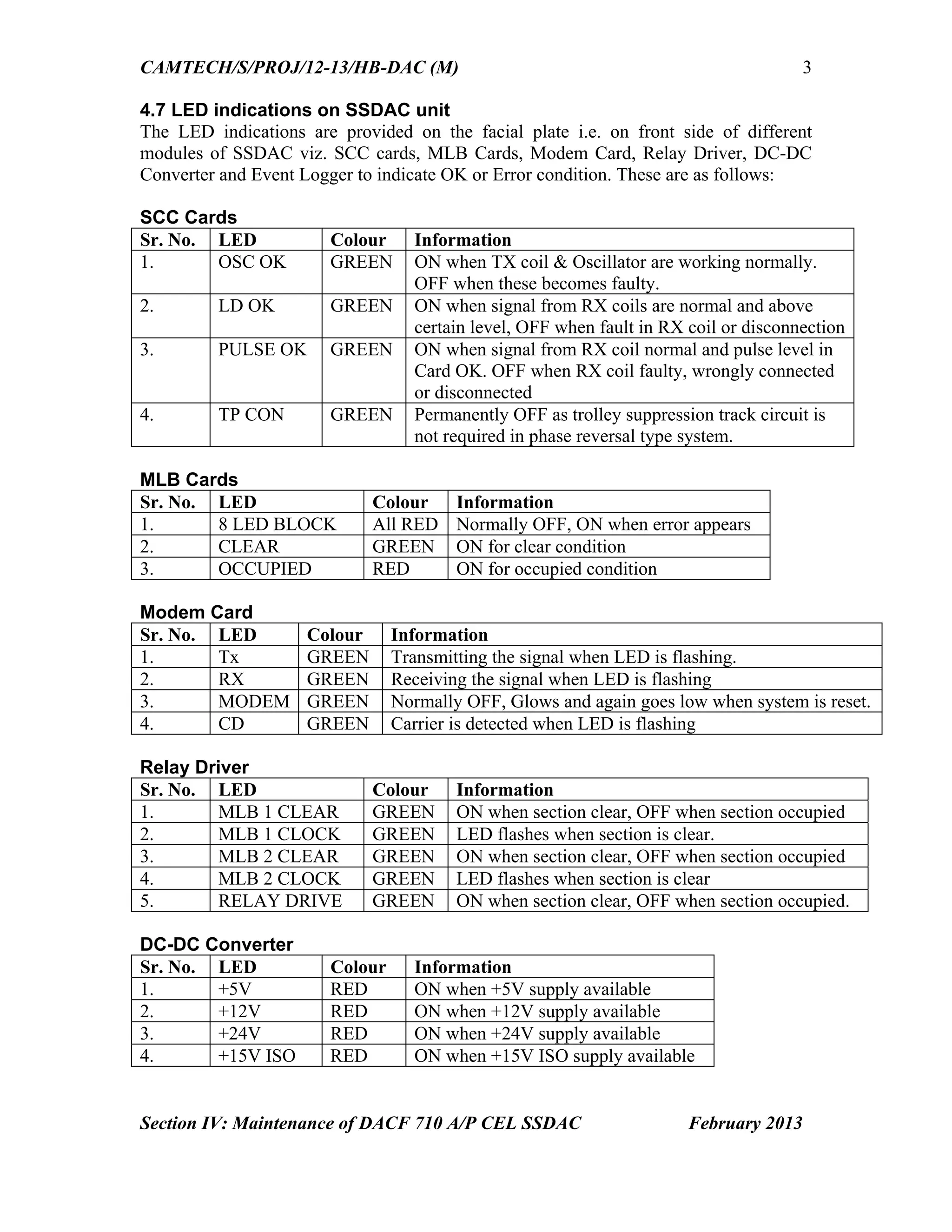
4.5 Surge Voltage Protection Device
This Surge Voltage Protection Device is
provided to protect the equipments from surge
voltages. This device is to be installed at each
location along with every SSDAC unit.
Fig. 4.3: Surge Voltage Protection Device
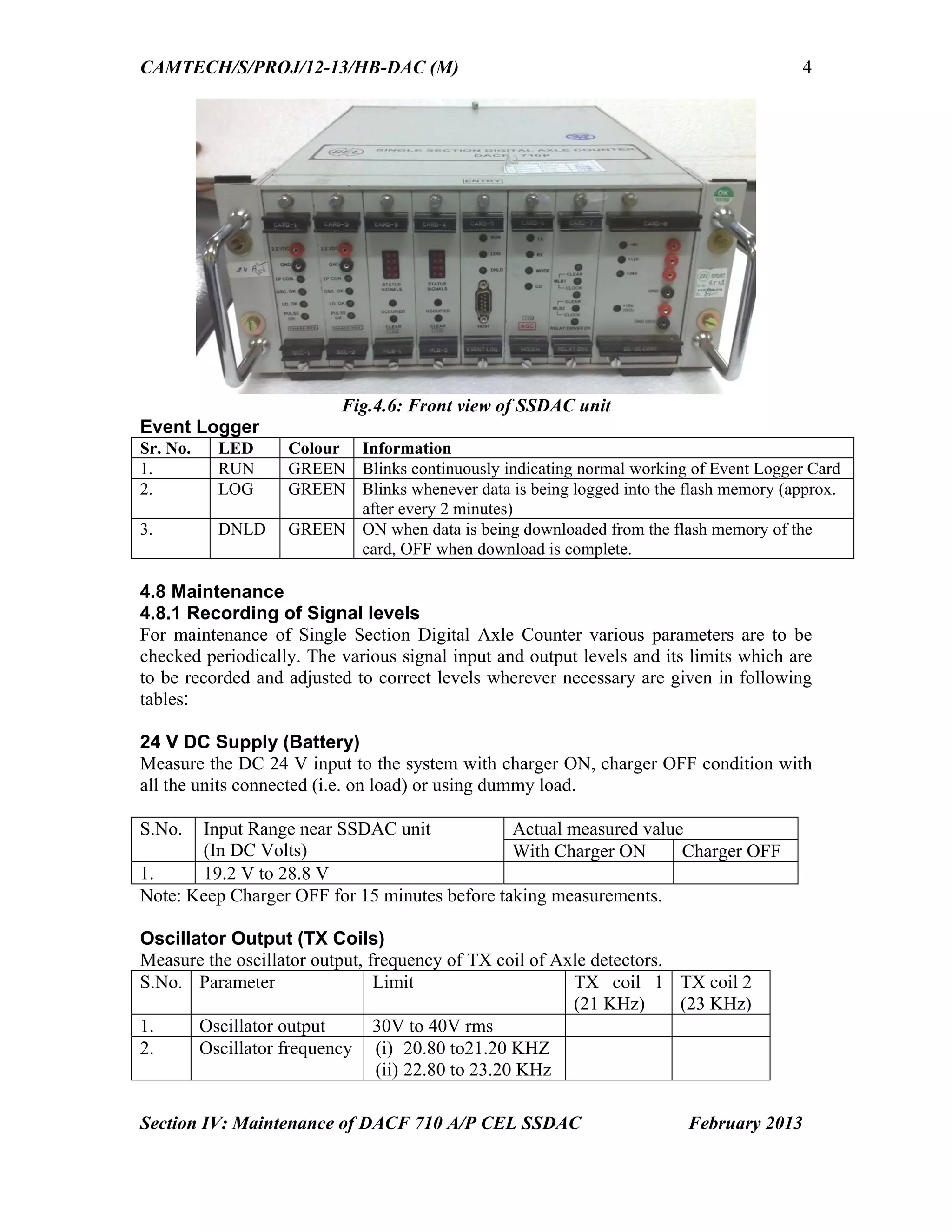
4.6 Installation of Tx and Rx coils after replacement of rail
Marking and drilling holes on web of
rail
3 holes of 14 mm dia.on the rail web 0-170-
340 mm at 86 mm from top for 90R rail and
88 mm. from the top for 52 Kg/60Kg. rail.
Fig.4.4: Fixing of Marking Jig. Marking
using punching guide as per rail size
Fig. 4.5 : Marking Jig, Punch and fixing device
53.
CAMTECH/S/PROJ/12-13/HB-DAC (M)
Section IV:Maintenance of DACF 710 A/P CEL SSDAC February 2013
3
4.7 LED indications on SSDAC unit
The LED indications are provided on the facial plate i.e. on front side of different
modules of SSDAC viz. SCC cards, MLB Cards, Modem Card, Relay Driver, DC-DC
Converter and Event Logger to indicate OK or Error condition. These are as follows:
SCC Cards
Sr. No. LED Colour Information
1. OSC OK GREEN ON when TX coil & Oscillator are working normally.
OFF when these becomes faulty.
2. LD OK GREEN ON when signal from RX coils are normal and above
certain level, OFF when fault in RX coil or disconnection
3. PULSE OK GREEN ON when signal from RX coil normal and pulse level in
Card OK. OFF when RX coil faulty, wrongly connected
or disconnected
4. TP CON GREEN Permanently OFF as trolley suppression track circuit is
not required in phase reversal type system.
MLB Cards
Sr. No. LED Colour Information
1. 8 LED BLOCK All RED Normally OFF, ON when error appears
2. CLEAR GREEN ON for clear condition
3. OCCUPIED RED ON for occupied condition
Modem Card
Sr. No. LED Colour Information
1. Tx GREEN Transmitting the signal when LED is flashing.
2. RX GREEN Receiving the signal when LED is flashing
3. MODEM GREEN Normally OFF, Glows and again goes low when system is reset.
4. CD GREEN Carrier is detected when LED is flashing
Relay Driver
Sr. No. LED Colour Information
1. MLB 1 CLEAR GREEN ON when section clear, OFF when section occupied
2. MLB 1 CLOCK GREEN LED flashes when section is clear.
3. MLB 2 CLEAR GREEN ON when section clear, OFF when section occupied
4. MLB 2 CLOCK GREEN LED flashes when section is clear
5. RELAY DRIVE GREEN ON when section clear, OFF when section occupied.
DC-DC Converter
Sr. No. LED Colour Information
1. +5V RED ON when +5V supply available
2. +12V RED ON when +12V supply available
3. +24V RED ON when +24V supply available
4. +15V ISO RED ON when +15V ISO supply available
54.
CAMTECH/S/PROJ/12-13/HB-DAC (M)
Section IV:Maintenance of DACF 710 A/P CEL SSDAC February 2013
4
Fig.4.6: Front view of SSDAC unit
Event Logger
Sr. No. LED Colour Information
1. RUN GREEN Blinks continuously indicating normal working of Event Logger Card
2. LOG GREEN Blinks whenever data is being logged into the flash memory (approx.
after every 2 minutes)
3. DNLD GREEN ON when data is being downloaded from the flash memory of the
card, OFF when download is complete.
4.8 Maintenance
4.8.1 Recording of Signal levels
For maintenance of Single Section Digital Axle Counter various parameters are to be
checked periodically. The various signal input and output levels and its limits which are
to be recorded and adjusted to correct levels wherever necessary are given in following
tables:
24 V DC Supply (Battery)
Measure the DC 24 V input to the system with charger ON, charger OFF condition with
all the units connected (i.e. on load) or using dummy load.
S.No. Input Range near SSDAC unit
(In DC Volts)
Actual measured value
With Charger ON Charger OFF
1. 19.2 V to 28.8 V
Note: Keep Charger OFF for 15 minutes before taking measurements.
Oscillator Output (TX Coils)
Measure the oscillator output, frequency of TX coil of Axle detectors.
S.No. Parameter Limit TX coil 1
(21 KHz)
TX coil 2
(23 KHz)
1. Oscillator output 30V to 40V rms
2. Oscillator frequency (i) 20.80 to21.20 KHZ
(ii) 22.80 to 23.20 KHz
55.
CAMTECH/S/PROJ/12-13/HB-DAC (M)
Section IV:Maintenance of DACF 710 A/P CEL SSDAC February 2013
5
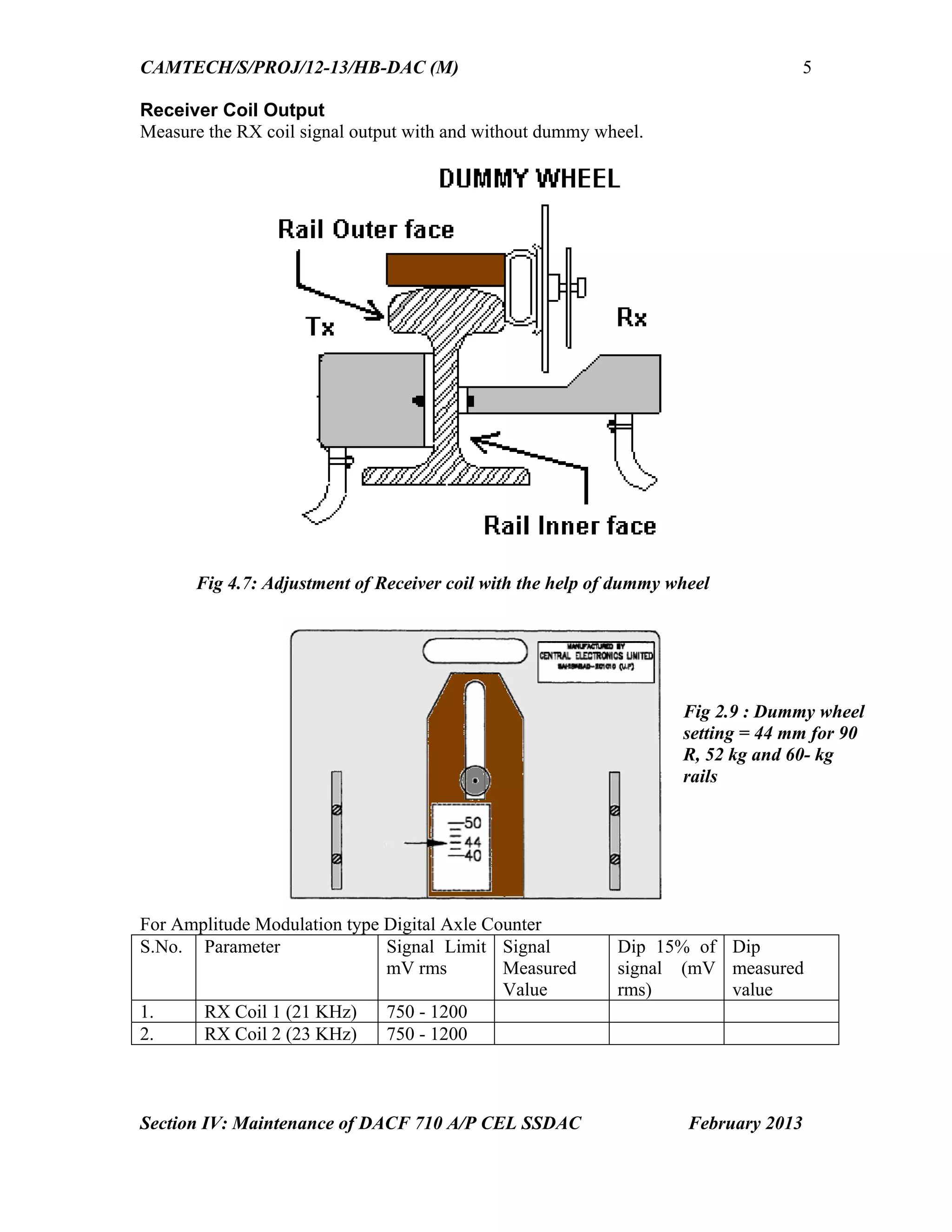
Receiver Coil Output
Measure the RX coil signal output with and without dummy wheel.
Fig 4.7: Adjustment of Receiver coil with the help of dummy wheel
For Amplitude Modulation type Digital Axle Counter
S.No. Parameter Signal Limit
mV rms
Signal
Measured
Value
Dip 15% of
signal (mV
rms)
Dip
measured
value
1. RX Coil 1 (21 KHz) 750 - 1200
2. RX Coil 2 (23 KHz) 750 - 1200
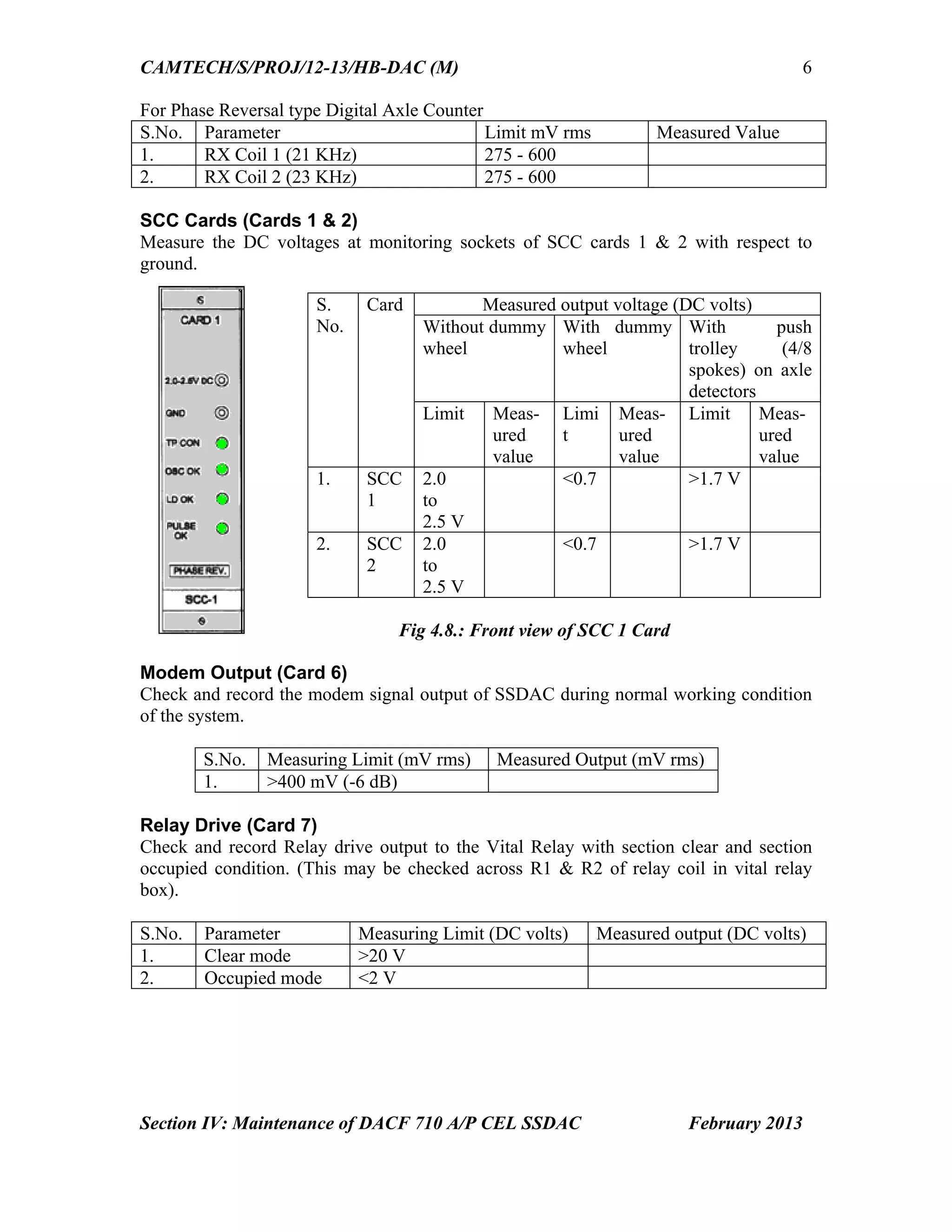
Fig 2.9 : Dummy wheel
setting = 44 mm for 90
R, 52 kg and 60- kg
rails
56.
CAMTECH/S/PROJ/12-13/HB-DAC (M)
Section IV:Maintenance of DACF 710 A/P CEL SSDAC February 2013
6
For Phase Reversal type Digital Axle Counter
S.No. Parameter Limit mV rms Measured Value
1. RX Coil 1 (21 KHz) 275 - 600
2. RX Coil 2 (23 KHz) 275 - 600
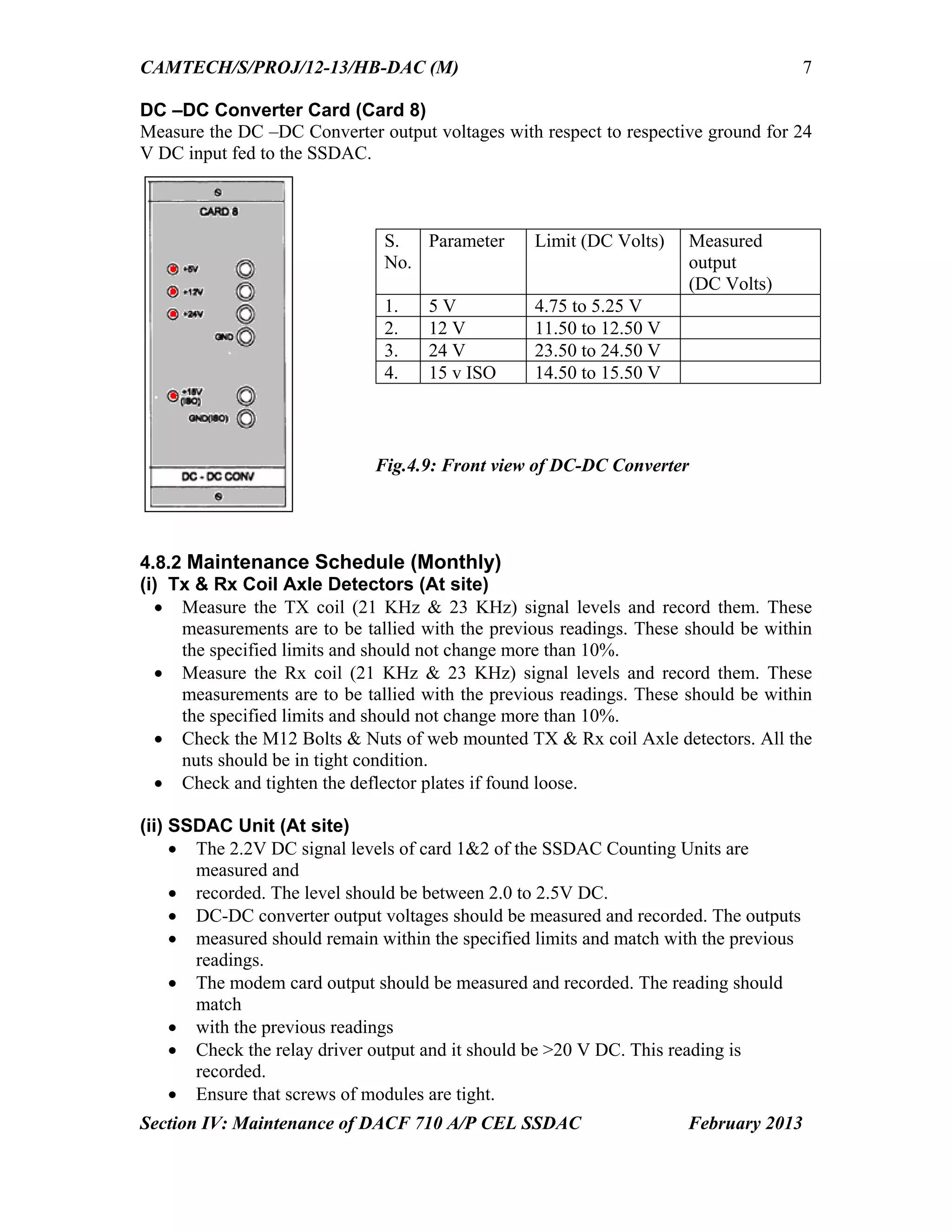
SCC Cards (Cards 1 & 2)
Measure the DC voltages at monitoring sockets of SCC cards 1 & 2 with respect to
ground.
Modem Output (Card 6)
Check and record the modem signal output of SSDAC during normal working condition
of the system.
S.No. Measuring Limit (mV rms) Measured Output (mV rms)
1. >400 mV (-6 dB)
Relay Drive (Card 7)
Check and record Relay drive output to the Vital Relay with section clear and section
occupied condition. (This may be checked across R1 & R2 of relay coil in vital relay
box).
S.No. Parameter Measuring Limit (DC volts) Measured output (DC volts)
1. Clear mode >20 V
2. Occupied mode <2 V
S.
No.
Card Measured output voltage (DC volts)
Without dummy
wheel
With dummy
wheel
With push
trolley (4/8
spokes) on axle
detectors
Limit Meas-
ured
value
Limi
t
Meas-
ured
value
Limit Meas-
ured
value
1. SCC
1
2.0
to
2.5 V
<0.7 >1.7 V
2. SCC
2
2.0
to
2.5 V
<0.7 >1.7 V
Fig 4.8.: Front view of SCC 1 Card
57.
CAMTECH/S/PROJ/12-13/HB-DAC (M)
Section IV:Maintenance of DACF 710 A/P CEL SSDAC February 2013
7
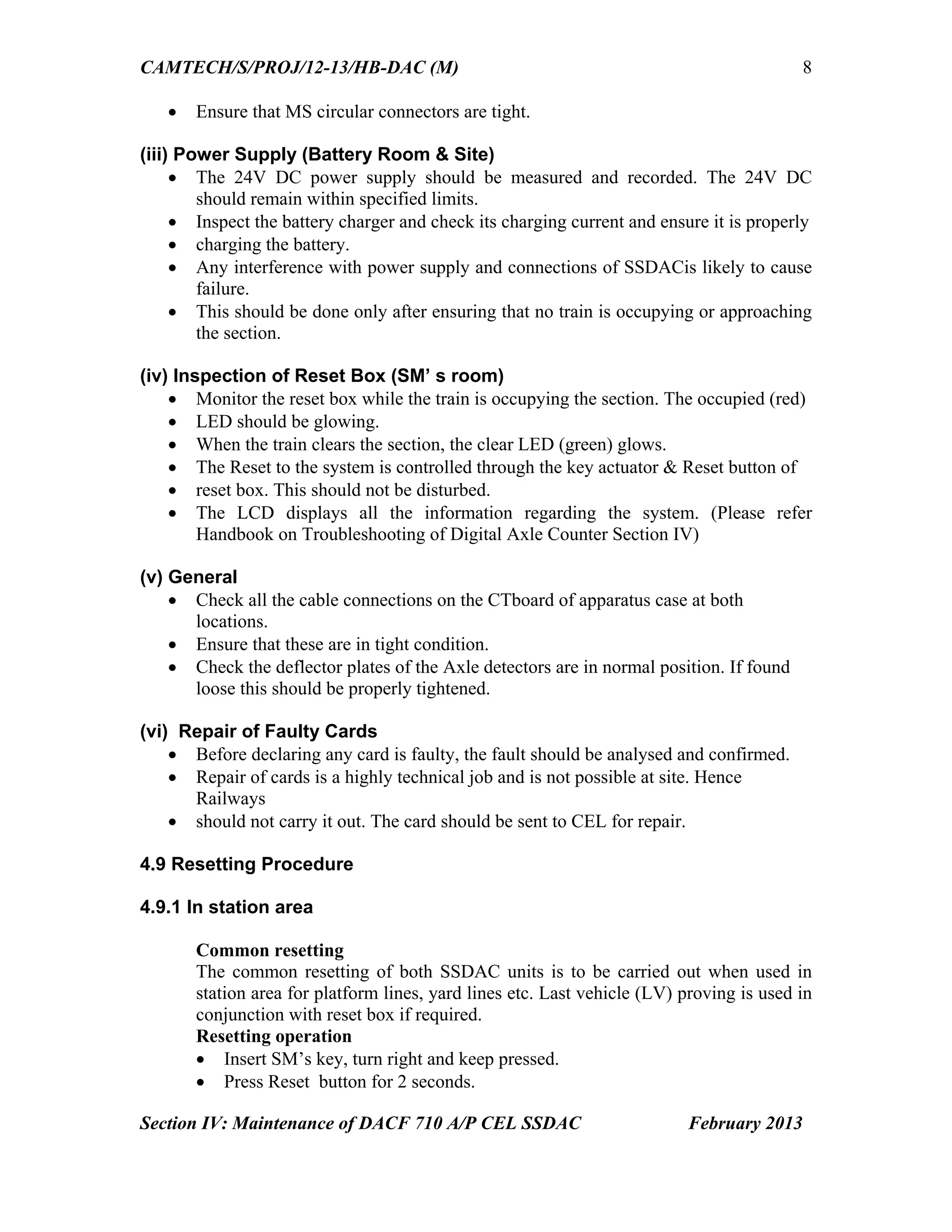
DC –DC Converter Card (Card 8)
Measure the DC –DC Converter output voltages with respect to respective ground for 24
V DC input fed to the SSDAC.
4.8.2 Maintenance Schedule (Monthly)
(i) Tx & Rx Coil Axle Detectors (At site)
Measure the TX coil (21 KHz & 23 KHz) signal levels and record them. These
measurements are to be tallied with the previous readings. These should be within
the specified limits and should not change more than 10%.
Measure the Rx coil (21 KHz & 23 KHz) signal levels and record them. These
measurements are to be tallied with the previous readings. These should be within
the specified limits and should not change more than 10%.
Check the M12 Bolts & Nuts of web mounted TX & Rx coil Axle detectors. All the
nuts should be in tight condition.
Check and tighten the deflector plates if found loose.
(ii) SSDAC Unit (At site)
The 2.2V DC signal levels of card 1&2 of the SSDAC Counting Units are
measured and
recorded. The level should be between 2.0 to 2.5V DC.
DC-DC converter output voltages should be measured and recorded. The outputs
measured should remain within the specified limits and match with the previous
readings.
The modem card output should be measured and recorded. The reading should
match
with the previous readings
Check the relay driver output and it should be >20 V DC. This reading is
recorded.
Ensure that screws of modules are tight.
S.
No.
Parameter Limit (DC Volts) Measured
output
(DC Volts)
1. 5 V 4.75 to 5.25 V
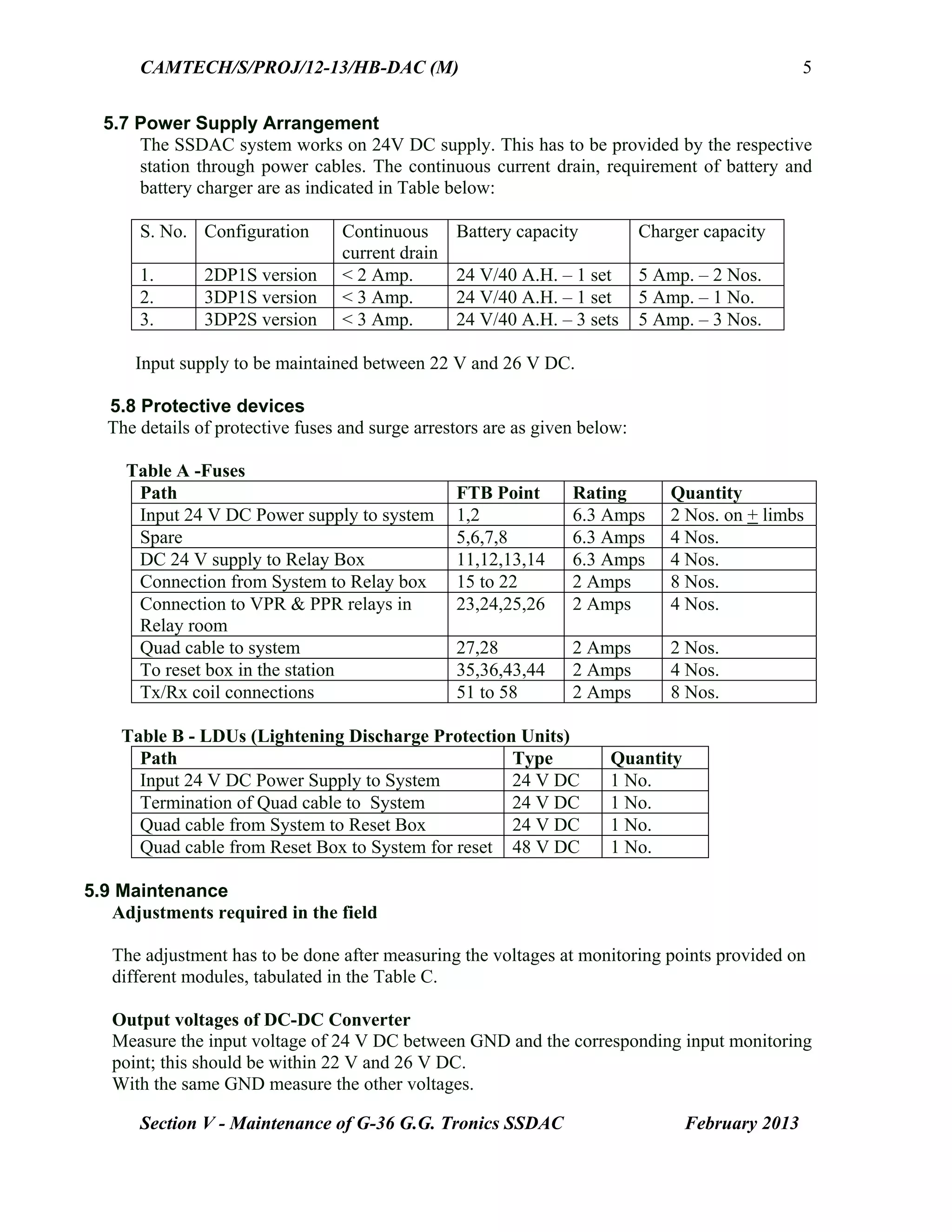
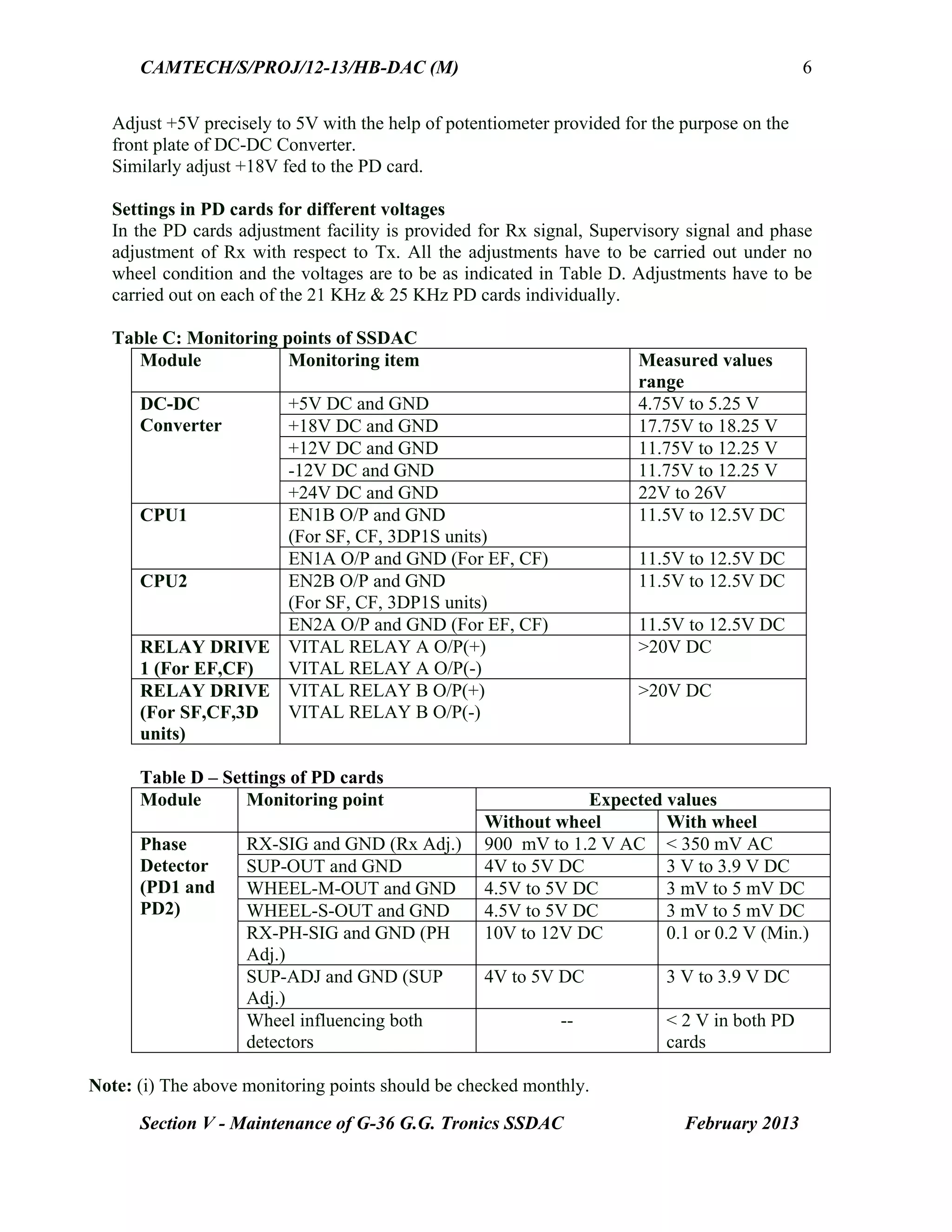
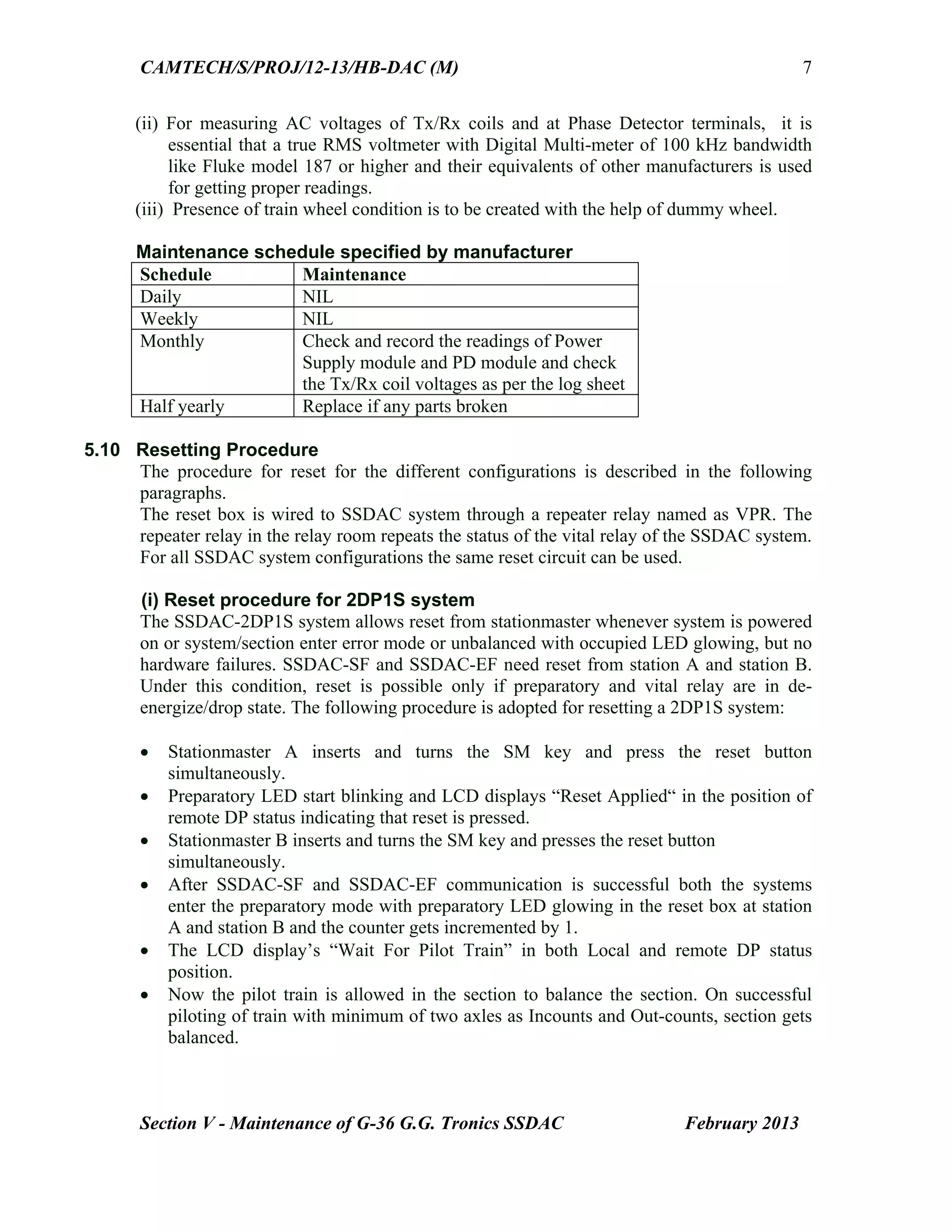
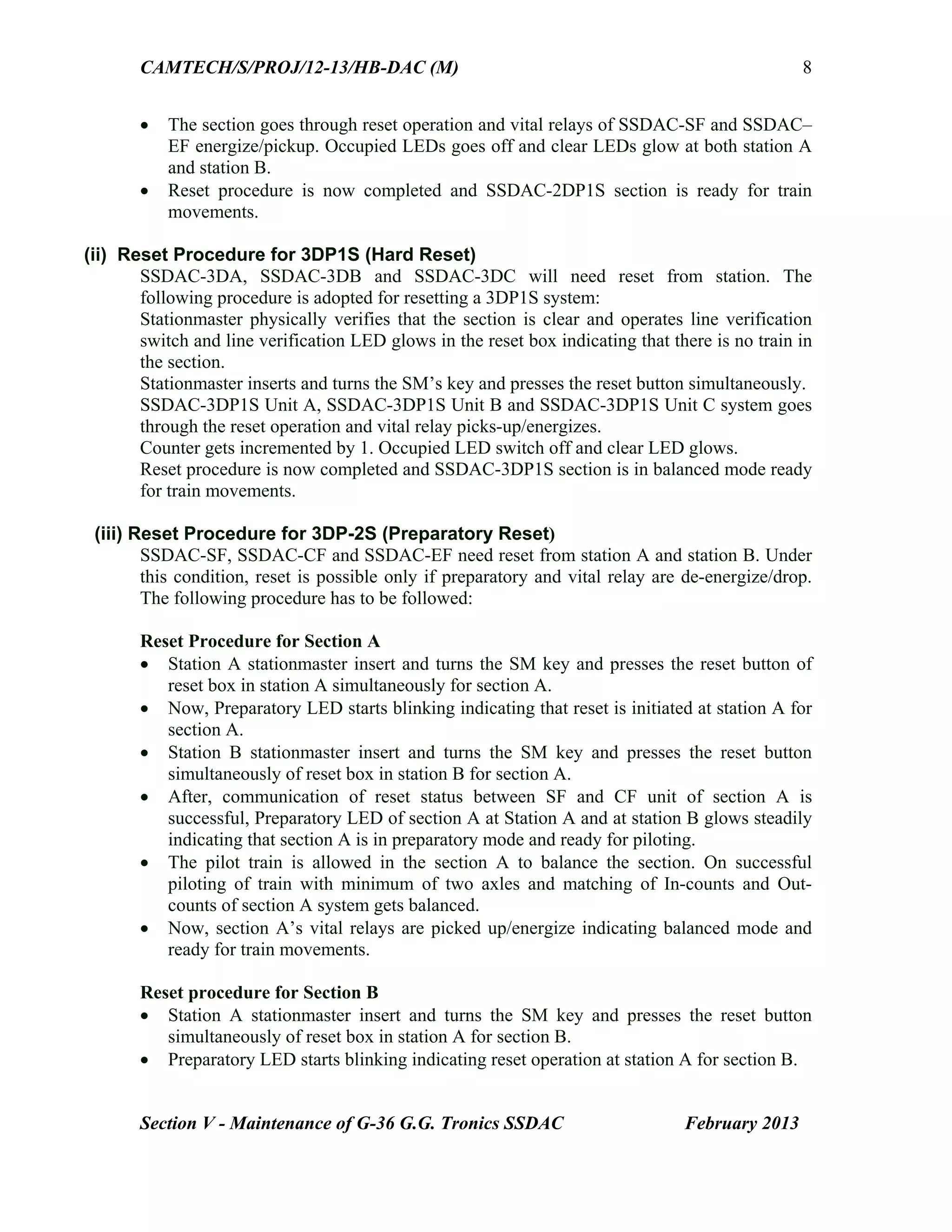
2. 12 V 11.50 to 12.50 V
3. 24 V 23.50 to 24.50 V
4. 15 v ISO 14.50 to 15.50 V
Fig.4.9: Front view of DC-DC Converter
58.
CAMTECH/S/PROJ/12-13/HB-DAC (M)
Section IV:Maintenance of DACF 710 A/P CEL SSDAC February 2013
8
Ensure that MS circular connectors are tight.
(iii) Power Supply (Battery Room & Site)
The 24V DC power supply should be measured and recorded. The 24V DC
should remain within specified limits.
Inspect the battery charger and check its charging current and ensure it is properly
charging the battery.
Any interference with power supply and connections of SSDACis likely to cause
failure.
This should be done only after ensuring that no train is occupying or approaching
the section.
(iv) Inspection of Reset Box (SM’ s room)
Monitor the reset box while the train is occupying the section. The occupied (red)
LED should be glowing.
When the train clears the section, the clear LED (green) glows.
The Reset to the system is controlled through the key actuator & Reset button of
reset box. This should not be disturbed.
The LCD displays all the information regarding the system. (Please refer
Handbook on Troubleshooting of Digital Axle Counter Section IV)
(v) General
Check all the cable connections on the CTboard of apparatus case at both
locations.
Ensure that these are in tight condition.
Check the deflector plates of the Axle detectors are in normal position. If found
loose this should be properly tightened.
(vi) Repair of Faulty Cards
Before declaring any card is faulty, the fault should be analysed and confirmed.
Repair of cards is a highly technical job and is not possible at site. Hence
Railways
should not carry it out. The card should be sent to CEL for repair.
4.9 Resetting Procedure
4.9.1 In station area
Common resetting
The common resetting of both SSDAC units is to be carried out when used in
station area for platform lines, yard lines etc. Last vehicle (LV) proving is used in
conjunction with reset box if required.
Resetting operation
Insert SM’s key, turn right and keep pressed.
Press Reset button for 2 seconds.
59.
CAMTECH/S/PROJ/12-13/HB-DAC (M)
Section IV:Maintenance of DACF 710 A/P CEL SSDAC February 2013
9
Release SM’s key and Reset Button.
Turn left, remove SM’s key and keep in safe custody.
With the above operation
48 V DC from reset box is extended to SSDAC unit.
Reset command is generated in MLB1 and MLB2 cards (Cards 3 & 4).
The SSDAC units are reset and counts become zero.
The SSDAC units attain the preparatory reset state.
The PR & PPR relays pick up and Prep. Reset indication glows on the reset
box.
The reset counter reading increments by 1 count.
After one pilot train is passed in the section the system becomes normal.
Vital Relay picks up.
Note: Reset command to Micro-controllers will not be generated if system is in
clear/preparatory/occupied state. System can be resetted if it is in error state or out
counts were registered after occupied state.
4.9.2 In Block Section
Independent resetting
The independent resetting of SSDAC units at each station is to be carried out
when used in Block Sections. Sometimes SM’s key and button contacts are
extended to a remote location for resetting purpose.
Resetting operation
Insert SM’s key, turn right and keep pressed.
Press Reset button for 2 seconds.
Preparatory LED starts flashing.
Release SM’s key and Reset Button.
Turn left, remove SM’s key and keep in safe custody.
With the above operation
48 V DC from reset box is extended to SSDAC unit.
Reset command is generated in MLB1 and MLB2 cards (Cards 3 & 4).
The SSDAC units are reset and counts become zero.
The SSDAC units attain the preparatory reset state.
The PR & PPR relays pick up and Prep. Reset indication glows on the reset
box.
The reset counter reading increments by 1 count.
After one pilot train is passed in the section the system becomes normal.
Vital Relay picks up.
60.
CAMTECH/S/PROJ/12-13/HB-DAC (M)
Section IV:Maintenance of DACF 710 A/P CEL SSDAC February 2013
10
Note:
Reset command to Micro-controllers will not be generated if system is in
clear/preparatory/occupied state. System can be resetted if it is in error state or out
counts were registered after occupied state.
Resetting operation by both stations is required and is necessary in BPAC use.
4.10 Tools and Spares
The following tool kit and spares are required for installation and maintenance:
Tool Kit
1. Portable data analyzer for downloading event logger data for analysis and
report generation. (Specification ref: RDSO letter No.
STS/E/AC/DIGITAL/CEL dated 19.12.2006.
1 No.
2. Pure sine wave Digital Multimeter make Fluke model 187/Rishabh
model 285/ Kusum Meco model 859CF or equivalent.
1 No.
3. Train simulator, Model TS 267P CEL make 1 No.
4. Extender card (Card No.557) 1 No.
5. Dummy wheel 1 No.
6. Ring spanner 17-19, 24-26 1 No. each
7. Open end spanner 17-19, 24-26 1 No. each
8. Socket spanner with handle 1 No.
9. Torque wrench (Jaicom JPR65 or equivalent, 88NM) 1 No.
10. Screw driver No. 902 1 No.
11. Screw driver No. 935 1 No.
12. Marking jig for drilling 1 No.
13. Dummy load to check power supply (resistive) 1 No.
Recommended Spares
The following spares are to be recommended to be kept for 5 Nos. of working Single
Section Digital Axle Counter in a particular section.
1. SCC Cards (Card 1 & 2) 2 Nos
2. MLB Cards (Card 3 & 4) 2 Nos
3. Modem Card (Card6) 1 No
4. Relay driver (Card 7) 1 No.
5. Event Logger Card (Card 5) 2 Nos.
6. DC –DC Converter (Card 8) 1 No.
7. Axle Detectors (AD710) 21 KHz/23KHz (Tx coil) 1 No.
8. Axle Detectors (AD710) 21 KHz/23KHz (Rx coil) 1 No.
9. Hardware for mounting Axle Detectors 1 Set
10. MS circular connectors (6 Nos.) 1 Set
11. Reset box RB -259 1 Set
12. SSDAC unit (housing with mother board, without cards) 1 No.
13. Vital Relay Box with Relay 24 V, 1000 Ohm, Q type 1 No.
14. Surge Voltage Protection Device box (SV – 121) 1 No.
61.
CAMTECH/S/PROJ/12-13/HB-DAC (M)
Section IV:Maintenance of DACF 710 A/P CEL SSDAC February 2013
11
4.11 Do's & Dont’s
Do’s
The inter connection drawings are to be followed for connecting the
Transmitter & Receiver coils. Tx1 is 21 KHz, Tx2 is 23 KHz & Rx1 and Rx2
coils are 21 KHz & 23 KHz, respectively.
Ensure that Receiver and Transmitter coil cables have been laid in different
pipes.
Ensure that both the TX coils & Rx coils are having proper alignment on Rail.
Ensure that packing of sleepers with ballast on both sides of Axle detector is
proper.
Check that metal sheaths of the outdoor cable are connected to earth at both
ends
The recommended cables for wiring of the system at site should be used.
The steady Battery voltage 24V should be maintained.
The cable connections should not be connected loosely.
The M.S Circular connectors of SSDAC are checked and maintained firmly.
The SSDAC & Reset box is provided with sealing arrangement. They should
be sealed at site.
Resetting should be done only after ensuring that there is no train in the
section
Don'ts
Don’t install the Axle detectors near the rail joint (should be more than 6
sleepers away).
Don’t install the Axle detectors where the rail is badly worn out.
Don’t cut or join the Transmitter / Receiver cables supplied along with the
coil. It would result in change of frequency of signal.
Don’t lay the TX and RX coil cables in the same pipe.
Don’t use any other outdoor cable other than the recommended cables.
Avoid installing the Axle detectors on curve of rail / too much slope of rail to
the possible extent.
Don’t remove the cards from SSDAC units under power ON condition of
system.
Remove card if necessary after Switching OFF the power to the unit.
Go to Chapter index
Contents
Section V: Maintenanceof G36 GG Tronics Single Section Digital Axle
Counter
Sr. No. Description Page No.
5.1 Introduction 1
5.2 Modules of G36 SSDAC 1
5.3 Configurations 1
5.4 Relay Box 3
5.5 Reset Box 3
5.6 Fixing of TX/RX coils after rail replacement 4
5.7 Power Supply Arrangement 5
5.8 Protective devices 5
5.9 Maintenance 5
5.10 Resetting procedure 7
5.11 Tools and Spares 9
5.12 Precautions 10
5.13 Do’s & Don’ts 10
5.14 Maintenance Log Sheet for SSDAC – G36 12
Go to Main index
64.
CAMTECH/S/PROJ/12-13/HB-DAC (M)
Section V- Maintenance of G-36 G.G. Tronics SSDAC February 2013
1
Section V
Maintenance of
SSDAC-G36
G.G.Tronics Single Section Digital Axle Counter
5.1 Introduction
SSDAC G36 manufactured by M/s G.G.Tronics India Pvt. Ltd., is a microcontroller
based system with 2 out of 2 architecture suited for proving station and block section.
5.2 Modules of G36 SSDAC
The hardware and software for all the configurations are same. The main modules for
SSDAC-G36 are listed below:
SSDAC unit
Reset box
Axle Detectors (Tx & Rx coils factory tuned to 21 KHz & 25 KHz with
associated cables of 15 Mtrs.each)
5.3 Configurations
SSDAC-G36 units can be installed to work in the following configurations:
Two detection points Single section: In straight line [2DP1S].
Three detection points Single section: In point zone [3DP1S].
Three-detection points for two consecutive sections in a straight line [3DP2S].
(i) SSDAC 2DP1S system
This system is provided with two detection points on straight lines in station or block
section. It indicates the section as occupied or clear through a Vital Relay (VR) output.
The system consists of Start Fed (SF) and End Fed (EF) units. The SF and EF unit
consists of the following modules:
Phase detector Card 1 - 21 KHz – 1No.
Phase detector Card 2 - 25 KHz – 1 No.
Central Processing Unit 1(CPU1) – 1 No.
Central Processing Unit 2(CPU2) – 1 No.
Communication module – 1No.
Relay Drive Module – 1 No.
SM-CPU /Event logger module – 1 No.
DC/DC Converter – 1 No.
LCD display Module
65.
CAMTECH/S/PROJ/12-13/HB-DAC (M)
Section V- Maintenance of G-36 G.G. Tronics SSDAC February 2013
2
LCD alphanumeric display with 4 lines & 20 characters per line is fixed on SF/EF units
for providing live display of different status, wheel counts and error messages in plain
English for guiding the installation and maintenance staff.
Note:
(i). CPU1 & CPU2 have unique addresses.
(ii). Communication and relay drive modules are equipped in different positions in SF/EF
units for unique port addressing.
Fig.5.1:2DP1S system layout plans for block section and station section
(ii) SSDAC- 3DP1S System
In SSDAC 3DP1S configuration, there will be three SSDAC units i.e. Unit A, Unit B and
Unit C can be interfaced using FSK Modem communication. All the other features are
similar to that of 2DP1S system.
(iii) SSDAC-3DP-2S System
In this configuration, there will be three SSDAC units i.e. Start Fed, Centre Fed and End
Fed units which are interfaced using FSK Modem communication. All the other features
are similar to that of 2DP1S system.
Fig. 5.3: 3DP2S system layout plan for two consecutive sections in a straight line
SF: Start Fed, CF: Centre Fed, EF: End Fed EFVR - A : Vital Relay at Sec B for End Fed
CFVR - A : Vital Relay for Sec A at Centre Fed PR: Preparatory Relay
CFVR - B : Vital Relay for Sec B at Centre Fed SFVR - A : Vital Relay at Sec A for Start Fed)
, Com2 : Communication Card
Station Station
Section A Section B
Block Section
DP-SF DP-EFDP-CF
DP-B
DP-C
DP-A
DP-SF DP-EF
Station Section
Station
Station Station
Block Section
DP-SF DP-EF
Fig.3.2: 3DP1S system layout
plan for point zone
66.
CAMTECH/S/PROJ/12-13/HB-DAC (M)
Section V- Maintenance of G-36 G.G. Tronics SSDAC February 2013
3
5.4 Relay Box
Relay boxes are provided depending upon the configuration as given below:
Sr. No. Configuration Units Vital relay Preparatory Relay
1. 2DP1S version SF 1 1
EF 1 1
2. 3DP1S version -- 1 --
3. 3DP2S version SF 1 1
EF 1 1
CF 2 2
5.5 Reset Box
The Reset Box has the following controls and displays.
SM Key – This has
a facility of locking to prevent unauthorized operations. For executing a reset command,
this key has to be kept pressed after unlocking it.
Reset Push Button – This switch is meant for sending the reset command to the system.
For sending the reset command, both the SM Key and the reset push button are to be held
pressed simultaneously and momentarily.
Line Verification Box
Line verification Box is supplied only for case where hard reset has to be adopted instead
of a preparatory reset.
Indications
One 10 mm Green and Red LED are provided for indicating status of block section.
One 5 mm green LED for indicating the status of preparatory reset. Flashing- when local
reset is applied. Steady - when reset is applied at the other end also & the system is
waiting for pilot train. OFF – when the section becomes clear.
One 5 mm Yellow LED for indicating the line verification status. Normally OFF; glows
only when line verification key is operated for executing direct reset.
One 5 m Yellow LED for indicating power ON condition.
Fig. 5.4.:
Reset box
front view
67.
CAMTECH/S/PROJ/12-13/HB-DAC (M)
Section V- Maintenance of G-36 G.G. Tronics SSDAC February 2013
4
Counter
One 6 digit non-resettable counter is provided which increments after each resetting
operation.
Display
One LCD display with 4 lines & 40 characters gives display of events, System Status,
Checksum and Version No, Counts and error code.
The reset box is connected to the system with one pair of quad cable for FSK
communication and 12 core signal cable for transfer of reset commands and reception of
the signals from the system.
The reset box required may be one per unit or two per unit depending upon the
configurations. Process of resetting required for a particular configuration also differs.
For example a single stationmaster or two separate stationmasters can do reset.
SIGNALLING CABLE
FSK QUAD CABLE
Fig. 5.5: Termination details of Reset Box
5.6 Fixing of TX/RX coils after rail replacement
Marking & Drilling holes on the Rail
The 3 Holes of 13 mm dia. are required to be marked and drilled for fixing web mounted
TX/RX coils at each location with spacing of 183mm.
From bottom of the rail drill the holes at 68 mm for 52 Kg, 84 mm for 60 Kg and 57 mm
for 90 R. A standard MS jig with pilot holes for marking the drilling of rails of different
gauges is provided for the installation of the system. This jig can be fixed on to the
bottom of the rails and the track drilling can be marked accurately for fixing Tx/Rx coils.
RESET DETAIL
T1 +24V T9 LV FC 1B
T2 GND T10 LV FC 2A
T3 Prep Relay FC1 T11 LV FC 2B
T4 Spare T12 Vital Relay FC2
T5 Vital Relay FC1 T13 Vital Relay BC2
T6 Spare T14 +RESET
T7 Spare T15 -RESET
T8 LV FC 1A T16 Spare
FSK DETAIL
T1 Spare
T2 Spare
T3 Spare
T4 Spare
T5 SM Modem FSK
T6 SM Modem FSK
T1
T2
T3
T4
T5
T6
T7
T8
T9
T10
T11
T12
T13
T14
T15
T16
T1
T2
T3
T4
T5
T6
68.
CAMTECH/S/PROJ/12-13/HB-DAC (M)
Section V- Maintenance of G-36 G.G. Tronics SSDAC February 2013
5
5.7 Power Supply Arrangement
The SSDAC system works on 24V DC supply. This has to be provided by the respective
station through power cables. The continuous current drain, requirement of battery and
battery charger are as indicated in Table below:
S. No. Configuration Continuous
current drain
Battery capacity Charger capacity
1. 2DP1S version < 2 Amp. 24 V/40 A.H. – 1 set 5 Amp. – 2 Nos.
2. 3DP1S version < 3 Amp. 24 V/40 A.H. – 1 set 5 Amp. – 1 No.
3. 3DP2S version < 3 Amp. 24 V/40 A.H. – 3 sets 5 Amp. – 3 Nos.
Input supply to be maintained between 22 V and 26 V DC.
5.8 Protective devices
The details of protective fuses and surge arrestors are as given below:
Table A -Fuses
Path FTB Point Rating Quantity
Input 24 V DC Power supply to system 1,2 6.3 Amps 2 Nos. on + limbs
Spare 5,6,7,8 6.3 Amps 4 Nos.
DC 24 V supply to Relay Box 11,12,13,14 6.3 Amps 4 Nos.
Connection from System to Relay box 15 to 22 2 Amps 8 Nos.
Connection to VPR & PPR relays in
Relay room
23,24,25,26 2 Amps 4 Nos.
Quad cable to system 27,28 2 Amps 2 Nos.
To reset box in the station 35,36,43,44 2 Amps 4 Nos.
Tx/Rx coil connections 51 to 58 2 Amps 8 Nos.
Table B - LDUs (Lightening Discharge Protection Units)
Path Type Quantity
Input 24 V DC Power Supply to System 24 V DC 1 No.
Termination of Quad cable to System 24 V DC 1 No.
Quad cable from System to Reset Box 24 V DC 1 No.
Quad cable from Reset Box to System for reset 48 V DC 1 No.
5.9 Maintenance
Adjustments required in the field
The adjustment has to be done after measuring the voltages at monitoring points provided on
different modules, tabulated in the Table C.
Output voltages of DC-DC Converter
Measure the input voltage of 24 V DC between GND and the corresponding input monitoring
point; this should be within 22 V and 26 V DC.
With the same GND measure the other voltages.
69.
CAMTECH/S/PROJ/12-13/HB-DAC (M)
Section V- Maintenance of G-36 G.G. Tronics SSDAC February 2013
6
Adjust +5V precisely to 5V with the help of potentiometer provided for the purpose on the
front plate of DC-DC Converter.
Similarly adjust +18V fed to the PD card.
Settings in PD cards for different voltages
In the PD cards adjustment facility is provided for Rx signal, Supervisory signal and phase
adjustment of Rx with respect to Tx. All the adjustments have to be carried out under no
wheel condition and the voltages are to be as indicated in Table D. Adjustments have to be
carried out on each of the 21 KHz & 25 KHz PD cards individually.
Table C: Monitoring points of SSDAC
Module Monitoring item Measured values
range
DC-DC
Converter
+5V DC and GND 4.75V to 5.25 V
+18V DC and GND 17.75V to 18.25 V
+12V DC and GND 11.75V to 12.25 V
-12V DC and GND 11.75V to 12.25 V
+24V DC and GND 22V to 26V
CPU1 EN1B O/P and GND
(For SF, CF, 3DP1S units)
11.5V to 12.5V DC
EN1A O/P and GND (For EF, CF) 11.5V to 12.5V DC
CPU2 EN2B O/P and GND
(For SF, CF, 3DP1S units)
11.5V to 12.5V DC
EN2A O/P and GND (For EF, CF) 11.5V to 12.5V DC
RELAY DRIVE
1 (For EF,CF)
VITAL RELAY A O/P(+)
VITAL RELAY A O/P(-)
>20V DC
RELAY DRIVE
(For SF,CF,3D
units)
VITAL RELAY B O/P(+)
VITAL RELAY B O/P(-)
>20V DC
Table D – Settings of PD cards
Module Monitoring point Expected values
Without wheel With wheel
Phase
Detector
(PD1 and
PD2)
RX-SIG and GND (Rx Adj.) 900 mV to 1.2 V AC < 350 mV AC
SUP-OUT and GND 4V to 5V DC 3 V to 3.9 V DC
WHEEL-M-OUT and GND 4.5V to 5V DC 3 mV to 5 mV DC
WHEEL-S-OUT and GND 4.5V to 5V DC 3 mV to 5 mV DC
RX-PH-SIG and GND (PH
Adj.)
10V to 12V DC 0.1 or 0.2 V (Min.)
SUP-ADJ and GND (SUP
Adj.)
4V to 5V DC 3 V to 3.9 V DC
Wheel influencing both
detectors
-- < 2 V in both PD
cards
Note: (i) The above monitoring points should be checked monthly.
70.
CAMTECH/S/PROJ/12-13/HB-DAC (M)
Section V- Maintenance of G-36 G.G. Tronics SSDAC February 2013
7
(ii) For measuring AC voltages of Tx/Rx coils and at Phase Detector terminals, it is
essential that a true RMS voltmeter with Digital Multi-meter of 100 kHz bandwidth
like Fluke model 187 or higher and their equivalents of other manufacturers is used
for getting proper readings.
(iii) Presence of train wheel condition is to be created with the help of dummy wheel.
Maintenance schedule specified by manufacturer
Schedule Maintenance
Daily NIL
Weekly NIL
Monthly Check and record the readings of Power
Supply module and PD module and check
the Tx/Rx coil voltages as per the log sheet
Half yearly Replace if any parts broken
5.10 Resetting Procedure
The procedure for reset for the different configurations is described in the following
paragraphs.
The reset box is wired to SSDAC system through a repeater relay named as VPR. The
repeater relay in the relay room repeats the status of the vital relay of the SSDAC system.
For all SSDAC system configurations the same reset circuit can be used.
(i) Reset procedure for 2DP1S system
The SSDAC-2DP1S system allows reset from stationmaster whenever system is powered
on or system/section enter error mode or unbalanced with occupied LED glowing, but no
hardware failures. SSDAC-SF and SSDAC-EF need reset from station A and station B.
Under this condition, reset is possible only if preparatory and vital relay are in de-
energize/drop state. The following procedure is adopted for resetting a 2DP1S system:
Stationmaster A inserts and turns the SM key and press the reset button
simultaneously.
Preparatory LED start blinking and LCD displays “Reset Applied“ in the position of
remote DP status indicating that reset is pressed.
Stationmaster B inserts and turns the SM key and presses the reset button
simultaneously.
After SSDAC-SF and SSDAC-EF communication is successful both the systems
enter the preparatory mode with preparatory LED glowing in the reset box at station
A and station B and the counter gets incremented by 1.
The LCD display’s “Wait For Pilot Train” in both Local and remote DP status
position.
Now the pilot train is allowed in the section to balance the section. On successful
piloting of train with minimum of two axles as Incounts and Out-counts, section gets
balanced.
71.
CAMTECH/S/PROJ/12-13/HB-DAC (M)
Section V- Maintenance of G-36 G.G. Tronics SSDAC February 2013
8
The section goes through reset operation and vital relays of SSDAC-SF and SSDAC–
EF energize/pickup. Occupied LEDs goes off and clear LEDs glow at both station A
and station B.
Reset procedure is now completed and SSDAC-2DP1S section is ready for train
movements.
(ii) Reset Procedure for 3DP1S (Hard Reset)
SSDAC-3DA, SSDAC-3DB and SSDAC-3DC will need reset from station. The
following procedure is adopted for resetting a 3DP1S system:
Stationmaster physically verifies that the section is clear and operates line verification
switch and line verification LED glows in the reset box indicating that there is no train in
the section.
Stationmaster inserts and turns the SM’s key and presses the reset button simultaneously.
SSDAC-3DP1S Unit A, SSDAC-3DP1S Unit B and SSDAC-3DP1S Unit C system goes
through the reset operation and vital relay picks-up/energizes.
Counter gets incremented by 1. Occupied LED switch off and clear LED glows.
Reset procedure is now completed and SSDAC-3DP1S section is in balanced mode ready
for train movements.
(iii) Reset Procedure for 3DP-2S (Preparatory Reset)
SSDAC-SF, SSDAC-CF and SSDAC-EF need reset from station A and station B. Under
this condition, reset is possible only if preparatory and vital relay are de-energize/drop.
The following procedure has to be followed:
Reset Procedure for Section A
Station A stationmaster insert and turns the SM key and presses the reset button of
reset box in station A simultaneously for section A.
Now, Preparatory LED starts blinking indicating that reset is initiated at station A for
section A.
Station B stationmaster insert and turns the SM key and presses the reset button
simultaneously of reset box in station B for section A.
After, communication of reset status between SF and CF unit of section A is
successful, Preparatory LED of section A at Station A and at station B glows steadily
indicating that section A is in preparatory mode and ready for piloting.
The pilot train is allowed in the section A to balance the section. On successful
piloting of train with minimum of two axles and matching of In-counts and Out-
counts of section A system gets balanced.
Now, section A’s vital relays are picked up/energize indicating balanced mode and
ready for train movements.
Reset procedure for Section B
Station A stationmaster insert and turns the SM key and presses the reset button
simultaneously of reset box in station A for section B.
Preparatory LED starts blinking indicating reset operation at station A for section B.
72.
CAMTECH/S/PROJ/12-13/HB-DAC (M)
Section V- Maintenance of G-36 G.G. Tronics SSDAC February 2013
9
Station B stationmaster insert and turns the SM key and presses the reset button
simultaneously of reset box in station B for section B.
After, communication of reset status between EF and CF unit of section B is
successful. Preparatory LED of section B at Station A and at station B glows steadily
indicating that section B is in preparatory mode and ready for piloting. The rest
procedure is same as for Section A.
5.11 Tools and Spares
The following toolkit and spares must be procured separately for installation and
maintenance (1 set of tool kit for every 10 sets of SSDAC systems).
Tool Kit
Sr. No. Tools Quantity
1. Portable data-logger for downloading event logger data for analysis
and report generation.
1
2. Pure Sine wave Digital Multimeter (Fluke make 187 or Rishab make
28S or similar which can measure voltages and currents accurately at
25 KHz)
1
3. Train Simulator 1
4. Extender module 1
5. Dummy Wheel 1
6. Ring spanner 17-19,24-26 1
7. Open end spanner 17-19, 24-26 1
8. Socket spanner with handle 1
9. Torque wrench, Jaicom make JPR65 or Equivalent -88 Nm. 1
10. Screw Driver No.902 1
11. Screw Driver No.935 1
12. Marking jig for drilling 1
Recommended Spares
The following spares are to be procured separately for 5 nos. of Single Section Digital
Axle Counter working in field.
Sr.
No.
Spares Part no. Quantity
1. Phase detector modules 1 (PD1 ) H001M01R1 2
2. Phase detector modules 2 (PD2 ) H001M02R1 2
3. CPU1 Module of SF H001M09R1 1
4. CPU2 Module of SF H001M10R1 1
5. CPU1 Module of EF H001M11R1 1
6. CPU2 Module of EF H001M12R1 1
7. Communication module 1 H001M04R1 1
8. Communication module 2 H001M05R1 1
9. Relay drive module 1 H001M07R1 1
10. Relay drive module 2 H001M06R1 1
11. Event logger/SM-CPU module H001M03R1 2
73.
CAMTECH/S/PROJ/12-13/HB-DAC (M)
Section V- Maintenance of G-36 G.G. Tronics SSDAC February 2013
10
Sr.
No.
Spares Part no. Quantity
12. DC-DC Converter module H001M08R1 2
13. Axle detectors 21 kHz/25 kHZ (TX coil) G36 – T212500 2
14. Axle detectors 21 kHz/25 kHZ (RX coil) G36 – R212500 2
15. Hardware for mounting axle detectors -- 1
16. MS circular connectors (6 No.) -- 2
17. SSDAC - Reset box with error display G36 – RSBX01 2
18. SSDAC - SF unit (housing with motherboard,
without modules)
H001M21R1 1
19. SSDAC - EF unit (housing with motherboard,
without modules)
H001M21R1 1
20. Relay box G36 – RB2R00 2
5.12 Precautions
Maintain 24 V DC supply between 22V & 26V DC at the terminals of the system
always.
Use 120 AH battery with axle counter type charger to take care of severe interruption
of 230 V mains supply.
Ensure good earthing with an earth resistance of 1 to 2 ohms by providing parallel or
special earth.
The entry of cables at the location box is to be filled with sand and sealed with
Bitumen compound without any gaps for preventing the entry of rats.
To avoid damage of web mounted detector coils due to track repair work or tie
tamping machine, ensure that only careful manual activity is performed on the portion
where the detectors are mounted.
Suitable warning board may be erected on either side of the detector coil not
infringing with the schedule of dimensions with the approval of competent authority.
For push trolleys, avoid solid wheels. Instead use spoked wheel.
After power ON, check that amber LEDs on PD cards do not glow under no wheel
condition. If they glow, interchange Rx wire connections of the module (21/25 KHz)
to put off the LEDs. Amber LEDs shall glow undr wheel presence.
5.13 Do’s & Don’ts
Do’s
Always follow interconnection drawings for connecting the Transmitter and Reciever
Coils.(Tx1-21 KHz, Tx2-25KHz, Rx1-21 KHz, Rx2-25 KHz).
Ensure that Receiver and Transmitter coil cables have been laid in different pipes.
Ensure that both the Tx coils and Rx coils are having proper alignment on rail.
Ensure that packing of sleepers with ballast on both sides of axle detector is proper.
Check that metal sheaths of the outdoor cable are connected to earth at both ends.
Use only the recommended cables for wiring of the system at site.
Maintain steady battery voltage of 24 V DC
Check MS coupler connectors of SSDAC system and maintain firmly.
74.
CAMTECH/S/PROJ/12-13/HB-DAC (M)
Section V- Maintenance of G-36 G.G. Tronics SSDAC February 2013
11
Preparatory Resetting should be done only after ensuring that there is no train in the
section.
It is recommended that heat resisting paint to be used on the apparatus case so that the
temperature inside apparatus case is maintained lower in comparison to normal
paints.
Place Caution Board near the SSDAC Axle Detectors to avoid damage to the coils
from packing machines.
Provide Deflector plates near the SSDAC Axle Detectors to avoid damage to the coils
from hanging parts of trains.
Use spoked wheels for push trolleys in place of solid wheels to avoid error in SSDAC
system.
Don’ts
Do not connect the cable connections loosely.
Don’t cut or join the Transmitter/Receiver cables supplied along with the coil. It
would result in change of input Receiver signal.
Don’t remove the modules from SSDAC system under Power ON condition. Remove
the modules if necessary after switching OFF the power to the SSDAC system.
Local address of CPU-1, CPU-2 and configuration settings of the SSDAC system
should not be changed at the field.
When section is in Occupied/Preparatory mode, Motor trolley wheel, Push trolley
with solid mass wheel and Material trolley wheel must not be allowed to Enter/Exit
the section to avoid SSDAC system going to Error condition.
75.
CAMTECH/S/PROJ/12-13/HB-DAC (M)
Section V- Maintenance of G-36 G.G. Tronics SSDAC February 2013
12
5.14 Maintenance Log Sheet for SSDAC – G36
Block Section : …………………………….. Station…………………….. SF/EF
S.
No.
Date Battery AC Volts Phase Detector 1 Phase Detector 2 With push
trolley on
Axle
Detector
(4 spokes)
DC-DC Converters (DC Volts)
TX1
V rms
/freq
TX2
V
rms
/freq
RX1
V
rms
/freq
RX2
V
rms
/freq
RX
Sig
&
GND
AC
Volts
SUP
level
&
GND
DC
volts
RX PH-SIG &
GND socket DC
volts
RX
Sig
&
GND
AC
volts
SUP
level
&
GND
DC
volts
RX PH-SIG &
GND socket DC
volts
RX PH –
SIG &
GND
socket
5 V +12
V
-12
V
+18V 24V
Normal Dummy
Wheel
Normal Dummy
wheel
PD1 PD2 Monitor sockets on DC-DC
Converter cardFTB
1&2
FTB
52 &
53
FTB
56 &
57
FTB
54&
55
FTB
58&
59
22-
30V
40-70
V
20.802
to
21.302
kHz
40-
70 V
24.7
50 to
25.2
50
kHz
300
mV
to
1.2
V
300
mV
to
1.2
V
10 to
12 V
< 1 v 10 to
12 V
< 1 v 10
to
12
V
10
to
12
V
4.75
to
5.25
V
11.75
to
12.25
V
-
11.75
to
-
12.25
V
17.75
to
18.25
V
22
to
26
V
Go to chapter index
76.
CAMTECH/S/PROJ/12-13/HB-DAC (M)
Maintenance ofDigital Axle Counters
ANNEXURE I - Abbreviations February 2013
ANNEXURE I
ABBREVIATIONS
Section I :Az LS Eldyne SSDAC
AC Alternating Current
AzLM Thales Multi Section Digital Axle Counter
AzLS Thales Single Section Digital Axle Counter
DC Direct Current
DIP Dual in line Packeged
DP Detection Point
EAK Tack side Electronic Unit
ETU001 Test equipment (Tool Kit)
Hz Hertz
LED Light Emitting Diode
MESSAB1 Rx voltage for SK1
MESSAB2 Rx voltage for SK2
PCB Printed circuit Board
PEGUE1 Reference voltage for SK1
PEGUE2 Reference voltage for SK2
RMS Root Mean Square
Rx Reciever
Sk1, Sk2 Tx /Rx coil sets
SK30H Rail contacts
Tx Transmitter
Zp30CA-2. Detection points
Section II: Az LM Eldyne MSDAC
AC Alternating Current
ACE Axle Counter Evaluator
AzLM Thales Multi Section Digital Axle Counter
AzLS Thales Single Section Digital Axle Counter
DC Direct Current
DIP Dual in line Packeged
DP Detection Point
EAK Tack side Electronic Unit
ETU001 Test equipment (Tool Kit)
Hz Hertz
ISDN Integrated Services Digital Network
LED Light Emitting Diode
MESSAB1 Rx voltage for SK1
MESSAB2 Rx voltage for SK2
PCB Printed circuit Board
PEGUE1 Reference voltage for SK1
PEGUE2 Reference voltage for SK2
RMS Root Mean Square
Rx Reciever
Sk1, Sk2 Tx /Rx coil sets
SK30H Rail contacts
Tx Transmitter
Zp30CA-2. Detection points
77.
CAMTECH/S/PROJ/12-13/HB-DAC (M)
Maintenance ofDigital Axle Counters
ANNEXURE I - Abbreviations February 2013
Section III: Az S 350 U Siemens MSDAC
AC Alternating Current
AFTC Audio Frequency Track Circuit
AWS Automatic Warning System
AzGrH Auxiliary Axle Count Reset Button
AzGrT Axle Count Reset Button
Az S 350 U Siemens Multi Section Digital Axle Counter
BLEA Block Input/Output
CH Channel
DC Direct Current
DIN Standards setting organization for Germany
kHz Kilo-Hertz
LED Light Emitting Diode
mV Milli Volt
PC Personal Computer
RR Reset Restriction
SIRIUS Serial computer interface universal board
SOPP Internal Software Test
STEU Control& Diagnostic
TVDS Track Vacancy Detection Section
VAU Processing & Monitoring
vAzGrT Preparatory Axle Count Reset Button
VESBA Amplifier, trigger and band-pass filter
WDE Wheel Detection Equipment
ZP 43 Wheel detection equipment
Section IV: DACF 710 A & DACF 710 P CEL SSDAC
AC Alternating Current
BPAC Block Proving by Axle Counter
CD Carrier Detection
CEL Central Electronic Ltd.
DACF 710 A Amplitude Modulation type Digital Axle Counter
DACF 710 P Phase Reversal type Digital Axle Counter
dB Decibel
DC Direct Current
DIP Dual In line Packaged
DNLD Download
LCD Liquid Crystal Display
LD Level Detector
LED Light Emitting Diode
LV Last Vehicle
MLB Micro Controller Logic Block
PR Preparatory Reset Relay
PPR Preparatory Proving Relay
RDSO Research Designs & Standards Organisation
Rx Reciever
SCC Signal Conditioning Card
SM Station Master
SSDAC Single Section Digital Axle Counter
TP Trolley Protection
Tx Transmitter
78.
CAMTECH/S/PROJ/12-13/HB-DAC (M)
Maintenance ofDigital Axle Counters
ANNEXURE I - Abbreviations February 2013
VR Vital Relay
Section V: G36 G.G. Tronics SSDAC
AH Ampere Hour
CF Centre Fed
CPU Central Processing Unit
CFVR Vital Relay for Centre Fed
DC Direct Current
2DP1S Two detection points Single section
3DP1S Three detection points Single section
3DP2S Three-detection points for two consecutive sections in a straight line
EF End Fed
EFVR Vital Relay for End Fed
FSK Frequency Shift Keying
FTB Fused Terminal Blocks
GND Ground
Hz Hertz
KHz Kilo Hertz
LCD Liquid Crystal Diode
LDU Lightning Detector Unit
LED Light Emitting Diode
MS Mild Steel
PD Phase Detector
PPR Repeater relay for Preparatory Relay
PR Preparatory Relay
QNA1 Style Q AC immunized relay
RDSO Research Design & Standards Organisation
Rx Receiver
SF Start Fed
SFVR Vital Relay for Start Fed
SM Station master
SSDAC Single Section Digital Axle Counter
Tx Transmitter
VPR Repeater relay for Vital Relay
VR Vital Relay
79.
CAMTECH/S/PROJ/12-13/HB-DAC
Maintenance of DigitalAxle Counters
ANNEXURE II - References February 2013
ANNEXURE II
REFERENCES
RDSO Specification No. RDSO/SPN/177/2003 Version 1.0 with amdt.2
RDSO Specification No.RDSO/SPN/177/2012 Version 3.0
RDSO specification No.RDSO/ SPN /176 /2005 Version 2.0
AzLS installation guideline – M/s Eldyne Electro-Systems Pvt. Ltd.
AzLM installation guideline – M/s Eldyne Electro-Systems Pvt. Ltd.
Installation Manuals - Single section Digital Axle Counter DACF -710 A &
DACF 710 P – M/s Central Electronics Ltd.
SSDAC G-36 2DP1S Operation and Maintenance Manual (SSDAC-2DP1S-MM)
Version 1.0– M/s G.G.Tronics India Pvt.Ltd.
Maintenance Instructions Az S 350 U Microcomputer Axle Counting System – M/s
Siemens Ltd.
Installation and Maintenance Instructions DEK 43 Electronic Double Wheel
Detector for ZP 43 Wheel Detection Equipment – M/s Siemens Ltd.
Operating & Service Manual ZP43 (S210) Wheel Detection Equipment
Go to main Index