Secure Hadoop Application
Ecosystem
Boston Application Security
Conference
Oct 3 2015
Google Trends – Big Data Big Data Job Trends 2
3
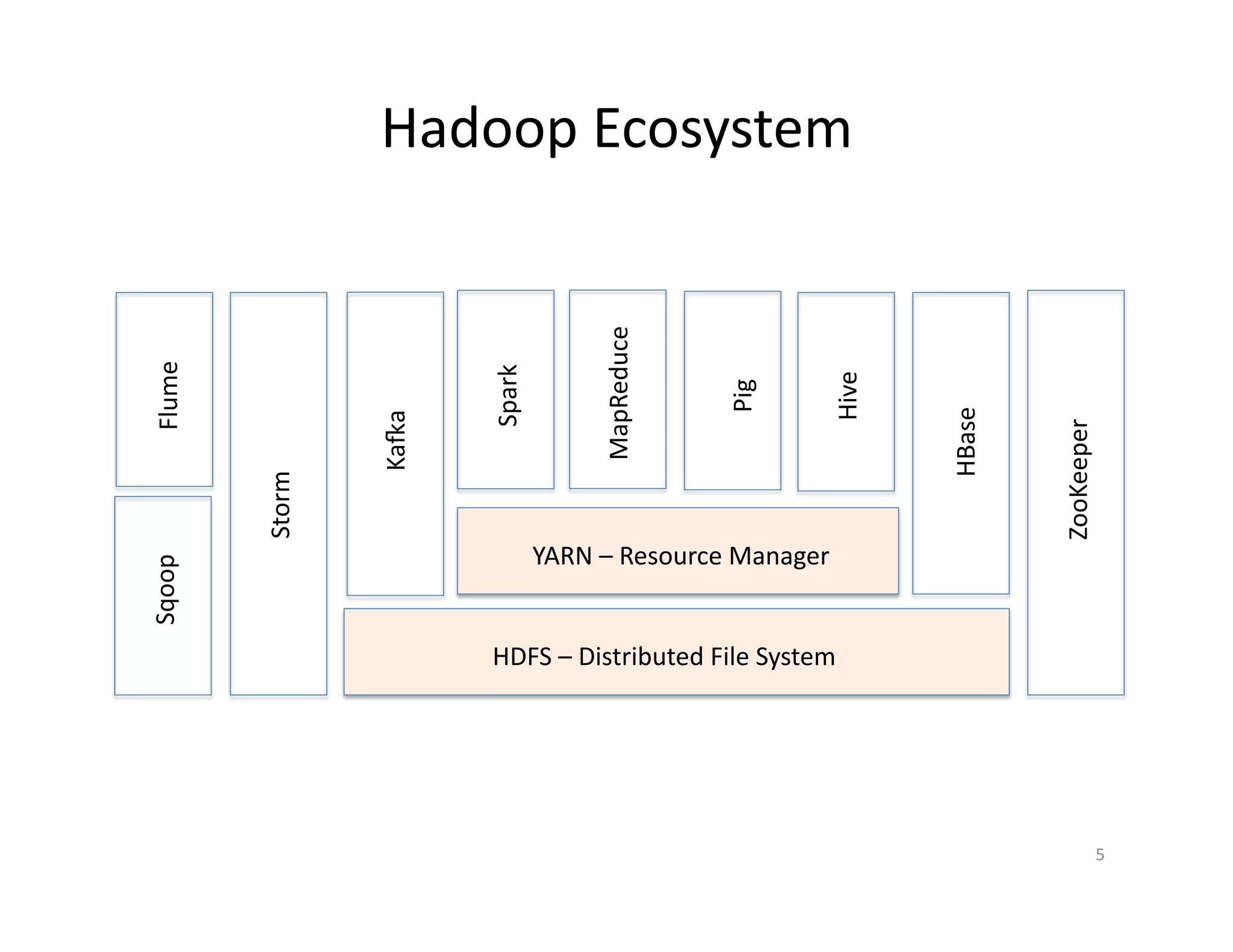
Hadoop EcosystemFlumeSqoop
ZooKeeper
HBase
Hive
Pig
MapReduce
Spark
YARN – Resource Manager
HDFS – Distributed File System
Kafka
Storm
4
Why
• Hadoop is a storage/processing infrastructure
– Whether Big Data is hype or not
• Fits well for lot of use cases
• Inherent distributed storage/processing
– Provides scalability at a relatively low cost
• There is lot of backing
– IBM, Microsoft, Amazon, Google, Intel …
• Various distributions and companies
5
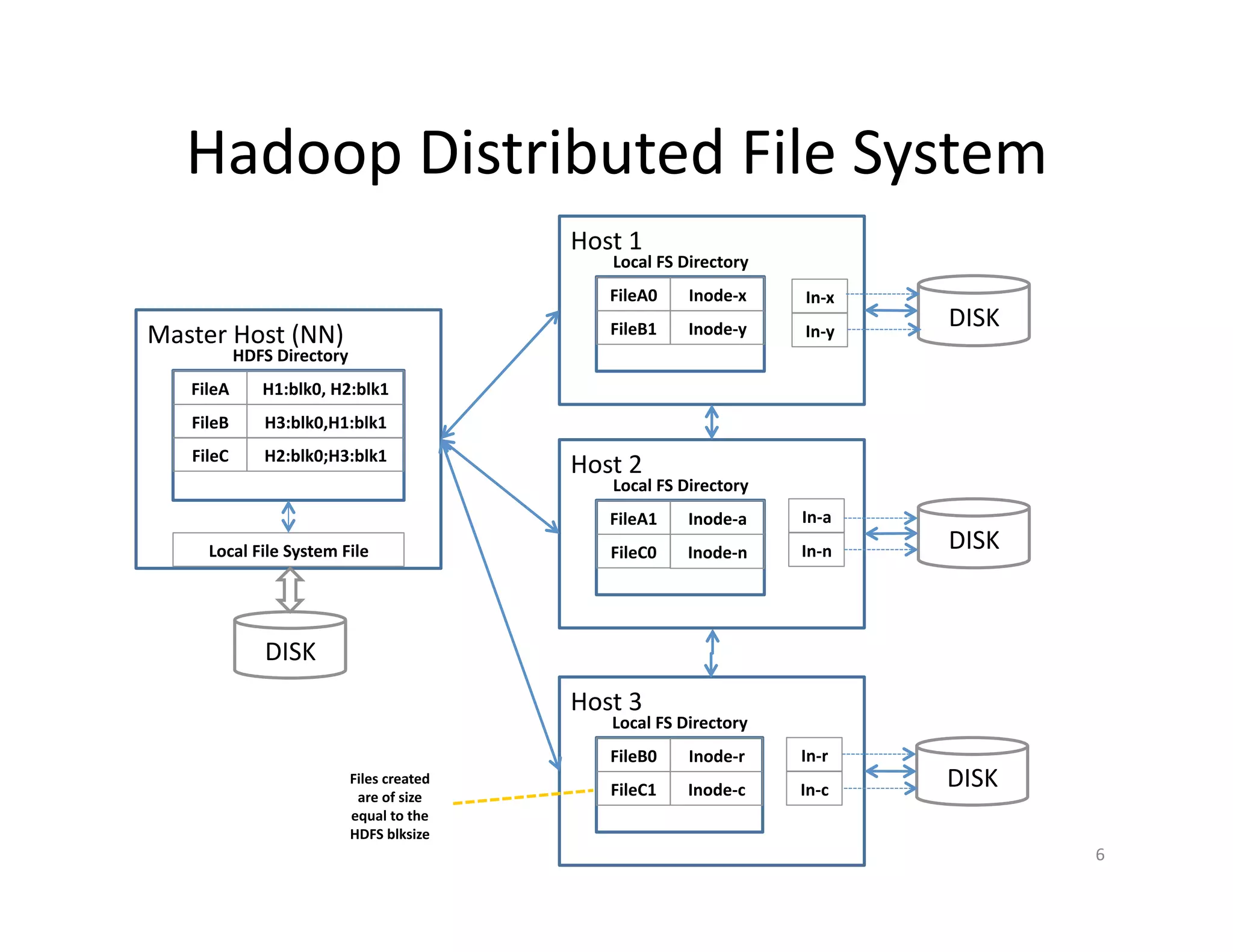
Hadoop Distributed File System
FileA
FileB
FileC
H1:blk0, H2:blk1
H3:blk0,H1:blk1
H2:blk0;H3:blk1
HDFS Directory
Master Host (NN)
DISK
Local File System File
FileA0
FileB1
Inode-x
Inode-y
Local FS Directory
Host 1
FileA1
FileC0
Inode-a
Inode-n
Local FS Directory
Host 2
FileB0
FileC1
Inode-r
Inode-c
Local FS Directory
Host 3
In-x
In-y
In-a
In-n
In-r
In-c
DISK
DISK
DISK
Files created
are of size
equal to the
HDFS blksize
6
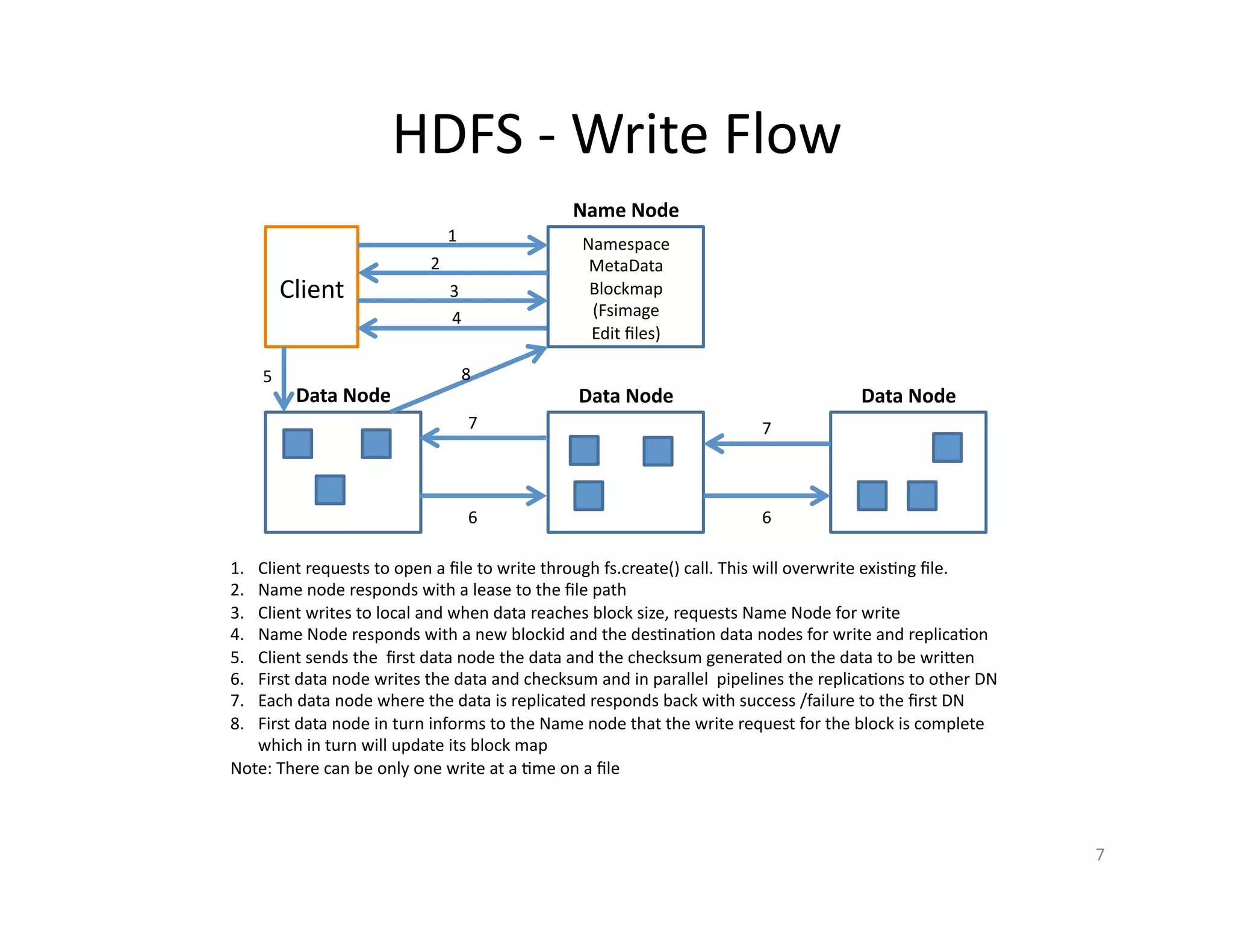
HDFS - Write Flow
Client
Namespace
MetaData
Blockmap
(Fsimage
Edit files)
Name Node
Data Node Data Node Data Node
1
2
3
4
5
6 6
77
8
1. Client requests to open a file to write through fs.create() call. This will overwrite existing file.
2. Name node responds with a lease to the file path
3. Client writes to local and when data reaches block size, requests Name Node for write
4. Name Node responds with a new blockid and the destination data nodes for write and replication
5. Client sends the first data node the data and the checksum generated on the data to be written
6. First data node writes the data and checksum and in parallel pipelines the replications to other DN
7. Each data node where the data is replicated responds back with success /failure to the first DN
8. First data node in turn informs to the Name node that the write request for the block is complete
which in turn will update its block map
Note: There can be only one write at a time on a file
7
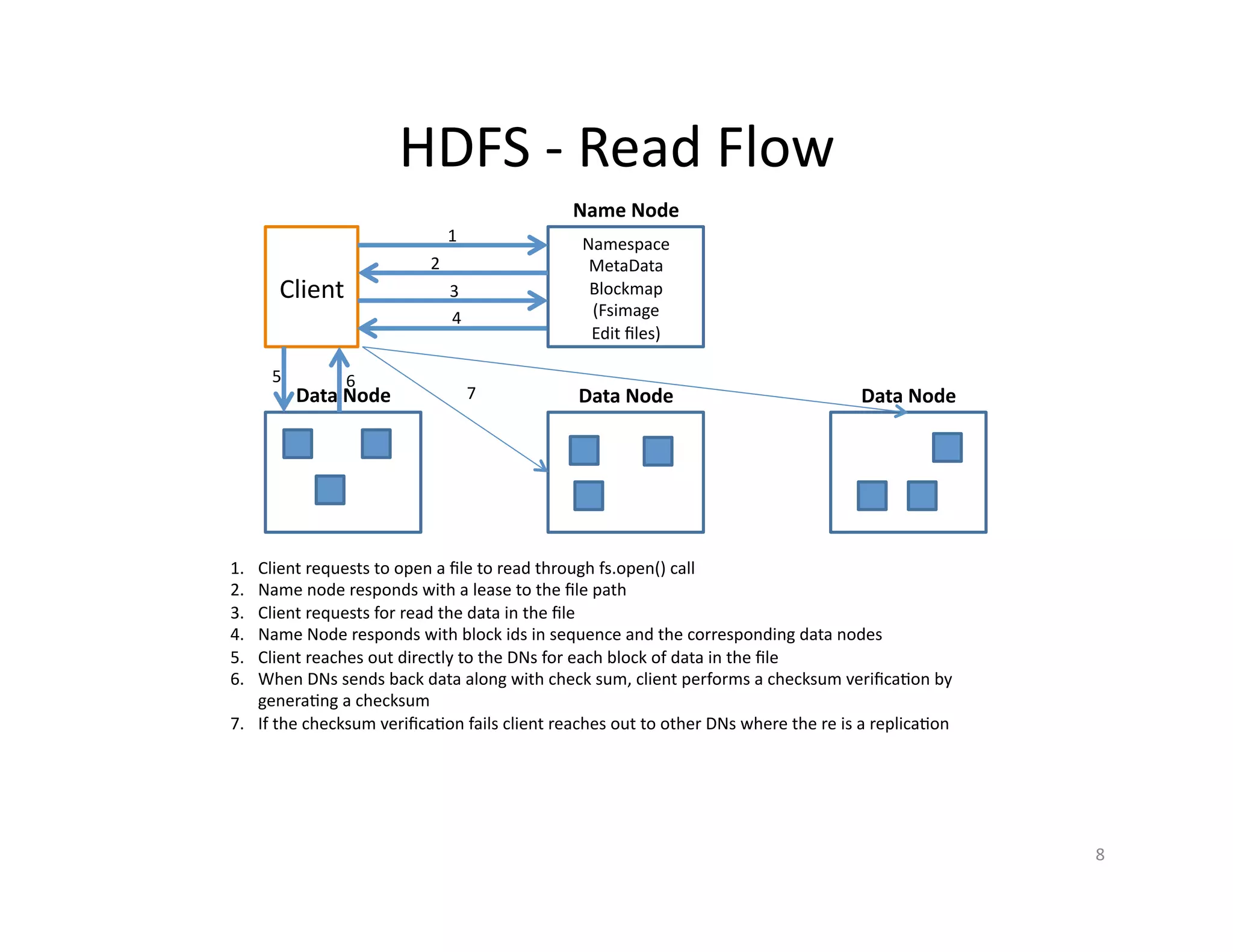
HDFS - Read Flow
Client
Namespace
MetaData
Blockmap
(Fsimage
Edit files)
Name Node
Data Node Data Node Data Node
1
2
3
4
5 6
1. Client requests to open a file to read through fs.open() call
2. Name node responds with a lease to the file path
3. Client requests for read the data in the file
4. Name Node responds with block ids in sequence and the corresponding data nodes
5. Client reaches out directly to the DNs for each block of data in the file
6. When DNs sends back data along with check sum, client performs a checksum verification by
generating a checksum
7. If the checksum verification fails client reaches out to other DNs where the re is a replication
7
8
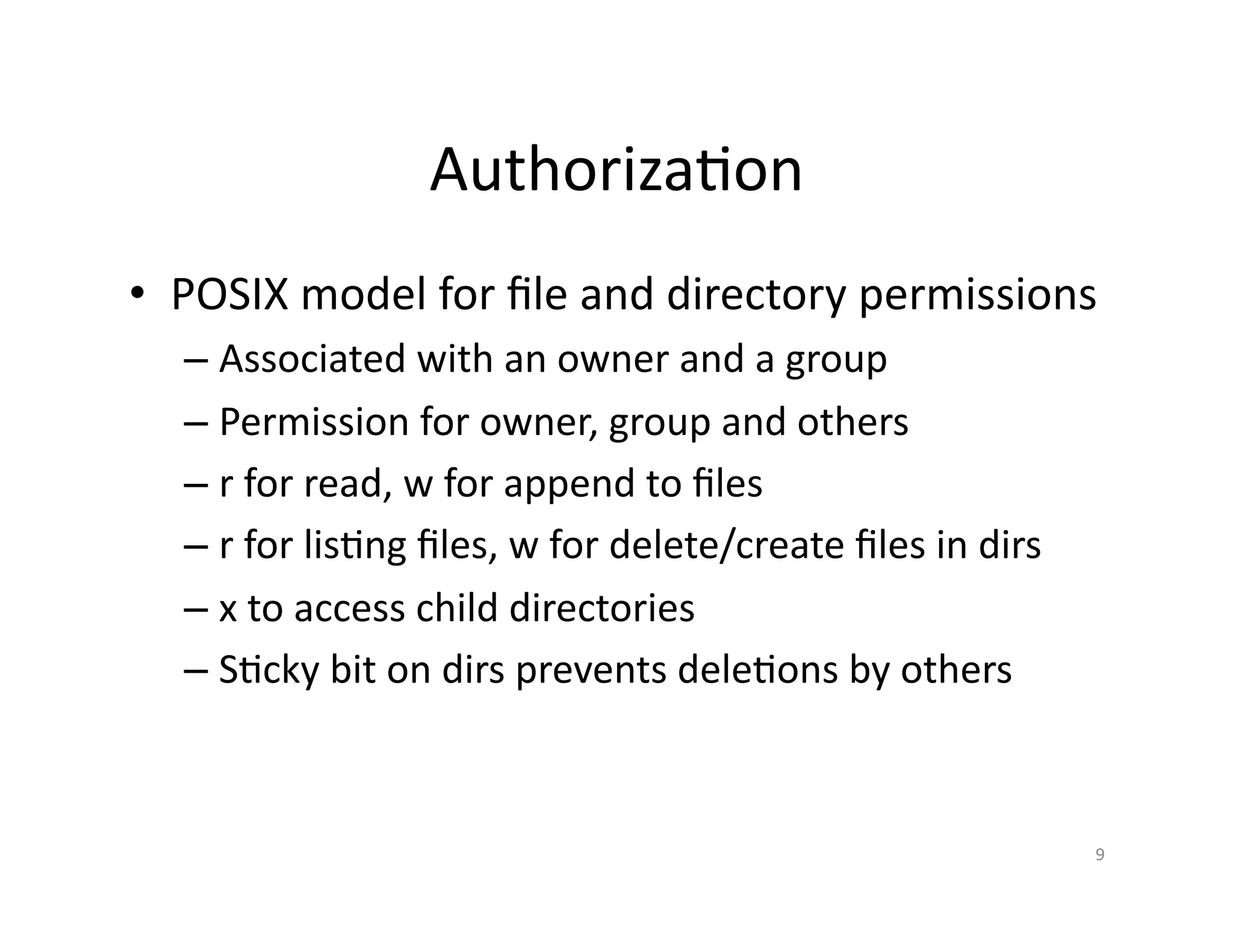
Authorization
• POSIX model for file and directory permissions
– Associated with an owner and a group
– Permission for owner, group and others
– r for read, w for append to files
– r for listing files, w for delete/create files in dirs
– x to access child directories
– Sticky bit on dirs prevents deletions by others
9
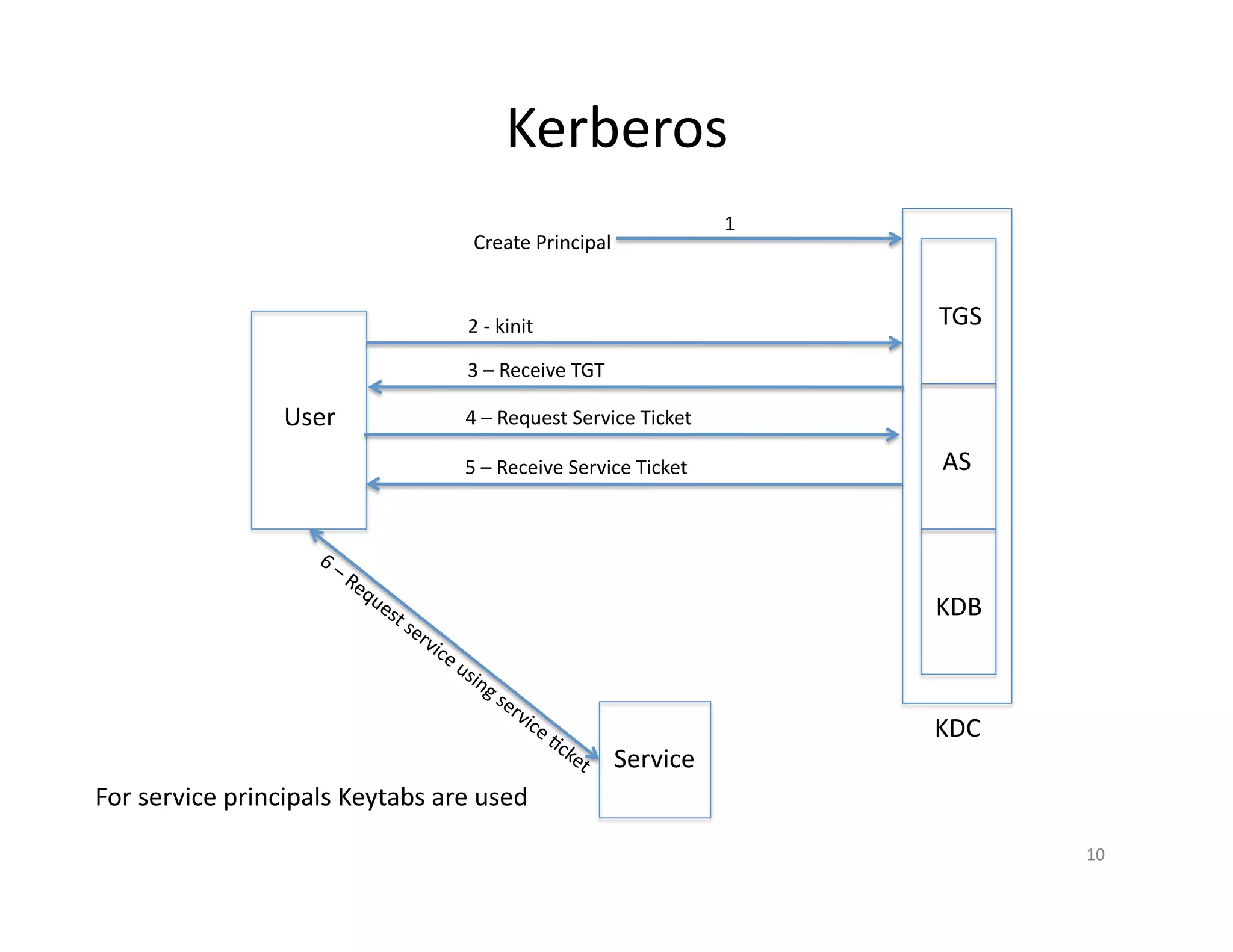
Kerberos
10
TGS
AS
KDB
KDC
1
Create Principal
User
2 - kinit
3 – Receive TGT
4 – Request Service Ticket
Service
5 – Receive Service Ticket
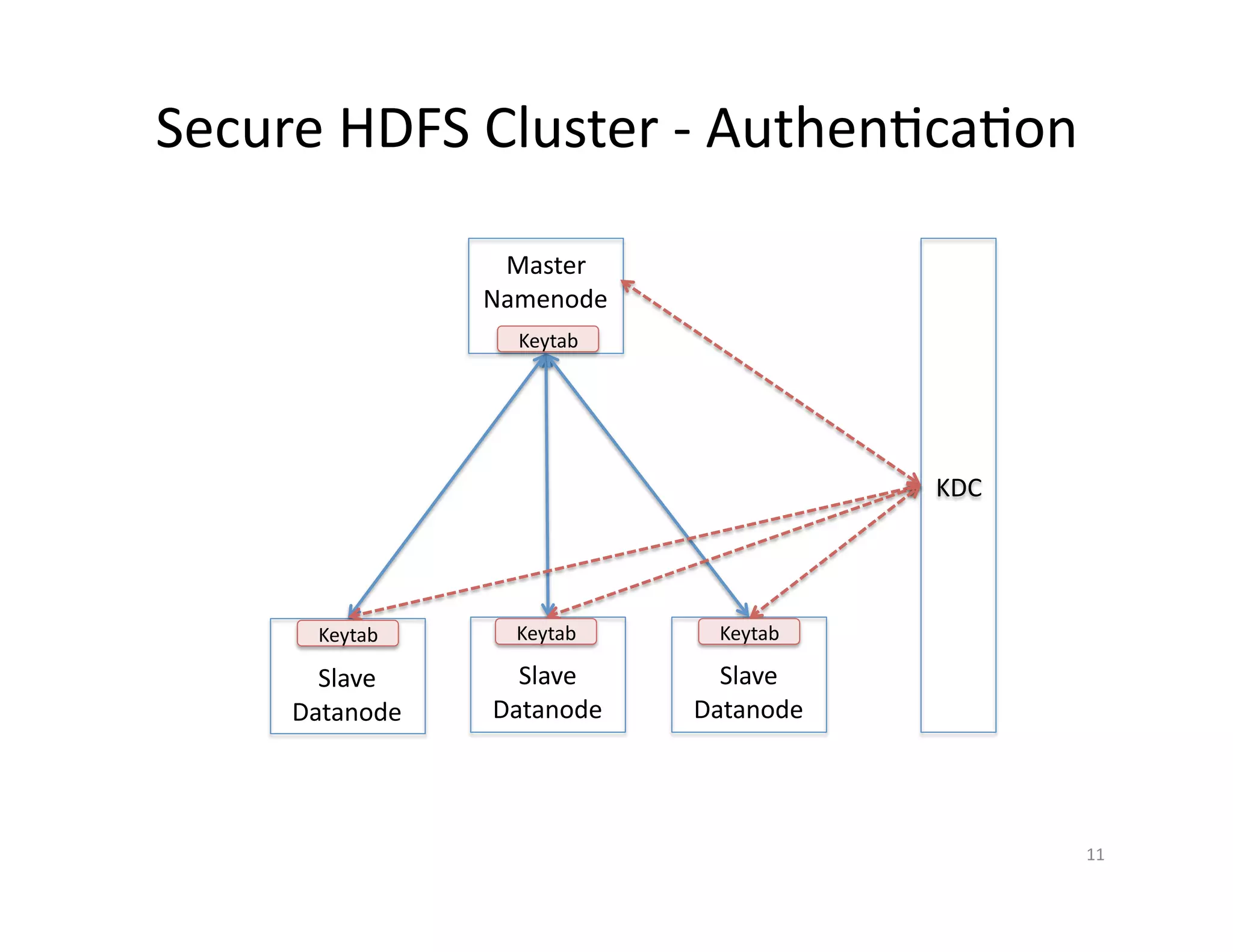
For service principals Keytabs are used
Secure HDFS Cluster - Authentication
Master
Namenode
Slave
Datanode
Slave
Datanode
Slave
Datanode
KDC
Keytab Keytab Keytab
Keytab
11
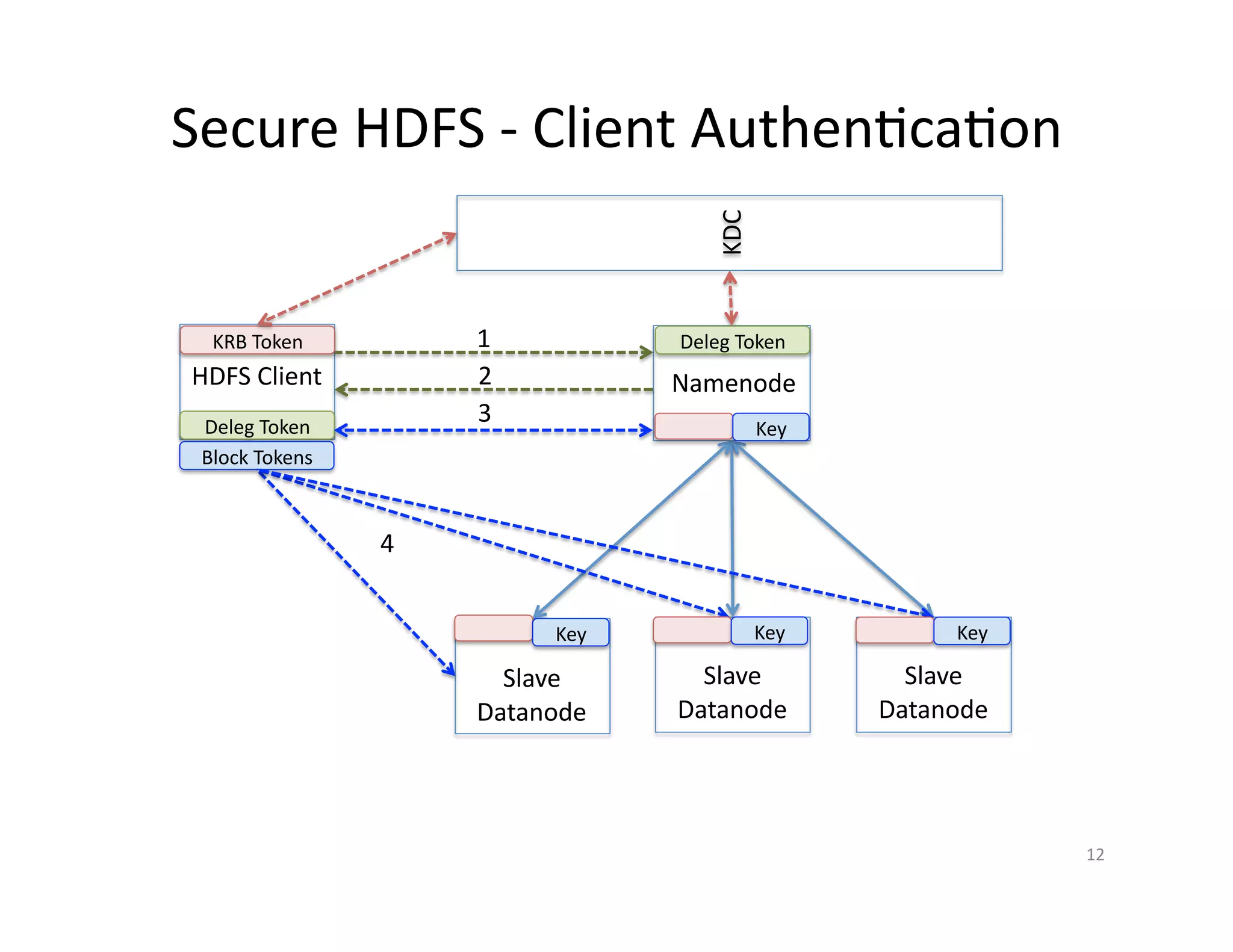
Secure HDFS - Client Authentication
Namenode
Slave
Datanode
Slave
Datanode
Slave
Datanode
KDC
HDFS Client
KRB Token 1
Deleg Token
2
3
Block Tokens
Deleg Token
Key
Key Key Key
4
12
Authentication Configuration
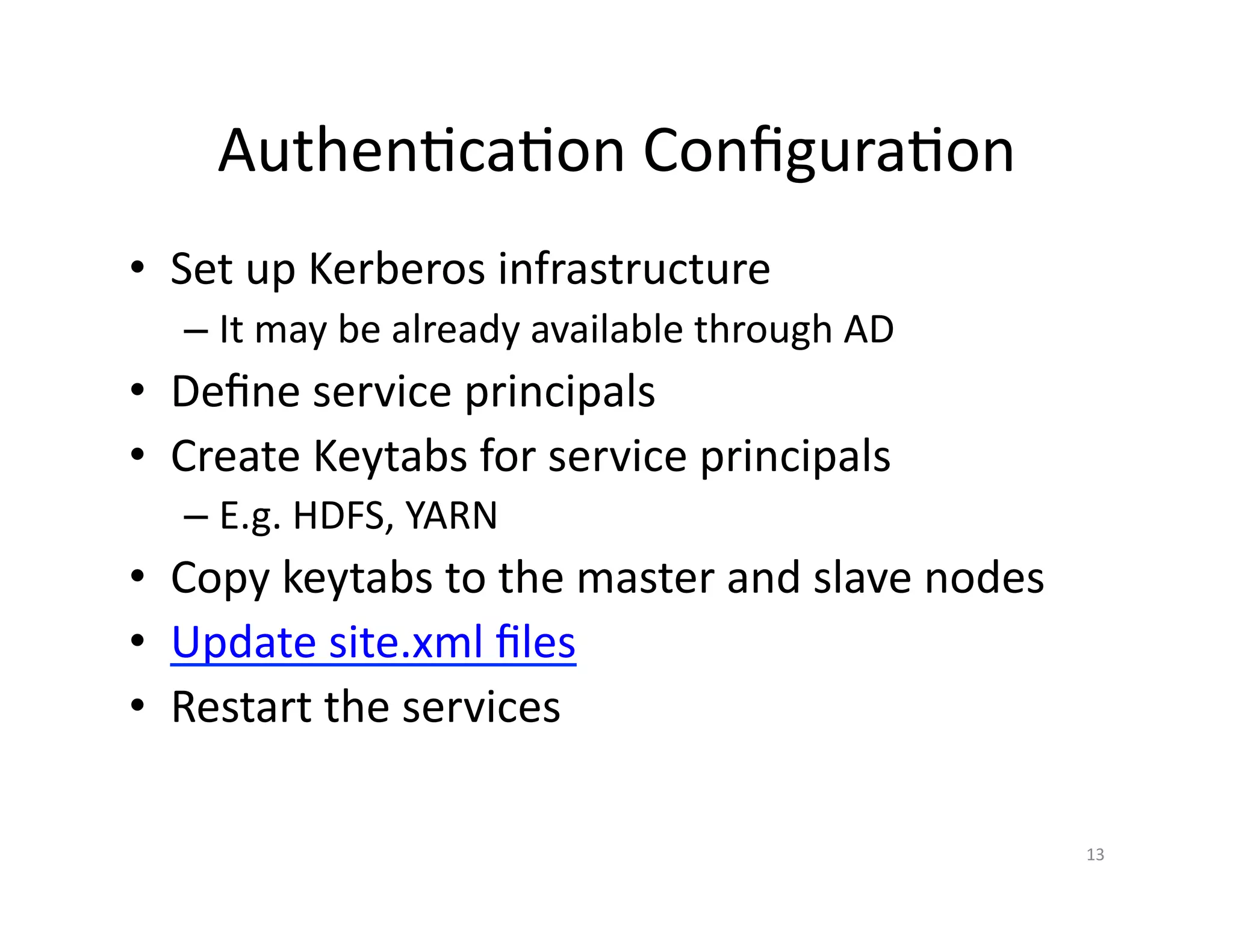
• Set up Kerberos infrastructure
– It may be already available through AD
• Define service principals
• Create Keytabs for service principals
– E.g. HDFS, YARN
• Copy keytabs to the master and slave nodes
• Update site.xml files
• Restart the services
13
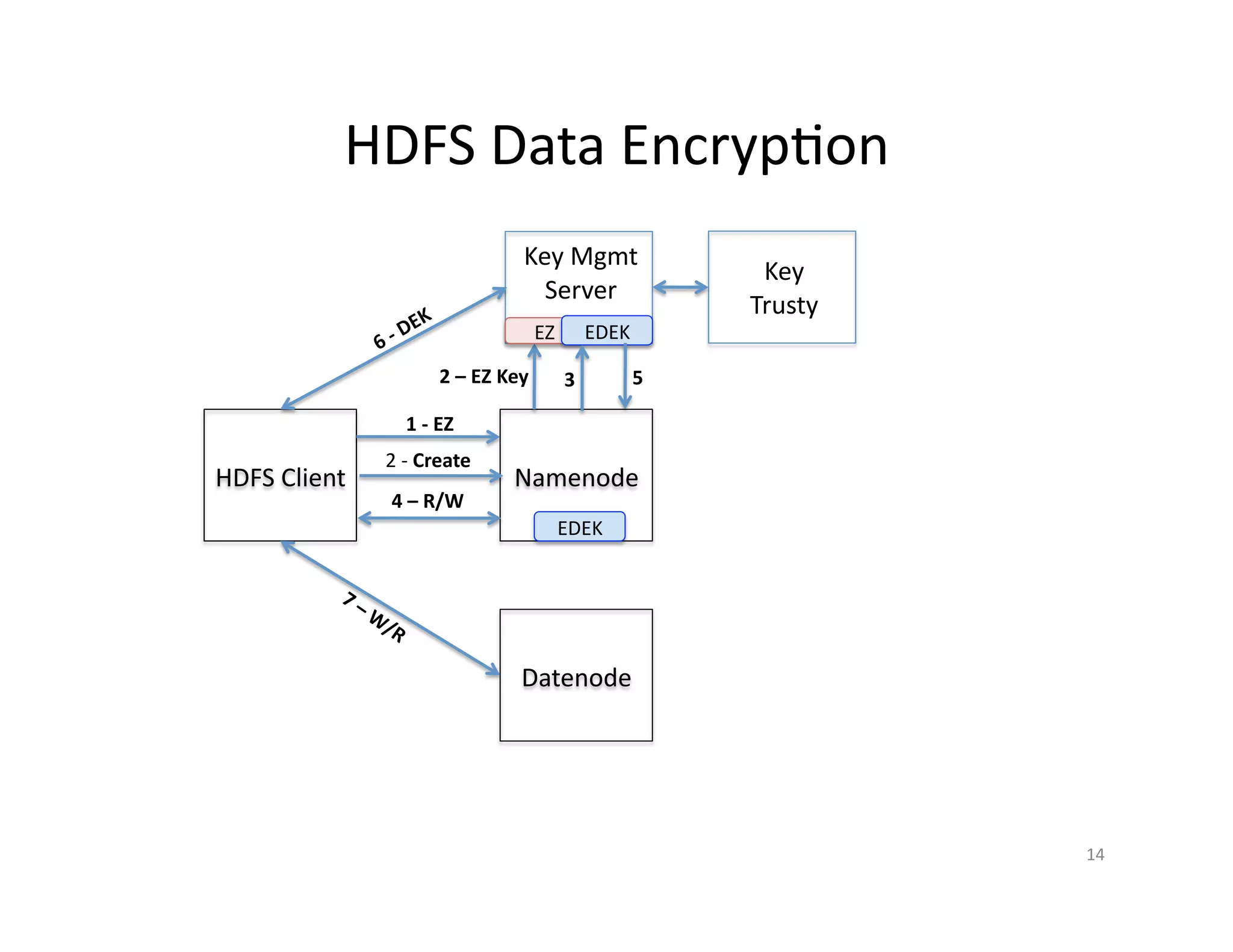
HDFS Data Encryption
HDFS
Client
Key Mgmt
Server
Key
Trusty
Namenode
Datenode
1 - EZ
2 – EZ Key
2 - Create
EZ EDEK
3
EDEK
4 – R/W
5
14
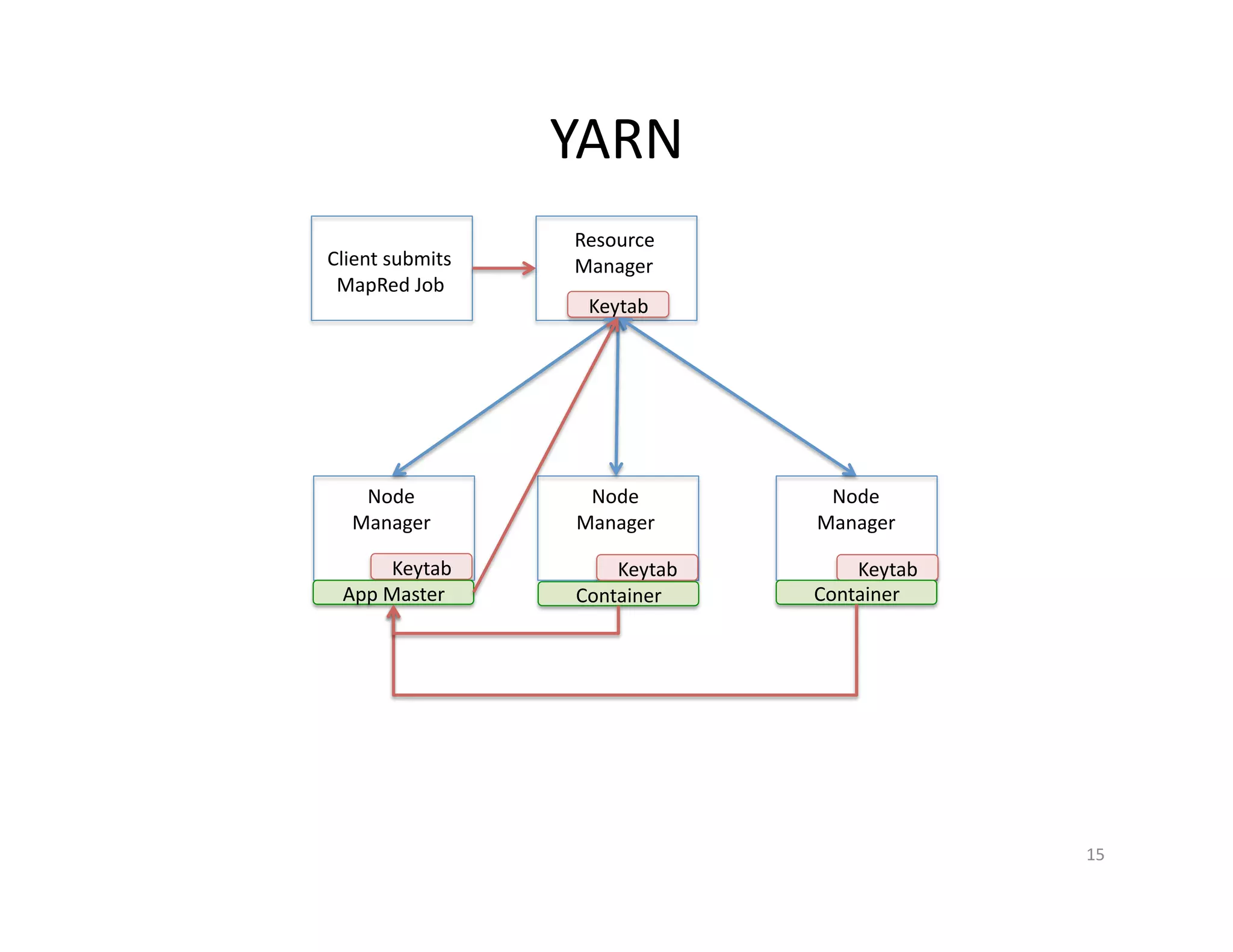
YARN
15
Resource
Manager
Node
Manager
Node
Manager
Node
Manager
Keytab Keytab Keytab
Keytab
Client submits
MapRed Job
App Master Container Container
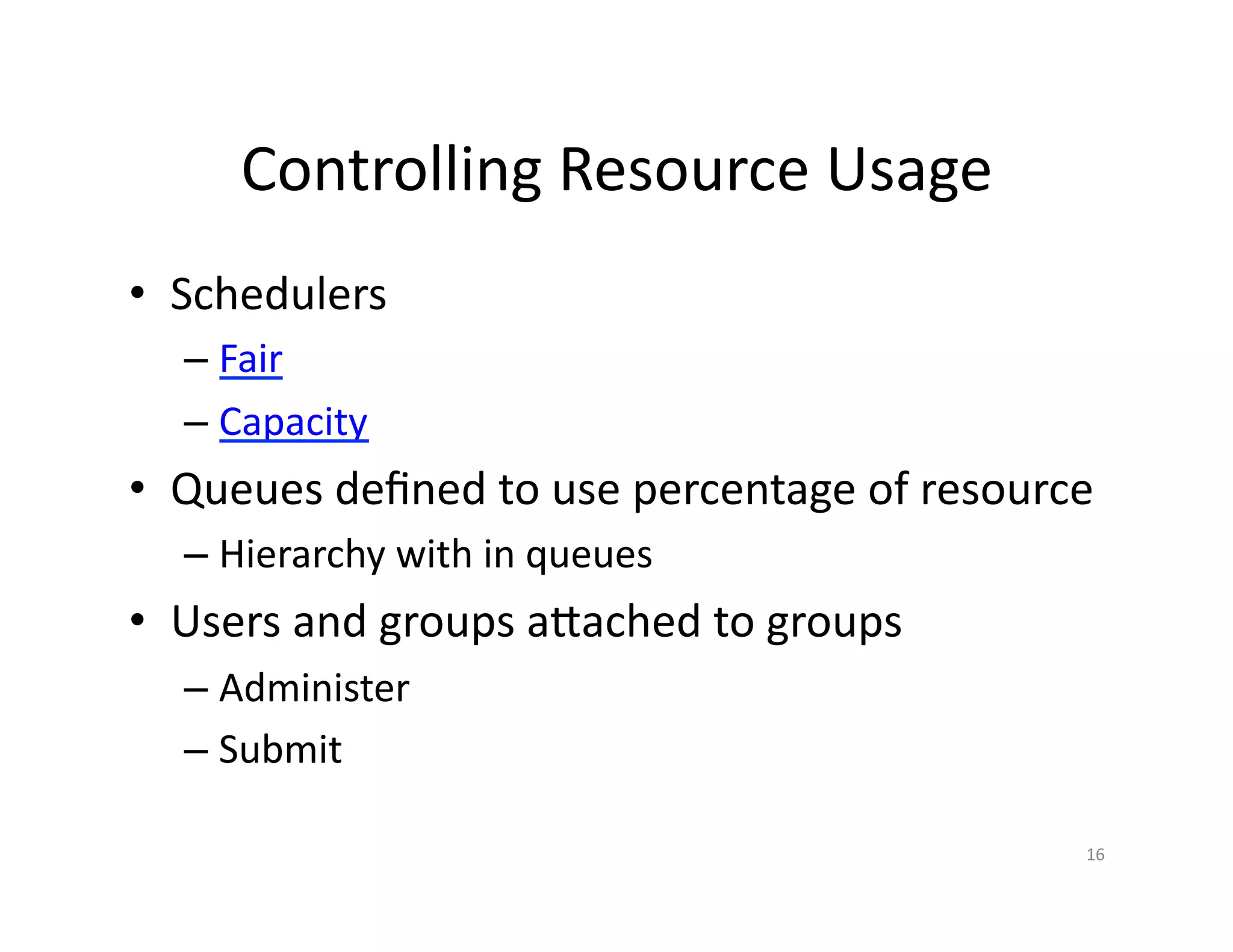
Controlling Resource Usage
• Schedulers
– Fair
– Capacity
• Queues defined to use percentage of resource
– Hierarchy with in queues
• Users and groups attached to groups
– Administer
– Submit
16
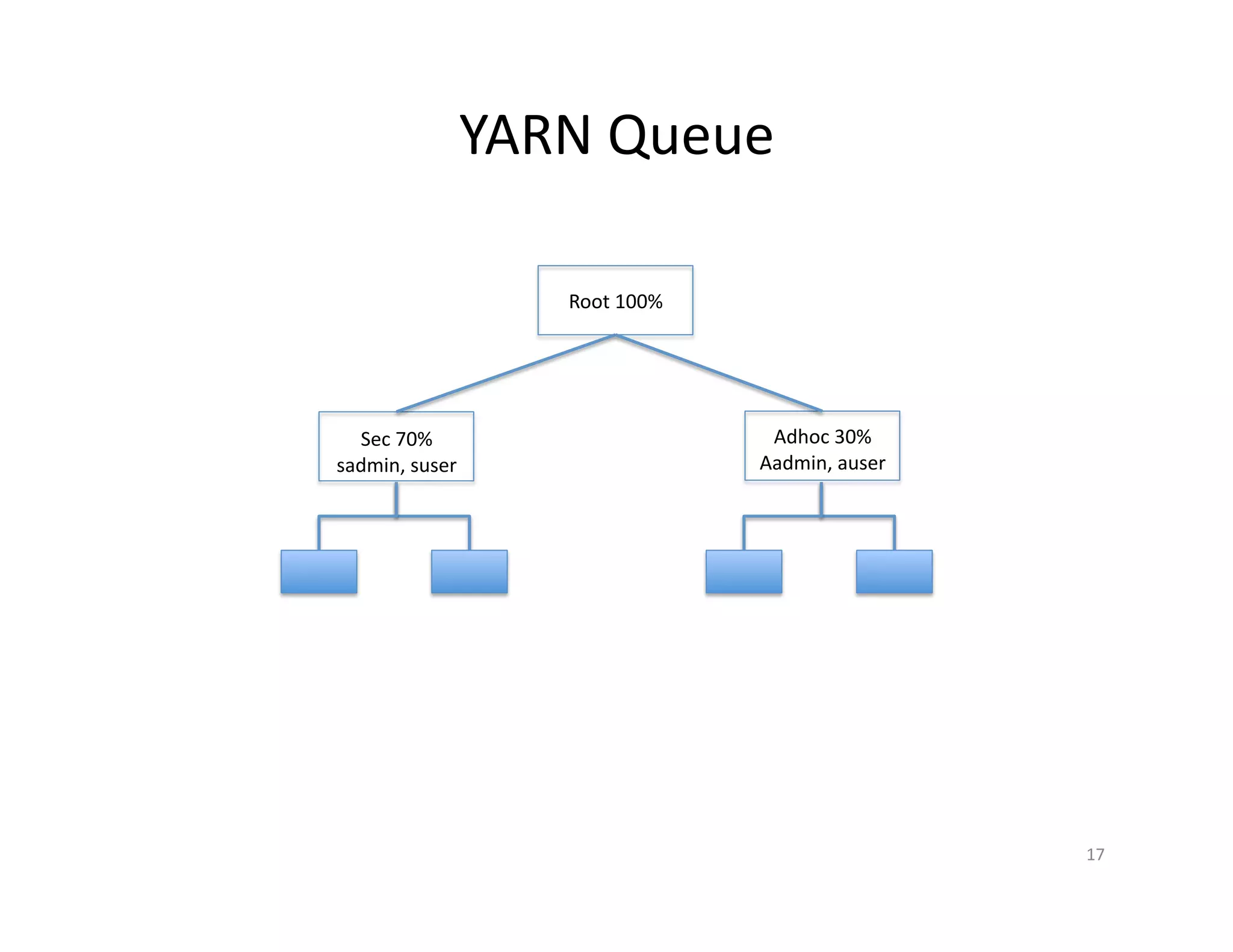
YARN Queue
17
Root 100%
Sec 70%
sadmin, suser
Adhoc 30%
Aadmin, auser
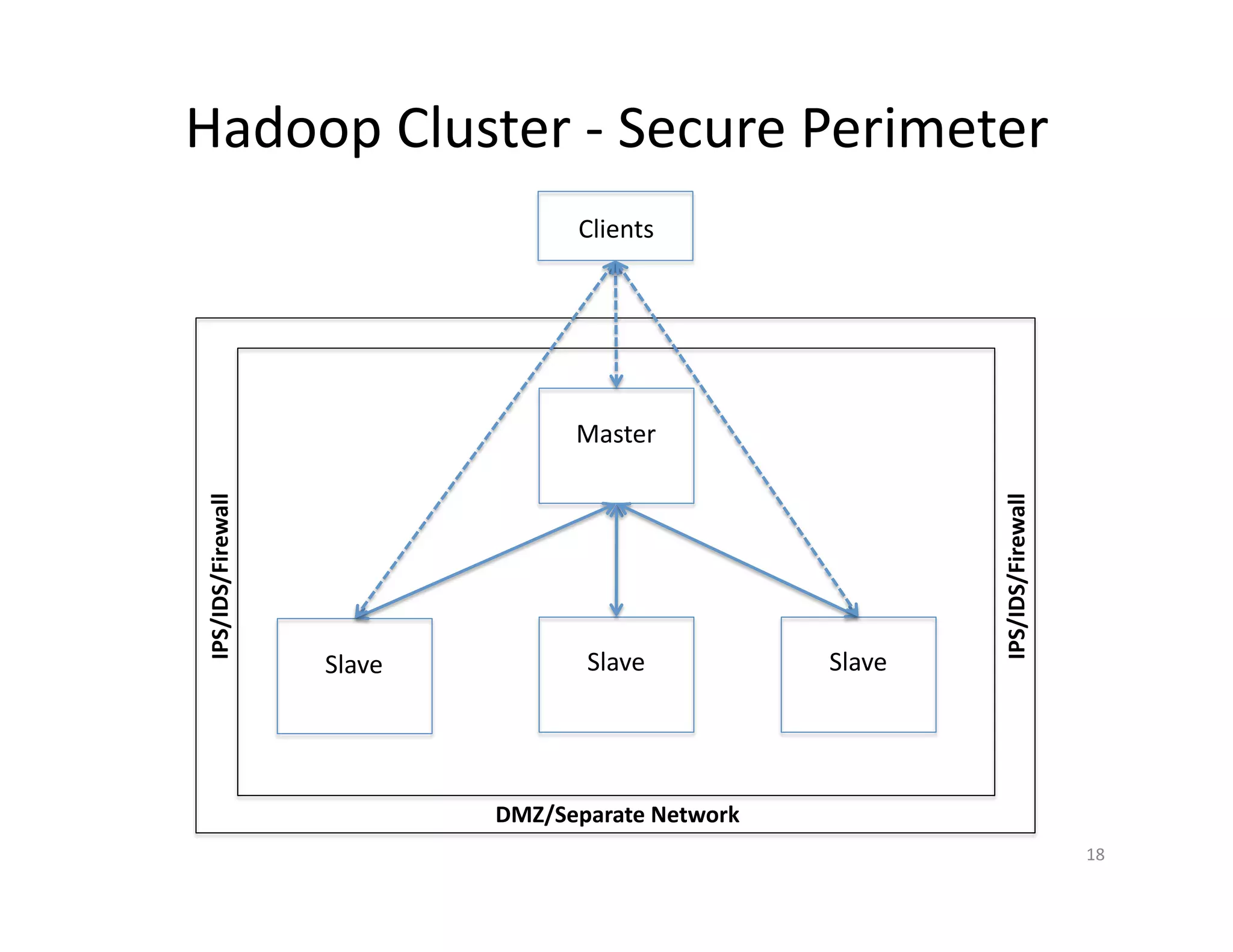
Hadoop Cluster - Secure Perimeter
Master
Slave Slave Slave
IPS/IDS/Firewall
IPS/IDS/Firewall
Clients
DMZ/Separate Network
18
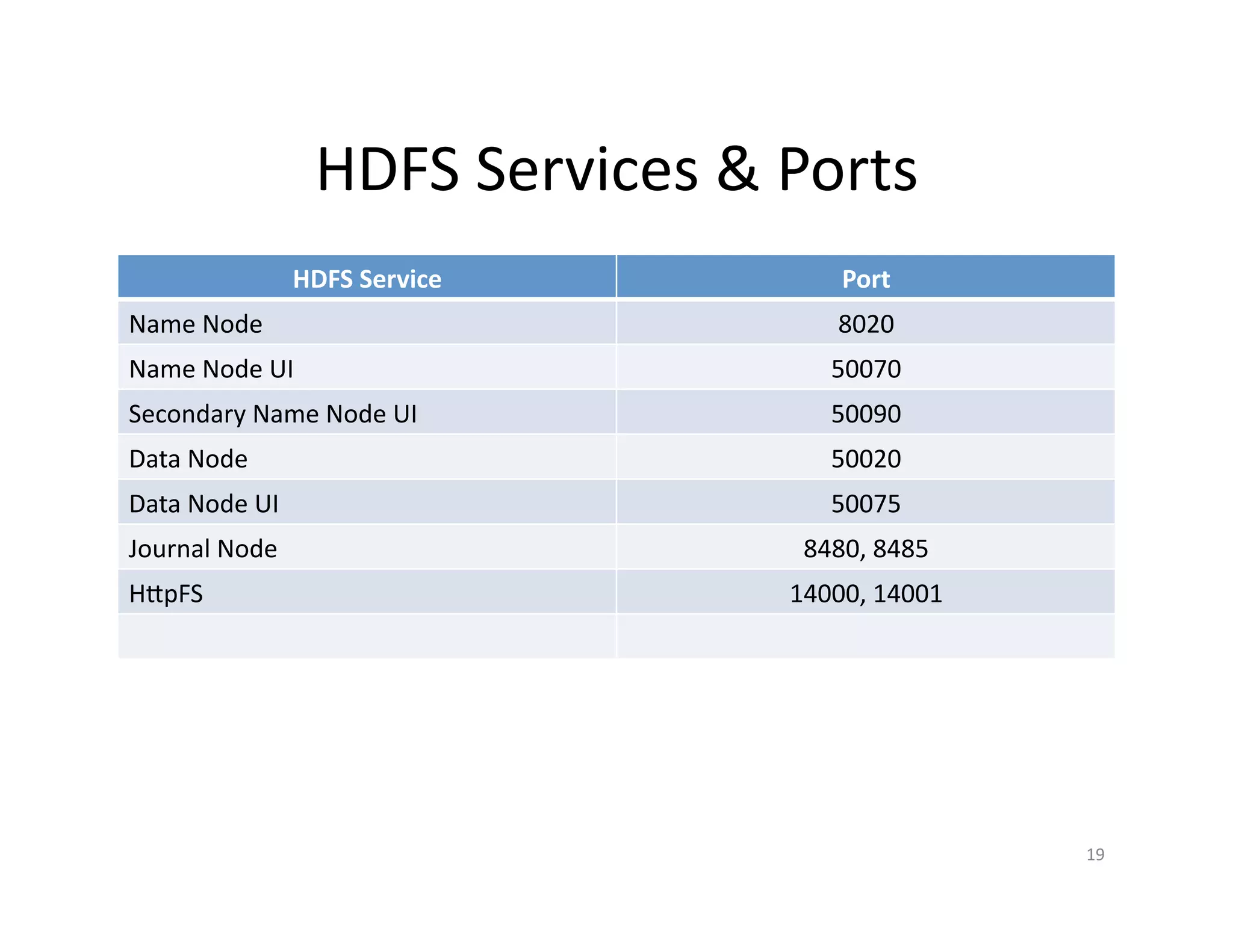
HDFS Services & Ports
HDFS Service Port
Name Node 8020
Name Node UI 50070
Secondary Name Node UI 50090
Data Node 50020
Data Node UI 50075
Journal Node 8480, 8485
HttpFS 14000, 14001
19
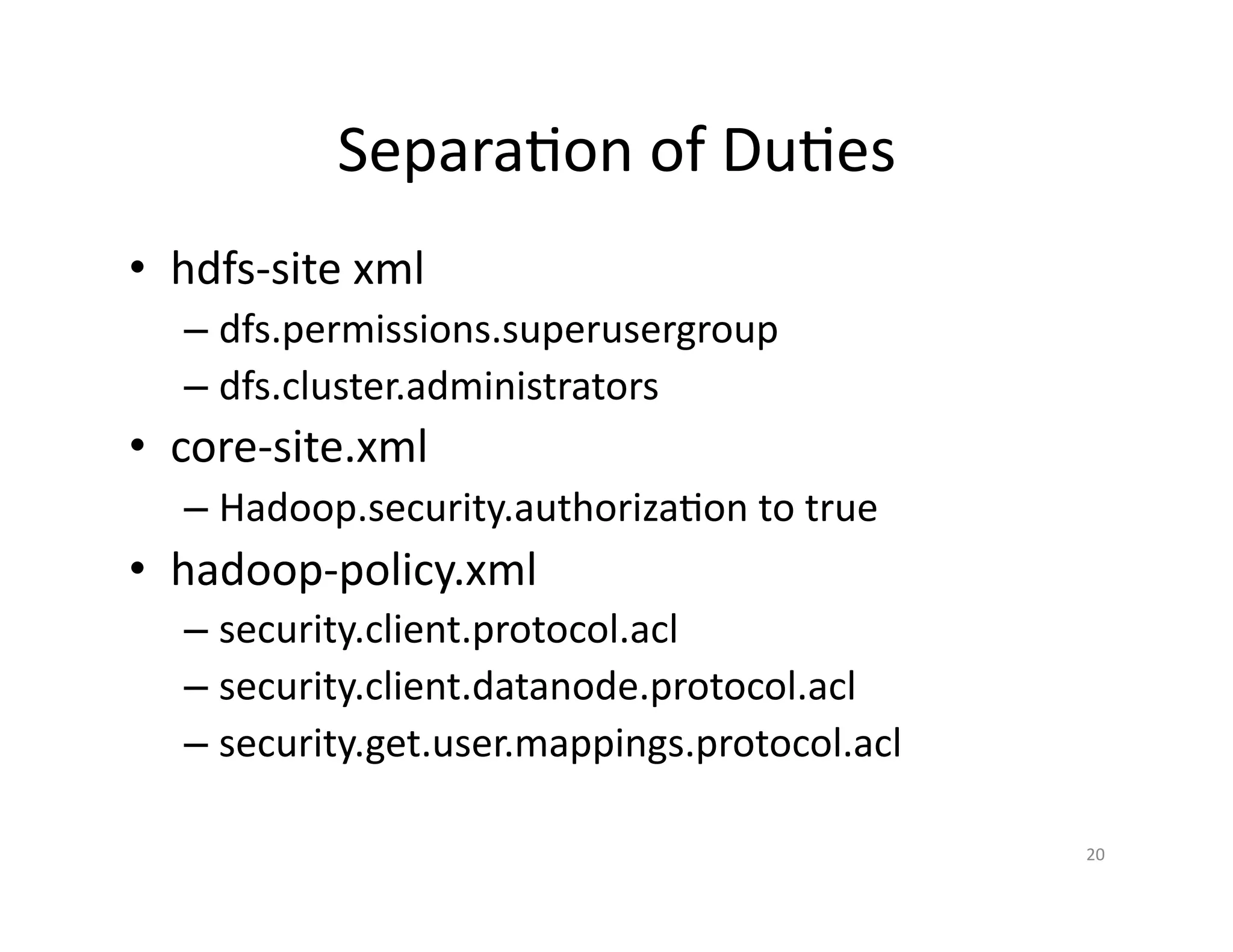
Principle of Least Priviledge
• hdfs-site xml
– dfs.permissions.superusergroup
– dfs.cluster.administrators
• core-site.xml
– Hadoop.security.authorization to true
• hadoop-policy.xml
– security.client.protocol.acl
– security.client.datanode.protocol.acl
– security.get.user.mappings.protocol.acl
20
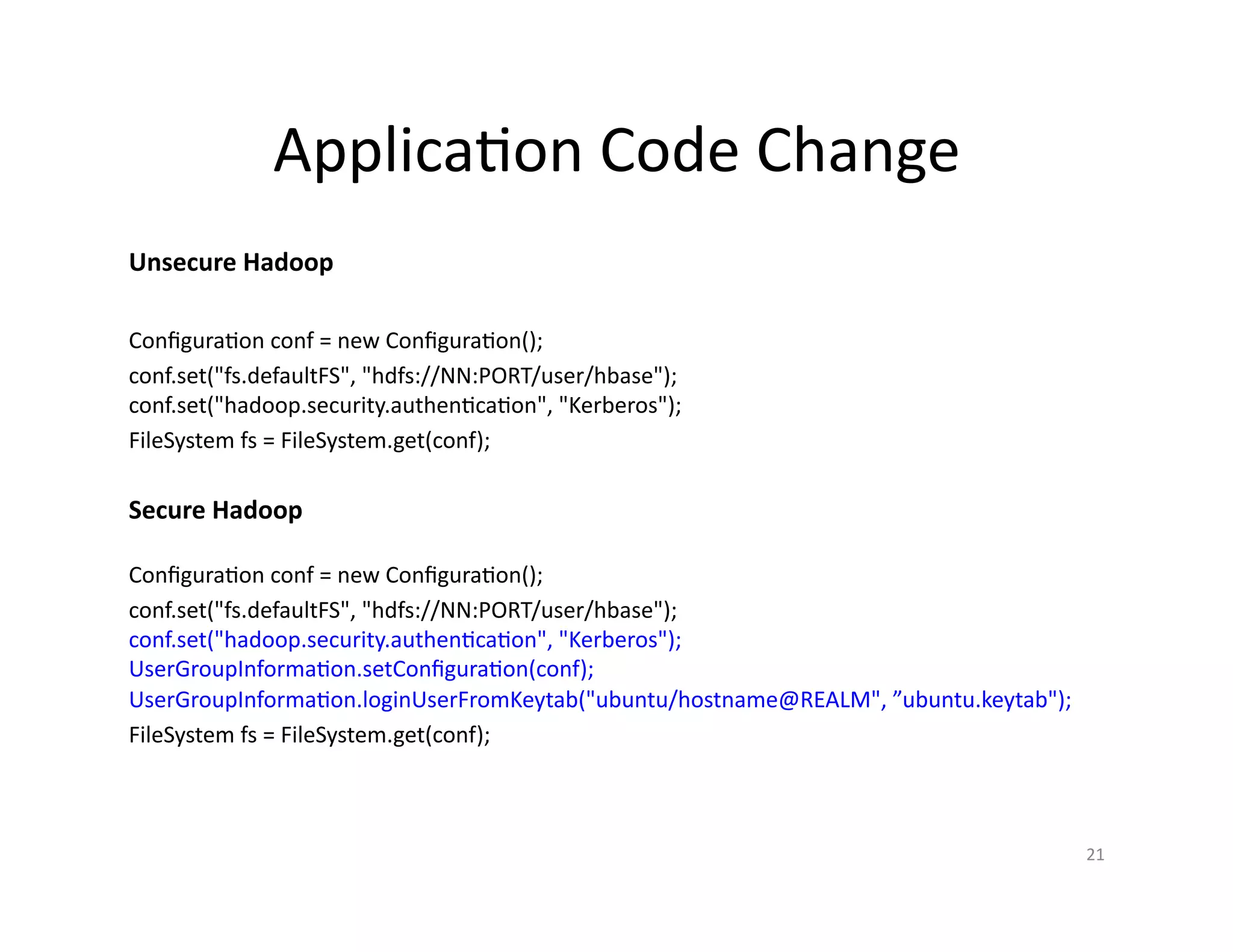
Application Code Change
Configuration conf = new Configuration();
conf.set("fs.defaultFS", "hdfs://NN:PORT/user/hbase");
conf.set("hadoop.security.authentication", "Kerberos");
UserGroupInformation.setConfiguration(conf);
UserGroupInformation.loginUserFromKeytab("ubuntu/hostname@REALM", ”ubuntu.keytab");
FileSystem fs = FileSystem.get(conf);
21
Configuration conf = new Configuration();
conf.set("fs.defaultFS", "hdfs://NN:PORT/user/hbase");
conf.set("hadoop.security.authentication", "Kerberos");
FileSystem fs = FileSystem.get(conf);
Unsecure Hadoop
Secure Hadoop
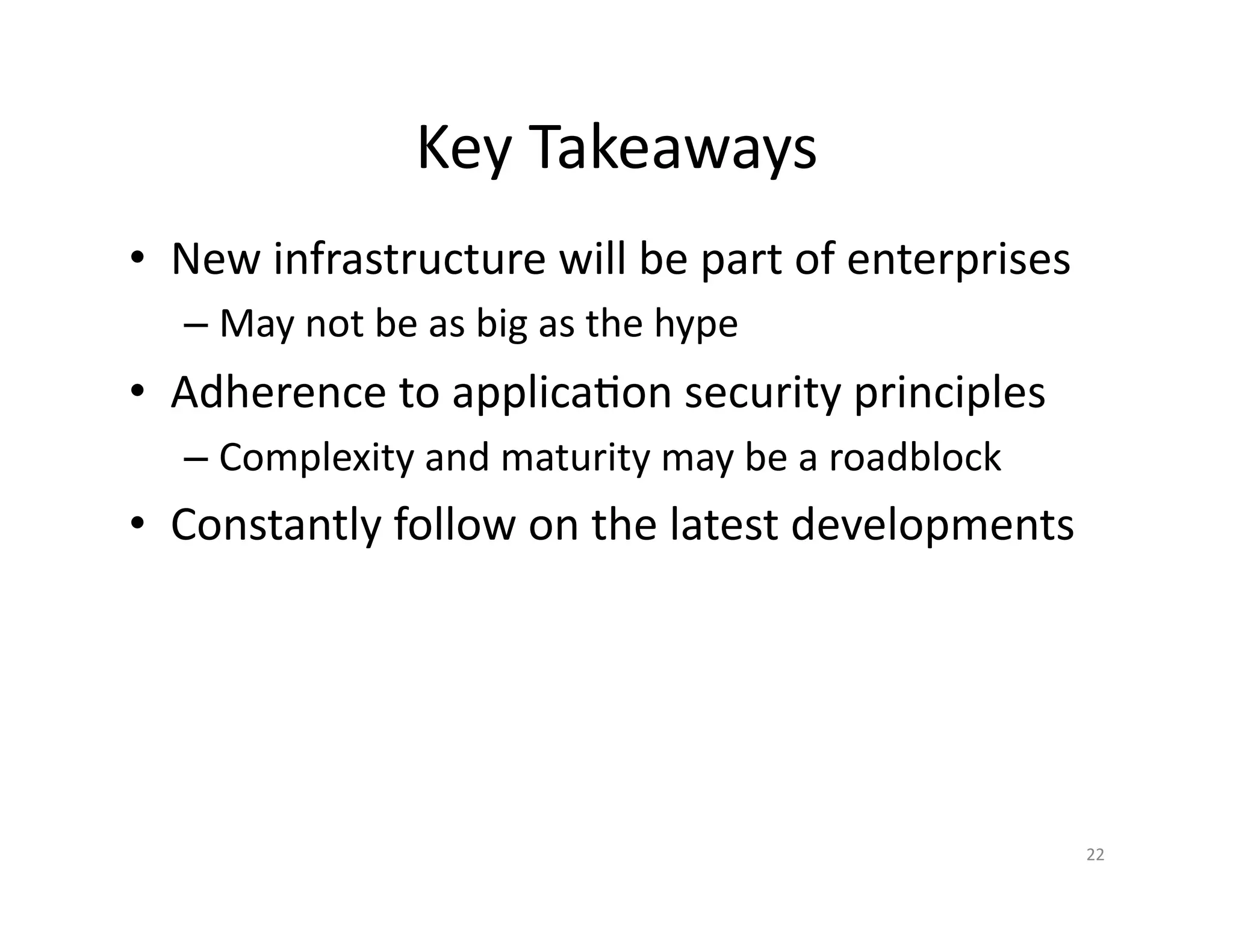
Key Takeaways
• New infrastructure will be part of enterprises
– May not be as big as the hype
• Adherence to application security principles
– Complexity and maturity may be a roadblock
• Constant follow-up on latest developments
22
References & Acknowledgements
• Hadoop Security
– https://issues.apache.org/jira/browse/HADOOP-4487
– Hadoop Project – Securing Hadoop Page
• HDFS Encryption
– https://issues.apache.org/jira/browse/HDFS-6134
– Hadoop Project Transparent Encryption Page
– http://www.slideshare.net/Hadoop_Summit/transparent-encryption-in-hdfs
• Hadoop service level authorization
• YARN
– Fair Scheduler
– Capacity Scheduler
• Hadoop Security Book
23
Thank You!!
24
bnair@asquareb.com
blog.asquareb.com
https://github.com/bijugs
@gsbiju
http://www.slideshare.net/bijugs

Hadoop security

  • 1.
    Secure Hadoop Application Ecosystem BostonApplication Security Conference Oct 3 2015
  • 2.
    Google Trends –Big Data Big Data Job Trends 2
  • 3.
  • 4.
    Hadoop EcosystemFlumeSqoop ZooKeeper HBase Hive Pig MapReduce Spark YARN –Resource Manager HDFS – Distributed File System Kafka Storm 4
  • 5.
    Why • Hadoop isa storage/processing infrastructure – Whether Big Data is hype or not • Fits well for lot of use cases • Inherent distributed storage/processing – Provides scalability at a relatively low cost • There is lot of backing – IBM, Microsoft, Amazon, Google, Intel … • Various distributions and companies 5
  • 6.
    Hadoop Distributed FileSystem FileA FileB FileC H1:blk0, H2:blk1 H3:blk0,H1:blk1 H2:blk0;H3:blk1 HDFS Directory Master Host (NN) DISK Local File System File FileA0 FileB1 Inode-x Inode-y Local FS Directory Host 1 FileA1 FileC0 Inode-a Inode-n Local FS Directory Host 2 FileB0 FileC1 Inode-r Inode-c Local FS Directory Host 3 In-x In-y In-a In-n In-r In-c DISK DISK DISK Files created are of size equal to the HDFS blksize 6
  • 7.
    HDFS - WriteFlow Client Namespace MetaData Blockmap (Fsimage Edit files) Name Node Data Node Data Node Data Node 1 2 3 4 5 6 6 77 8 1. Client requests to open a file to write through fs.create() call. This will overwrite existing file. 2. Name node responds with a lease to the file path 3. Client writes to local and when data reaches block size, requests Name Node for write 4. Name Node responds with a new blockid and the destination data nodes for write and replication 5. Client sends the first data node the data and the checksum generated on the data to be written 6. First data node writes the data and checksum and in parallel pipelines the replications to other DN 7. Each data node where the data is replicated responds back with success /failure to the first DN 8. First data node in turn informs to the Name node that the write request for the block is complete which in turn will update its block map Note: There can be only one write at a time on a file 7
  • 8.
    HDFS - ReadFlow Client Namespace MetaData Blockmap (Fsimage Edit files) Name Node Data Node Data Node Data Node 1 2 3 4 5 6 1. Client requests to open a file to read through fs.open() call 2. Name node responds with a lease to the file path 3. Client requests for read the data in the file 4. Name Node responds with block ids in sequence and the corresponding data nodes 5. Client reaches out directly to the DNs for each block of data in the file 6. When DNs sends back data along with check sum, client performs a checksum verification by generating a checksum 7. If the checksum verification fails client reaches out to other DNs where the re is a replication 7 8
  • 9.
    Authorization • POSIX modelfor file and directory permissions – Associated with an owner and a group – Permission for owner, group and others – r for read, w for append to files – r for listing files, w for delete/create files in dirs – x to access child directories – Sticky bit on dirs prevents deletions by others 9
  • 10.
    Kerberos 10 TGS AS KDB KDC 1 Create Principal User 2 -kinit 3 – Receive TGT 4 – Request Service Ticket Service 5 – Receive Service Ticket For service principals Keytabs are used
  • 11.
    Secure HDFS Cluster- Authentication Master Namenode Slave Datanode Slave Datanode Slave Datanode KDC Keytab Keytab Keytab Keytab 11
  • 12.
    Secure HDFS -Client Authentication Namenode Slave Datanode Slave Datanode Slave Datanode KDC HDFS Client KRB Token 1 Deleg Token 2 3 Block Tokens Deleg Token Key Key Key Key 4 12
  • 13.
    Authentication Configuration • Setup Kerberos infrastructure – It may be already available through AD • Define service principals • Create Keytabs for service principals – E.g. HDFS, YARN • Copy keytabs to the master and slave nodes • Update site.xml files • Restart the services 13
  • 14.
    HDFS Data Encryption HDFS Client KeyMgmt Server Key Trusty Namenode Datenode 1 - EZ 2 – EZ Key 2 - Create EZ EDEK 3 EDEK 4 – R/W 5 14
  • 15.
  • 16.
    Controlling Resource Usage •Schedulers – Fair – Capacity • Queues defined to use percentage of resource – Hierarchy with in queues • Users and groups attached to groups – Administer – Submit 16
  • 17.
    YARN Queue 17 Root 100% Sec70% sadmin, suser Adhoc 30% Aadmin, auser
  • 18.
    Hadoop Cluster -Secure Perimeter Master Slave Slave Slave IPS/IDS/Firewall IPS/IDS/Firewall Clients DMZ/Separate Network 18
  • 19.
    HDFS Services &Ports HDFS Service Port Name Node 8020 Name Node UI 50070 Secondary Name Node UI 50090 Data Node 50020 Data Node UI 50075 Journal Node 8480, 8485 HttpFS 14000, 14001 19
  • 20.
    Principle of LeastPriviledge • hdfs-site xml – dfs.permissions.superusergroup – dfs.cluster.administrators • core-site.xml – Hadoop.security.authorization to true • hadoop-policy.xml – security.client.protocol.acl – security.client.datanode.protocol.acl – security.get.user.mappings.protocol.acl 20
  • 21.
    Application Code Change Configurationconf = new Configuration(); conf.set("fs.defaultFS", "hdfs://NN:PORT/user/hbase"); conf.set("hadoop.security.authentication", "Kerberos"); UserGroupInformation.setConfiguration(conf); UserGroupInformation.loginUserFromKeytab("ubuntu/hostname@REALM", ”ubuntu.keytab"); FileSystem fs = FileSystem.get(conf); 21 Configuration conf = new Configuration(); conf.set("fs.defaultFS", "hdfs://NN:PORT/user/hbase"); conf.set("hadoop.security.authentication", "Kerberos"); FileSystem fs = FileSystem.get(conf); Unsecure Hadoop Secure Hadoop
  • 22.
    Key Takeaways • Newinfrastructure will be part of enterprises – May not be as big as the hype • Adherence to application security principles – Complexity and maturity may be a roadblock • Constant follow-up on latest developments 22
  • 23.
    References & Acknowledgements •Hadoop Security – https://issues.apache.org/jira/browse/HADOOP-4487 – Hadoop Project – Securing Hadoop Page • HDFS Encryption – https://issues.apache.org/jira/browse/HDFS-6134 – Hadoop Project Transparent Encryption Page – http://www.slideshare.net/Hadoop_Summit/transparent-encryption-in-hdfs • Hadoop service level authorization • YARN – Fair Scheduler – Capacity Scheduler • Hadoop Security Book 23
  • 24.
  • 25.