1Copyright © 2014 Pivotal Software, Inc. All rights reserved. 1Copyright © 2014 Pivotal Software, Inc. All rights reserved.
Hadoop Security
Kerberos, PAM and LDAP Integration
Kashif Khan: Advisory Solutions Architect - PS
2Copyright © 2014 Pivotal Software, Inc. All rights reserved.
Why Security
 Threats and Challenges in unsecured hadoop cluster
_ Absence of service level authentication
- Lack of ACL at data nodes, once Namenode authorizes access
- Intermediate Map output is not stored in HDFS; it is stored on the local disk of each
compute node
- In multi-tenant shared environment, tasks of different tenant can execute on same
machine, posses unauthorized access threat.
- Impersonation
- Unauthorized access of web consoles (namenode, yarn, oozie)
3Copyright © 2014 Pivotal Software, Inc. All rights reserved.
Security Terms
 SASL(Simple Authentication and Security Layer)
Generic framework for authentication and data security, supports GSSAPI
 GSSAPI(Generic Security Services API)
Generic Interface for programs to access security services.
 SPNEGO(Simple and Protected GSSAPI Negotiations Mechanism)
A pseudo mechanism, used when a client application wants to authenticate to a remote server, but neither end is sure
what authentication protocols the other supports.
Needed for authentication of http web-consoles
 ACL(Access Control List)
Handles service and file level authorization
 PAM(Pluggable Authentication Modules)
A common framework for authentication and security
4Copyright © 2014 Pivotal Software, Inc. All rights reserved.
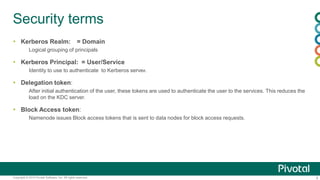
Security terms
 Kerberos Realm: = Domain
Logical grouping of principals
 Kerberos Principal: = User/Service
Identity to use to authenticate to Kerberos server.
 Delegation token:
After initial authentication of the user, these tokens are used to authenticate the user to the services. This reduces the
load on the KDC server.
 Block Access token:
Namenode issues Block access tokens that is sent to data nodes for block access requests.
5Copyright © 2014 Pivotal Software, Inc. All rights reserved.
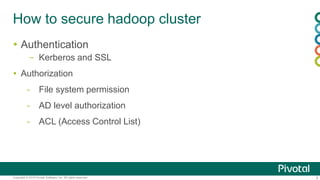
How to secure hadoop cluster
 Authentication
– Kerberos and SSL
 Authorization
- File system permission
- AD level authorization
- ACL (Access Control List)
6Copyright © 2014 Pivotal Software, Inc. All rights reserved.
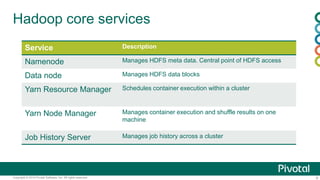
Hadoop core services
Service Description
Namenode Manages HDFS meta data. Central point of HDFS access
Data node Manages HDFS data blocks
Yarn Resource Manager Schedules container execution within a cluster
Yarn Node Manager Manages container execution and shuffle results on one
machine
Job History Server Manages job history across a cluster
7Copyright © 2014 Pivotal Software, Inc. All rights reserved.
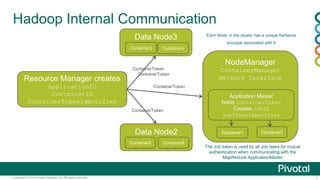
Hadoop Internal Communication
Resource Manager creates
ApplicationID
ContainerID
ContainerTokenIdentifier
ContainerToken
NodeManager
ContainerManager
Network Interface
Application Master
holds containerToken
Creates JobID
jobTokenIdentifier
Container1 Container2Data Node2
Data Node3
ContainerToken
ContainerToken
Container3 Container4
Container5 Container6
The Job token is used by all Job tasks for mutual
authentication when communicating with the
MapReduce ApplicationMaster
ContainerToken
Each Node in the cluster has a unique Kerberos
principal associated with it
8Copyright © 2014 Pivotal Software, Inc. All rights reserved.
Authentication
 What is Kerberos?
- Developed by MIT in 1980s as part of project Athena and X Window System.
- Provides mutual authentication between two nodes/services over an insecure network.
- Uses symmetric cryptography and need third party trust(KDC).
Same cryptographic keys for both encryption of plaintext and decryption of cipher text.
- Provides authenticated access for users and services.
- Uses ticket based authentication
- Password is not stored or transmitted over network
- Can define secondary Kerberos server to deal with primary server failure
- Can be integrated with AD/LDAP.
9Copyright © 2014 Pivotal Software, Inc. All rights reserved.
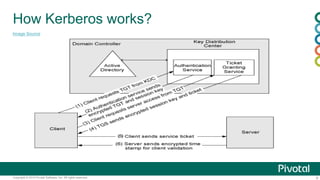
How Kerberos works?
Image Source
10Copyright © 2014 Pivotal Software, Inc. All rights reserved.
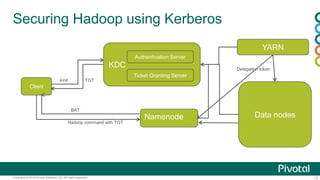
Securing Hadoop using Kerberos
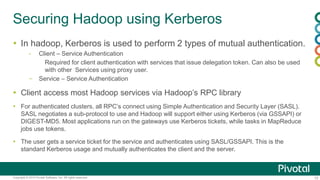
 In hadoop, Kerberos is used to perform 2 types of mutual authentication.
- Client – Service Authentication
Required for client authentication with services that issue delegation token. Can also be used
with other Services using proxy user.
– Service – Service Authentication
 Client access most Hadoop services via Hadoop’s RPC library
 For authenticated clusters, all RPC’s connect using Simple Authentication and Security Layer (SASL).
SASL negotiates a sub-protocol to use and Hadoop will support either using Kerberos (via GSSAPI) or
DIGEST-MD5. Most applications run on the gateways use Kerberos tickets, while tasks in MapReduce
jobs use tokens.
 The user gets a service ticket for the service and authenticates using SASL/GSSAPI. This is the
standard Kerberos usage and mutually authenticates the client and the server.
11Copyright © 2014 Pivotal Software, Inc. All rights reserved.
Securing Hadoop using Kerberos
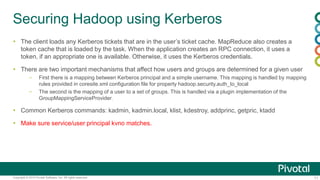
 The client loads any Kerberos tickets that are in the user’s ticket cache. MapReduce also creates a
token cache that is loaded by the task. When the application creates an RPC connection, it uses a
token, if an appropriate one is available. Otherwise, it uses the Kerberos credentials.
 There are two important mechanisms that affect how users and groups are determined for a given user
– First there is a mapping between Kerberos principal and a simple username. This mapping is handled by mapping
rules provided in coresite.xml configuration file for property hadoop.security.auth_to_local
– The second is the mapping of a user to a set of groups. This is handled via a plugin implementation of the
GroupMappingServiceProvider.
 Common Kerberos commands: kadmin, kadmin.local, klist, kdestroy, addprinc, getpric, ktadd
 Make sure service/user principal kvno matches.
12Copyright © 2014 Pivotal Software, Inc. All rights reserved.
Securing Hadoop using Kerberos
Client
KDC
Authentication Server
Ticket Granting Server
Namenode
kinit TGT
Hadoop command with TGT
YARN
Data nodes
BAT
Delegation token
13Copyright © 2014 Pivotal Software, Inc. All rights reserved.
Technical Details
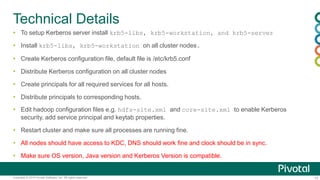
 To setup Kerberos server install krb5-libs, krb5-workstation, and krb5-server
 Install krb5-libs, krb5-workstation on all cluster nodes.
 Create Kerberos configuration file, default file is /etc/krb5.conf
 Distribute Kerberos configuration on all cluster nodes
 Create principals for all required services for all hosts.
 Distribute principals to corresponding hosts.
 Edit hadoop configuration files e.g. hdfs-site.xml and core-site.xml to enable Kerberos
security, add service principal and keytab properties.
 Restart cluster and make sure all processes are running fine.
 All nodes should have access to KDC, DNS should work fine and clock should be in sync.
 Make sure OS version, Java version and Kerberos Version is compatible.
14Copyright © 2014 Pivotal Software, Inc. All rights reserved.
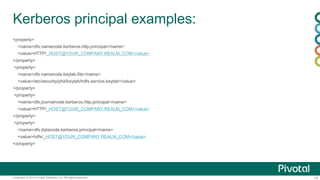
Kerberos principal examples:
<property>
<name>dfs.namenode.kerberos.http.principal</name>
<value>HTTP/_HOST@YOUR_COMPANY.REALM_COM</value>
</property>
<property>
<name>dfs.namenode.keytab.file</name>
<value>/etc/security/phd/keytab/hdfs.service.keytab</value>
</property>
<property>
<name>dfs.journalnode.kerberos.http.principal</name>
<value>HTTP/_HOST@YOUR_COMPANY.REALM_COM</value>
</property>
<property>
<name>dfs.datanode.kerberos.principal</name>
<value>hdfs/_HOST@YOUR_COMPANY.REALM_COM</value>
</property>
15Copyright © 2014 Pivotal Software, Inc. All rights reserved.
krb5.conf example
[libdefaults]
default_realm = ATHENA.MIT.EDU
default_tkt_enctypes = des3-hmac-sha1 des-cbc-crc
default_tgs_enctypes = des3-hmac-sha1 des-cbc-crc
dns_lookup_kdc = true
dns_lookup_realm = false
[realms]
ATHENA.MIT.EDU = {
kdc = kerberos.mit.edu
kdc = kerberos-1.mit.edu
kdc = kerberos-2.mit.edu:750
admin_server = kerberos.mit.edu
master_kdc = kerberos.mit.edu
default_domain = mit.edu
}
EXAMPLE.COM = {
kdc = kerberos.example.com
kdc = kerberos-1.example.com
admin_server = kerberos.example.com
}
[domain_realm] => Maps server hostnames to Kerberos realms
.mit.edu = ATHENA.MIT.EDU
mit.edu = ATHENA.MIT.EDU
16Copyright © 2014 Pivotal Software, Inc. All rights reserved.
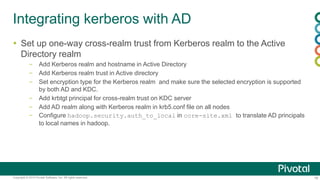
Integrating kerberos with AD
 Set up one-way cross-realm trust from Kerberos realm to the Active
Directory realm
– Add Kerberos realm and hostname in Active Directory
– Add Kerberos realm trust in Active directory
– Set encryption type for the Kerberos realm and make sure the selected encryption is supported
by both AD and KDC.
– Add krbtgt principal for cross-realm trust on KDC server
– Add AD realm along with Kerberos realm in krb5.conf file on all nodes
– Configure hadoop.security.auth_to_local in core-site.xml to translate AD principals
to local names in hadoop.
17Copyright © 2014 Pivotal Software, Inc. All rights reserved.
Authorization
 Service Level Authorization
- Service Level Authorization is performed much before to other
access control checks such as file-permission checks, access
control on job queues etc.
- Access control list for all hadoop services is defined in hadoop-
policy.xml file.
- To enable service level authorization, hadoop.security.authorization
property must be set to true in core-site.xml file.
- HDFS file level ACL will be supported from hadoop version 2.4
18Copyright © 2014 Pivotal Software, Inc. All rights reserved.
Authorization
Examples:
 Allow only users John, Mark and users in the mapreduce group to submit jobs to the MapReduce cluster:
<property>
<name>security.job.submission.protocol.acl</name>
<value>john,mark mapreduce</value>
</property>
 Allow only DataNodes running as the users who belong to the group datanodes to communicate with the NameNode:
<property>
<name>security.datanode.protocol.acl</name>
<value>datanodes</value>
</property>
19Copyright © 2014 Pivotal Software, Inc. All rights reserved.
Authorization
 Job queue ACLs
– Controls who can submit jobs to a queue, kill jobs, or modify their
priority
– mapred.acls.enabled should be set to true in mapred-site.xml
– ACLs should be defined in mapred-queue-acls.xml file.
A NEW PLATFORM FOR A NEW ERA

Hadoop security

  • 1.
    1Copyright © 2014Pivotal Software, Inc. All rights reserved. 1Copyright © 2014 Pivotal Software, Inc. All rights reserved. Hadoop Security Kerberos, PAM and LDAP Integration Kashif Khan: Advisory Solutions Architect - PS
  • 2.
    2Copyright © 2014Pivotal Software, Inc. All rights reserved. Why Security  Threats and Challenges in unsecured hadoop cluster _ Absence of service level authentication - Lack of ACL at data nodes, once Namenode authorizes access - Intermediate Map output is not stored in HDFS; it is stored on the local disk of each compute node - In multi-tenant shared environment, tasks of different tenant can execute on same machine, posses unauthorized access threat. - Impersonation - Unauthorized access of web consoles (namenode, yarn, oozie)
  • 3.
    3Copyright © 2014Pivotal Software, Inc. All rights reserved. Security Terms  SASL(Simple Authentication and Security Layer) Generic framework for authentication and data security, supports GSSAPI  GSSAPI(Generic Security Services API) Generic Interface for programs to access security services.  SPNEGO(Simple and Protected GSSAPI Negotiations Mechanism) A pseudo mechanism, used when a client application wants to authenticate to a remote server, but neither end is sure what authentication protocols the other supports. Needed for authentication of http web-consoles  ACL(Access Control List) Handles service and file level authorization  PAM(Pluggable Authentication Modules) A common framework for authentication and security
  • 4.
    4Copyright © 2014Pivotal Software, Inc. All rights reserved. Security terms  Kerberos Realm: = Domain Logical grouping of principals  Kerberos Principal: = User/Service Identity to use to authenticate to Kerberos server.  Delegation token: After initial authentication of the user, these tokens are used to authenticate the user to the services. This reduces the load on the KDC server.  Block Access token: Namenode issues Block access tokens that is sent to data nodes for block access requests.
  • 5.
    5Copyright © 2014Pivotal Software, Inc. All rights reserved. How to secure hadoop cluster  Authentication – Kerberos and SSL  Authorization - File system permission - AD level authorization - ACL (Access Control List)
  • 6.
    6Copyright © 2014Pivotal Software, Inc. All rights reserved. Hadoop core services Service Description Namenode Manages HDFS meta data. Central point of HDFS access Data node Manages HDFS data blocks Yarn Resource Manager Schedules container execution within a cluster Yarn Node Manager Manages container execution and shuffle results on one machine Job History Server Manages job history across a cluster
  • 7.
    7Copyright © 2014Pivotal Software, Inc. All rights reserved. Hadoop Internal Communication Resource Manager creates ApplicationID ContainerID ContainerTokenIdentifier ContainerToken NodeManager ContainerManager Network Interface Application Master holds containerToken Creates JobID jobTokenIdentifier Container1 Container2Data Node2 Data Node3 ContainerToken ContainerToken Container3 Container4 Container5 Container6 The Job token is used by all Job tasks for mutual authentication when communicating with the MapReduce ApplicationMaster ContainerToken Each Node in the cluster has a unique Kerberos principal associated with it
  • 8.
    8Copyright © 2014Pivotal Software, Inc. All rights reserved. Authentication  What is Kerberos? - Developed by MIT in 1980s as part of project Athena and X Window System. - Provides mutual authentication between two nodes/services over an insecure network. - Uses symmetric cryptography and need third party trust(KDC). Same cryptographic keys for both encryption of plaintext and decryption of cipher text. - Provides authenticated access for users and services. - Uses ticket based authentication - Password is not stored or transmitted over network - Can define secondary Kerberos server to deal with primary server failure - Can be integrated with AD/LDAP.
  • 9.
    9Copyright © 2014Pivotal Software, Inc. All rights reserved. How Kerberos works? Image Source
  • 10.
    10Copyright © 2014Pivotal Software, Inc. All rights reserved. Securing Hadoop using Kerberos  In hadoop, Kerberos is used to perform 2 types of mutual authentication. - Client – Service Authentication Required for client authentication with services that issue delegation token. Can also be used with other Services using proxy user. – Service – Service Authentication  Client access most Hadoop services via Hadoop’s RPC library  For authenticated clusters, all RPC’s connect using Simple Authentication and Security Layer (SASL). SASL negotiates a sub-protocol to use and Hadoop will support either using Kerberos (via GSSAPI) or DIGEST-MD5. Most applications run on the gateways use Kerberos tickets, while tasks in MapReduce jobs use tokens.  The user gets a service ticket for the service and authenticates using SASL/GSSAPI. This is the standard Kerberos usage and mutually authenticates the client and the server.
  • 11.
    11Copyright © 2014Pivotal Software, Inc. All rights reserved. Securing Hadoop using Kerberos  The client loads any Kerberos tickets that are in the user’s ticket cache. MapReduce also creates a token cache that is loaded by the task. When the application creates an RPC connection, it uses a token, if an appropriate one is available. Otherwise, it uses the Kerberos credentials.  There are two important mechanisms that affect how users and groups are determined for a given user – First there is a mapping between Kerberos principal and a simple username. This mapping is handled by mapping rules provided in coresite.xml configuration file for property hadoop.security.auth_to_local – The second is the mapping of a user to a set of groups. This is handled via a plugin implementation of the GroupMappingServiceProvider.  Common Kerberos commands: kadmin, kadmin.local, klist, kdestroy, addprinc, getpric, ktadd  Make sure service/user principal kvno matches.
  • 12.
    12Copyright © 2014Pivotal Software, Inc. All rights reserved. Securing Hadoop using Kerberos Client KDC Authentication Server Ticket Granting Server Namenode kinit TGT Hadoop command with TGT YARN Data nodes BAT Delegation token
  • 13.
    13Copyright © 2014Pivotal Software, Inc. All rights reserved. Technical Details  To setup Kerberos server install krb5-libs, krb5-workstation, and krb5-server  Install krb5-libs, krb5-workstation on all cluster nodes.  Create Kerberos configuration file, default file is /etc/krb5.conf  Distribute Kerberos configuration on all cluster nodes  Create principals for all required services for all hosts.  Distribute principals to corresponding hosts.  Edit hadoop configuration files e.g. hdfs-site.xml and core-site.xml to enable Kerberos security, add service principal and keytab properties.  Restart cluster and make sure all processes are running fine.  All nodes should have access to KDC, DNS should work fine and clock should be in sync.  Make sure OS version, Java version and Kerberos Version is compatible.
  • 14.
    14Copyright © 2014Pivotal Software, Inc. All rights reserved. Kerberos principal examples: <property> <name>dfs.namenode.kerberos.http.principal</name> <value>HTTP/_HOST@YOUR_COMPANY.REALM_COM</value> </property> <property> <name>dfs.namenode.keytab.file</name> <value>/etc/security/phd/keytab/hdfs.service.keytab</value> </property> <property> <name>dfs.journalnode.kerberos.http.principal</name> <value>HTTP/_HOST@YOUR_COMPANY.REALM_COM</value> </property> <property> <name>dfs.datanode.kerberos.principal</name> <value>hdfs/_HOST@YOUR_COMPANY.REALM_COM</value> </property>
  • 15.
    15Copyright © 2014Pivotal Software, Inc. All rights reserved. krb5.conf example [libdefaults] default_realm = ATHENA.MIT.EDU default_tkt_enctypes = des3-hmac-sha1 des-cbc-crc default_tgs_enctypes = des3-hmac-sha1 des-cbc-crc dns_lookup_kdc = true dns_lookup_realm = false [realms] ATHENA.MIT.EDU = { kdc = kerberos.mit.edu kdc = kerberos-1.mit.edu kdc = kerberos-2.mit.edu:750 admin_server = kerberos.mit.edu master_kdc = kerberos.mit.edu default_domain = mit.edu } EXAMPLE.COM = { kdc = kerberos.example.com kdc = kerberos-1.example.com admin_server = kerberos.example.com } [domain_realm] => Maps server hostnames to Kerberos realms .mit.edu = ATHENA.MIT.EDU mit.edu = ATHENA.MIT.EDU
  • 16.
    16Copyright © 2014Pivotal Software, Inc. All rights reserved. Integrating kerberos with AD  Set up one-way cross-realm trust from Kerberos realm to the Active Directory realm – Add Kerberos realm and hostname in Active Directory – Add Kerberos realm trust in Active directory – Set encryption type for the Kerberos realm and make sure the selected encryption is supported by both AD and KDC. – Add krbtgt principal for cross-realm trust on KDC server – Add AD realm along with Kerberos realm in krb5.conf file on all nodes – Configure hadoop.security.auth_to_local in core-site.xml to translate AD principals to local names in hadoop.
  • 17.
    17Copyright © 2014Pivotal Software, Inc. All rights reserved. Authorization  Service Level Authorization - Service Level Authorization is performed much before to other access control checks such as file-permission checks, access control on job queues etc. - Access control list for all hadoop services is defined in hadoop- policy.xml file. - To enable service level authorization, hadoop.security.authorization property must be set to true in core-site.xml file. - HDFS file level ACL will be supported from hadoop version 2.4
  • 18.
    18Copyright © 2014Pivotal Software, Inc. All rights reserved. Authorization Examples:  Allow only users John, Mark and users in the mapreduce group to submit jobs to the MapReduce cluster: <property> <name>security.job.submission.protocol.acl</name> <value>john,mark mapreduce</value> </property>  Allow only DataNodes running as the users who belong to the group datanodes to communicate with the NameNode: <property> <name>security.datanode.protocol.acl</name> <value>datanodes</value> </property>
  • 19.
    19Copyright © 2014Pivotal Software, Inc. All rights reserved. Authorization  Job queue ACLs – Controls who can submit jobs to a queue, kill jobs, or modify their priority – mapred.acls.enabled should be set to true in mapred-site.xml – ACLs should be defined in mapred-queue-acls.xml file.
  • 20.
    A NEW PLATFORMFOR A NEW ERA

Editor's Notes

  • #9 Good reference: http://hadoop.apache.org/docs/r1.1.2/hdfs_design.html#The+Persistence+of+File+System+Metadata