


 Understand Big Data, Hadoop 2.0 architecture and it’s
Ecosystem
 Deep Dive into HDFS and YARN Architecture
 Writing map reduce algorithms using java APIs
 Advanced Map Reduce features & Algorithms
 How to leverage Hive & Pig for structured and
unstructured data analysis
 Data import and export using Sqoop and Flume and
create workflows using Oozie
 Hadoop Best Practices, Sizing and capacity planning
 Creating reference architectures for big data solutions
BigData& HadoopDeveloperWorkshop
Manaranjan Pradhan
1
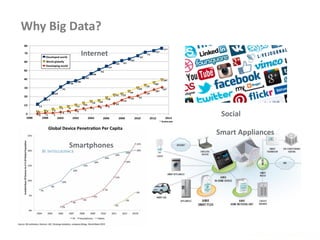
Why Big Data?
www.enablecloud.com
Internet
Social
Smartphones
Smart Appliances
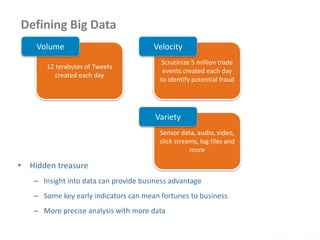
Defining Big Data
www.enablecloud.com
12 terabytes of Tweets
created each day
Volume
Scrutinize 5 million trade
events created each day
to identify potential fraud
Velocity
Sensor data, audio, video,
click streams, log files and
more
Variety
• Hidden treasure
– Insight into data can provide business advantage
– Some key early indicators can mean fortunes to business
– More precise analysis with more data
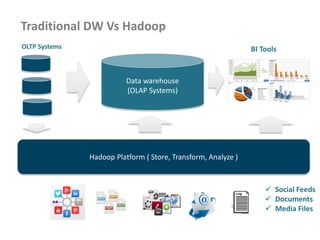
Traditional DW Vs Hadoop
Hadoop Platform ( Store, Transform, Analyze )
 Social Feeds
 Documents
 Media Files
Data warehouse
(OLAP Systems)
BI ToolsOLTP Systems
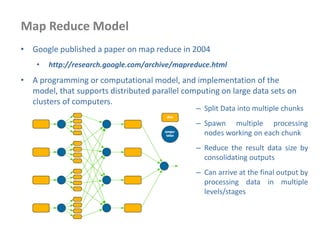
Map Reduce Model
• Google published a paper on map reduce in 2004
• http://research.google.com/archive/mapreduce.html
• A programming or computational model, and implementation of the
model, that supports distributed parallel computing on large data sets on
clusters of computers.
– Split Data into multiple chunks
– Spawn multiple processing
nodes working on each chunk
– Reduce the result data size by
consolidating outputs
– Can arrive at the final output by
processing data in multiple
levels/stages
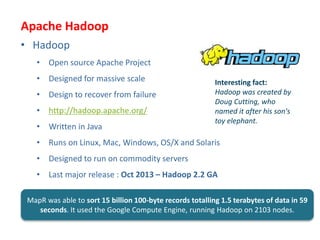
Apache Hadoop
• Hadoop
• Open source Apache Project
• Designed for massive scale
• Design to recover from failure
• http://hadoop.apache.org/
• Written in Java
• Runs on Linux, Mac, Windows, OS/X and Solaris
• Designed to run on commodity servers
• Last major release : Oct 2013 – Hadoop 2.2 GA
Interesting fact:
Hadoop was created by
Doug Cutting, who
named it after his son's
toy elephant.
MapR was able to sort 15 billion 100-byte records totalling 1.5 terabytes of data in 59
seconds. It used the Google Compute Engine, running Hadoop on 2103 nodes.
Who is using it?
• LinkedIn – Predict “People You May Know” and other facts
• Journey Dynamics – Analyze GPS records for traffic speed
forecasting
• New York Times – Newspaper archive image conversion to
PDF
• Spadac.com – Geospatial data indexing
• UNC Chapel Hill – Analyze gene sequence data
• Yahoo!
• More than 100,000 CPUs in >40,000 computers running Hadoop
• Biggest cluster: 4500 nodes
• Used to support research for Ad Systems and Web Search
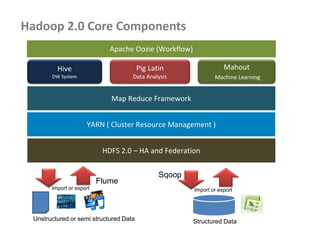
Hadoop 2.0 Core Components
Hive
DW System
Pig Latin
Data Analysis
Mahout
Machine Learning
Map Reduce Framework
HDFS 2.0 – HA and Federation
Structured DataUnstructured or semi structured Data
Import or export
Sqoop
Flume
Apache Oozie (Workflow)
Import or export
YARN ( Cluster Resource Management )
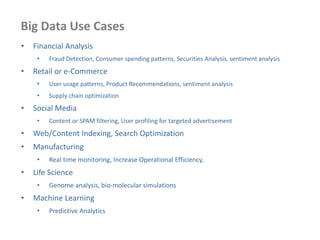
Big Data Use Cases
• Financial Analysis
• Fraud Detection, Consumer spending patterns, Securities Analysis, sentiment analysis
• Retail or e-Commerce
• User usage patterns, Product Recommendations, sentiment analysis
• Supply chain optimization
• Social Media
• Content or SPAM filtering, User profiling for targeted advertisement
• Web/Content Indexing, Search Optimization
• Manufacturing
• Real time monitoring, Increase Operational Efficiency,
• Life Science
• Genome analysis, bio-molecular simulations
• Machine Learning
• Predictive Analytics
Hadoop Architecture – Deep Dive
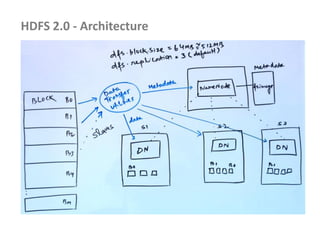
HDFS 2.0 - Architecture
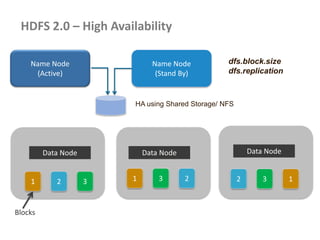
HDFS 2.0 – High Availability
Data Node Data Node Data Node
1 2 3 1 3 2 2 3 1
Blocks
Name Node
(Active)
Name Node
(Stand By)
HA using Shared Storage/ NFS
dfs.block.size
dfs.replication
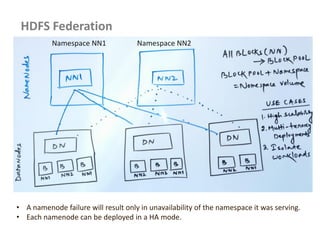
HDFS Federation
• A namenode failure will result only in unavailability of the namespace it was serving.
• Each namenode can be deployed in a HA mode.
Namespace NN1 Namespace NN2
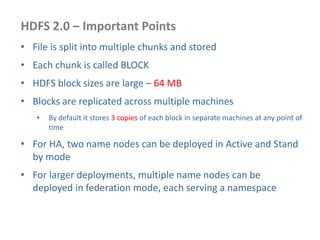
HDFS 2.0 – Important Points
• File is split into multiple chunks and stored
• Each chunk is called BLOCK
• HDFS block sizes are large – 64 MB
• Blocks are replicated across multiple machines
• By default it stores 3 copies of each block in separate machines at any point of
time
• For HA, two name nodes can be deployed in Active and Stand
by mode
• For larger deployments, multiple name nodes can be
deployed in federation mode, each serving a namespace
THANK YOU!
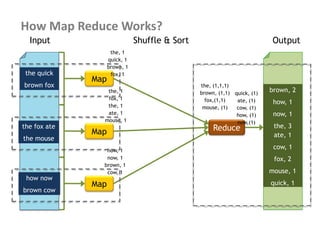
How Map Reduce Works?
the quick
brown fox
the fox ate
the mouse
how now
brown cow
Map
Map
Map
Reduce
brown, 2
how, 1
now, 1
the, 3
ate, 1
cow, 1
fox, 2
mouse, 1
quick, 1
the, 1
quick, 1
brown, 1
fox, 1
the, 1
fox, 1
the, 1
ate, 1
mouse, 1
how, 1
now, 1
brown, 1
cow, 1
Input Shuffle & Sort Output
the, (1,1,1)
brown, (1,1)
fox,(1,1)
mouse, (1)
quick, (1)
ate, (1)
cow, (1)
how, (1)
now,(1)
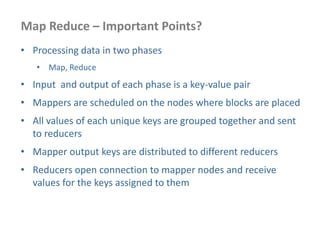
Map Reduce – Important Points?
• Processing data in two phases
• Map, Reduce
• Input and output of each phase is a key-value pair
• Mappers are scheduled on the nodes where blocks are placed
• All values of each unique keys are grouped together and sent
to reducers
• Mapper output keys are distributed to different reducers
• Reducers open connection to mapper nodes and receive
values for the keys assigned to them
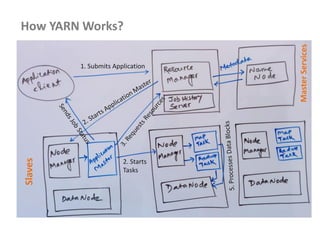
How YARN Works?
1. Submits Application
2. Starts
Tasks
Slaves
MasterServices
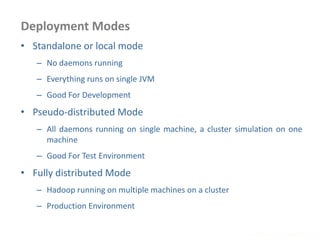
Deployment Modes
www.enablecloud.com
• Standalone or local mode
– No daemons running
– Everything runs on single JVM
– Good For Development
• Pseudo-distributed Mode
– All daemons running on single machine, a cluster simulation on one
machine
– Good For Test Environment
• Fully distributed Mode
– Hadoop running on multiple machines on a cluster
– Production Environment
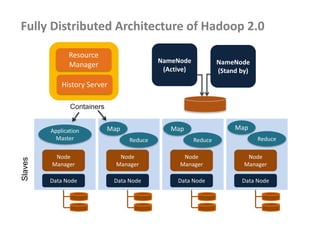
Fully Distributed Architecture of Hadoop 2.0
NameNode
(Active)
Node
Manager
Data Node
Node
Manager
Data Node
Node
Manager
Data Node
Node
Manager
Data Node
Slaves
Resource
Manager
History Server
Application
Master
Map
Reduce
Map
Reduce
Map
Reduce
Containers
NameNode
(Stand by)
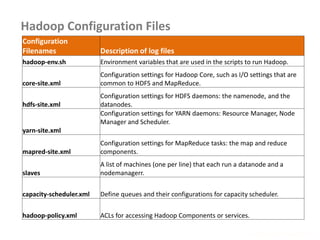
Hadoop Configuration Files
www.enablecloud.com
Configuration
Filenames Description of log files
hadoop-env.sh Environment variables that are used in the scripts to run Hadoop.
core-site.xml
Configuration settings for Hadoop Core, such as I/O settings that are
common to HDFS and MapReduce.
hdfs-site.xml
Configuration settings for HDFS daemons: the namenode, and the
datanodes.
yarn-site.xml
Configuration settings for YARN daemons: Resource Manager, Node
Manager and Scheduler.
mapred-site.xml
Configuration settings for MapReduce tasks: the map and reduce
components.
slaves
A list of machines (one per line) that each run a datanode and a
nodemanagerr.
capacity-scheduler.xml Define queues and their configurations for capacity scheduler.
hadoop-policy.xml ACLs for accessing Hadoop Components or services.
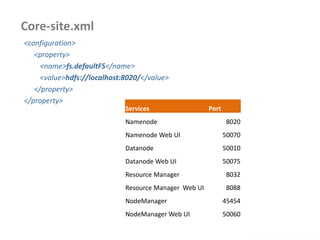
Core-site.xml
www.enablecloud.com
<configuration>
<property>
<name>fs.defaultFS</name>
<value>hdfs://localhost:8020/</value>
</property>
</property>
Services Port
Namenode 8020
Namenode Web UI 50070
Datanode 50010
Datanode Web UI 50075
Resource Manager 8032
Resource Manager Web UI 8088
NodeManager 45454
NodeManager Web UI 50060
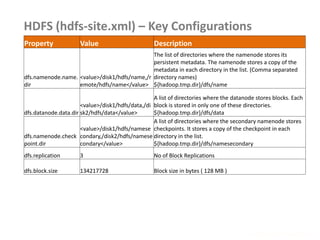
HDFS (hdfs-site.xml) – Key Configurations
www.enablecloud.com
Property Value Description
dfs.namenode.name.
dir
<value>/disk1/hdfs/name,/r
emote/hdfs/name</value>
The list of directories where the namenode stores its
persistent metadata. The namenode stores a copy of the
metadata in each directory in the list. (Comma separated
directory names)
${hadoop.tmp.dir}/dfs/name
dfs.datanode.data.dir
<value>/disk1/hdfs/data,/di
sk2/hdfs/data</value>
A list of directories where the datanode stores blocks. Each
block is stored in only one of these directories.
${hadoop.tmp.dir}/dfs/data
dfs.namenode.check
point.dir
<value>/disk1/hdfs/namese
condary,/disk2/hdfs/namese
condary</value>
A list of directories where the secondary namenode stores
checkpoints. It stores a copy of the checkpoint in each
directory in the list.
${hadoop.tmp.dir}/dfs/namesecondary
dfs.replication 3 No of Block Replications
dfs.block.size 134217728 Block size in bytes ( 128 MB )
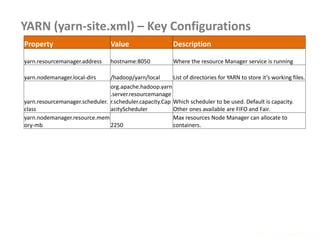
YARN (yarn-site.xml) – Key Configurations
www.enablecloud.com
Property Value Description
yarn.resourcemanager.address hostname:8050 Where the resource Manager service is running
yarn.nodemanager.local-dirs /hadoop/yarn/local List of directories for YARN to store it’s working files.
yarn.resourcemanager.scheduler.
class
org.apache.hadoop.yarn
.server.resourcemanage
r.scheduler.capacity.Cap
acityScheduler
Which scheduler to be used. Default is capacity.
Other ones available are FIFO and Fair.
yarn.nodemanager.resource.mem
ory-mb 2250
Max resources Node Manager can allocate to
containers.
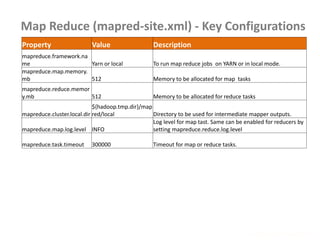
Map Reduce (mapred-site.xml) - Key Configurations
www.enablecloud.com
Property Value Description
mapreduce.framework.na
me Yarn or local To run map reduce jobs on YARN or in local mode.
mapreduce.map.memory.
mb 512 Memory to be allocated for map tasks
mapreduce.reduce.memor
y.mb 512 Memory to be allocated for reduce tasks
mapreduce.cluster.local.dir
${hadoop.tmp.dir}/map
red/local Directory to be used for intermediate mapper outputs.
mapreduce.map.log.level INFO
Log level for map tast. Same can be enabled for reducers by
setting mapreduce.reduce.log.level
mapreduce.task.timeout 300000 Timeout for map or reduce tasks.
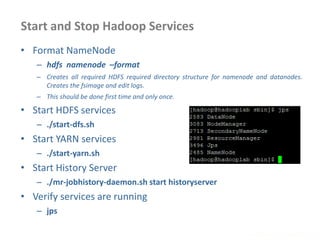
Start and Stop Hadoop Services
www.enablecloud.com
• Format NameNode
– hdfs namenode –format
– Creates all required HDFS required directory structure for namenode and datanodes.
Creates the fsimage and edit logs.
– This should be done first time and only once.
• Start HDFS services
– ./start-dfs.sh
• Start YARN services
– ./start-yarn.sh
• Start History Server
– ./mr-jobhistory-daemon.sh start historyserver
• Verify services are running
– jps
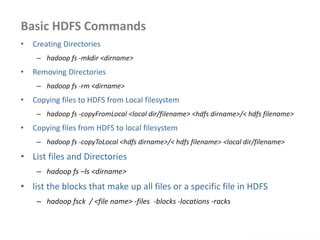
Basic HDFS Commands
www.enablecloud.com
• Creating Directories
– hadoop fs -mkdir <dirname>
• Removing Directories
– hadoop fs -rm <dirname>
• Copying files to HDFS from Local filesystem
– hadoop fs -copyFromLocal <local dir/filename> <hdfs dirname>/< hdfs filename>
• Copying files from HDFS to local filesystem
– hadoop fs -copyToLocal <hdfs dirname>/< hdfs filename> <local dir/filename>
• List files and Directories
– hadoop fs –ls <dirname>
• list the blocks that make up all files or a specific file in HDFS
– hadoop fsck / <file name> -files -blocks -locations -racks
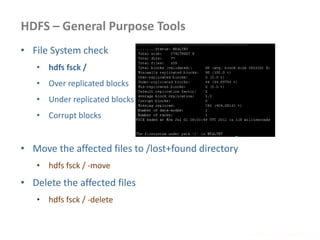
HDFS – General Purpose Tools
www.enablecloud.com
• File System check
• hdfs fsck /
• Over replicated blocks
• Under replicated blocks
• Corrupt blocks
• Move the affected files to /lost+found directory
• hdfs fsck / -move
• Delete the affected files
• hdfs fsck / -delete
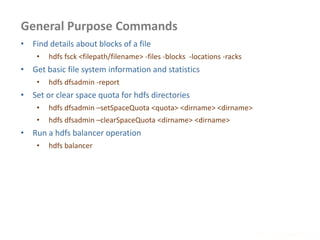
General Purpose Commands
www.enablecloud.com
• Find details about blocks of a file
• hdfs fsck <filepath/filename> -files -blocks -locations -racks
• Get basic file system information and statistics
• hdfs dfsadmin -report
• Set or clear space quota for hdfs directories
• hdfs dfsadmin –setSpaceQuota <quota> <dirname> <dirname>
• hdfs dfsadmin –clearSpaceQuota <dirname> <dirname>
• Run a hdfs balancer operation
• hdfs balancer
Getting Data Into HDFS
www.enablecloud.com
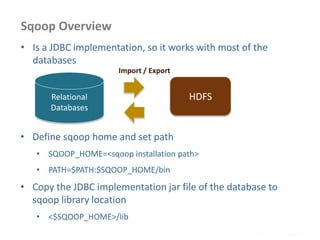
Sqoop Overview
www.enablecloud.com
Relational
Databases
HDFS
• Is a JDBC implementation, so it works with most of the
databases
• Define sqoop home and set path
• SQOOP_HOME=<sqoop installation path>
• PATH=$PATH:$SQOOP_HOME/bin
• Copy the JDBC implementation jar file of the database to
sqoop library location
• <$SQOOP_HOME>/lib
Import / Export
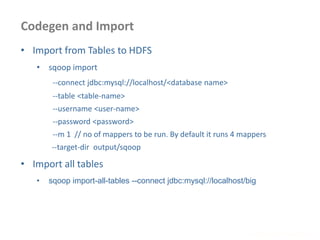
Codegen and Import
www.enablecloud.com
• Import from Tables to HDFS
• sqoop import
--connect jdbc:mysql://localhost/<database name>
--table <table-name>
--username <user-name>
--password <password>
--m 1 // no of mappers to be run. By default it runs 4 mappers
--target-dir output/sqoop
• Import all tables
• sqoop import-all-tables --connect jdbc:mysql://localhost/big
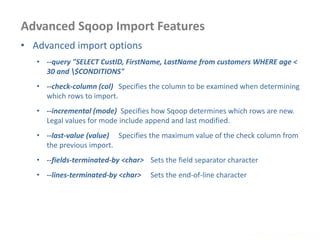
Advanced Sqoop Import Features
www.enablecloud.com
• Advanced import options
• --query "SELECT CustID, FirstName, LastName from customers WHERE age <
30 and $CONDITIONS"
• --check-column (col) Specifies the column to be examined when determining
which rows to import.
• --incremental (mode) Specifies how Sqoop determines which rows are new.
Legal values for mode include append and last modified.
• --last-value (value) Specifies the maximum value of the check column from
the previous import.
• --fields-terminated-by <char> Sets the field separator character
• --lines-terminated-by <char> Sets the end-of-line character
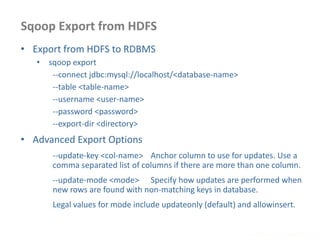
Sqoop Export from HDFS
www.enablecloud.com
• Export from HDFS to RDBMS
• sqoop export
--connect jdbc:mysql://localhost/<database-name>
--table <table-name>
--username <user-name>
--password <password>
--export-dir <directory>
• Advanced Export Options
--update-key <col-name> Anchor column to use for updates. Use a
comma separated list of columns if there are more than one column.
--update-mode <mode> Specify how updates are performed when
new rows are found with non-matching keys in database.
Legal values for mode include updateonly (default) and allowinsert.
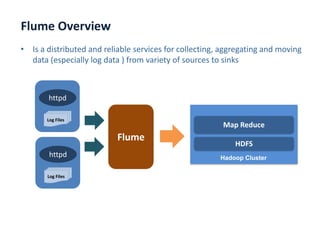
Flume Overview
www.enablecloud.com
• Is a distributed and reliable services for collecting, aggregating and moving
data (especially log data ) from variety of sources to sinks
httpd
Log Files
httpd
Log Files
Flume
HDFS
Hadoop Cluster
Map Reduce
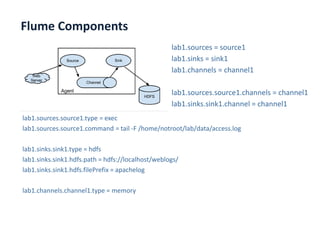
Flume Components
www.enablecloud.com
lab1.sources = source1
lab1.sinks = sink1
lab1.channels = channel1
lab1.sources.source1.channels = channel1
lab1.sinks.sink1.channel = channel1
lab1.sources.source1.type = exec
lab1.sources.source1.command = tail -F /home/notroot/lab/data/access.log
lab1.sinks.sink1.type = hdfs
lab1.sinks.sink1.hdfs.path = hdfs://localhost/weblogs/
lab1.sinks.sink1.hdfs.filePrefix = apachelog
lab1.channels.channel1.type = memory
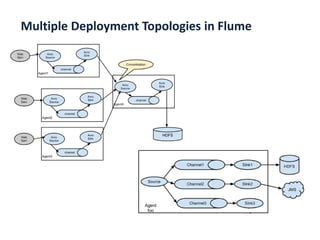
Multiple Deployment Topologies in Flume
www.enablecloud.com
Writing Map Reduce Programs
Input Formats
www.enablecloud.com
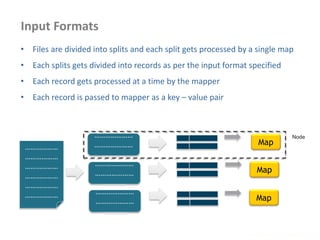
• Files are divided into splits and each split gets processed by a single map
• Each splits gets divided into records as per the input format specified
• Each record gets processed at a time by the mapper
• Each record is passed to mapper as a key – value pair
………………
………………
………………
………………
………………
………………
…………………
…………………
…………
…………………
…………………
………….
…………………
…………………
………….
Map
Map
Map
Node
Type of InputFormats
www.enablecloud.com
• FileInputFormat
• base class for all implementations of InputFormat
• TextInputFormat
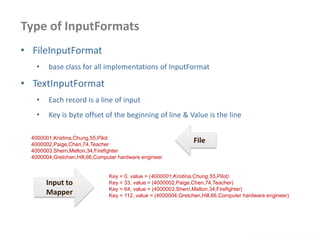
• Each record is a line of input
• Key is byte offset of the beginning of line & Value is the line
4000001,Kristina,Chung,55,Pilot
4000002,Paige,Chen,74,Teacher
4000003,Sherri,Melton,34,Firefighter
4000004,Gretchen,Hill,66,Computer hardware engineer
Key = 0, value = (4000001,Kristina,Chung,55,Pilot)
Key = 33, value = (4000002,Paige,Chen,74,Teacher)
Key = 64, value = (4000003,Sherri,Melton,34,Firefighter)
Key = 112, value = (4000004,Gretchen,Hill,66,Computer hardware engineer)
File
Input to
Mapper
Type of InputFormats
• KeyValueTextInputFormat
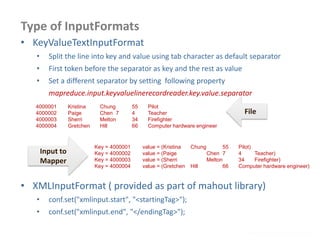
• Split the line into key and value using tab character as default separator
• First token before the separator as key and the rest as value
• Set a different separator by setting following property
mapreduce.input.keyvaluelinerecordreader.key.value.separator
www.enablecloud.com
4000001 Kristina Chung 55 Pilot
4000002 Paige Chen 7 4 Teacher
4000003 Sherri Melton 34 Firefighter
4000004 Gretchen Hill 66 Computer hardware engineer
File
Input to
Mapper
Key = 4000001 value = (Kristina Chung 55 Pilot)
Key = 4000002 value = (Paige Chen 7 4 Teacher)
Key = 4000003 value = (Sherri Melton 34 Firefighter)
Key = 4000004 value = (Gretchen Hill 66 Computer hardware engineer)
• XMLInputFormat ( provided as part of mahout library)
• conf.set("xmlinput.start", "<startingTag>");
• conf.set("xmlinput.end", "</endingTag>");
Type of InputFormats
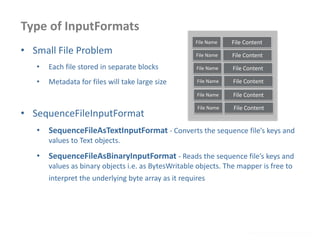
• Small File Problem
• Each file stored in separate blocks
• Metadata for files will take large size
• SequenceFileInputFormat
• SequenceFileAsTextInputFormat - Converts the sequence file’s keys and
values to Text objects.
• SequenceFileAsBinaryInputFormat - Reads the sequence file’s keys and
values as binary objects i.e. as BytesWritable objects. The mapper is free to
interpret the underlying byte array as it requires
www.enablecloud.com
File Name File Content
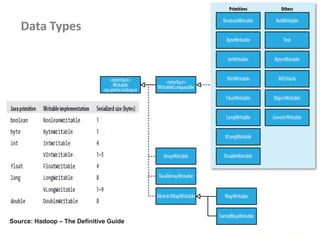
Data Types
www.enablecloud.com
Source: Hadoop – The Definitive Guide
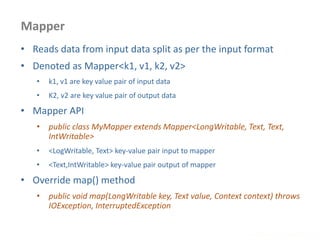
Mapper
www.enablecloud.com
• Reads data from input data split as per the input format
• Denoted as Mapper<k1, v1, k2, v2>
• k1, v1 are key value pair of input data
• K2, v2 are key value pair of output data
• Mapper API
• public class MyMapper extends Mapper<LongWritable, Text, Text,
IntWritable>
• <LogWritable, Text> key-value pair input to mapper
• <Text,IntWritable> key-value pair output of mapper
• Override map() method
• public void map(LongWritable key, Text value, Context context) throws
IOException, InterruptedException
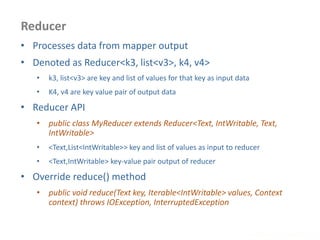
Reducer
www.enablecloud.com
• Processes data from mapper output
• Denoted as Reducer<k3, list<v3>, k4, v4>
• k3, list<v3> are key and list of values for that key as input data
• K4, v4 are key value pair of output data
• Reducer API
• public class MyReducer extends Reducer<Text, IntWritable, Text,
IntWritable>
• <Text,List<IntWritable>> key and list of values as input to reducer
• <Text,IntWritable> key-value pair output of reducer
• Override reduce() method
• public void reduce(Text key, Iterable<IntWritable> values, Context
context) throws IOException, InterruptedException
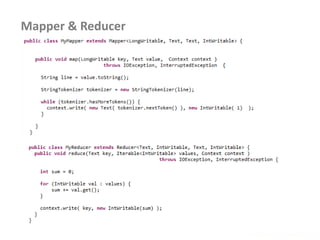
Mapper & Reducer
www.enablecloud.com
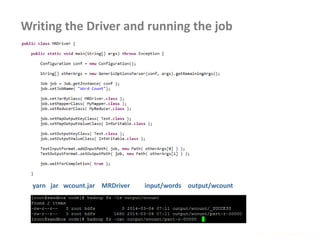
Writing the Driver and running the job
www.enablecloud.com
yarn jar wcount.jar MRDriver input/words output/wcount
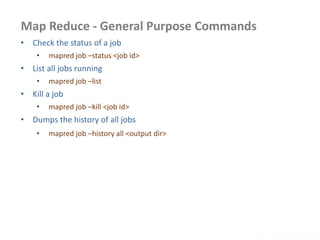
Map Reduce - General Purpose Commands
www.enablecloud.com
• Check the status of a job
• mapred job –status <job id>
• List all jobs running
• mapred job –list
• Kill a job
• mapred job –kill <job id>
• Dumps the history of all jobs
• mapred job –history all <output dir>
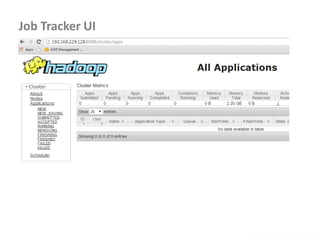
Job Tracker UI
www.enablecloud.com
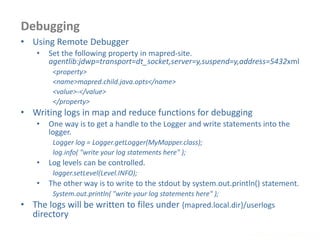
Debugging
www.enablecloud.com
• Using Remote Debugger
• Set the following property in mapred-site.
agentlib:jdwp=transport=dt_socket,server=y,suspend=y,address=5432xml
<property>
<name>mapred.child.java.opts</name>
<value>-</value>
</property>
• Writing logs in map and reduce functions for debugging
• One way is to get a handle to the Logger and write statements into the
logger.
Logger log = Logger.getLogger(MyMapper.class);
log.info( "write your log statements here" );
• Log levels can be controlled.
logger.setLevel(Level.INFO);
• The other way is to write to the stdout by system.out.println() statement.
System.out.println( "write your log statements here" );
• The logs will be written to files under {mapred.local.dir}/userlogs
directory
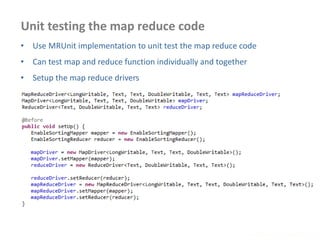
Unit testing the map reduce code
www.enablecloud.com
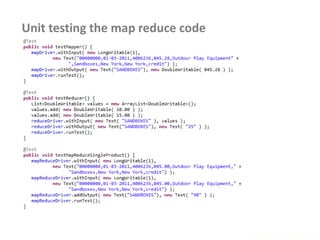
• Use MRUnit implementation to unit test the map reduce code
• Can test map and reduce function individually and together
• Setup the map reduce drivers
www.enablecloud.com
Unit testing the map reduce code
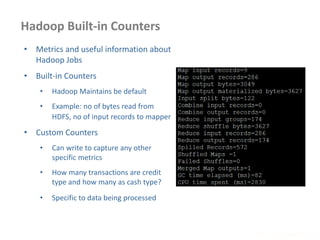
Hadoop Built-in Counters
www.enablecloud.com
• Metrics and useful information about
Hadoop Jobs
• Built-in Counters
• Hadoop Maintains be default
• Example: no of bytes read from
HDFS, no of input records to mapper
• Custom Counters
• Can write to capture any other
specific metrics
• How many transactions are credit
type and how many as cash type?
• Specific to data being processed
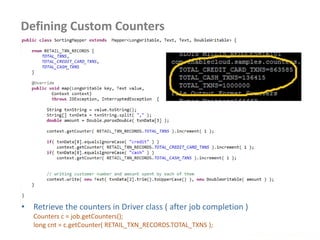
Defining Custom Counters
www.enablecloud.com
• Retrieve the counters in Driver class ( after job completion )
Counters c = job.getCounters();
long cnt = c.getCounter( RETAIL_TXN_RECORDS.TOTAL_TXNS );
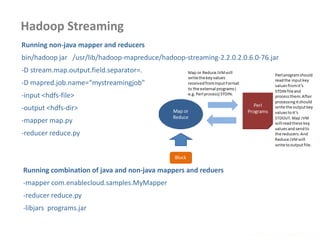
Hadoop Streaming
www.enablecloud.com
Running non-java mapper and reducers
bin/hadoop jar /usr/lib/hadoop-mapreduce/hadoop-streaming-2.2.0.2.0.6.0-76.jar
-D stream.map.output.field.separator=.
-D mapred.job.name=“mystreamingjob"
-input <hdfs-file>
-output <hdfs-dir>
-mapper map.py
-reducer reduce.py
Running combination of java and non-java mappers and reduers
-mapper com.enablecloud.samples.MyMapper
-reducer reduce.py
-libjars programs.jar
Advanced Map Reduce Topics
• Combiner
• Partitioner
• Setup and Teardown
• Side Data Distribution
• Multiple Inputs
• Job Chaining
• Skipping Bad Records
www.enablecloud.com
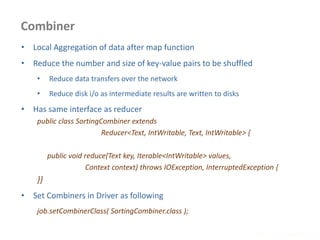
Combiner
www.enablecloud.com
• Local Aggregation of data after map function
• Reduce the number and size of key-value pairs to be shuffled
• Reduce data transfers over the network
• Reduce disk i/o as intermediate results are written to disks
• Has same interface as reducer
public class SortingCombiner extends
Reducer<Text, IntWritable, Text, IntWritable> {
public void reduce(Text key, Iterable<IntWritable> values,
Context context) throws IOException, InterruptedException {
}}
• Set Combiners in Driver as following
job.setCombinerClass( SortingCombiner.class );
Partitioning
www.enablecloud.com
• Deciding which reducer will receive which intermediate keys
and values
• Mapper output with same keys belongs to same partition and
is processed by same reducer
• Hadoop uses a Partitioner interface to determine the
destination partition for a key, value pair
• HashPartitioner is the default Partitioner
• Uses hashcode() to determine which key goes where
• Data is distributed depending on number of reducers
configured
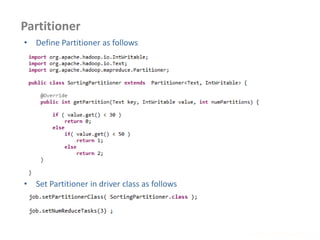
Partitioner
www.enablecloud.com
• Set Partitioner in driver class as follows
• Define Partitioner as follows
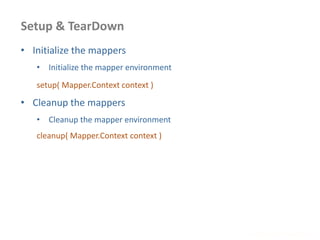
Setup & TearDown
www.enablecloud.com
• Initialize the mappers
• Initialize the mapper environment
setup( Mapper.Context context )
• Cleanup the mappers
• Cleanup the mapper environment
cleanup( Mapper.Context context )
Passing Parameters using Configuration
www.enablecloud.com
• Passing some parameters to mapper or reducer environments
• Configuration details can be passed using this technique
• Set the parameter in driver code as follows
Configuration conf = new Configuration();
conf.set( "Product", args[0] );
conf.set( "Amount", args[1] );
• Retrieve the parameter in mapper or reducer code as follows
Configuration conf = context.getConfiguration();
String product = conf.get( "Product" ).trim();
Distribute Files and Retrieve in MR programs
www.enablecloud.com
• Add cache file as follows
job.addCacheFile( new URI( <filepath>/<filename> ) );
yarn jar -files <file,file,file> <jar name> <Driver classname>
• Distributed cache can be used distribute jars and native libraries
job.addFileToClassPath( new Path( "/myapp/mylib.jar" ) );
yarn jar –libjars <f.jar, f2.jar> <jar name> <Driver classname>
• Retrieving the data files on the Map Reduce Programs
@Override
protected void setup(Context context)
throws IOException, InterruptedException {
Path[] localPaths = context.getLocalCacheFiles();
if (localPaths.length == 0) {
throw new FileNotFoundException("Distributed cache file not found.");
}
File localFile = new File(localPaths[0].toUri());
}
Multiple Inputs
www.enablecloud.com
• Different input formats or
types
• Multiple mappers
needed to process
requests
MultipleInputs.addInputPath( job,
new Path( otherArgs[0] ),
FileInputFormat.class,
TxnSortingMapper.class );
MultipleInputs.addInputPath( job,
new Path( otherArgs[1] ),
KeyValueTextInputFormat.cla ss,
CustomerMapper.class );
Map 1
Passed to map()
Map 2
Passed to map()
Reduce
Job Chaining
www.enablecloud.com
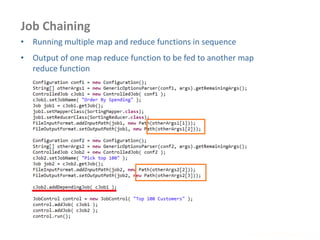
• Running multiple map and reduce functions in sequence
• Output of one map reduce function to be fed to another map
reduce function
Skipping Bad Records and Blocks
www.enablecloud.com
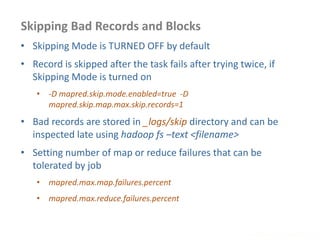
• Skipping Mode is TURNED OFF by default
• Record is skipped after the task fails after trying twice, if
Skipping Mode is turned on
• -D mapred.skip.mode.enabled=true -D
mapred.skip.map.max.skip.records=1
• Bad records are stored in _logs/skip directory and can be
inspected late using hadoop fs –text <filename>
• Setting number of map or reduce failures that can be
tolerated by job
• mapred.max.map.failures.percent
• mapred.max.reduce.failures.percent
Using Hive & Pig
What is Hive?
www.enablecloud.com
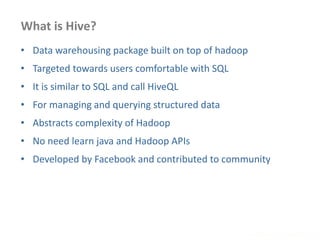
• Data warehousing package built on top of hadoop
• Targeted towards users comfortable with SQL
• It is similar to SQL and call HiveQL
• For managing and querying structured data
• Abstracts complexity of Hadoop
• No need learn java and Hadoop APIs
• Developed by Facebook and contributed to community
Hive Architecture
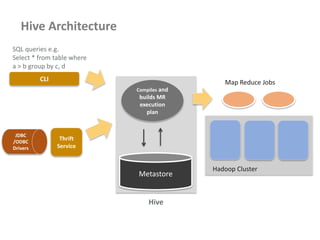
CLI
Hadoop Cluster
Map Reduce Jobs
Metastore
Compiles and
builds MR
execution
plan
Thrift
Service
SQL queries e.g.
Select * from table where
a > b group by c, d
Hive
JDBC
/ODBC
Drivers
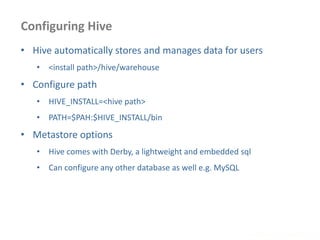
Configuring Hive
www.enablecloud.com
• Hive automatically stores and manages data for users
• <install path>/hive/warehouse
• Configure path
• HIVE_INSTALL=<hive path>
• PATH=$PAH:$HIVE_INSTALL/bin
• Metastore options
• Hive comes with Derby, a lightweight and embedded sql
• Can configure any other database as well e.g. MySQL
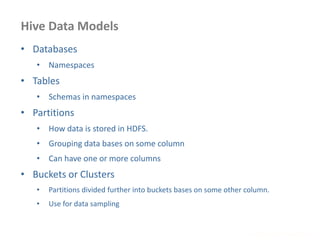
Hive Data Models
www.enablecloud.com
• Databases
• Namespaces
• Tables
• Schemas in namespaces
• Partitions
• How data is stored in HDFS.
• Grouping data bases on some column
• Can have one or more columns
• Buckets or Clusters
• Partitions divided further into buckets bases on some other column.
• Use for data sampling
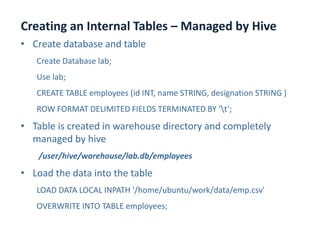
Creating an Internal Tables – Managed by Hive
www.enablecloud.com
• Create database and table
Create Database lab;
Use lab;
CREATE TABLE employees (id INT, name STRING, designation STRING )
ROW FORMAT DELIMITED FIELDS TERMINATED BY ‘t‘;
• Table is created in warehouse directory and completely
managed by hive
/user/hive/warehouse/lab.db/employees
• Load the data into the table
LOAD DATA LOCAL INPATH '/home/ubuntu/work/data/emp.csv'
OVERWRITE INTO TABLE employees;
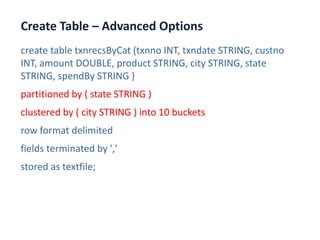
Create Table – Advanced Options
www.enablecloud.com
create table txnrecsByCat (txnno INT, txndate STRING, custno
INT, amount DOUBLE, product STRING, city STRING, state
STRING, spendBy STRING )
partitioned by ( state STRING )
clustered by ( city STRING ) into 10 buckets
row format delimited
fields terminated by ','
stored as textfile;
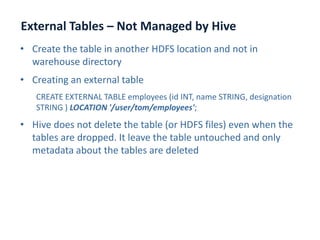
External Tables – Not Managed by Hive
www.enablecloud.com
• Create the table in another HDFS location and not in
warehouse directory
• Creating an external table
CREATE EXTERNAL TABLE employees (id INT, name STRING, designation
STRING ) LOCATION '/user/tom/employees';
• Hive does not delete the table (or HDFS files) even when the
tables are dropped. It leave the table untouched and only
metadata about the tables are deleted
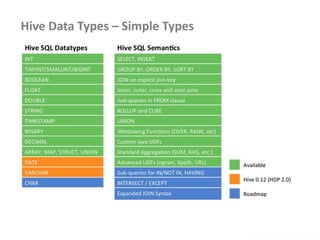
Hive Data Types – Simple Types
www.enablecloud.com
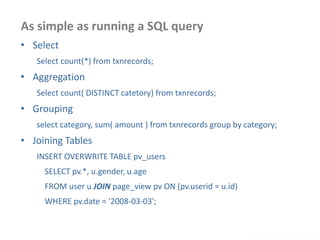
As simple as running a SQL query
www.enablecloud.com
• Select
Select count(*) from txnrecords;
• Aggregation
Select count( DISTINCT catetory) from txnrecords;
• Grouping
select category, sum( amount ) from txnrecords group by category;
• Joining Tables
INSERT OVERWRITE TABLE pv_users
SELECT pv.*, u.gender, u.age
FROM user u JOIN page_view pv ON (pv.userid = u.id)
WHERE pv.date = '2008-03-03';
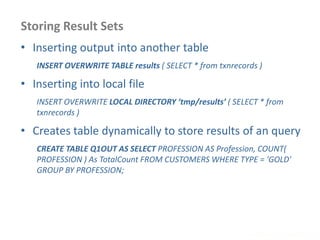
Storing Result Sets
www.enablecloud.com
• Inserting output into another table
INSERT OVERWRITE TABLE results ( SELECT * from txnrecords )
• Inserting into local file
INSERT OVERWRITE LOCAL DIRECTORY ‘tmp/results’ ( SELECT * from
txnrecords )
• Creates table dynamically to store results of an query
CREATE TABLE Q1OUT AS SELECT PROFESSION AS Profession, COUNT(
PROFESSION ) As TotalCount FROM CUSTOMERS WHERE TYPE = 'GOLD'
GROUP BY PROFESSION;
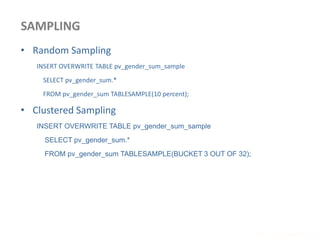
SAMPLING
www.enablecloud.com
• Random Sampling
INSERT OVERWRITE TABLE pv_gender_sum_sample
SELECT pv_gender_sum.*
FROM pv_gender_sum TABLESAMPLE(10 percent);
• Clustered Sampling
INSERT OVERWRITE TABLE pv_gender_sum_sample
SELECT pv_gender_sum.*
FROM pv_gender_sum TABLESAMPLE(BUCKET 3 OUT OF 32);
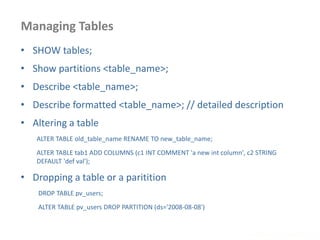
Managing Tables
www.enablecloud.com
• SHOW tables;
• Show partitions <table_name>;
• Describe <table_name>;
• Describe formatted <table_name>; // detailed description
• Altering a table
ALTER TABLE old_table_name RENAME TO new_table_name;
ALTER TABLE tab1 ADD COLUMNS (c1 INT COMMENT 'a new int column', c2 STRING
DEFAULT 'def val');
• Dropping a table or a paritition
DROP TABLE pv_users;
ALTER TABLE pv_users DROP PARTITION (ds='2008-08-08')
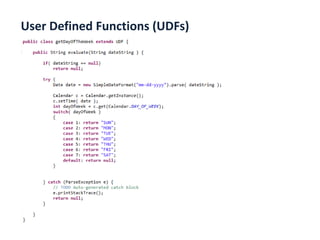
User Defined Functions (UDFs)
www.enablecloud.com
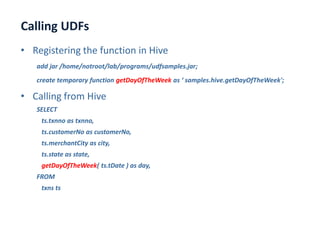
Calling UDFs
www.enablecloud.com
• Registering the function in Hive
add jar /home/notroot/lab/programs/udfsamples.jar;
create temporary function getDayOfTheWeek as ‘ samples.hive.getDayOfTheWeek';
• Calling from Hive
SELECT
ts.txnno as txnno,
ts.customerNo as customerNo,
ts.merchantCity as city,
ts.state as state,
getDayOfTheWeek( ts.tDate ) as day,
FROM
txns ts
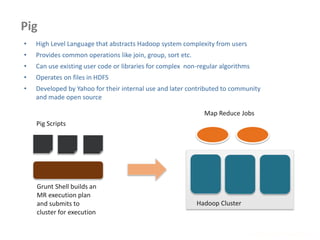
Pig
www.enablecloud.com
Pig Scripts
Grunt Shell builds an
MR execution plan
and submits to
cluster for execution
Hadoop Cluster
Map Reduce Jobs
• High Level Language that abstracts Hadoop system complexity from users
• Provides common operations like join, group, sort etc.
• Can use existing user code or libraries for complex non-regular algorithms
• Operates on files in HDFS
• Developed by Yahoo for their internal use and later contributed to community
and made open source
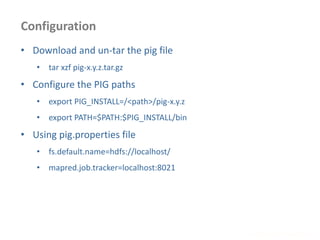
Configuration
www.enablecloud.com
• Download and un-tar the pig file
• tar xzf pig-x.y.z.tar.gz
• Configure the PIG paths
• export PIG_INSTALL=/<path>/pig-x.y.z
• export PATH=$PATH:$PIG_INSTALL/bin
• Using pig.properties file
• fs.default.name=hdfs://localhost/
• mapred.job.tracker=localhost:8021
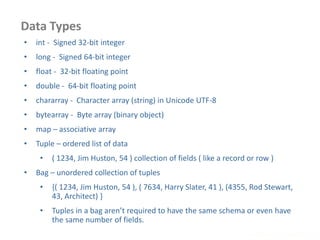
Data Types
www.enablecloud.com
• int - Signed 32-bit integer
• long - Signed 64-bit integer
• float - 32-bit floating point
• double - 64-bit floating point
• chararray - Character array (string) in Unicode UTF-8
• bytearray - Byte array (binary object)
• map – associative array
• Tuple – ordered list of data
• ( 1234, Jim Huston, 54 ) collection of fields ( like a record or row )
• Bag – unordered collection of tuples
• {( 1234, Jim Huston, 54 ), ( 7634, Harry Slater, 41 ), (4355, Rod Stewart,
43, Architect) }
• Tuples in a bag aren’t required to have the same schema or even have
the same number of fields.
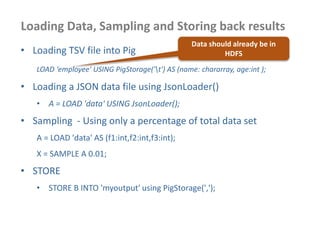
Loading Data, Sampling and Storing back results
• Loading TSV file into Pig
LOAD ‘employee' USING PigStorage('t') AS (name: chararray, age:int );
• Loading a JSON data file using JsonLoader()
• A = LOAD 'data' USING JsonLoader();
• Sampling - Using only a percentage of total data set
A = LOAD 'data' AS (f1:int,f2:int,f3:int);
X = SAMPLE A 0.01;
• STORE
• STORE B INTO 'myoutput' using PigStorage(',');
Data should already be in
HDFS
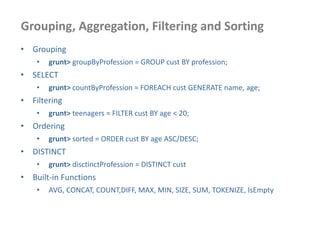
Grouping, Aggregation, Filtering and Sorting
• Grouping
• grunt> groupByProfession = GROUP cust BY profession;
• SELECT
• grunt> countByProfession = FOREACH cust GENERATE name, age;
• Filtering
• grunt> teenagers = FILTER cust BY age < 20;
• Ordering
• grunt> sorted = ORDER cust BY age ASC/DESC;
• DISTINCT
• grunt> disctinctProfession = DISTINCT cust
• Built-in Functions
• AVG, CONCAT, COUNT,DIFF, MAX, MIN, SIZE, SUM, TOKENIZE, IsEmpty
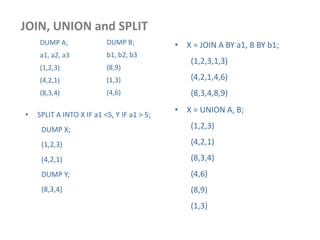
JOIN, UNION and SPLIT
DUMP A;
a1, a2, a3
(1,2,3)
(4,2,1)
(8,3,4)
DUMP B;
b1, b2, b3
(8,9)
(1,3)
(4,6)
• X = JOIN A BY a1, B BY b1;
(1,2,3,1,3)
(4,2,1,4,6)
(8,3,4,8,9)
• X = UNION A, B;
(1,2,3)
(4,2,1)
(8,3,4)
(4,6)
(8,9)
(1,3)
• SPLIT A INTO X IF a1 <5, Y IF a1 > 5;
DUMP X;
(1,2,3)
(4,2,1)
DUMP Y;
(8,3,4)
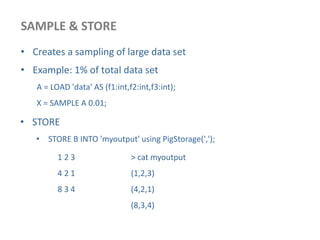
SAMPLE & STORE
• Creates a sampling of large data set
• Example: 1% of total data set
A = LOAD 'data' AS (f1:int,f2:int,f3:int);
X = SAMPLE A 0.01;
• STORE
• STORE B INTO 'myoutput' using PigStorage(',');
1 2 3
4 2 1
8 3 4
> cat myoutput
(1,2,3)
(4,2,1)
(8,3,4)
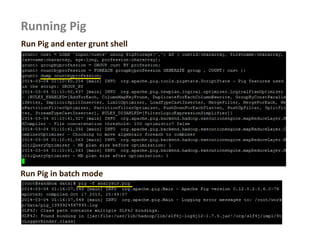
Running Pig
Run Pig and enter grunt shell
Run Pig in batch mode
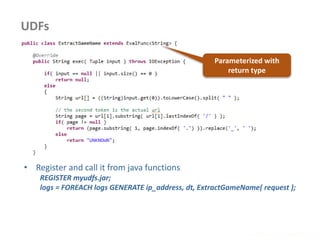
UDFs
www.enablecloud.com
• Register and call it from java functions
REGISTER myudfs.jar;
logs = FOREACH logs GENERATE ip_address, dt, ExtractGameName( request );
Parameterized with
return type
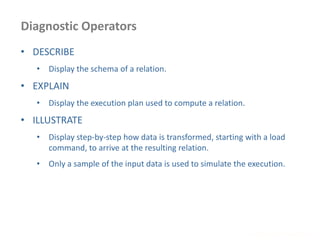
Diagnostic Operators
www.enablecloud.com
• DESCRIBE
• Display the schema of a relation.
• EXPLAIN
• Display the execution plan used to compute a relation.
• ILLUSTRATE
• Display step-by-step how data is transformed, starting with a load
command, to arrive at the resulting relation.
• Only a sample of the input data is used to simulate the execution.
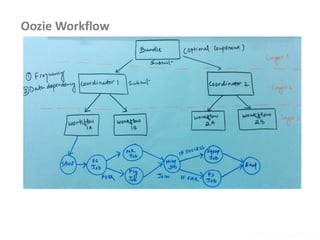
Oozie Workflow
www.enablecloud.com
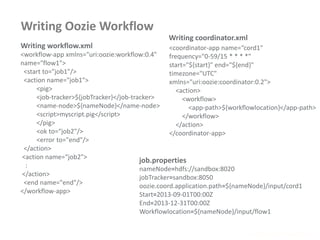
Writing Oozie Workflow
www.enablecloud.com
<workflow-app xmlns="uri:oozie:workflow:0.4"
name="flow1">
<start to="job1"/>
<action name="job1">
<pig>
<job-tracker>${jobTracker}</job-tracker>
<name-node>${nameNode}</name-node>
<script>myscript.pig</script>
</pig>
<ok to=“job2"/>
<error to="end"/>
</action>
<action name=“job2">
:
</action>
<end name="end"/>
</workflow-app>
<coordinator-app name=“cord1"
frequency="0-59/15 * * * *"
start="${start}" end="${end}"
timezone="UTC"
xmlns="uri:oozie:coordinator:0.2">
<action>
<workflow>
<app-path>${workflowlocation}</app-path>
</workflow>
</action>
</coordinator-app>
nameNode=hdfs://sandbox:8020
jobTracker=sandbox:8050
oozie.coord.application.path=${nameNode}/input/cord1
Start=2013-09-01T00:00Z
End=2013-12-31T00:00Z
Workflowlocation=${nameNode}/input/flow1
Writing workflow.xml
Writing coordinator.xml
job.properties
Best Practices - Deployment
 Allocate Resources Appropriately
 Namenode RAM Requirement
 Use thumb rule: 1 GB for storing 1 million Blocks information
 Deploy namenode in HA mode
 Allocate memory limits for container allocations for each node manager
 yarn.nodemanager.resource.memory-mb
 Configure minimum and maximum RAM and CPU allocation for containers
 yarn.scheduler.minimum-allocation-mb, yarn.scheduler.maximum-allocation-mb
 yarn.scheduler.minimum-allocation-vcores, yarn.scheduler.maximum-allocation-vcores
 Define queues using capacity scheduler and ensure jobs are submitted to
appropriate queues
 Configure resource required for your mapper and reducer tasks
 mapreduce.map.memory.mb
 mapreduce.reduce.memory.mb
www.enablecloud.com
Best Practices - Deployment
 Choosing right hardware for different roles
 Memory, CPU, Disk and networks
 Consider Cloud deployments of Hadoop for periodic
workloads or once-in-a-while tasks
 Continuously monitor your infrastructure
 Use Tools like ganglia, Nagios etc. to monitor resource usages
 Do periodic Maintenance
 Backup Name Node files periodically
 Add nodes or remove nodes appropriately
 Remove temporary or corrupt files
 Run re-balancer operations intermittantly
www.enablecloud.com
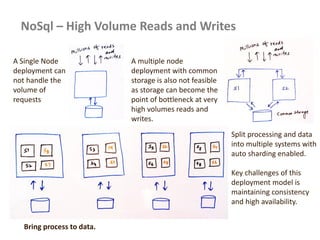
NoSql – High Volume Reads and Writes
A Single Node
deployment can
not handle the
volume of
requests
A multiple node
deployment with common
storage is also not feasible
as storage can become the
point of bottleneck at very
high volumes reads and
writes.
Split processing and data
into multiple systems with
auto sharding enabled.
Key challenges of this
deployment model is
maintaining consistency
and high availability.
Bring process to data.
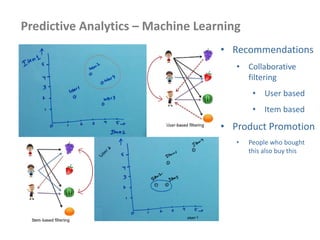
Predictive Analytics – Machine Learning
• Recommendations
• Collaborative
filtering
• User based
• Item based
• Product Promotion
• People who bought
this also buy this
Predictive Analytics – Machine Learning
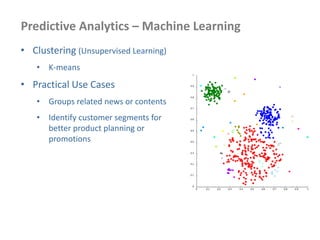
• Clustering (Unsupervised Learning)
• K-means
• Practical Use Cases
• Groups related news or contents
• Identify customer segments for
better product planning or
promotions
Predictive Analytics – Machine Learning
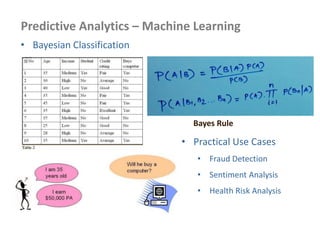
• Bayesian Classification
Bayes Rule
• Practical Use Cases
• Fraud Detection
• Sentiment Analysis
• Health Risk Analysis
References
 Apache Hadoop 2.0
 http://hadoop.apache.org/docs/r2.3.0/
 Hive
 https://hive.apache.org/
 Pig
 https://pig.apache.org/
 Sqoop
 http://sqoop.apache.org/
 Map Reduce
 https://hadoop.apache.org/docs/r2.2.0/api/
 Other useful Resources
 www.bigdataleap.com
 www.cloudera.com
 www.hortonworks.com
www.enablecloud.com

Hadoop 2.0 handout 5.0

  • 1.
     Understand BigData, Hadoop 2.0 architecture and it’s Ecosystem  Deep Dive into HDFS and YARN Architecture  Writing map reduce algorithms using java APIs  Advanced Map Reduce features & Algorithms  How to leverage Hive & Pig for structured and unstructured data analysis  Data import and export using Sqoop and Flume and create workflows using Oozie  Hadoop Best Practices, Sizing and capacity planning  Creating reference architectures for big data solutions BigData& HadoopDeveloperWorkshop Manaranjan Pradhan 1
  • 2.
  • 3.
    Defining Big Data www.enablecloud.com 12terabytes of Tweets created each day Volume Scrutinize 5 million trade events created each day to identify potential fraud Velocity Sensor data, audio, video, click streams, log files and more Variety • Hidden treasure – Insight into data can provide business advantage – Some key early indicators can mean fortunes to business – More precise analysis with more data
  • 4.
    Traditional DW VsHadoop Hadoop Platform ( Store, Transform, Analyze )  Social Feeds  Documents  Media Files Data warehouse (OLAP Systems) BI ToolsOLTP Systems
  • 5.
    Map Reduce Model •Google published a paper on map reduce in 2004 • http://research.google.com/archive/mapreduce.html • A programming or computational model, and implementation of the model, that supports distributed parallel computing on large data sets on clusters of computers. – Split Data into multiple chunks – Spawn multiple processing nodes working on each chunk – Reduce the result data size by consolidating outputs – Can arrive at the final output by processing data in multiple levels/stages
  • 6.
    Apache Hadoop • Hadoop •Open source Apache Project • Designed for massive scale • Design to recover from failure • http://hadoop.apache.org/ • Written in Java • Runs on Linux, Mac, Windows, OS/X and Solaris • Designed to run on commodity servers • Last major release : Oct 2013 – Hadoop 2.2 GA Interesting fact: Hadoop was created by Doug Cutting, who named it after his son's toy elephant. MapR was able to sort 15 billion 100-byte records totalling 1.5 terabytes of data in 59 seconds. It used the Google Compute Engine, running Hadoop on 2103 nodes.
  • 7.
    Who is usingit? • LinkedIn – Predict “People You May Know” and other facts • Journey Dynamics – Analyze GPS records for traffic speed forecasting • New York Times – Newspaper archive image conversion to PDF • Spadac.com – Geospatial data indexing • UNC Chapel Hill – Analyze gene sequence data • Yahoo! • More than 100,000 CPUs in >40,000 computers running Hadoop • Biggest cluster: 4500 nodes • Used to support research for Ad Systems and Web Search
  • 8.
    Hadoop 2.0 CoreComponents Hive DW System Pig Latin Data Analysis Mahout Machine Learning Map Reduce Framework HDFS 2.0 – HA and Federation Structured DataUnstructured or semi structured Data Import or export Sqoop Flume Apache Oozie (Workflow) Import or export YARN ( Cluster Resource Management )
  • 9.
    Big Data UseCases • Financial Analysis • Fraud Detection, Consumer spending patterns, Securities Analysis, sentiment analysis • Retail or e-Commerce • User usage patterns, Product Recommendations, sentiment analysis • Supply chain optimization • Social Media • Content or SPAM filtering, User profiling for targeted advertisement • Web/Content Indexing, Search Optimization • Manufacturing • Real time monitoring, Increase Operational Efficiency, • Life Science • Genome analysis, bio-molecular simulations • Machine Learning • Predictive Analytics
  • 10.
  • 11.
    HDFS 2.0 -Architecture
  • 12.
    HDFS 2.0 –High Availability Data Node Data Node Data Node 1 2 3 1 3 2 2 3 1 Blocks Name Node (Active) Name Node (Stand By) HA using Shared Storage/ NFS dfs.block.size dfs.replication
  • 13.
    HDFS Federation • Anamenode failure will result only in unavailability of the namespace it was serving. • Each namenode can be deployed in a HA mode. Namespace NN1 Namespace NN2
  • 14.
    HDFS 2.0 –Important Points • File is split into multiple chunks and stored • Each chunk is called BLOCK • HDFS block sizes are large – 64 MB • Blocks are replicated across multiple machines • By default it stores 3 copies of each block in separate machines at any point of time • For HA, two name nodes can be deployed in Active and Stand by mode • For larger deployments, multiple name nodes can be deployed in federation mode, each serving a namespace
  • 15.
    THANK YOU! How MapReduce Works? the quick brown fox the fox ate the mouse how now brown cow Map Map Map Reduce brown, 2 how, 1 now, 1 the, 3 ate, 1 cow, 1 fox, 2 mouse, 1 quick, 1 the, 1 quick, 1 brown, 1 fox, 1 the, 1 fox, 1 the, 1 ate, 1 mouse, 1 how, 1 now, 1 brown, 1 cow, 1 Input Shuffle & Sort Output the, (1,1,1) brown, (1,1) fox,(1,1) mouse, (1) quick, (1) ate, (1) cow, (1) how, (1) now,(1)
  • 16.
    Map Reduce –Important Points? • Processing data in two phases • Map, Reduce • Input and output of each phase is a key-value pair • Mappers are scheduled on the nodes where blocks are placed • All values of each unique keys are grouped together and sent to reducers • Mapper output keys are distributed to different reducers • Reducers open connection to mapper nodes and receive values for the keys assigned to them
  • 17.
    How YARN Works? 1.Submits Application 2. Starts Tasks Slaves MasterServices
  • 18.
    Deployment Modes www.enablecloud.com • Standaloneor local mode – No daemons running – Everything runs on single JVM – Good For Development • Pseudo-distributed Mode – All daemons running on single machine, a cluster simulation on one machine – Good For Test Environment • Fully distributed Mode – Hadoop running on multiple machines on a cluster – Production Environment
  • 19.
    Fully Distributed Architectureof Hadoop 2.0 NameNode (Active) Node Manager Data Node Node Manager Data Node Node Manager Data Node Node Manager Data Node Slaves Resource Manager History Server Application Master Map Reduce Map Reduce Map Reduce Containers NameNode (Stand by)
  • 20.
    Hadoop Configuration Files www.enablecloud.com Configuration FilenamesDescription of log files hadoop-env.sh Environment variables that are used in the scripts to run Hadoop. core-site.xml Configuration settings for Hadoop Core, such as I/O settings that are common to HDFS and MapReduce. hdfs-site.xml Configuration settings for HDFS daemons: the namenode, and the datanodes. yarn-site.xml Configuration settings for YARN daemons: Resource Manager, Node Manager and Scheduler. mapred-site.xml Configuration settings for MapReduce tasks: the map and reduce components. slaves A list of machines (one per line) that each run a datanode and a nodemanagerr. capacity-scheduler.xml Define queues and their configurations for capacity scheduler. hadoop-policy.xml ACLs for accessing Hadoop Components or services.
  • 21.
    Core-site.xml www.enablecloud.com <configuration> <property> <name>fs.defaultFS</name> <value>hdfs://localhost:8020/</value> </property> </property> Services Port Namenode 8020 NamenodeWeb UI 50070 Datanode 50010 Datanode Web UI 50075 Resource Manager 8032 Resource Manager Web UI 8088 NodeManager 45454 NodeManager Web UI 50060
  • 22.
    HDFS (hdfs-site.xml) –Key Configurations www.enablecloud.com Property Value Description dfs.namenode.name. dir <value>/disk1/hdfs/name,/r emote/hdfs/name</value> The list of directories where the namenode stores its persistent metadata. The namenode stores a copy of the metadata in each directory in the list. (Comma separated directory names) ${hadoop.tmp.dir}/dfs/name dfs.datanode.data.dir <value>/disk1/hdfs/data,/di sk2/hdfs/data</value> A list of directories where the datanode stores blocks. Each block is stored in only one of these directories. ${hadoop.tmp.dir}/dfs/data dfs.namenode.check point.dir <value>/disk1/hdfs/namese condary,/disk2/hdfs/namese condary</value> A list of directories where the secondary namenode stores checkpoints. It stores a copy of the checkpoint in each directory in the list. ${hadoop.tmp.dir}/dfs/namesecondary dfs.replication 3 No of Block Replications dfs.block.size 134217728 Block size in bytes ( 128 MB )
  • 23.
    YARN (yarn-site.xml) –Key Configurations www.enablecloud.com Property Value Description yarn.resourcemanager.address hostname:8050 Where the resource Manager service is running yarn.nodemanager.local-dirs /hadoop/yarn/local List of directories for YARN to store it’s working files. yarn.resourcemanager.scheduler. class org.apache.hadoop.yarn .server.resourcemanage r.scheduler.capacity.Cap acityScheduler Which scheduler to be used. Default is capacity. Other ones available are FIFO and Fair. yarn.nodemanager.resource.mem ory-mb 2250 Max resources Node Manager can allocate to containers.
  • 24.
    Map Reduce (mapred-site.xml)- Key Configurations www.enablecloud.com Property Value Description mapreduce.framework.na me Yarn or local To run map reduce jobs on YARN or in local mode. mapreduce.map.memory. mb 512 Memory to be allocated for map tasks mapreduce.reduce.memor y.mb 512 Memory to be allocated for reduce tasks mapreduce.cluster.local.dir ${hadoop.tmp.dir}/map red/local Directory to be used for intermediate mapper outputs. mapreduce.map.log.level INFO Log level for map tast. Same can be enabled for reducers by setting mapreduce.reduce.log.level mapreduce.task.timeout 300000 Timeout for map or reduce tasks.
  • 25.
    Start and StopHadoop Services www.enablecloud.com • Format NameNode – hdfs namenode –format – Creates all required HDFS required directory structure for namenode and datanodes. Creates the fsimage and edit logs. – This should be done first time and only once. • Start HDFS services – ./start-dfs.sh • Start YARN services – ./start-yarn.sh • Start History Server – ./mr-jobhistory-daemon.sh start historyserver • Verify services are running – jps
  • 26.
    Basic HDFS Commands www.enablecloud.com •Creating Directories – hadoop fs -mkdir <dirname> • Removing Directories – hadoop fs -rm <dirname> • Copying files to HDFS from Local filesystem – hadoop fs -copyFromLocal <local dir/filename> <hdfs dirname>/< hdfs filename> • Copying files from HDFS to local filesystem – hadoop fs -copyToLocal <hdfs dirname>/< hdfs filename> <local dir/filename> • List files and Directories – hadoop fs –ls <dirname> • list the blocks that make up all files or a specific file in HDFS – hadoop fsck / <file name> -files -blocks -locations -racks
  • 27.
    HDFS – GeneralPurpose Tools www.enablecloud.com • File System check • hdfs fsck / • Over replicated blocks • Under replicated blocks • Corrupt blocks • Move the affected files to /lost+found directory • hdfs fsck / -move • Delete the affected files • hdfs fsck / -delete
  • 28.
    General Purpose Commands www.enablecloud.com •Find details about blocks of a file • hdfs fsck <filepath/filename> -files -blocks -locations -racks • Get basic file system information and statistics • hdfs dfsadmin -report • Set or clear space quota for hdfs directories • hdfs dfsadmin –setSpaceQuota <quota> <dirname> <dirname> • hdfs dfsadmin –clearSpaceQuota <dirname> <dirname> • Run a hdfs balancer operation • hdfs balancer
  • 29.
    Getting Data IntoHDFS www.enablecloud.com
  • 30.
    Sqoop Overview www.enablecloud.com Relational Databases HDFS • Isa JDBC implementation, so it works with most of the databases • Define sqoop home and set path • SQOOP_HOME=<sqoop installation path> • PATH=$PATH:$SQOOP_HOME/bin • Copy the JDBC implementation jar file of the database to sqoop library location • <$SQOOP_HOME>/lib Import / Export
  • 31.
    Codegen and Import www.enablecloud.com •Import from Tables to HDFS • sqoop import --connect jdbc:mysql://localhost/<database name> --table <table-name> --username <user-name> --password <password> --m 1 // no of mappers to be run. By default it runs 4 mappers --target-dir output/sqoop • Import all tables • sqoop import-all-tables --connect jdbc:mysql://localhost/big
  • 32.
    Advanced Sqoop ImportFeatures www.enablecloud.com • Advanced import options • --query "SELECT CustID, FirstName, LastName from customers WHERE age < 30 and $CONDITIONS" • --check-column (col) Specifies the column to be examined when determining which rows to import. • --incremental (mode) Specifies how Sqoop determines which rows are new. Legal values for mode include append and last modified. • --last-value (value) Specifies the maximum value of the check column from the previous import. • --fields-terminated-by <char> Sets the field separator character • --lines-terminated-by <char> Sets the end-of-line character
  • 33.
    Sqoop Export fromHDFS www.enablecloud.com • Export from HDFS to RDBMS • sqoop export --connect jdbc:mysql://localhost/<database-name> --table <table-name> --username <user-name> --password <password> --export-dir <directory> • Advanced Export Options --update-key <col-name> Anchor column to use for updates. Use a comma separated list of columns if there are more than one column. --update-mode <mode> Specify how updates are performed when new rows are found with non-matching keys in database. Legal values for mode include updateonly (default) and allowinsert.
  • 34.
    Flume Overview www.enablecloud.com • Isa distributed and reliable services for collecting, aggregating and moving data (especially log data ) from variety of sources to sinks httpd Log Files httpd Log Files Flume HDFS Hadoop Cluster Map Reduce
  • 35.
    Flume Components www.enablecloud.com lab1.sources =source1 lab1.sinks = sink1 lab1.channels = channel1 lab1.sources.source1.channels = channel1 lab1.sinks.sink1.channel = channel1 lab1.sources.source1.type = exec lab1.sources.source1.command = tail -F /home/notroot/lab/data/access.log lab1.sinks.sink1.type = hdfs lab1.sinks.sink1.hdfs.path = hdfs://localhost/weblogs/ lab1.sinks.sink1.hdfs.filePrefix = apachelog lab1.channels.channel1.type = memory
  • 36.
    Multiple Deployment Topologiesin Flume www.enablecloud.com
  • 37.
  • 38.
    Input Formats www.enablecloud.com • Filesare divided into splits and each split gets processed by a single map • Each splits gets divided into records as per the input format specified • Each record gets processed at a time by the mapper • Each record is passed to mapper as a key – value pair ……………… ……………… ……………… ……………… ……………… ……………… ………………… ………………… ………… ………………… ………………… …………. ………………… ………………… …………. Map Map Map Node
  • 39.
    Type of InputFormats www.enablecloud.com •FileInputFormat • base class for all implementations of InputFormat • TextInputFormat • Each record is a line of input • Key is byte offset of the beginning of line & Value is the line 4000001,Kristina,Chung,55,Pilot 4000002,Paige,Chen,74,Teacher 4000003,Sherri,Melton,34,Firefighter 4000004,Gretchen,Hill,66,Computer hardware engineer Key = 0, value = (4000001,Kristina,Chung,55,Pilot) Key = 33, value = (4000002,Paige,Chen,74,Teacher) Key = 64, value = (4000003,Sherri,Melton,34,Firefighter) Key = 112, value = (4000004,Gretchen,Hill,66,Computer hardware engineer) File Input to Mapper
  • 40.
    Type of InputFormats •KeyValueTextInputFormat • Split the line into key and value using tab character as default separator • First token before the separator as key and the rest as value • Set a different separator by setting following property mapreduce.input.keyvaluelinerecordreader.key.value.separator www.enablecloud.com 4000001 Kristina Chung 55 Pilot 4000002 Paige Chen 7 4 Teacher 4000003 Sherri Melton 34 Firefighter 4000004 Gretchen Hill 66 Computer hardware engineer File Input to Mapper Key = 4000001 value = (Kristina Chung 55 Pilot) Key = 4000002 value = (Paige Chen 7 4 Teacher) Key = 4000003 value = (Sherri Melton 34 Firefighter) Key = 4000004 value = (Gretchen Hill 66 Computer hardware engineer) • XMLInputFormat ( provided as part of mahout library) • conf.set("xmlinput.start", "<startingTag>"); • conf.set("xmlinput.end", "</endingTag>");
  • 41.
    Type of InputFormats •Small File Problem • Each file stored in separate blocks • Metadata for files will take large size • SequenceFileInputFormat • SequenceFileAsTextInputFormat - Converts the sequence file’s keys and values to Text objects. • SequenceFileAsBinaryInputFormat - Reads the sequence file’s keys and values as binary objects i.e. as BytesWritable objects. The mapper is free to interpret the underlying byte array as it requires www.enablecloud.com File Name File Content File Name File Content File Name File Content File Name File Content File Name File Content File Name File Content
  • 42.
  • 43.
    Mapper www.enablecloud.com • Reads datafrom input data split as per the input format • Denoted as Mapper<k1, v1, k2, v2> • k1, v1 are key value pair of input data • K2, v2 are key value pair of output data • Mapper API • public class MyMapper extends Mapper<LongWritable, Text, Text, IntWritable> • <LogWritable, Text> key-value pair input to mapper • <Text,IntWritable> key-value pair output of mapper • Override map() method • public void map(LongWritable key, Text value, Context context) throws IOException, InterruptedException
  • 44.
    Reducer www.enablecloud.com • Processes datafrom mapper output • Denoted as Reducer<k3, list<v3>, k4, v4> • k3, list<v3> are key and list of values for that key as input data • K4, v4 are key value pair of output data • Reducer API • public class MyReducer extends Reducer<Text, IntWritable, Text, IntWritable> • <Text,List<IntWritable>> key and list of values as input to reducer • <Text,IntWritable> key-value pair output of reducer • Override reduce() method • public void reduce(Text key, Iterable<IntWritable> values, Context context) throws IOException, InterruptedException
  • 45.
  • 46.
    Writing the Driverand running the job www.enablecloud.com yarn jar wcount.jar MRDriver input/words output/wcount
  • 47.
    Map Reduce -General Purpose Commands www.enablecloud.com • Check the status of a job • mapred job –status <job id> • List all jobs running • mapred job –list • Kill a job • mapred job –kill <job id> • Dumps the history of all jobs • mapred job –history all <output dir>
  • 48.
  • 49.
    Debugging www.enablecloud.com • Using RemoteDebugger • Set the following property in mapred-site. agentlib:jdwp=transport=dt_socket,server=y,suspend=y,address=5432xml <property> <name>mapred.child.java.opts</name> <value>-</value> </property> • Writing logs in map and reduce functions for debugging • One way is to get a handle to the Logger and write statements into the logger. Logger log = Logger.getLogger(MyMapper.class); log.info( "write your log statements here" ); • Log levels can be controlled. logger.setLevel(Level.INFO); • The other way is to write to the stdout by system.out.println() statement. System.out.println( "write your log statements here" ); • The logs will be written to files under {mapred.local.dir}/userlogs directory
  • 50.
    Unit testing themap reduce code www.enablecloud.com • Use MRUnit implementation to unit test the map reduce code • Can test map and reduce function individually and together • Setup the map reduce drivers
  • 51.
  • 52.
    Hadoop Built-in Counters www.enablecloud.com •Metrics and useful information about Hadoop Jobs • Built-in Counters • Hadoop Maintains be default • Example: no of bytes read from HDFS, no of input records to mapper • Custom Counters • Can write to capture any other specific metrics • How many transactions are credit type and how many as cash type? • Specific to data being processed
  • 53.
    Defining Custom Counters www.enablecloud.com •Retrieve the counters in Driver class ( after job completion ) Counters c = job.getCounters(); long cnt = c.getCounter( RETAIL_TXN_RECORDS.TOTAL_TXNS );
  • 54.
    Hadoop Streaming www.enablecloud.com Running non-javamapper and reducers bin/hadoop jar /usr/lib/hadoop-mapreduce/hadoop-streaming-2.2.0.2.0.6.0-76.jar -D stream.map.output.field.separator=. -D mapred.job.name=“mystreamingjob" -input <hdfs-file> -output <hdfs-dir> -mapper map.py -reducer reduce.py Running combination of java and non-java mappers and reduers -mapper com.enablecloud.samples.MyMapper -reducer reduce.py -libjars programs.jar
  • 55.
    Advanced Map ReduceTopics • Combiner • Partitioner • Setup and Teardown • Side Data Distribution • Multiple Inputs • Job Chaining • Skipping Bad Records www.enablecloud.com
  • 56.
    Combiner www.enablecloud.com • Local Aggregationof data after map function • Reduce the number and size of key-value pairs to be shuffled • Reduce data transfers over the network • Reduce disk i/o as intermediate results are written to disks • Has same interface as reducer public class SortingCombiner extends Reducer<Text, IntWritable, Text, IntWritable> { public void reduce(Text key, Iterable<IntWritable> values, Context context) throws IOException, InterruptedException { }} • Set Combiners in Driver as following job.setCombinerClass( SortingCombiner.class );
  • 57.
    Partitioning www.enablecloud.com • Deciding whichreducer will receive which intermediate keys and values • Mapper output with same keys belongs to same partition and is processed by same reducer • Hadoop uses a Partitioner interface to determine the destination partition for a key, value pair • HashPartitioner is the default Partitioner • Uses hashcode() to determine which key goes where • Data is distributed depending on number of reducers configured
  • 58.
    Partitioner www.enablecloud.com • Set Partitionerin driver class as follows • Define Partitioner as follows
  • 59.
    Setup & TearDown www.enablecloud.com •Initialize the mappers • Initialize the mapper environment setup( Mapper.Context context ) • Cleanup the mappers • Cleanup the mapper environment cleanup( Mapper.Context context )
  • 60.
    Passing Parameters usingConfiguration www.enablecloud.com • Passing some parameters to mapper or reducer environments • Configuration details can be passed using this technique • Set the parameter in driver code as follows Configuration conf = new Configuration(); conf.set( "Product", args[0] ); conf.set( "Amount", args[1] ); • Retrieve the parameter in mapper or reducer code as follows Configuration conf = context.getConfiguration(); String product = conf.get( "Product" ).trim();
  • 61.
    Distribute Files andRetrieve in MR programs www.enablecloud.com • Add cache file as follows job.addCacheFile( new URI( <filepath>/<filename> ) ); yarn jar -files <file,file,file> <jar name> <Driver classname> • Distributed cache can be used distribute jars and native libraries job.addFileToClassPath( new Path( "/myapp/mylib.jar" ) ); yarn jar –libjars <f.jar, f2.jar> <jar name> <Driver classname> • Retrieving the data files on the Map Reduce Programs @Override protected void setup(Context context) throws IOException, InterruptedException { Path[] localPaths = context.getLocalCacheFiles(); if (localPaths.length == 0) { throw new FileNotFoundException("Distributed cache file not found."); } File localFile = new File(localPaths[0].toUri()); }
  • 62.
    Multiple Inputs www.enablecloud.com • Differentinput formats or types • Multiple mappers needed to process requests MultipleInputs.addInputPath( job, new Path( otherArgs[0] ), FileInputFormat.class, TxnSortingMapper.class ); MultipleInputs.addInputPath( job, new Path( otherArgs[1] ), KeyValueTextInputFormat.cla ss, CustomerMapper.class ); Map 1 Passed to map() Map 2 Passed to map() Reduce
  • 63.
    Job Chaining www.enablecloud.com • Runningmultiple map and reduce functions in sequence • Output of one map reduce function to be fed to another map reduce function
  • 64.
    Skipping Bad Recordsand Blocks www.enablecloud.com • Skipping Mode is TURNED OFF by default • Record is skipped after the task fails after trying twice, if Skipping Mode is turned on • -D mapred.skip.mode.enabled=true -D mapred.skip.map.max.skip.records=1 • Bad records are stored in _logs/skip directory and can be inspected late using hadoop fs –text <filename> • Setting number of map or reduce failures that can be tolerated by job • mapred.max.map.failures.percent • mapred.max.reduce.failures.percent
  • 65.
  • 66.
    What is Hive? www.enablecloud.com •Data warehousing package built on top of hadoop • Targeted towards users comfortable with SQL • It is similar to SQL and call HiveQL • For managing and querying structured data • Abstracts complexity of Hadoop • No need learn java and Hadoop APIs • Developed by Facebook and contributed to community
  • 67.
    Hive Architecture CLI Hadoop Cluster MapReduce Jobs Metastore Compiles and builds MR execution plan Thrift Service SQL queries e.g. Select * from table where a > b group by c, d Hive JDBC /ODBC Drivers
  • 68.
    Configuring Hive www.enablecloud.com • Hiveautomatically stores and manages data for users • <install path>/hive/warehouse • Configure path • HIVE_INSTALL=<hive path> • PATH=$PAH:$HIVE_INSTALL/bin • Metastore options • Hive comes with Derby, a lightweight and embedded sql • Can configure any other database as well e.g. MySQL
  • 69.
    Hive Data Models www.enablecloud.com •Databases • Namespaces • Tables • Schemas in namespaces • Partitions • How data is stored in HDFS. • Grouping data bases on some column • Can have one or more columns • Buckets or Clusters • Partitions divided further into buckets bases on some other column. • Use for data sampling
  • 70.
    Creating an InternalTables – Managed by Hive www.enablecloud.com • Create database and table Create Database lab; Use lab; CREATE TABLE employees (id INT, name STRING, designation STRING ) ROW FORMAT DELIMITED FIELDS TERMINATED BY ‘t‘; • Table is created in warehouse directory and completely managed by hive /user/hive/warehouse/lab.db/employees • Load the data into the table LOAD DATA LOCAL INPATH '/home/ubuntu/work/data/emp.csv' OVERWRITE INTO TABLE employees;
  • 71.
    Create Table –Advanced Options www.enablecloud.com create table txnrecsByCat (txnno INT, txndate STRING, custno INT, amount DOUBLE, product STRING, city STRING, state STRING, spendBy STRING ) partitioned by ( state STRING ) clustered by ( city STRING ) into 10 buckets row format delimited fields terminated by ',' stored as textfile;
  • 72.
    External Tables –Not Managed by Hive www.enablecloud.com • Create the table in another HDFS location and not in warehouse directory • Creating an external table CREATE EXTERNAL TABLE employees (id INT, name STRING, designation STRING ) LOCATION '/user/tom/employees'; • Hive does not delete the table (or HDFS files) even when the tables are dropped. It leave the table untouched and only metadata about the tables are deleted
  • 73.
    Hive Data Types– Simple Types www.enablecloud.com
  • 74.
    As simple asrunning a SQL query www.enablecloud.com • Select Select count(*) from txnrecords; • Aggregation Select count( DISTINCT catetory) from txnrecords; • Grouping select category, sum( amount ) from txnrecords group by category; • Joining Tables INSERT OVERWRITE TABLE pv_users SELECT pv.*, u.gender, u.age FROM user u JOIN page_view pv ON (pv.userid = u.id) WHERE pv.date = '2008-03-03';
  • 75.
    Storing Result Sets www.enablecloud.com •Inserting output into another table INSERT OVERWRITE TABLE results ( SELECT * from txnrecords ) • Inserting into local file INSERT OVERWRITE LOCAL DIRECTORY ‘tmp/results’ ( SELECT * from txnrecords ) • Creates table dynamically to store results of an query CREATE TABLE Q1OUT AS SELECT PROFESSION AS Profession, COUNT( PROFESSION ) As TotalCount FROM CUSTOMERS WHERE TYPE = 'GOLD' GROUP BY PROFESSION;
  • 76.
    SAMPLING www.enablecloud.com • Random Sampling INSERTOVERWRITE TABLE pv_gender_sum_sample SELECT pv_gender_sum.* FROM pv_gender_sum TABLESAMPLE(10 percent); • Clustered Sampling INSERT OVERWRITE TABLE pv_gender_sum_sample SELECT pv_gender_sum.* FROM pv_gender_sum TABLESAMPLE(BUCKET 3 OUT OF 32);
  • 77.
    Managing Tables www.enablecloud.com • SHOWtables; • Show partitions <table_name>; • Describe <table_name>; • Describe formatted <table_name>; // detailed description • Altering a table ALTER TABLE old_table_name RENAME TO new_table_name; ALTER TABLE tab1 ADD COLUMNS (c1 INT COMMENT 'a new int column', c2 STRING DEFAULT 'def val'); • Dropping a table or a paritition DROP TABLE pv_users; ALTER TABLE pv_users DROP PARTITION (ds='2008-08-08')
  • 78.
    User Defined Functions(UDFs) www.enablecloud.com
  • 79.
    Calling UDFs www.enablecloud.com • Registeringthe function in Hive add jar /home/notroot/lab/programs/udfsamples.jar; create temporary function getDayOfTheWeek as ‘ samples.hive.getDayOfTheWeek'; • Calling from Hive SELECT ts.txnno as txnno, ts.customerNo as customerNo, ts.merchantCity as city, ts.state as state, getDayOfTheWeek( ts.tDate ) as day, FROM txns ts
  • 80.
    Pig www.enablecloud.com Pig Scripts Grunt Shellbuilds an MR execution plan and submits to cluster for execution Hadoop Cluster Map Reduce Jobs • High Level Language that abstracts Hadoop system complexity from users • Provides common operations like join, group, sort etc. • Can use existing user code or libraries for complex non-regular algorithms • Operates on files in HDFS • Developed by Yahoo for their internal use and later contributed to community and made open source
  • 81.
    Configuration www.enablecloud.com • Download andun-tar the pig file • tar xzf pig-x.y.z.tar.gz • Configure the PIG paths • export PIG_INSTALL=/<path>/pig-x.y.z • export PATH=$PATH:$PIG_INSTALL/bin • Using pig.properties file • fs.default.name=hdfs://localhost/ • mapred.job.tracker=localhost:8021
  • 82.
    Data Types www.enablecloud.com • int- Signed 32-bit integer • long - Signed 64-bit integer • float - 32-bit floating point • double - 64-bit floating point • chararray - Character array (string) in Unicode UTF-8 • bytearray - Byte array (binary object) • map – associative array • Tuple – ordered list of data • ( 1234, Jim Huston, 54 ) collection of fields ( like a record or row ) • Bag – unordered collection of tuples • {( 1234, Jim Huston, 54 ), ( 7634, Harry Slater, 41 ), (4355, Rod Stewart, 43, Architect) } • Tuples in a bag aren’t required to have the same schema or even have the same number of fields.
  • 83.
    Loading Data, Samplingand Storing back results • Loading TSV file into Pig LOAD ‘employee' USING PigStorage('t') AS (name: chararray, age:int ); • Loading a JSON data file using JsonLoader() • A = LOAD 'data' USING JsonLoader(); • Sampling - Using only a percentage of total data set A = LOAD 'data' AS (f1:int,f2:int,f3:int); X = SAMPLE A 0.01; • STORE • STORE B INTO 'myoutput' using PigStorage(','); Data should already be in HDFS
  • 84.
    Grouping, Aggregation, Filteringand Sorting • Grouping • grunt> groupByProfession = GROUP cust BY profession; • SELECT • grunt> countByProfession = FOREACH cust GENERATE name, age; • Filtering • grunt> teenagers = FILTER cust BY age < 20; • Ordering • grunt> sorted = ORDER cust BY age ASC/DESC; • DISTINCT • grunt> disctinctProfession = DISTINCT cust • Built-in Functions • AVG, CONCAT, COUNT,DIFF, MAX, MIN, SIZE, SUM, TOKENIZE, IsEmpty
  • 85.
    JOIN, UNION andSPLIT DUMP A; a1, a2, a3 (1,2,3) (4,2,1) (8,3,4) DUMP B; b1, b2, b3 (8,9) (1,3) (4,6) • X = JOIN A BY a1, B BY b1; (1,2,3,1,3) (4,2,1,4,6) (8,3,4,8,9) • X = UNION A, B; (1,2,3) (4,2,1) (8,3,4) (4,6) (8,9) (1,3) • SPLIT A INTO X IF a1 <5, Y IF a1 > 5; DUMP X; (1,2,3) (4,2,1) DUMP Y; (8,3,4)
  • 86.
    SAMPLE & STORE •Creates a sampling of large data set • Example: 1% of total data set A = LOAD 'data' AS (f1:int,f2:int,f3:int); X = SAMPLE A 0.01; • STORE • STORE B INTO 'myoutput' using PigStorage(','); 1 2 3 4 2 1 8 3 4 > cat myoutput (1,2,3) (4,2,1) (8,3,4)
  • 87.
    Running Pig Run Pigand enter grunt shell Run Pig in batch mode
  • 88.
    UDFs www.enablecloud.com • Register andcall it from java functions REGISTER myudfs.jar; logs = FOREACH logs GENERATE ip_address, dt, ExtractGameName( request ); Parameterized with return type
  • 89.
    Diagnostic Operators www.enablecloud.com • DESCRIBE •Display the schema of a relation. • EXPLAIN • Display the execution plan used to compute a relation. • ILLUSTRATE • Display step-by-step how data is transformed, starting with a load command, to arrive at the resulting relation. • Only a sample of the input data is used to simulate the execution.
  • 90.
  • 91.
    Writing Oozie Workflow www.enablecloud.com <workflow-appxmlns="uri:oozie:workflow:0.4" name="flow1"> <start to="job1"/> <action name="job1"> <pig> <job-tracker>${jobTracker}</job-tracker> <name-node>${nameNode}</name-node> <script>myscript.pig</script> </pig> <ok to=“job2"/> <error to="end"/> </action> <action name=“job2"> : </action> <end name="end"/> </workflow-app> <coordinator-app name=“cord1" frequency="0-59/15 * * * *" start="${start}" end="${end}" timezone="UTC" xmlns="uri:oozie:coordinator:0.2"> <action> <workflow> <app-path>${workflowlocation}</app-path> </workflow> </action> </coordinator-app> nameNode=hdfs://sandbox:8020 jobTracker=sandbox:8050 oozie.coord.application.path=${nameNode}/input/cord1 Start=2013-09-01T00:00Z End=2013-12-31T00:00Z Workflowlocation=${nameNode}/input/flow1 Writing workflow.xml Writing coordinator.xml job.properties
  • 92.
    Best Practices -Deployment  Allocate Resources Appropriately  Namenode RAM Requirement  Use thumb rule: 1 GB for storing 1 million Blocks information  Deploy namenode in HA mode  Allocate memory limits for container allocations for each node manager  yarn.nodemanager.resource.memory-mb  Configure minimum and maximum RAM and CPU allocation for containers  yarn.scheduler.minimum-allocation-mb, yarn.scheduler.maximum-allocation-mb  yarn.scheduler.minimum-allocation-vcores, yarn.scheduler.maximum-allocation-vcores  Define queues using capacity scheduler and ensure jobs are submitted to appropriate queues  Configure resource required for your mapper and reducer tasks  mapreduce.map.memory.mb  mapreduce.reduce.memory.mb www.enablecloud.com
  • 93.
    Best Practices -Deployment  Choosing right hardware for different roles  Memory, CPU, Disk and networks  Consider Cloud deployments of Hadoop for periodic workloads or once-in-a-while tasks  Continuously monitor your infrastructure  Use Tools like ganglia, Nagios etc. to monitor resource usages  Do periodic Maintenance  Backup Name Node files periodically  Add nodes or remove nodes appropriately  Remove temporary or corrupt files  Run re-balancer operations intermittantly www.enablecloud.com
  • 94.
    NoSql – HighVolume Reads and Writes A Single Node deployment can not handle the volume of requests A multiple node deployment with common storage is also not feasible as storage can become the point of bottleneck at very high volumes reads and writes. Split processing and data into multiple systems with auto sharding enabled. Key challenges of this deployment model is maintaining consistency and high availability. Bring process to data.
  • 95.
    Predictive Analytics –Machine Learning • Recommendations • Collaborative filtering • User based • Item based • Product Promotion • People who bought this also buy this
  • 96.
    Predictive Analytics –Machine Learning • Clustering (Unsupervised Learning) • K-means • Practical Use Cases • Groups related news or contents • Identify customer segments for better product planning or promotions
  • 97.
    Predictive Analytics –Machine Learning • Bayesian Classification Bayes Rule • Practical Use Cases • Fraud Detection • Sentiment Analysis • Health Risk Analysis
  • 98.
    References  Apache Hadoop2.0  http://hadoop.apache.org/docs/r2.3.0/  Hive  https://hive.apache.org/  Pig  https://pig.apache.org/  Sqoop  http://sqoop.apache.org/  Map Reduce  https://hadoop.apache.org/docs/r2.2.0/api/  Other useful Resources  www.bigdataleap.com  www.cloudera.com  www.hortonworks.com www.enablecloud.com