UI WITH JDI
EASY FAST GOOD
24 FEBRUARY 2017
Chief QA Automation
In Testing more than 11 years
In Testing Automation 9 years
ROMAN IOVLEV
3
?
4
JDI SETUP
README
http://jdi.epam.com/
https://github.com/epam/JDI
https://vk.com/jdi_framework
<dependency>
<groupId>com.epam.jdi</groupId>
<artifactId>jdi-uitest-web</artifactId>
<version>1.0.58</version>
</dependency>
5
JDI SETUP
Maven, Gradle, Ivy
https://github.com/epam/JDI-Examples
https://github.com/epam/JDI README
6
FAQ
SIMPLE TEST
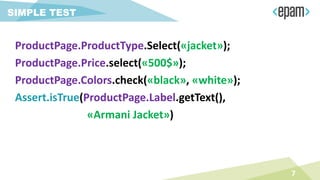
ProductPage.ProductType.Select(«jacket»);
ProductPage.Price.select(«500$»);
ProductPage.Colors.check(«black», «white»);
Assert.isTrue(ProductPage.Label.getText(),
«Armani Jacket»)
7
SIMPLE TEST
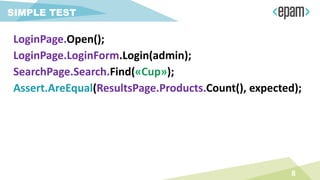
LoginPage.Open();
LoginPage.LoginForm.Login(admin);
SearchPage.Search.Find(«Cup»);
Assert.AreEqual(ResultsPage.Products.Count(), expected);
8
PAGE ELEMENTS
9
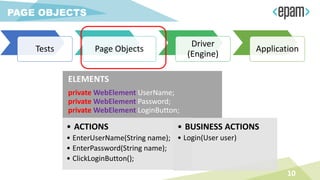
PAGE OBJECTS
Tests Page Objects
Driver
(Engine)
Application
ELEMENTS
private WebElement UserName;
private WebElement Password;
private WebElement LoginButton;
• ACTIONS
• EnterUserName(String name);
• EnterPassword(String name);
• ClickLoginButton();
• BUSINESS ACTIONS
• Login(User user)
10
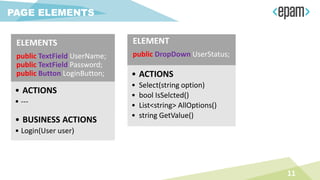
PAGE ELEMENTS
ELEMENTS
public TextField UserName;
public TextField Password;
public Button LoginButton;
• ACTIONS
• ---
• BUSINESS ACTIONS
• Login(User user)
ELEMENT
public DropDown UserStatus;
• ACTIONS
• Select(string option)
• bool IsSelcted()
• List<string> AllOptions()
• string GetValue()
11
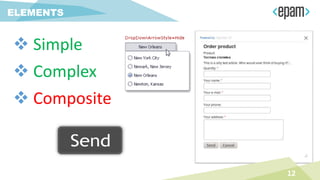
ELEMENTS
 Simple
 Complex
 Composite
12
SIMPLE
ELEMENTS
13
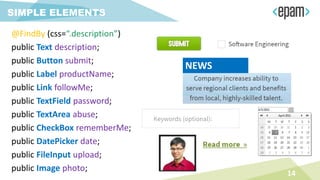
SIMPLE ELEMENTS
@FindBy (css=“.description”)
public Text description;
public Button submit;
public Label productName;
public Link followMe;
public TextField password;
public TextArea abuse;
public CheckBox rememberMe;
public DatePicker date;
public FileInput upload;
public Image photo;
14
NEWS
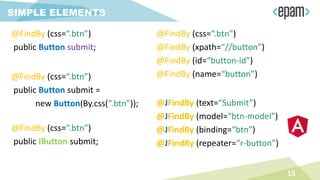
SIMPLE ELEMENTS
@FindBy (css=“.btn”)
public Button submit;
15
@FindBy (css=“.btn”)
@FindBy (xpath=“//button”)
@FindBy (id=“button-id”)
@FindBy (name=“button”)@FindBy (css=“.btn”)
public Button submit =
new Button(By.css(“.btn”));
@FindBy (css=“.btn”)
public IButton submit;
@JFindBy (text=“Submit”)
@JFindBy (model=“btn-model”)
@JFindBy (binding=“btn”)
@JFindBy (repeater=“r-button”)
MULTILOCATORS
16
Multi language testing
@JFindBy (text=“Submit”, group=“en”)
@JFindBy (text=“Отправить” , group=“ru”)
public Button submit;
Multi version testing
@JFindBy (text=“Submit”, group=“1.7”)
@JFindBy (value=“Submit” , group=“2.0”)
public Button submit;
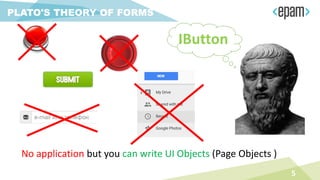
PLATO'S THEORY OF FORMS
5
No application but you can write UI Objects (Page Objects )
IButton
COMPLEX
ELEMENTS
18
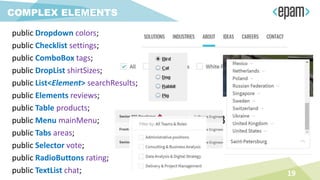
COMPLEX ELEMENTS
public Dropdown colors;
public Checklist settings;
public ComboBox tags;
public DropList shirtSizes;
public List<Element> searchResults;
public Elements reviews;
public Table products;
public Menu mainMenu;
public Tabs areas;
public Selector vote;
public RadioButtons rating;
public TextList chat; 19
COMPLEX ELEMENTS
@JDropdown (
root = @FindBy(css = “.colors"),
value = @FindBy(css = “.value"),
elementByName = @FindBy(tagName = “li"))
public Dropdown colors;
@JTable(
root = @FindBy (css = “.offers"),
row = @FindBy (xpath = ".//li[%s]//div"),
column = @FindBy (xpath = ".//li//div[%s]"),
header = {“ID", “Title", “Apply”} )
public Table offers;
20
COMPLEX ELEMENTS
@FindBy(css = “.colors")
public Dropdown colors;
@FindBy(css = “.table”)
public Table offers;
21
@FindBy(css = “.menu li”)
public Menu navigation;
@FindBy(css = “.menu ul”)
public Menu navigation;
@FindBy(xpath = “//*[@class=‘menu’]//li[text()=‘%s’]”)
public Menu navigation;
USING ENUMS
22
23
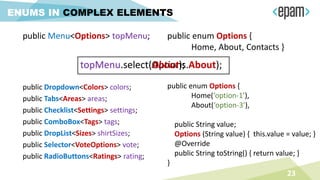
ENUMS IN COMPLEX ELEMENTS
public Menu<Options> topMenu; public enum Options {
Home, About, Contacts }
public enum Options {
Home(‘option-1’),
About(‘option-3’),
public String value;
Options (String value) { this.value = value; }
@Override
public String toString() { return value; }
}
public Dropdown<Colors> colors;
public Tabs<Areas> areas;
public Checklist<Settings> settings;
public ComboBox<Tags> tags;
public DropList<Sizes> shirtSizes;
public Selector<VoteOptions> vote;
public RadioButtons<Ratings> rating;
topMenu.select(Options.About);topMenu.select(About);
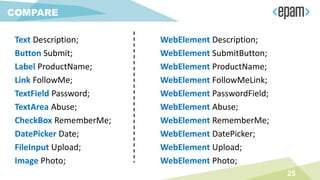
• Code readability
• Clear behavior
• Union of all element’s locators
• Union of element and its actions
• Detailed logging
TYPIFIED ELEMENTS
24
Text Description;
Button Submit;
Label ProductName;
Link FollowMe;
TextField Password;
TextArea Abuse;
CheckBox RememberMe;
DatePicker Date;
FileInput Upload;
Image Photo;
WebElement Description;
WebElement SubmitButton;
WebElement ProductName;
WebElement FollowMeLink;
WebElement PasswordField;
WebElement Abuse;
WebElement RememberMe;
WebElement DatePicker;
WebElement Upload;
WebElement Photo;
COMPARE
25
COMPARE
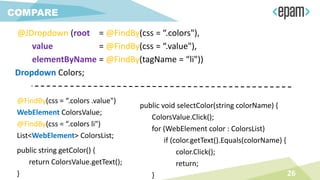
@JDropdown (root = @FindBy(css = “.colors"),
value = @FindBy(css = “.value"),
elementByName = @FindBy(tagName = “li"))
Dropdown Colors;
@FindBy(css = “.colors .value")
WebElement ColorsValue;
@FindBy(css = “.colors li")
List<WebElement> ColorsList;
public string getColor() {
return ColorsValue.getText();
}
public void selectColor(string colorName) {
ColorsValue.Click();
for (WebElement color : ColorsList)
if (color.getText().Equals(colorName) {
color.Click();
return;
} 26
COMPARE
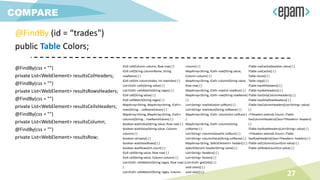
@FindBy (id = “trades")
public Table Colors;
@FindBy(css = "")
private List<WebElement> resultsColHeaders;
@FindBy(css = "")
private List<WebElement> resultsRowsHeaders;
@FindBy(css = "")
private List<WebElement> resultsCellsHeaders;
@FindBy(css = "")
private List<WebElement> resultsColumn;
@FindBy(css = "")
private List<WebElement> resultsRow;
ICell cell(Column column, Row row) { }
ICell cell(String columnName, String
rowName) { }
ICell cell(int columnIndex, int rowIndex) { }
List<ICell> cells(String value) { }
List<ICell> cellsMatch(String regex) { }
ICell cell(String value) { }
ICell cellMatch(String regex) { }
MapArray<String, MapArray<String, ICell>>
rows(String... colNameValues) { }
MapArray<String, MapArray<String, ICell>>
columns(String... rowNameValues) { }
boolean waitValue(String value, Row row) { }
boolean waitValue(String value, Column
column) { }
boolean isEmpty() { }
boolean waitHaveRows() { }
boolean waitRows(int count) { }
ICell cell(String value, Row row) { }
ICell cell(String value, Column column) { }
List<ICell> cellsMatch(String regex, Row row) {
}
List<ICell> cellsMatch(String regex, Column
column) { }
MapArray<String, ICell> row(String value,
Column column) { }
MapArray<String, ICell> column(String value,
Row row) { }
MapArray<String, ICell> row(int rowNum) { }
MapArray<String, ICell> row(String rowName)
{ }
List<String> rowValue(int colNum) { }
List<String> rowValue(String colName) { }
MapArray<String, ICell> column(int colNum) {
}
MapArray<String, ICell> column(String
colName) { }
List<String> columnValue(int colNum) { }
List<String> columnValue(String colName) { }
MapArray<String, SelectElement> header() { }
SelectElement header(String name) { }
List<String> headers() { }
List<String> footer() { }
List<ICell> getCells() { }
void clean() { }
void clear() { }
ITable useCache(boolean value) { }
ITable useCache() { }
Table clone() { }
Table copy() { }
ITable hasAllHeaders() { }
ITable hasNoHeaders() { }
ITable hasOnlyColumnHeaders() { }
ITable hasOnlyRowHeaders() { }
ITable hasColumnHeaders(List<String> value)
{ }
<THeaders extends Enum> ITable
hasColumnHeaders(Class<THeaders> headers)
{ }
ITable hasRowHeaders(List<String> value) { }
<THeaders extends Enum> ITable
hasRowHeaders(Class<THeaders> headers) { }
ITable setColumnsCount(int value) { }
ITable setRowsCount(int value) { }
27
COMPOSITE
ELEMENTS
28
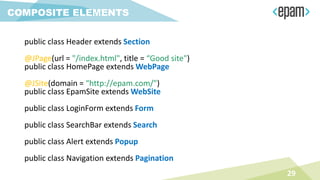
public class Header extends Section
@JPage(url = "/index.html", title = “Good site")
public class HomePage extends WebPage
@JSite(domain = “http://epam.com/")
public class EpamSite extends WebSite
public class LoginForm extends Form
public class SearchBar extends Search
public class Alert extends Popup
public class Navigation extends Pagination
29
COMPOSITE ELEMENTS
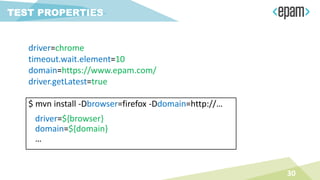
$ mvn install -Dbrowser=firefox -Ddomain=http://…
driver=${browser}
domain=${domain}
…
30
TEST PROPERTIES
driver=chrome
timeout.wait.element=10
domain=https://www.epam.com/
driver.getLatest=true
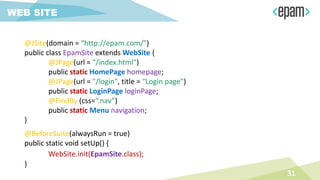
@JSite(domain = “http://epam.com/")
public class EpamSite extends WebSite {
@JPage(url = "/index.html")
public static HomePage homepage;
@JPage(url = "/login", title = “Login page")
public static LoginPage loginPage;
@FindBy (css=“.nav”)
public static Menu navigation;
}
31
WEB SITE
@BeforeSuite(alwaysRun = true)
public static void setUp() {
WebSite.init(EpamSite.class);
}
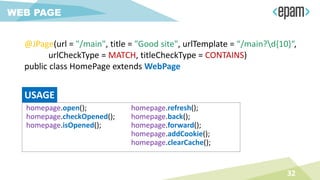
@JPage(url = "/main", title = "Good site", urlTemplate = “/main?d{10}“,
urlCheckType = MATCH, titleCheckType = CONTAINS)
public class HomePage extends WebPage
32
WEB PAGE
homepage.open();
homepage.checkOpened();
homepage.isOpened();
homepage.refresh();
homepage.back();
homepage.forward();
homepage.addCookie();
homepage.clearCache();
USAGE
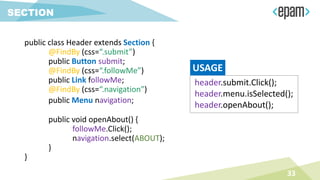
public class Header extends Section {
@FindBy (css=“.submit”)
public Button submit;
@FindBy (css=“.followMe”)
public Link followMe;
@FindBy (css=“.navigation”)
public Menu navigation;
public void openAbout() {
followMe.Click();
navigation.select(ABOUT);
}
}
33
SECTION
header.submit.Click();
header.menu.isSelected();
header.openAbout();
USAGE
ENTITY DRIVEN
TESTING
34
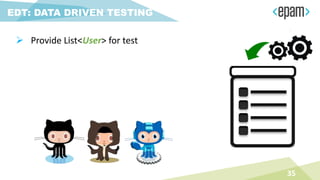
EDT: DATA DRIVEN TESTING
35
 Provide List<User> for test
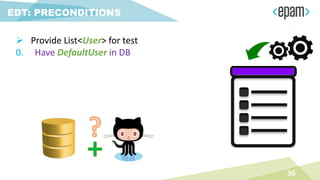
EDT: PRECONDITIONS
36
 Provide List<User> for test
0. Have DefaultUser in DB
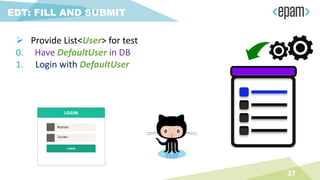
EDT: FILL AND SUBMIT
37
 Provide List<User> for test
0. Have DefaultUser in DB
1. Login with DefaultUser
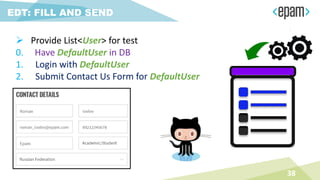
EDT: FILL AND SEND
38
 Provide List<User> for test
0. Have DefaultUser in DB
1. Login with DefaultUser
2. Submit Contact Us Form for DefaultUser
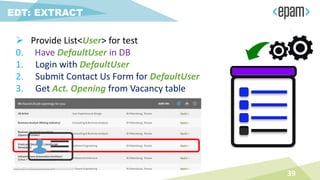
EDT: EXTRACT
39
 Provide List<User> for test
0. Have DefaultUser in DB
1. Login with DefaultUser
2. Submit Contact Us Form for DefaultUser
3. Get Act. Opening from Vacancy table
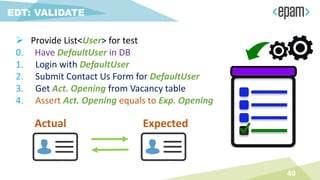
EDT: VALIDATE
40
 Provide List<User> for test
0. Have DefaultUser in DB
1. Login with DefaultUser
2. Submit Contact Us Form for DefaultUser
3. Get Act. Opening from Vacancy table
4. Assert Act. Opening equals to Exp. Opening
ExpectedActual
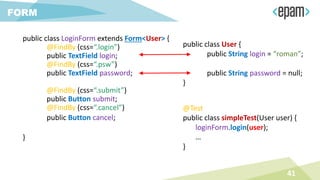
public class LoginForm extends Form<User> {
@FindBy (css=“.login”)
public TextField login;
@FindBy (css=“.psw”)
public TextField password;
@FindBy (css=“.submit”)
public Button submit;
@FindBy (css=“.cancel”)
public Button cancel;
}
41
FORM
public class User {
public String login = “roman”;
public String password = null;
}
@Test
public class simpleTest(User user) {
loginForm.login(user);
…
}
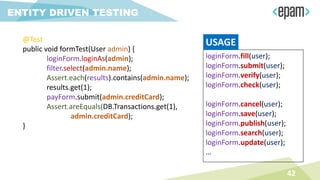
@Test
public void formTest(User admin) {
loginForm.loginAs(admin);
filter.select(admin.name);
Assert.each(results).contains(admin.name);
results.get(1);
payForm.submit(admin.creditCard);
Assert.areEquals(DB.Transactions.get(1),
admin.creditCard);
}
42
ENTITY DRIVEN TESTING
loginForm.fill(user);
loginForm.submit(user);
loginForm.verify(user);
loginForm.check(user);
loginForm.cancel(user);
loginForm.save(user);
loginForm.publish(user);
loginForm.search(user);
loginForm.update(user);
…
USAGE
• @JTable(
• root = @FindBy(className = "search-result-list"),
• row = @FindBy(xpath = ".//li[%s]//div"),
• column = @FindBy(xpath = ".//li//div[%s]"),
• header = {"name", "category", "location", "apply"})
• public EntityTable<Job, JobRecord> jobs =
• new EntityTable<>(Job.class, JobRecord.class);
43
JobsRow job = jobsPage.jobs.firstRow(r ->
textOf(r.title).equals(“Senior QA Engineer”) &&
textOf(r.location).equals(“Saint-Petersburg”))
job.apply.agree.click();
List<Job> jobs = jobsPage.jobs.entites();
Assert.entitiesAreEquals(jobs, expectedJobs);
44
ENTITY TABLES
@FindBy(css = ".list.ui-sortable")
public Elements<FilmCard> filmCards;
filmCards.get(name).title.getText();
Assert.listEquals(filmCards.asData(Film.class), films);
45
ELEMENTS
46
OTHER UI OBJECTS
public class SearchBar extends Search { }
public class Navigation extends Pagination { }
public class Confirmation extends Popup { }
…
public class MyCustom extends CustomObject { }
// implements IComposite
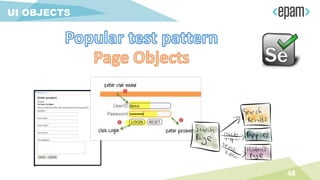
UI OBJECTS
PATTERN
47
48
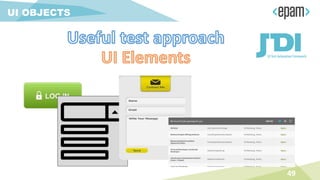
UI OBJECTS
49
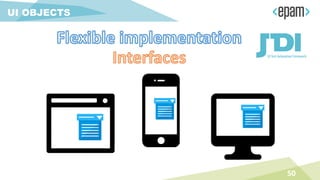
UI OBJECTS
50
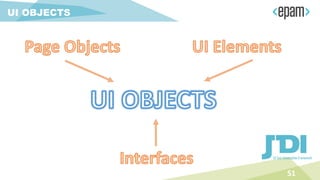
UI OBJECTS
51
UI OBJECTS
TEST SETTINGS
52
driver=${browser}
domain=${domain}
…
53
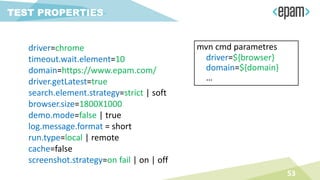
TEST PROPERTIES
driver=chrome
timeout.wait.element=10
domain=https://www.epam.com/
driver.getLatest=true
search.element.strategy=strict | soft
browser.size=1800X1000
demo.mode=false | true
log.message.format = short
run.type=local | remote
cache=false
screenshot.strategy=on fail | on | off
mvn cmd parametres
54
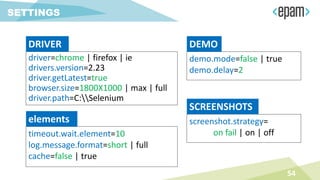
SETTINGS
driver=chrome | firefox | ie
drivers.version=2.23
driver.getLatest=true
browser.size=1800X1000 | max | full
driver.path=C:Selenium
DRIVER
timeout.wait.element=10
log.message.format=short | full
cache=false | true
elements
demo.mode=false | true
demo.delay=2
DEMO
screenshot.strategy=
on fail | on | off
SCREENSHOTS
55
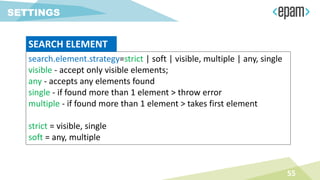
SETTINGS
search.element.strategy=strict | soft | visible, multiple | any, single
visible - accept only visible elements;
any - accepts any elements found
single - if found more than 1 element > throw error
multiple - if found more than 1 element > takes first element
strict = visible, single
soft = any, multiple
SEARCH ELEMENT
LOGGER
56
57
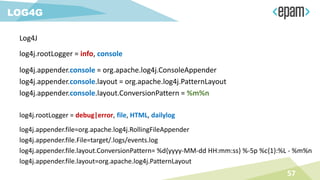
LOG4G
Log4J
log4j.rootLogger = info, console
log4j.appender.console = org.apache.log4j.ConsoleAppender
log4j.appender.console.layout = org.apache.log4j.PatternLayout
log4j.appender.console.layout.ConversionPattern = %m%n
log4j.rootLogger = debug|error, file, HTML, dailylog
log4j.appender.file=org.apache.log4j.RollingFileAppender
log4j.appender.file.File=target/.logs/events.log
log4j.appender.file.layout.ConversionPattern= %d{yyyy-MM-dd HH:mm:ss} %-5p %c{1}:%L - %m%n
log4j.appender.file.layout=org.apache.log4j.PatternLayout
58
LOGGING JDI
JDISettings.logger = SuperLogger.Logger();
logger.info(“Start tests”);
colors.select(BLUE);
[Info] 10:20.154 Start tests
[Info] 10:20.220 Select Blue for Selector ‘Colors' (.Selector; css=‘.colors')
[Debug] 10:21.004 Get web element for Clickable 'Clickable' (.Clickable; css=‘.colors’)
[Debug] 10:21.932 Done
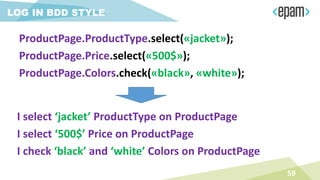
LOG IN BDD STYLE
I select ‘jacket’ ProductType on ProductPage
I select ‘500$’ Price on ProductPage
I check ‘black’ and ‘white’ Colors on ProductPage
59
ProductPage.ProductType.select(«jacket»);
ProductPage.Price.select(«500$»);
ProductPage.Colors.check(«black», «white»);
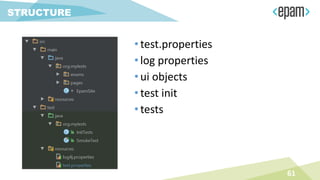
STRUCTURE
60
•test.properties
•log properties
•ui objects
•test init
•tests
61
STRUCTURE
CUSTOMIZATION
62
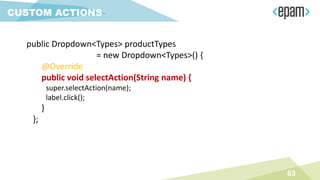
public Dropdown<Types> productTypes
= new Dropdown<Types>() {
@Override
public void selectAction(String name) {
super.selectAction(name);
label.click();
}
};
63
CUSTOM ACTIONS
public class TreeDropdown<T extends Enum> extends Dropdown<T> {
…
@Override
protected void selectAction(String name) {
expandAction();
String[] nodes = name.split(" > ");
SearchContext context = getDriver();
if (treeLocators.size() >= nodes.length)
for (int i=0; i < nodes.length; i++) {
String value = nodes[i];
context = first(context.findElements(treeLocators.get(i)),
el -> el.getText().equals(value));
new Clickable((WebElement) context).click();
}
}
}
64
CUSTOM ELEMENTS
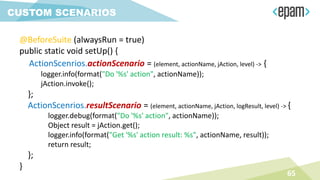
@BeforeSuite (alwaysRun = true)
public static void setUp() {
ActionScenrios.actionScenario = (element, actionName, jAction, level) -> {
logger.info(format("Do '%s' action", actionName));
jAction.invoke();
};
ActionScenrios.resultScenario = (element, actionName, jAction, logResult, level) -> {
logger.debug(format("Do '%s' action", actionName));
Object result = jAction.get();
logger.info(format("Get '%s' action result: %s", actionName, result));
return result;
};
}
65
CUSTOM SCENARIOS
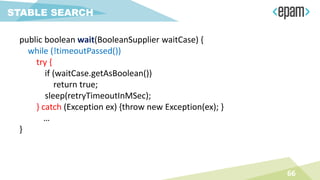
public boolean wait(BooleanSupplier waitCase) {
while (!timeoutPassed())
try {
if (waitCase.getAsBoolean())
return true;
sleep(retryTimeoutInMSec);
} catch (Exception ex) {throw new Exception(ex); }
…
}
66
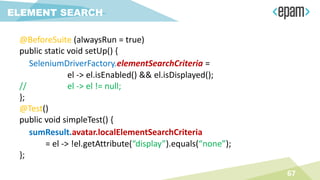
STABLE SEARCH
@BeforeSuite (alwaysRun = true)
public static void setUp() {
SeleniumDriverFactory.elementSearchCriteria =
el -> el.isEnabled() && el.isDisplayed();
// el -> el != null;
};
@Test()
public void simpleTest() {
sumResult.avatar.localElementSearchCriteria
= el -> !el.getAttribute(“display”).equals(“none”);
};
67
ELEMENT SEARCH
PRECONDITIONS
68
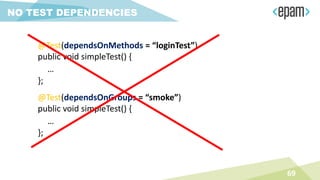
NO TEST DEPENDENCIES
69
@Test(dependsOnMethods = “loginTest”)
public void simpleTest() {
…
};
@Test(dependsOnGroups = “smoke”)
public void simpleTest() {
…
};
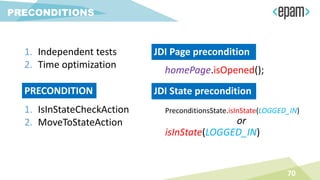
1. Independent tests
2. Time optimization
70
PRECONDITIONS
PRECONDITION
1. IsInStateCheckAction
2. MoveToStateAction
JDI Page precondition
homePage.isOpened();
JDI State precondition
PreconditionsState.isInState(LOGGED_IN)
or
isInState(LOGGED_IN)
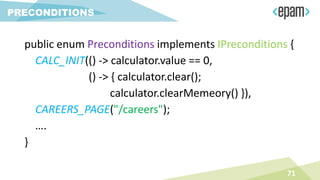
71
PRECONDITIONS
public enum Preconditions implements IPreconditions {
CALC_INIT(() -> calculator.value == 0,
() -> { calculator.clear();
calculator.clearMemeory() }),
CAREERS_PAGE("/careers");
….
}
DEMO: PRECONDITIONS
72
MATCHERS
73
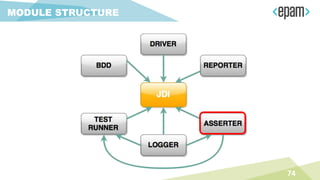
MODULE STRUCTURE
74
75
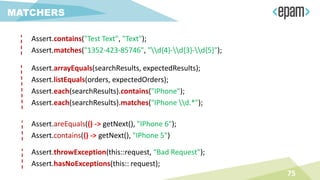
MATCHERS
Assert.contains("Test Text", "Text");
Assert.matches("1352-423-85746", "d{4}-d{3}-d{5}");
Assert.arrayEquals(searchResults, expectedResults);
Assert.listEquals(orders, expectedOrders);
Assert.each(searchResults).contains("IPhone");
Assert.each(searchResults).matches("IPhone d.*");
Assert.areEquals(() -> getNext(), "IPhone 6");
Assert.contains(() -> getNext(), "IPhone 5")
Assert.throwException(this::request, “Bad Request");
Assert.hasNoExceptions(this:: request);
76
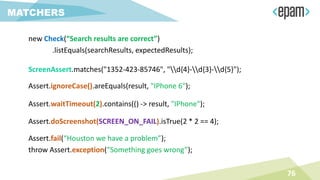
MATCHERS
new Check(“Search results are correct”)
.listEquals(searchResults, expectedResults);
ScreenAssert.matches("1352-423-85746", "d{4}-d{3}-d{5}");
Assert.ignoreCase().areEquals(result, "IPhone 6");
Assert.waitTimeout(2).contains(() -> result, "IPhone");
Assert.doScreenshot(SCREEN_ON_FAIL).isTrue(2 * 2 == 4);
Assert.fail(“Houston we have a problem”);
throw Assert.exception(“Something goes wrong”);
INTERFACES
77
78
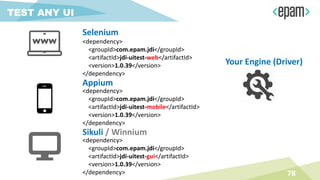
TEST ANY UI
<dependency>
<groupId>com.epam.jdi</groupId>
<artifactId>jdi-uitest-web</artifactId>
<version>1.0.39</version>
</dependency>
<dependency>
<groupId>com.epam.jdi</groupId>
<artifactId>jdi-uitest-gui</artifactId>
<version>1.0.39</version>
</dependency>
<dependency>
<groupId>com.epam.jdi</groupId>
<artifactId>jdi-uitest-mobile</artifactId>
<version>1.0.39</version>
</dependency>
Selenium
Appium
Sikuli / Winnium
Your Engine (Driver)
79
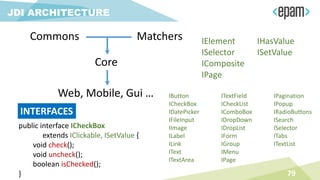
JDI ARCHITECTURE
Commons
Core
Matchers
Web, Mobile, Gui …
public interface ICheckBox
extends IClickable, ISetValue {
void check();
void uncheck();
boolean isChecked();
}
INTERFACES
IElement
ISelector
IComposite
IPage
IHasValue
ISetValue
IButton
ICheckBox
IDatePicker
IFileInput
IImage
ILabel
ILink
IText
ITextArea
ITextField
ICheckList
IComboBox
IDropDown
IDropList
IForm
IGroup
IMenu
IPage
IPagination
IPopup
IRadioButtons
ISearch
ISelector
ITabs
ITextList
80
INTERFACES
public class Header extends Section {
@FindBy (css=“.submit”)
public IButton submit;
@FindBy (css=“.followMe”)
public ILink followMe;
@FindBy (css=“.navigation”)
public IMenu navigation;
}
MapInterfaceToElement.update(
new Object[][] {
{ IDropDown.class, MyDropDown.class},
{ IButton.class, MyButton.class},
{ ITable.class, CustomTable.class}
});
PARALLEL
TEST RUN
81
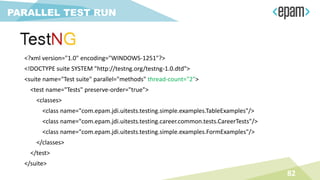
<?xml version="1.0" encoding="WINDOWS-1251"?>
<!DOCTYPE suite SYSTEM "http://testng.org/testng-1.0.dtd">
<suite name="Test suite" parallel="methods" thread-count="2">
<test name="Tests" preserve-order="true">
<classes>
<class name="com.epam.jdi.uitests.testing.simple.examples.TableExamples"/>
<class name="com.epam.jdi.uitests.testing.career.common.tests.CareerTests"/>
<class name="com.epam.jdi.uitests.testing.simple.examples.FormExamples"/>
</classes>
</test>
</suite>
82
PARALLEL TEST RUN
INSTRUCTION
83
84
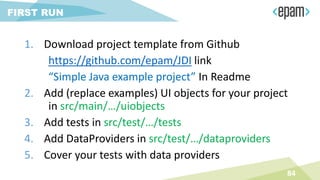
FIRST RUN
1. Download project template from Github
https://github.com/epam/JDI link
“Simple Java example project” In Readme
2. Add (replace examples) UI objects for your project
in src/main/…/uiobjects
3. Add tests in src/test/…/tests
4. Add DataProviders in src/test/…/dataproviders
5. Cover your tests with data providers
85
INSTRUCTION
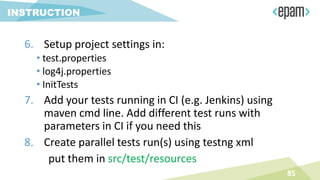
6. Setup project settings in:
• test.properties
• log4j.properties
• InitTests
7. Add your tests running in CI (e.g. Jenkins) using
maven cmd line. Add different test runs with
parameters in CI if you need this
8. Create parallel tests run(s) using testng xml
put them in src/test/resources
FOR BUSINESS
86
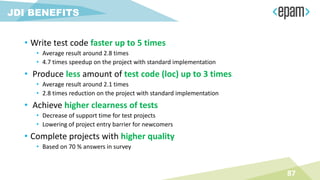
• Write test code faster up to 5 times
• Average result around 2.8 times
• 4.7 times speedup on the project with standard implementation
• Produce less amount of test code (loc) up to 3 times
• Average result around 2.1 times
• 2.8 times reduction on the project with standard implementation
• Achieve higher clearness of tests
• Decrease of support time for test projects
• Lowering of project entry barrier for newcomers
• Complete projects with higher quality
• Based on 70 % answers in survey
87
JDI BENEFITS
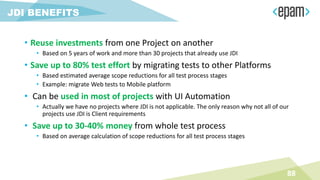
• Reuse investments from one Project on another
• Based on 5 years of work and more than 30 projects that already use JDI
• Save up to 80% test effort by migrating tests to other Platforms
• Based estimated average scope reductions for all test process stages
• Example: migrate Web tests to Mobile platform
• Can be used in most of projects with UI Automation
• Actually we have no projects where JDI is not applicable. The only reason why not all of our
projects use JDI is Client requirements
• Save up to 30-40% money from whole test process
• Based on average calculation of scope reductions for all test process stages
88
JDI BENEFITS
FUTURE
89
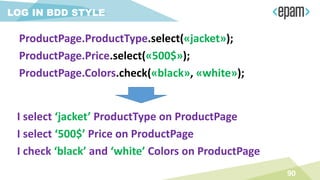
LOG IN BDD STYLE
I select ‘jacket’ ProductType on ProductPage
I select ‘500$’ Price on ProductPage
I check ‘black’ and ‘white’ Colors on ProductPage
90
ProductPage.ProductType.select(«jacket»);
ProductPage.Price.select(«500$»);
ProductPage.Colors.check(«black», «white»);
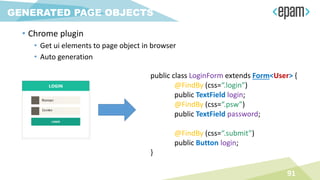
• Chrome plugin
• Get ui elements to page object in browser
• Auto generation
91
GENERATED PAGE OBJECTS
public class LoginForm extends Form<User> {
@FindBy (css=“.login”)
public TextField login;
@FindBy (css=“.psw”)
public TextField password;
@FindBy (css=“.submit”)
public Button login;
}
92
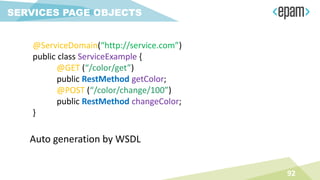
SERVICES PAGE OBJECTS
@ServiceDomain(“http://service.com”)
public class ServiceExample {
@GET (“/color/get”)
public RestMethod getColor;
@POST (“/color/change/100”)
public RestMethod changeColor;
}
Auto generation by WSDL
93
DB TESTING SUPPORT
94
SIMPLE TESTS GENERATOR
95
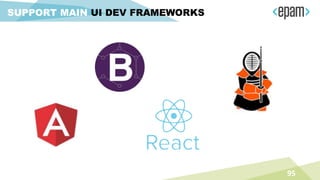
SUPPORT MAIN UI DEV FRAMEWORKS
96
PERFORMANCE / STATISTIC
97
SNIFF HTTP REQUESTS
98
SUPPORT JS / PHYTON
GOOD
PRACTICES
99
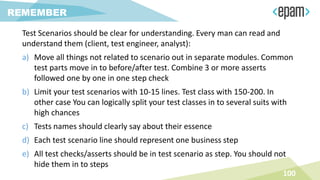
Test Scenarios should be clear for understanding. Every man can read and
understand them (client, test engineer, analyst):
a) Move all things not related to scenario out in separate modules. Common
test parts move in to before/after test. Combine 3 or more asserts
followed one by one in one step check
b) Limit your test scenarios with 10-15 lines. Test class with 150-200. In
other case You can logically split your test classes in to several suits with
high chances
c) Tests names should clearly say about their essence
d) Each test scenario line should represent one business step
e) All test checks/asserts should be in test scenario as step. You should not
hide them in to steps
100
REMEMBER
Test scenarios are useless without right test infrastructure:
a) Tests should run on regular basement on CI. Your test scenarios should be
ready to get settings from command line (environment domain, test
group, browser etc.)
b) Test suit should work stable on stable build. If some tests falls randomly.
You must fix them or temporarily remove them from test suit
c) Tests should represent all info about test run in suitable format. They
should provide detailed enough log about scenario steps and provide
visible reports
101
REMEMBER
• Tests should be independent. Each test should be run separetly. Use
preconditions in order to move test to expected state. Tests should not
disturb one to another. If some tests should use common data then move
them in separate group
• Never use ThreadSleep. Wait some application state (page load, end of
ajax…) or next element appearance instead
• Use your brain and get pleasure from testing. If automation testing not
make you happy possibly you doing something wrong. Think about it
102
REMEMBER
103
ENJOY
104
CONTACTS
http://jdi.epam.com/
https://vk.com/jdi_framework
https://github.com/epam/JDI
• UI Objects
• typified Elements
• typified Objects
• Entity Driven testing
• Interfaces
roman.Iovlev
roman_iovlev@epam.com

Roman iovlev. Test UI with JDI - Selenium camp

  • 1.
    UI WITH JDI EASYFAST GOOD 24 FEBRUARY 2017
  • 2.
    Chief QA Automation InTesting more than 11 years In Testing Automation 9 years ROMAN IOVLEV
  • 3.
  • 4.
  • 5.
  • 6.
  • 7.
  • 8.
  • 9.
  • 10.
    PAGE OBJECTS Tests PageObjects Driver (Engine) Application ELEMENTS private WebElement UserName; private WebElement Password; private WebElement LoginButton; • ACTIONS • EnterUserName(String name); • EnterPassword(String name); • ClickLoginButton(); • BUSINESS ACTIONS • Login(User user) 10
  • 11.
    PAGE ELEMENTS ELEMENTS public TextFieldUserName; public TextField Password; public Button LoginButton; • ACTIONS • --- • BUSINESS ACTIONS • Login(User user) ELEMENT public DropDown UserStatus; • ACTIONS • Select(string option) • bool IsSelcted() • List<string> AllOptions() • string GetValue() 11
  • 12.
  • 13.
  • 14.
    SIMPLE ELEMENTS @FindBy (css=“.description”) publicText description; public Button submit; public Label productName; public Link followMe; public TextField password; public TextArea abuse; public CheckBox rememberMe; public DatePicker date; public FileInput upload; public Image photo; 14 NEWS
  • 15.
    SIMPLE ELEMENTS @FindBy (css=“.btn”) publicButton submit; 15 @FindBy (css=“.btn”) @FindBy (xpath=“//button”) @FindBy (id=“button-id”) @FindBy (name=“button”)@FindBy (css=“.btn”) public Button submit = new Button(By.css(“.btn”)); @FindBy (css=“.btn”) public IButton submit; @JFindBy (text=“Submit”) @JFindBy (model=“btn-model”) @JFindBy (binding=“btn”) @JFindBy (repeater=“r-button”)
  • 16.
    MULTILOCATORS 16 Multi language testing @JFindBy(text=“Submit”, group=“en”) @JFindBy (text=“Отправить” , group=“ru”) public Button submit; Multi version testing @JFindBy (text=“Submit”, group=“1.7”) @JFindBy (value=“Submit” , group=“2.0”) public Button submit;
  • 17.
    PLATO'S THEORY OFFORMS 5 No application but you can write UI Objects (Page Objects ) IButton
  • 18.
  • 19.
    COMPLEX ELEMENTS public Dropdowncolors; public Checklist settings; public ComboBox tags; public DropList shirtSizes; public List<Element> searchResults; public Elements reviews; public Table products; public Menu mainMenu; public Tabs areas; public Selector vote; public RadioButtons rating; public TextList chat; 19
  • 20.
    COMPLEX ELEMENTS @JDropdown ( root= @FindBy(css = “.colors"), value = @FindBy(css = “.value"), elementByName = @FindBy(tagName = “li")) public Dropdown colors; @JTable( root = @FindBy (css = “.offers"), row = @FindBy (xpath = ".//li[%s]//div"), column = @FindBy (xpath = ".//li//div[%s]"), header = {“ID", “Title", “Apply”} ) public Table offers; 20
  • 21.
    COMPLEX ELEMENTS @FindBy(css =“.colors") public Dropdown colors; @FindBy(css = “.table”) public Table offers; 21 @FindBy(css = “.menu li”) public Menu navigation; @FindBy(css = “.menu ul”) public Menu navigation; @FindBy(xpath = “//*[@class=‘menu’]//li[text()=‘%s’]”) public Menu navigation;
  • 22.
  • 23.
    23 ENUMS IN COMPLEXELEMENTS public Menu<Options> topMenu; public enum Options { Home, About, Contacts } public enum Options { Home(‘option-1’), About(‘option-3’), public String value; Options (String value) { this.value = value; } @Override public String toString() { return value; } } public Dropdown<Colors> colors; public Tabs<Areas> areas; public Checklist<Settings> settings; public ComboBox<Tags> tags; public DropList<Sizes> shirtSizes; public Selector<VoteOptions> vote; public RadioButtons<Ratings> rating; topMenu.select(Options.About);topMenu.select(About);
  • 24.
    • Code readability •Clear behavior • Union of all element’s locators • Union of element and its actions • Detailed logging TYPIFIED ELEMENTS 24
  • 25.
    Text Description; Button Submit; LabelProductName; Link FollowMe; TextField Password; TextArea Abuse; CheckBox RememberMe; DatePicker Date; FileInput Upload; Image Photo; WebElement Description; WebElement SubmitButton; WebElement ProductName; WebElement FollowMeLink; WebElement PasswordField; WebElement Abuse; WebElement RememberMe; WebElement DatePicker; WebElement Upload; WebElement Photo; COMPARE 25
  • 26.
    COMPARE @JDropdown (root =@FindBy(css = “.colors"), value = @FindBy(css = “.value"), elementByName = @FindBy(tagName = “li")) Dropdown Colors; @FindBy(css = “.colors .value") WebElement ColorsValue; @FindBy(css = “.colors li") List<WebElement> ColorsList; public string getColor() { return ColorsValue.getText(); } public void selectColor(string colorName) { ColorsValue.Click(); for (WebElement color : ColorsList) if (color.getText().Equals(colorName) { color.Click(); return; } 26
  • 27.
    COMPARE @FindBy (id =“trades") public Table Colors; @FindBy(css = "") private List<WebElement> resultsColHeaders; @FindBy(css = "") private List<WebElement> resultsRowsHeaders; @FindBy(css = "") private List<WebElement> resultsCellsHeaders; @FindBy(css = "") private List<WebElement> resultsColumn; @FindBy(css = "") private List<WebElement> resultsRow; ICell cell(Column column, Row row) { } ICell cell(String columnName, String rowName) { } ICell cell(int columnIndex, int rowIndex) { } List<ICell> cells(String value) { } List<ICell> cellsMatch(String regex) { } ICell cell(String value) { } ICell cellMatch(String regex) { } MapArray<String, MapArray<String, ICell>> rows(String... colNameValues) { } MapArray<String, MapArray<String, ICell>> columns(String... rowNameValues) { } boolean waitValue(String value, Row row) { } boolean waitValue(String value, Column column) { } boolean isEmpty() { } boolean waitHaveRows() { } boolean waitRows(int count) { } ICell cell(String value, Row row) { } ICell cell(String value, Column column) { } List<ICell> cellsMatch(String regex, Row row) { } List<ICell> cellsMatch(String regex, Column column) { } MapArray<String, ICell> row(String value, Column column) { } MapArray<String, ICell> column(String value, Row row) { } MapArray<String, ICell> row(int rowNum) { } MapArray<String, ICell> row(String rowName) { } List<String> rowValue(int colNum) { } List<String> rowValue(String colName) { } MapArray<String, ICell> column(int colNum) { } MapArray<String, ICell> column(String colName) { } List<String> columnValue(int colNum) { } List<String> columnValue(String colName) { } MapArray<String, SelectElement> header() { } SelectElement header(String name) { } List<String> headers() { } List<String> footer() { } List<ICell> getCells() { } void clean() { } void clear() { } ITable useCache(boolean value) { } ITable useCache() { } Table clone() { } Table copy() { } ITable hasAllHeaders() { } ITable hasNoHeaders() { } ITable hasOnlyColumnHeaders() { } ITable hasOnlyRowHeaders() { } ITable hasColumnHeaders(List<String> value) { } <THeaders extends Enum> ITable hasColumnHeaders(Class<THeaders> headers) { } ITable hasRowHeaders(List<String> value) { } <THeaders extends Enum> ITable hasRowHeaders(Class<THeaders> headers) { } ITable setColumnsCount(int value) { } ITable setRowsCount(int value) { } 27
  • 28.
  • 29.
    public class Headerextends Section @JPage(url = "/index.html", title = “Good site") public class HomePage extends WebPage @JSite(domain = “http://epam.com/") public class EpamSite extends WebSite public class LoginForm extends Form public class SearchBar extends Search public class Alert extends Popup public class Navigation extends Pagination 29 COMPOSITE ELEMENTS
  • 30.
    $ mvn install-Dbrowser=firefox -Ddomain=http://… driver=${browser} domain=${domain} … 30 TEST PROPERTIES driver=chrome timeout.wait.element=10 domain=https://www.epam.com/ driver.getLatest=true
  • 31.
    @JSite(domain = “http://epam.com/") publicclass EpamSite extends WebSite { @JPage(url = "/index.html") public static HomePage homepage; @JPage(url = "/login", title = “Login page") public static LoginPage loginPage; @FindBy (css=“.nav”) public static Menu navigation; } 31 WEB SITE @BeforeSuite(alwaysRun = true) public static void setUp() { WebSite.init(EpamSite.class); }
  • 32.
    @JPage(url = "/main",title = "Good site", urlTemplate = “/main?d{10}“, urlCheckType = MATCH, titleCheckType = CONTAINS) public class HomePage extends WebPage 32 WEB PAGE homepage.open(); homepage.checkOpened(); homepage.isOpened(); homepage.refresh(); homepage.back(); homepage.forward(); homepage.addCookie(); homepage.clearCache(); USAGE
  • 33.
    public class Headerextends Section { @FindBy (css=“.submit”) public Button submit; @FindBy (css=“.followMe”) public Link followMe; @FindBy (css=“.navigation”) public Menu navigation; public void openAbout() { followMe.Click(); navigation.select(ABOUT); } } 33 SECTION header.submit.Click(); header.menu.isSelected(); header.openAbout(); USAGE
  • 34.
  • 35.
    EDT: DATA DRIVENTESTING 35  Provide List<User> for test
  • 36.
    EDT: PRECONDITIONS 36  ProvideList<User> for test 0. Have DefaultUser in DB
  • 37.
    EDT: FILL ANDSUBMIT 37  Provide List<User> for test 0. Have DefaultUser in DB 1. Login with DefaultUser
  • 38.
    EDT: FILL ANDSEND 38  Provide List<User> for test 0. Have DefaultUser in DB 1. Login with DefaultUser 2. Submit Contact Us Form for DefaultUser
  • 39.
    EDT: EXTRACT 39  ProvideList<User> for test 0. Have DefaultUser in DB 1. Login with DefaultUser 2. Submit Contact Us Form for DefaultUser 3. Get Act. Opening from Vacancy table
  • 40.
    EDT: VALIDATE 40  ProvideList<User> for test 0. Have DefaultUser in DB 1. Login with DefaultUser 2. Submit Contact Us Form for DefaultUser 3. Get Act. Opening from Vacancy table 4. Assert Act. Opening equals to Exp. Opening ExpectedActual
  • 41.
    public class LoginFormextends Form<User> { @FindBy (css=“.login”) public TextField login; @FindBy (css=“.psw”) public TextField password; @FindBy (css=“.submit”) public Button submit; @FindBy (css=“.cancel”) public Button cancel; } 41 FORM public class User { public String login = “roman”; public String password = null; } @Test public class simpleTest(User user) { loginForm.login(user); … }
  • 42.
    @Test public void formTest(Useradmin) { loginForm.loginAs(admin); filter.select(admin.name); Assert.each(results).contains(admin.name); results.get(1); payForm.submit(admin.creditCard); Assert.areEquals(DB.Transactions.get(1), admin.creditCard); } 42 ENTITY DRIVEN TESTING loginForm.fill(user); loginForm.submit(user); loginForm.verify(user); loginForm.check(user); loginForm.cancel(user); loginForm.save(user); loginForm.publish(user); loginForm.search(user); loginForm.update(user); … USAGE
  • 43.
    • @JTable( • root= @FindBy(className = "search-result-list"), • row = @FindBy(xpath = ".//li[%s]//div"), • column = @FindBy(xpath = ".//li//div[%s]"), • header = {"name", "category", "location", "apply"}) • public EntityTable<Job, JobRecord> jobs = • new EntityTable<>(Job.class, JobRecord.class); 43
  • 44.
    JobsRow job =jobsPage.jobs.firstRow(r -> textOf(r.title).equals(“Senior QA Engineer”) && textOf(r.location).equals(“Saint-Petersburg”)) job.apply.agree.click(); List<Job> jobs = jobsPage.jobs.entites(); Assert.entitiesAreEquals(jobs, expectedJobs); 44 ENTITY TABLES
  • 45.
    @FindBy(css = ".list.ui-sortable") publicElements<FilmCard> filmCards; filmCards.get(name).title.getText(); Assert.listEquals(filmCards.asData(Film.class), films); 45 ELEMENTS
  • 46.
    46 OTHER UI OBJECTS publicclass SearchBar extends Search { } public class Navigation extends Pagination { } public class Confirmation extends Popup { } … public class MyCustom extends CustomObject { } // implements IComposite
  • 47.
  • 48.
  • 49.
  • 50.
  • 51.
  • 52.
  • 53.
    driver=${browser} domain=${domain} … 53 TEST PROPERTIES driver=chrome timeout.wait.element=10 domain=https://www.epam.com/ driver.getLatest=true search.element.strategy=strict |soft browser.size=1800X1000 demo.mode=false | true log.message.format = short run.type=local | remote cache=false screenshot.strategy=on fail | on | off mvn cmd parametres
  • 54.
    54 SETTINGS driver=chrome | firefox| ie drivers.version=2.23 driver.getLatest=true browser.size=1800X1000 | max | full driver.path=C:Selenium DRIVER timeout.wait.element=10 log.message.format=short | full cache=false | true elements demo.mode=false | true demo.delay=2 DEMO screenshot.strategy= on fail | on | off SCREENSHOTS
  • 55.
    55 SETTINGS search.element.strategy=strict | soft| visible, multiple | any, single visible - accept only visible elements; any - accepts any elements found single - if found more than 1 element > throw error multiple - if found more than 1 element > takes first element strict = visible, single soft = any, multiple SEARCH ELEMENT
  • 56.
  • 57.
    57 LOG4G Log4J log4j.rootLogger = info,console log4j.appender.console = org.apache.log4j.ConsoleAppender log4j.appender.console.layout = org.apache.log4j.PatternLayout log4j.appender.console.layout.ConversionPattern = %m%n log4j.rootLogger = debug|error, file, HTML, dailylog log4j.appender.file=org.apache.log4j.RollingFileAppender log4j.appender.file.File=target/.logs/events.log log4j.appender.file.layout.ConversionPattern= %d{yyyy-MM-dd HH:mm:ss} %-5p %c{1}:%L - %m%n log4j.appender.file.layout=org.apache.log4j.PatternLayout
  • 58.
    58 LOGGING JDI JDISettings.logger =SuperLogger.Logger(); logger.info(“Start tests”); colors.select(BLUE); [Info] 10:20.154 Start tests [Info] 10:20.220 Select Blue for Selector ‘Colors' (.Selector; css=‘.colors') [Debug] 10:21.004 Get web element for Clickable 'Clickable' (.Clickable; css=‘.colors’) [Debug] 10:21.932 Done
  • 59.
    LOG IN BDDSTYLE I select ‘jacket’ ProductType on ProductPage I select ‘500$’ Price on ProductPage I check ‘black’ and ‘white’ Colors on ProductPage 59 ProductPage.ProductType.select(«jacket»); ProductPage.Price.select(«500$»); ProductPage.Colors.check(«black», «white»);
  • 60.
  • 61.
  • 62.
  • 63.
    public Dropdown<Types> productTypes =new Dropdown<Types>() { @Override public void selectAction(String name) { super.selectAction(name); label.click(); } }; 63 CUSTOM ACTIONS
  • 64.
    public class TreeDropdown<Textends Enum> extends Dropdown<T> { … @Override protected void selectAction(String name) { expandAction(); String[] nodes = name.split(" > "); SearchContext context = getDriver(); if (treeLocators.size() >= nodes.length) for (int i=0; i < nodes.length; i++) { String value = nodes[i]; context = first(context.findElements(treeLocators.get(i)), el -> el.getText().equals(value)); new Clickable((WebElement) context).click(); } } } 64 CUSTOM ELEMENTS
  • 65.
    @BeforeSuite (alwaysRun =true) public static void setUp() { ActionScenrios.actionScenario = (element, actionName, jAction, level) -> { logger.info(format("Do '%s' action", actionName)); jAction.invoke(); }; ActionScenrios.resultScenario = (element, actionName, jAction, logResult, level) -> { logger.debug(format("Do '%s' action", actionName)); Object result = jAction.get(); logger.info(format("Get '%s' action result: %s", actionName, result)); return result; }; } 65 CUSTOM SCENARIOS
  • 66.
    public boolean wait(BooleanSupplierwaitCase) { while (!timeoutPassed()) try { if (waitCase.getAsBoolean()) return true; sleep(retryTimeoutInMSec); } catch (Exception ex) {throw new Exception(ex); } … } 66 STABLE SEARCH
  • 67.
    @BeforeSuite (alwaysRun =true) public static void setUp() { SeleniumDriverFactory.elementSearchCriteria = el -> el.isEnabled() && el.isDisplayed(); // el -> el != null; }; @Test() public void simpleTest() { sumResult.avatar.localElementSearchCriteria = el -> !el.getAttribute(“display”).equals(“none”); }; 67 ELEMENT SEARCH
  • 68.
  • 69.
    NO TEST DEPENDENCIES 69 @Test(dependsOnMethods= “loginTest”) public void simpleTest() { … }; @Test(dependsOnGroups = “smoke”) public void simpleTest() { … };
  • 70.
    1. Independent tests 2.Time optimization 70 PRECONDITIONS PRECONDITION 1. IsInStateCheckAction 2. MoveToStateAction JDI Page precondition homePage.isOpened(); JDI State precondition PreconditionsState.isInState(LOGGED_IN) or isInState(LOGGED_IN)
  • 71.
    71 PRECONDITIONS public enum Preconditionsimplements IPreconditions { CALC_INIT(() -> calculator.value == 0, () -> { calculator.clear(); calculator.clearMemeory() }), CAREERS_PAGE("/careers"); …. }
  • 72.
  • 73.
  • 74.
  • 75.
    75 MATCHERS Assert.contains("Test Text", "Text"); Assert.matches("1352-423-85746","d{4}-d{3}-d{5}"); Assert.arrayEquals(searchResults, expectedResults); Assert.listEquals(orders, expectedOrders); Assert.each(searchResults).contains("IPhone"); Assert.each(searchResults).matches("IPhone d.*"); Assert.areEquals(() -> getNext(), "IPhone 6"); Assert.contains(() -> getNext(), "IPhone 5") Assert.throwException(this::request, “Bad Request"); Assert.hasNoExceptions(this:: request);
  • 76.
    76 MATCHERS new Check(“Search resultsare correct”) .listEquals(searchResults, expectedResults); ScreenAssert.matches("1352-423-85746", "d{4}-d{3}-d{5}"); Assert.ignoreCase().areEquals(result, "IPhone 6"); Assert.waitTimeout(2).contains(() -> result, "IPhone"); Assert.doScreenshot(SCREEN_ON_FAIL).isTrue(2 * 2 == 4); Assert.fail(“Houston we have a problem”); throw Assert.exception(“Something goes wrong”);
  • 77.
  • 78.
  • 79.
    79 JDI ARCHITECTURE Commons Core Matchers Web, Mobile,Gui … public interface ICheckBox extends IClickable, ISetValue { void check(); void uncheck(); boolean isChecked(); } INTERFACES IElement ISelector IComposite IPage IHasValue ISetValue IButton ICheckBox IDatePicker IFileInput IImage ILabel ILink IText ITextArea ITextField ICheckList IComboBox IDropDown IDropList IForm IGroup IMenu IPage IPagination IPopup IRadioButtons ISearch ISelector ITabs ITextList
  • 80.
    80 INTERFACES public class Headerextends Section { @FindBy (css=“.submit”) public IButton submit; @FindBy (css=“.followMe”) public ILink followMe; @FindBy (css=“.navigation”) public IMenu navigation; } MapInterfaceToElement.update( new Object[][] { { IDropDown.class, MyDropDown.class}, { IButton.class, MyButton.class}, { ITable.class, CustomTable.class} });
  • 81.
  • 82.
    <?xml version="1.0" encoding="WINDOWS-1251"?> <!DOCTYPEsuite SYSTEM "http://testng.org/testng-1.0.dtd"> <suite name="Test suite" parallel="methods" thread-count="2"> <test name="Tests" preserve-order="true"> <classes> <class name="com.epam.jdi.uitests.testing.simple.examples.TableExamples"/> <class name="com.epam.jdi.uitests.testing.career.common.tests.CareerTests"/> <class name="com.epam.jdi.uitests.testing.simple.examples.FormExamples"/> </classes> </test> </suite> 82 PARALLEL TEST RUN
  • 83.
  • 84.
    84 FIRST RUN 1. Downloadproject template from Github https://github.com/epam/JDI link “Simple Java example project” In Readme 2. Add (replace examples) UI objects for your project in src/main/…/uiobjects 3. Add tests in src/test/…/tests 4. Add DataProviders in src/test/…/dataproviders 5. Cover your tests with data providers
  • 85.
    85 INSTRUCTION 6. Setup projectsettings in: • test.properties • log4j.properties • InitTests 7. Add your tests running in CI (e.g. Jenkins) using maven cmd line. Add different test runs with parameters in CI if you need this 8. Create parallel tests run(s) using testng xml put them in src/test/resources
  • 86.
  • 87.
    • Write testcode faster up to 5 times • Average result around 2.8 times • 4.7 times speedup on the project with standard implementation • Produce less amount of test code (loc) up to 3 times • Average result around 2.1 times • 2.8 times reduction on the project with standard implementation • Achieve higher clearness of tests • Decrease of support time for test projects • Lowering of project entry barrier for newcomers • Complete projects with higher quality • Based on 70 % answers in survey 87 JDI BENEFITS
  • 88.
    • Reuse investmentsfrom one Project on another • Based on 5 years of work and more than 30 projects that already use JDI • Save up to 80% test effort by migrating tests to other Platforms • Based estimated average scope reductions for all test process stages • Example: migrate Web tests to Mobile platform • Can be used in most of projects with UI Automation • Actually we have no projects where JDI is not applicable. The only reason why not all of our projects use JDI is Client requirements • Save up to 30-40% money from whole test process • Based on average calculation of scope reductions for all test process stages 88 JDI BENEFITS
  • 89.
  • 90.
    LOG IN BDDSTYLE I select ‘jacket’ ProductType on ProductPage I select ‘500$’ Price on ProductPage I check ‘black’ and ‘white’ Colors on ProductPage 90 ProductPage.ProductType.select(«jacket»); ProductPage.Price.select(«500$»); ProductPage.Colors.check(«black», «white»);
  • 91.
    • Chrome plugin •Get ui elements to page object in browser • Auto generation 91 GENERATED PAGE OBJECTS public class LoginForm extends Form<User> { @FindBy (css=“.login”) public TextField login; @FindBy (css=“.psw”) public TextField password; @FindBy (css=“.submit”) public Button login; }
  • 92.
    92 SERVICES PAGE OBJECTS @ServiceDomain(“http://service.com”) publicclass ServiceExample { @GET (“/color/get”) public RestMethod getColor; @POST (“/color/change/100”) public RestMethod changeColor; } Auto generation by WSDL
  • 93.
  • 94.
  • 95.
    95 SUPPORT MAIN UIDEV FRAMEWORKS
  • 96.
  • 97.
  • 98.
  • 99.
  • 100.
    Test Scenarios shouldbe clear for understanding. Every man can read and understand them (client, test engineer, analyst): a) Move all things not related to scenario out in separate modules. Common test parts move in to before/after test. Combine 3 or more asserts followed one by one in one step check b) Limit your test scenarios with 10-15 lines. Test class with 150-200. In other case You can logically split your test classes in to several suits with high chances c) Tests names should clearly say about their essence d) Each test scenario line should represent one business step e) All test checks/asserts should be in test scenario as step. You should not hide them in to steps 100 REMEMBER
  • 101.
    Test scenarios areuseless without right test infrastructure: a) Tests should run on regular basement on CI. Your test scenarios should be ready to get settings from command line (environment domain, test group, browser etc.) b) Test suit should work stable on stable build. If some tests falls randomly. You must fix them or temporarily remove them from test suit c) Tests should represent all info about test run in suitable format. They should provide detailed enough log about scenario steps and provide visible reports 101 REMEMBER
  • 102.
    • Tests shouldbe independent. Each test should be run separetly. Use preconditions in order to move test to expected state. Tests should not disturb one to another. If some tests should use common data then move them in separate group • Never use ThreadSleep. Wait some application state (page load, end of ajax…) or next element appearance instead • Use your brain and get pleasure from testing. If automation testing not make you happy possibly you doing something wrong. Think about it 102 REMEMBER
  • 103.
  • 104.
    104 CONTACTS http://jdi.epam.com/ https://vk.com/jdi_framework https://github.com/epam/JDI • UI Objects •typified Elements • typified Objects • Entity Driven testing • Interfaces roman.Iovlev roman_iovlev@epam.com

Editor's Notes

  • #3 Работаю в компании Epam в
  • #18 Why we develop it? Some people formulate it as “Why you create one more wheel”
  • #73 Demo Элементы на UI