Greedy Algorithms
(Huffman Coding)
Slide 1
Huffman Coding
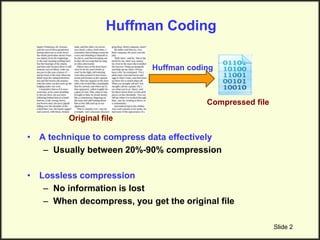
• A technique to compress data effectively
– Usually between 20%-90% compression
• Lossless compression
– No information is lost
– When decompress, you get the original file
Slide 2
Original file
Compressed file
Huffman coding
Huffman Coding: Applications
• Saving space
– Store compressed files instead of original files
• Transmitting files or data
– Send compressed data to save transmission time and power
• Encryption and decryption
– Cannot read the compressed file without knowing the “key”
Slide 3
Original file
Compressed file
Huffman coding
Main Idea: Frequency-Based Encoding
• Assume in this file only 6 characters appear
– E, A, C, T, K, N
• The frequencies are: Character Frequency
E 10,000
A 4,000
C 300
T 200
K 100
N 100
• Option I (No Compression)
– Each character = 1 Byte (8 bits)
– Total file size = 14,700 * 8 = 117,600 bits
• Option 2 (Fixed size compression)
– We have 6 characters, so we need
3 bits to encode them
– Total file size = 14,700 * 3 = 44,100 bits
Character Fixed Encoding
E 000
A 001
C 010
T 100
K 110
N 111
Main Idea: Frequency-Based Encoding
(Cont’d)
• Assume in this file only 6 characters appear
– E, A, C, T, K, N
• The frequencies are: Character Frequency
E 10,000
A 4,000
C 300
T 200
K 100
N 100
• Option 3 (Huffman compression)
– Variable-length compression
– Assign shorter codes to more frequent characters and
longer codes to less frequent characters
– Total file size:
Char. HuffmanEncoding
E 0
A 10
C 110
T 1110
K 11110
N 11111
(10,000 x 1) + (4,000 x 2) + (300 x 3) + (200 x 4) + (100 x
5) + (100 x 5) = 20,700 bits
Huffman Coding
• A variable-length coding for characters
– More frequent characters  shorter codes
– Less frequent characters  longer codes
• It is not like ASCII coding where all characters have the
same coding length (8 bits)
• Two main questions
– How to assign codes (Encoding process)?
– How to decode (from the compressed file, generate the
original file) (Decoding process)?
Slide 6
Decoding for fixed-length codes is
much easier
Slide 7
Character Fixed-length
Encoding
E 000
A 001
C 010
T 100
K 110
N 111
010001100110111000
010 001 100 110 111 000
Divide into 3’s
C A T K N E
Decode
Decoding for variable-length codes is
not that easy…
Slide 8
Character Variable-length
Encoding
E 0
A 00
C 001
… …
… …
… …
000001
It means what???
EEEC EAC AEC
Huffman encoding guarantees to avoid this
uncertainty …Always have a single decoding
Huffman Algorithm
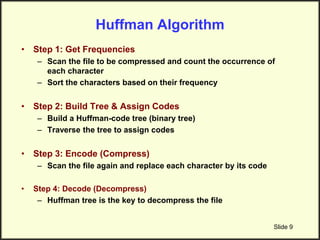
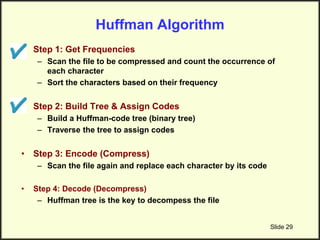
• Step 1: Get Frequencies
– Scan the file to be compressed and count the occurrence of
each character
– Sort the characters based on their frequency
• Step 2: Build Tree & Assign Codes
– Build a Huffman-code tree (binary tree)
– Traverse the tree to assign codes
• Step 3: Encode (Compress)
– Scan the file again and replace each character by its code
• Step 4: Decode (Decompress)
– Huffman tree is the key to decompress the file
Slide 9
Step 1: Get Frequencies
Slide 10
Eerie eyes seen near lake.
Char Freq. Char Freq. Char Freq.
E 1 y 1 k 1
e 8 s 2 . 1
r 2 n 2
i 1 a 2
space 4 l 1
Input File:
Step 2: Build Huffman Tree & Assign Codes
• It is a binary tree in which each character is a leaf node
– Initially each node is a separate root
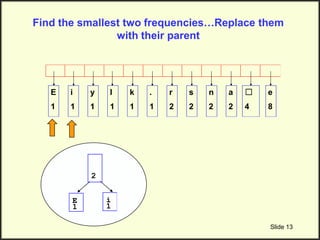
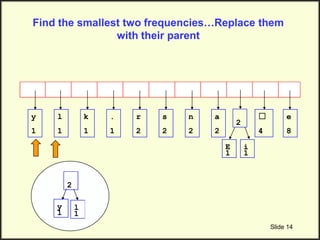
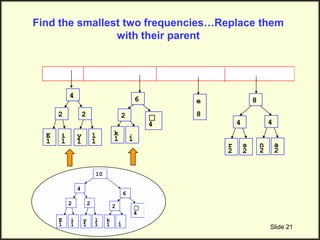
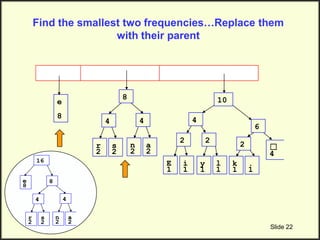
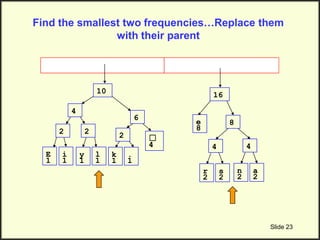
• At each step
– Select two roots with smallest frequency and connect them to
a new parent (Break ties arbitrary) [The greedy choice]
– The parent will get the sum of frequencies of the two child
nodes
• Repeat until you have one root
Slide 11
Example
Slide 12
Char Freq. Char Freq. Char Freq.
E 1 y 1 k 1
e 8 s 2 . 1
r 2 n 2
i 1 a 2
space 4 l 1
E
1
i
1
y
1
l
1
k
1
.
1
r
2
s
2
n
2
a
2
☐
4
e
8
Each char. has a
leaf node with its
frequency
Find the smallest two frequencies…Replace them
with their parent
Slide 13
E
1
i
1
y
1
l
1
k
1
.
1
r
2
s
2
n
2
a
2
☐
4
e
8
E
1
i
1
2
Slide 14
E
1
i
1
y
1
l
1
k
1
.
1
r
2
s
2
n
2
a
2
☐
4
e
8
2
Find the smallest two frequencies…Replace them
with their parent
y
1
l
1
2
Slide 15
E
1
i
1
k
1
.
1
r
2
s
2
n
2
a
2
☐
4
e
8
2
y
1
l
1
2
Find the smallest two frequencies…Replace them
with their parent
k
1
.
1
2
Slide 16
E
1
i
1
r
2
s
2
n
2
a
2
☐
4
e
8
2
y
1
l
1
2
k
1
.
1
2
Find the smallest two frequencies…Replace them
with their parent
r
2
s
2
4
Slide 17
E
1
i
1
n
2
a
2
☐
4
e
8
2
y
1
l
1
2
k
1
.
1
2
r
2
s
2
4
Find the smallest two frequencies…Replace them
with their parent
n
2
a
2
4
Slide 18
E
1
i
1
☐
4
e
8
2
y
1
l
1
2
k
1
.
1
2
r
2
s
2
4
n
2
a
2
4
Find the smallest two frequencies…Replace them
with their parent
E
1
i
1
2
y
1
l
1
2
4
Slide 19
E
1
i
1
☐
4
e
8
2
y
1
l
1
2
k
1
.
1
2
r
2
s
2
4
n
2
a
2
4 4
Find the smallest two frequencies…Replace them
with their parent
☐
4
k
1
.
1
2
6
Slide 20
E
1
i
1
☐
4
e
8
2
y
1
l
1
2
k
1
.
1
2
r
2
s
2
4
n
2
a
2
4 4 6
Find the smallest two frequencies…Replace them
with their parent
r
2
s
2
4
n
2
a
2
4
8
Slide 21
E
1
i
1
☐
4
e
8
2
y
1
l
1
2
k
1
.
1
2
r
2
s
2
4
n
2
a
2
4
4
6 8
Find the smallest two frequencies…Replace them
with their parent
E
1
i
1
☐
4
2
y
1
l
1
2
k
1
.
1
2
4
6
10
Slide 22
E
1
i
1
☐
4
e
8
2
y
1
l
1
2
k
1
.
1
2
r
2
s
2
4
n
2
a
2
4 4
6
8 10
Find the smallest two frequencies…Replace them
with their parent
e
8
r
2
s
2
4
n
2
a
2
4
8
16
Slide 23
E
1
i
1
☐
4
e
8
2
y
1
l
1
2
k
1
.
1
2
r
2
s
2
4
n
2
a
2
4
4
6
8
10 16
Find the smallest two frequencies…Replace them
with their parent
Slide 24
E
1
i
1
☐
4
e
8
2
y
1
l
1
2
k
1
.
1
2
r
2
s
2
4
n
2
a
2
4
4
6
8
10
16
26
Now we have a single root…This is the Huffman Tree
Lets Analyze Huffman Tree
Slide 25
E
1
i
1
☐
4
e
8
2
y
1
l
1
2
k
1
.
1
2
r
2
s
2
4
n
2
a
2
4
4
6
8
10
16
26
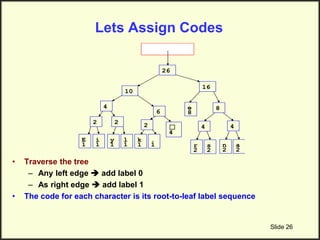
• All characters are at the leaf nodes
• The number at the root = # of characters in the file
• High-frequency chars (E.g., “e”) are near the root
• Low-frequency chars are far from the root
Lets Assign Codes
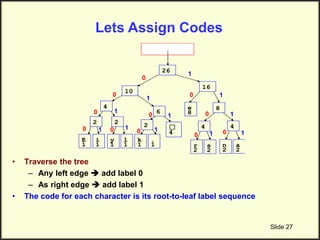
• Traverse the tree
– Any left edge  add label 0
– As right edge  add label 1
• The code for each character is its root-to-leaf label sequence
Slide 26
E
1
i
1
☐
4
e
8
2
y
1
l
1
2
k
1
.
1
2
r
2
s
2
4
n
2
a
2
4
4
6
8
10
16
26
Slide 27
E
1
i
1
☐
4
e
8
2
y
1
l
1
2
k
1
.
1
2
r
2
s
2
4
n
2
a
2
4
4
6
8
10
16
26
0
1
0
0
0
0
0
0 0
1
1
1
1
1
1
1
1
0
0
0
1 1
• Traverse the tree
– Any left edge  add label 0
– As right edge  add label 1
• The code for each character is its root-to-leaf label sequence
Lets Assign Codes
Slide 28
• Traverse the tree
– Any left edge  add label 0
– As right edge  add label 1
• The code for each character is its root-to-leaf label sequence
Lets Assign Codes
Char Code
E 0000
i 0001
y 0010
l 0011
k 0100
. 0101
space☐ 011
e 10
r 1100
s 1101
n 1110
a 1111
Coding Table
Huffman Algorithm
• Step 1: Get Frequencies
– Scan the file to be compressed and count the occurrence of
each character
– Sort the characters based on their frequency
• Step 2: Build Tree & Assign Codes
– Build a Huffman-code tree (binary tree)
– Traverse the tree to assign codes
• Step 3: Encode (Compress)
– Scan the file again and replace each character by its code
• Step 4: Decode (Decompress)
– Huffman tree is the key to decompess the file
Slide 29
Generate the
encoded file
Step 3: Encode (Compress) The File
Slide 30
Eerie eyes seen near lake.
Input File:
Char Code
E 0000
i 0001
y 0010
l 0011
k 0100
. 0101
space☐ 011
e 10
r 1100
s 1101
n 1110
a 1111
Coding Table
+
000010 1100 000110 ….
Notice that no code is prefix to any other code 
Ensures the decoding will be unique (Unlike Slide 8)
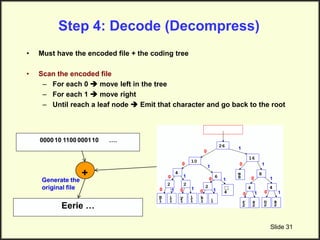
Step 4: Decode (Decompress)
• Must have the encoded file + the coding tree
• Scan the encoded file
– For each 0  move left in the tree
– For each 1  move right
– Until reach a leaf node  Emit that character and go back to the root
Slide 31
000010 1100 000110 ….
+
Eerie …
Generate the
original file
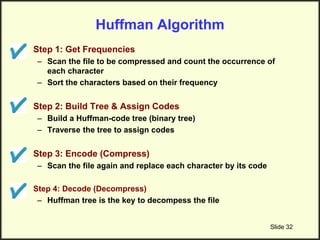
Huffman Algorithm
• Step 1: Get Frequencies
– Scan the file to be compressed and count the occurrence of
each character
– Sort the characters based on their frequency
• Step 2: Build Tree & Assign Codes
– Build a Huffman-code tree (binary tree)
– Traverse the tree to assign codes
• Step 3: Encode (Compress)
– Scan the file again and replace each character by its code
• Step 4: Decode (Decompress)
– Huffman tree is the key to decompess the file
Slide 32

Greedy Algorithms Huffman Coding.ppt

  • 1.
  • 2.
    Huffman Coding • Atechnique to compress data effectively – Usually between 20%-90% compression • Lossless compression – No information is lost – When decompress, you get the original file Slide 2 Original file Compressed file Huffman coding
  • 3.
    Huffman Coding: Applications •Saving space – Store compressed files instead of original files • Transmitting files or data – Send compressed data to save transmission time and power • Encryption and decryption – Cannot read the compressed file without knowing the “key” Slide 3 Original file Compressed file Huffman coding
  • 4.
    Main Idea: Frequency-BasedEncoding • Assume in this file only 6 characters appear – E, A, C, T, K, N • The frequencies are: Character Frequency E 10,000 A 4,000 C 300 T 200 K 100 N 100 • Option I (No Compression) – Each character = 1 Byte (8 bits) – Total file size = 14,700 * 8 = 117,600 bits • Option 2 (Fixed size compression) – We have 6 characters, so we need 3 bits to encode them – Total file size = 14,700 * 3 = 44,100 bits Character Fixed Encoding E 000 A 001 C 010 T 100 K 110 N 111
  • 5.
    Main Idea: Frequency-BasedEncoding (Cont’d) • Assume in this file only 6 characters appear – E, A, C, T, K, N • The frequencies are: Character Frequency E 10,000 A 4,000 C 300 T 200 K 100 N 100 • Option 3 (Huffman compression) – Variable-length compression – Assign shorter codes to more frequent characters and longer codes to less frequent characters – Total file size: Char. HuffmanEncoding E 0 A 10 C 110 T 1110 K 11110 N 11111 (10,000 x 1) + (4,000 x 2) + (300 x 3) + (200 x 4) + (100 x 5) + (100 x 5) = 20,700 bits
  • 6.
    Huffman Coding • Avariable-length coding for characters – More frequent characters  shorter codes – Less frequent characters  longer codes • It is not like ASCII coding where all characters have the same coding length (8 bits) • Two main questions – How to assign codes (Encoding process)? – How to decode (from the compressed file, generate the original file) (Decoding process)? Slide 6
  • 7.
    Decoding for fixed-lengthcodes is much easier Slide 7 Character Fixed-length Encoding E 000 A 001 C 010 T 100 K 110 N 111 010001100110111000 010 001 100 110 111 000 Divide into 3’s C A T K N E Decode
  • 8.
    Decoding for variable-lengthcodes is not that easy… Slide 8 Character Variable-length Encoding E 0 A 00 C 001 … … … … … … 000001 It means what??? EEEC EAC AEC Huffman encoding guarantees to avoid this uncertainty …Always have a single decoding
  • 9.
    Huffman Algorithm • Step1: Get Frequencies – Scan the file to be compressed and count the occurrence of each character – Sort the characters based on their frequency • Step 2: Build Tree & Assign Codes – Build a Huffman-code tree (binary tree) – Traverse the tree to assign codes • Step 3: Encode (Compress) – Scan the file again and replace each character by its code • Step 4: Decode (Decompress) – Huffman tree is the key to decompress the file Slide 9
  • 10.
    Step 1: GetFrequencies Slide 10 Eerie eyes seen near lake. Char Freq. Char Freq. Char Freq. E 1 y 1 k 1 e 8 s 2 . 1 r 2 n 2 i 1 a 2 space 4 l 1 Input File:
  • 11.
    Step 2: BuildHuffman Tree & Assign Codes • It is a binary tree in which each character is a leaf node – Initially each node is a separate root • At each step – Select two roots with smallest frequency and connect them to a new parent (Break ties arbitrary) [The greedy choice] – The parent will get the sum of frequencies of the two child nodes • Repeat until you have one root Slide 11
  • 12.
    Example Slide 12 Char Freq.Char Freq. Char Freq. E 1 y 1 k 1 e 8 s 2 . 1 r 2 n 2 i 1 a 2 space 4 l 1 E 1 i 1 y 1 l 1 k 1 . 1 r 2 s 2 n 2 a 2 ☐ 4 e 8 Each char. has a leaf node with its frequency
  • 13.
    Find the smallesttwo frequencies…Replace them with their parent Slide 13 E 1 i 1 y 1 l 1 k 1 . 1 r 2 s 2 n 2 a 2 ☐ 4 e 8 E 1 i 1 2
  • 14.
    Slide 14 E 1 i 1 y 1 l 1 k 1 . 1 r 2 s 2 n 2 a 2 ☐ 4 e 8 2 Find thesmallest two frequencies…Replace them with their parent y 1 l 1 2
  • 15.
    Slide 15 E 1 i 1 k 1 . 1 r 2 s 2 n 2 a 2 ☐ 4 e 8 2 y 1 l 1 2 Find thesmallest two frequencies…Replace them with their parent k 1 . 1 2
  • 16.
    Slide 16 E 1 i 1 r 2 s 2 n 2 a 2 ☐ 4 e 8 2 y 1 l 1 2 k 1 . 1 2 Find thesmallest two frequencies…Replace them with their parent r 2 s 2 4
  • 17.
    Slide 17 E 1 i 1 n 2 a 2 ☐ 4 e 8 2 y 1 l 1 2 k 1 . 1 2 r 2 s 2 4 Find thesmallest two frequencies…Replace them with their parent n 2 a 2 4
  • 18.
    Slide 18 E 1 i 1 ☐ 4 e 8 2 y 1 l 1 2 k 1 . 1 2 r 2 s 2 4 n 2 a 2 4 Find thesmallest two frequencies…Replace them with their parent E 1 i 1 2 y 1 l 1 2 4
  • 19.
    Slide 19 E 1 i 1 ☐ 4 e 8 2 y 1 l 1 2 k 1 . 1 2 r 2 s 2 4 n 2 a 2 4 4 Findthe smallest two frequencies…Replace them with their parent ☐ 4 k 1 . 1 2 6
  • 20.
    Slide 20 E 1 i 1 ☐ 4 e 8 2 y 1 l 1 2 k 1 . 1 2 r 2 s 2 4 n 2 a 2 4 46 Find the smallest two frequencies…Replace them with their parent r 2 s 2 4 n 2 a 2 4 8
  • 21.
    Slide 21 E 1 i 1 ☐ 4 e 8 2 y 1 l 1 2 k 1 . 1 2 r 2 s 2 4 n 2 a 2 4 4 6 8 Findthe smallest two frequencies…Replace them with their parent E 1 i 1 ☐ 4 2 y 1 l 1 2 k 1 . 1 2 4 6 10
  • 22.
    Slide 22 E 1 i 1 ☐ 4 e 8 2 y 1 l 1 2 k 1 . 1 2 r 2 s 2 4 n 2 a 2 4 4 6 810 Find the smallest two frequencies…Replace them with their parent e 8 r 2 s 2 4 n 2 a 2 4 8 16
  • 23.
    Slide 23 E 1 i 1 ☐ 4 e 8 2 y 1 l 1 2 k 1 . 1 2 r 2 s 2 4 n 2 a 2 4 4 6 8 10 16 Findthe smallest two frequencies…Replace them with their parent
  • 24.
  • 25.
    Lets Analyze HuffmanTree Slide 25 E 1 i 1 ☐ 4 e 8 2 y 1 l 1 2 k 1 . 1 2 r 2 s 2 4 n 2 a 2 4 4 6 8 10 16 26 • All characters are at the leaf nodes • The number at the root = # of characters in the file • High-frequency chars (E.g., “e”) are near the root • Low-frequency chars are far from the root
  • 26.
    Lets Assign Codes •Traverse the tree – Any left edge  add label 0 – As right edge  add label 1 • The code for each character is its root-to-leaf label sequence Slide 26 E 1 i 1 ☐ 4 e 8 2 y 1 l 1 2 k 1 . 1 2 r 2 s 2 4 n 2 a 2 4 4 6 8 10 16 26
  • 27.
    Slide 27 E 1 i 1 ☐ 4 e 8 2 y 1 l 1 2 k 1 . 1 2 r 2 s 2 4 n 2 a 2 4 4 6 8 10 16 26 0 1 0 0 0 0 0 0 0 1 1 1 1 1 1 1 1 0 0 0 11 • Traverse the tree – Any left edge  add label 0 – As right edge  add label 1 • The code for each character is its root-to-leaf label sequence Lets Assign Codes
  • 28.
    Slide 28 • Traversethe tree – Any left edge  add label 0 – As right edge  add label 1 • The code for each character is its root-to-leaf label sequence Lets Assign Codes Char Code E 0000 i 0001 y 0010 l 0011 k 0100 . 0101 space☐ 011 e 10 r 1100 s 1101 n 1110 a 1111 Coding Table
  • 29.
    Huffman Algorithm • Step1: Get Frequencies – Scan the file to be compressed and count the occurrence of each character – Sort the characters based on their frequency • Step 2: Build Tree & Assign Codes – Build a Huffman-code tree (binary tree) – Traverse the tree to assign codes • Step 3: Encode (Compress) – Scan the file again and replace each character by its code • Step 4: Decode (Decompress) – Huffman tree is the key to decompess the file Slide 29
  • 30.
    Generate the encoded file Step3: Encode (Compress) The File Slide 30 Eerie eyes seen near lake. Input File: Char Code E 0000 i 0001 y 0010 l 0011 k 0100 . 0101 space☐ 011 e 10 r 1100 s 1101 n 1110 a 1111 Coding Table + 000010 1100 000110 …. Notice that no code is prefix to any other code  Ensures the decoding will be unique (Unlike Slide 8)
  • 31.
    Step 4: Decode(Decompress) • Must have the encoded file + the coding tree • Scan the encoded file – For each 0  move left in the tree – For each 1  move right – Until reach a leaf node  Emit that character and go back to the root Slide 31 000010 1100 000110 …. + Eerie … Generate the original file
  • 32.
    Huffman Algorithm • Step1: Get Frequencies – Scan the file to be compressed and count the occurrence of each character – Sort the characters based on their frequency • Step 2: Build Tree & Assign Codes – Build a Huffman-code tree (binary tree) – Traverse the tree to assign codes • Step 3: Encode (Compress) – Scan the file again and replace each character by its code • Step 4: Decode (Decompress) – Huffman tree is the key to decompess the file Slide 32