Strategy to Implement a GRC Software Solution
(Governance, Risk, and Compliance)
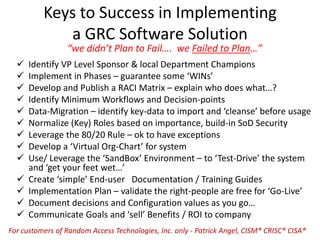
Keys to Success in Implementing
a GRC Software Solution
 Identify VP Level Sponsor & local Department Champions
 Implement in Phases – guarantee some ‘WINs’
 Develop and Publish a RACI Matrix – explain who does what…?
 Identify Minimum Workflows and Decision-points
 Data-Migration – identify key-data to import and ‘cleanse’ before usage
 Normalize (Key) Roles based on importance, build-in SoD Security
 Leverage the 80/20 Rule – ok to have exceptions
 Develop a ‘Virtual Org-Chart’ for system
 Use/ Leverage the ‘SandBox’ Environment – to ‘Test-Drive’ the system
and ‘get your feet wet…’
 Create ‘simple’ End-user Documentation / Training Guides
 Implementation Plan – validate the right-people are free for ‘Go-Live’
 Document decisions and Configuration values as you go…
 Communicate Goals and ‘sell’ Benefits / ROI to company
“we didn’t Plan to Fail…. we Failed to Plan…”
For customers of Random Access Technologies, Inc. only - Patrick Angel, CISM® CRISC® CISA®
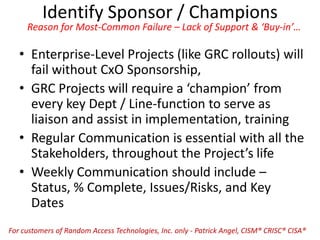
Identify Sponsor / Champions
Reason for Most-Common Failure – Lack of Support & ‘Buy-in’…
• Enterprise-Level Projects (like GRC rollouts) will
fail without CxO Sponsorship,
• GRC Projects will require a ‘champion’ from
every key Dept / Line-function to serve as
liaison and assist in implementation, training
• Regular Communication is essential with all the
Stakeholders, throughout the Project’s life
• Weekly Communication should include –
Status, % Complete, Issues/Risks, and Key
Dates
For customers of Random Access Technologies, Inc. only - Patrick Angel, CISM® CRISC® CISA®
Implement the GRC system in ‘Phases’
Guaranteeing some ‘Wins’ will guarantee overall ‘Success’
• Grab the ‘low-hanging fruit’ (simple functions
like SURVEYs) to show progress, quick ‘wins’
and results, begin to engage the users,
• Phased approach is the ‘safest’ and progress is
easily measured,
• Engage the end-user to review (and sign-off) on
all Major changes / updates to GRC System,
• Engage Line-Management to review / assist in
developing Training Material and format
(e.g. CBT vs Live/In-person), & take ownership
For customers of Random Access Technologies, Inc. only - Patrick Angel, CISM® CRISC® CISA®
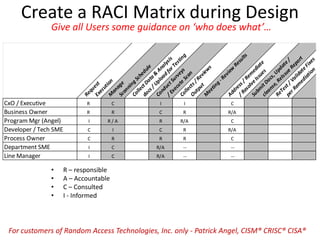
Create a RACI Matrix during Design
Give all Users some guidance on ‘who does what’…
• R – responsible
• A – Accountable
• C – Consulted
• I - Informed
For customers of Random Access Technologies, Inc. only - Patrick Angel, CISM® CRISC® CISA®
RequestExecutionM
anageScanning
Schedule
CollectData
&
Analysis
docs/Upload
forTesting
ConductSurveys
/Execute
Scan
Collects/Review
s
Output
M
eeting
-Review
Results
Address/Rem
ediate
/ResolveIssues
Subm
itDocs,Update/
cleanse,ReIssue
Report
ReTest/ValidateFixes
perRem
ediation
CxO / Executive R C I I C
Business Owner R R C R R/A
Program Mgr (Angel) I R / A R R/A C
Developer / Tech SME C I C R R/A
Process Owner C R R R C
Department SME I C R/A -- --
Line Manager I C R/A -- --
Data-Migration and ‘Cleansing’
If you don’t need it… don’t pack it up and take it with you.
• Identify Core-Data and plan to migrate only
‘Key Data’ to the new system
• Take this as an opportunity to ‘cleanse’ your
data / formats – don’t move your old Dirt…
• Focus on the ‘minimum necessary data’ to
integrate into your GRC System (you can add
more later)
• Plan to have your data ‘cleansed’ and ready to
migrate 1 month before ‘Go-Live’
For customers of Random Access Technologies, Inc. only - Patrick Angel, CISM® CRISC® CISA®
Workflows and Required Use-Cases (minimum)
Implement ‘most-needed’ / Common Functions 1st – biggest ‘bang’
• Self-Service User – Password Reset / Change
• Login (access) as Manager
• View (staff) Reports, by Manager
• View Assigned Roles and Available Roles,
• Request basic (minimum) account –Email, Active Dir, etc.
• Provision / Request access to Role – Add (new) user
• Update / Change user access to (role)
• De-Provision – Remove (delete/terminate) user
• Route Approval-Request
• Approve Request(s)
• Reject Request(s)
• Request additional info on Request
Integrate Separation-of-Duties (SoD) into design of (New) Roles
For customers of Random Access Technologies, Inc. only - Patrick Angel, CISM® CRISC® CISA®
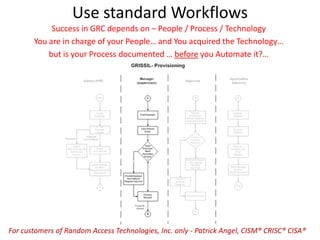
Use standard Workflows
Success in GRC depends on – People / Process / Technology
You are in charge of your People… and You acquired the Technology…
but is your Process documented … before you Automate it?…
For customers of Random Access Technologies, Inc. only - Patrick Angel, CISM® CRISC® CISA®
Leverage the “80/20” Rule
It’s ok to have ‘exceptions’ as long as they don’t become the Rule
• Should be able to Normalize 80% of the Roles
using only 20% of the overall ‘effort’
• Remaining 20% of the Roles will require the
balance (80%) of the ‘effort’ to standardize…
• Pick your Battles – what Roles are important to
have as ‘exceptions’ – Mgmt / Oversight…?
– Require Line-Mgmt to ‘defend’ need for exceptions
• GRC will always have ‘exceptions’ – which ones
are important to you / company….?
For customers of Random Access Technologies, Inc. only - Patrick Angel, CISM® CRISC® CISA®
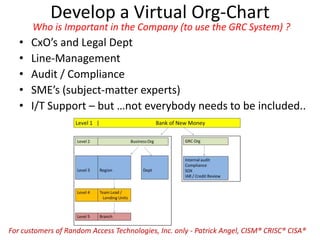
Develop a Virtual Org-Chart
Who is Important in the Company (to use the GRC System) ?
• CxO’s and Legal Dept
• Line-Management
• Audit / Compliance
• SME’s (subject-matter experts)
• I/T Support – but …not everybody needs to be included..
For customers of Random Access Technologies, Inc. only - Patrick Angel, CISM® CRISC® CISA®
Create / use the ‘SandBox’ Environment
Let the Users / Mgmt get a feel for the system in a ‘safe’ place…
• Allows for Real-Time Feedback on system,
• Provide Logins for all SME’s and Key
Stakeholders to explore the system,
• Safe-Environment permits faster adoption of
system
• Allow end-users way to identify problems and
updates required before Go-Live,
• Create Action-List for system-updates / fixes,
For customers of Random Access Technologies, Inc. only - Patrick Angel, CISM® CRISC® CISA®
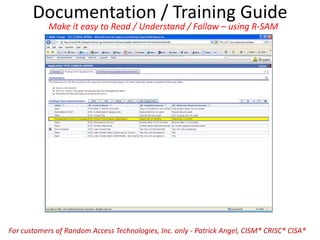
Documentation / Training Guide
Make it easy to Read / Understand / Follow – using R-SAM
For customers of Random Access Technologies, Inc. only - Patrick Angel, CISM® CRISC® CISA®
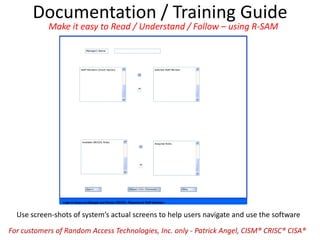
Documentation / Training Guide
Use screen-shots of system’s actual screens to help users navigate and use the software
Make it easy to Read / Understand / Follow – using R-SAM
For customers of Random Access Technologies, Inc. only - Patrick Angel, CISM® CRISC® CISA®
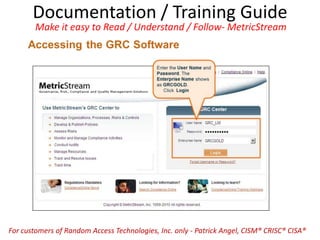
Documentation / Training Guide
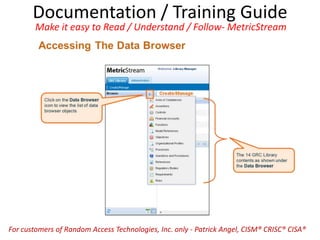
Make it easy to Read / Understand / Follow- MetricStream
For customers of Random Access Technologies, Inc. only - Patrick Angel, CISM® CRISC® CISA®
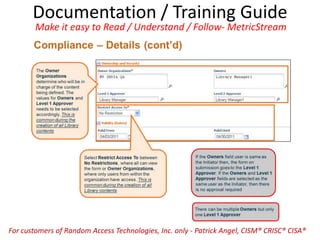
Documentation / Training Guide
Make it easy to Read / Understand / Follow- MetricStream
For customers of Random Access Technologies, Inc. only - Patrick Angel, CISM® CRISC® CISA®
Documentation / Training Guide
Make it easy to Read / Understand / Follow- MetricStream
For customers of Random Access Technologies, Inc. only - Patrick Angel, CISM® CRISC® CISA®
Documentation / Training Guide
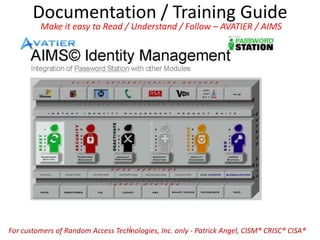
Make it easy to Read / Understand / Follow – AVATIER / AIMS
For customers of Random Access Technologies, Inc. only - Patrick Angel, CISM® CRISC® CISA®
Documentation / Training Guide
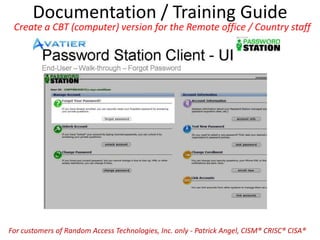
Create a CBT (computer) version for the Remote office / Country staff
For customers of Random Access Technologies, Inc. only - Patrick Angel, CISM® CRISC® CISA®
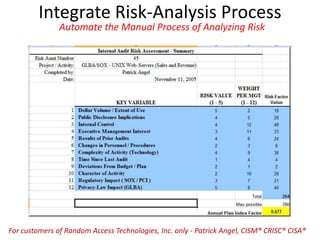
Integrate Risk-Analysis Process
Automate the Manual Process of Analyzing Risk
For customers of Random Access Technologies, Inc. only - Patrick Angel, CISM® CRISC® CISA®
Document Config-Values and Decisions
Ensure you meet Regulatory / Compliance Requirements as you go…
• Document all Configuration / setup Values ‘as
you go’ when setting up GRC System,
– At minimum, use screen-prints in a Word file to
track entries and values, will need it later on
• Document all (Key) Decisions by both Tech Staff
and CxO / Management (including Emails),
• Save, backup, and store in duplicate, and
• Will be required for Maintenance / Support /
Regulatory and Compliance-discussions.
For customers of Random Access Technologies, Inc. only - Patrick Angel, CISM® CRISC® CISA®
Implementation Plan for ‘Go-Live’
A Migration-Plan will keep the ship heading in the right direction
• Verify your Key people will be available during
the ‘Go-Live’ period (e.g. vacation / holidays)
• Sync up the GRC Migration with the current
Maintenance Windows calendar
• Confirm Dependency-Milestone-dates will be
completed prior to Migration (critical-path)
• Conduct Desk-walkthrough of the Migration
Plan to avoid obvious mistakes / oversights,
• Validate that the Target-Environment is set up
the same as the Test / Sandbox Environment
For customers of Random Access Technologies, Inc. only - Patrick Angel, CISM® CRISC® CISA®
Sell Benefits / ROI and Communicate
Facilitate acceptance by selling benefits / communicating Goals to company / Staff
• Leverage Status Reports to ‘spread the word’…
• Document efficiency gained via Usage by SME’s,
• Communicate to all Stakeholders about new
Functionality and Milestones completed,
• Create Login ID’s for all major Stakeholders so
they can ‘see and touch’ the system,
• Use Vendor WhitePapers to impress the overall
Benefits of using the new GRC System,
• Hold company-wide ‘Kick-Off’ Announcement
For customers of Random Access Technologies, Inc. only - Patrick Angel, CISM® CRISC® CISA®
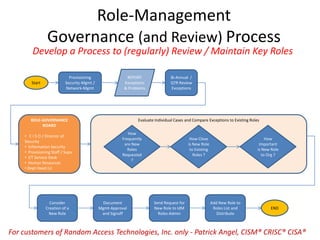
Role-Management
Governance (and Review) Process
Start
Provisioning
Security-Mgmt /
Network-Mgmt
Bi-Annual /
QTR Review
Exceptions
Consider
Creation of a
New Role
Document
Mgmt-Approval
and Signoff
END
Send Request for
New Role to IdM
Roles-Admin
ROLE-GOVERNANCE
BOARD
• C I S O / Director of
Security
• Information Security
• Provisioning Staff / Supv
• I/T Service-Desk
• Human Resources
• Dept Head (s)
Evaluate Individual Cases and Compare Exceptions to Existing Roles
How
Frequently
are New
Roles
Requested
?
How Close
is New Role
to Existing
Roles ?
How
Important
is New Role
to Org ?
Add New Role to
Roles List and
Distribute
REPORT
Exceptions
& Problems
Develop a Process to (regularly) Review / Maintain Key Roles
For customers of Random Access Technologies, Inc. only - Patrick Angel, CISM® CRISC® CISA®
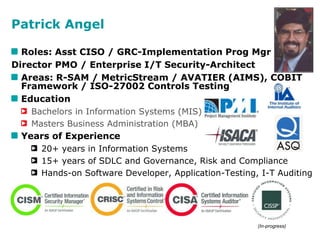
Patrick Angel
Roles: Asst CISO / GRC-Implementation Prog Mgr
Director PMO / Enterprise I/T Security-Architect
Areas: R-SAM / MetricStream / AVATIER (AIMS), COBIT
Framework / ISO-27002 Controls Testing
Education
Bachelors in Information Systems (MIS)
Masters Business Administration (MBA)
Years of Experience
20+ years in Information Systems
15+ years of SDLC and Governance, Risk and Compliance
Hands-on Software Developer, Application-Testing, I-T Auditing
Certifications and Associations include -
(In-progress)
Get Started Now…
‘…Chance favors the prepared Mind’
For customers of Random Access Technologies, Inc. only - Patrick Angel, CISM® CRISC® CISA®
www.RandomAccessTechnology.com
(214) 826-3812

GRC Software Implementation Strategy

  • 1.
    Strategy to Implementa GRC Software Solution (Governance, Risk, and Compliance)
  • 2.
    Keys to Successin Implementing a GRC Software Solution  Identify VP Level Sponsor & local Department Champions  Implement in Phases – guarantee some ‘WINs’  Develop and Publish a RACI Matrix – explain who does what…?  Identify Minimum Workflows and Decision-points  Data-Migration – identify key-data to import and ‘cleanse’ before usage  Normalize (Key) Roles based on importance, build-in SoD Security  Leverage the 80/20 Rule – ok to have exceptions  Develop a ‘Virtual Org-Chart’ for system  Use/ Leverage the ‘SandBox’ Environment – to ‘Test-Drive’ the system and ‘get your feet wet…’  Create ‘simple’ End-user Documentation / Training Guides  Implementation Plan – validate the right-people are free for ‘Go-Live’  Document decisions and Configuration values as you go…  Communicate Goals and ‘sell’ Benefits / ROI to company “we didn’t Plan to Fail…. we Failed to Plan…” For customers of Random Access Technologies, Inc. only - Patrick Angel, CISM® CRISC® CISA®
  • 3.
    Identify Sponsor /Champions Reason for Most-Common Failure – Lack of Support & ‘Buy-in’… • Enterprise-Level Projects (like GRC rollouts) will fail without CxO Sponsorship, • GRC Projects will require a ‘champion’ from every key Dept / Line-function to serve as liaison and assist in implementation, training • Regular Communication is essential with all the Stakeholders, throughout the Project’s life • Weekly Communication should include – Status, % Complete, Issues/Risks, and Key Dates For customers of Random Access Technologies, Inc. only - Patrick Angel, CISM® CRISC® CISA®
  • 4.
    Implement the GRCsystem in ‘Phases’ Guaranteeing some ‘Wins’ will guarantee overall ‘Success’ • Grab the ‘low-hanging fruit’ (simple functions like SURVEYs) to show progress, quick ‘wins’ and results, begin to engage the users, • Phased approach is the ‘safest’ and progress is easily measured, • Engage the end-user to review (and sign-off) on all Major changes / updates to GRC System, • Engage Line-Management to review / assist in developing Training Material and format (e.g. CBT vs Live/In-person), & take ownership For customers of Random Access Technologies, Inc. only - Patrick Angel, CISM® CRISC® CISA®
  • 5.
    Create a RACIMatrix during Design Give all Users some guidance on ‘who does what’… • R – responsible • A – Accountable • C – Consulted • I - Informed For customers of Random Access Technologies, Inc. only - Patrick Angel, CISM® CRISC® CISA® RequestExecutionM anageScanning Schedule CollectData & Analysis docs/Upload forTesting ConductSurveys /Execute Scan Collects/Review s Output M eeting -Review Results Address/Rem ediate /ResolveIssues Subm itDocs,Update/ cleanse,ReIssue Report ReTest/ValidateFixes perRem ediation CxO / Executive R C I I C Business Owner R R C R R/A Program Mgr (Angel) I R / A R R/A C Developer / Tech SME C I C R R/A Process Owner C R R R C Department SME I C R/A -- -- Line Manager I C R/A -- --
  • 6.
    Data-Migration and ‘Cleansing’ Ifyou don’t need it… don’t pack it up and take it with you. • Identify Core-Data and plan to migrate only ‘Key Data’ to the new system • Take this as an opportunity to ‘cleanse’ your data / formats – don’t move your old Dirt… • Focus on the ‘minimum necessary data’ to integrate into your GRC System (you can add more later) • Plan to have your data ‘cleansed’ and ready to migrate 1 month before ‘Go-Live’ For customers of Random Access Technologies, Inc. only - Patrick Angel, CISM® CRISC® CISA®
  • 7.
    Workflows and RequiredUse-Cases (minimum) Implement ‘most-needed’ / Common Functions 1st – biggest ‘bang’ • Self-Service User – Password Reset / Change • Login (access) as Manager • View (staff) Reports, by Manager • View Assigned Roles and Available Roles, • Request basic (minimum) account –Email, Active Dir, etc. • Provision / Request access to Role – Add (new) user • Update / Change user access to (role) • De-Provision – Remove (delete/terminate) user • Route Approval-Request • Approve Request(s) • Reject Request(s) • Request additional info on Request Integrate Separation-of-Duties (SoD) into design of (New) Roles For customers of Random Access Technologies, Inc. only - Patrick Angel, CISM® CRISC® CISA®
  • 8.
    Use standard Workflows Successin GRC depends on – People / Process / Technology You are in charge of your People… and You acquired the Technology… but is your Process documented … before you Automate it?… For customers of Random Access Technologies, Inc. only - Patrick Angel, CISM® CRISC® CISA®
  • 9.
    Leverage the “80/20”Rule It’s ok to have ‘exceptions’ as long as they don’t become the Rule • Should be able to Normalize 80% of the Roles using only 20% of the overall ‘effort’ • Remaining 20% of the Roles will require the balance (80%) of the ‘effort’ to standardize… • Pick your Battles – what Roles are important to have as ‘exceptions’ – Mgmt / Oversight…? – Require Line-Mgmt to ‘defend’ need for exceptions • GRC will always have ‘exceptions’ – which ones are important to you / company….? For customers of Random Access Technologies, Inc. only - Patrick Angel, CISM® CRISC® CISA®
  • 10.
    Develop a VirtualOrg-Chart Who is Important in the Company (to use the GRC System) ? • CxO’s and Legal Dept • Line-Management • Audit / Compliance • SME’s (subject-matter experts) • I/T Support – but …not everybody needs to be included.. For customers of Random Access Technologies, Inc. only - Patrick Angel, CISM® CRISC® CISA®
  • 11.
    Create / usethe ‘SandBox’ Environment Let the Users / Mgmt get a feel for the system in a ‘safe’ place… • Allows for Real-Time Feedback on system, • Provide Logins for all SME’s and Key Stakeholders to explore the system, • Safe-Environment permits faster adoption of system • Allow end-users way to identify problems and updates required before Go-Live, • Create Action-List for system-updates / fixes, For customers of Random Access Technologies, Inc. only - Patrick Angel, CISM® CRISC® CISA®
  • 12.
    Documentation / TrainingGuide Make it easy to Read / Understand / Follow – using R-SAM For customers of Random Access Technologies, Inc. only - Patrick Angel, CISM® CRISC® CISA®
  • 13.
    Documentation / TrainingGuide Use screen-shots of system’s actual screens to help users navigate and use the software Make it easy to Read / Understand / Follow – using R-SAM For customers of Random Access Technologies, Inc. only - Patrick Angel, CISM® CRISC® CISA®
  • 14.
    Documentation / TrainingGuide Make it easy to Read / Understand / Follow- MetricStream For customers of Random Access Technologies, Inc. only - Patrick Angel, CISM® CRISC® CISA®
  • 15.
    Documentation / TrainingGuide Make it easy to Read / Understand / Follow- MetricStream For customers of Random Access Technologies, Inc. only - Patrick Angel, CISM® CRISC® CISA®
  • 16.
    Documentation / TrainingGuide Make it easy to Read / Understand / Follow- MetricStream For customers of Random Access Technologies, Inc. only - Patrick Angel, CISM® CRISC® CISA®
  • 17.
    Documentation / TrainingGuide Make it easy to Read / Understand / Follow – AVATIER / AIMS For customers of Random Access Technologies, Inc. only - Patrick Angel, CISM® CRISC® CISA®
  • 18.
    Documentation / TrainingGuide Create a CBT (computer) version for the Remote office / Country staff For customers of Random Access Technologies, Inc. only - Patrick Angel, CISM® CRISC® CISA®
  • 19.
    Integrate Risk-Analysis Process Automatethe Manual Process of Analyzing Risk For customers of Random Access Technologies, Inc. only - Patrick Angel, CISM® CRISC® CISA®
  • 20.
    Document Config-Values andDecisions Ensure you meet Regulatory / Compliance Requirements as you go… • Document all Configuration / setup Values ‘as you go’ when setting up GRC System, – At minimum, use screen-prints in a Word file to track entries and values, will need it later on • Document all (Key) Decisions by both Tech Staff and CxO / Management (including Emails), • Save, backup, and store in duplicate, and • Will be required for Maintenance / Support / Regulatory and Compliance-discussions. For customers of Random Access Technologies, Inc. only - Patrick Angel, CISM® CRISC® CISA®
  • 21.
    Implementation Plan for‘Go-Live’ A Migration-Plan will keep the ship heading in the right direction • Verify your Key people will be available during the ‘Go-Live’ period (e.g. vacation / holidays) • Sync up the GRC Migration with the current Maintenance Windows calendar • Confirm Dependency-Milestone-dates will be completed prior to Migration (critical-path) • Conduct Desk-walkthrough of the Migration Plan to avoid obvious mistakes / oversights, • Validate that the Target-Environment is set up the same as the Test / Sandbox Environment For customers of Random Access Technologies, Inc. only - Patrick Angel, CISM® CRISC® CISA®
  • 22.
    Sell Benefits /ROI and Communicate Facilitate acceptance by selling benefits / communicating Goals to company / Staff • Leverage Status Reports to ‘spread the word’… • Document efficiency gained via Usage by SME’s, • Communicate to all Stakeholders about new Functionality and Milestones completed, • Create Login ID’s for all major Stakeholders so they can ‘see and touch’ the system, • Use Vendor WhitePapers to impress the overall Benefits of using the new GRC System, • Hold company-wide ‘Kick-Off’ Announcement For customers of Random Access Technologies, Inc. only - Patrick Angel, CISM® CRISC® CISA®
  • 23.
    Role-Management Governance (and Review)Process Start Provisioning Security-Mgmt / Network-Mgmt Bi-Annual / QTR Review Exceptions Consider Creation of a New Role Document Mgmt-Approval and Signoff END Send Request for New Role to IdM Roles-Admin ROLE-GOVERNANCE BOARD • C I S O / Director of Security • Information Security • Provisioning Staff / Supv • I/T Service-Desk • Human Resources • Dept Head (s) Evaluate Individual Cases and Compare Exceptions to Existing Roles How Frequently are New Roles Requested ? How Close is New Role to Existing Roles ? How Important is New Role to Org ? Add New Role to Roles List and Distribute REPORT Exceptions & Problems Develop a Process to (regularly) Review / Maintain Key Roles For customers of Random Access Technologies, Inc. only - Patrick Angel, CISM® CRISC® CISA®
  • 24.
    Patrick Angel Roles: AsstCISO / GRC-Implementation Prog Mgr Director PMO / Enterprise I/T Security-Architect Areas: R-SAM / MetricStream / AVATIER (AIMS), COBIT Framework / ISO-27002 Controls Testing Education Bachelors in Information Systems (MIS) Masters Business Administration (MBA) Years of Experience 20+ years in Information Systems 15+ years of SDLC and Governance, Risk and Compliance Hands-on Software Developer, Application-Testing, I-T Auditing Certifications and Associations include - (In-progress)
  • 25.
    Get Started Now… ‘…Chancefavors the prepared Mind’ For customers of Random Access Technologies, Inc. only - Patrick Angel, CISM® CRISC® CISA® www.RandomAccessTechnology.com (214) 826-3812