
Web Analytics in
    Government
                                        Tim Evans
                    Social Security Administration
            Co-Chair, Federal Metrics Sub-Council
Chair, Web Analytics Association Public Sector SIG
 Some overall, introductory, Dutch-Uncle
  stuff
 Nuts and bolts of collecting web analytics
 Why Analytics is so hard in Government
 Building a culture of Analytics
 Web Analytics Resources


Setting Expectations
 Better Web sites based on data about site
  visitors
 Enable site decisions based on analysis of
  empirical visitor data, not Highly Paid
  persons' opinions
 Identify and fix site problems
 Help site users succeed


Why Web Analytics?
 Visitor Behavior: What they do on your
  website (often called “Clickstream”)
 Visitor Outcomes: How successful they
  are
 Visitor Experience: How happy they are
  about it
 Quality/Integrity data: Broken/missing
  links, SEO, etc.
 Social Media Metrics and “Buzz”


Web Analytics Data
 By definition, our data is about all visitors,
  or interesting segments of visitors, not
  individuals
 OMB policies emphasize this
 No place for PII here
 Tools that track individual behavior
  should be limited to a customer-service
  context (that is, casework)


Web Analytics Data is Aggregate
Data
Vocabulary Alert: Banish “hits”

   Resist requests for bragging-rights
                numbers


How not to Track Success
 Every site has a purpose; its goals
  should be identified before starting an
  Analytics project
 Key Metrics for your site must be based
  on your site’s goals
 One-size-fits-all data reporting can’t
  possibly meet your project’s needs
 You must find the one, true set of
  metrics for your site

Every Site is Different; so are its
Goals; so are its Key Metrics
 Plenty of tools will collect masses of
  analytics data on a site
 Highly competitive market; most have
  the same general range of
  capabilities
 Some very expensive, some free
 Regardless of choice, none will meet
  your needs out of the box
 Your work required in implementing the
  tools, then analyzing the data


Tools: Just 10% of the Job
   What they do on your website
    ◦ What pages, how many?
    ◦ Where did they enter, come from?
    ◦ How long did they stay?
    ◦ What did they search for?
   What did we learn about them
    ◦ Top Tasks
    ◦ Bounce rates
    ◦ Where did they quit?
   What’s relevant to your site’s unique
    goals?

Behavioral Data
 Web server log files
 Specialized logs created by JavaScript
  “page tags” embedded in web pages
 Passive, on-wire network sniffers that log
  web traffic
 Hybrids combining two or more of the
  above


Sources of Behavioral Data
 Traditional source of data, kept by the
  web server itself as it serves pages
 Logs all activities with date stamps, IP
  address, resource (page) accessed, time-
  to-serve, much else
 Web Analytics tools parse the logs to
  create reports
 Major shortcomings; some pro’s


Web Server Log Files
 Records all site activity, including that of
  spiders, ‘bots, door-knob-rattlers and
  other non-humans (over count)
 Does not record site activity served from
  ISP caching servers (under count)
 Dependent on central IT for setup and
  support, which may also control the
  Analytics tool


Web Server Logs: Con’s
 Some technical data (e.g., error
  messages, bandwidth use) collected that
  is not in page-tag data
 Especially good for capacity planning
  functions (costly Analytics tools may be
  overkill for this purpose)
 On-site search terms automatically logged
 Logs can be re-analyzed, after the fact.


Web Server Logs: Pro’s
 Bits of JavaScript (usually) embedded in
  web pages
 Code executed by visitors’ browsers;
  web server is not involved
 Browsers “phone home” to site data
  collector (local or vendor-hosted),
  exchanging session data
 Data collectors log the session info:
  Analytics tools run against this data


Page Tags: Introduction
<script src="/includes/wtinit.js"
type="text/javascript"></script>
<script src="/includes/wtbase.js"
type="text/javascript"></script>
<script type="text/javascript"> //<![CDATA[ var
_tag=new WebTrends(); //]]>> </script> <script
type="text/javascript">
//<![CDATA[ // Add custom parameters here.
//_tag.DCSext.param_name=param_value;
_tag.dcsCollect(); //]]>> </script> <noscript>
<div><img alt="DCSIMG" id="DCSIMG" width="1"
height="1"
src="https://stats.ssa.gov/dcs5w0txb10000wocrvq
y1nqm_6n1p/njs.gif?dcsuri=/nojavascript&amp;W
T.js=No&amp;DCS.dcscfg=1&amp;WT.tv=8.6.2"/>
</div> </noscript>
 Easy to implement (theoretically)
 Controlled, and configurable, by business
  users, not IT
 Data collected real time, immediately
  accessible for analysis
 Ignores spiders/bots/non-humans (they
  don’t execute JavaScript)
 Busts ISP caches—every page view
  triggers tag, regardless of its source
 All vendor innovation in Analytics here


Page Tags: Pro’s
 Tag must be in every page
 Increases page size (+/- 200KB)
 ~2% of users disable JavaScript
 Capacity-planning data not collected
 Since data is collected real time,
  botched/missing tags collect no or incomplete
  data; cannot be re-played
 Tag changes may render prior data invalid
 Mixing vendor tags may/may not create
  problems


Page Tags: Con’s
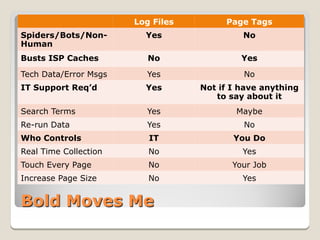
Log Files        Page Tags
Spiders/Bots/Non-        Yes                No
Human
Busts ISP Caches          No                Yes

Tech Data/Error Msgs     Yes                No
IT Support Req’d         Yes       Not if I have anything
                                      to say about it
Search Terms             Yes               Maybe
Re-run Data              Yes                No
Who Controls              IT              You Do
Real Time Collection      No                Yes
Touch Every Page          No              Your Job
Increase Page Size        No                Yes


Bold Moves Me
   Most vendors support hybrid data
    collection (logs + page tag data), and can
    merge them
   GA is exception; requires local Urchin install
   Sniffer appliances capture/log web traffic by
    on-wire packet inspection (no tags may
    be involved)
   On-the-fly insertion of page tag at site exit
    point to ensure consistency
   Some movement toward “universal” tags,
    partly result of concern about multiple tags


Various Workarounds
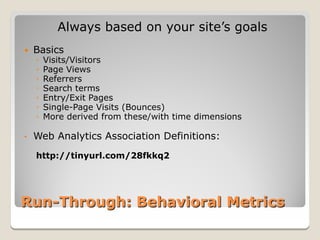
Always based on your site’s goals
   Basics
    ◦   Visits/Visitors
    ◦   Page Views
    ◦   Referrers
    ◦   Search terms
    ◦   Entry/Exit Pages
    ◦   Single-Page Visits (Bounces)
    ◦   More derived from these/with time dimensions

•   Web Analytics Association Definitions:
    http://tinyurl.com/28fkkq2


Run-Through: Behavioral Metrics
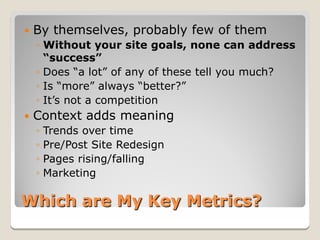
   By themselves, probably few of them
    ◦ Without your site goals, none can address
      “success”
    ◦ Does “a lot” of any of these tell you much?
    ◦ Is “more” always “better?”
    ◦ It’s not a competition
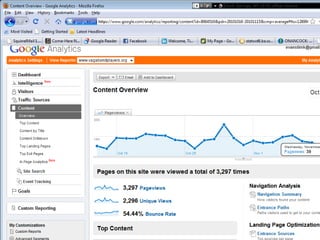
   Context adds meaning
    ◦ Trends over time
    ◦ Pre/Post Site Redesign
    ◦ Pages rising/falling
    ◦ Marketing

Which are My Key Metrics?
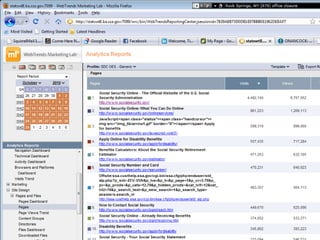
 Most-viewed pages tell you visitors’ Top
  Tasks: Are they what you thought they
  were? If not, what does that do to your
  thinking?
 Search Terms tell you what visitors
  looked for: Did they find it? Did they not
  find it?
 Referrers tell you where visitors come
  from: Is your marketing succeeding?
  Where else should you be marketing?

This is too much Work; What’s
Low-Hanging?
 Persistent Cookies ID returning visitors
 New OMB policy (6/10), removes prior
  prohibition
 Segmenting new and returning visitors is
  key; otherwise all visits are new ones
 Absent cookies, reported numbers of
  new/returning visitors are inaccurate
 Cookies also enable EZ login, site
  customization (“Remember Me”)
 http://challenge.gov/privacy#cookies


Behavioral Detour: Cookies
 Attractive, powerful, free Web Analytics
  tool, with Federal Terms of service
  (http://apps.gov/)
 Hosted service (i.e., Google’s data center)
 Uses page tags, persistent cookies
 Possible issues with data ownership,
  location, retention, large sites, PII
 Geolocation data, but no IP addresses


Behavioral Detour: Google
Analytics
Measures of success depend on your
                 site goals

 Task completion/Conversions
 Views/downloads of pages you wanted
  them to see
 Successful searches
 Time on site (maybe)
 Bounce rate (maybe)
 Engagement

Outcomes Data
   Web Analytics Tool
    ◦ Files (you wanted) viewed/downloaded
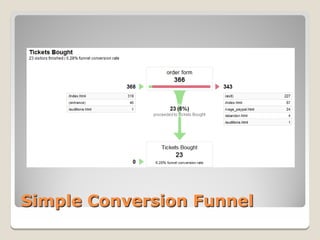
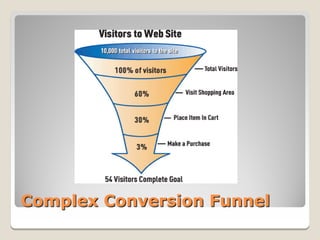
    ◦ Funnel Analysis on tasks pinpoint failure points
    ◦ Site registrations
   Other Places
    ◦ Mailing list sign-ups
    ◦ Call center activities
    ◦ Traditional MI: tasks completed
    ◦ Specific outcomes Q’s on surveys
    ◦ Session “replay” applications
   Converging multiple-source data an issue

Sources of Outcomes Data
Simple Conversion Funnel
Complex Conversion Funnel
How visitors feel about their experience on
                    your site
 Customer Satisfaction
    ◦ Overall Satisfaction
    ◦ Ratings on aspects of your site
    ◦ Future Behaviors
    ◦ Satisfaction with agency overall (clicks &
      mortar)
   Questions related to your site goals
       Why did you come to our site?
       Did you succeed?

Experience Data: Introduction
 Surveys (on line, on phone, in person)
 Web Site Quality/Integrity Testing
 Usability Testing/Assessments
 Social Media “buzz”


Experience Data: Sources
On-web “Pop-up” Surveys

 Ratings for Satisfaction, major site
  Elements (Navigation, Search)
 “Likely-to” questions
 Custom questions
 Open Ends
 ForeSee Results, iPerceptions, 4Q (free),
  others


Experience Data: Surveys
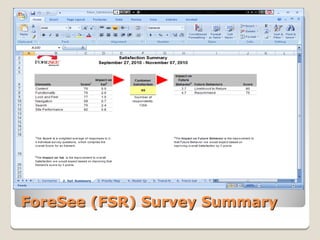
ForeSee (FSR) Survey Summary
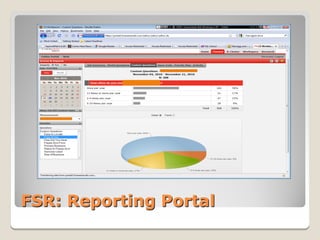
FSR: Reporting Portal
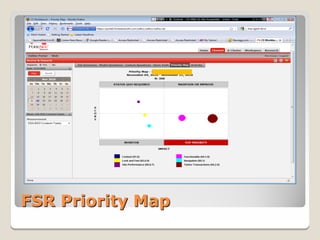
FSR Priority Map
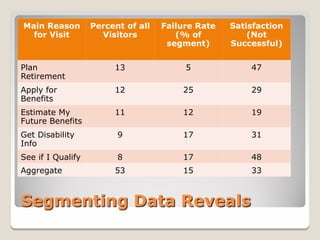
Main Reason        Percent of all   Failure Rate   Satisfaction
  for Visit          Visitors          (% of           (Not
                                     segment)      Successful)


Plan                    13               5             47
Retirement
Apply for               12              25             29
Benefits
Estimate My             11              12             19
Future Benefits
Get Disability           9              17             31
Info
See if I Qualify         8              17             48
Aggregate               53              15             33


Segmenting Data Reveals
 Franchised through Interior’s National
  Business Center for Fed-wide use
 No procurement; Inter-Agency Agreement
 Pre-cleared by OMB for Paperwork
  Reduction Act purposes
 Cost: $25-30K per survey/year; more
  with add-on features
 Info: http://fcg.nbc.gov/


Info about Federal FSR Use
   4Q (Site survey)
    ◦ http://www.4qsurvey.com/; No-cost; just four questions
   iPerceptions (Site survey)
    ◦ http://www.iperceptions.com/; Owns 4Q, other products
   Net Promoter (Site Survey)
    ◦ http://www.netpromoter.com/; Just one question
   Kampyle (page-level survey)
    ◦ http://www.kampyle.com/; User-selected, at every page
      on site
   Remember OMB PRA Requirements!


Some Other Survey Tools
 Many call center software packages can
  incorporate surveys
 ForeSee Results conducts phone surveys
  on overall Government Satisfaction
 SSA frequently surveys recent claimants
  about their experience, by phone and mail

Incorporating this data with other
 experience data is a challenge, esp. in
 attributing conversions

Phone/Other Surveys
Assessment of site quality & integrity
 aspects: Find and fix broken stuff
 before it affects visitor experience

   Broken links, misspellings, etc.
   Section 508 compliance
   Missing meta-data, analytics page tags
   Page weights and proximity
   SEO
   More


Site Quality/Integrity Data
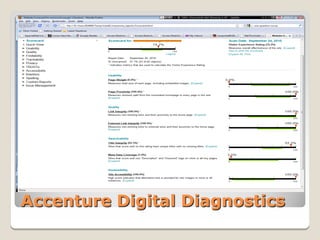
Accenture Digital Diagnostics
 Franchised through Interior’s National
  Business Center for Fed-wide use
 No procurement; Inter-Agency Agreement
 Cost: ~$5-$10K initial purchase + plus
  annual maintenance
 Hosted (costs more) or on-site service
  (your hardware; your work)
 Also does web server log file analysis
 Info: http://fcg.nbc.gov/


Info about ADD
   W3C Quality Assurance Tools:
    http://www.w3.org/QA/Tools/
   Xenu Link Sleuth:
    http://home.snafu.de/tilman/xenulink.html
   Google Website Optimizer:
    http://www.google.com/analytics/siteopt/
   Many, many SEO “consultants” out there--
    beware


Other Quality/Integrity Tools
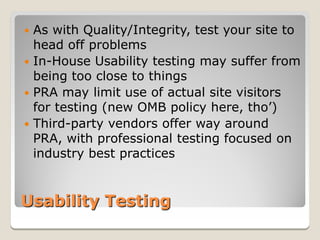
 As with Quality/Integrity, test your site to
  head off problems
 In-House Usability testing may suffer from
  being too close to things
 PRA may limit use of actual site visitors
  for testing (new OMB policy here, tho’)
 Third-party vendors offer way around
  PRA, with professional testing focused on
  industry best practices


Usability Testing
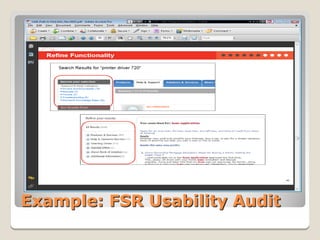
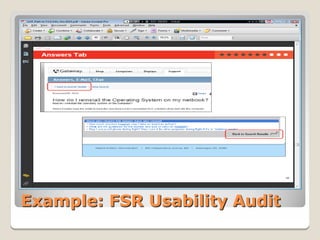
Example: FSR Usability Audit
 Traditional Referrer metrics: who’s
  sending visitors to your site
 Number of friends/likes/followers,
  comments on your Social Media pages
 “Buzz” monitoring/response
 Vendors rushing into this space
 Reference: Jim Stern, Social Media Metrics


Social Media Analytics
Search & Aggregate Mentions in
            Social/Traditional Media

 Searchable, indexable, trendable
 Automated reports
 Influencer, Sentiment analysis
    ◦ Importance of poster
    ◦ Lexical Analysis: meaning of posts
   Response workflow tools
    ◦ Assign/manage response to posts


Social Media: Buzz/Response
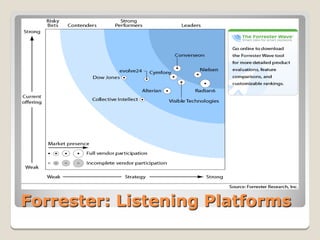
Forrester: Listening Platforms
Why is Analytics so Hard in Gov’t?
Reason #1: We don’t Make Money
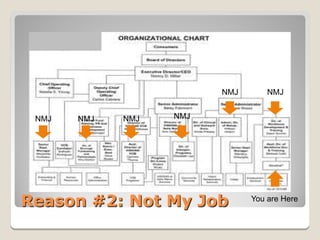
NMJ       NMJ


 NMJ   NMJ   NMJ   NMJ


Reason #2: Not My Job          You are Here
   Cost savings—you can measure it
    ◦ FTE, infrastructure savings from on-line
      services
    ◦ ~40% of SSA FAQ’s users say found what they
      wanted; won’t contact via hi-cost channel;
      double-digit FTE savings
   Citizen Time Savings
    ◦ Time on phone, travel, wait at gov’t office
    ◦ Time spent on paper forms vis-à-vis on-line
      (PRA data provides hints)
    ◦ Soft data; may have to ask citizens (ACSI?)


ROI: Gov’t Web Analytics
 IT has hardware, software, wiring,
  security, monitoring, storage, capacity
  planning, boo-koo other folks—all have a
  piece, but it’s none of their jobs
 Content owners manage your Web
  Analytics page tags, but that’s not their
  job
 Business users may have Analytics
  “ownership,” but need IT and Content
  folks (again, stuff that isn’t their jobs)

NMJ: The Real Problem
 Build cross-component relationships
 Convert your boss
 Look for small successes within your
  grasp/control to gain confidence of others


   Above all, find an Executive to be your
    Analytics Champion


NMJ: Some Solutions
Objectives we stated earlier:

 Better Web sites based on data about site
  visitors
 Site decisions based on analysis of
  empirical visitor data, not Highly Paid
  persons' opinions
 Identify and fix site problems
 Help site users succeed


Analytics Culture: Objectives
   Don’t “Spew” Data—200-page out-of-the-box
    report from WA tool not usually of much value
   Start small, with Outcomes data about
    something you can control
   Find Champions, Heroes, Role Models
   Buy doughnuts or pizza; invite the NMJ’s
   Deliver reports that drive action by connecting
    data, insight, and Outcomes
   Answer this: What’s the point?

http://www.kaushik.net/avinash/

Analytics Culture: Tactics
   Jim Stern, Web Metrics (oldie but goodie)
   Eric Peterson, Web Analytics Demystified (also old)
   Jason Burby/Shane Atchison, Actionable Web Analytics
   Brian Eisenberg/Jeffrey Eisenberg, Call to Action
   Brian Eisenberg/Jeffrey Eisenberg, Waiting for Your Cat to
    Bark
   Avinash Kaushik, Web Analytics: An Hour a Day
   Brian Eisenberg/John Quarto-vonTivadar, w/Lisa T. Davie,
    a/b: always be testing
   Avinash Kaushik, Web Analytics 2.0
   Brian Clifton, Advanced Web Metrics with Google Analytics
   Jim Stern, Social Media Metrics


Recommended Reading
   Web Analytics Association (Gov't discount!):
    http://www.webanalyticsassociation.org/
   eMetrics conferences: http://www.emetrics.org/
   UBC On-Line Program (WAA discount!):
    http://www.tech.ubc.ca/webanalytics/
   Federal Web Managers’ Council Metrics:
    http://forum.webcontent.gov/members/group.asp?id=316
    82
   Yahoo Web Analytics Forum:
    http://tech.groups.yahoo.com/group/webanalytics/
   Web Analytics Demystified:
  http://blog.webanalyticsdemystified.com/
 http://google.com/search?q=web+analytics+blog


Web Analytics Resources
   Nuts and bolts of collecting web analytics
    ◦ Behavioral, Outcomes, and Experience data
   Why Analytics is so hard in Government
    ◦ Hard to prove ROI when we don’t sell
    ◦ NMJ
   Building a culture of Analytics
    ◦ Objectives
    ◦ Tactics
   Web Analytics Resources


Review
Tim Evans
    Social Security Administration
    http://www.socialsecurity.gov/

            tim.evans@ssa.gov
          tkevans@tkevans.com
              (410) 965-4217
              (443) 618-0351


Contact

Government Web Analytics

  • 1.
    Web Analytics in Government Tim Evans Social Security Administration Co-Chair, Federal Metrics Sub-Council Chair, Web Analytics Association Public Sector SIG
  • 2.
     Some overall,introductory, Dutch-Uncle stuff  Nuts and bolts of collecting web analytics  Why Analytics is so hard in Government  Building a culture of Analytics  Web Analytics Resources Setting Expectations
  • 3.
     Better Websites based on data about site visitors  Enable site decisions based on analysis of empirical visitor data, not Highly Paid persons' opinions  Identify and fix site problems  Help site users succeed Why Web Analytics?
  • 4.
     Visitor Behavior:What they do on your website (often called “Clickstream”)  Visitor Outcomes: How successful they are  Visitor Experience: How happy they are about it  Quality/Integrity data: Broken/missing links, SEO, etc.  Social Media Metrics and “Buzz” Web Analytics Data
  • 5.
     By definition,our data is about all visitors, or interesting segments of visitors, not individuals  OMB policies emphasize this  No place for PII here  Tools that track individual behavior should be limited to a customer-service context (that is, casework) Web Analytics Data is Aggregate Data
  • 6.
    Vocabulary Alert: Banish“hits” Resist requests for bragging-rights numbers How not to Track Success
  • 7.
     Every sitehas a purpose; its goals should be identified before starting an Analytics project  Key Metrics for your site must be based on your site’s goals  One-size-fits-all data reporting can’t possibly meet your project’s needs  You must find the one, true set of metrics for your site Every Site is Different; so are its Goals; so are its Key Metrics
  • 8.
     Plenty oftools will collect masses of analytics data on a site  Highly competitive market; most have the same general range of capabilities  Some very expensive, some free  Regardless of choice, none will meet your needs out of the box  Your work required in implementing the tools, then analyzing the data Tools: Just 10% of the Job
  • 9.
    What they do on your website ◦ What pages, how many? ◦ Where did they enter, come from? ◦ How long did they stay? ◦ What did they search for?  What did we learn about them ◦ Top Tasks ◦ Bounce rates ◦ Where did they quit?  What’s relevant to your site’s unique goals? Behavioral Data
  • 10.
     Web serverlog files  Specialized logs created by JavaScript “page tags” embedded in web pages  Passive, on-wire network sniffers that log web traffic  Hybrids combining two or more of the above Sources of Behavioral Data
  • 11.
     Traditional sourceof data, kept by the web server itself as it serves pages  Logs all activities with date stamps, IP address, resource (page) accessed, time- to-serve, much else  Web Analytics tools parse the logs to create reports  Major shortcomings; some pro’s Web Server Log Files
  • 12.
     Records allsite activity, including that of spiders, ‘bots, door-knob-rattlers and other non-humans (over count)  Does not record site activity served from ISP caching servers (under count)  Dependent on central IT for setup and support, which may also control the Analytics tool Web Server Logs: Con’s
  • 13.
     Some technicaldata (e.g., error messages, bandwidth use) collected that is not in page-tag data  Especially good for capacity planning functions (costly Analytics tools may be overkill for this purpose)  On-site search terms automatically logged  Logs can be re-analyzed, after the fact. Web Server Logs: Pro’s
  • 14.
     Bits ofJavaScript (usually) embedded in web pages  Code executed by visitors’ browsers; web server is not involved  Browsers “phone home” to site data collector (local or vendor-hosted), exchanging session data  Data collectors log the session info: Analytics tools run against this data Page Tags: Introduction
  • 15.
    <script src="/includes/wtinit.js" type="text/javascript"></script> <script src="/includes/wtbase.js" type="text/javascript"></script> <scripttype="text/javascript"> //<![CDATA[ var _tag=new WebTrends(); //]]>> </script> <script type="text/javascript"> //<![CDATA[ // Add custom parameters here. //_tag.DCSext.param_name=param_value; _tag.dcsCollect(); //]]>> </script> <noscript> <div><img alt="DCSIMG" id="DCSIMG" width="1" height="1" src="https://stats.ssa.gov/dcs5w0txb10000wocrvq y1nqm_6n1p/njs.gif?dcsuri=/nojavascript&amp;W T.js=No&amp;DCS.dcscfg=1&amp;WT.tv=8.6.2"/> </div> </noscript>
  • 16.
     Easy toimplement (theoretically)  Controlled, and configurable, by business users, not IT  Data collected real time, immediately accessible for analysis  Ignores spiders/bots/non-humans (they don’t execute JavaScript)  Busts ISP caches—every page view triggers tag, regardless of its source  All vendor innovation in Analytics here Page Tags: Pro’s
  • 17.
     Tag mustbe in every page  Increases page size (+/- 200KB)  ~2% of users disable JavaScript  Capacity-planning data not collected  Since data is collected real time, botched/missing tags collect no or incomplete data; cannot be re-played  Tag changes may render prior data invalid  Mixing vendor tags may/may not create problems Page Tags: Con’s
  • 18.
    Log Files Page Tags Spiders/Bots/Non- Yes No Human Busts ISP Caches No Yes Tech Data/Error Msgs Yes No IT Support Req’d Yes Not if I have anything to say about it Search Terms Yes Maybe Re-run Data Yes No Who Controls IT You Do Real Time Collection No Yes Touch Every Page No Your Job Increase Page Size No Yes Bold Moves Me
  • 19.
    Most vendors support hybrid data collection (logs + page tag data), and can merge them  GA is exception; requires local Urchin install  Sniffer appliances capture/log web traffic by on-wire packet inspection (no tags may be involved)  On-the-fly insertion of page tag at site exit point to ensure consistency  Some movement toward “universal” tags, partly result of concern about multiple tags Various Workarounds
  • 20.
    Always based onyour site’s goals  Basics ◦ Visits/Visitors ◦ Page Views ◦ Referrers ◦ Search terms ◦ Entry/Exit Pages ◦ Single-Page Visits (Bounces) ◦ More derived from these/with time dimensions • Web Analytics Association Definitions: http://tinyurl.com/28fkkq2 Run-Through: Behavioral Metrics
  • 23.
    By themselves, probably few of them ◦ Without your site goals, none can address “success” ◦ Does “a lot” of any of these tell you much? ◦ Is “more” always “better?” ◦ It’s not a competition  Context adds meaning ◦ Trends over time ◦ Pre/Post Site Redesign ◦ Pages rising/falling ◦ Marketing Which are My Key Metrics?
  • 24.
     Most-viewed pagestell you visitors’ Top Tasks: Are they what you thought they were? If not, what does that do to your thinking?  Search Terms tell you what visitors looked for: Did they find it? Did they not find it?  Referrers tell you where visitors come from: Is your marketing succeeding? Where else should you be marketing? This is too much Work; What’s Low-Hanging?
  • 25.
     Persistent CookiesID returning visitors  New OMB policy (6/10), removes prior prohibition  Segmenting new and returning visitors is key; otherwise all visits are new ones  Absent cookies, reported numbers of new/returning visitors are inaccurate  Cookies also enable EZ login, site customization (“Remember Me”)  http://challenge.gov/privacy#cookies Behavioral Detour: Cookies
  • 26.
     Attractive, powerful,free Web Analytics tool, with Federal Terms of service (http://apps.gov/)  Hosted service (i.e., Google’s data center)  Uses page tags, persistent cookies  Possible issues with data ownership, location, retention, large sites, PII  Geolocation data, but no IP addresses Behavioral Detour: Google Analytics
  • 27.
    Measures of successdepend on your site goals  Task completion/Conversions  Views/downloads of pages you wanted them to see  Successful searches  Time on site (maybe)  Bounce rate (maybe)  Engagement Outcomes Data
  • 28.
    Web Analytics Tool ◦ Files (you wanted) viewed/downloaded ◦ Funnel Analysis on tasks pinpoint failure points ◦ Site registrations  Other Places ◦ Mailing list sign-ups ◦ Call center activities ◦ Traditional MI: tasks completed ◦ Specific outcomes Q’s on surveys ◦ Session “replay” applications  Converging multiple-source data an issue Sources of Outcomes Data
  • 29.
  • 30.
  • 31.
    How visitors feelabout their experience on your site  Customer Satisfaction ◦ Overall Satisfaction ◦ Ratings on aspects of your site ◦ Future Behaviors ◦ Satisfaction with agency overall (clicks & mortar)  Questions related to your site goals  Why did you come to our site?  Did you succeed? Experience Data: Introduction
  • 32.
     Surveys (online, on phone, in person)  Web Site Quality/Integrity Testing  Usability Testing/Assessments  Social Media “buzz” Experience Data: Sources
  • 33.
    On-web “Pop-up” Surveys Ratings for Satisfaction, major site Elements (Navigation, Search)  “Likely-to” questions  Custom questions  Open Ends  ForeSee Results, iPerceptions, 4Q (free), others Experience Data: Surveys
  • 34.
  • 35.
  • 36.
  • 37.
    Main Reason Percent of all Failure Rate Satisfaction for Visit Visitors (% of (Not segment) Successful) Plan 13 5 47 Retirement Apply for 12 25 29 Benefits Estimate My 11 12 19 Future Benefits Get Disability 9 17 31 Info See if I Qualify 8 17 48 Aggregate 53 15 33 Segmenting Data Reveals
  • 38.
     Franchised throughInterior’s National Business Center for Fed-wide use  No procurement; Inter-Agency Agreement  Pre-cleared by OMB for Paperwork Reduction Act purposes  Cost: $25-30K per survey/year; more with add-on features  Info: http://fcg.nbc.gov/ Info about Federal FSR Use
  • 39.
    4Q (Site survey) ◦ http://www.4qsurvey.com/; No-cost; just four questions  iPerceptions (Site survey) ◦ http://www.iperceptions.com/; Owns 4Q, other products  Net Promoter (Site Survey) ◦ http://www.netpromoter.com/; Just one question  Kampyle (page-level survey) ◦ http://www.kampyle.com/; User-selected, at every page on site  Remember OMB PRA Requirements! Some Other Survey Tools
  • 40.
     Many callcenter software packages can incorporate surveys  ForeSee Results conducts phone surveys on overall Government Satisfaction  SSA frequently surveys recent claimants about their experience, by phone and mail Incorporating this data with other experience data is a challenge, esp. in attributing conversions Phone/Other Surveys
  • 41.
    Assessment of sitequality & integrity aspects: Find and fix broken stuff before it affects visitor experience  Broken links, misspellings, etc.  Section 508 compliance  Missing meta-data, analytics page tags  Page weights and proximity  SEO  More Site Quality/Integrity Data
  • 42.
  • 43.
     Franchised throughInterior’s National Business Center for Fed-wide use  No procurement; Inter-Agency Agreement  Cost: ~$5-$10K initial purchase + plus annual maintenance  Hosted (costs more) or on-site service (your hardware; your work)  Also does web server log file analysis  Info: http://fcg.nbc.gov/ Info about ADD
  • 44.
    W3C Quality Assurance Tools: http://www.w3.org/QA/Tools/  Xenu Link Sleuth: http://home.snafu.de/tilman/xenulink.html  Google Website Optimizer: http://www.google.com/analytics/siteopt/  Many, many SEO “consultants” out there-- beware Other Quality/Integrity Tools
  • 45.
     As withQuality/Integrity, test your site to head off problems  In-House Usability testing may suffer from being too close to things  PRA may limit use of actual site visitors for testing (new OMB policy here, tho’)  Third-party vendors offer way around PRA, with professional testing focused on industry best practices Usability Testing
  • 46.
  • 47.
  • 48.
     Traditional Referrermetrics: who’s sending visitors to your site  Number of friends/likes/followers, comments on your Social Media pages  “Buzz” monitoring/response  Vendors rushing into this space  Reference: Jim Stern, Social Media Metrics Social Media Analytics
  • 49.
    Search & AggregateMentions in Social/Traditional Media  Searchable, indexable, trendable  Automated reports  Influencer, Sentiment analysis ◦ Importance of poster ◦ Lexical Analysis: meaning of posts  Response workflow tools ◦ Assign/manage response to posts Social Media: Buzz/Response
  • 50.
  • 51.
    Why is Analyticsso Hard in Gov’t?
  • 52.
    Reason #1: Wedon’t Make Money
  • 53.
    NMJ NMJ NMJ NMJ NMJ NMJ Reason #2: Not My Job You are Here
  • 54.
    Cost savings—you can measure it ◦ FTE, infrastructure savings from on-line services ◦ ~40% of SSA FAQ’s users say found what they wanted; won’t contact via hi-cost channel; double-digit FTE savings  Citizen Time Savings ◦ Time on phone, travel, wait at gov’t office ◦ Time spent on paper forms vis-à-vis on-line (PRA data provides hints) ◦ Soft data; may have to ask citizens (ACSI?) ROI: Gov’t Web Analytics
  • 55.
     IT hashardware, software, wiring, security, monitoring, storage, capacity planning, boo-koo other folks—all have a piece, but it’s none of their jobs  Content owners manage your Web Analytics page tags, but that’s not their job  Business users may have Analytics “ownership,” but need IT and Content folks (again, stuff that isn’t their jobs) NMJ: The Real Problem
  • 56.
     Build cross-componentrelationships  Convert your boss  Look for small successes within your grasp/control to gain confidence of others  Above all, find an Executive to be your Analytics Champion NMJ: Some Solutions
  • 57.
    Objectives we statedearlier:  Better Web sites based on data about site visitors  Site decisions based on analysis of empirical visitor data, not Highly Paid persons' opinions  Identify and fix site problems  Help site users succeed Analytics Culture: Objectives
  • 58.
    Don’t “Spew” Data—200-page out-of-the-box report from WA tool not usually of much value  Start small, with Outcomes data about something you can control  Find Champions, Heroes, Role Models  Buy doughnuts or pizza; invite the NMJ’s  Deliver reports that drive action by connecting data, insight, and Outcomes  Answer this: What’s the point? http://www.kaushik.net/avinash/ Analytics Culture: Tactics
  • 59.
    Jim Stern, Web Metrics (oldie but goodie)  Eric Peterson, Web Analytics Demystified (also old)  Jason Burby/Shane Atchison, Actionable Web Analytics  Brian Eisenberg/Jeffrey Eisenberg, Call to Action  Brian Eisenberg/Jeffrey Eisenberg, Waiting for Your Cat to Bark  Avinash Kaushik, Web Analytics: An Hour a Day  Brian Eisenberg/John Quarto-vonTivadar, w/Lisa T. Davie, a/b: always be testing  Avinash Kaushik, Web Analytics 2.0  Brian Clifton, Advanced Web Metrics with Google Analytics  Jim Stern, Social Media Metrics Recommended Reading
  • 60.
    Web Analytics Association (Gov't discount!): http://www.webanalyticsassociation.org/  eMetrics conferences: http://www.emetrics.org/  UBC On-Line Program (WAA discount!): http://www.tech.ubc.ca/webanalytics/  Federal Web Managers’ Council Metrics: http://forum.webcontent.gov/members/group.asp?id=316 82  Yahoo Web Analytics Forum: http://tech.groups.yahoo.com/group/webanalytics/  Web Analytics Demystified: http://blog.webanalyticsdemystified.com/  http://google.com/search?q=web+analytics+blog Web Analytics Resources
  • 61.
    Nuts and bolts of collecting web analytics ◦ Behavioral, Outcomes, and Experience data  Why Analytics is so hard in Government ◦ Hard to prove ROI when we don’t sell ◦ NMJ  Building a culture of Analytics ◦ Objectives ◦ Tactics  Web Analytics Resources Review
  • 62.
    Tim Evans Social Security Administration http://www.socialsecurity.gov/ tim.evans@ssa.gov tkevans@tkevans.com (410) 965-4217 (443) 618-0351 Contact