Group 6:
 G. Saidinesh (20DM081)
 Itika Vashistha (20DM087)
 Juhi Srivastava (20DM093)
 Kartik Garg (20DM099)
 Kunal Jain (20DM107)
 Mahima Agarwal (20DM113)
ABOUT
 Google Drive is a file storage and synchronization service developed by Google.
 Launched on April 24, 2012, Google Drive allows users to:
 store files on their servers,
 synchronize files across devices, and
 share files.
 Google Drive encompasses Google Docs, Google Sheets, Google Forms and Google Slides.
 These are a part of an office suite that permits collaborative editing of documents, spreadsheets,
presentations, drawings, forms, and more.
 Files created and edited through the office suite are saved in Google Drive.
MISSION, VISION & VALUES
MISSION STATEMENT:
Organize the world's information and make it universally
accessible and useful.
VISION STATEMENT:
To provide access to the world’s information in one click
VALUES:
 Great isn’t good enough.
 Focus on the user, all else will follow.
 It’s best to do one thing really well.
 Fast is better than slow.
 You can make money without doing evil.
 There is always more information.
 The need for information crosses all borders.
VALUE PROPOSITION
It pinpoints the value proposition of providing a single, safe place for all your files.
SERVICES BY GOOGLE DRIVE:
 Google Drive offers users 15 gigabytes of free storage through Google One.
 Google One also offers 100 gigabytes, 200 gigabytes, 2 terabytes, 10
terabytes, 20 terabytes, and 30 terabytes offered through optional paid plans.
Files uploaded can be up to 5 terabytes in size.
 Users can change privacy settings for individual files and folders, including
enabling sharing with other users or making content public
BUSINESS MODEL
 Service Provider.
 E-tailers sell product online while service providers sell services online.
 Google drive provides services online to its users.
 Google drive follows the software as a service structure.
 Google drive provides its customer an online storage space wherein they
can upload pictures, files, folders and any kind of document which can be
accessed easily from anywhere any time they want.
 There is an integrated collaboration between google doc, sheets slides and
google drive where these files are automatically saved on google drive. Which
provides users a work friendly platform.
REVENUE MODEL
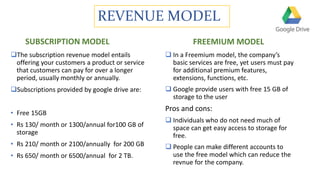
SUBSCRIPTION MODEL
The subscription revenue model entails
offering your customers a product or service
that customers can pay for over a longer
period, usually monthly or annually.
Subscriptions provided by google drive are:
• Free 15GB
• Rs 130/ month or 1300/annual for100 GB of
storage
• Rs 210/ month or 2100/annually for 200 GB
• Rs 650/ month or 6500/annual for 2 TB.
FREEMIUM MODEL
 In a Freemium model, the company’s
basic services are free, yet users must pay
for additional premium features,
extensions, functions, etc.
 Google provide users with free 15 GB of
storage to the user
Pros and cons:
 Individuals who do not need much of
space can get easy access to storage for
free.
 People can make different accounts to
use the free model which can reduce the
revnue for the company.
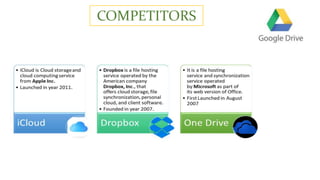
COMPETITORS
BUSINESS VALUE
 Accessibility For A Growing Mobile
Workforce.
 Improved Competency In How Data
Is Handled.
 Cost effective.
 Collaborative works.
LIMITATIONS
 Tampering of files uploaded on the drive
by other users.
 In case a user modifies the uploaded MS
Word document on the drives link,
Google docs tend to mess up the
formatting of the document.
 Google Drive can only be accessed with
Gmail ID’s of the user. It lacks the users
with other E-mail ids to access the
google drive link.
OPERATIONAL EXCELLENCE
“A philosophy of the workplace where problem-solving, teamwork, and leadership results in the
ongoing improvement in an organization. The process involves focusing on the customers' needs,
keeping the employees positive and empowered, and continually improving the current activities
in the workplace.”
Principles of Operational Excellence:
 Respect for Every Individual
 Lead with Humility
 Seek Perfection
 Embrace Scientific Thinking
 Focus on Process
 Assure Quality at the Source
 Flow & Pull Value
 Think Systemically
 Create Consistency of Purpose
SOLUTION FOR OPERATIONAL EXCELLENCE
STRATEGIES:
 Automate build, test, and deploy: Use continuous integration and continuous deployment (CI/CD)
pipelines to build automated testing into your releases. Perform automated integration testing and
deployment.
 Monitor business objectives metrics: Define, measure, and alert on relevant business metrics.
 Conduct disaster recovery testing: Don't wait for a disaster to strike. Instead, periodically verify that
your disaster recovery procedures work, and test the processes regularly.
BEST PRACTICES:
 Increase software development and release velocity.
 Monitor for system health and business health.
 Plan and design for failures.
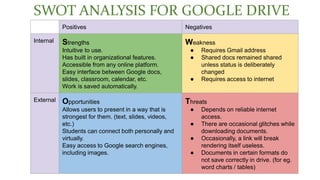
SWOT ANALYSIS FOR GOOGLE DRIVE
Positives Negatives
Internal Strengths
Intuitive to use.
Has built in organizational features.
Accessible from any online platform.
Easy interface between Google docs,
slides, classroom, calendar, etc.
Work is saved automatically.
Weakness
● Requires Gmail address
● Shared docs remained shared
unless status is deliberately
changed
● Requires access to internet
External Opportunities
Allows users to present in a way that is
strongest for them. (text, slides, videos,
etc.)
Students can connect both personally and
virtually.
Easy access to Google search engines,
including images.
Threats
● Depends on reliable internet
access.
● There are occasional glitches while
downloading documents.
● Occasionally, a link will break
rendering itself useless.
● Documents in certain formats do
not save correctly in drive. (for eg.
word charts / tables)
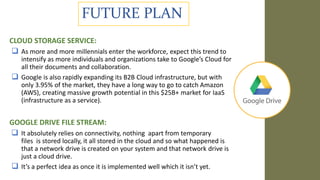
FUTURE PLAN
CLOUD STORAGE SERVICE:
 As more and more millennials enter the workforce, expect this trend to
intensify as more individuals and organizations take to Google’s Cloud for
all their documents and collaboration.
 Google is also rapidly expanding its B2B Cloud infrastructure, but with
only 3.95% of the market, they have a long way to go to catch Amazon
(AWS), creating massive growth potential in this $25B+ market for IaaS
(infrastructure as a service).
GOOGLE DRIVE FILE STREAM:
 It absolutely relies on connectivity, nothing apart from temporary
files is stored locally, it all stored in the cloud and so what happened is
that a network drive is created on your system and that network drive is
just a cloud drive.
 It’s a perfect idea as once it is implemented well which it isn’t yet.
FUTURE PLAN
 The idea is to make collaboration with external
third parties, colleagues in different teams or
different levels of management easier without
having to give broad drive permission.
 “For a marketing department, you can have a
shared drive accessible by all internal employees,
with a specific folder for advertising materials that’s
also accessible to an external agency.”
THANK YOU

Google Drive

  • 1.
    Group 6:  G.Saidinesh (20DM081)  Itika Vashistha (20DM087)  Juhi Srivastava (20DM093)  Kartik Garg (20DM099)  Kunal Jain (20DM107)  Mahima Agarwal (20DM113)
  • 2.
    ABOUT  Google Driveis a file storage and synchronization service developed by Google.  Launched on April 24, 2012, Google Drive allows users to:  store files on their servers,  synchronize files across devices, and  share files.  Google Drive encompasses Google Docs, Google Sheets, Google Forms and Google Slides.  These are a part of an office suite that permits collaborative editing of documents, spreadsheets, presentations, drawings, forms, and more.  Files created and edited through the office suite are saved in Google Drive.
  • 3.
    MISSION, VISION &VALUES MISSION STATEMENT: Organize the world's information and make it universally accessible and useful. VISION STATEMENT: To provide access to the world’s information in one click VALUES:  Great isn’t good enough.  Focus on the user, all else will follow.  It’s best to do one thing really well.  Fast is better than slow.  You can make money without doing evil.  There is always more information.  The need for information crosses all borders.
  • 4.
    VALUE PROPOSITION It pinpointsthe value proposition of providing a single, safe place for all your files. SERVICES BY GOOGLE DRIVE:  Google Drive offers users 15 gigabytes of free storage through Google One.  Google One also offers 100 gigabytes, 200 gigabytes, 2 terabytes, 10 terabytes, 20 terabytes, and 30 terabytes offered through optional paid plans. Files uploaded can be up to 5 terabytes in size.  Users can change privacy settings for individual files and folders, including enabling sharing with other users or making content public
  • 5.
    BUSINESS MODEL  ServiceProvider.  E-tailers sell product online while service providers sell services online.  Google drive provides services online to its users.  Google drive follows the software as a service structure.  Google drive provides its customer an online storage space wherein they can upload pictures, files, folders and any kind of document which can be accessed easily from anywhere any time they want.  There is an integrated collaboration between google doc, sheets slides and google drive where these files are automatically saved on google drive. Which provides users a work friendly platform.
  • 6.
    REVENUE MODEL SUBSCRIPTION MODEL Thesubscription revenue model entails offering your customers a product or service that customers can pay for over a longer period, usually monthly or annually. Subscriptions provided by google drive are: • Free 15GB • Rs 130/ month or 1300/annual for100 GB of storage • Rs 210/ month or 2100/annually for 200 GB • Rs 650/ month or 6500/annual for 2 TB. FREEMIUM MODEL  In a Freemium model, the company’s basic services are free, yet users must pay for additional premium features, extensions, functions, etc.  Google provide users with free 15 GB of storage to the user Pros and cons:  Individuals who do not need much of space can get easy access to storage for free.  People can make different accounts to use the free model which can reduce the revnue for the company.
  • 7.
  • 9.
    BUSINESS VALUE  AccessibilityFor A Growing Mobile Workforce.  Improved Competency In How Data Is Handled.  Cost effective.  Collaborative works.
  • 10.
    LIMITATIONS  Tampering offiles uploaded on the drive by other users.  In case a user modifies the uploaded MS Word document on the drives link, Google docs tend to mess up the formatting of the document.  Google Drive can only be accessed with Gmail ID’s of the user. It lacks the users with other E-mail ids to access the google drive link.
  • 11.
    OPERATIONAL EXCELLENCE “A philosophyof the workplace where problem-solving, teamwork, and leadership results in the ongoing improvement in an organization. The process involves focusing on the customers' needs, keeping the employees positive and empowered, and continually improving the current activities in the workplace.” Principles of Operational Excellence:  Respect for Every Individual  Lead with Humility  Seek Perfection  Embrace Scientific Thinking  Focus on Process  Assure Quality at the Source  Flow & Pull Value  Think Systemically  Create Consistency of Purpose
  • 12.
    SOLUTION FOR OPERATIONALEXCELLENCE STRATEGIES:  Automate build, test, and deploy: Use continuous integration and continuous deployment (CI/CD) pipelines to build automated testing into your releases. Perform automated integration testing and deployment.  Monitor business objectives metrics: Define, measure, and alert on relevant business metrics.  Conduct disaster recovery testing: Don't wait for a disaster to strike. Instead, periodically verify that your disaster recovery procedures work, and test the processes regularly. BEST PRACTICES:  Increase software development and release velocity.  Monitor for system health and business health.  Plan and design for failures.
  • 13.
    SWOT ANALYSIS FORGOOGLE DRIVE Positives Negatives Internal Strengths Intuitive to use. Has built in organizational features. Accessible from any online platform. Easy interface between Google docs, slides, classroom, calendar, etc. Work is saved automatically. Weakness ● Requires Gmail address ● Shared docs remained shared unless status is deliberately changed ● Requires access to internet External Opportunities Allows users to present in a way that is strongest for them. (text, slides, videos, etc.) Students can connect both personally and virtually. Easy access to Google search engines, including images. Threats ● Depends on reliable internet access. ● There are occasional glitches while downloading documents. ● Occasionally, a link will break rendering itself useless. ● Documents in certain formats do not save correctly in drive. (for eg. word charts / tables)
  • 14.
    FUTURE PLAN CLOUD STORAGESERVICE:  As more and more millennials enter the workforce, expect this trend to intensify as more individuals and organizations take to Google’s Cloud for all their documents and collaboration.  Google is also rapidly expanding its B2B Cloud infrastructure, but with only 3.95% of the market, they have a long way to go to catch Amazon (AWS), creating massive growth potential in this $25B+ market for IaaS (infrastructure as a service). GOOGLE DRIVE FILE STREAM:  It absolutely relies on connectivity, nothing apart from temporary files is stored locally, it all stored in the cloud and so what happened is that a network drive is created on your system and that network drive is just a cloud drive.  It’s a perfect idea as once it is implemented well which it isn’t yet.
  • 15.
    FUTURE PLAN  Theidea is to make collaboration with external third parties, colleagues in different teams or different levels of management easier without having to give broad drive permission.  “For a marketing department, you can have a shared drive accessible by all internal employees, with a specific folder for advertising materials that’s also accessible to an external agency.”
  • 16.