Problems

Have ever lost any important documents, pics, videos etc
Tired of Image file size limitations
Are you afraid that your hard drive crash will destroy all
your data
Are you worried that a virus attack can sweep off your
hard saved data
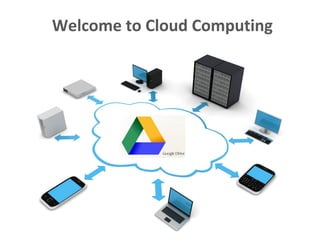
Welcome to Cloud Computing
What is Google Docs Drive
Create & Collaborate
Google Docs (documents, spreadsheets, presentations)
Share content, comments and receive notifications
Store everything safely and access it anywhere
Search you content anytime anywhere.
….Cloud Storage Service from Google
Officially released on 24th April 2012
Overview
Available on any Gmail ID
Originally was called Google Docs
Supports all formats (approx 20 formats)
Similar to Dropbox but……
Its open to all platforms
Cloud computing concept for storage & access
Versions of Google Drive
• Free: Gives upto 5GB data storage

• Premium: Gives from 25GB till 16TB online storage on a
monthly rental model (starting 2.49GB per month)
Advantage Google Drive
• Live changes: Users can create documents, spreadsheets,
presentations etc. and can edit the same over internet.
• Anytime accessibility: Files and documents stored in the
data centres of Google can be accessed by a user while
sitting in any part of the world, by simply logging into their
Google drive account.
• Device independency: There is no specific platform defined
for using the file uploaded on Google’s drive. Any device,
which is connected to network, can be used to access the
file stored on drive.
Advantage Google Drive
• Send large files: Now you don’t need to attach big files
with your emails. You can send/share files from your
Google Drive and recipients will be able to access the same
version of the file.
• Social Integration: The photos and videos you store in
Google Drive are directly available on your Google Plus
account. All it takes is one click to share them within your
circles
Advantage Google Drive
• Control your files: You can share your files with specific
people, give them editing or viewing privileges to files the
way you want
• Go back in time: Google Drive tracks every change you
make—so when you hit the save button, a new revision is
saved. You can look back as far as 30 days automatically, or
choose a revision to save forever
• Real Time Back-up - Drive provides an easy solution for
online back-up of data to the users. Especially, in
emergency situations like hard drive crash or data
corruption
Disadvantage Google Drive
• Security Issue : In a cloud environment, many Data security
issues are arises and due to which it is considered
unsuitable for use by governments or commercial
organisations.
• Internet Dependency: Internet based service means full
dependency on internet to access the data. As data is
stored remotely so some connection is required to access
the data. In case of a scenario where the Internet isn’t
functioning access to your data in such situation becomes
impossible.
Contact for a Workshop
Annkur Pandey
M: +91-9008927766
E: annkur@entroduce.in
www.entroduce.in
Linkedin: www.linkedin.com/in/annkurpandey

Basics of Google Drive

  • 1.
    Problems Have ever lostany important documents, pics, videos etc Tired of Image file size limitations Are you afraid that your hard drive crash will destroy all your data Are you worried that a virus attack can sweep off your hard saved data
  • 2.
  • 3.
    What is GoogleDocs Drive Create & Collaborate Google Docs (documents, spreadsheets, presentations) Share content, comments and receive notifications Store everything safely and access it anywhere Search you content anytime anywhere. ….Cloud Storage Service from Google Officially released on 24th April 2012
  • 4.
    Overview Available on anyGmail ID Originally was called Google Docs Supports all formats (approx 20 formats) Similar to Dropbox but…… Its open to all platforms Cloud computing concept for storage & access
  • 5.
    Versions of GoogleDrive • Free: Gives upto 5GB data storage • Premium: Gives from 25GB till 16TB online storage on a monthly rental model (starting 2.49GB per month)
  • 6.
    Advantage Google Drive •Live changes: Users can create documents, spreadsheets, presentations etc. and can edit the same over internet. • Anytime accessibility: Files and documents stored in the data centres of Google can be accessed by a user while sitting in any part of the world, by simply logging into their Google drive account. • Device independency: There is no specific platform defined for using the file uploaded on Google’s drive. Any device, which is connected to network, can be used to access the file stored on drive.
  • 7.
    Advantage Google Drive •Send large files: Now you don’t need to attach big files with your emails. You can send/share files from your Google Drive and recipients will be able to access the same version of the file. • Social Integration: The photos and videos you store in Google Drive are directly available on your Google Plus account. All it takes is one click to share them within your circles
  • 8.
    Advantage Google Drive •Control your files: You can share your files with specific people, give them editing or viewing privileges to files the way you want • Go back in time: Google Drive tracks every change you make—so when you hit the save button, a new revision is saved. You can look back as far as 30 days automatically, or choose a revision to save forever • Real Time Back-up - Drive provides an easy solution for online back-up of data to the users. Especially, in emergency situations like hard drive crash or data corruption
  • 9.
    Disadvantage Google Drive •Security Issue : In a cloud environment, many Data security issues are arises and due to which it is considered unsuitable for use by governments or commercial organisations. • Internet Dependency: Internet based service means full dependency on internet to access the data. As data is stored remotely so some connection is required to access the data. In case of a scenario where the Internet isn’t functioning access to your data in such situation becomes impossible.
  • 10.
    Contact for aWorkshop Annkur Pandey M: +91-9008927766 E: annkur@entroduce.in www.entroduce.in Linkedin: www.linkedin.com/in/annkurpandey