WHAT IS GOOGLE DRIVE?
• is a file storage and synchronization service
developed by Google.
• launched on April 24, 2012, Google Drive allows
users to store files in the cloud, synchronize files
across devices, and share files.
• Google Drive encompasses Google Docs, Sheets
and Slides, an office suite that permits
collaborative editing of documents, spreadsheets,
presentations, drawings, forms, and more. Files
created and edited through the office suite are
saved in Google Drive.
• Google Drive offers users 15 gigabytes of free
storage, with 100 gigabytes, 1 terabyte, 2
terabytes, 10 terabytes, 20 terabytes, and 30
terabytes offered through optional paid plans.
• Google Drive is a key component of G Suite,
Google's monthly subscription offering for
businesses and organizations.
FOUNDERS OF GOOGLE
LARRY PAGE
• (born March 26, 1973) is an American computer
scientist and Internet entrepreneur who co-founded
Google with Sergey Brin.
• Page is the chief executive officer (CEO) of Google's
parent company, Alphabet Inc.
• As of March 2017, Page
is the 12th richest
person in the world,
with an estimated net
worth of US$40.7 billion.
SERGEY BRIN
• (born August 21, 1973) is a Russian-born American
computer scientist, internet entrepreneur, and
philanthropist.
• he co-founded Google. Brin is the President of
Google's parent company Alphabet Inc.
• as of July 2017, Brin is the
12th richest person in the
world, with an estimated
net worth of US$45
billion.
THE LOGO OF GOOGLE DRIVE
TAGLINE: “KEEP EVERYTHING, SHARE
EVERYTHING.”
it is a combination of three colors forming
a triangle. Just to make sure that your data
is safe and protected it is forming a closed
figure.
FEATURES
OF
GOOGLE DRIVE
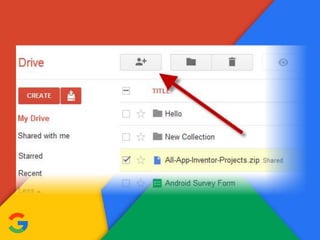
SHARING
• Google Drive incorporates a system of file sharing in
which the creator of a file or folder is, by default, its
owner.
• Files or folders can be shared privately with
particular users having a Google account, using their
@gmail.com email addresses.
• Files and folders can also be made "public on the
web", which means that they can be indexed by
search engines and thus can be found and accessed
by anyone.
• The three access levels offered are "can edit", "can
comment" and "can view". Users with editing access
can invite others to edit.
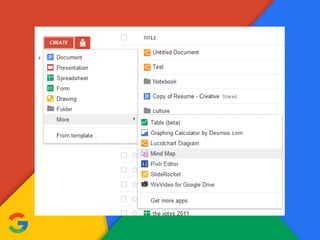
THIRD PARTY APPS
• To add an app, users are required to sign into
the Chrome Web Store, but the apps are
compatible with all supported web browsers.
• Drive apps operate on the online files, and can
be used to view, edit and create files in various
formats, edit images and videos, fax and sign
documents, manage projects, create
flowcharts, etc.
• Some of these apps also work offline on Google
Chrome and Chrome OS.
FILE LIMITS
• Files uploaded, but not converted to Google
Docs, Sheets, or Slides formats, may be up to
5 TB in size. There are also limits, specific to
file type, listed below:
– Documents (Google Docs)
– Spreadsheets (Google Sheets)
– Presentations (Google Slides)
DOCUMENTS (GOOGLE DOCS)
• Up to 1.02 million characters, regardless of the
number of pages or font size. Document files
converted to .gdoc Docs format cannot be larger
than 50 MB. Images inserted cannot be larger
than 50 MB, and must be in either .jpg, .png, or
non-animated .gif formats.
SPREADSHEETS (GOOGLE SHEET)
• Up to 2 million cells.
PRESENTATIONS (GOOGLE SLIDES)
• Presentation files converted to .gslides Slides
format cannot be larger than 100 MB. Images
inserted cannot be larger than 50 MB, and
must be in either .jpg, .png, or non-animated
.gif formats.
QUICK ACCESS
• Introduced in the Android app in September
2016, Quick Access uses machine learning to
"intelligently predict the files you need before
you've even typed anything".
• The feature was announced to be expanded to
iOS and the web in March 2017, though the
website interface received the feature in May.
SEARCH
• Search results can be narrowed by file type, ownership,
visibility, and the open-with app. Users can search for
images by describing or naming what is in them.
• In September 2016, Google added "natural language
processing" for searching on the Google Drive website,
enabling specific user search queries like "find my
budget spreadsheet from last December".
• In February 2017, Google integrated Drive and the
Google Search app on Android, letting users search for
keywords, switch to an "In Apps" tab, and see any
relevant Drive files.
BACK-UPS
• In December 2016, Google updated the Android
app and website with a "Backups" section, listing
the Android device and app backups saved to
Drive. The section lets users see what backups
are stored, the backups' sizes and details, and
delete backups.
• In June 2017, Google announced that a new app,
"Backup and Sync", would be able to synchronize
any folder on the user's computer to Google.
• The app was released on July 12, 2017.
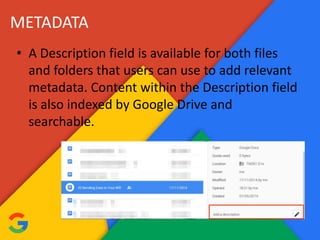
METADATA
• A Description field is available for both files
and folders that users can use to add relevant
metadata. Content within the Description field
is also indexed by Google Drive and
searchable.
MOBILE APPS
• The main Google Drive mobile app supported
editing of documents and spreadsheets until
April 2014, when the capability was moved to
separate, standalone apps for Google Docs,
Sheets, and Slides.
• In October 2014, the Android app was updated
with a Material Design user interface, improved
search, the ability to add a custom message
while sharing a file, and a new PDF viewer.
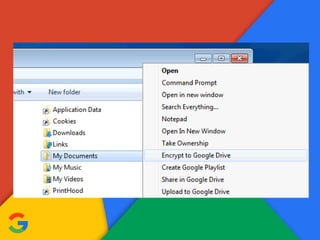
ENCRYPTION
• Before 2013, Google did not encrypt data stored on
its servers.
• Following information that the United States'
National Security Agency had "direct access" to
servers owned by multiple technology companies,
including Google, the company began testing
encrypting data in July, and enabled encryption for
data in transit between its data centers in
November.
• However, as of 2015, Google Drive does not provide
client-side encryption.
ETORMA, Louis Vincent Lloyd M.
G117
THANK YOU!

Google Drive

  • 2.
    WHAT IS GOOGLEDRIVE? • is a file storage and synchronization service developed by Google. • launched on April 24, 2012, Google Drive allows users to store files in the cloud, synchronize files across devices, and share files. • Google Drive encompasses Google Docs, Sheets and Slides, an office suite that permits collaborative editing of documents, spreadsheets, presentations, drawings, forms, and more. Files created and edited through the office suite are saved in Google Drive.
  • 3.
    • Google Driveoffers users 15 gigabytes of free storage, with 100 gigabytes, 1 terabyte, 2 terabytes, 10 terabytes, 20 terabytes, and 30 terabytes offered through optional paid plans. • Google Drive is a key component of G Suite, Google's monthly subscription offering for businesses and organizations.
  • 4.
  • 5.
    LARRY PAGE • (bornMarch 26, 1973) is an American computer scientist and Internet entrepreneur who co-founded Google with Sergey Brin. • Page is the chief executive officer (CEO) of Google's parent company, Alphabet Inc. • As of March 2017, Page is the 12th richest person in the world, with an estimated net worth of US$40.7 billion.
  • 6.
    SERGEY BRIN • (bornAugust 21, 1973) is a Russian-born American computer scientist, internet entrepreneur, and philanthropist. • he co-founded Google. Brin is the President of Google's parent company Alphabet Inc. • as of July 2017, Brin is the 12th richest person in the world, with an estimated net worth of US$45 billion.
  • 8.
    THE LOGO OFGOOGLE DRIVE TAGLINE: “KEEP EVERYTHING, SHARE EVERYTHING.” it is a combination of three colors forming a triangle. Just to make sure that your data is safe and protected it is forming a closed figure.
  • 9.
  • 10.
    SHARING • Google Driveincorporates a system of file sharing in which the creator of a file or folder is, by default, its owner. • Files or folders can be shared privately with particular users having a Google account, using their @gmail.com email addresses. • Files and folders can also be made "public on the web", which means that they can be indexed by search engines and thus can be found and accessed by anyone. • The three access levels offered are "can edit", "can comment" and "can view". Users with editing access can invite others to edit.
  • 12.
    THIRD PARTY APPS •To add an app, users are required to sign into the Chrome Web Store, but the apps are compatible with all supported web browsers. • Drive apps operate on the online files, and can be used to view, edit and create files in various formats, edit images and videos, fax and sign documents, manage projects, create flowcharts, etc. • Some of these apps also work offline on Google Chrome and Chrome OS.
  • 14.
    FILE LIMITS • Filesuploaded, but not converted to Google Docs, Sheets, or Slides formats, may be up to 5 TB in size. There are also limits, specific to file type, listed below: – Documents (Google Docs) – Spreadsheets (Google Sheets) – Presentations (Google Slides)
  • 15.
    DOCUMENTS (GOOGLE DOCS) •Up to 1.02 million characters, regardless of the number of pages or font size. Document files converted to .gdoc Docs format cannot be larger than 50 MB. Images inserted cannot be larger than 50 MB, and must be in either .jpg, .png, or non-animated .gif formats.
  • 16.
    SPREADSHEETS (GOOGLE SHEET) •Up to 2 million cells.
  • 17.
    PRESENTATIONS (GOOGLE SLIDES) •Presentation files converted to .gslides Slides format cannot be larger than 100 MB. Images inserted cannot be larger than 50 MB, and must be in either .jpg, .png, or non-animated .gif formats.
  • 18.
    QUICK ACCESS • Introducedin the Android app in September 2016, Quick Access uses machine learning to "intelligently predict the files you need before you've even typed anything". • The feature was announced to be expanded to iOS and the web in March 2017, though the website interface received the feature in May.
  • 20.
    SEARCH • Search resultscan be narrowed by file type, ownership, visibility, and the open-with app. Users can search for images by describing or naming what is in them. • In September 2016, Google added "natural language processing" for searching on the Google Drive website, enabling specific user search queries like "find my budget spreadsheet from last December". • In February 2017, Google integrated Drive and the Google Search app on Android, letting users search for keywords, switch to an "In Apps" tab, and see any relevant Drive files.
  • 22.
    BACK-UPS • In December2016, Google updated the Android app and website with a "Backups" section, listing the Android device and app backups saved to Drive. The section lets users see what backups are stored, the backups' sizes and details, and delete backups. • In June 2017, Google announced that a new app, "Backup and Sync", would be able to synchronize any folder on the user's computer to Google. • The app was released on July 12, 2017.
  • 24.
    METADATA • A Descriptionfield is available for both files and folders that users can use to add relevant metadata. Content within the Description field is also indexed by Google Drive and searchable.
  • 25.
    MOBILE APPS • Themain Google Drive mobile app supported editing of documents and spreadsheets until April 2014, when the capability was moved to separate, standalone apps for Google Docs, Sheets, and Slides. • In October 2014, the Android app was updated with a Material Design user interface, improved search, the ability to add a custom message while sharing a file, and a new PDF viewer.
  • 27.
    ENCRYPTION • Before 2013,Google did not encrypt data stored on its servers. • Following information that the United States' National Security Agency had "direct access" to servers owned by multiple technology companies, including Google, the company began testing encrypting data in July, and enabled encryption for data in transit between its data centers in November. • However, as of 2015, Google Drive does not provide client-side encryption.
  • 29.
    ETORMA, Louis VincentLloyd M. G117 THANK YOU!