Google Drive
By Reiner Vince M. Chavez
G117
Overview
Google Drive is a cloud storage and
synchronization service developed by
Google.
It also encompasses Google Docs, Sheets,
and Slides, a suite that allows
collaborative editing of presentations,
documents, and spreadsheets. All files
made from Google are saved in Google
Drive.
Overview
Google Drive offers 15 GB storage for free,
and optional pain plans are offered in 100
GB, 1 TB, 2 TB, 10 TB, 20 TB, and 30 TB
storage. Users can upload a maximum of
a 5-TB file.
Sharing, Google Docs, Slides, and Sheets, Quick Access, Mobile Apps
Features
Sharing
Google Drive offers a file sharing in which
the owner, the creator, can regulate the
public visibility of the file.
Ownership is transferable. Files can be
shared with users with Google account.
Google Docs, Slides, and Sheets
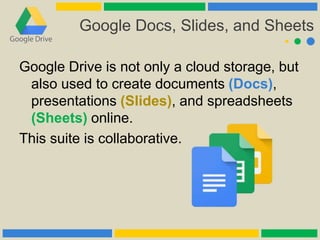
Google Drive is not only a cloud storage, but
also used to create documents (Docs),
presentations (Slides), and spreadsheets
(Sheets) online.
This suite is collaborative.
Quick Access
Quick Access makes finding/accessing a file
in the storage more faster.
This feature can be used in Android in 2016
and the web and iOs in March 2017.
Mobile Apps
The separate Google Docs, Sheets, and
Slides app on Android allows users to edit
their files in their mobile devices.
Google Drive allows users to take photo of a
document, sign, and use optical character
recognition to convert to text that can be
edited.
History
Platforms History
Google Drive was launched on April 24,
2012 and it is made available on Windows,
MacOS, Android, and website interface.
On June 2012, the iOS app was made
available.
Platforms History
In 2014, the website platform received a
visual overhaul that gave a completely
new look and improvised performance.
In 2016, it changed the visual elements in
the website that includes logo, search box,
and the primary color red was changed to
blue.
Platforms History
In June 2017, Google announced that a new
app, "Backup and Sync", would replace
the existing, individual Google Drive and
Google Photos Backups apps, creating
one unified app.
Procedure
Procedure
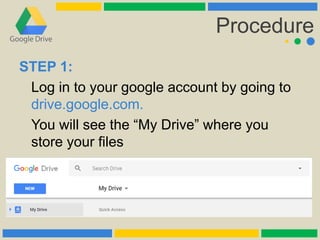
STEP 1:
Log in to your google account by going to
drive.google.com.
You will see the “My Drive” where you
store your files
Procedure
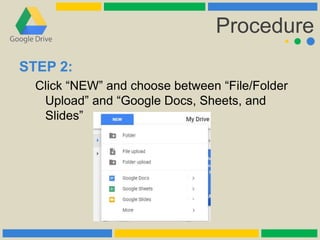
STEP 2:
Click “NEW” and choose between “File/Folder
Upload” and “Google Docs, Sheets, and
Slides”
Procedure
STEP 3:
To share or to make a file accessible to edit or
to see, just right-click a file and click “Share.”
You could edit participants and customize other
options in the panel.
Thank you!
By Reiner Vince M. Chavez
G117

GOOGLE DRIVE

  • 1.
    Google Drive By ReinerVince M. Chavez G117
  • 2.
    Overview Google Drive isa cloud storage and synchronization service developed by Google. It also encompasses Google Docs, Sheets, and Slides, a suite that allows collaborative editing of presentations, documents, and spreadsheets. All files made from Google are saved in Google Drive.
  • 3.
    Overview Google Drive offers15 GB storage for free, and optional pain plans are offered in 100 GB, 1 TB, 2 TB, 10 TB, 20 TB, and 30 TB storage. Users can upload a maximum of a 5-TB file.
  • 4.
    Sharing, Google Docs,Slides, and Sheets, Quick Access, Mobile Apps Features
  • 5.
    Sharing Google Drive offersa file sharing in which the owner, the creator, can regulate the public visibility of the file. Ownership is transferable. Files can be shared with users with Google account.
  • 6.
    Google Docs, Slides,and Sheets Google Drive is not only a cloud storage, but also used to create documents (Docs), presentations (Slides), and spreadsheets (Sheets) online. This suite is collaborative.
  • 7.
    Quick Access Quick Accessmakes finding/accessing a file in the storage more faster. This feature can be used in Android in 2016 and the web and iOs in March 2017.
  • 8.
    Mobile Apps The separateGoogle Docs, Sheets, and Slides app on Android allows users to edit their files in their mobile devices. Google Drive allows users to take photo of a document, sign, and use optical character recognition to convert to text that can be edited.
  • 9.
  • 10.
    Platforms History Google Drivewas launched on April 24, 2012 and it is made available on Windows, MacOS, Android, and website interface. On June 2012, the iOS app was made available.
  • 11.
    Platforms History In 2014,the website platform received a visual overhaul that gave a completely new look and improvised performance. In 2016, it changed the visual elements in the website that includes logo, search box, and the primary color red was changed to blue.
  • 12.
    Platforms History In June2017, Google announced that a new app, "Backup and Sync", would replace the existing, individual Google Drive and Google Photos Backups apps, creating one unified app.
  • 13.
  • 14.
    Procedure STEP 1: Log into your google account by going to drive.google.com. You will see the “My Drive” where you store your files
  • 15.
    Procedure STEP 2: Click “NEW”and choose between “File/Folder Upload” and “Google Docs, Sheets, and Slides”
  • 16.
    Procedure STEP 3: To shareor to make a file accessible to edit or to see, just right-click a file and click “Share.” You could edit participants and customize other options in the panel.
  • 17.
    Thank you! By ReinerVince M. Chavez G117