Google Products


      Irmeli Pietilä
16.05.12              Irmeli Pietilä


Why Google Docs?


               You can Upload stuff that you have made with
               Office Programs
               You can create documents, spreadsheets,
               presentations, pictures and forms
           •   You can share your documents with other
               collaborators and edit them simultaneously
           •   You can download your stuff and continue editing
               in Office programs
               With Google Drive managing your documents is
               even easier than before

                                                                  2
16.05.12                Irmeli Pietilä


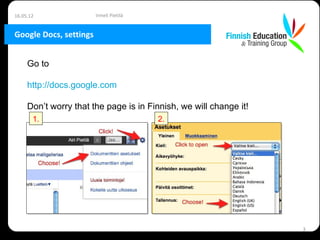
Google Docs, settings


     Go to

     http://docs.google.com

     Don’t worry that the page is in Finnish, we will change it!
       1.                                2.


                                                                   3
16.05.12                Irmeli Pietilä


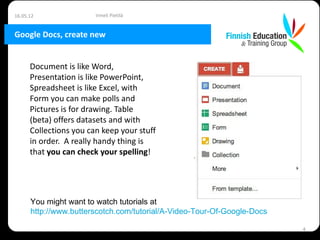
Google Docs, create new


      Document is like Word,
      Presentation is like PowerPoint,
      Spreadsheet is like Excel, with
      Form you can make polls and
      Pictures is for drawing. Table
      (beta) offers datasets and with
      Collections you can keep your stuff
      in order. A really handy thing is
      that you can check your spelling!


      You might want to watch tutorials at
      http://www.butterscotch.com/tutorial/A-Video-Tour-Of-Google-Docs

                                                                         4
16.05.12               Irmeli Pietilä


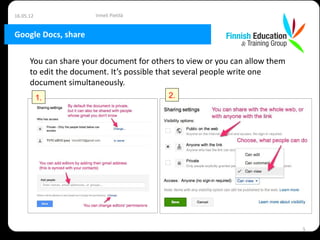
Google Docs, share

      You can share your document for others to view or you can allow them
      to edit the document. It’s possible that several people write one
      document simultaneously.
           1.                             2.


                                                                             5
16.05.12                Irmeli Pietilä


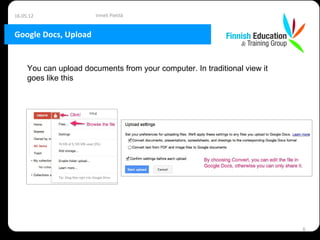
Google Docs, Upload


     You can upload documents from your computer. In traditional view it
     goes like this


                                                                           6
16.05.12              Irmeli Pietilä


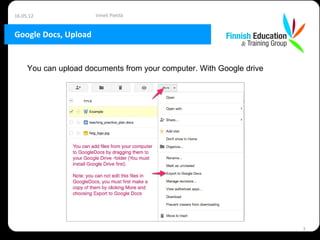
Google Docs, Upload


     You can upload documents from your computer. With Google drive


                                                                      7
16.05.12               Irmeli Pietilä


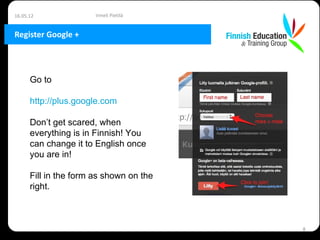
Register Google +


      Go to

      http://plus.google.com

      Don’t get scared, when
      everything is in Finnish! You
      can change it to English once
      you are in!

      Fill in the form as shown on the
      right.


                                         8
16.05.12                   Irmeli Pietilä


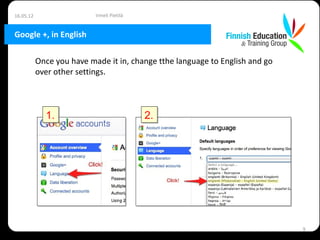
Google +, in English

           Once you have made it in, change tthe language to English and go
           over other settings.


             1.                             2.


                                                                              9
16.05.12                    Irmeli Pietilä


Google +, setup & use


           Set up your profile, search people to your circles… Tutorials for
           Google+ can be found at
           http://www.youtube.com/watch?v=ocPeAdpe_A8&feature=relmfu

           One feature I recommend warmly is Hangout with extras, which we
           used with Pekka. It allows up to 10 people have a videoconference,
           and share Google documents while doing it. It is also possible to
           share one’s screen. According to Google Extras are available for a
           limited time, but I hope they’ll remain, because they really offer lots
           of potential!


                                                                                     10
16.05.12                  Irmeli Pietilä


Some exercises


           1.   Log into your Gmail account and send a message to
                sunaitis@gmail.com (=Irmeli) and to
                ihanainenpekka@gmail.com
           2.   Share you Gmail address with the person next to you, and work
                as a pair in the next exercises
           3.   Go to http://docs.google.com and change it into English (see
                instructions on page 3)
           4.   Create a new document and share it with your neighbor. Write
                together about last weekend. Try editing options, adding links
                and pictures. Tutorial for creating new documents,
                http://www.butterscotch.com/tutorial/A-Video-Tour-Of-Google-Docs
                . Tutorial for sharing documents,
                http://www.butterscotch.com/tutorial/Sharing-And-Emailing-In-Google-D

                                                                               11
16.05.12                  Irmeli Pietilä


Some exercises


           1.   Create a new presentation and make a four-slide presentation
                of your school. Add your school logo. Try different templates.
                Tutorial for presentations,
                http://www.butterscotch.com/tutorial/Creating-A-Presentation-In-Google
           2.   Upload a document from your computer (if there aren’t any,
                make first a document in Word and save it to the Desktop).
                Tutorial for uploads,
                http://www.butterscotch.com/tutorial/Uploading-Files-To-Google-Docs


                                                                               12
16.05.12                  Irmeli Pietilä


Some exercises


           1.   Design a poll for gathering feedback from this class (use
                “create new form”) and ask your friends to answer it. Tutorial
                for forms,
                http://www.butterscotch.com/tutorial/Using-Forms-In-Google-Docs
           2.   Share the Teaching Practice –document with your team
                members and start collaborating on the plan!
           3.   Go to your account in Google+. Make a circle called Teacher
                Training and add as many fellow students as you can find. You
                can also add teachers (but they might mainly post in Finnish!)
           4.   Try Google+ Hangout (preferably on a laptop in your room, it
                would be quite noisy in the classroom, if you all started a
                Hangout!).


                                                                                  13

Google docs tvtcs2012

  • 1.
    Google Products Irmeli Pietilä
  • 2.
    16.05.12 Irmeli Pietilä Why Google Docs? You can Upload stuff that you have made with Office Programs You can create documents, spreadsheets, presentations, pictures and forms • You can share your documents with other collaborators and edit them simultaneously • You can download your stuff and continue editing in Office programs With Google Drive managing your documents is even easier than before 2
  • 3.
    16.05.12 Irmeli Pietilä Google Docs, settings Go to http://docs.google.com Don’t worry that the page is in Finnish, we will change it! 1. 2. 3
  • 4.
    16.05.12 Irmeli Pietilä Google Docs, create new Document is like Word, Presentation is like PowerPoint, Spreadsheet is like Excel, with Form you can make polls and Pictures is for drawing. Table (beta) offers datasets and with Collections you can keep your stuff in order. A really handy thing is that you can check your spelling! You might want to watch tutorials at http://www.butterscotch.com/tutorial/A-Video-Tour-Of-Google-Docs 4
  • 5.
    16.05.12 Irmeli Pietilä Google Docs, share You can share your document for others to view or you can allow them to edit the document. It’s possible that several people write one document simultaneously. 1. 2. 5
  • 6.
    16.05.12 Irmeli Pietilä Google Docs, Upload You can upload documents from your computer. In traditional view it goes like this 6
  • 7.
    16.05.12 Irmeli Pietilä Google Docs, Upload You can upload documents from your computer. With Google drive 7
  • 8.
    16.05.12 Irmeli Pietilä Register Google + Go to http://plus.google.com Don’t get scared, when everything is in Finnish! You can change it to English once you are in! Fill in the form as shown on the right. 8
  • 9.
    16.05.12 Irmeli Pietilä Google +, in English Once you have made it in, change tthe language to English and go over other settings. 1. 2. 9
  • 10.
    16.05.12 Irmeli Pietilä Google +, setup & use Set up your profile, search people to your circles… Tutorials for Google+ can be found at http://www.youtube.com/watch?v=ocPeAdpe_A8&feature=relmfu One feature I recommend warmly is Hangout with extras, which we used with Pekka. It allows up to 10 people have a videoconference, and share Google documents while doing it. It is also possible to share one’s screen. According to Google Extras are available for a limited time, but I hope they’ll remain, because they really offer lots of potential! 10
  • 11.
    16.05.12 Irmeli Pietilä Some exercises 1. Log into your Gmail account and send a message to sunaitis@gmail.com (=Irmeli) and to ihanainenpekka@gmail.com 2. Share you Gmail address with the person next to you, and work as a pair in the next exercises 3. Go to http://docs.google.com and change it into English (see instructions on page 3) 4. Create a new document and share it with your neighbor. Write together about last weekend. Try editing options, adding links and pictures. Tutorial for creating new documents, http://www.butterscotch.com/tutorial/A-Video-Tour-Of-Google-Docs . Tutorial for sharing documents, http://www.butterscotch.com/tutorial/Sharing-And-Emailing-In-Google-D 11
  • 12.
    16.05.12 Irmeli Pietilä Some exercises 1. Create a new presentation and make a four-slide presentation of your school. Add your school logo. Try different templates. Tutorial for presentations, http://www.butterscotch.com/tutorial/Creating-A-Presentation-In-Google 2. Upload a document from your computer (if there aren’t any, make first a document in Word and save it to the Desktop). Tutorial for uploads, http://www.butterscotch.com/tutorial/Uploading-Files-To-Google-Docs 12
  • 13.
    16.05.12 Irmeli Pietilä Some exercises 1. Design a poll for gathering feedback from this class (use “create new form”) and ask your friends to answer it. Tutorial for forms, http://www.butterscotch.com/tutorial/Using-Forms-In-Google-Docs 2. Share the Teaching Practice –document with your team members and start collaborating on the plan! 3. Go to your account in Google+. Make a circle called Teacher Training and add as many fellow students as you can find. You can also add teachers (but they might mainly post in Finnish!) 4. Try Google+ Hangout (preferably on a laptop in your room, it would be quite noisy in the classroom, if you all started a Hangout!). 13