
Ad-Formats Explained
There's more than one way to display.
The Google Display Network (GDN) plays host to
huge variety of Ad Formats!
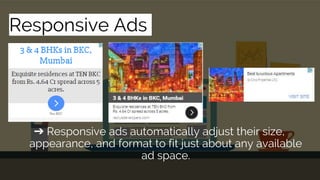
Responsive Ads
➔ Responsive ads automatically adjust their size,
appearance, and format to fit just about any available
ad space.
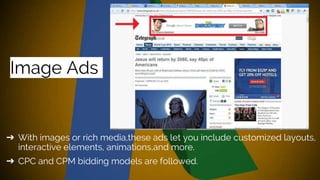
Image Ads
➔ With images or rich media,these ads let you include customized layouts,
interactive elements, animations,and more.
➔ CPC and CPM bidding models are followed.
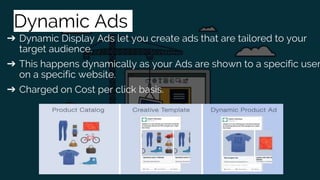
Dynamic Ads
➔ Dynamic Display Ads let you create ads that are tailored to your
target audience.
➔ This happens dynamically as your Ads are shown to a specific user
on a specific website.
➔ Charged on Cost per click basis.
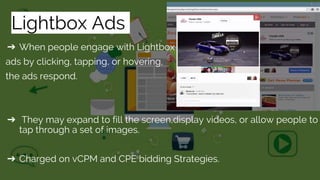
Lightbox Ads
➔ When people engage with Lightbox
ads by clicking, tapping, or hovering,
the ads respond.
➔ They may expand to fill the screen,display videos, or allow people to
tap through a set of images.
➔ Charged on vCPM and CPE bidding Strategies.
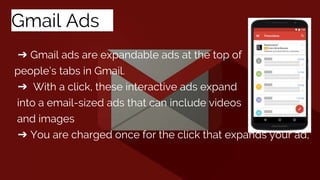
Gmail Adss
➔ Gmail ads are expandable ads at the top of
people’s tabs in Gmail.
➔ With a click, these interactive ads expand
into a email-sized ads that can include videos
and images
➔ You are charged once for the click that expands your ad,
TrueView in-stream ads:
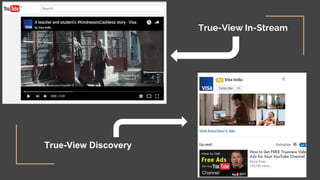
➔ This Ad-format plays our video before,during or after other videos.
➔ The viewer has an option to skip the ad after 5 seconds,
➔ It can appear on YouTube watch pages and on partner sites and
apps in the Display Network.
TrueView video Discovery:
➔ This format can promote a video in places of discovery, including
next to related YouTube videos, as part of a YouTube search result,
or on the YouTube mobile homepage.
➔ Trueview ad format is only charged when someone chooses to
watch your ad.
True-View In-Stream
True-View Discovery
➔ These are a short video ad format designed to allow you reach more
customers and increase awareness about your brand.
➔ Bumper ads use CPM (cost-per-thousand impression) bidding. Your
pay each time your ad is shown 1,000 times
Bumper Ads:
Google Display Ad-Formats Explained

Google Display Ad-Formats Explained

  • 1.
  • 3.
    There's more thanone way to display. The Google Display Network (GDN) plays host to huge variety of Ad Formats!
  • 4.
    Responsive Ads ➔ Responsiveads automatically adjust their size, appearance, and format to fit just about any available ad space.
  • 5.
    Image Ads ➔ Withimages or rich media,these ads let you include customized layouts, interactive elements, animations,and more. ➔ CPC and CPM bidding models are followed.
  • 6.
    Dynamic Ads ➔ DynamicDisplay Ads let you create ads that are tailored to your target audience. ➔ This happens dynamically as your Ads are shown to a specific user on a specific website. ➔ Charged on Cost per click basis.
  • 7.
    Lightbox Ads ➔ Whenpeople engage with Lightbox ads by clicking, tapping, or hovering, the ads respond. ➔ They may expand to fill the screen,display videos, or allow people to tap through a set of images. ➔ Charged on vCPM and CPE bidding Strategies.
  • 8.
    Gmail Adss ➔ Gmailads are expandable ads at the top of people’s tabs in Gmail. ➔ With a click, these interactive ads expand into a email-sized ads that can include videos and images ➔ You are charged once for the click that expands your ad,
  • 9.
    TrueView in-stream ads: ➔This Ad-format plays our video before,during or after other videos. ➔ The viewer has an option to skip the ad after 5 seconds, ➔ It can appear on YouTube watch pages and on partner sites and apps in the Display Network. TrueView video Discovery: ➔ This format can promote a video in places of discovery, including next to related YouTube videos, as part of a YouTube search result, or on the YouTube mobile homepage. ➔ Trueview ad format is only charged when someone chooses to watch your ad.
  • 10.
  • 11.
    ➔ These area short video ad format designed to allow you reach more customers and increase awareness about your brand. ➔ Bumper ads use CPM (cost-per-thousand impression) bidding. Your pay each time your ad is shown 1,000 times Bumper Ads: