In Google Adwords
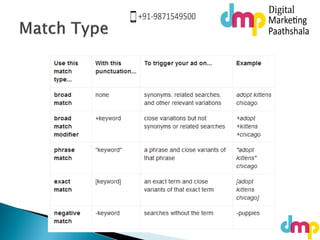
 The default matching option, broad match means
that your ad may show if a search term contains
your keyword terms in any order, and possibly
along with other terms. Your ads can also show
for singular or plural forms, synonyms,
 stemming (such as floor and flooring), related
searches, and other relevant variations. Sticking
with the broad match default is a great choice if
you don't want to spend a lot of time building
your keyword lists and want to capture the
highest possible volume of ad traffic.
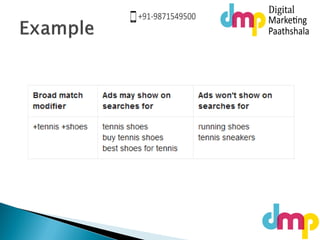
 You can add a modifier, a plus sign (+), to
your broad match keywords if you'd like your
ads to show when someone searches for
close variants of your keywords in any order
 Close variants include misspellings,
singular/plural forms, abbreviations and
acronyms, and stemming. Unlike broad
match, using a modifier excludes synonyms
or related searches
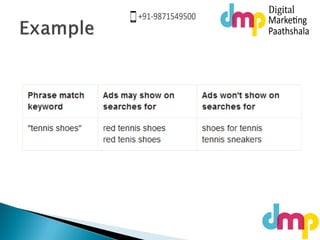
 With phrase match, your ad can show when
someone searches for your exact keyword, or
your exact keyword with additional words
before or after it. We'll also show your ad
when someone searches for close variants of
that exact keyword, or with additional words
before or after it
 To use a phrase match keyword, simply
surround the words you want matched with
quotation marks
 With exact match, your ads can appear when
someone searches for your exact keyword,
without any other terms in the search. We'll
also show your ad when someone searches
for close variants of that specific keyword.
 To use an exact match keyword, simply
surround the words you want matched with
brackets
 You can use negative match to filter out
irrelevant searches and thus prevent
unwanted clicks. Your ad won't show if a
search query contains the keyword term you
define with a minus sign (-) prefix
 Negative keywords are an especially useful
way to filter your search traffic if your
account contains lots of broad match
keywords.
 When we review your ad, we give it one of
several approval statuses. If your ad isn't
showing for certain users, or if it's not
showing at all, it could be because of your
ad's approval status. Some approval statuses,
like Approved (adult) or Approved (limited),
mean that your ad can only show for certain
users.
 Other approval statuses,
likeDisapproved or Site suspended, mean that
your ad can't show at all right now.
 Under review
 Eligible
 Approved
 Approved (non-family)
 Approved (adult)
 Approved (limited)
 Disapproved
 Site suspended
 Ads with this status are still under review and
can't show anywhere yet.
 When you save your ad, it'll get either an
"under review" status or an "eligible" status.
While "eligible" ads are allowed to run on
certain pages before they're approved, "under
review" ads can't run anywhere until they're
approved because they need a closer look.
Below are some examples of ads that will
initially get an "under review" status:
 Ads with this status are still being reviewed,
but can show on Google search pages.
 Eligible ads can only run on Google search pages until they're
approved.
 Eligible ads can't run on the Search Network and Display
Network until they're approved.
 Ads with this status are allowed to show on
all networks, since they're considered to have
content that's safe for all audiences.
 Ads with this status are considered to have
content that may be inappropriate for certain
audiences. For example, certain gambling or
dating site ads may fall under this category.
 Ads with this status are considered to have
"adult" content. For example, ads that
promote sites with nude images may fall
under this category.
 Ads with this status are allowed to show with
certain limitations.
 For example, these ads might only be allowed
to show in
 certain countries
 certain devices
 certain search terms
 based on the content of your ad text and
website.
 Ads with this status have an issue with one or
more of our advertising policies, and
therefore can't show until the issue is
resolved.
 Ads with this status are pointing to a
suspended website, and therefore can't show
until the issue is resolved. A suspended
website is a site that violates one or more of
our policies.
Keyword Match types explained in detail - Google Adwords Training by Digital Marketing Paathshala

Keyword Match types explained in detail - Google Adwords Training by Digital Marketing Paathshala

  • 1.
  • 3.
     The defaultmatching option, broad match means that your ad may show if a search term contains your keyword terms in any order, and possibly along with other terms. Your ads can also show for singular or plural forms, synonyms,  stemming (such as floor and flooring), related searches, and other relevant variations. Sticking with the broad match default is a great choice if you don't want to spend a lot of time building your keyword lists and want to capture the highest possible volume of ad traffic.
  • 5.
     You canadd a modifier, a plus sign (+), to your broad match keywords if you'd like your ads to show when someone searches for close variants of your keywords in any order  Close variants include misspellings, singular/plural forms, abbreviations and acronyms, and stemming. Unlike broad match, using a modifier excludes synonyms or related searches
  • 7.
     With phrasematch, your ad can show when someone searches for your exact keyword, or your exact keyword with additional words before or after it. We'll also show your ad when someone searches for close variants of that exact keyword, or with additional words before or after it  To use a phrase match keyword, simply surround the words you want matched with quotation marks
  • 9.
     With exactmatch, your ads can appear when someone searches for your exact keyword, without any other terms in the search. We'll also show your ad when someone searches for close variants of that specific keyword.  To use an exact match keyword, simply surround the words you want matched with brackets
  • 11.
     You canuse negative match to filter out irrelevant searches and thus prevent unwanted clicks. Your ad won't show if a search query contains the keyword term you define with a minus sign (-) prefix  Negative keywords are an especially useful way to filter your search traffic if your account contains lots of broad match keywords.
  • 13.
     When wereview your ad, we give it one of several approval statuses. If your ad isn't showing for certain users, or if it's not showing at all, it could be because of your ad's approval status. Some approval statuses, like Approved (adult) or Approved (limited), mean that your ad can only show for certain users.  Other approval statuses, likeDisapproved or Site suspended, mean that your ad can't show at all right now.
  • 14.
     Under review Eligible  Approved  Approved (non-family)  Approved (adult)  Approved (limited)  Disapproved  Site suspended
  • 15.
     Ads withthis status are still under review and can't show anywhere yet.  When you save your ad, it'll get either an "under review" status or an "eligible" status. While "eligible" ads are allowed to run on certain pages before they're approved, "under review" ads can't run anywhere until they're approved because they need a closer look. Below are some examples of ads that will initially get an "under review" status:
  • 16.
     Ads withthis status are still being reviewed, but can show on Google search pages.  Eligible ads can only run on Google search pages until they're approved.  Eligible ads can't run on the Search Network and Display Network until they're approved.
  • 17.
     Ads withthis status are allowed to show on all networks, since they're considered to have content that's safe for all audiences.
  • 18.
     Ads withthis status are considered to have content that may be inappropriate for certain audiences. For example, certain gambling or dating site ads may fall under this category.
  • 19.
     Ads withthis status are considered to have "adult" content. For example, ads that promote sites with nude images may fall under this category.
  • 20.
     Ads withthis status are allowed to show with certain limitations.  For example, these ads might only be allowed to show in  certain countries  certain devices  certain search terms  based on the content of your ad text and website.
  • 21.
     Ads withthis status have an issue with one or more of our advertising policies, and therefore can't show until the issue is resolved.
  • 22.
     Ads withthis status are pointing to a suspended website, and therefore can't show until the issue is resolved. A suspended website is a site that violates one or more of our policies.