Make Your Site W k H d
M k Y     Si Work Harder
Simple Tips to Get More From Your Google Analytics Account
                                     g       y


                      Jeff Sauer
               Three Deep Marketing
             www.threedeepmarketing.com
                    651-789-7701
                     @jeffsauer
                     @threedeep
                    #mimasummit
Why Google Analytics?
www.threedeepmarketing.com | @jeffsauer | @threedeep
It s
It’s FREE
It s
It’s AWESOME
It s
It’s POWEFUL
It s
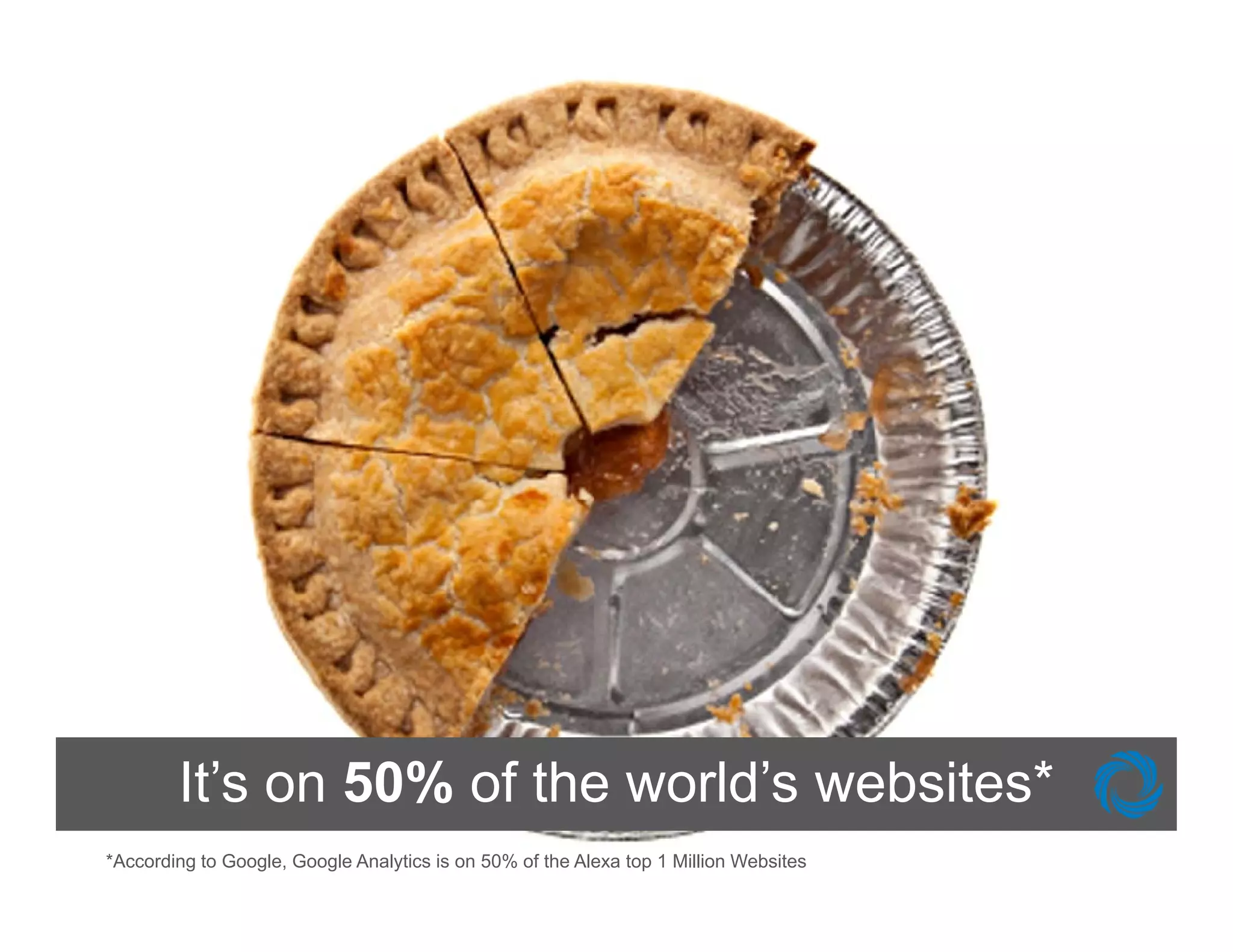
        It’s on 50% of the world’s websites*
                           world s
*According to Google, Google Analytics is on 50% of the Alexa top 1 Million Websites
What can I do with Google Analytics?
    •   Track Social Media
    •   Track E il
        T k Emails
    •   Customize Your Dashboards
    •   Block Internal Traffic
    •   Set Up Goals and Goal Funnels
    •   Website and URL Structure
    •   Link Adwords with Analytics
    •   Improve Site Search
    •   Segment Traffic
    •   Track Events
www.threedeepmarketing.com | @jeffsauer | @threedeep
Track Social Media
Is Social Media Working?


        Problem: W know we need to do Social
        P bl        We k              dt d S i l
        Media, so we have a presence on
        Facebook and T itt
        F    b k d Twitter… but I have no
                                  b t h
        idea if this generates incremental visitors,
        leads
        l d or sales on my website
                     l            b it


www.threedeepmarketing.com | @jeffsauer | @threedeep
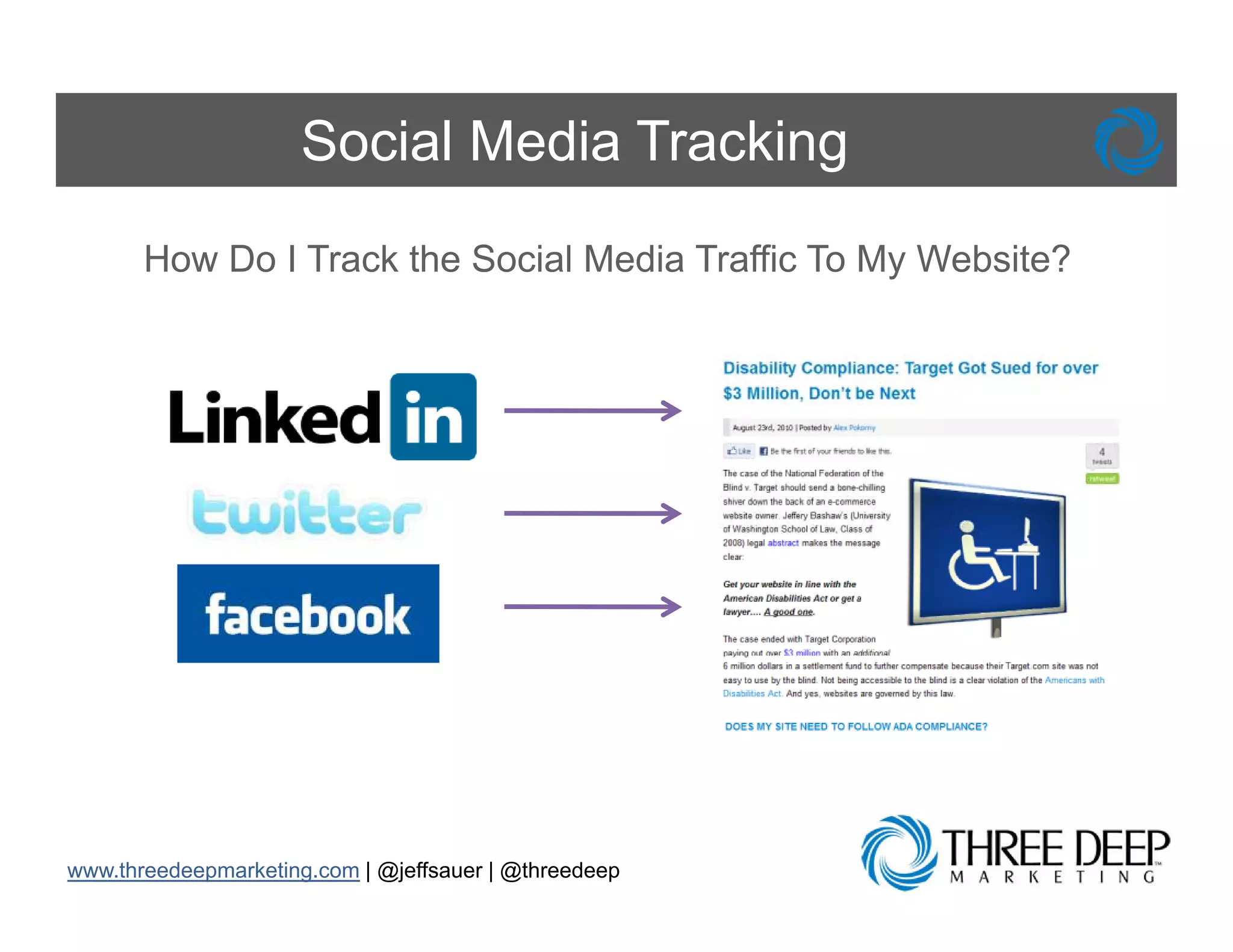
Social Media Tracking
       How Do I Track the Social Media Traffic To My Website?


www.threedeepmarketing.com | @jeffsauer | @threedeep
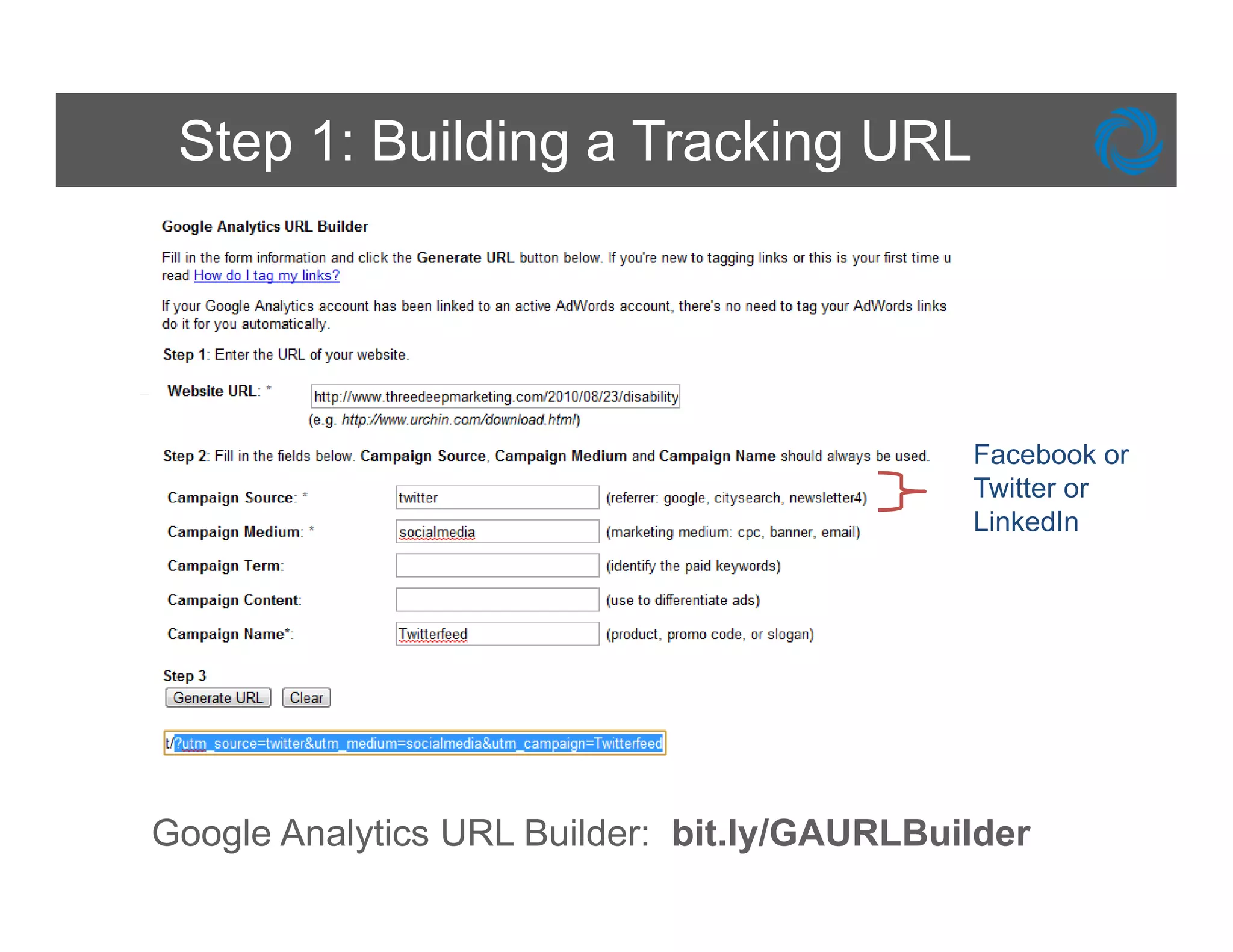
Step 1: Building a Tracking URL


                                             Facebook or
                                             Twitter or
                                             LinkedIn


Google Analytics URL Builder: bit.ly/GAURLBuilder
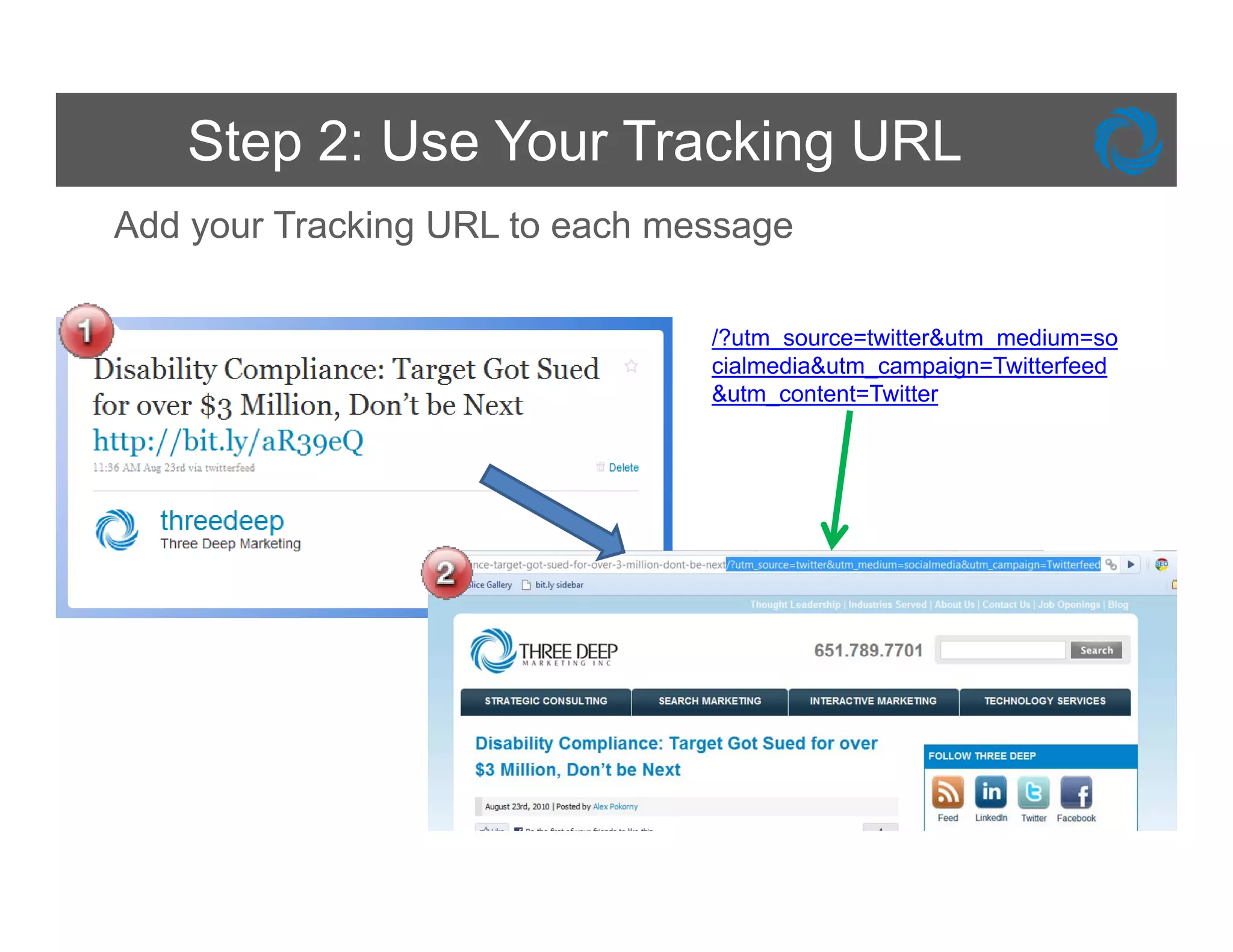
Step 2: Use Your Tracking URL
Add your Tracking URL to each message

                                /?utm_source=twitter&utm_medium=so
                                cialmedia&utm_campaign=Twitterfeed
                                &utm_content=Twitter
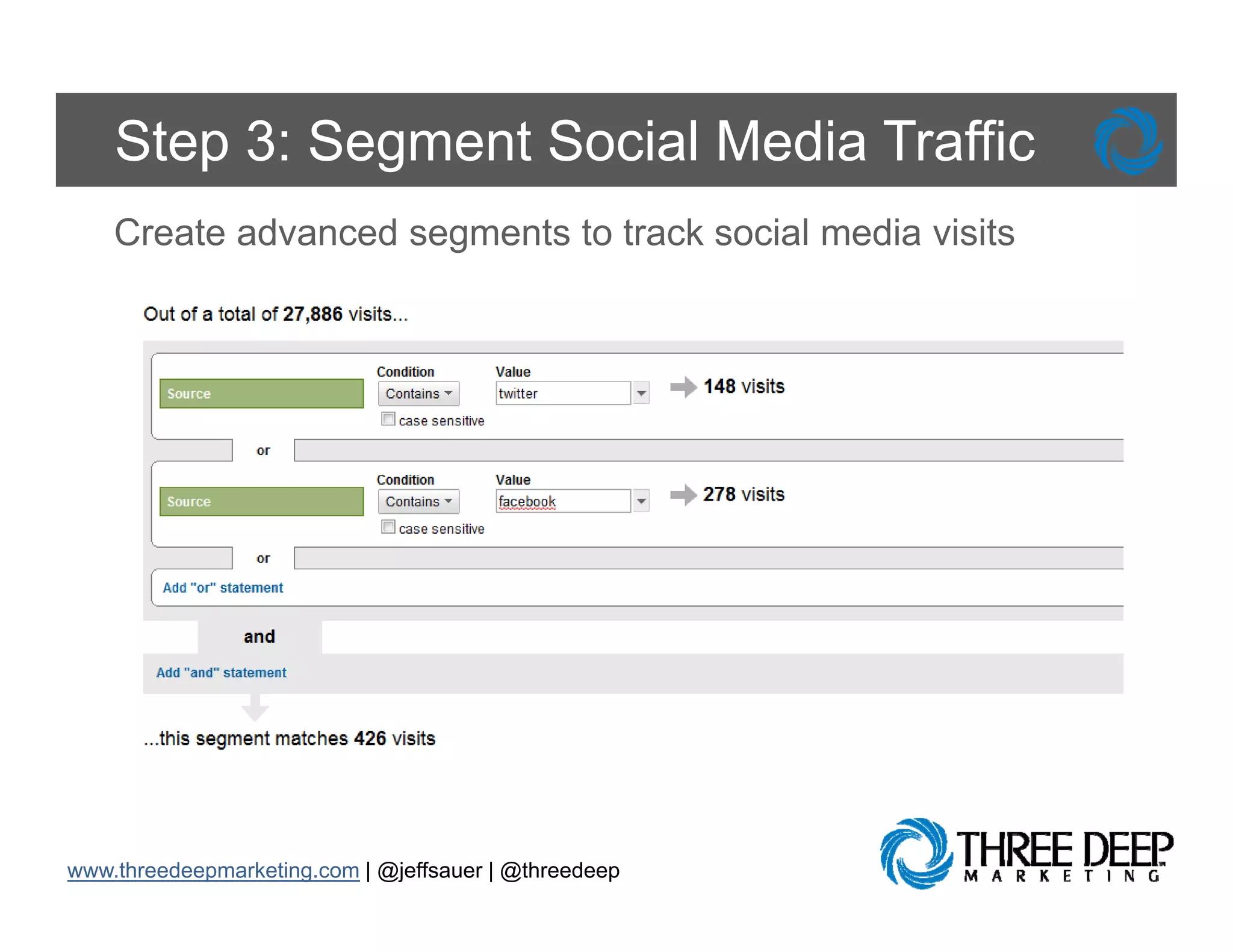
Step 3: Segment Social Media Traffic
    Create advanced segments to track social media visits


www.threedeepmarketing.com | @jeffsauer | @threedeep
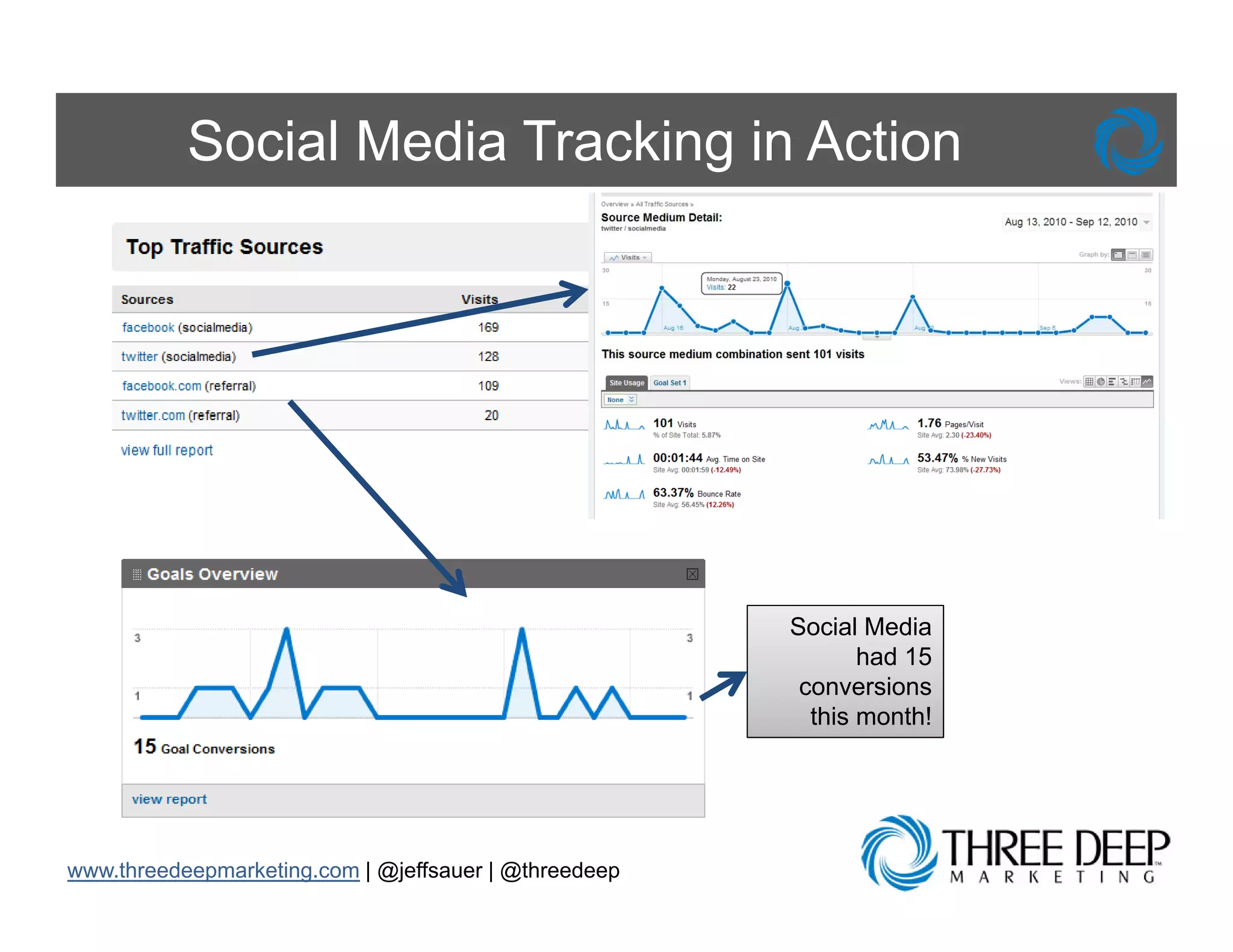
Social Media Tracking in Action


                                                       Social Media
                                                              had 15
                                                        conversions
                                                         this month!


www.threedeepmarketing.com | @jeffsauer | @threedeep
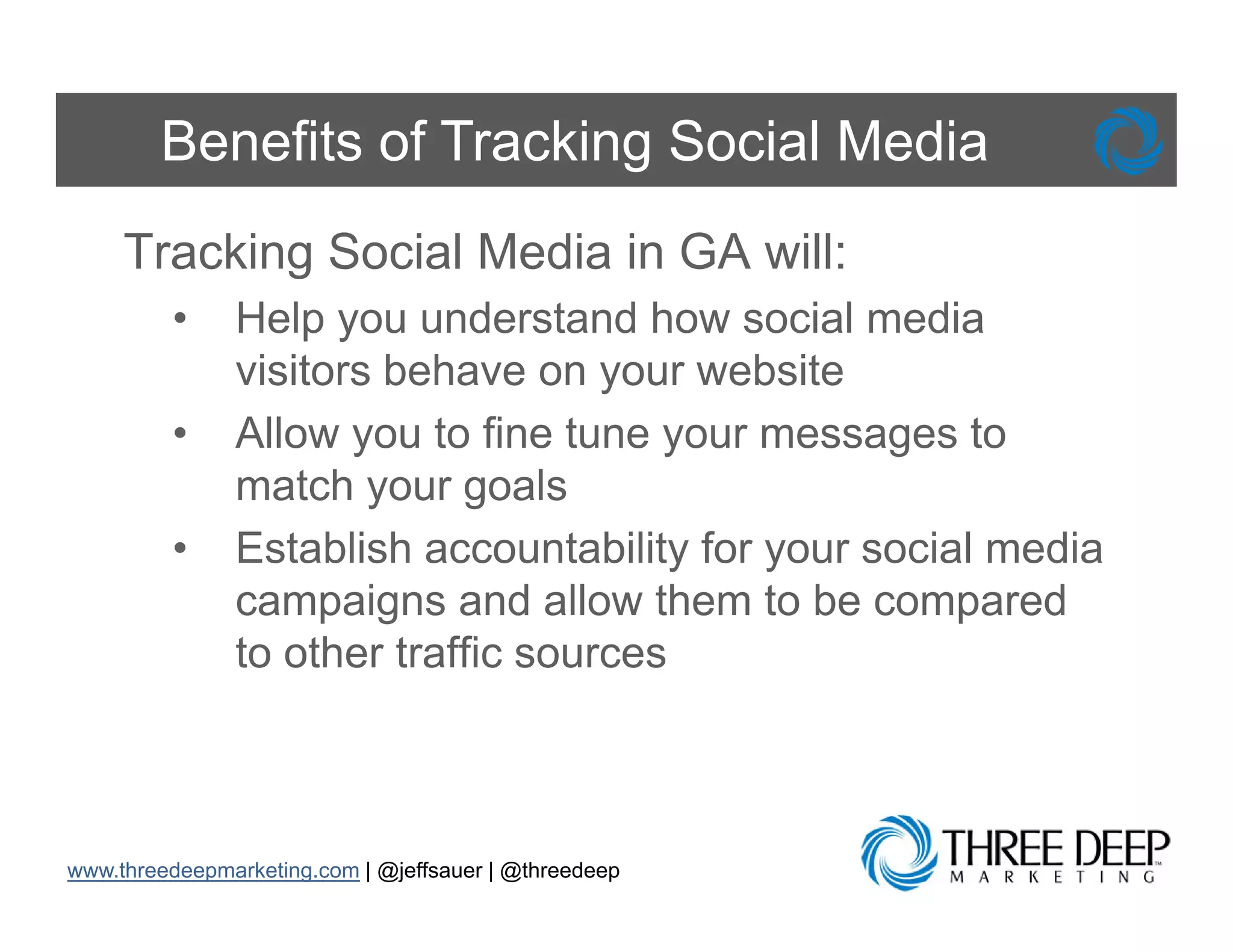
Benefits of Tracking Social Media
     Tracking Social Media in GA will:
         •     Help you understand how social media
               visitors behave on your website
         •     Allow you to fine tune your messages to
               match your goals
         •     Establish
               E t bli h accountability f your social media
                                  t bilit for     i l   di
               campaigns and allow them to be compared
               to other traffic sources


www.threedeepmarketing.com | @jeffsauer | @threedeep
Track Emails
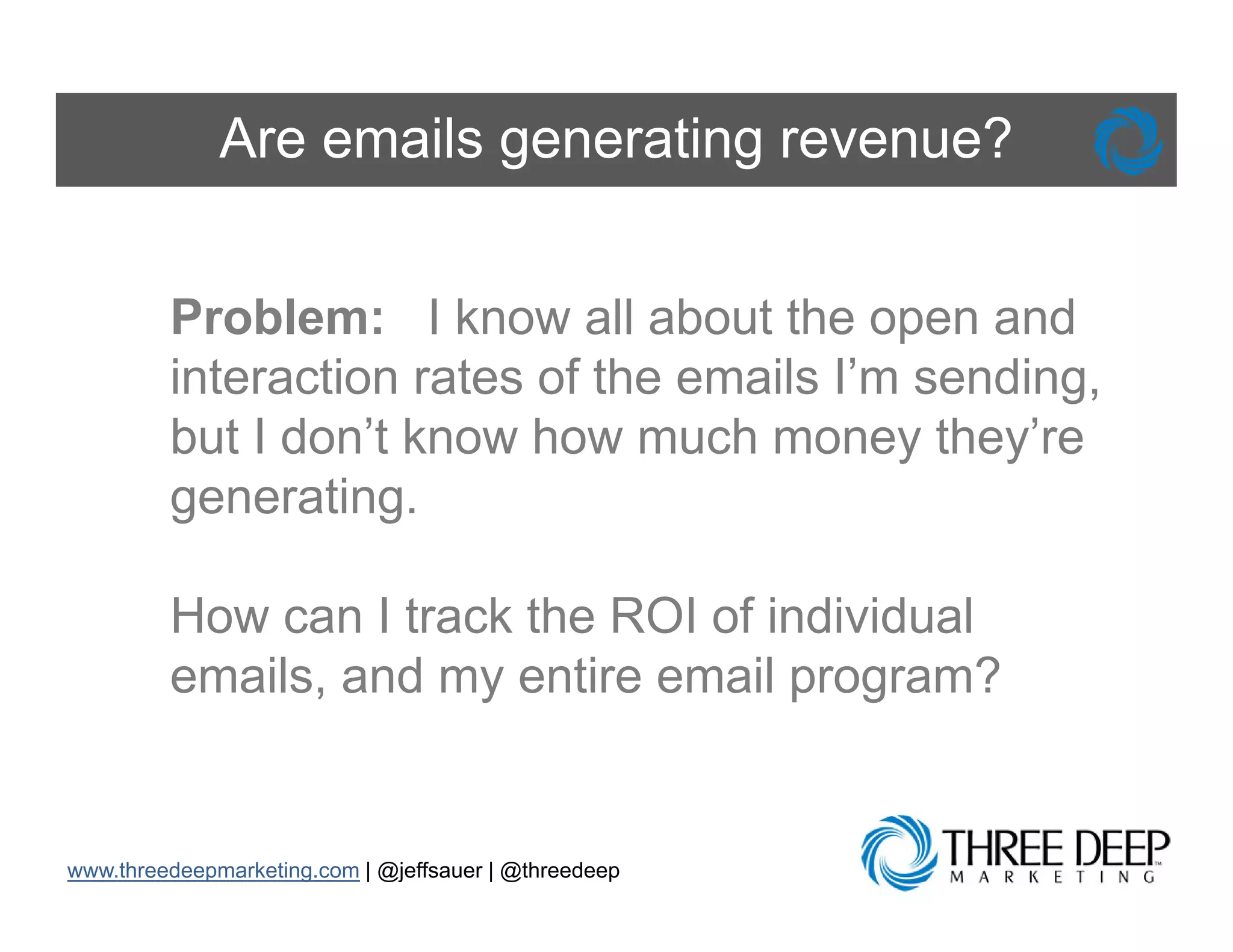
Are emails generating revenue?


         Problem: I know all about the open and
         interaction rates of the emails I’m sending,
         but I don’t know how much money they’re
         generating.

         How can I track the ROI of individual
         emails, and my entire email program?


www.threedeepmarketing.com | @jeffsauer | @threedeep
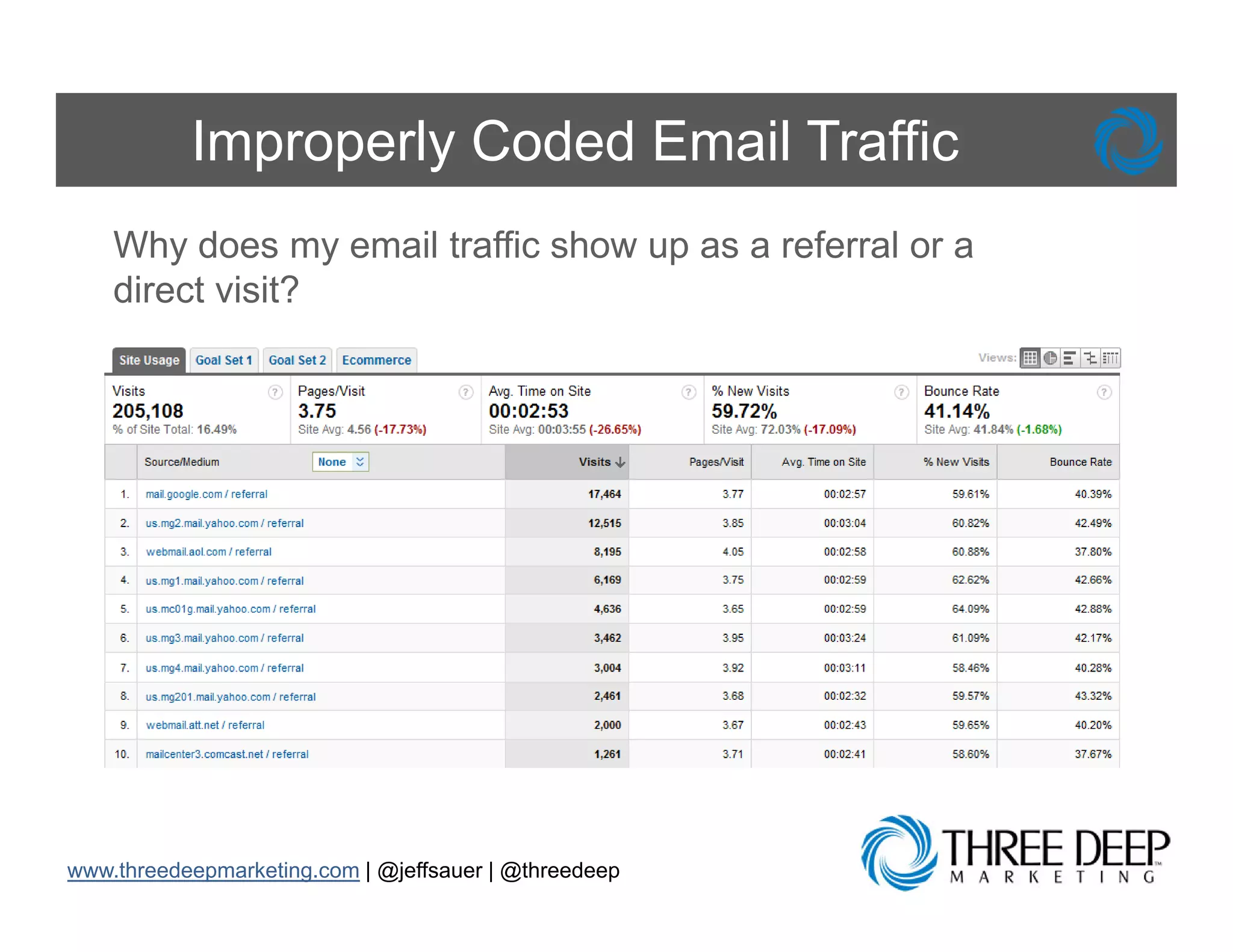
Improperly Coded Email Traffic
    Why does my email traffic show up as a referral or a
    direct visit?


www.threedeepmarketing.com | @jeffsauer | @threedeep
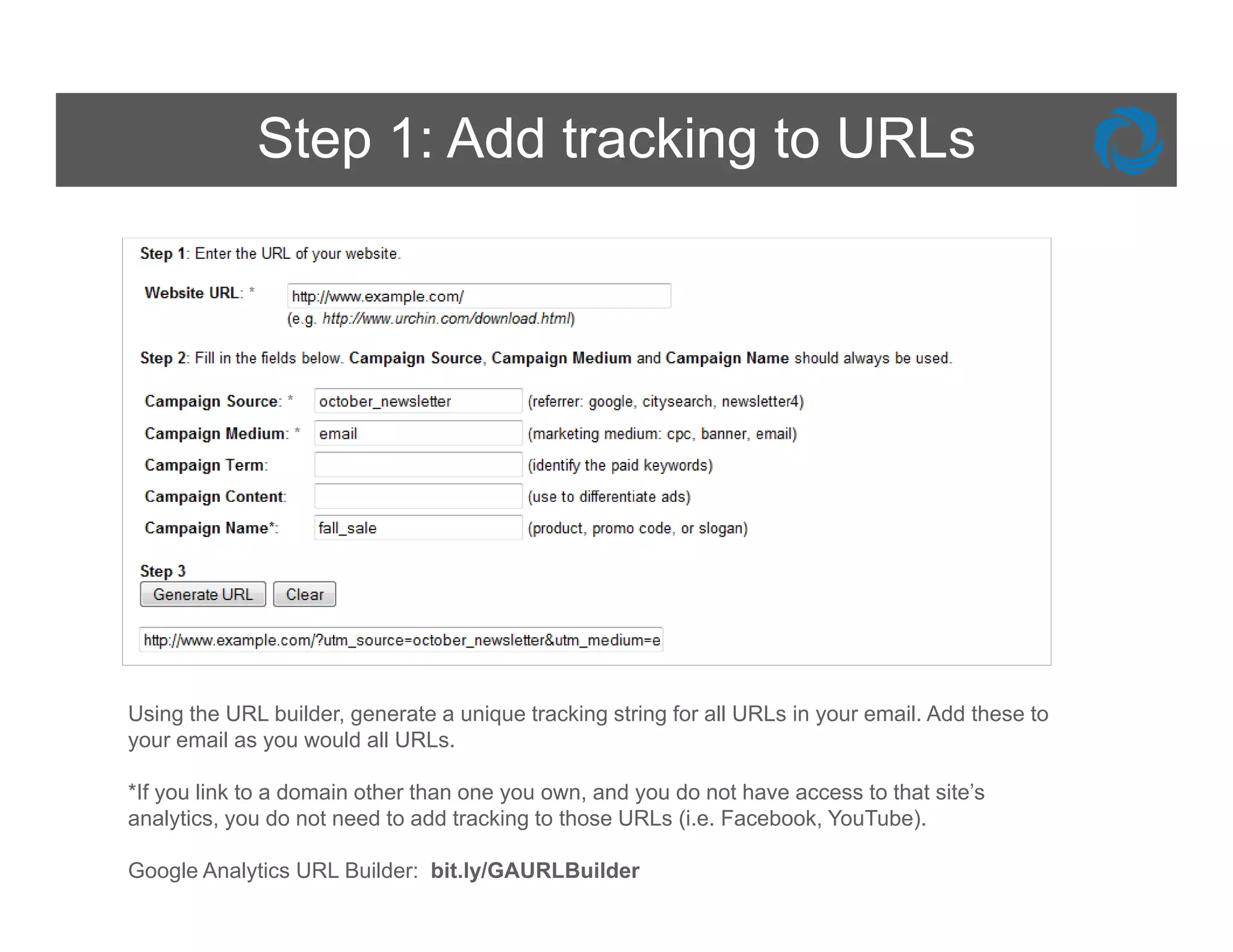
Step 1: Add tracking to URLs


Using the URL builder, generate a unique tracking string for all URLs in your email. Add these to
your email as you would all URLs.

*If you link to a domain other than one you own, and you do not have access to that site’s
analytics, you do not need to add tracking to those URLs (i.e. Facebook, YouTube).

Google Analytics URL Builder: bit.ly/GAURLBuilder
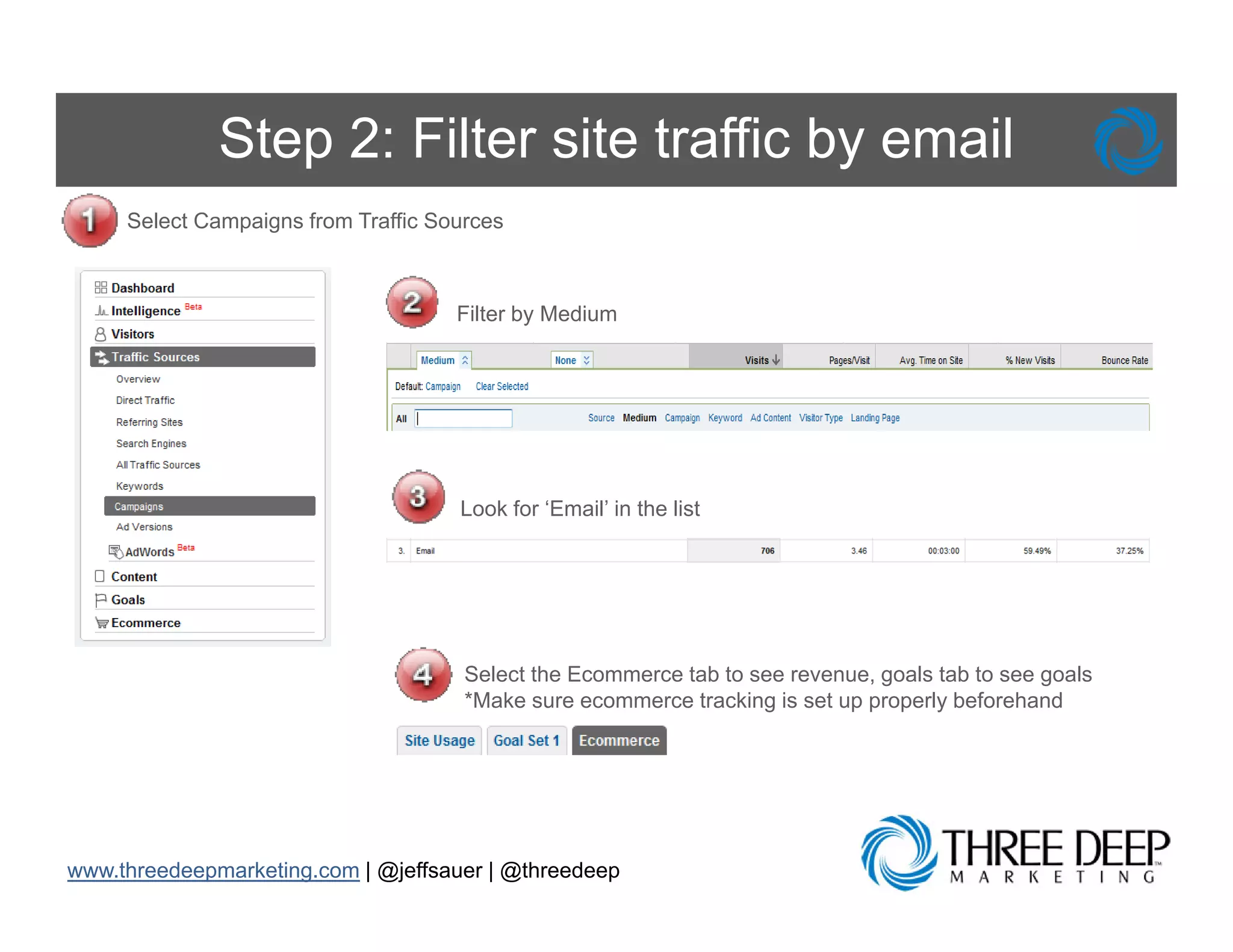
Step 2: Filter site traffic by email
     Select Campaigns from Traffic Sources


                                     Filter by Medium


                                     Look for ‘Email’ in the list


                                      Select the Ecommerce tab to see revenue, goals tab to see goals
                                      *Make sure ecommerce tracking is set up properly beforehand


www.threedeepmarketing.com | @jeffsauer | @threedeep
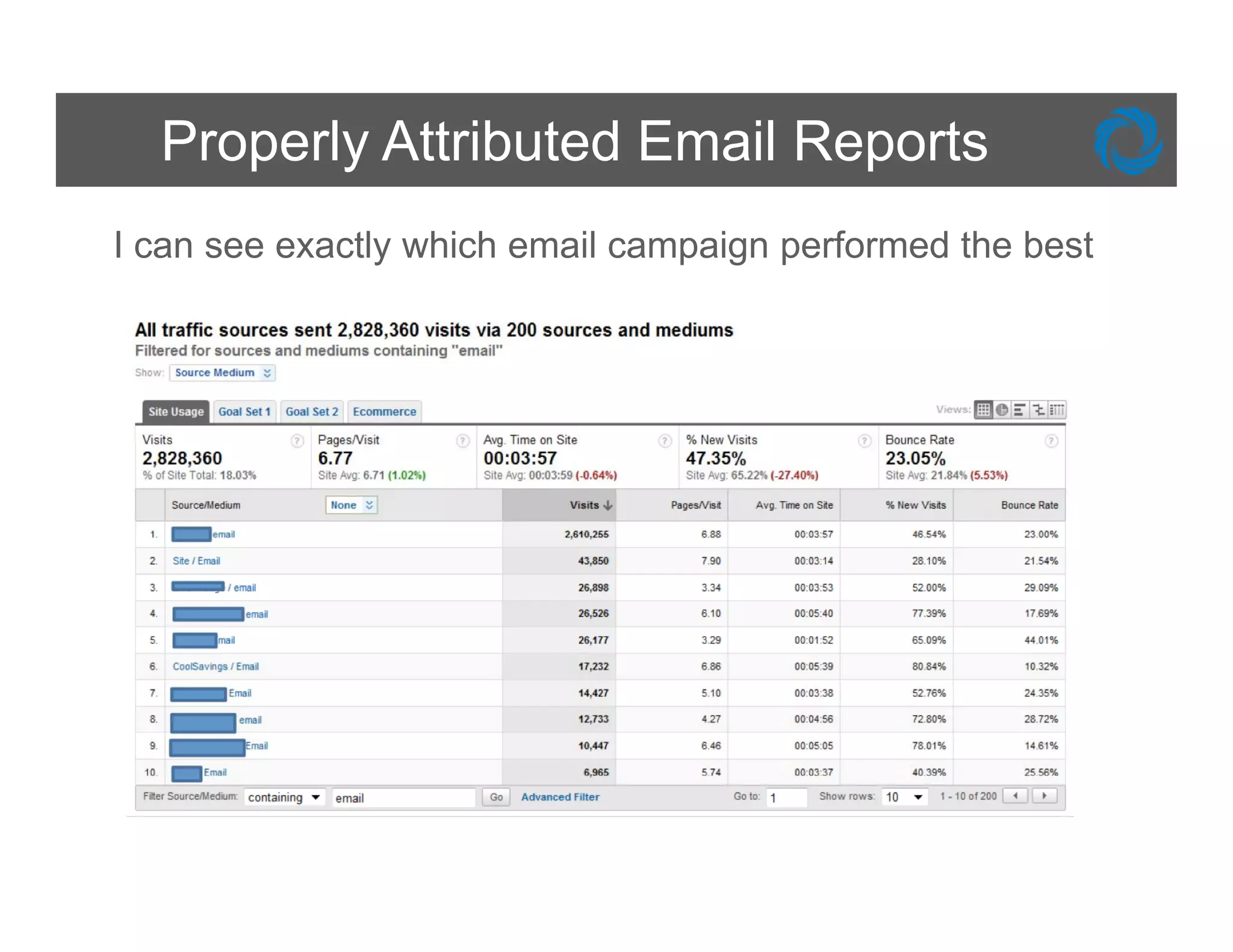
Properly Attributed Email Reports
I can see exactly which email campaign performed the best
Benefits of Email Tracking

Tracking Email Marketing will:
  •   Assist in measurement of the ROI of your email
      program in online retail
  •   Allow you to start determining the effectiveness of
      your email campaigns RIGHT NOW
  •   Will not replace the reports provided by your ESP
      (Email Service Provider), but it can enhance and
      inform your email program with respect to:

         • A/B testing
         • Geographic campaign traction and penetration
         • Consumer interest and preference
Customize Your Dashboards
Right Metrics, Right Time


        Problem: Wh I installed G
        P bl       When i t ll d Google    l
        Analytics, they created a dashboard for
        me, b t th t d hb d d
             but that dashboard doesn’t show me
                                       ’t h
        the information that matters for MY
        business and I d ’t h
        b i          d don’t have ti
                                   time t di i
                                         to dig in
        and find what I need


www.threedeepmarketing.com | @jeffsauer | @threedeep
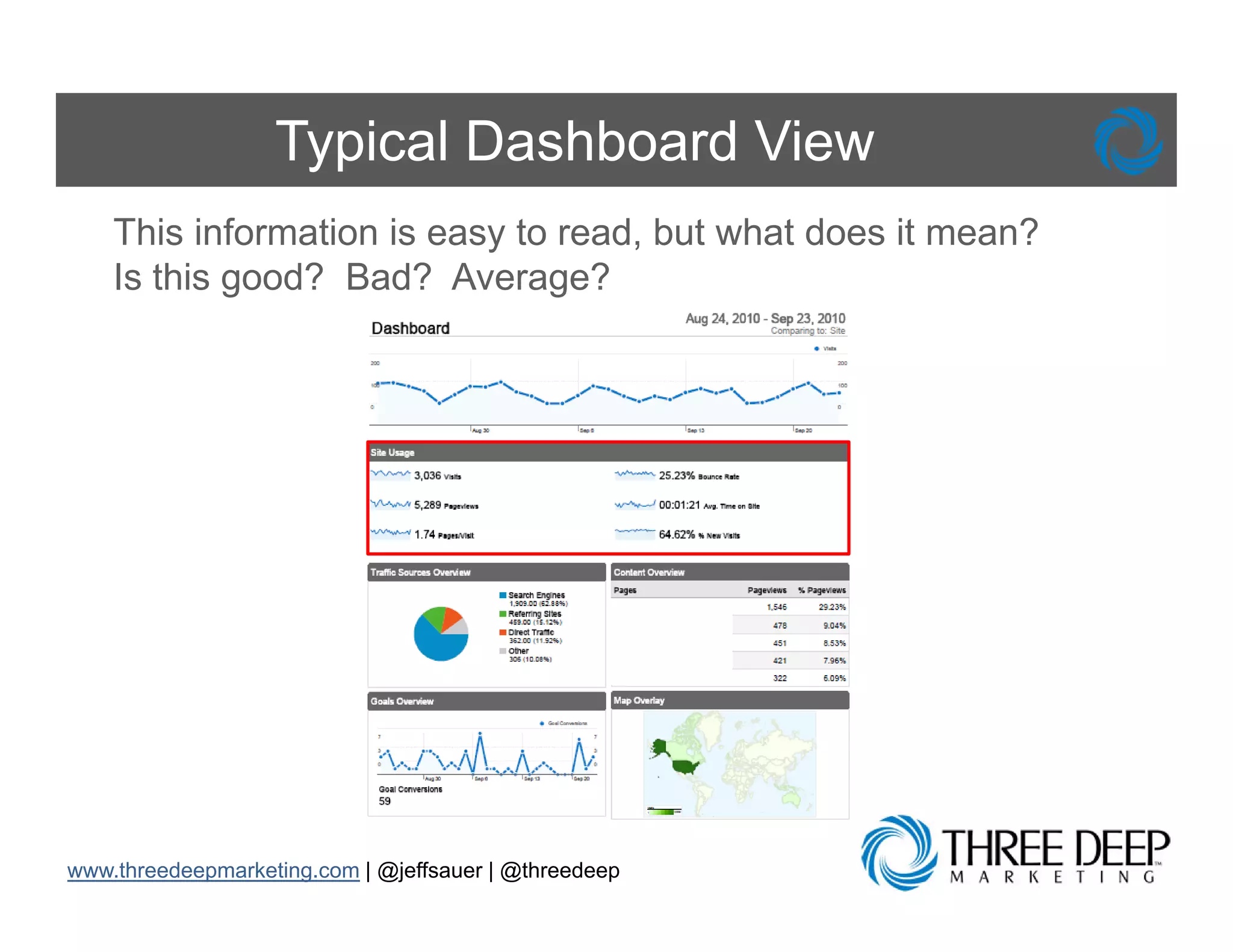
Typical Dashboard View
    This information is easy to read, but what does it mean?
    Is this good? Bad? Average?
            g                  g


www.threedeepmarketing.com | @jeffsauer | @threedeep
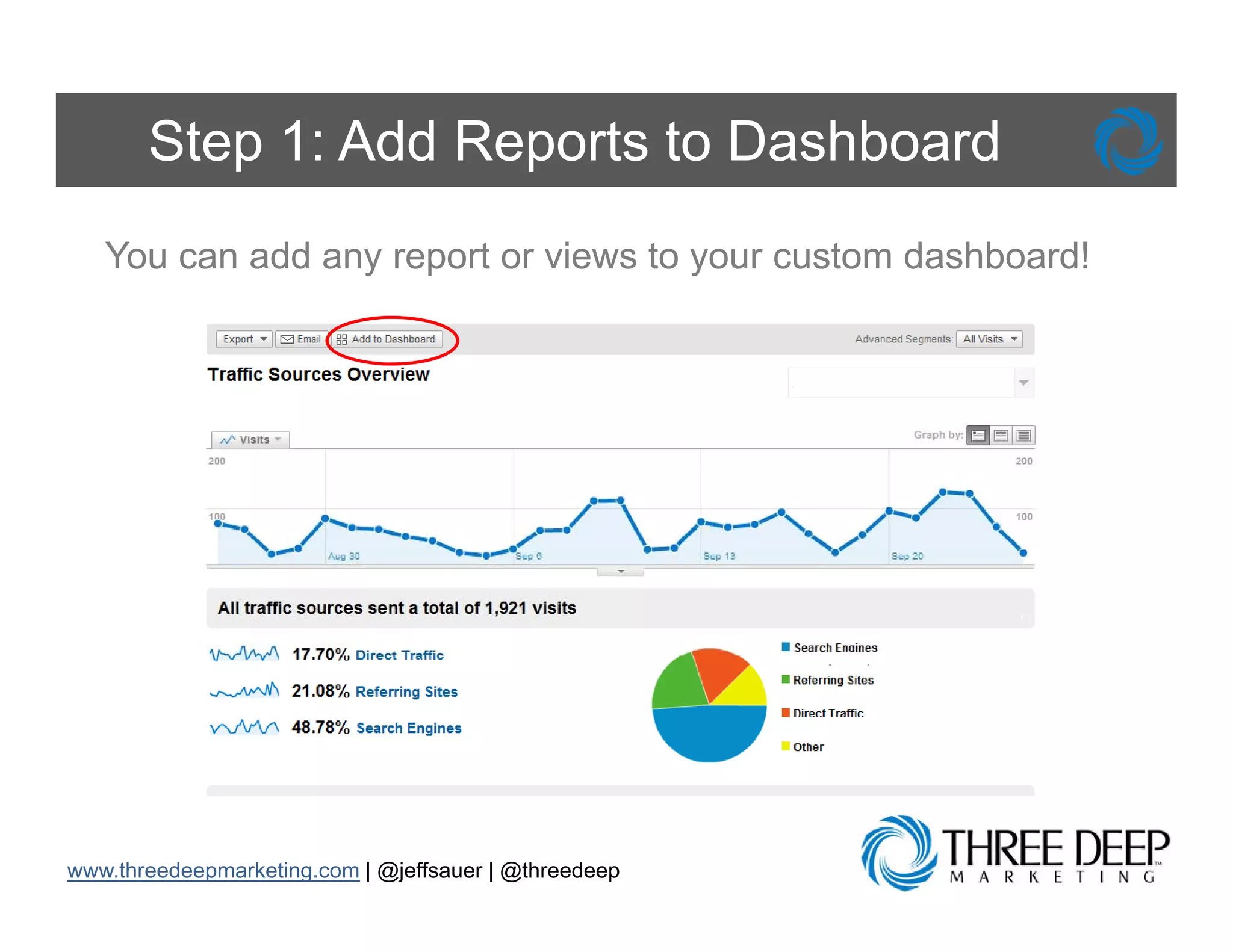
Step 1: Add Reports to Dashboard
   You can add any report or views to your custom dashboard!


www.threedeepmarketing.com | @jeffsauer | @threedeep
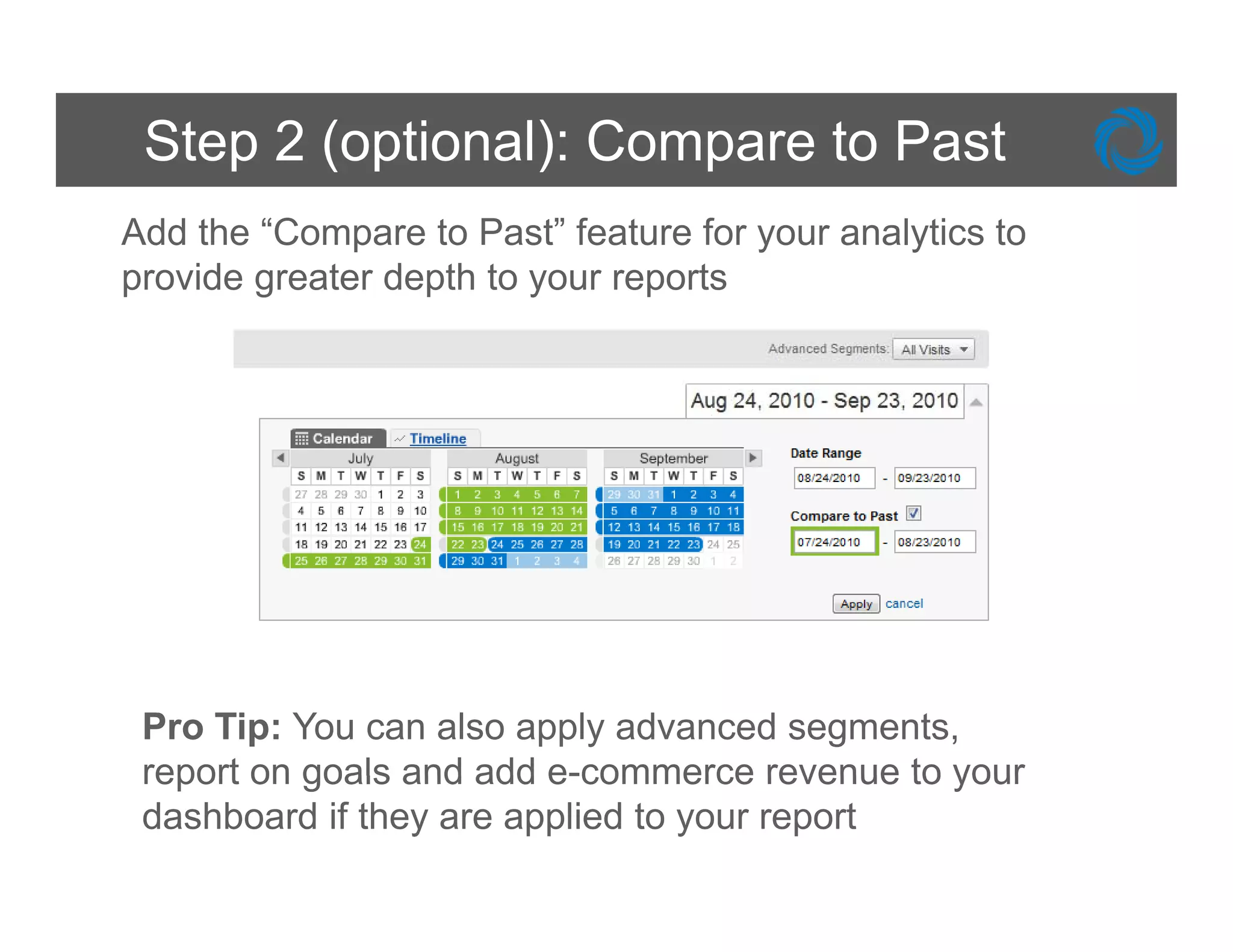
Step 2 (optional): Compare to Past
Add the “Compare to Past” feature for your analytics to
p
provide g
        greater depth to y
                  p      your reports
                                p


 Pro Tip: You can also apply advanced segments,
 report on goals and add e-commerce revenue to your
 dashboard if they are applied to your report
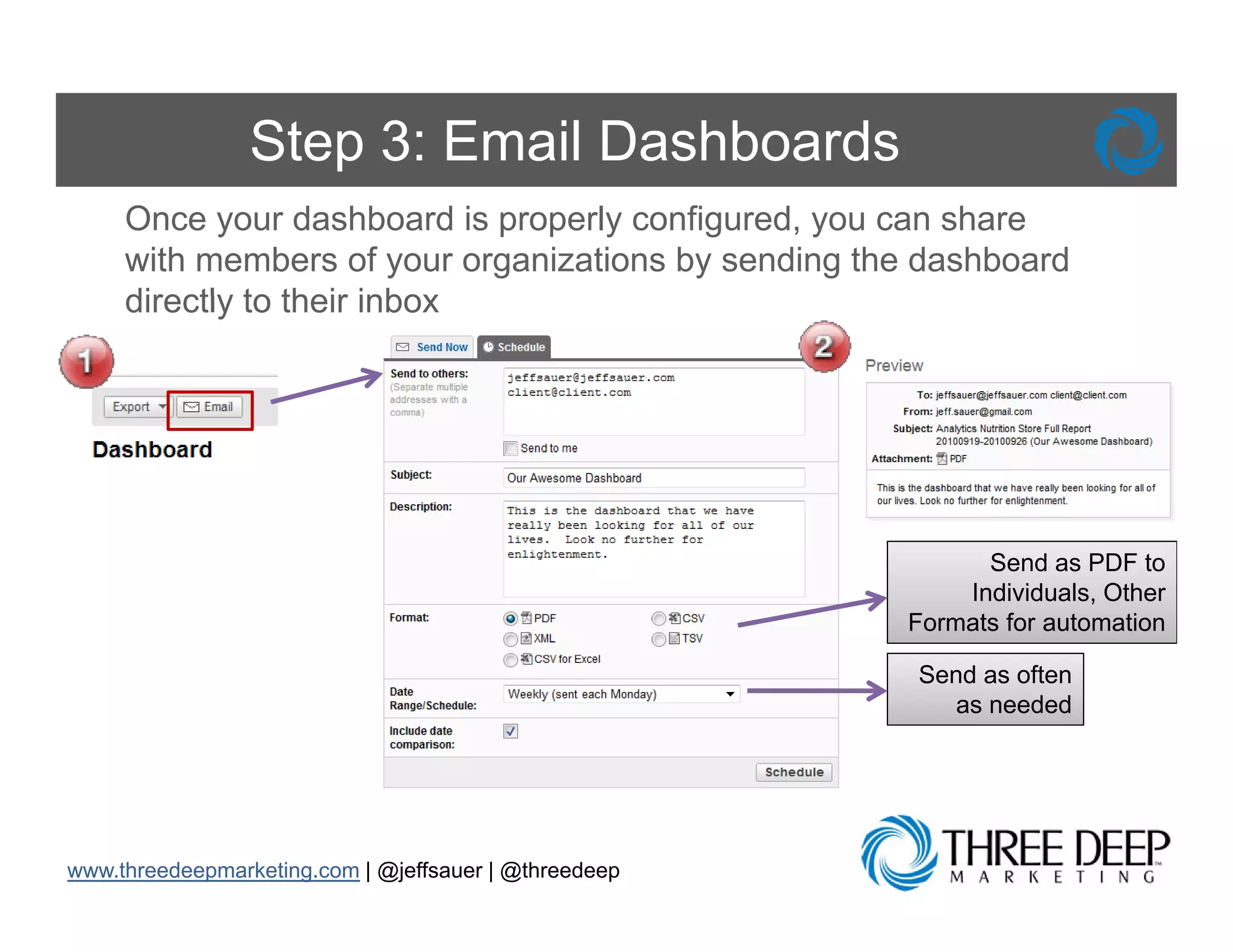
Step 3: Email Dashboards
     Once your dashboard is properly configured, you can share
     with members of your organizations by sending the dashboard
     directly to their inbox


                                                             Send as PDF to
                                                           Individuals, Other
                                                       Formats for automation

                                                       Send as often
                                                          as needed


www.threedeepmarketing.com | @jeffsauer | @threedeep
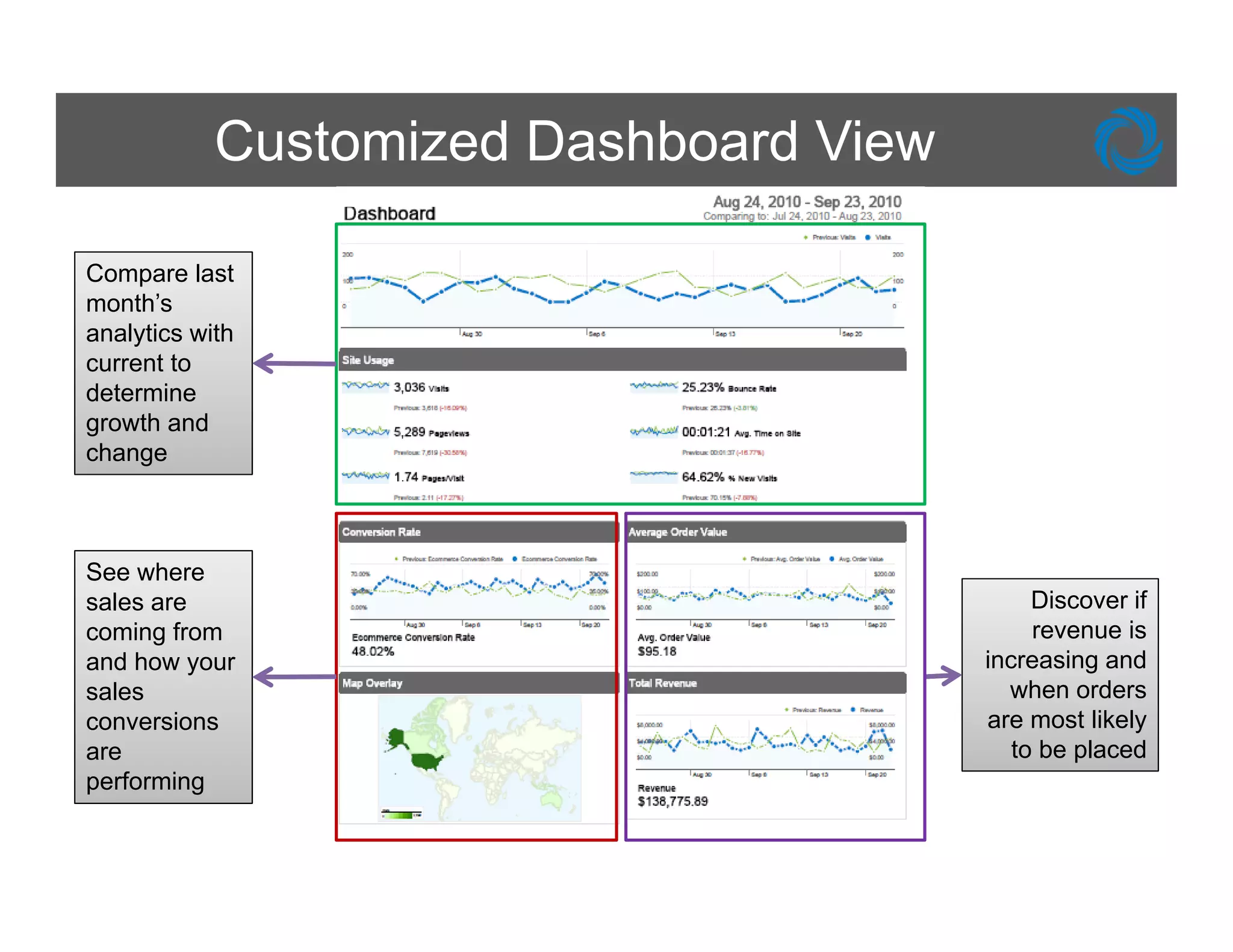
Customized Dashboard View

Compare last
month’s
    th’
analytics with
current to
determine
growth and
     th d
change


See where
sales are                                    Discover if
coming from                                  revenue is
and h
  d how your                            increasing and
sales                                     when orders
conversions                             are most likely
are                                        to be placed
performing
   f    i
Benefits of Custom Dashboards
     Customizing your dashboard will:
          • P id you a quick overview of th
            Provide             i k      i    f the
            performance of the metrics most important to
            you business
            your bus ess
          • Can be emailed to you daily, weekly, monthly
            and quarterly
          • Can provide comparisons to performance in
            previous days, weeks, months
          • All
            Allows for flexibility as your b i
                   f fl ibilit             business grows
            and changes


www.threedeepmarketing.com | @jeffsauer | @threedeep
Block Internal Traffic
Visitors Aren’t Really Visitors


        Problem: E
        P bl       Everybody i our company
                         b d in
        uses our corporate website as their
        homepage and I’ not sure if our t ffi
        h             d I’m t            traffic
        reports are accurate


www.threedeepmarketing.com | @jeffsauer | @threedeep
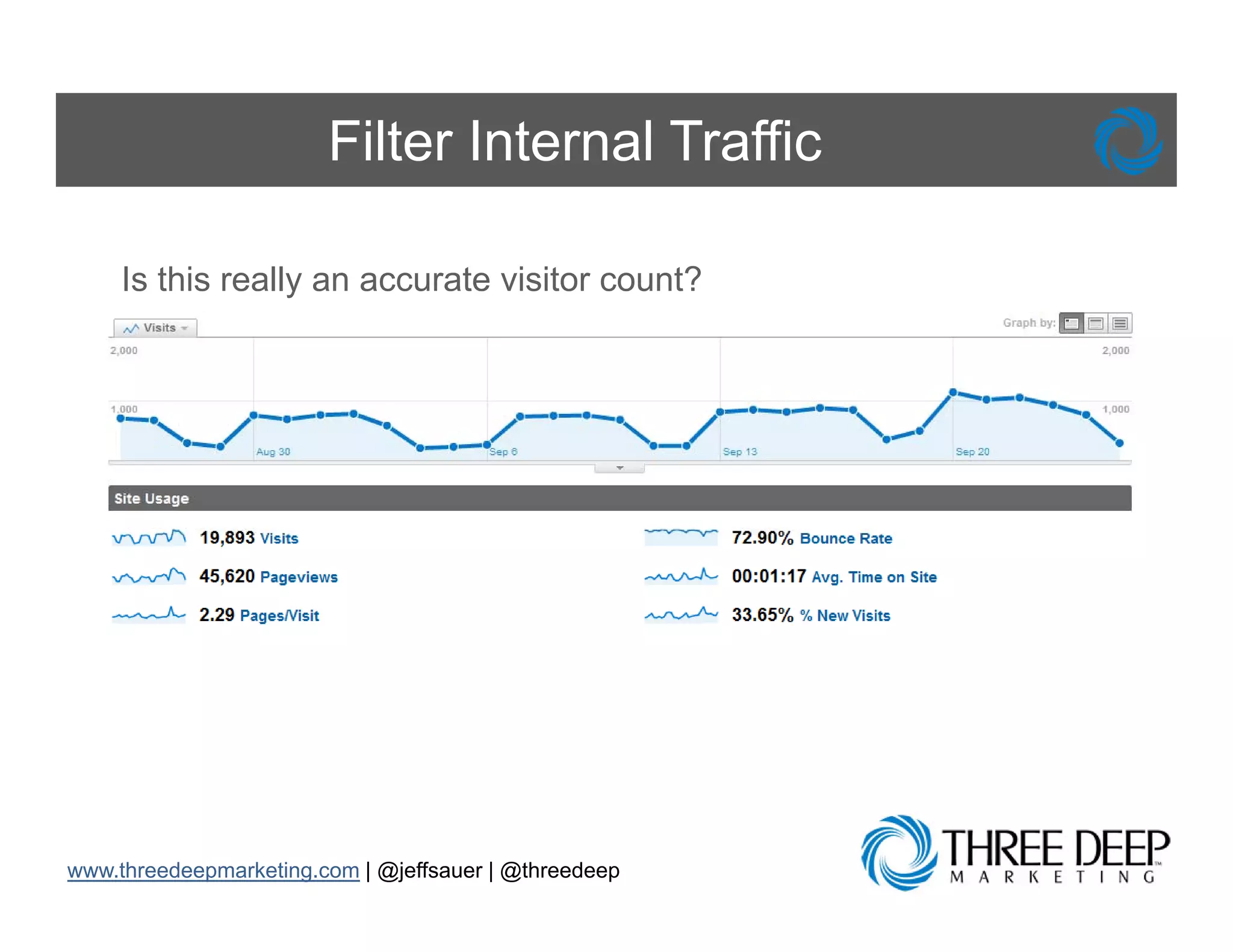
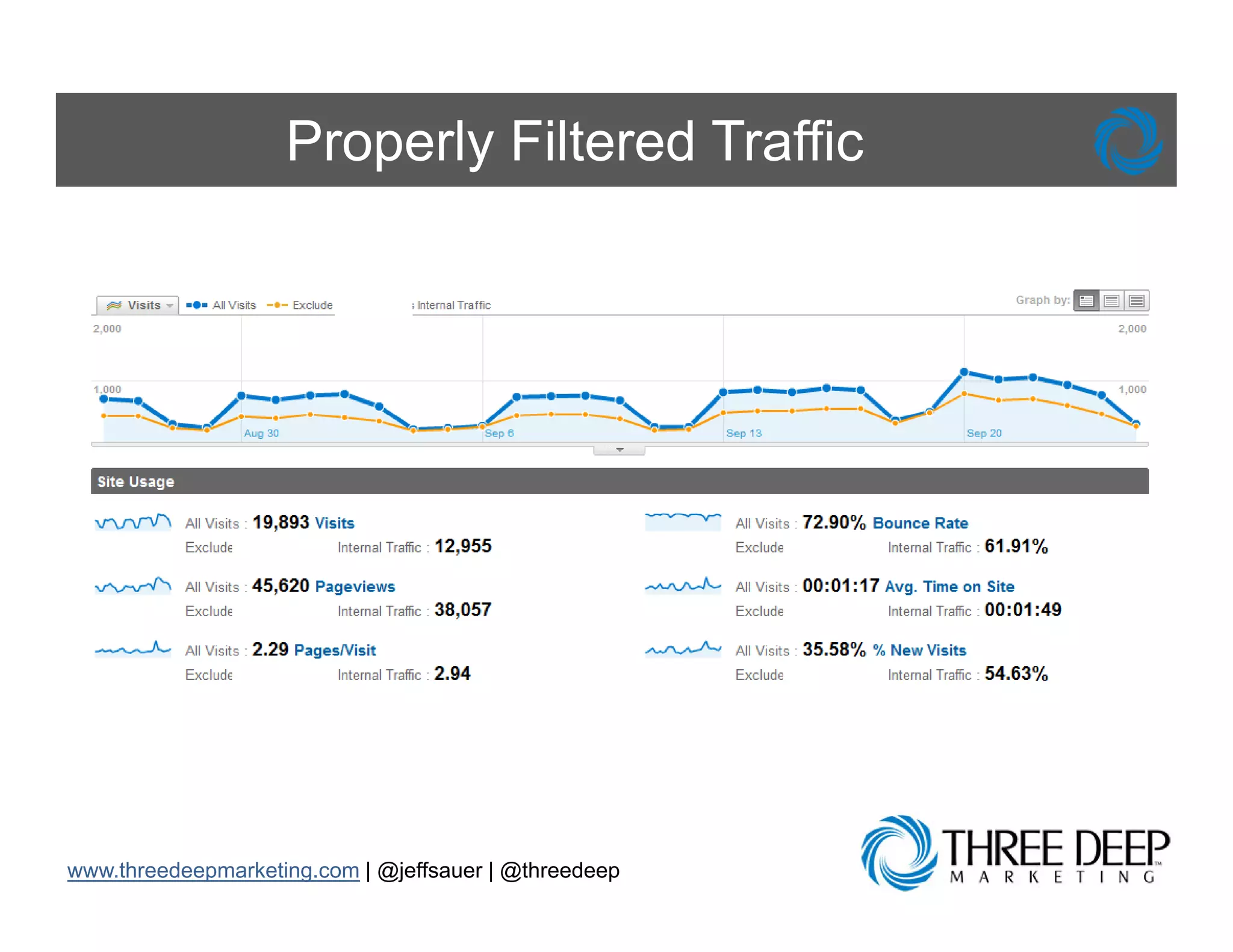
Filter Internal Traffic

     Is this really an accurate visitor count?
                  y


www.threedeepmarketing.com | @jeffsauer | @threedeep
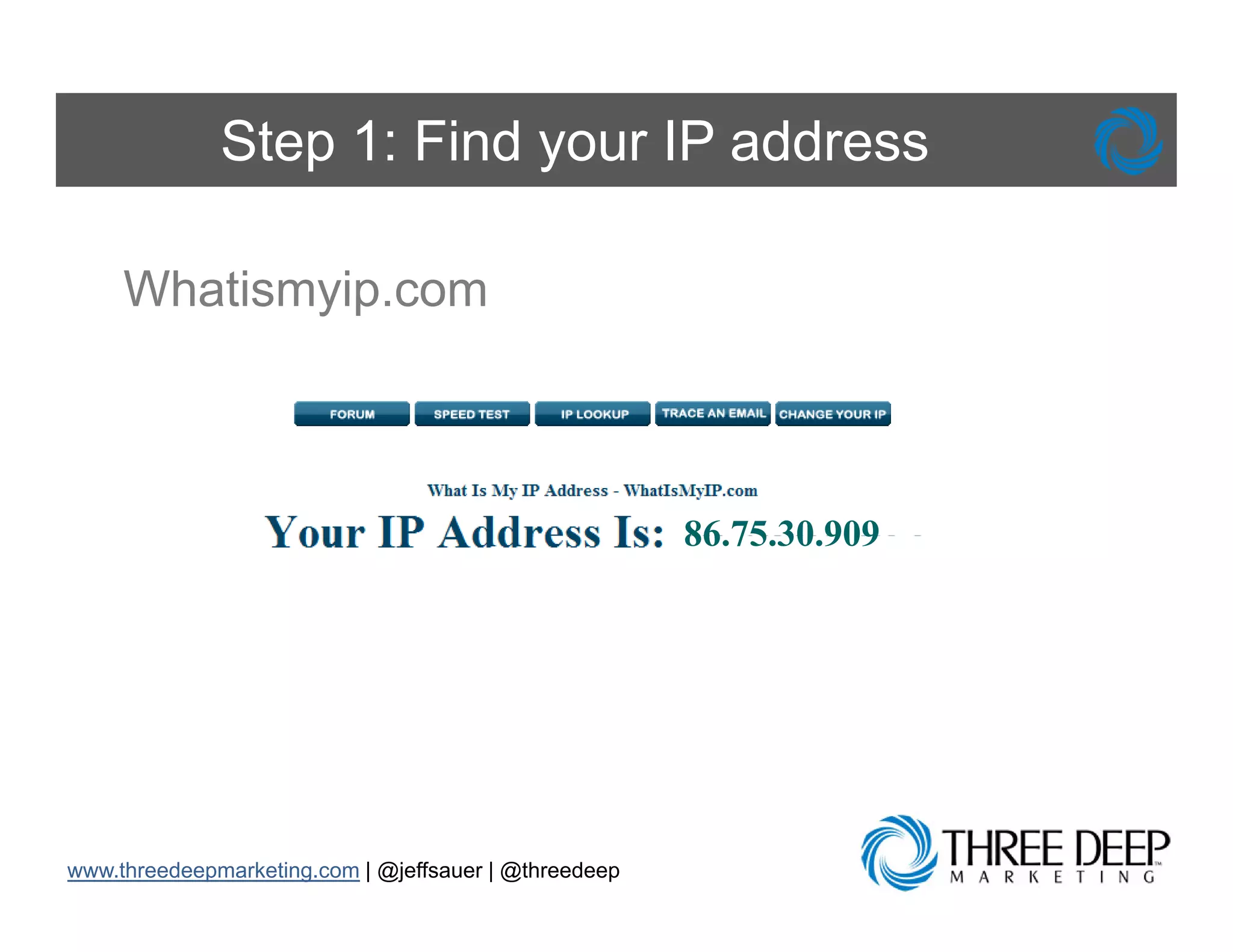
Step 1: Find your IP address

     Whatismyip.com
     Whatismyip com


                                                       86.75.30.909
                                                       86 75 30 909


www.threedeepmarketing.com | @jeffsauer | @threedeep
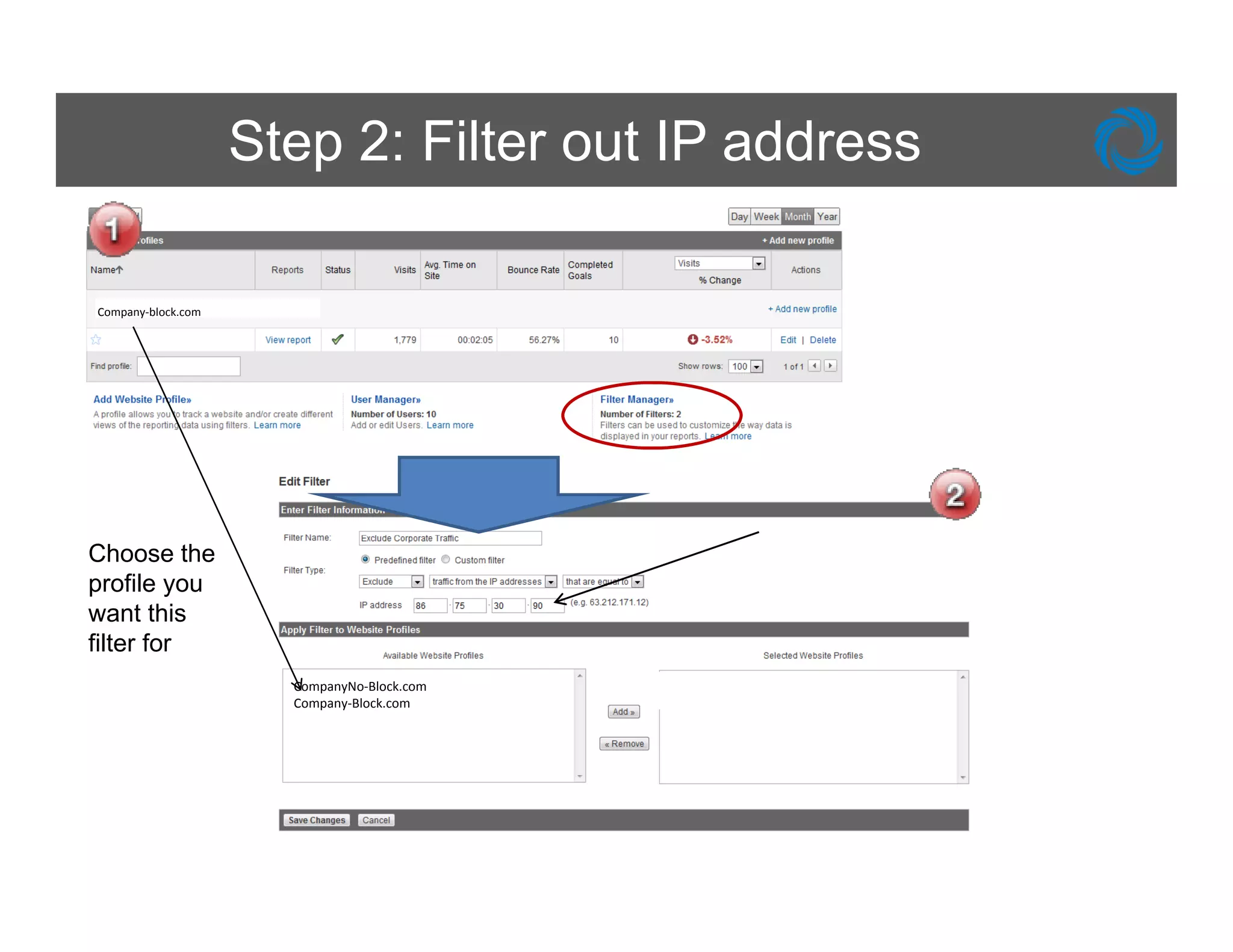
Step 2: Filter out IP address

Company‐block.com


Choose the
profile you
want this
filter for
                      CompanyNo‐Block.com
                      Company‐Block.com
Properly Filtered Traffic


www.threedeepmarketing.com | @jeffsauer | @threedeep
Benefits of Traffic Filtering

     Filtering Internal Traffic will:
          • Allow you to see exactly who visited your site
          • Make reporting more actionable by showing a
            true picture of what happened on your site
          • Bring the best metrics to the forefront and
            keep reporting on track


www.threedeepmarketing.com | @jeffsauer | @threedeep
Set Up Goals and Goal Funnels
What is the Value of my Website?


        Problem: I have had this website for
        years and I’m not sure if it is generating
        new business for my company


www.threedeepmarketing.com | @jeffsauer | @threedeep
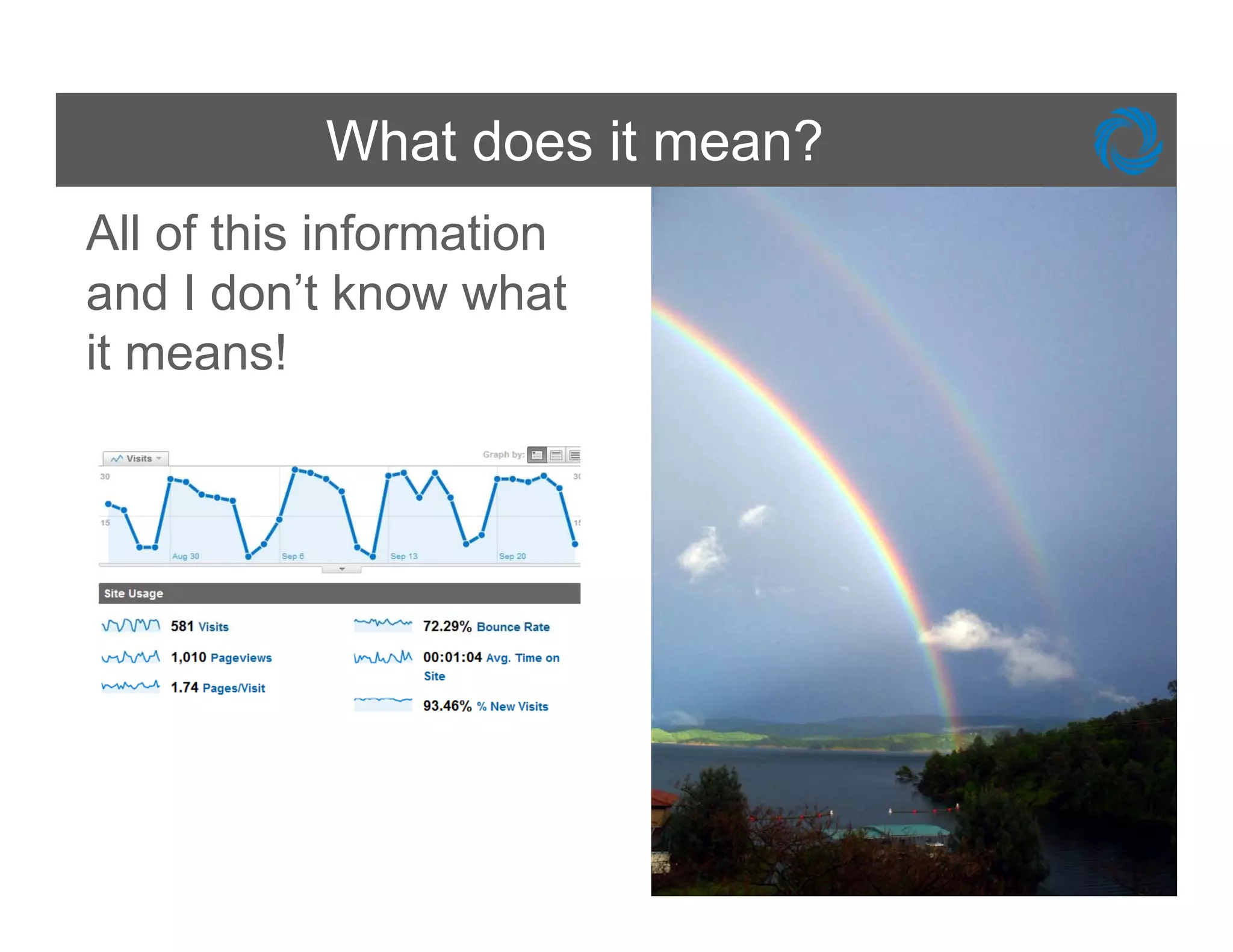
What does it mean?
All of this information
and I don’t know what
       don t
it means!
Determine Your Goals

  Examples of common website g
      p                      goals include:
       • Ecommerce Transactions
       • Completion of a form (lead collection or
         newsletter opt-ins)
       • Visitors downloading a whitepaper or p
                               g        p p      product
         brochure
       • Visitor engagement ( g comment, adding or
                   g g          (blog         ,      g
         editing a profile, time-on-site, pageviews)


www.threedeepmarketing.com | @jeffsauer | @threedeep
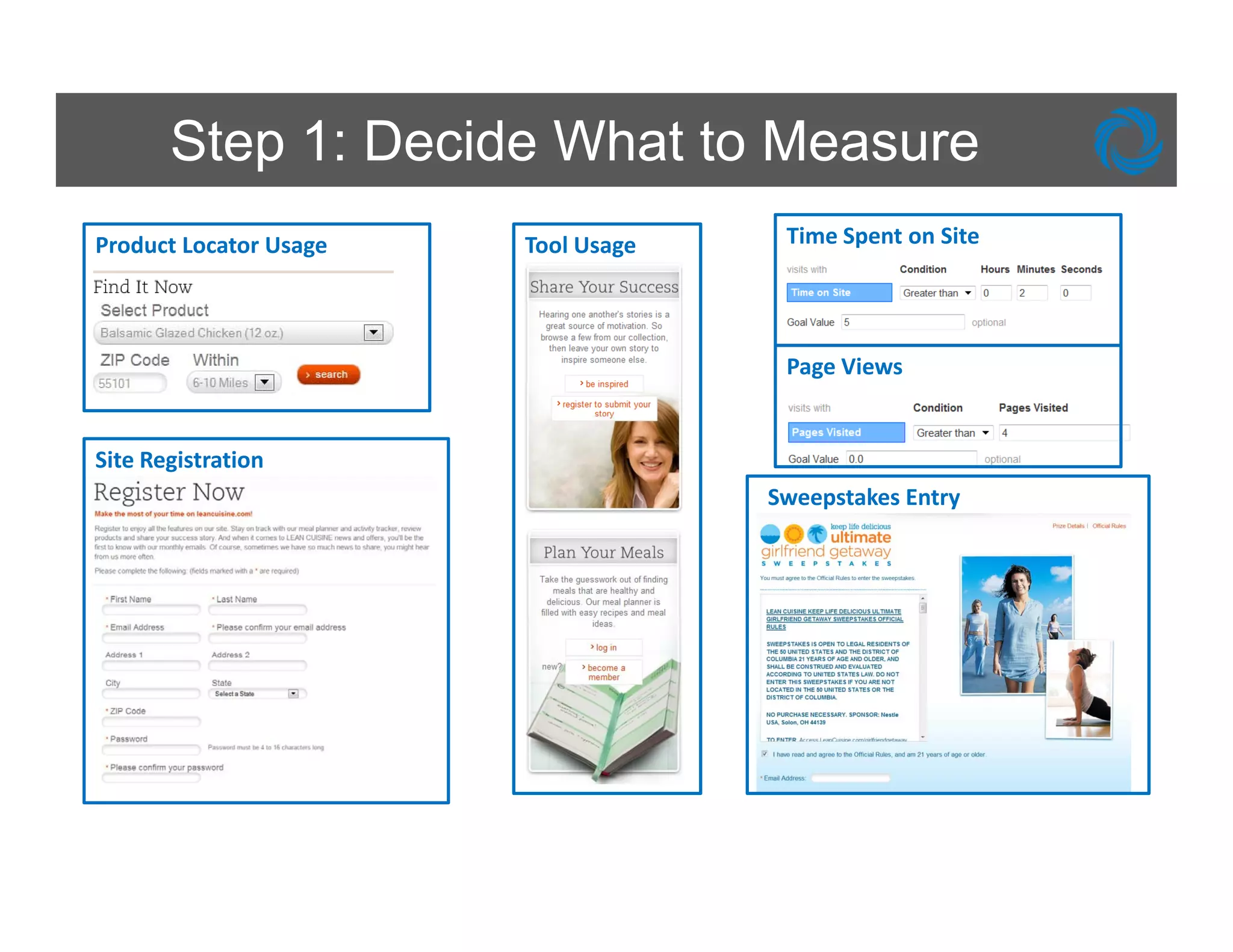
Step 1: Decide What to Measure
Product Locator Usage   Tool Usage    Time Spent on Site


                                      Page Views


Site Registration
                                     Sweepstakes Entry
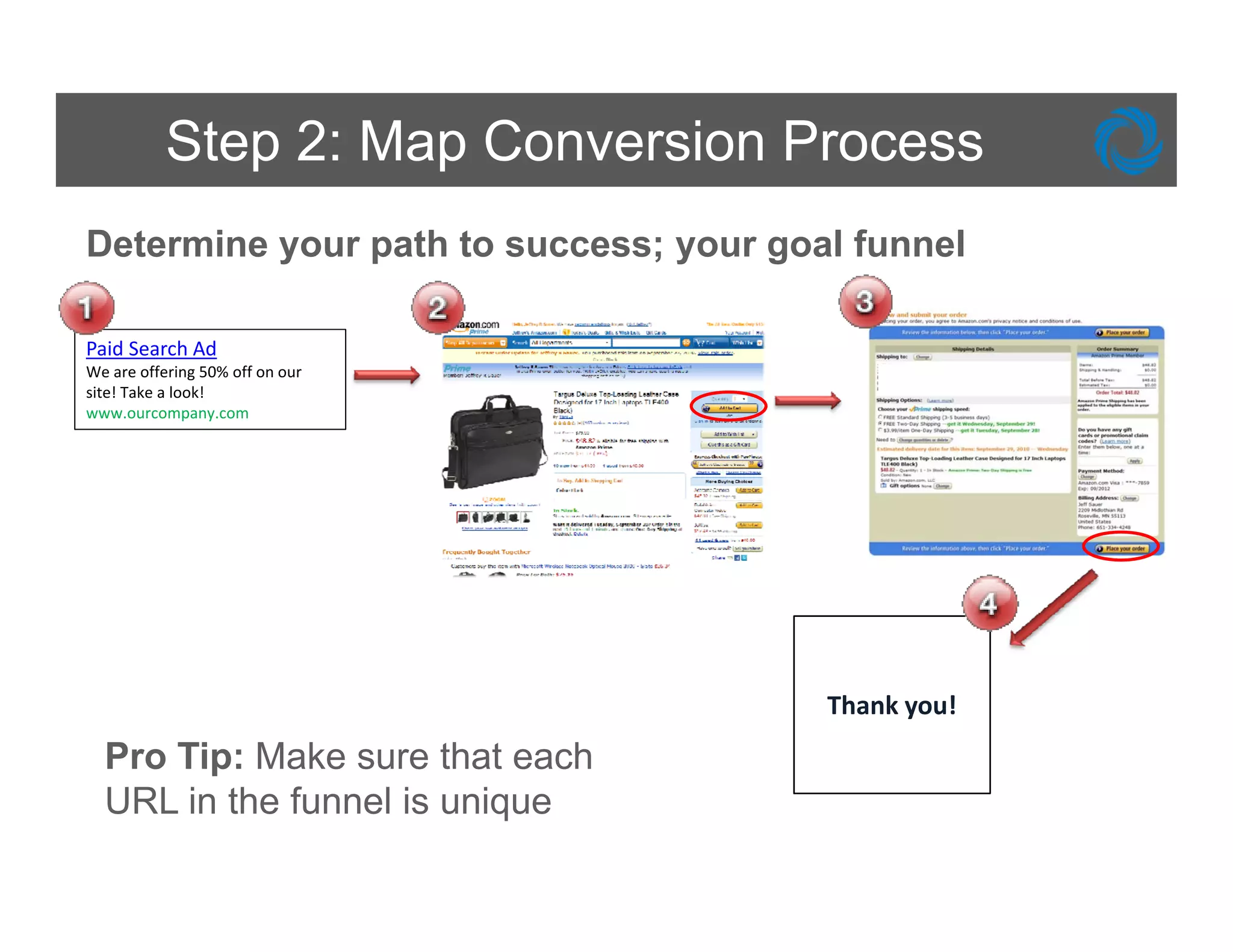
Step 2: Map Conversion Process
Determine your path to success; your goal funnel

Paid Search Ad
We are offering 50% off on our 
site! Take a look! 
www.ourcompany.com
www ourcompany com


                                        Thank you! 
  Pro Tip: Make sure that each
        p
  URL in the funnel is unique
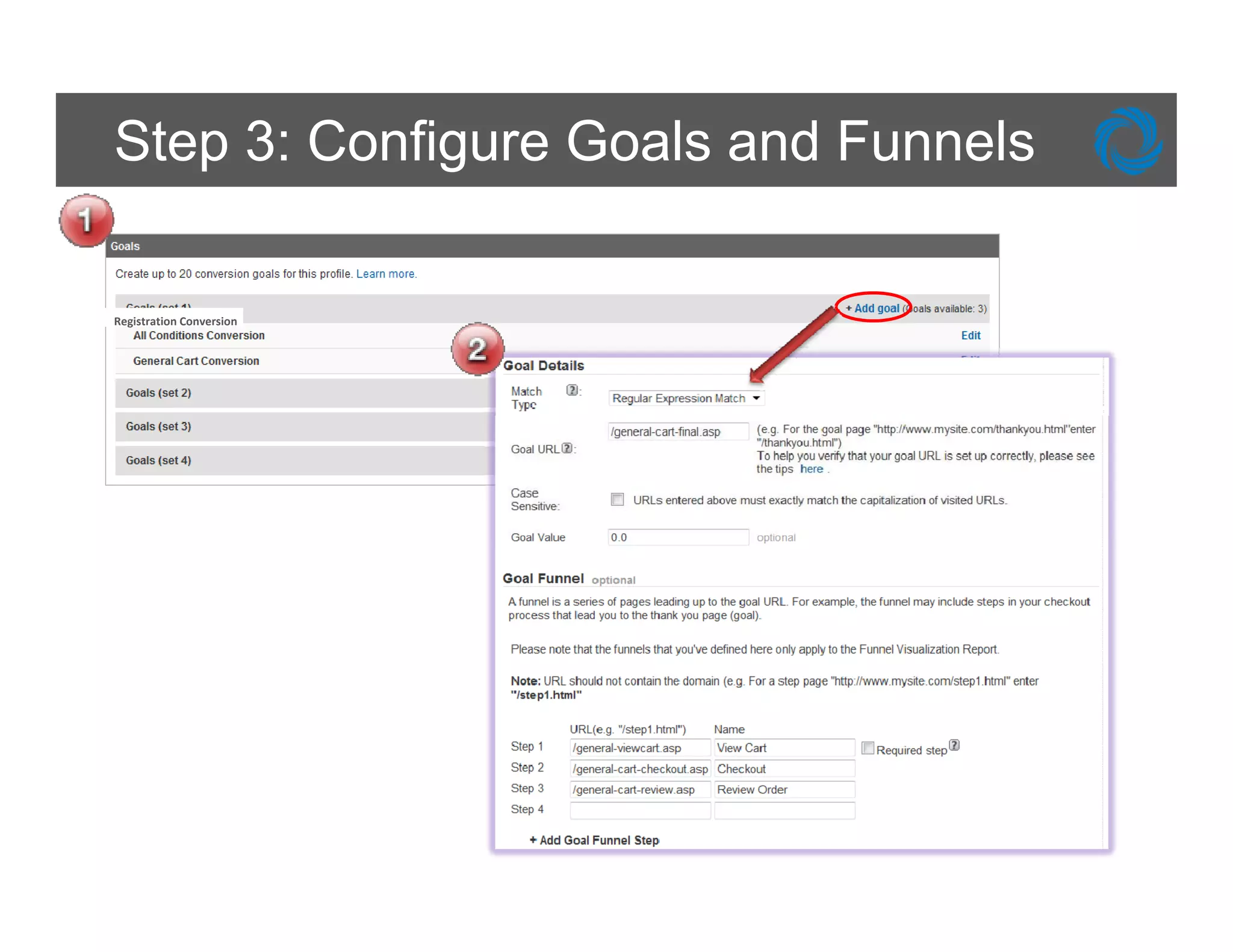
Step 3: Configure Goals and Funnels

Registration Conversion
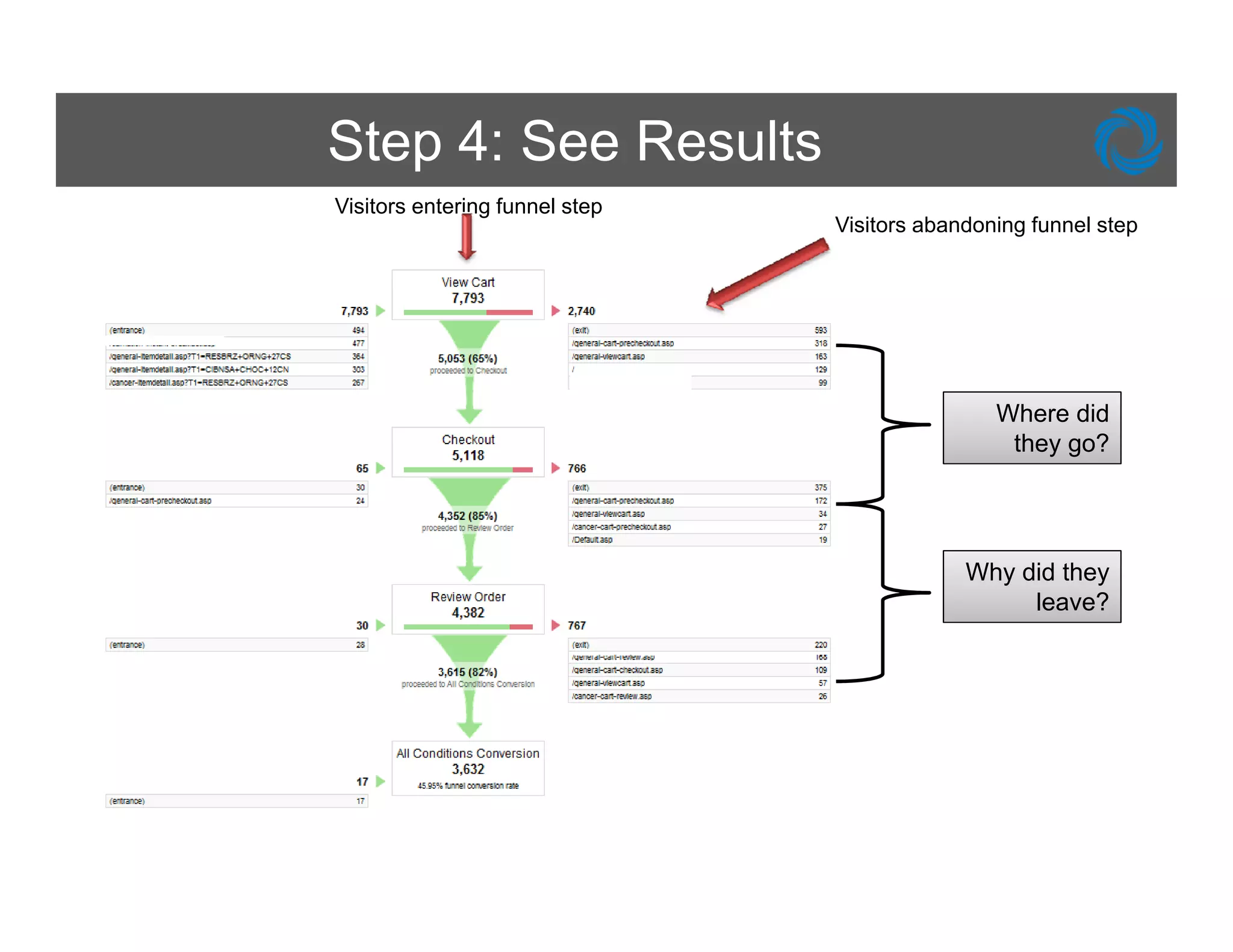
Step 4: See Results
Visitors entering funnel step
                                Visitors abandoning funnel step


                                                Where did
                                                 they go?


                                             Why did they
                                                  leave?
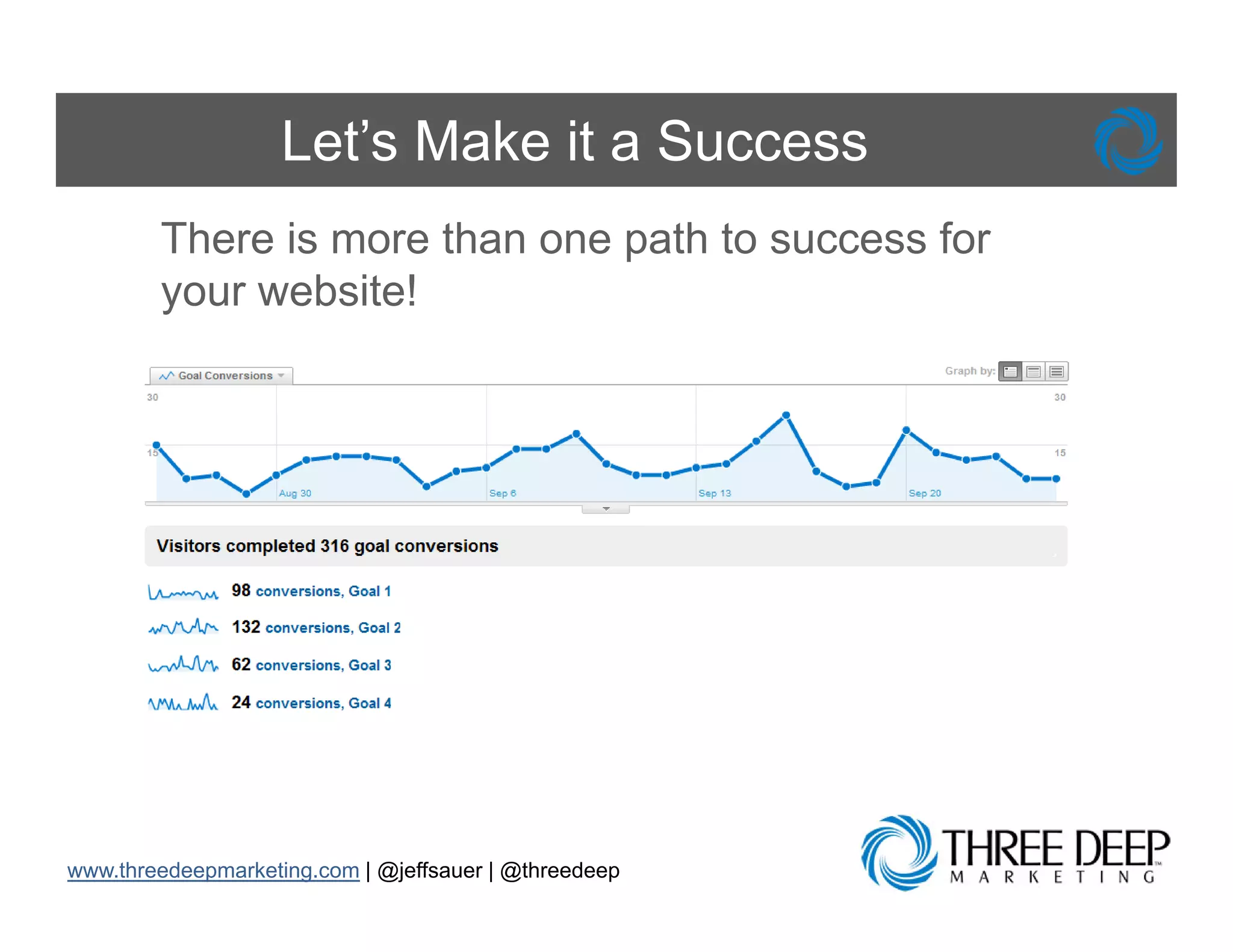
Let’s Make it a Success
        There is more than one path to success for
        your website!


www.threedeepmarketing.com | @jeffsauer | @threedeep
Benefits of Goal Tracking

     Defining and Tracking Goals will:
          • Assist you in setting up funnels to determine
            where visitors drop off on your site
          • H l you establish value f actions t k on
            Help         t bli h l for ti           taken
            your website
          • Allow you to report on the performance of
            each individual traffic driver to your site
          • Enable you to report on engagement metrics
                     y        p          g g
            like time on site and total page views
          • Let you report on up to 20 specific actions

www.threedeepmarketing.com | @jeffsauer | @threedeep
Website and URL Structure
Page URLs Not User Friendly


        Problem: Dynamic URLs don’t make any
        sense when they show up in my Analytics
        reports and it makes it really hard to do


www.threedeepmarketing.com | @jeffsauer | @threedeep
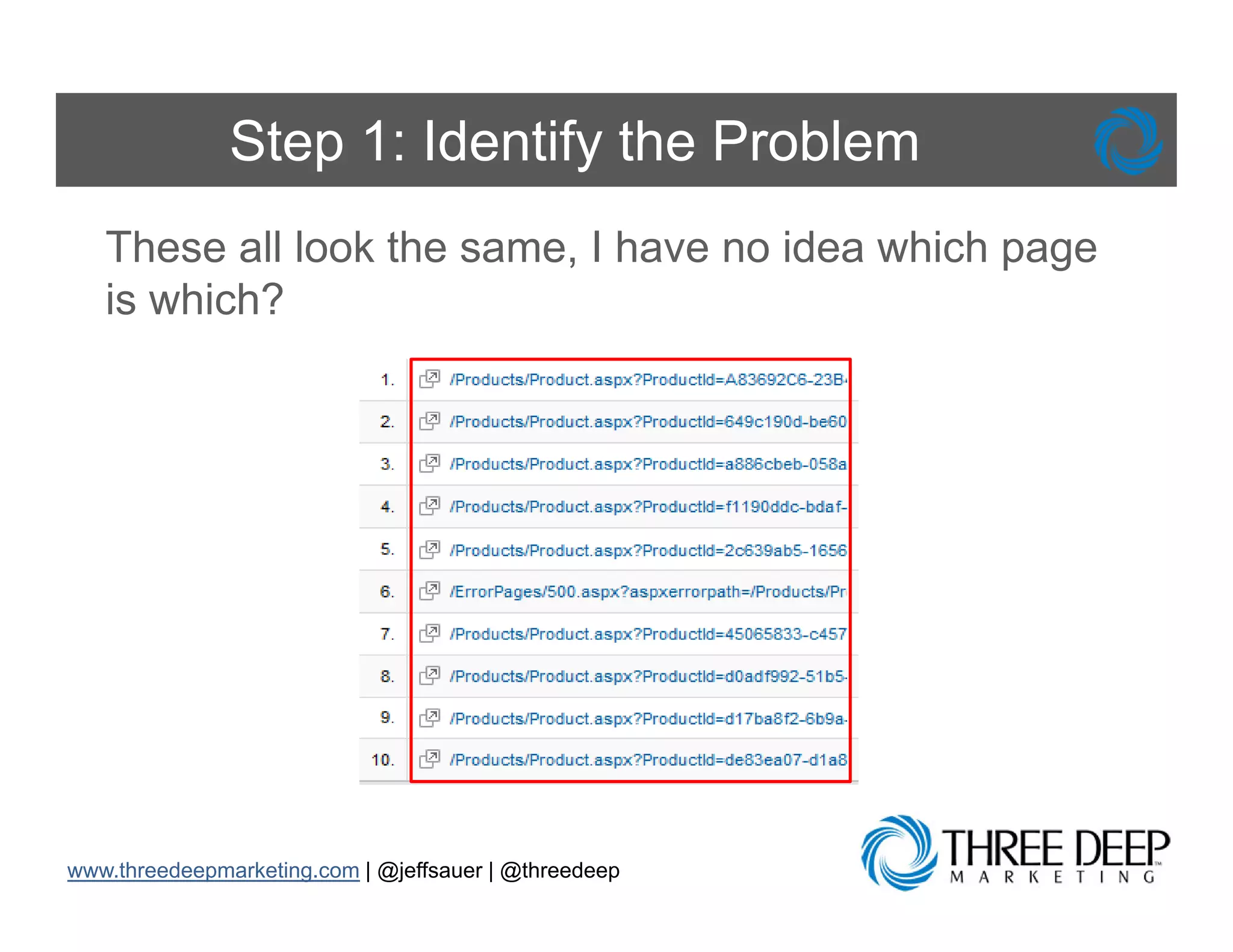
Step 1: Identify the Problem
   These all look the same, I have no idea which page
   is which?


www.threedeepmarketing.com | @jeffsauer | @threedeep
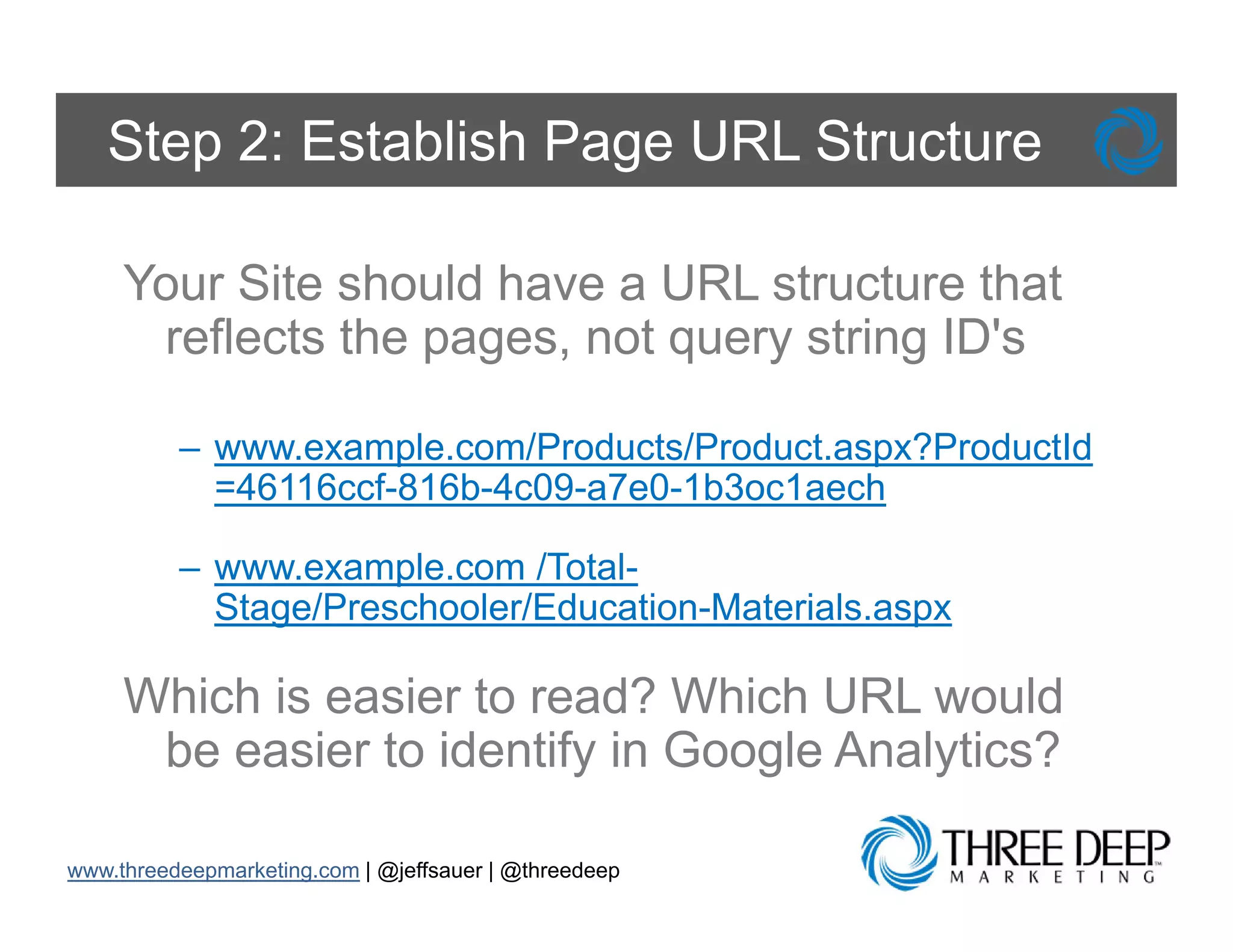
Step 2: Establish Page URL Structure

     Your Site should have a URL structure that
      reflects the pages, not query string ID's

          – www.example.com/Products/Product.aspx?ProductId
            =46116ccf-816b-4c09-a7e0-1b3oc1aech

          – www.example.com /Total-
            Stage/Preschooler/Education-Materials.aspx

     Which is easier to read? Which URL would
      be easier to identify in Google Analytics?
                          y       g       y

www.threedeepmarketing.com | @jeffsauer | @threedeep
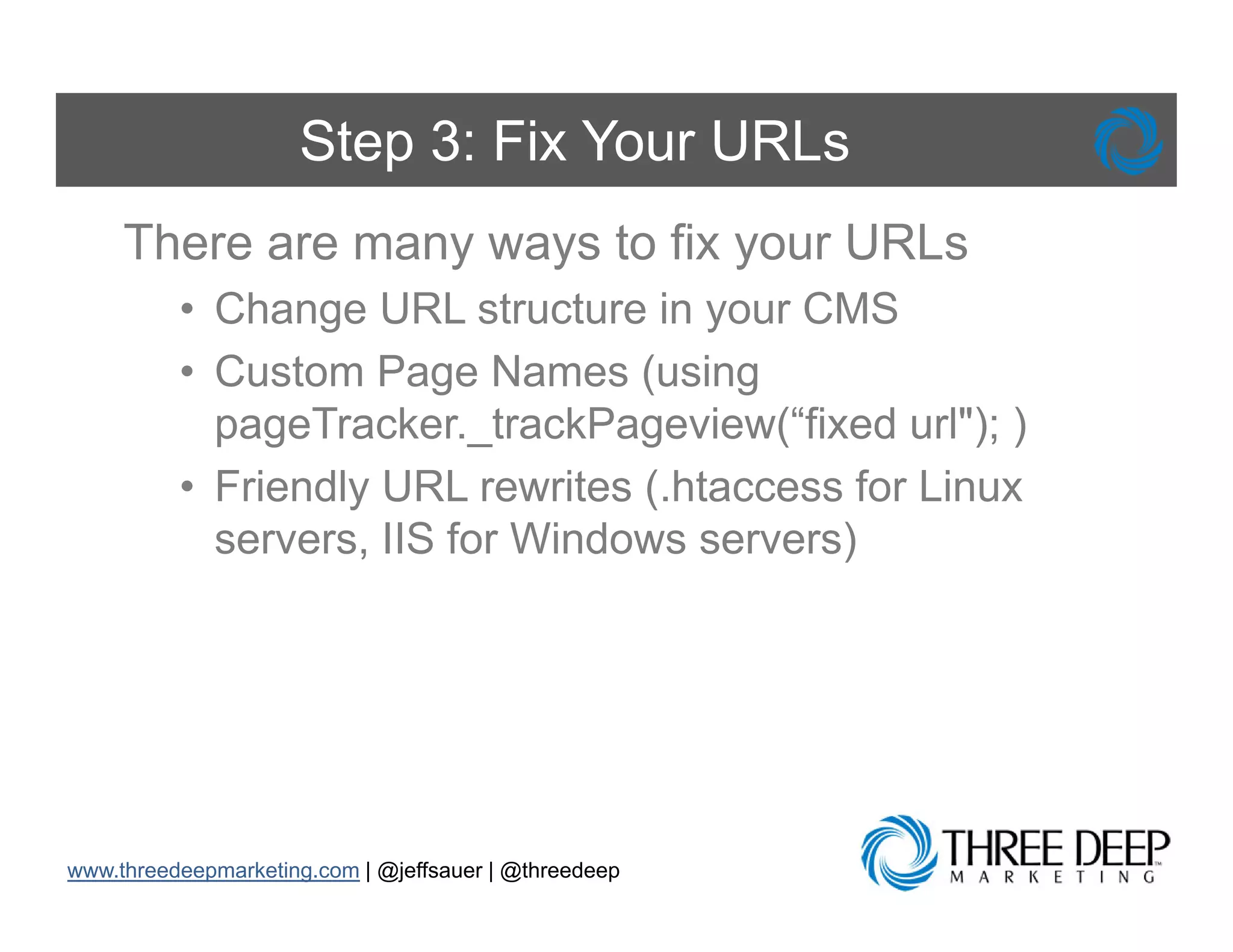
Step 3: Fix Your URLs
     There are many ways to fix your URLs
          • Ch
            Change URL structure i your CMS
                           t t     in
          • Custom Page Names (using
            pageTracker._trackPageview(“fixed rl")
            pageTracker trackPage ie (“fi ed url"); )
          • Friendly URL rewrites (.htaccess for Linux

            servers,
            servers IIS for Windows servers)


www.threedeepmarketing.com | @jeffsauer | @threedeep
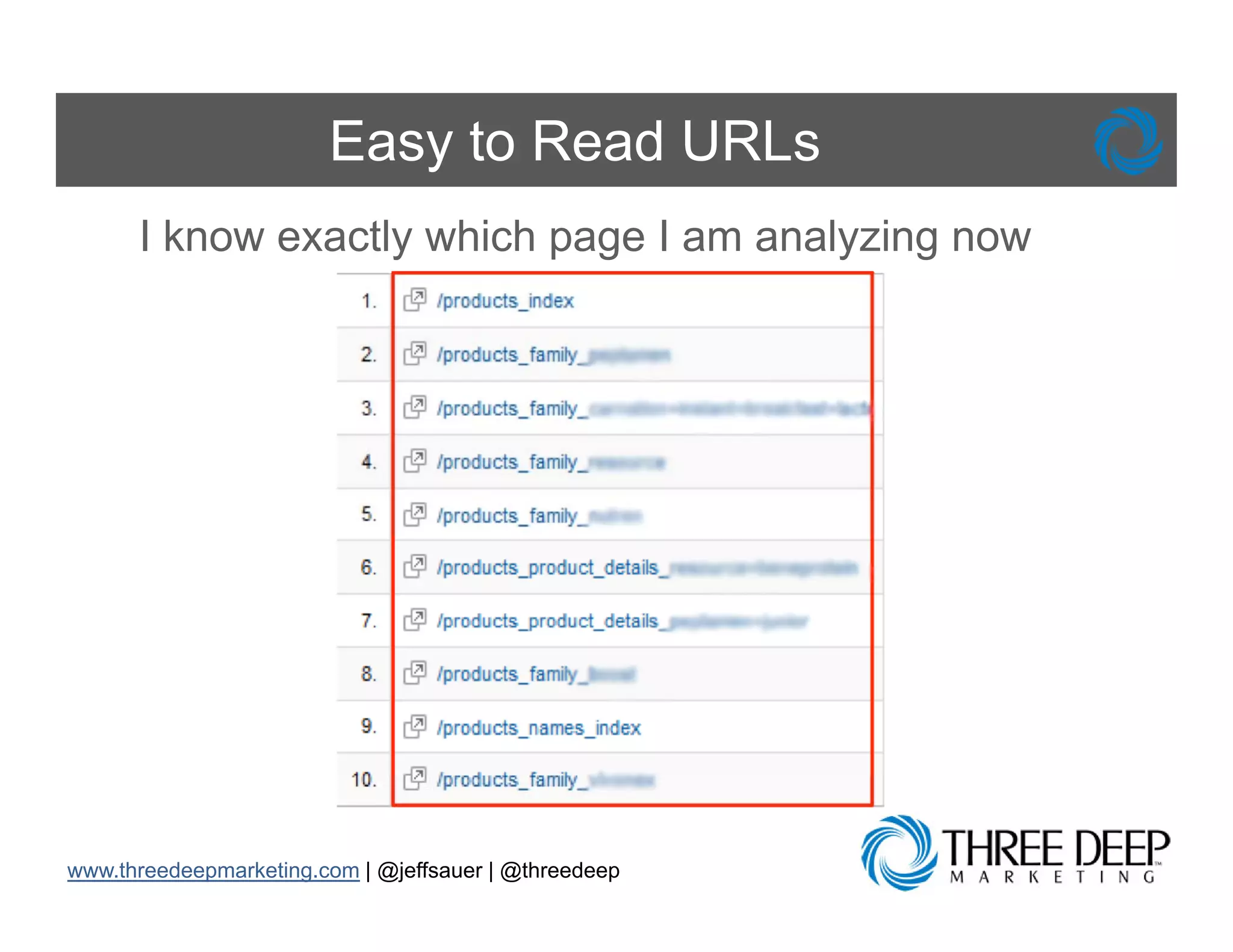
Easy to Read URLs
      I know exactly which page I am analyzing now


www.threedeepmarketing.com | @jeffsauer | @threedeep
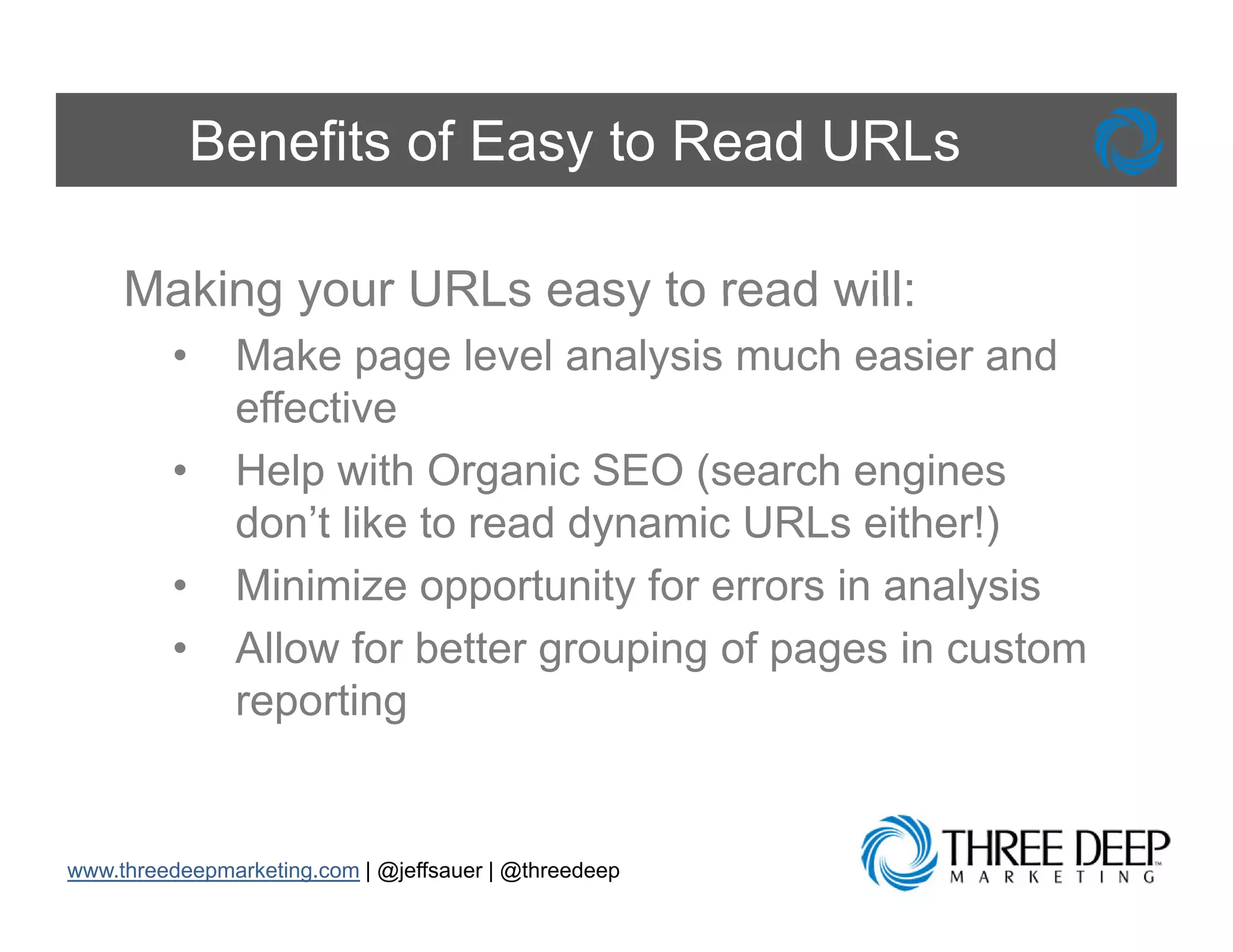
Benefits of Easy to Read URLs

     Making your URLs easy to read will:
         •     Make page level analysis much easier and
               effective
         •     Help with Organic SEO (search engines
               don t
               don’t like to read dynamic URLs either!)
         •     Minimize opportunity for errors in analysis
         •     Allow for better grouping of pages in custom
               reporting


www.threedeepmarketing.com | @jeffsauer | @threedeep
Link Adwords with Analytics
What is my paid search ROI?

       Problem: I think that my Google AdW d
       P bl        thi k th t    G    l AdWords
       is successful because I get leads from my
       website, b t I h
           b it but have no id what
                              idea h t
       keywords are the most valuable and ROI
       is t i
       i not in my vocabulary
                         b l


www.threedeepmarketing.com | @jeffsauer | @threedeep
Enhance Your Search Marketing
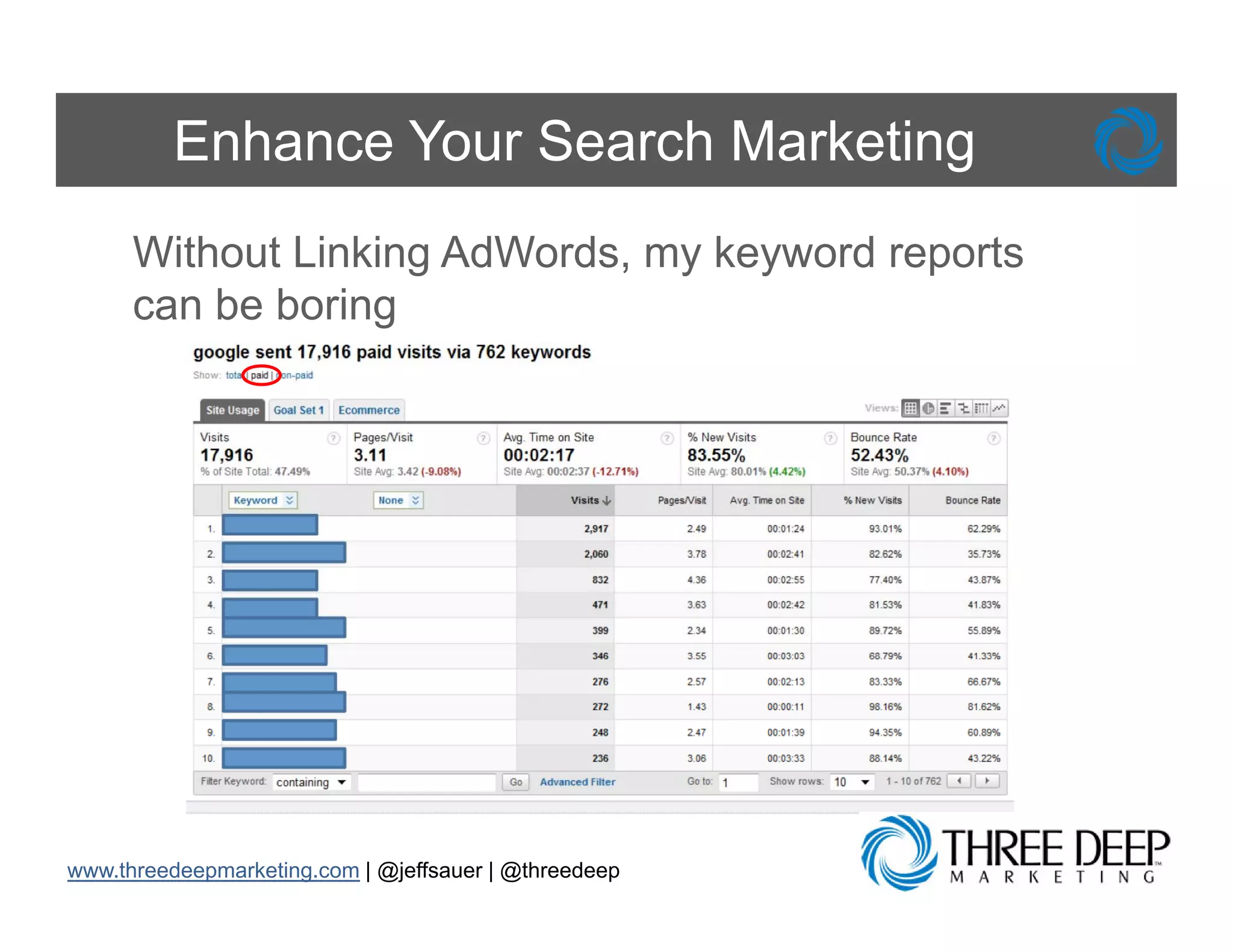
      Without Linking AdWords, my keyword reports
      can b b i
          be boring


www.threedeepmarketing.com | @jeffsauer | @threedeep
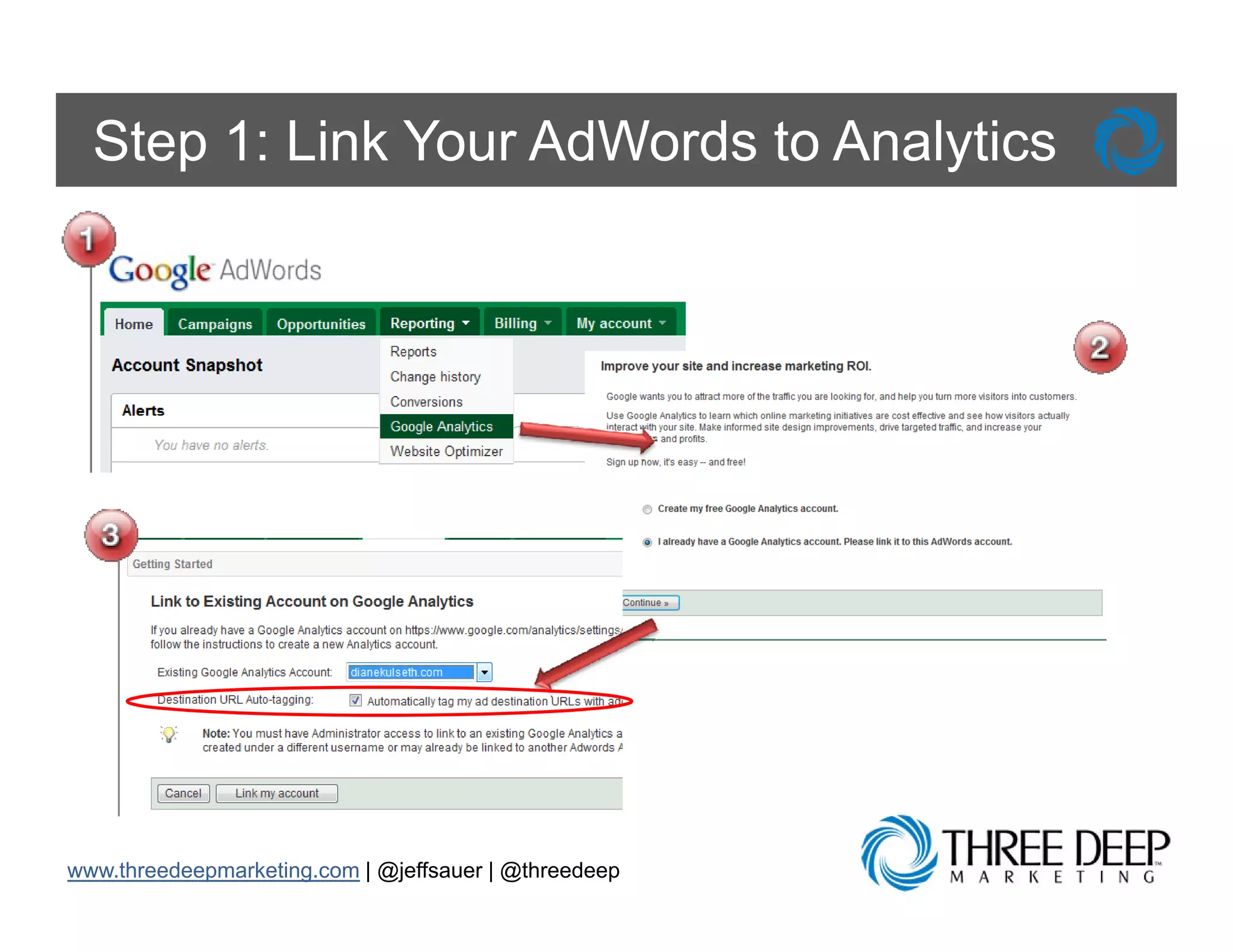
Step 1: Link Your AdWords to Analytics


www.threedeepmarketing.com | @jeffsauer | @threedeep
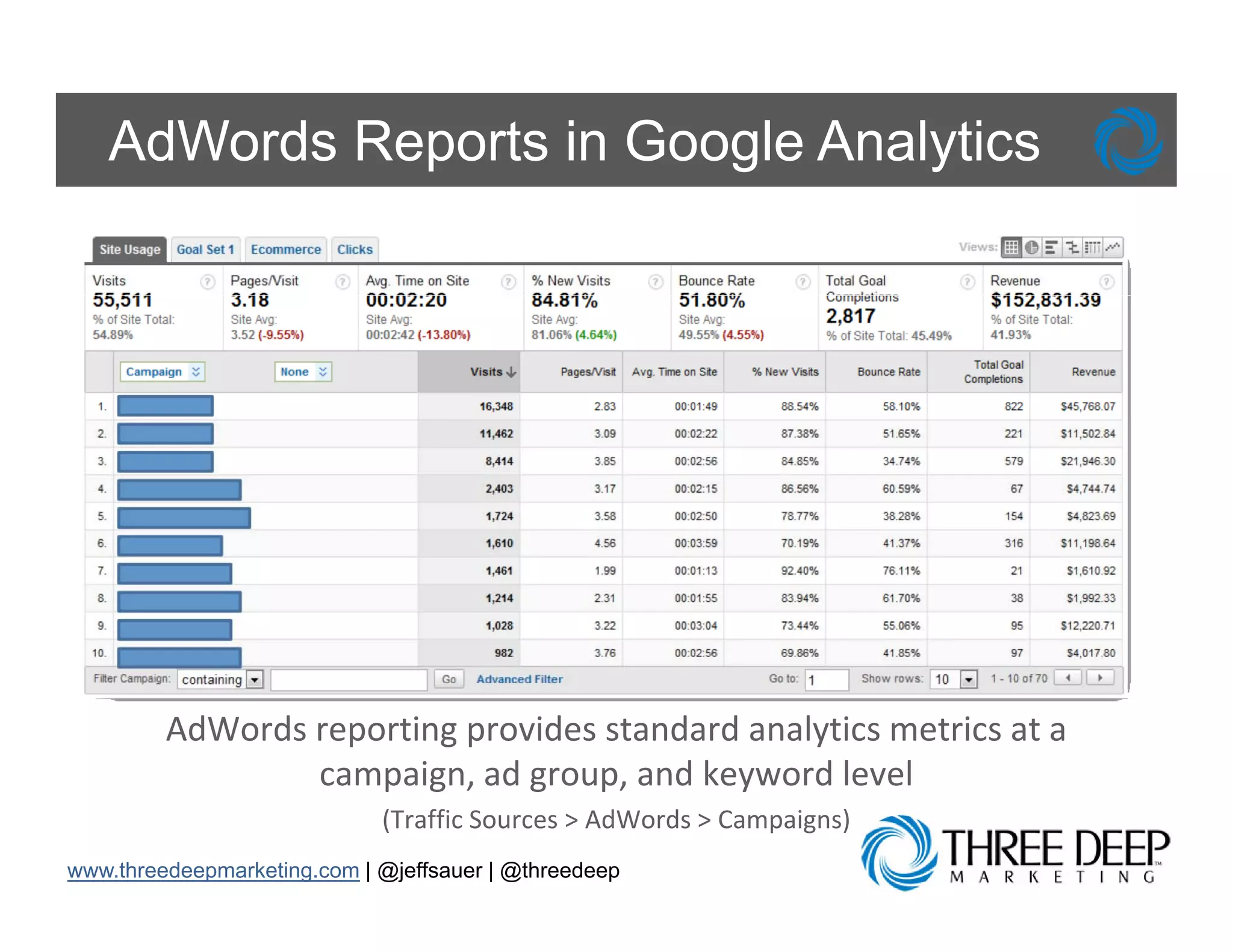
AdWords Reports in Google Analytics


         AdWords reporting provides standard analytics metrics at a 
                 campaign, ad group, and keyword level
                 campaign ad group and keyword level
                             (Traffic Sources > AdWords > Campaigns)
www.threedeepmarketing.com | @jeffsauer | @threedeep
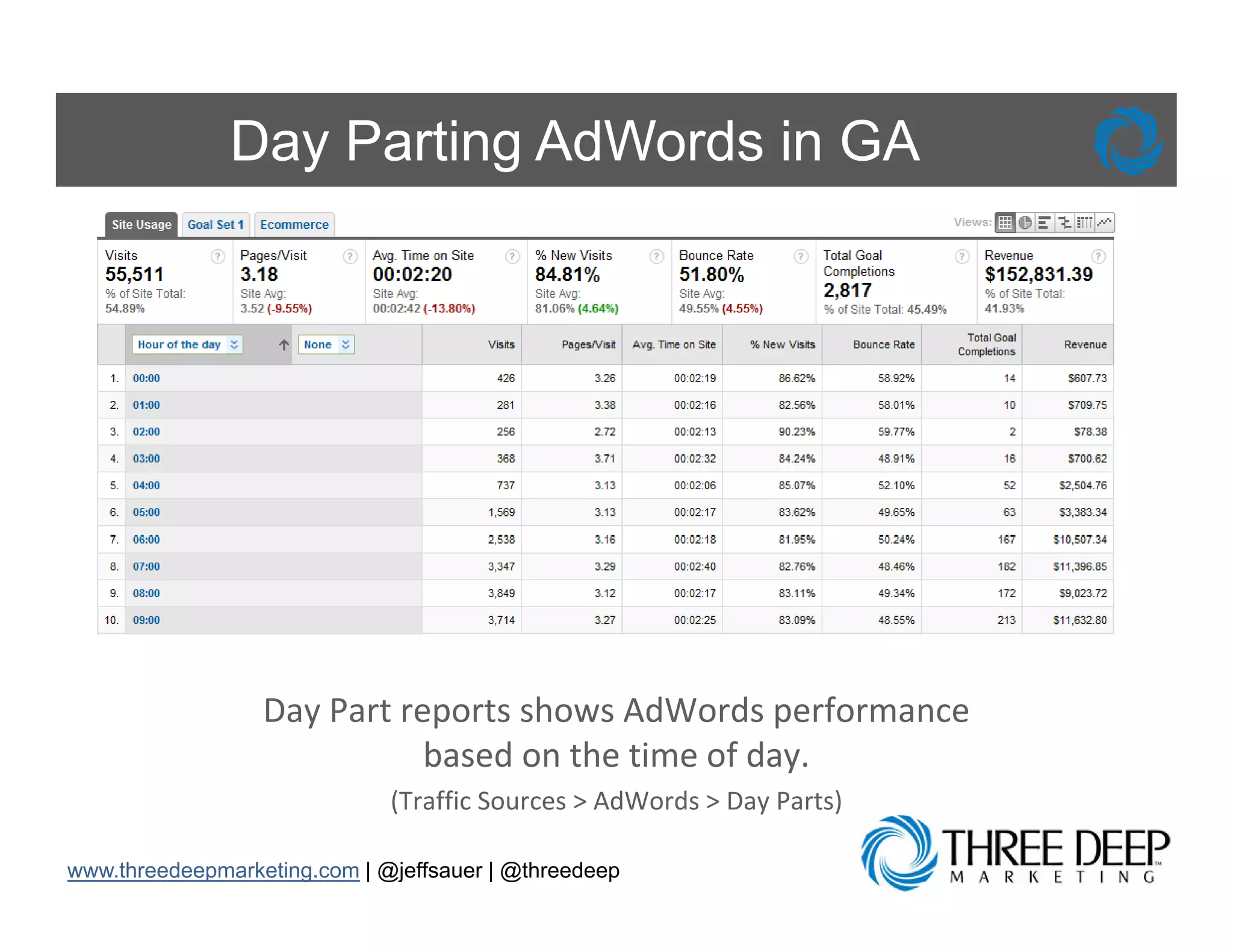
Day Parting AdWords in GA


                  Day Part reports shows AdWords performance 
                             based on the time of day. 
                              (Traffic Sources > AdWords > Day Parts)

www.threedeepmarketing.com | @jeffsauer | @threedeep
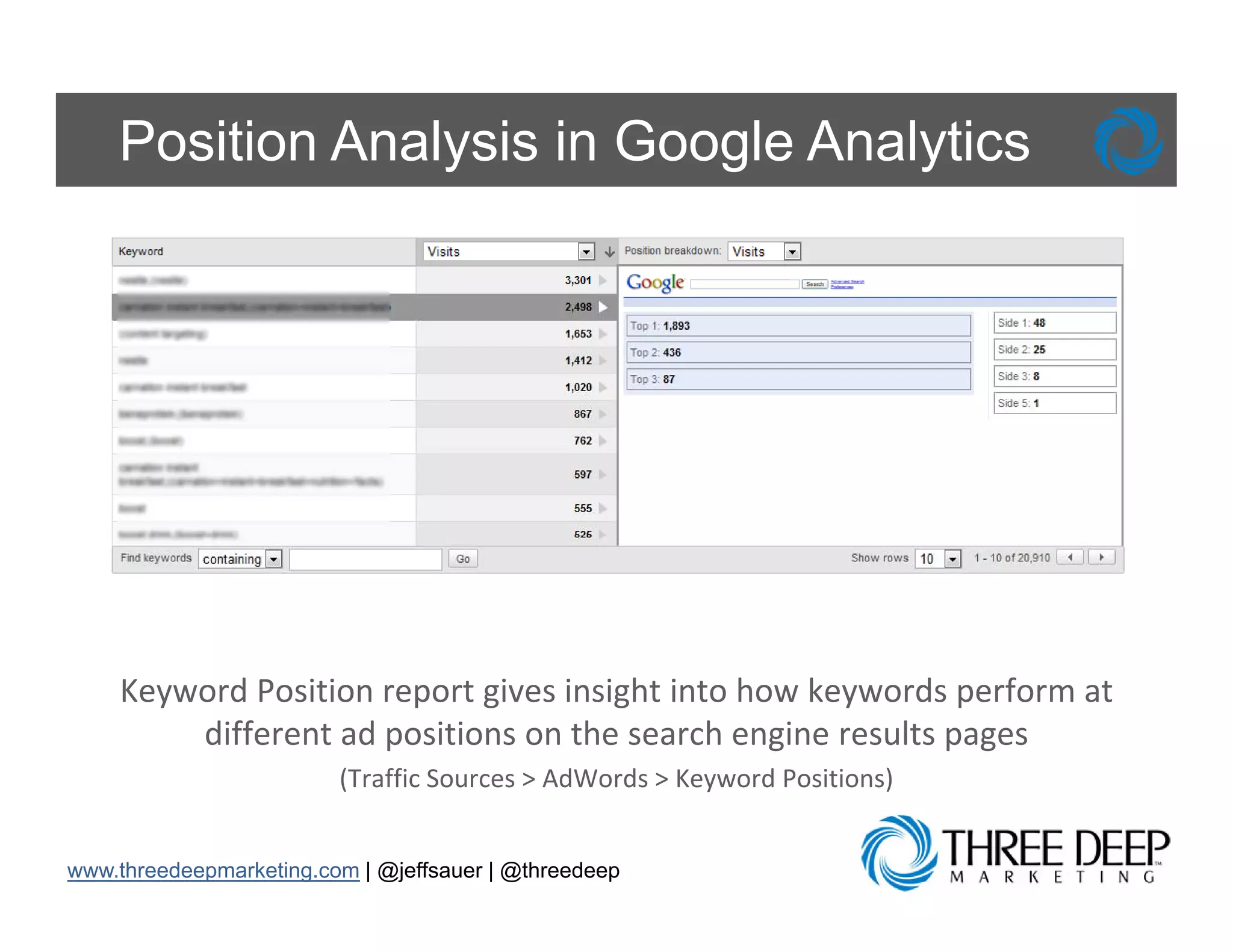
Position Analysis in Google Analytics


    Keyword Position report gives insight into how keywords perform at 
        different ad positions on the search engine results pages 
                         (Traffic Sources > AdWords > Keyword Positions)
                         (Traffic Sources > AdWords > Keyword Positions)


www.threedeepmarketing.com | @jeffsauer | @threedeep
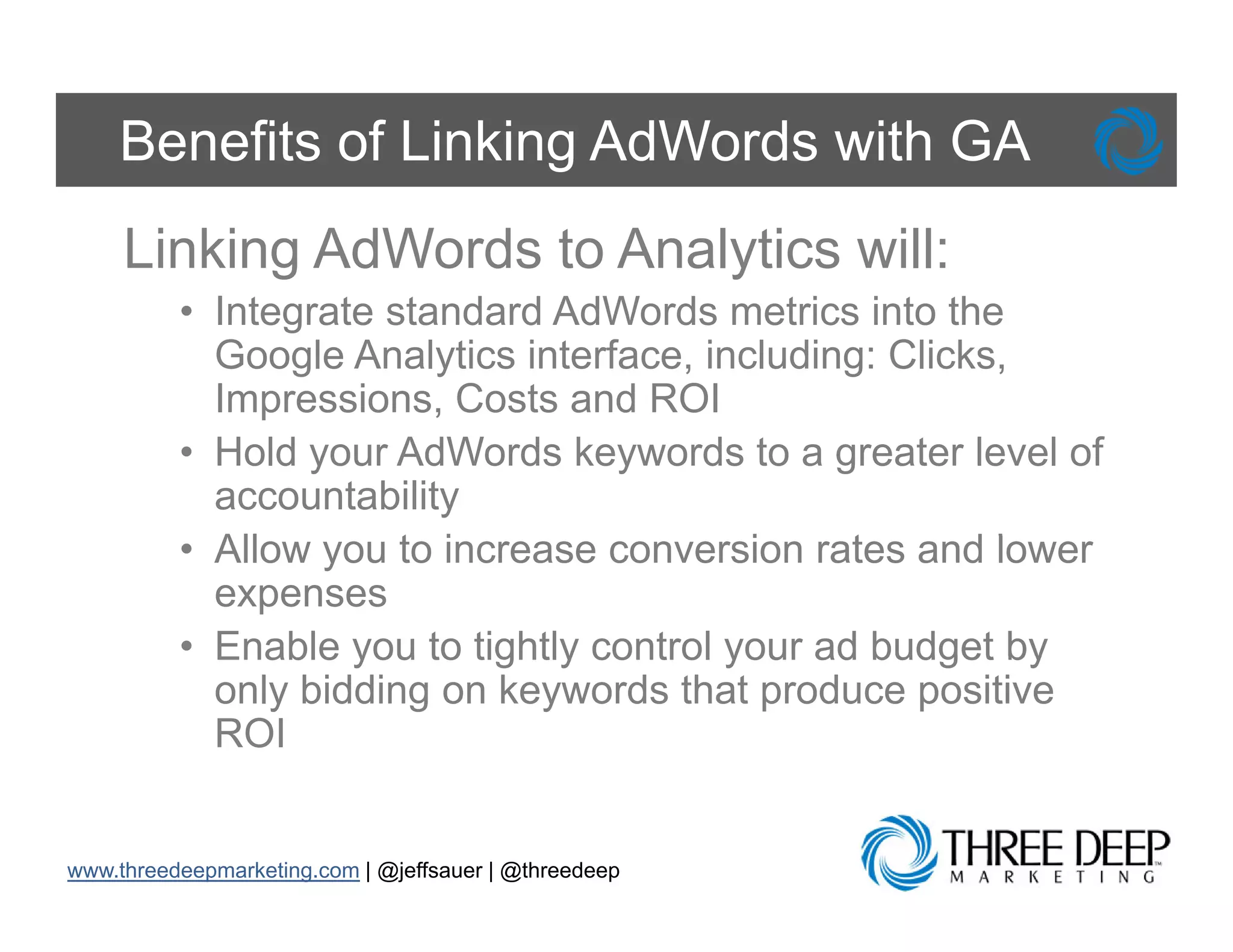
Benefits of Linking AdWords with GA
     Linking AdWords to Analytics will:
          • Integrate standard AdWords metrics into the
            Google Analytics interface, including: Clicks,
            Impressions, Costs and ROI
                p        ,
          • Hold your AdWords keywords to a greater level of
            accountability
          • All
            Allow you t i
                       to increase conversion rates and l
                                           i     t     d lower
            expenses
          • Enable you to tightly control your ad budget by
            only bidding on keywords that produce positive
            ROI


www.threedeepmarketing.com | @jeffsauer | @threedeep
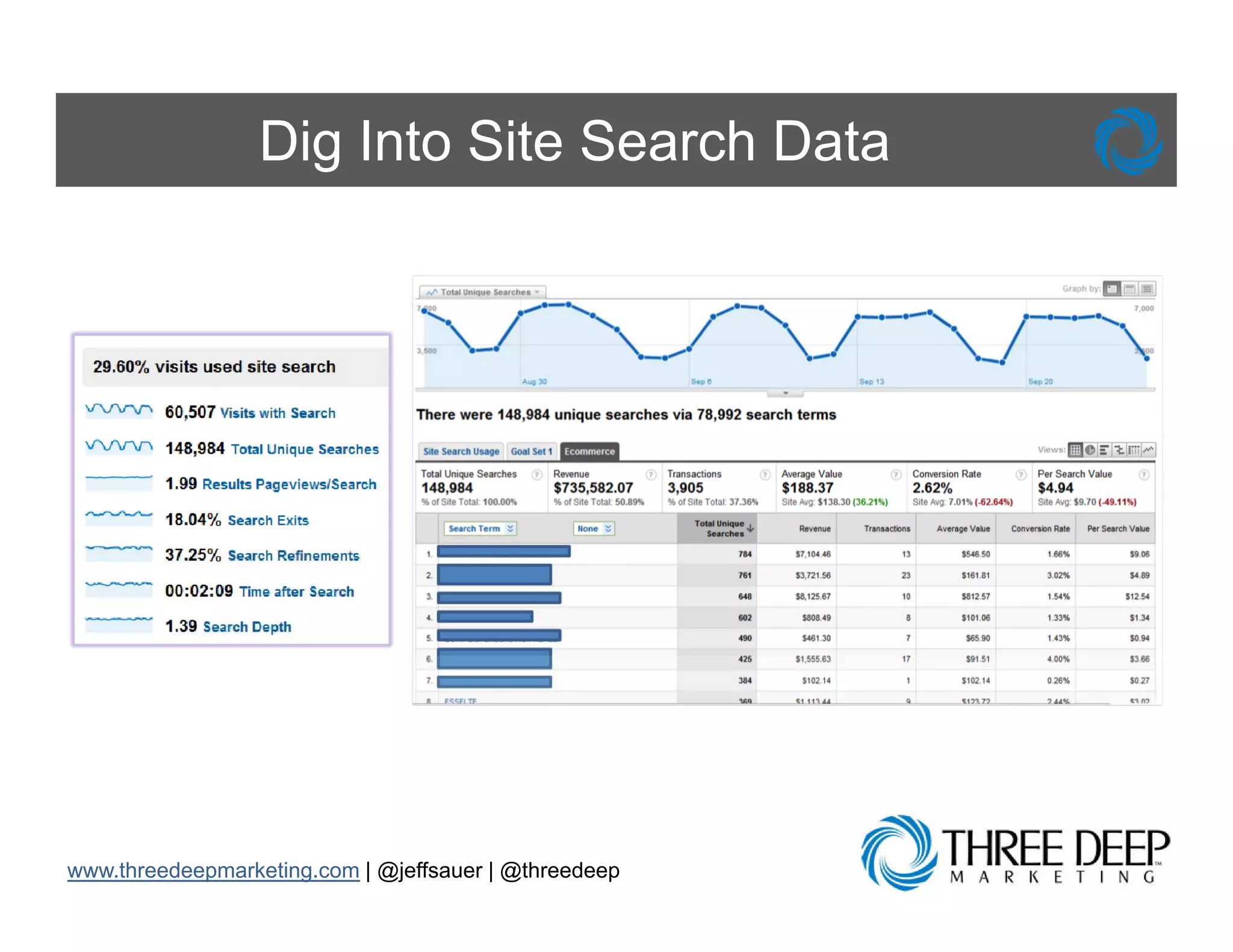
Improve Site Search
What are they hoping to find?


       Problem: I have a search box on my
       website, yet I have no idea if people use
       it, why they use it, and how they use it


www.threedeepmarketing.com | @jeffsauer | @threedeep
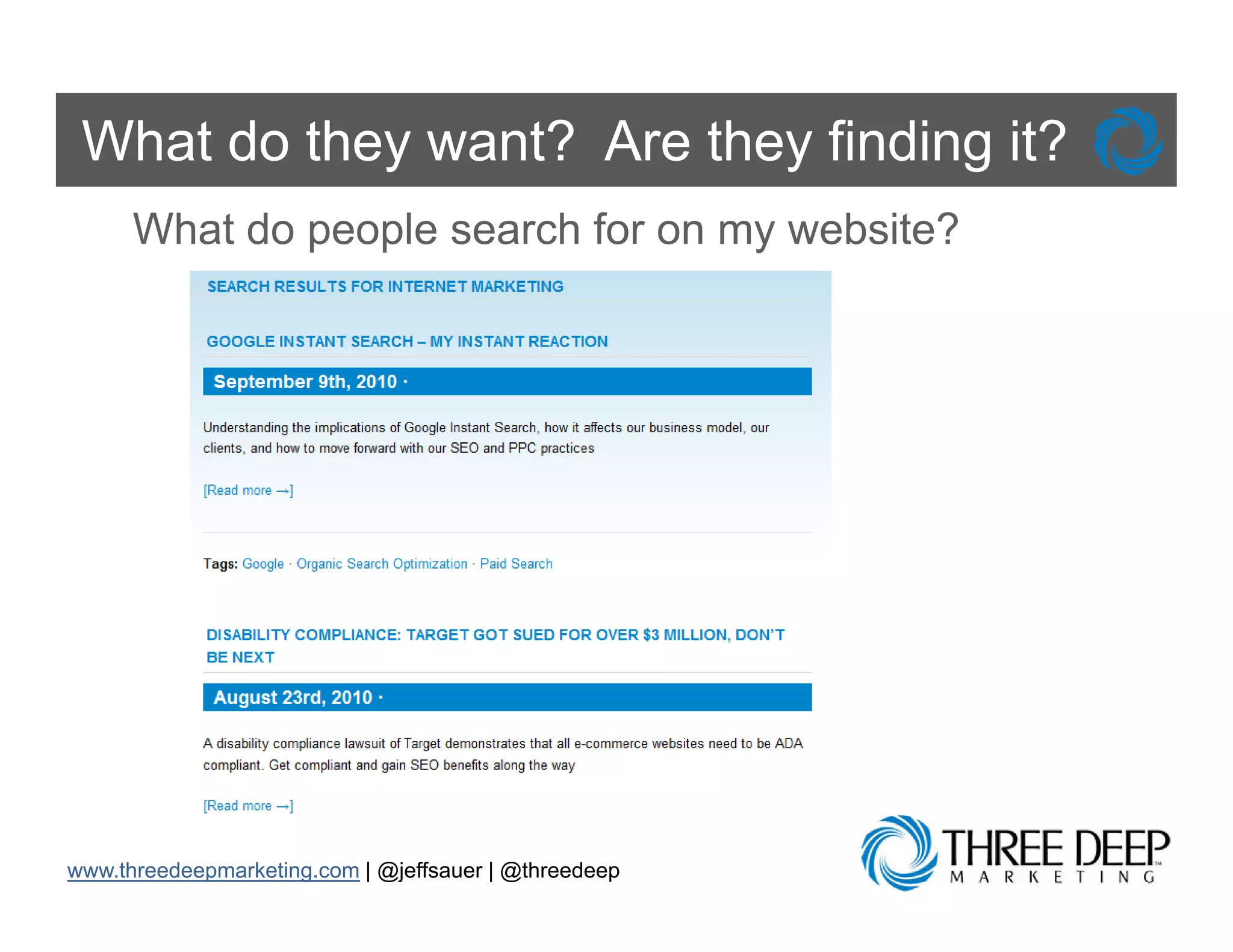
What do they want? Are they finding it?
      What do people search for on my website?


www.threedeepmarketing.com | @jeffsauer | @threedeep
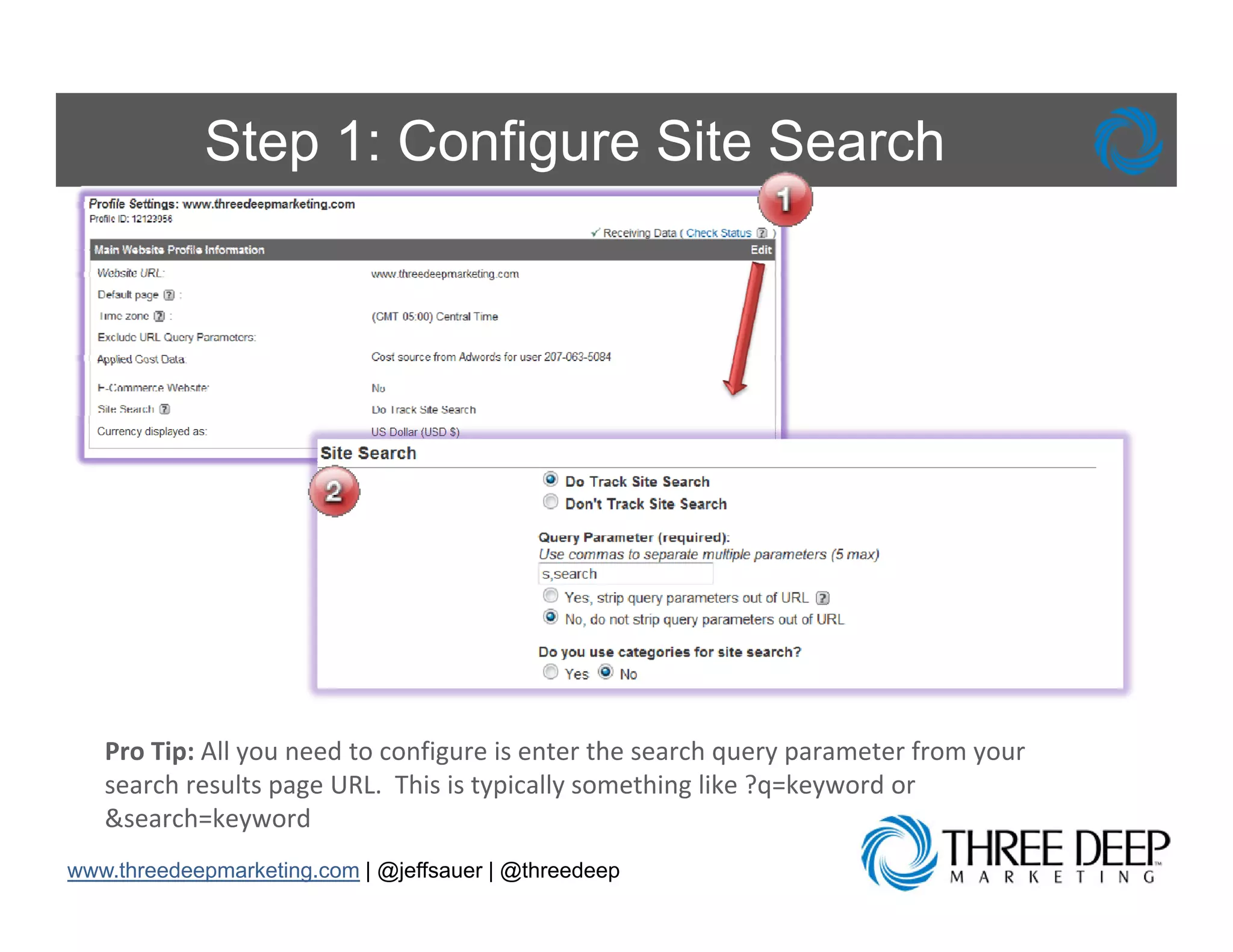
Step 1: Configure Site Search


   Pro Tip: All you need to configure is enter the search query parameter from your 
   search results page URL.  This is typically something like ?q=keyword or 
        h       l             hi i      i ll        hi lik ? k         d
   &search=keyword
www.threedeepmarketing.com | @jeffsauer | @threedeep
Dig Into Site Search Data


www.threedeepmarketing.com | @jeffsauer | @threedeep
Benefits of Site Search Reports

     Configuring Site Search will:
     • Allow you to improve navigation of your
       site
     • Get your visitors deeper into the content of
       your site
     • Help you measure how the search
       functionality effects the user’s experience
                                 user s
     • Identify low hanging fruit on your website
       design and information architecture

www.threedeepmarketing.com | @jeffsauer | @threedeep
Segment Traffic
Let’s Get Specific

        Problem: When I look at the reports for
        my website, the numbers rarely change
        and I wouldn’t know what to do with it if
              wouldn t
        they did

        “Don’t Puke Data… Focus your analytical and
        reporting efforts on ‘What's Changed’. “
        -Avinash Kaushik

        www.kaushik.net/avinash
            k   hik t/ i      h
www.threedeepmarketing.com | @jeffsauer | @threedeep
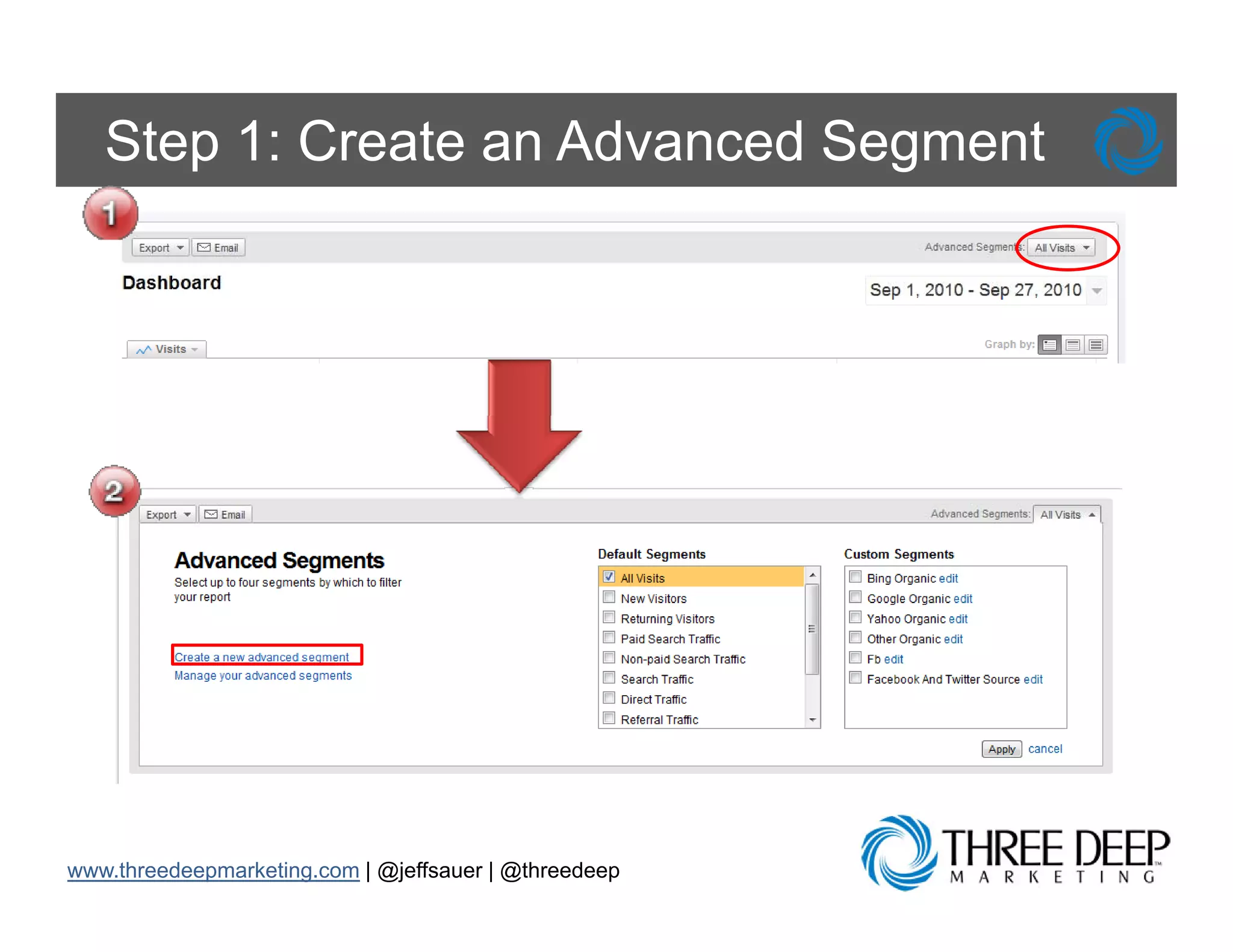
Step 1: Create an Advanced Segment


www.threedeepmarketing.com | @jeffsauer | @threedeep
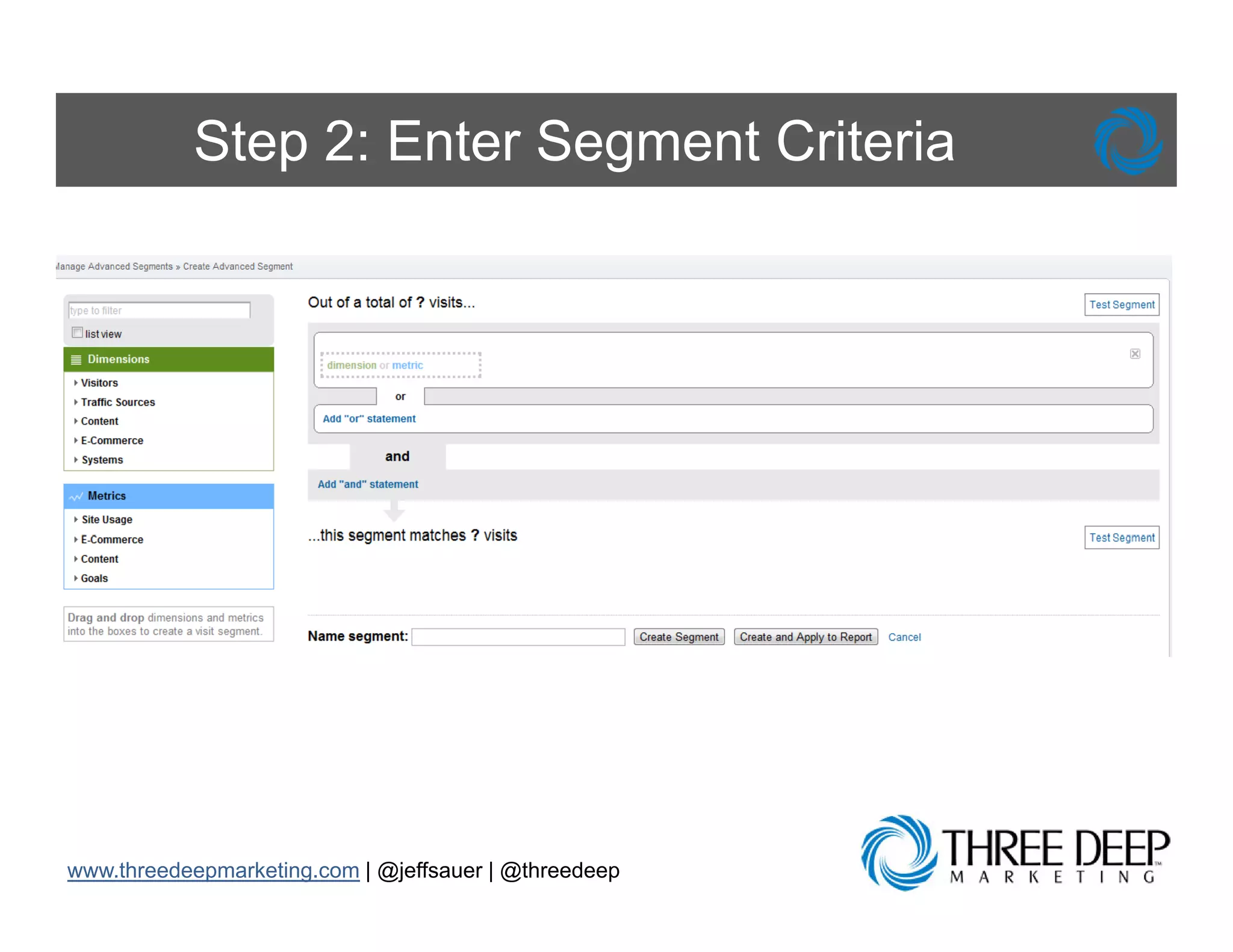
Step 2: Enter Segment Criteria


www.threedeepmarketing.com | @jeffsauer | @threedeep
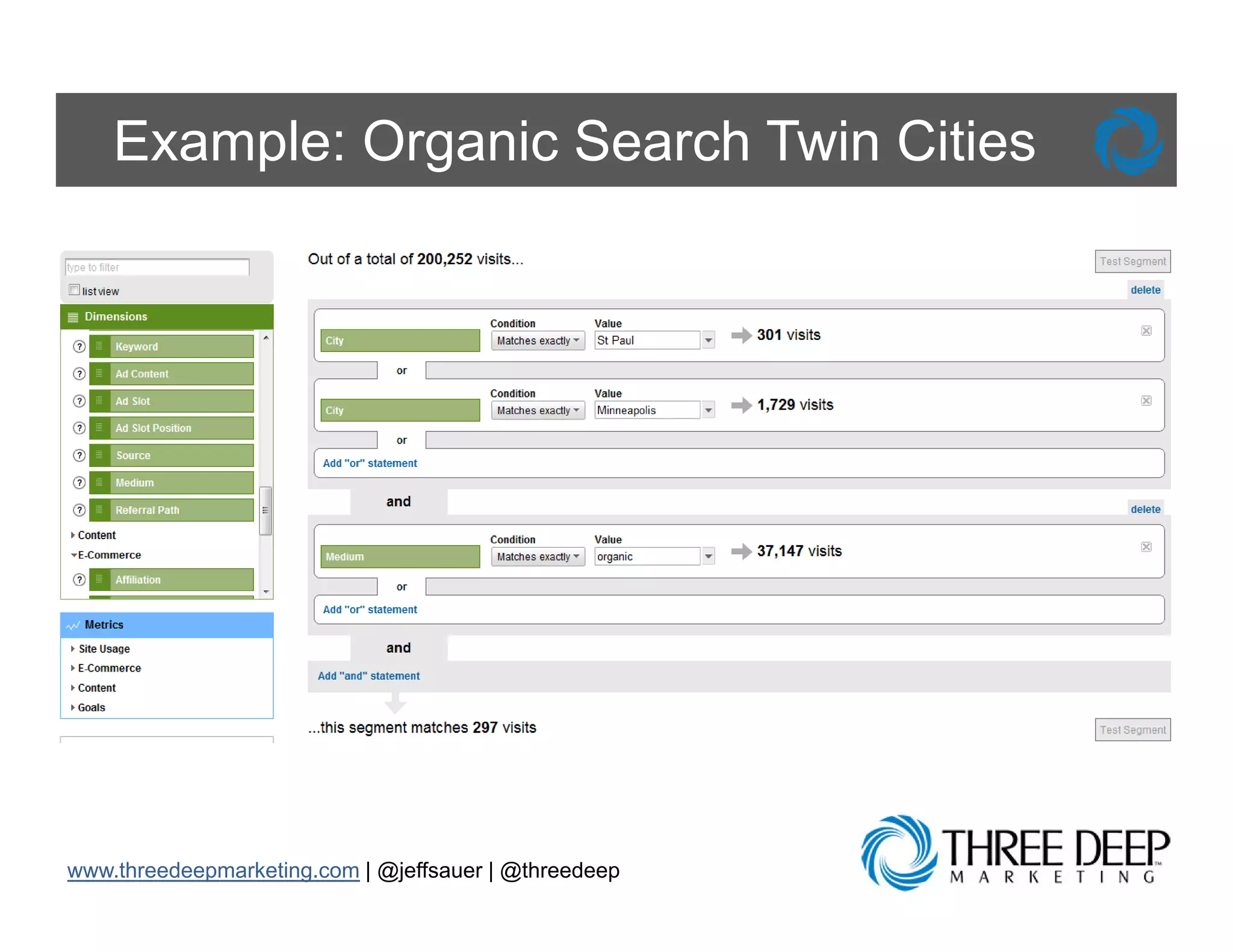
Example: Organic Search Twin Cities


www.threedeepmarketing.com | @jeffsauer | @threedeep
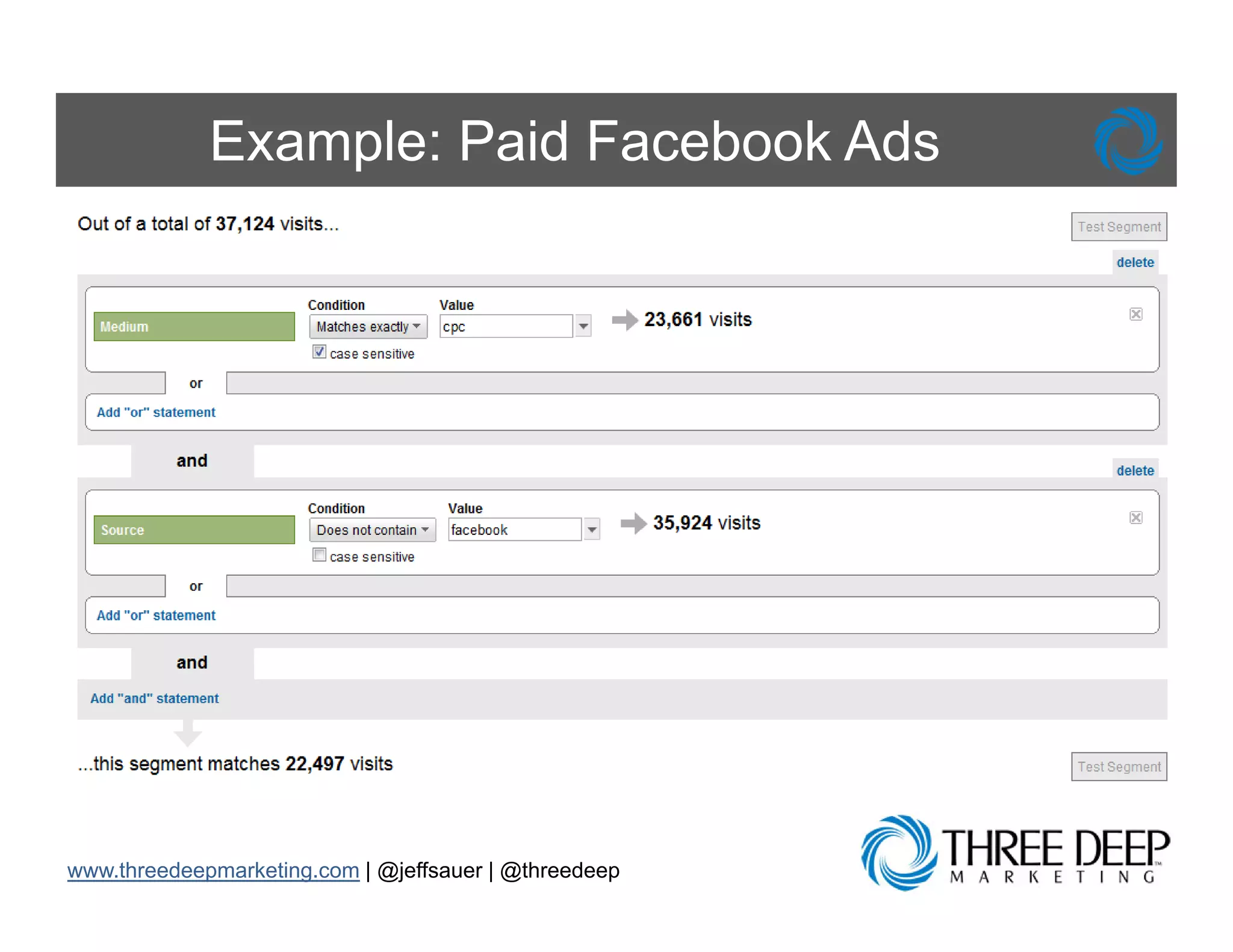
Example: Paid Facebook Ads

     •   Set up Multiple Profiles
     •   Use Analytics Intelligence
     •   Create Advanced S
         C t Ad          d Segments t
     •   Track E-Commerce Conversions
     •   Make Tracking SEO Friendly


www.threedeepmarketing.com | @jeffsauer | @threedeep
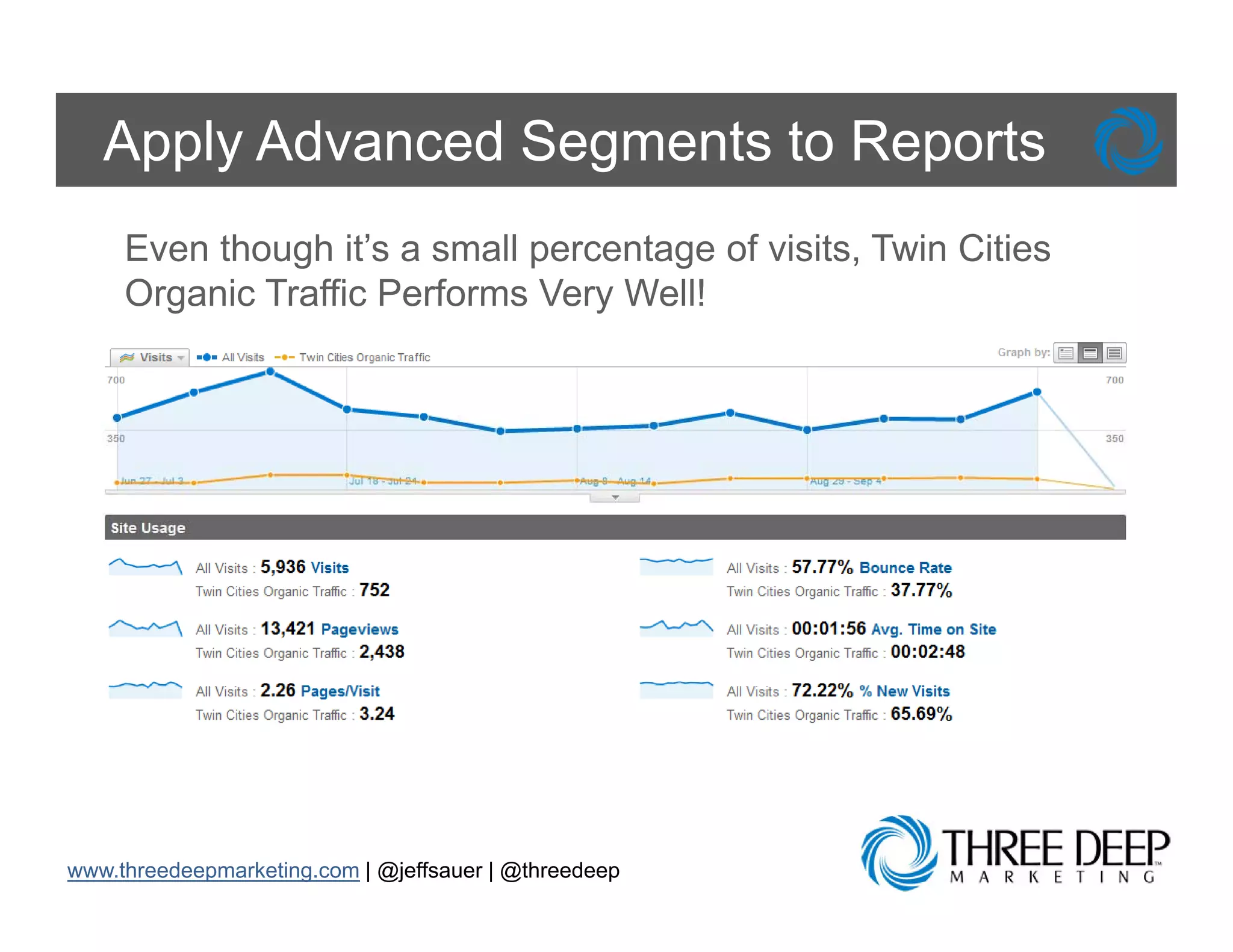
Apply Advanced Segments to Reports
     Even though it’s a small percentage of visits, Twin Cities
     Organic Traffic Performs Very Well!


www.threedeepmarketing.com | @jeffsauer | @threedeep
Benefits of Advanced Segments

     Using Advanced Segments will:
     • Enable you to provide true insights instead
       of presenting data
     • Increase your chances of finding
       information th t will genuinely i
       i f     ti that ill       i l impact your
                                            t
       business
     • Allow you to drill down and go three levels
       deep

www.threedeepmarketing.com | @jeffsauer | @threedeep
Track Events
Can’t Track Clicks to Non-Pages

     Problem: Measuring page views is greatgreat,
     but we also want to track interactions with
     our flash elements video interactions
               elements,        interactions,
     outbound clicks and more


www.threedeepmarketing.com | @jeffsauer | @threedeep
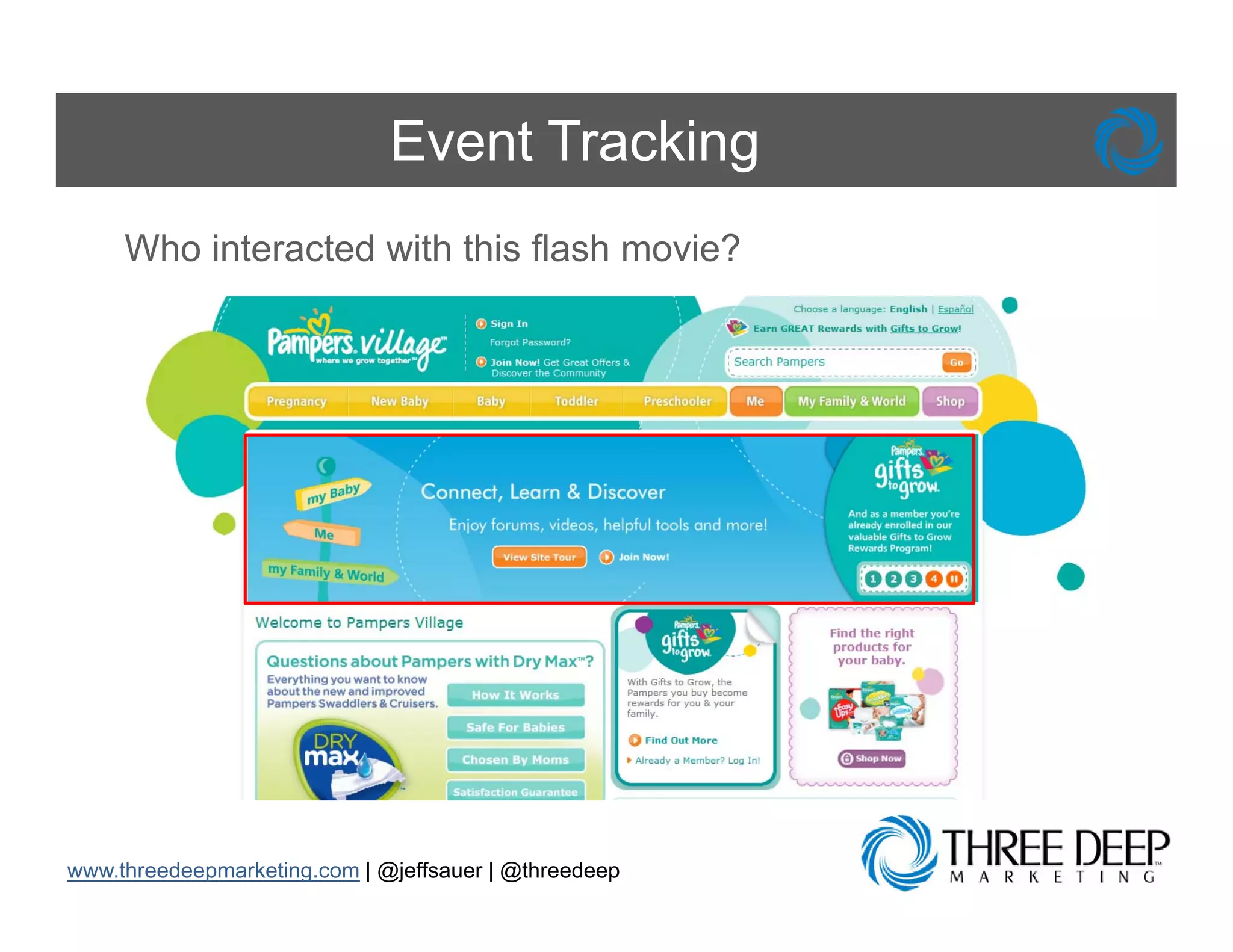
Event Tracking
     Who interacted with this flash movie?


www.threedeepmarketing.com | @jeffsauer | @threedeep
Step 1: Plan Event Tracking Strategy

     1.
     1 Define the events you want to track
     2. Enable Event Tracking in your reporting
        profile
     3. For each set of events, create an event
        instance
        i t
     4. Call _trackEvent() in the web page
        source code


www.threedeepmarketing.com | @jeffsauer | @threedeep
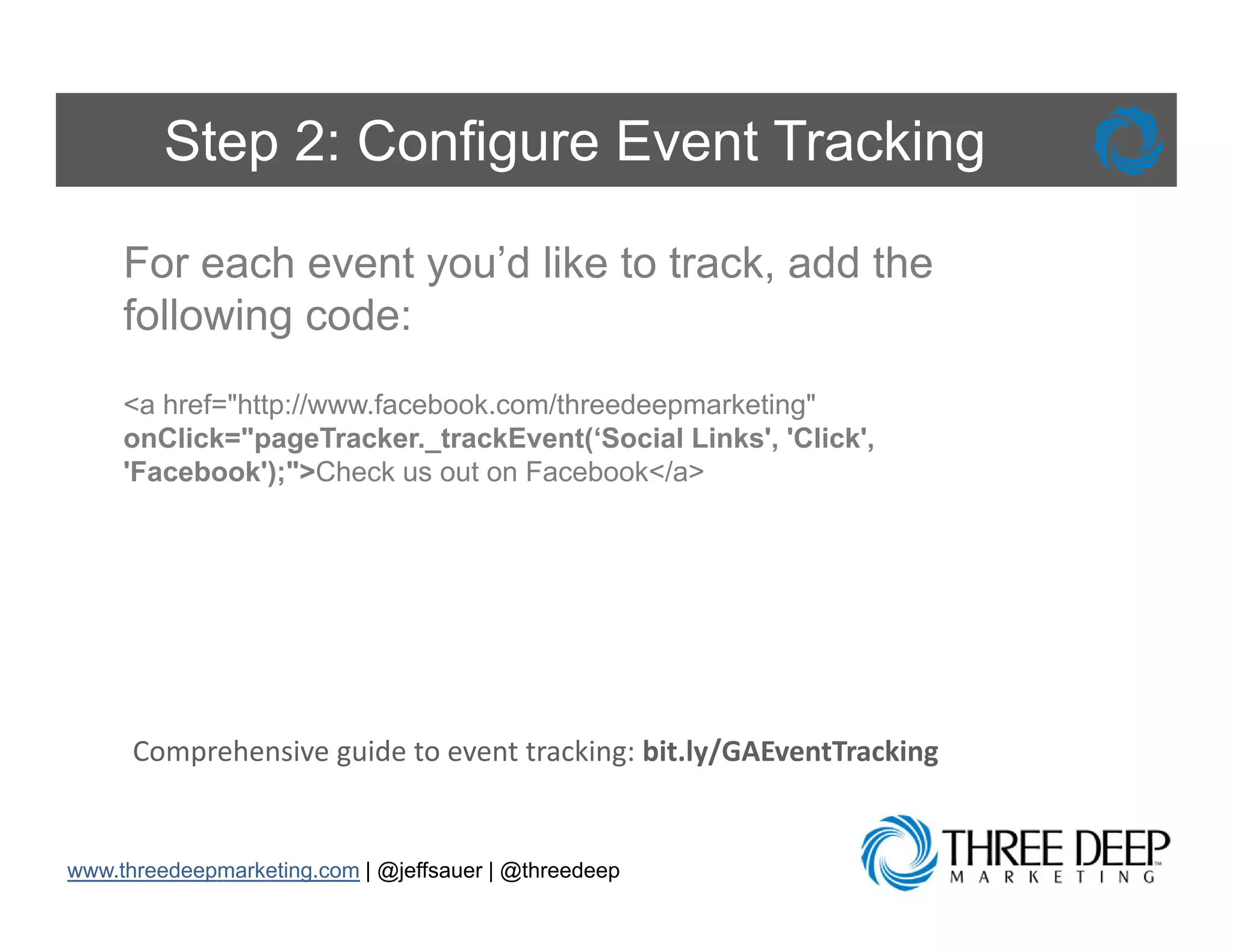
Step 2: Configure Event Tracking

     For each event you’d like to track, add the
     following code:
     <a href="http://www.facebook.com/threedeepmarketing"
                 p                            p        g
     onClick="pageTracker._trackEvent(‘Social Links', 'Click',
     'Facebook');">Check us out on Facebook</a>


      Comprehensive guide to event tracking: bit.ly/GAEventTracking


www.threedeepmarketing.com | @jeffsauer | @threedeep
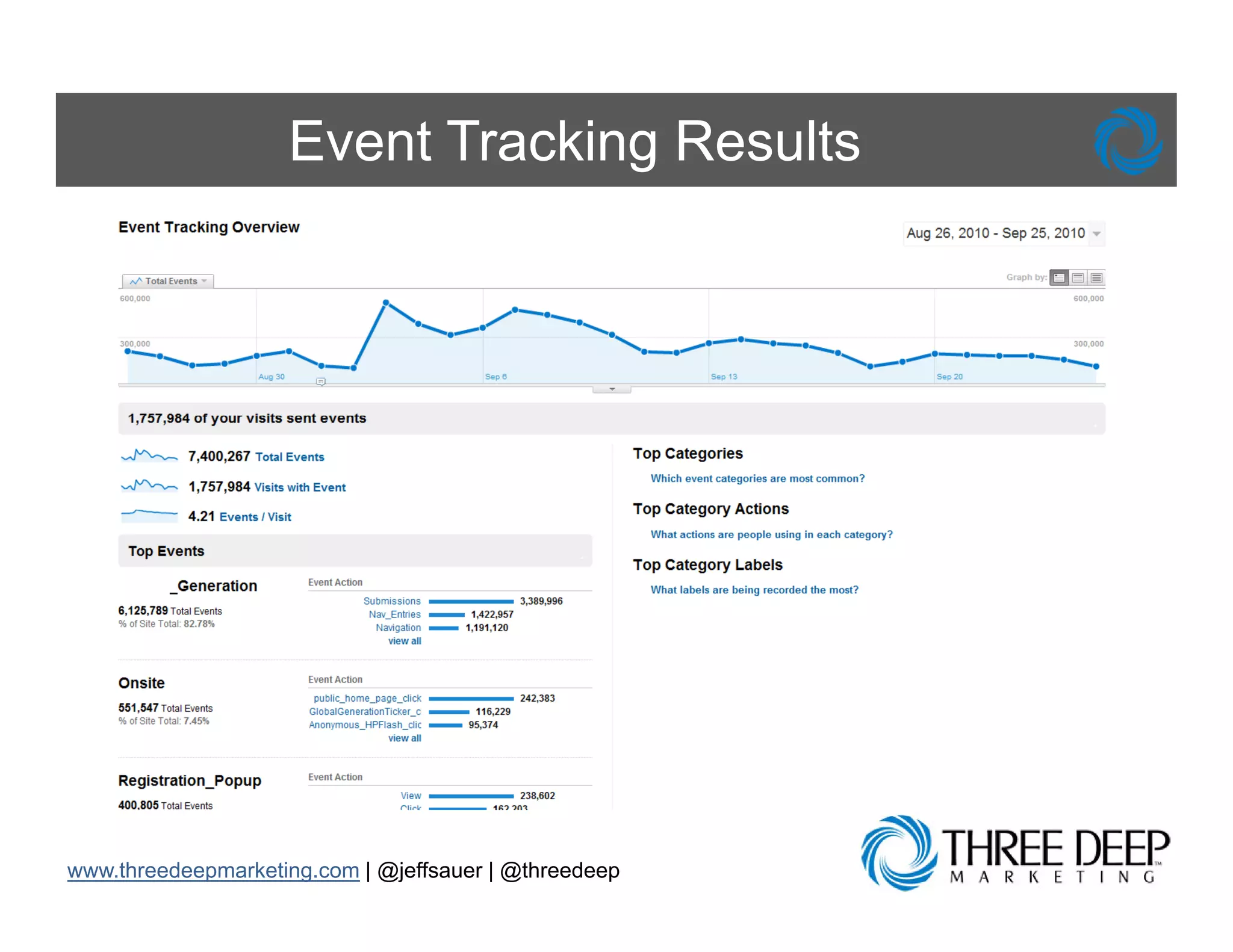
Event Tracking Results

     • Event Tracking is used to track events that
       cannot be tracked by the standard page
       view method of tracking
     • Examples of Event Tracking use cases
       include:
          – Items within a Flash element
          – AJAX or JavaScript functionality
          – PDF or other file downloads


www.threedeepmarketing.com | @jeffsauer | @threedeep
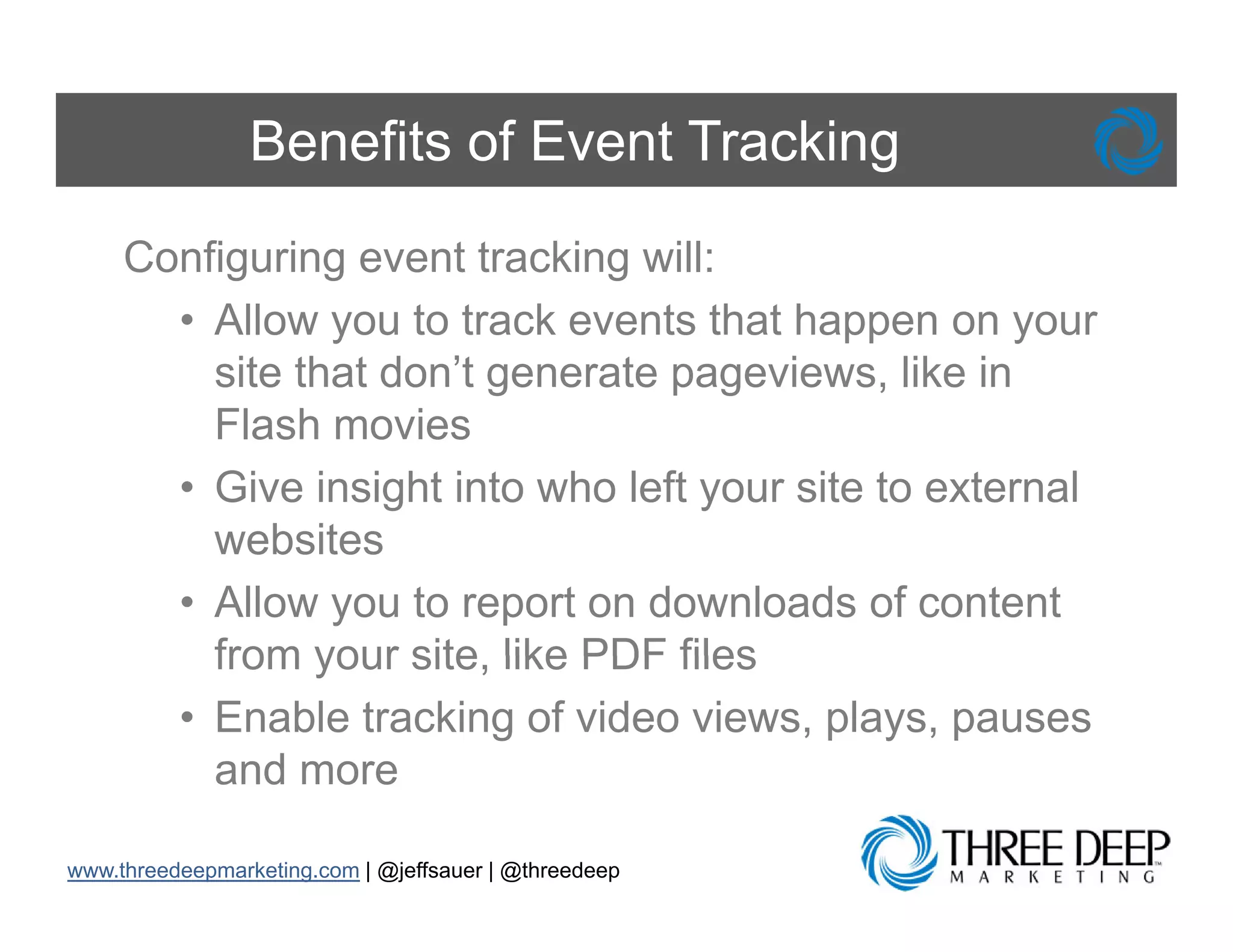
Benefits of Event Tracking
     Configuring event tracking will:
       • Allow you to track events that happen on your
         site that don’t generate pageviews, like in
         Flash
         Fl h moviesi
       • Give insight into who left your site to external
         websites
       • Allow you to report on downloads of content
         from your site like PDF files
                    site,
       • Enable tracking of video views, plays, pauses
         and more

www.threedeepmarketing.com | @jeffsauer | @threedeep
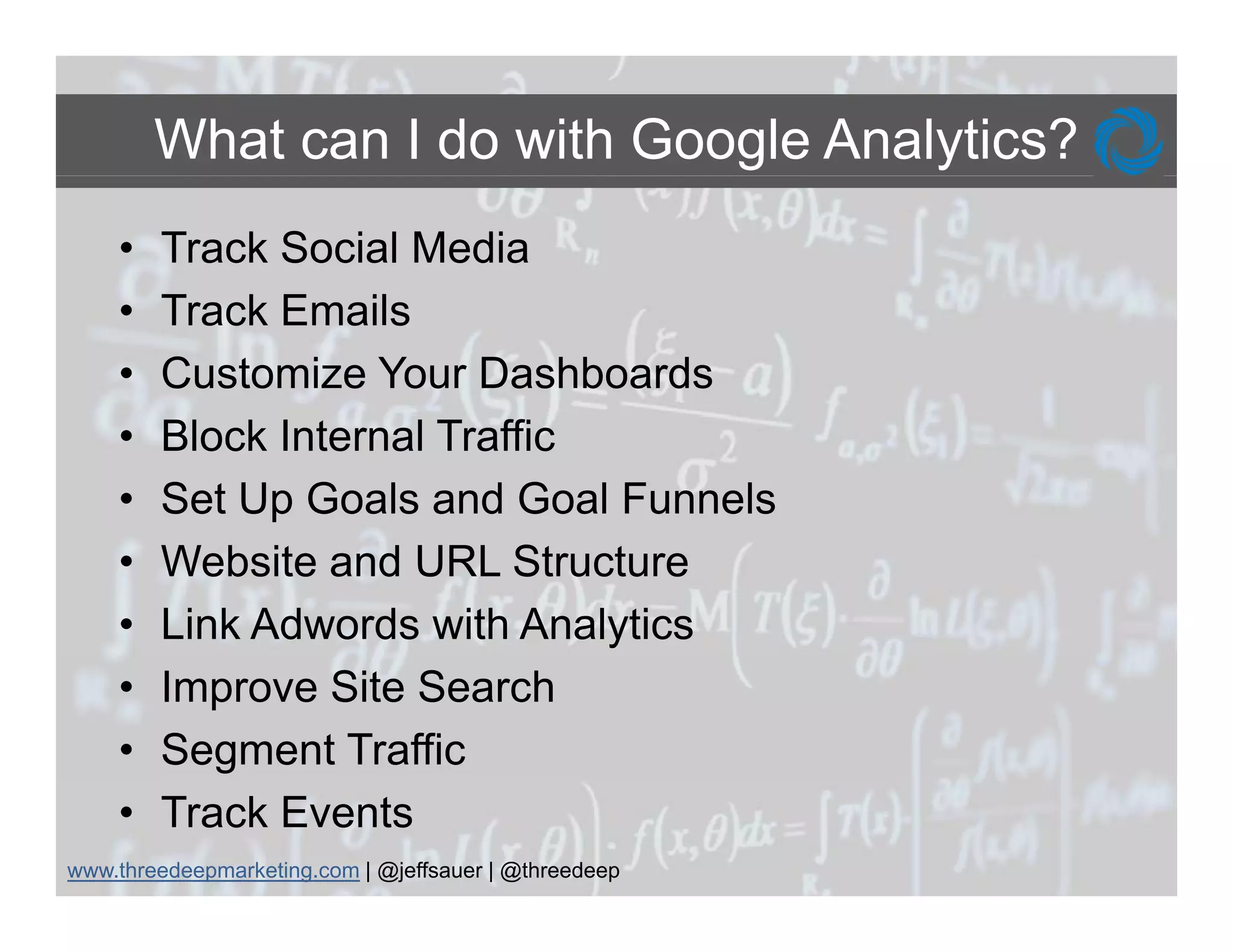
What can I do with Google Analytics?
    •   Track Social Media
    •   Track E il
        T k Emails
    •   Customize Your Dashboards
    •   Block Internal Traffic
    •   Set Up Goals and Goal Funnels
    •   Website and URL Structure
    •   Link Adwords with Analytics
    •   Improve Site Search
    •   Segment Traffic
    •   Track Events
www.threedeepmarketing.com | @jeffsauer | @threedeep
What Else Can I Do?

     • Set up Multiple Profiles Using Filters
     • Use Analytics Intelligence
     • Track E-Commerce Conversions
     • Make Tracking SEO Friendly using # in
       campaigns
     • Benchmark Your Site vs. Industry
     • A/B and Multivariate Tests with Google Website
       Optimizer


www.threedeepmarketing.com | @jeffsauer | @threedeep
Questions?
www.threedeepmarketing.com | @jeffsauer | @threedeep

Google Analytics: Make Your Site Work Harder from MIMA Summit

  • 1.
    Make Your SiteW k H d M k Y Si Work Harder Simple Tips to Get More From Your Google Analytics Account g y Jeff Sauer Three Deep Marketing www.threedeepmarketing.com 651-789-7701 @jeffsauer @threedeep #mimasummit
  • 2.
  • 3.
  • 4.
  • 5.
  • 6.
    It s It’s on 50% of the world’s websites* world s *According to Google, Google Analytics is on 50% of the Alexa top 1 Million Websites
  • 7.
    What can Ido with Google Analytics? • Track Social Media • Track E il T k Emails • Customize Your Dashboards • Block Internal Traffic • Set Up Goals and Goal Funnels • Website and URL Structure • Link Adwords with Analytics • Improve Site Search • Segment Traffic • Track Events www.threedeepmarketing.com | @jeffsauer | @threedeep
  • 8.
  • 9.
    Is Social MediaWorking? Problem: W know we need to do Social P bl We k dt d S i l Media, so we have a presence on Facebook and T itt F b k d Twitter… but I have no b t h idea if this generates incremental visitors, leads l d or sales on my website l b it www.threedeepmarketing.com | @jeffsauer | @threedeep
  • 10.
    Social Media Tracking How Do I Track the Social Media Traffic To My Website? www.threedeepmarketing.com | @jeffsauer | @threedeep
  • 11.
    Step 1: Buildinga Tracking URL Facebook or Twitter or LinkedIn Google Analytics URL Builder: bit.ly/GAURLBuilder
  • 12.
    Step 2: UseYour Tracking URL Add your Tracking URL to each message /?utm_source=twitter&utm_medium=so cialmedia&utm_campaign=Twitterfeed &utm_content=Twitter
  • 13.
    Step 3: SegmentSocial Media Traffic Create advanced segments to track social media visits www.threedeepmarketing.com | @jeffsauer | @threedeep
  • 14.
    Social Media Trackingin Action Social Media had 15 conversions this month! www.threedeepmarketing.com | @jeffsauer | @threedeep
  • 15.
    Benefits of TrackingSocial Media Tracking Social Media in GA will: • Help you understand how social media visitors behave on your website • Allow you to fine tune your messages to match your goals • Establish E t bli h accountability f your social media t bilit for i l di campaigns and allow them to be compared to other traffic sources www.threedeepmarketing.com | @jeffsauer | @threedeep
  • 16.
  • 17.
    Are emails generatingrevenue? Problem: I know all about the open and interaction rates of the emails I’m sending, but I don’t know how much money they’re generating. How can I track the ROI of individual emails, and my entire email program? www.threedeepmarketing.com | @jeffsauer | @threedeep
  • 18.
    Improperly Coded EmailTraffic Why does my email traffic show up as a referral or a direct visit? www.threedeepmarketing.com | @jeffsauer | @threedeep
  • 19.
    Step 1: Addtracking to URLs Using the URL builder, generate a unique tracking string for all URLs in your email. Add these to your email as you would all URLs. *If you link to a domain other than one you own, and you do not have access to that site’s analytics, you do not need to add tracking to those URLs (i.e. Facebook, YouTube). Google Analytics URL Builder: bit.ly/GAURLBuilder
  • 20.
    Step 2: Filtersite traffic by email Select Campaigns from Traffic Sources Filter by Medium Look for ‘Email’ in the list Select the Ecommerce tab to see revenue, goals tab to see goals *Make sure ecommerce tracking is set up properly beforehand www.threedeepmarketing.com | @jeffsauer | @threedeep
  • 21.
    Properly Attributed EmailReports I can see exactly which email campaign performed the best
  • 22.
    Benefits of EmailTracking Tracking Email Marketing will: • Assist in measurement of the ROI of your email program in online retail • Allow you to start determining the effectiveness of your email campaigns RIGHT NOW • Will not replace the reports provided by your ESP (Email Service Provider), but it can enhance and inform your email program with respect to: • A/B testing • Geographic campaign traction and penetration • Consumer interest and preference
  • 23.
  • 24.
    Right Metrics, RightTime Problem: Wh I installed G P bl When i t ll d Google l Analytics, they created a dashboard for me, b t th t d hb d d but that dashboard doesn’t show me ’t h the information that matters for MY business and I d ’t h b i d don’t have ti time t di i to dig in and find what I need www.threedeepmarketing.com | @jeffsauer | @threedeep
  • 25.
    Typical Dashboard View This information is easy to read, but what does it mean? Is this good? Bad? Average? g g www.threedeepmarketing.com | @jeffsauer | @threedeep
  • 26.
    Step 1: AddReports to Dashboard You can add any report or views to your custom dashboard! www.threedeepmarketing.com | @jeffsauer | @threedeep
  • 27.
    Step 2 (optional):Compare to Past Add the “Compare to Past” feature for your analytics to p provide g greater depth to y p your reports p Pro Tip: You can also apply advanced segments, report on goals and add e-commerce revenue to your dashboard if they are applied to your report
  • 28.
    Step 3: EmailDashboards Once your dashboard is properly configured, you can share with members of your organizations by sending the dashboard directly to their inbox Send as PDF to Individuals, Other Formats for automation Send as often as needed www.threedeepmarketing.com | @jeffsauer | @threedeep
  • 29.
    Customized Dashboard View Comparelast month’s th’ analytics with current to determine growth and th d change See where sales are Discover if coming from revenue is and h d how your increasing and sales when orders conversions are most likely are to be placed performing f i
  • 30.
    Benefits of CustomDashboards Customizing your dashboard will: • P id you a quick overview of th Provide i k i f the performance of the metrics most important to you business your bus ess • Can be emailed to you daily, weekly, monthly and quarterly • Can provide comparisons to performance in previous days, weeks, months • All Allows for flexibility as your b i f fl ibilit business grows and changes www.threedeepmarketing.com | @jeffsauer | @threedeep
  • 31.
  • 32.
    Visitors Aren’t ReallyVisitors Problem: E P bl Everybody i our company b d in uses our corporate website as their homepage and I’ not sure if our t ffi h d I’m t traffic reports are accurate www.threedeepmarketing.com | @jeffsauer | @threedeep
  • 33.
    Filter Internal Traffic Is this really an accurate visitor count? y www.threedeepmarketing.com | @jeffsauer | @threedeep
  • 34.
    Step 1: Findyour IP address Whatismyip.com Whatismyip com 86.75.30.909 86 75 30 909 www.threedeepmarketing.com | @jeffsauer | @threedeep
  • 35.
    Step 2: Filterout IP address Company‐block.com Choose the profile you want this filter for CompanyNo‐Block.com Company‐Block.com
  • 36.
  • 37.
    Benefits of TrafficFiltering Filtering Internal Traffic will: • Allow you to see exactly who visited your site • Make reporting more actionable by showing a true picture of what happened on your site • Bring the best metrics to the forefront and keep reporting on track www.threedeepmarketing.com | @jeffsauer | @threedeep
  • 38.
    Set Up Goalsand Goal Funnels
  • 39.
    What is theValue of my Website? Problem: I have had this website for years and I’m not sure if it is generating new business for my company www.threedeepmarketing.com | @jeffsauer | @threedeep
  • 40.
    What does itmean? All of this information and I don’t know what don t it means!
  • 41.
    Determine Your Goals Examples of common website g p goals include: • Ecommerce Transactions • Completion of a form (lead collection or newsletter opt-ins) • Visitors downloading a whitepaper or p g p p product brochure • Visitor engagement ( g comment, adding or g g (blog , g editing a profile, time-on-site, pageviews) www.threedeepmarketing.com | @jeffsauer | @threedeep
  • 42.
    Step 1: DecideWhat to Measure Product Locator Usage Tool Usage Time Spent on Site Page Views Site Registration Sweepstakes Entry
  • 43.
    Step 2: MapConversion Process Determine your path to success; your goal funnel Paid Search Ad We are offering 50% off on our  site! Take a look!  www.ourcompany.com www ourcompany com Thank you!  Pro Tip: Make sure that each p URL in the funnel is unique
  • 44.
    Step 3: ConfigureGoals and Funnels Registration Conversion
  • 45.
    Step 4: SeeResults Visitors entering funnel step Visitors abandoning funnel step Where did they go? Why did they leave?
  • 46.
    Let’s Make ita Success There is more than one path to success for your website! www.threedeepmarketing.com | @jeffsauer | @threedeep
  • 47.
    Benefits of GoalTracking Defining and Tracking Goals will: • Assist you in setting up funnels to determine where visitors drop off on your site • H l you establish value f actions t k on Help t bli h l for ti taken your website • Allow you to report on the performance of each individual traffic driver to your site • Enable you to report on engagement metrics y p g g like time on site and total page views • Let you report on up to 20 specific actions www.threedeepmarketing.com | @jeffsauer | @threedeep
  • 48.
    Website and URLStructure
  • 49.
    Page URLs NotUser Friendly Problem: Dynamic URLs don’t make any sense when they show up in my Analytics reports and it makes it really hard to do www.threedeepmarketing.com | @jeffsauer | @threedeep
  • 50.
    Step 1: Identifythe Problem These all look the same, I have no idea which page is which? www.threedeepmarketing.com | @jeffsauer | @threedeep
  • 51.
    Step 2: EstablishPage URL Structure Your Site should have a URL structure that reflects the pages, not query string ID's – www.example.com/Products/Product.aspx?ProductId =46116ccf-816b-4c09-a7e0-1b3oc1aech – www.example.com /Total- Stage/Preschooler/Education-Materials.aspx Which is easier to read? Which URL would be easier to identify in Google Analytics? y g y www.threedeepmarketing.com | @jeffsauer | @threedeep
  • 52.
    Step 3: FixYour URLs There are many ways to fix your URLs • Ch Change URL structure i your CMS t t in • Custom Page Names (using pageTracker._trackPageview(“fixed rl") pageTracker trackPage ie (“fi ed url"); ) • Friendly URL rewrites (.htaccess for Linux servers, servers IIS for Windows servers) www.threedeepmarketing.com | @jeffsauer | @threedeep
  • 53.
    Easy to ReadURLs I know exactly which page I am analyzing now www.threedeepmarketing.com | @jeffsauer | @threedeep
  • 54.
    Benefits of Easyto Read URLs Making your URLs easy to read will: • Make page level analysis much easier and effective • Help with Organic SEO (search engines don t don’t like to read dynamic URLs either!) • Minimize opportunity for errors in analysis • Allow for better grouping of pages in custom reporting www.threedeepmarketing.com | @jeffsauer | @threedeep
  • 55.
  • 56.
    What is mypaid search ROI? Problem: I think that my Google AdW d P bl thi k th t G l AdWords is successful because I get leads from my website, b t I h b it but have no id what idea h t keywords are the most valuable and ROI is t i i not in my vocabulary b l www.threedeepmarketing.com | @jeffsauer | @threedeep
  • 57.
    Enhance Your SearchMarketing Without Linking AdWords, my keyword reports can b b i be boring www.threedeepmarketing.com | @jeffsauer | @threedeep
  • 58.
    Step 1: LinkYour AdWords to Analytics www.threedeepmarketing.com | @jeffsauer | @threedeep
  • 59.
    AdWords Reports inGoogle Analytics AdWords reporting provides standard analytics metrics at a  campaign, ad group, and keyword level campaign ad group and keyword level (Traffic Sources > AdWords > Campaigns) www.threedeepmarketing.com | @jeffsauer | @threedeep
  • 60.
    Day Parting AdWordsin GA Day Part reports shows AdWords performance  based on the time of day.  (Traffic Sources > AdWords > Day Parts) www.threedeepmarketing.com | @jeffsauer | @threedeep
  • 61.
    Position Analysis inGoogle Analytics Keyword Position report gives insight into how keywords perform at  different ad positions on the search engine results pages  (Traffic Sources > AdWords > Keyword Positions) (Traffic Sources > AdWords > Keyword Positions) www.threedeepmarketing.com | @jeffsauer | @threedeep
  • 62.
    Benefits of LinkingAdWords with GA Linking AdWords to Analytics will: • Integrate standard AdWords metrics into the Google Analytics interface, including: Clicks, Impressions, Costs and ROI p , • Hold your AdWords keywords to a greater level of accountability • All Allow you t i to increase conversion rates and l i t d lower expenses • Enable you to tightly control your ad budget by only bidding on keywords that produce positive ROI www.threedeepmarketing.com | @jeffsauer | @threedeep
  • 63.
  • 64.
    What are theyhoping to find? Problem: I have a search box on my website, yet I have no idea if people use it, why they use it, and how they use it www.threedeepmarketing.com | @jeffsauer | @threedeep
  • 65.
    What do theywant? Are they finding it? What do people search for on my website? www.threedeepmarketing.com | @jeffsauer | @threedeep
  • 66.
    Step 1: ConfigureSite Search Pro Tip: All you need to configure is enter the search query parameter from your  search results page URL.  This is typically something like ?q=keyword or  h l hi i i ll hi lik ? k d &search=keyword www.threedeepmarketing.com | @jeffsauer | @threedeep
  • 67.
    Dig Into SiteSearch Data www.threedeepmarketing.com | @jeffsauer | @threedeep
  • 68.
    Benefits of SiteSearch Reports Configuring Site Search will: • Allow you to improve navigation of your site • Get your visitors deeper into the content of your site • Help you measure how the search functionality effects the user’s experience user s • Identify low hanging fruit on your website design and information architecture www.threedeepmarketing.com | @jeffsauer | @threedeep
  • 69.
  • 70.
    Let’s Get Specific Problem: When I look at the reports for my website, the numbers rarely change and I wouldn’t know what to do with it if wouldn t they did “Don’t Puke Data… Focus your analytical and reporting efforts on ‘What's Changed’. “ -Avinash Kaushik www.kaushik.net/avinash k hik t/ i h www.threedeepmarketing.com | @jeffsauer | @threedeep
  • 71.
    Step 1: Createan Advanced Segment www.threedeepmarketing.com | @jeffsauer | @threedeep
  • 72.
    Step 2: EnterSegment Criteria www.threedeepmarketing.com | @jeffsauer | @threedeep
  • 73.
    Example: Organic SearchTwin Cities www.threedeepmarketing.com | @jeffsauer | @threedeep
  • 74.
    Example: Paid FacebookAds • Set up Multiple Profiles • Use Analytics Intelligence • Create Advanced S C t Ad d Segments t • Track E-Commerce Conversions • Make Tracking SEO Friendly www.threedeepmarketing.com | @jeffsauer | @threedeep
  • 75.
    Apply Advanced Segmentsto Reports Even though it’s a small percentage of visits, Twin Cities Organic Traffic Performs Very Well! www.threedeepmarketing.com | @jeffsauer | @threedeep
  • 76.
    Benefits of AdvancedSegments Using Advanced Segments will: • Enable you to provide true insights instead of presenting data • Increase your chances of finding information th t will genuinely i i f ti that ill i l impact your t business • Allow you to drill down and go three levels deep www.threedeepmarketing.com | @jeffsauer | @threedeep
  • 77.
  • 78.
    Can’t Track Clicksto Non-Pages Problem: Measuring page views is greatgreat, but we also want to track interactions with our flash elements video interactions elements, interactions, outbound clicks and more www.threedeepmarketing.com | @jeffsauer | @threedeep
  • 79.
    Event Tracking Who interacted with this flash movie? www.threedeepmarketing.com | @jeffsauer | @threedeep
  • 80.
    Step 1: PlanEvent Tracking Strategy 1. 1 Define the events you want to track 2. Enable Event Tracking in your reporting profile 3. For each set of events, create an event instance i t 4. Call _trackEvent() in the web page source code www.threedeepmarketing.com | @jeffsauer | @threedeep
  • 81.
    Step 2: ConfigureEvent Tracking For each event you’d like to track, add the following code: <a href="http://www.facebook.com/threedeepmarketing" p p g onClick="pageTracker._trackEvent(‘Social Links', 'Click', 'Facebook');">Check us out on Facebook</a> Comprehensive guide to event tracking: bit.ly/GAEventTracking www.threedeepmarketing.com | @jeffsauer | @threedeep
  • 82.
    Event Tracking Results • Event Tracking is used to track events that cannot be tracked by the standard page view method of tracking • Examples of Event Tracking use cases include: – Items within a Flash element – AJAX or JavaScript functionality – PDF or other file downloads www.threedeepmarketing.com | @jeffsauer | @threedeep
  • 83.
    Benefits of EventTracking Configuring event tracking will: • Allow you to track events that happen on your site that don’t generate pageviews, like in Flash Fl h moviesi • Give insight into who left your site to external websites • Allow you to report on downloads of content from your site like PDF files site, • Enable tracking of video views, plays, pauses and more www.threedeepmarketing.com | @jeffsauer | @threedeep
  • 84.
    What can Ido with Google Analytics? • Track Social Media • Track E il T k Emails • Customize Your Dashboards • Block Internal Traffic • Set Up Goals and Goal Funnels • Website and URL Structure • Link Adwords with Analytics • Improve Site Search • Segment Traffic • Track Events www.threedeepmarketing.com | @jeffsauer | @threedeep
  • 85.
    What Else CanI Do? • Set up Multiple Profiles Using Filters • Use Analytics Intelligence • Track E-Commerce Conversions • Make Tracking SEO Friendly using # in campaigns • Benchmark Your Site vs. Industry • A/B and Multivariate Tests with Google Website Optimizer www.threedeepmarketing.com | @jeffsauer | @threedeep
  • 86.