Git
distributed version control system
          Wei-Tsung Lin
Introduction
● Git is a open source distributed version
  control system designed to handle
  everything from small to large projects with
  speed and efficiency.
● Create a branch to test new features,
  commit many times, and roll back to where
  you branched from.
● Have a master branch that contains only the
  content go to the production, another that
  you merge work for testing, and several tiny
  changes for nightly build.
Distributed
● Git is a distributed system, which means that
  instead of doing "checkout" of source code
  every times, you can have your own clone of
  the entire repository.
● You can work on the projects without
  Internet, and then commit your works after
  you get connection.
● Only "add" action is implemented, so you
  can restore everything which has existed in
  your repository.
Enviroment
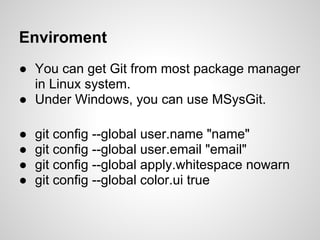
● You can get Git from most package manager
  in Linux system.
● Under Windows, you can use MSysGit.

●   git config --global user.name "name"
●   git config --global user.email "email"
●   git config --global apply.whitespace nowarn
●   git config --global color.ui true
Initialize
● Create new repository
  Find a empty directory, and execute
  command: "git init", initialize empty Git
  repository in directory ".git".

● Clone a repository
  Command: "git clone url"
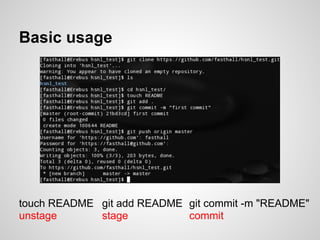
Basic usage


touch README git add README git commit -m "README"
unstage      stage          commit
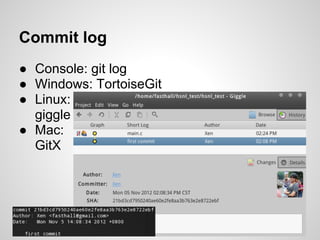
Commit log
● Console: git log
● Windows: TortoiseGit
● Linux:
  giggle
● Mac:
  GitX
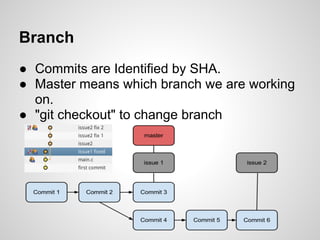
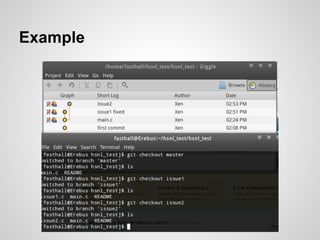
Branch
● Commits are Identified by SHA.
● Master means which branch we are working
  on.
● "git checkout" to change branch
Example
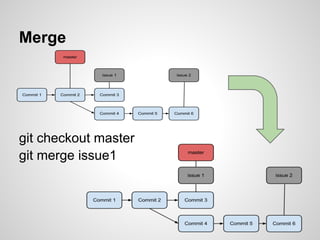
Merge


git checkout master
git merge issue1
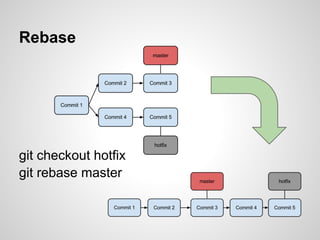
Rebase


git checkout hotfix
git rebase master
Reference
http://progit.org/

Git tutorial

  • 1.
    Git distributed version controlsystem Wei-Tsung Lin
  • 2.
    Introduction ● Git isa open source distributed version control system designed to handle everything from small to large projects with speed and efficiency. ● Create a branch to test new features, commit many times, and roll back to where you branched from. ● Have a master branch that contains only the content go to the production, another that you merge work for testing, and several tiny changes for nightly build.
  • 3.
    Distributed ● Git isa distributed system, which means that instead of doing "checkout" of source code every times, you can have your own clone of the entire repository. ● You can work on the projects without Internet, and then commit your works after you get connection. ● Only "add" action is implemented, so you can restore everything which has existed in your repository.
  • 4.
    Enviroment ● You canget Git from most package manager in Linux system. ● Under Windows, you can use MSysGit. ● git config --global user.name "name" ● git config --global user.email "email" ● git config --global apply.whitespace nowarn ● git config --global color.ui true
  • 5.
    Initialize ● Create newrepository Find a empty directory, and execute command: "git init", initialize empty Git repository in directory ".git". ● Clone a repository Command: "git clone url"
  • 6.
    Basic usage touch READMEgit add README git commit -m "README" unstage stage commit
  • 7.
    Commit log ● Console:git log ● Windows: TortoiseGit ● Linux: giggle ● Mac: GitX
  • 8.
    Branch ● Commits areIdentified by SHA. ● Master means which branch we are working on. ● "git checkout" to change branch
  • 9.
  • 10.
  • 11.
  • 12.