GIT
Gowarthini Bhuvaneshraja
AGENDA
 Git
 Git Design and Goals
 Working of Git
 GitHub
 VCS and Its Types
 Companies and Project Using Git
 Branching and Merging
 Clone
 Git Terminology
 Git Common Commands
GIT
 Git is FOSS (Free Open Source Software).
 It is Version Control System.
 It can be used to track changes in any set of files
 Was created by Linus Torvalds in 2005 while working on Linux kernel.
 Now maintained by Junio Hamano.
 GIT came into existence because BitKeeper became chargeable.
GIT DESIGN AND GOAL
 Speed.
 Simple Design.
 Strong support for thousands of parallel branches.
 Fully distributed.
 Able to handle larges projects like Linux kernel effectively.
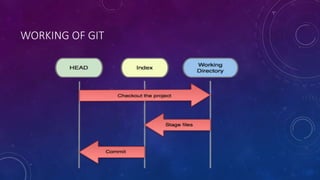
WORKING OF GIT
GITHUB
 GitHub is web-based hosting service for software development projects.
 GitHub offers both paid plans for private repositories, and free accounts for
open source projects.
 As of May 2011, GitHub was the most popular code repository site for open
source projects.
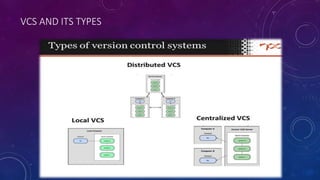
VCS AND ITS TYPES
COMPANIES & PROJECTS USING GIT
BRANCHING MERGING
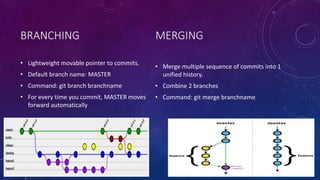
• Lightweight movable pointer to commits.
• Default branch name: MASTER
• Command: git branch branchname
• For every time you commit, MASTER moves
forward automatically
• Merge multiple sequence of commits into 1
unified history.
• Combine 2 branches
• Command: git merge branchname
CLONE
 A git clone makes it easier to copy the project in local machine.
 You retrieve all of the commits from the remote repository, and all of
its branches as well
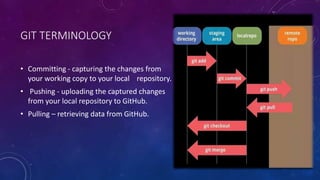
GIT TERMINOLOGY
• Committing - capturing the changes from
your working copy to your local repository.
• Pushing - uploading the captured changes
from your local repository to GitHub.
• Pulling – retrieving data from GitHub.
COMMON COMMANDS
 git init – Creates a new repository
 git clone – Copies an existing git repository
 git log – shows the commit logs
 git diff – displays the change that was made
 git status – displays the filenames that has been modified, added and
untracked
 git add – Adds the changes
 git commit – Creates a commit out of the changes that had been done
 git checkout – checking out a commit
PROS
• Speed
• Simplicity
• Fully Distributed
• Excellent support for parallel development, support for hundreds of
parallel branches.
• Integrity
CONS
• Huge amount of commands
Many Thanks

Git overview

  • 1.
  • 2.
    AGENDA  Git  GitDesign and Goals  Working of Git  GitHub  VCS and Its Types  Companies and Project Using Git  Branching and Merging  Clone  Git Terminology  Git Common Commands
  • 3.
    GIT  Git isFOSS (Free Open Source Software).  It is Version Control System.  It can be used to track changes in any set of files  Was created by Linus Torvalds in 2005 while working on Linux kernel.  Now maintained by Junio Hamano.  GIT came into existence because BitKeeper became chargeable.
  • 4.
    GIT DESIGN ANDGOAL  Speed.  Simple Design.  Strong support for thousands of parallel branches.  Fully distributed.  Able to handle larges projects like Linux kernel effectively.
  • 5.
  • 6.
    GITHUB  GitHub isweb-based hosting service for software development projects.  GitHub offers both paid plans for private repositories, and free accounts for open source projects.  As of May 2011, GitHub was the most popular code repository site for open source projects.
  • 7.
  • 8.
  • 9.
    BRANCHING MERGING • Lightweightmovable pointer to commits. • Default branch name: MASTER • Command: git branch branchname • For every time you commit, MASTER moves forward automatically • Merge multiple sequence of commits into 1 unified history. • Combine 2 branches • Command: git merge branchname
  • 10.
    CLONE  A gitclone makes it easier to copy the project in local machine.  You retrieve all of the commits from the remote repository, and all of its branches as well
  • 11.
    GIT TERMINOLOGY • Committing- capturing the changes from your working copy to your local repository. • Pushing - uploading the captured changes from your local repository to GitHub. • Pulling – retrieving data from GitHub.
  • 12.
    COMMON COMMANDS  gitinit – Creates a new repository  git clone – Copies an existing git repository  git log – shows the commit logs  git diff – displays the change that was made  git status – displays the filenames that has been modified, added and untracked  git add – Adds the changes  git commit – Creates a commit out of the changes that had been done  git checkout – checking out a commit
  • 13.
    PROS • Speed • Simplicity •Fully Distributed • Excellent support for parallel development, support for hundreds of parallel branches. • Integrity CONS • Huge amount of commands
  • 14.