git, from the beginning
Or, how not cut ourselves on all the shiny options
What we'll cover
• What git is
• Core concepts in git
• Github flow: collaboration (1)
• The core set of git operations
• Github flow: collaboration (2)
What git is
• A development tool
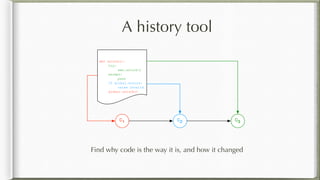
• A history tool
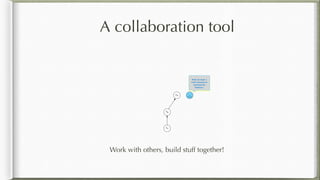
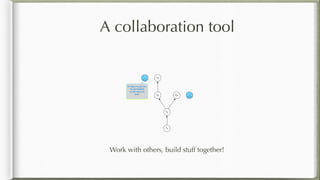
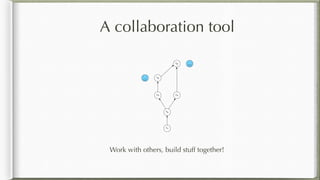
• A collaboration tool
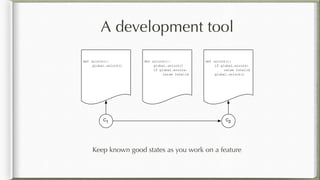
A development tool
Keep known good states as you work on a feature
C1 C2
def unlock():
global.unlock()
def unlock():
global.unlock()
if global.errors:
raise Invalid
def unlock():
if global.errors:
raise Invalid
global.unlock()
A history tool
Find why code is the way it is, and how it changed
C1 C2
def unlock():
try:
sem.unlock()
except:
pass
if global.errors:
raise Invalid
global.unlock()
C3
A collaboration tool
Work with others, build stuff together!
C1
C2
C3
Well, I'm stuck. I
need a function to
read from the
Wubstore.
A collaboration tool
Work with others, build stuff together!
C1
C2
C3
It's okay, I've got you.
I've just finished
exactly what you
need. C4
C5
A collaboration tool
Work with others, build stuff together!
C1
C2
C3C4
C5
C6
Core concepts in git
• Repository and working tree
• Commits
• The index
• Branches
• Collaborating across repositories
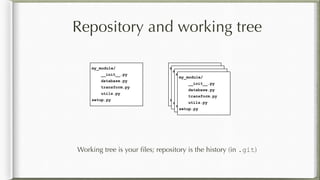
Repository and working tree
Working tree is your files; repository is the history (in .git)
my_module/
__init__.py
database.py
transform.py
utils.py
setup.py
my_module/
__init__.py
database.py
transform.py
utils.py
setup.py
my_module/
__init__.py
database.py
transform.py
utils.py
setup.py
my_module/
__init__.py
database.py
transform.py
utils.py
setup.py
my_module/
__init__.py
database.py
transform.py
utils.py
setup.py
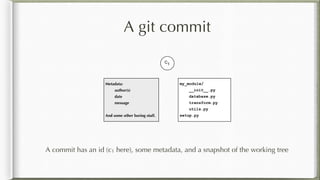
A git commit
A commit has an id (c1 here), some metadata, and a snapshot of the working tree
C1
my_module/
__init__.py
database.py
transform.py
utils.py
setup.py
Metadata:
author(s)
date
message
And some other boring stuff.
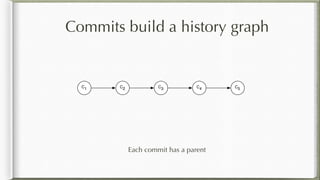
Commits build a history graph
Each commit has a parent
C1 C2 C3 C4 C5
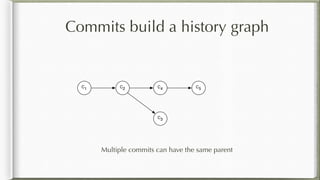
Commits build a history graph
Multiple commits can have the same parent
C1 C2
C3
C4 C5
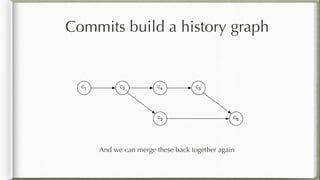
C1 C2
C3
C4 C5
C6
Commits build a history graph
And we can merge these back together again
The index
The index is a staging area for your next commit
C1
my_module/
__init__.py
database.py
transform.py
my_module/
__init__.py
database.py
transform.py
utils.py
Working tree
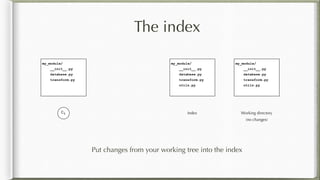
The index
Put changes from your working tree into the index
C1
my_module/
__init__.py
database.py
transform.py
my_module/
__init__.py
database.py
transform.py
utils.py
Working tree
my_module/
__init__.py
database.py
transform.py
utils.py
Index
(no changes)
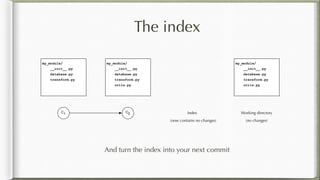
The index
And turn the index into your next commit
C1
my_module/
__init__.py
database.py
transform.py
my_module/
__init__.py
database.py
transform.py
utils.py
Working tree
my_module/
__init__.py
database.py
transform.py
utils.py
C2 Index
(now contains no changes) (no changes)
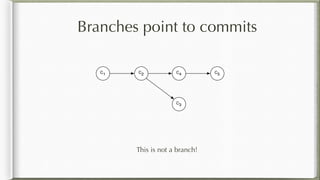
Branches point to commits
This is not a branch!
C1 C2
C3
C4 C5
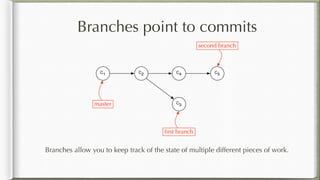
C1 C2
C3
C4 C5
master
first branch
second branch
Branches point to commits
Branches allow you to keep track of the state of multiple different pieces of work.
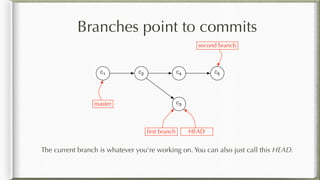
Branches point to commits
The current branch is whatever you're working on. You can also just call this HEAD.
C1 C2
C3
C4 C5
master
first branch
second branch
HEAD
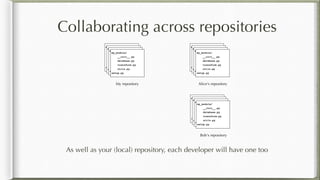
Collaborating across repositories
As well as your (local) repository, each developer will have one too
my_module/
__init__.py
database.py
transform.py
utils.py
setup.py
my_module/
__init__.py
database.py
transform.py
utils.py
setup.py
my_module/
__init__.py
database.py
transform.py
utils.py
setup.py
my_module/
__init__.py
database.py
transform.py
utils.py
setup.py
my_module/
__init__.py
database.py
transform.py
utils.py
setup.py
my_module/
__init__.py
database.py
transform.py
utils.py
setup.py
my_module/
__init__.py
database.py
transform.py
utils.py
setup.py
my_module/
__init__.py
database.py
transform.py
utils.py
setup.py
My repository Alice's repository
my_module/
__init__.py
database.py
transform.py
utils.py
setup.py
my_module/
__init__.py
database.py
transform.py
utils.py
setup.py
my_module/
__init__.py
database.py
transform.py
utils.py
setup.py
my_module/
__init__.py
database.py
transform.py
utils.py
setup.py
Bob's repository
Collaborating across repositories
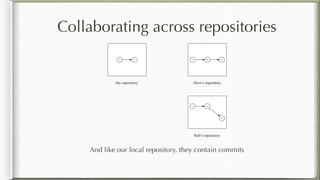
And like our local repository, they contain commits
My repository Alice's repository
Bob's repository
C1 C2 C1 C2 C4
C1 C2
C3
Collaborating across repositories
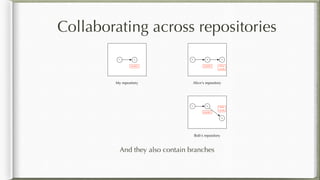
And they also contain branches
My repository Alice's repository
Bob's repository
C1 C2 C1 C2 C4
C1 C2
C3
master master
master
bob
work
alice
work
Remotes
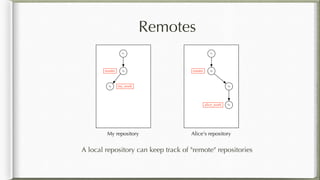
A local repository can keep track of "remote" repositories
My repository Alice's repository
C1
C2master
C5 my_work
C1
C2master
C3
alice_work C4
Remote tracking branches
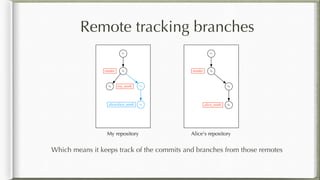
Which means it keeps track of the commits and branches from those remotes
My repository Alice's repository
C1
C2master
C5 my_work
C1
C2master
C3
alice_work C4
C3
alice/alice_work C4
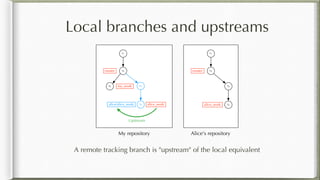
Local branches and upstreams
A remote tracking branch is "upstream" of the local equivalent
My repository
C1
C2master
C5 my_work C3
alice/alice_work C4 alice_work
Alice's repository
C1
C2master
C3
alice_work C4
Upstream
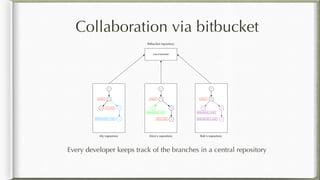
Collaboration via bitbucket
Every developer keeps track of the branches in a central repository
My repository Alice's repository
C1
C2master
C5 my_work
C1
C2master
C3
alice_work C4
C3
bitbucket/alice_work C4
Bob's repository
C1
C2master
C3
bitbucket/alice_work C4
Lots of branches!
Bitbucket repository
C5
bitbucket/my_work
C5
bitbucket/my_work
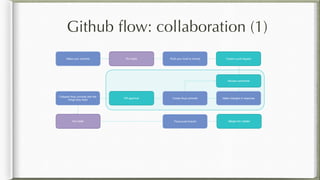
Github flow: collaboration (1)
Run tests
Push your local to remote Create a pull request
Make changes in response
Make your commits
Create fixup commitsPR approval
Collapse fixup commits with the
things they fixed
Force push branch Merge into master
Run tests
Review comments
The core set of git operations
• Working with remotes
• Working with branches
• Managing the index (and working tree)
• Working with commits
• Remotes and branches
• Rebasing: working on the history graph
Working with remotes
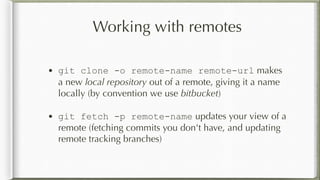
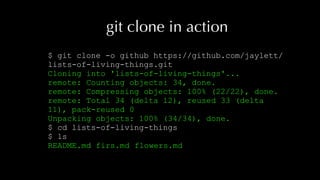
• git clone -o remote-name remote-url makes
a new local repository out of a remote, giving it a name
locally (by convention we use bitbucket)
• git fetch -p remote-name updates your view of a
remote (fetching commits you don't have, and updating
remote tracking branches)
git clone in action
$ git clone -o github https://github.com/jaylett/
lists-of-living-things.git
Cloning into 'lists-of-living-things'...
remote: Counting objects: 34, done.
remote: Compressing objects: 100% (22/22), done.
remote: Total 34 (delta 12), reused 33 (delta
11), pack-reused 0
Unpacking objects: 100% (34/34), done.
$ cd lists-of-living-things
$ ls
README.md firs.md flowers.md
Working with branches
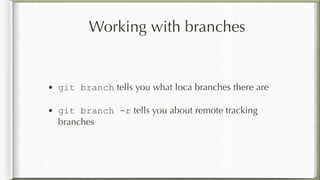
• git branch tells you what loca branches there are
• git branch -r tells you about remote tracking
branches
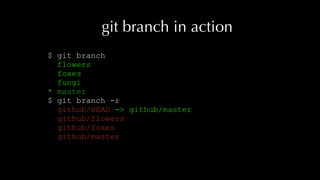
git branch in action
$ git branch
flowers
foxes
fungi
* master
$ git branch -r
github/HEAD -> github/master
github/flowers
github/foxes
github/master
Working with branches
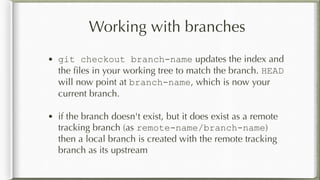
• git checkout branch-name updates the index and
the files in your working tree to match the branch. HEAD
will now point at branch-name, which is now your
current branch.
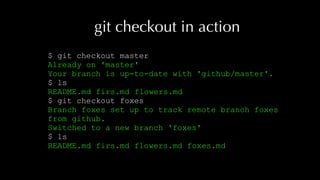
• if the branch doesn't exist, but it does exist as a remote
tracking branch (as remote-name/branch-name)
then a local branch is created with the remote tracking
branch as its upstream
git checkout in action
$ git checkout master
Already on 'master'
Your branch is up-to-date with 'github/master'.
$ ls
README.md firs.md flowers.md
$ git checkout foxes
Branch foxes set up to track remote branch foxes
from github.
Switched to a new branch 'foxes'
$ ls
README.md firs.md flowers.md foxes.md
Working with branches
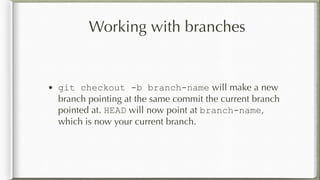
• git checkout -b branch-name will make a new
branch pointing at the same commit the current branch
pointed at. HEAD will now point at branch-name,
which is now your current branch.
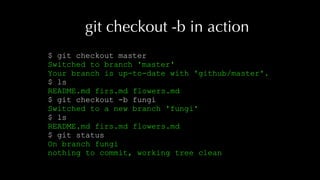
git checkout -b in action
$ git checkout master
Switched to branch 'master'
Your branch is up-to-date with 'github/master'.
$ ls
README.md firs.md flowers.md
$ git checkout -b fungi
Switched to a new branch 'fungi'
$ ls
README.md firs.md flowers.md
$ git status
On branch fungi
nothing to commit, working tree clean
Working with branches
• git show-branch branch1 branch2 will give an
overview of which commits are in the branches you
specify. A lot of IDEs and graphical tools (eg gitx on
macOS) will provide a similar view.
git show-branch in action
$ git show-branch master foxes
* [master] Flesh out our list of firs.
! [foxes] fixup! Add a list of foxes.
--
+ [foxes] fixup! Add a list of foxes.
+ [foxes^] fixup! Add a list of foxes.
+ [foxes~2] Add two foxes missing from our list.
+ [foxes~3] Add a list of foxes.
* [master] Flesh out our list of firs.
*+ [foxes~4] Add some more firs.
Working with branches
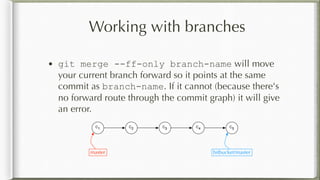
• git merge --ff-only branch-name will move
your current branch forward so it points at the same
commit as branch-name. If it cannot (because there's
no forward route through the commit graph) it will give
an error.
C1 C2 C3 C4 C5
master bitbucket/master
git merge --ff-only in action (1)
$ git checkout master
Switched to branch 'master'
Your branch is up-to-date with 'github/master'.
$ git remote add james https://github.com/jaylett/lists-of-
living-things-2.git
$ git fetch -p james
remote: Counting objects: 3, done.
remote: Compressing objects: 100% (3/3), done.
remote: Total 3 (delta 1), reused 2 (delta 0), pack-reused 0
Unpacking objects: 100% (3/3), done.
From https://github.com/jaylett/lists-of-living-things-2
* [new branch] flowers -> james/flowers
* [new branch] foxes -> james/foxes
* [new branch] master -> james/master
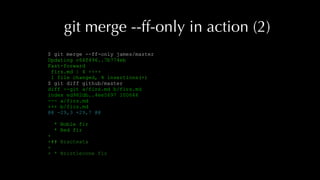
git merge --ff-only in action (2)
$ git merge --ff-only james/master
Updating c64f496..7b774eb
Fast-forward
firs.md | 4 ++++
1 file changed, 4 insertions(+)
$ git diff github/master
diff --git a/firs.md b/firs.md
index ed982db..4ee5697 100644
--- a/firs.md
+++ b/firs.md
@@ -29,3 +29,7 @@
* Noble fir
* Red fir
+
+## Bracteata
+
+ * Bristlecone fir
Working with branches
• git merge branch-name will create a merge
commit so that your current branch contains all the
changes on branch-name, back to their common
parent. This will update your current branch pointer, and
hence also move HEAD. (If it can, it will simply move
your current branch and HEAD to point at branch-
name, as with git merge --ff-only.)
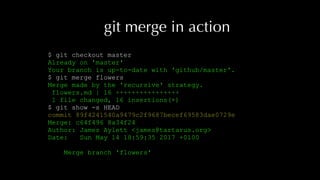
git merge in action
$ git checkout master
Already on 'master'
Your branch is up-to-date with 'github/master'.
$ git merge flowers
Merge made by the 'recursive' strategy.
flowers.md | 16 ++++++++++++++++
1 file changed, 16 insertions(+)
$ git show -s HEAD
commit 89f4241540a9479c2f9687becef69583dae0729e
Merge: c64f496 8a34f24
Author: James Aylett <james@tartarus.org>
Date: Sun May 14 18:59:35 2017 +0100
Merge branch 'flowers'
Managing the index (and working tree)
• git diff shows the differences between the working tree and the index
• git diff --cached shows the differences between the index and the last
commit
• You can include a list of filenames to restrict to just those
• You can include a commit or branch name (before the filenames, if any) to
show the difference between that commit and either the working tree or the
index
• git status will summarise what's going on with the index and working tree
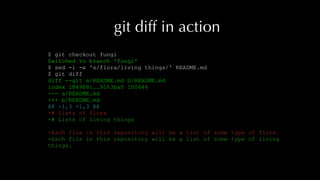
git diff in action
$ git checkout fungi
Switched to branch 'fungi'
$ sed -i -e 's/flora/living things/' README.md
$ git diff
diff --git a/README.md b/README.md
index 184968c..9163ba0 100644
--- a/README.md
+++ b/README.md
@@ -1,3 +1,3 @@
-# Lists of flora
+# Lists of living things
-Each file in this repository will be a list of some type of flora.
+Each file in this repository will be a list of some type of living
things.
Managing the index (and working tree)
• git add -p allows you to add changes into the index;
it will prompt for each change in the working tree
• git reset -p allows you to remove changes from the
index again
• git checkout -p allows you to discard changes in
the working tree (once gone, lost forever!)
git add -p in action
$ git add -p
diff --git a/README.md b/README.md
index 184968c..9163ba0 100644
--- a/README.md
+++ b/README.md
@@ -1,3 +1,3 @@
-# Lists of flora
+# Lists of living things
-Each file in this repository will be a list of some type
of flora.
+Each file in this repository will be a list of some type
of living things.
Stage this hunk [y,n,q,a,d,/,s,e,?]? y
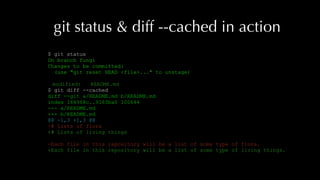
git status & diff --cached in action
$ git status
On branch fungi
Changes to be committed:
(use "git reset HEAD <file>..." to unstage)
modified: README.md
$ git diff --cached
diff --git a/README.md b/README.md
index 184968c..9163ba0 100644
--- a/README.md
+++ b/README.md
@@ -1,3 +1,3 @@
-# Lists of flora
+# Lists of living things
-Each file in this repository will be a list of some type of flora.
+Each file in this repository will be a list of some type of living things.
git reset -p in action
$ git reset -p
diff --git a/README.md b/README.md
index 184968c..9163ba0 100644
--- a/README.md
+++ b/README.md
@@ -1,3 +1,3 @@
-# Lists of flora
+# Lists of living things
-Each file in this repository will be a list of some type of flora.
+Each file in this repository will be a list of some type of living things.
Unstage this hunk [y,n,q,a,d,/,s,e,?]? y
$ git status
On branch fungi
Changes not staged for commit:
(use "git add <file>..." to update what will be committed)
(use "git checkout -- <file>..." to discard changes in working directory)
modified: README.md
no changes added to commit (use "git add" and/or "git commit -a")
git checkout -p in action
$ git checkout -p
diff --git a/README.md b/README.md
index 184968c..9163ba0 100644
--- a/README.md
+++ b/README.md
@@ -1,3 +1,3 @@
-# Lists of flora
+# Lists of living things
-Each file in this repository will be a list of some type of flora.
+Each file in this repository will be a list of some type of living
things.
Discard this hunk from worktree [y,n,q,a,d,/,s,e,?]? y
$ git status
On branch fungi
nothing to commit, working tree clean
Managing the index (and working tree)
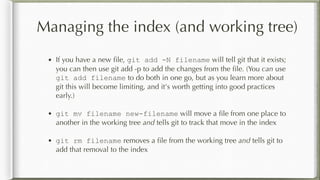
• If you have a new file, git add -N filename will tell git that it exists;
you can then use git add -p to add the changes from the file. (You can use
git add filename to do both in one go, but as you learn more about
git this will become limiting, and it's worth getting into good practices
early.)
• git mv filename new-filename will move a file from one place to
another in the working tree and tells git to track that move in the index
• git rm filename removes a file from the working tree and tells git to
add that removal to the index
git add -N in action
$ echo -e "# List of funginn * mushroom" > fungi.md
$ git add -N fungi.md
$ git add -p
diff --git a/fungi.md b/fungi.md
index e69de29..f47e8b0 100644
--- a/fungi.md
+++ b/fungi.md
@@ -0,0 +1,3 @@
+# List of fungi
+
+ * mushroom
Stage this hunk [y,n,q,a,d,/,e,?]? y
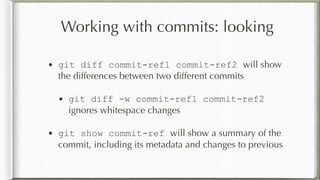
Working with commits: looking
• git diff commit-ref1 commit-ref2 will show
the differences between two different commits
• git diff -w commit-ref1 commit-ref2
ignores whitespace changes
• git show commit-ref will show a summary of the
commit, including its metadata and changes to previous
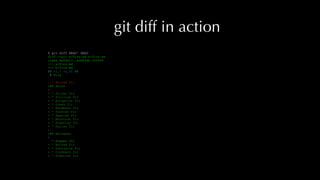
git diff in action
$ git diff HEAD^ HEAD
diff --git a/firs.md b/firs.md
index de0db27..ed982db 100644
--- a/firs.md
+++ b/firs.md
@@ -1,7 +1,31 @@
# Firs
- * Balsam fir
+## Abies
+
+ * Silver fir
+ * Sicilian fir
+ * Bulgarian fir
+ * Greek fir
+ * Nordmann fir
+ * Turkish fir
+ * Spanish fir
+ * Moroccan fir
+ * Algerian fir
+ * Syrian fir
+
+## Balsamea
+
* Fraser fir
+ * Balsam fir
+ * Subalpine fir
+ * Corkbark fir
+ * Siberian fir
git show in action
$ git show HEAD
commit c64f496f779ac1d5f079e824aa5d66dbbb94fdaf
Author: James Aylett <james@tartarus.org>
Date: Sun May 14 17:44:43 2017 +0100
Flesh out our list of firs.
Apparently firs come in different types! I probably haven't found
all of them, but this is a better list.
diff --git a/firs.md b/firs.md
index de0db27..ed982db 100644
--- a/firs.md
+++ b/firs.md
@@ -1,7 +1,31 @@
# Firs
- * Balsam fir
+## Abies
+
+ * Silver fir
+ * Sicilian fir
+ * Bulgarian fir
+ * Greek fir
+ * Nordmann fir
+ * Turkish fir
+ * Spanish fir
+ * Moroccan fir
+ * Algerian fir
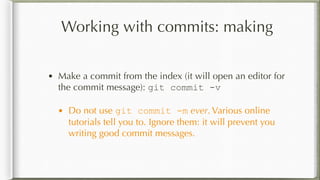
Working with commits: making
• Make a commit from the index (it will open an editor for
the commit message): git commit -v
• Do not use git commit -m ever. Various online
tutorials tell you to. Ignore them: it will prevent you
writing good commit messages.
git commit -v in action (1)
$ sed -i -e 's/flora/living things/' README.md
$ git add -p
diff --git a/README.md b/README.md
index 184968c..9163ba0 100644
--- a/README.md
+++ b/README.md
@@ -1,3 +1,3 @@
-# Lists of flora
+# Lists of living things
-Each file in this repository will be a list of some type of
flora.
+Each file in this repository will be a list of some type of
living things.
Stage this hunk [y,n,q,a,d,/,s,e,?]? y
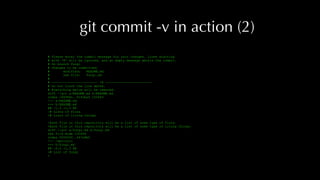
git commit -v in action (2)
# Please enter the commit message for your changes. Lines starting
# with '#' will be ignored, and an empty message aborts the commit.
# On branch fungi
# Changes to be committed:
# modified: README.md
# new file: fungi.md
#
# ------------------------ >8 ------------------------
# Do not touch the line above.
# Everything below will be removed.
diff --git a/README.md b/README.md
index 184968c..9163ba0 100644
--- a/README.md
+++ b/README.md
@@ -1,3 +1,3 @@
-# Lists of flora
+# Lists of living things
-Each file in this repository will be a list of some type of flora.
+Each file in this repository will be a list of some type of living things.
diff --git a/fungi.md b/fungi.md
new file mode 100644
index 0000000..f47e8b0
--- /dev/null
+++ b/fungi.md
@@ -0,0 +1,3 @@
+# List of fungi
+
git commit -v in action (3)
$ git commit -v
Here, git waits for you to edit the commit message and save it
[fungi cfcd7f5] Add mushrooms.
2 files changed, 5 insertions(+), 2 deletions(-)
create mode 100644 fungi.md
$ git show -s
commit cfcd7f5b02ea6008faf7235f1c3b2561ed50180f
Author: James Aylett <james@tartarus.org>
Date: Sun May 14 19:27:43 2017 +0100
Add mushrooms.
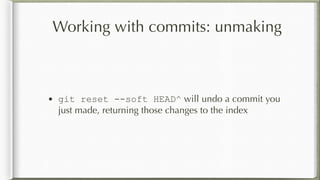
Working with commits: unmaking
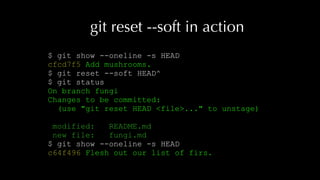
• git reset --soft HEAD^ will undo a commit you
just made, returning those changes to the index
git reset --soft in action
$ git show --oneline -s HEAD
cfcd7f5 Add mushrooms.
$ git reset --soft HEAD^
$ git status
On branch fungi
Changes to be committed:
(use "git reset HEAD <file>..." to unstage)
modified: README.md
new file: fungi.md
$ git show --oneline -s HEAD
c64f496 Flesh out our list of firs.
Working with commits: unmaking
• git reset --mixed commit-ref will undo all
commits back to the given commit or branch, leaving
the changes in the working tree.
• git reset --hard commit-ref will undo all
changes back to the given commit or branch. This is how
you throw away changes.
Remotes and branches
• Push your commits up to a remote for the first time: git
push -u remote-name branch-name
• After that, you can just do git push
git push -u in action
$ git commit -v
[fungi 283cf75] Add mushrooms.
2 files changed, 5 insertions(+), 2 deletions(-)
create mode 100644 fungi.md
$ git push -u james fungi
Counting objects: 4, done.
Delta compression using up to 24 threads.
Compressing objects: 100% (3/3), done.
Writing objects: 100% (4/4), 451 bytes | 0 bytes/s, done.
Total 4 (delta 0), reused 0 (delta 0)
To github.com:jaylett/lists-of-living-things-2.git
* [new branch] fungi -> fungi
Branch fungi set up to track remote branch fungi from james
git push in (boring) action
$ git push
Everything up-to-date
Rebasing: working on the history graph
Rebasing is crazy powerful. We'll just look at some very
simple uses.
• reword messages
• reorder commits
• collapse commits
Interactive rebase
You start an interactive rebase session with:
git rebase -i commit-ref
which will drop into an editor with a list of every commit
between commit-ref and HEAD. You can re-order the
commits, and also change the action to be taken for each.
Interactive rebase actions
• pick will just recreate the commit
• reword lets you edit the commit message first
• fixup collapses the changes into the previous commit
• squash is like fixup, but allows you to edit the commit
message afters
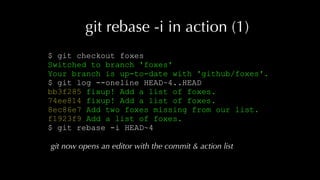
git rebase -i in action (1)
$ git checkout foxes
Switched to branch 'foxes'
Your branch is up-to-date with 'github/foxes'.
$ git log --oneline HEAD~4..HEAD
bb3f285 fixup! Add a list of foxes.
74ee814 fixup! Add a list of foxes.
8ec86e7 Add two foxes missing from our list.
f1923f9 Add a list of foxes.
$ git rebase -i HEAD~4
git now opens an editor with the commit & action list
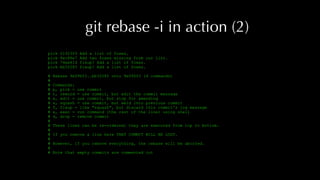
git rebase -i in action (2)
pick f1923f9 Add a list of foxes.
pick 8ec86e7 Add two foxes missing from our list.
pick 74ee814 fixup! Add a list of foxes.
pick bb3f285 fixup! Add a list of foxes.
# Rebase 9e096f3..bb3f285 onto 9e096f3 (4 commands)
#
# Commands:
# p, pick = use commit
# r, reword = use commit, but edit the commit message
# e, edit = use commit, but stop for amending
# s, squash = use commit, but meld into previous commit
# f, fixup = like "squash", but discard this commit's log message
# x, exec = run command (the rest of the line) using shell
# d, drop = remove commit
#
# These lines can be re-ordered; they are executed from top to bottom.
#
# If you remove a line here THAT COMMIT WILL BE LOST.
#
# However, if you remove everything, the rebase will be aborted.
#
# Note that empty commits are commented out
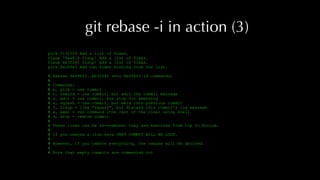
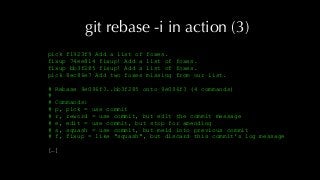
git rebase -i in action (3)
pick f1923f9 Add a list of foxes.
fixup 74ee814 fixup! Add a list of foxes.
fixup bb3f285 fixup! Add a list of foxes.
pick 8ec86e7 Add two foxes missing from our list.
# Rebase 9e096f3..bb3f285 onto 9e096f3 (4 commands)
#
# Commands:
# p, pick = use commit
# r, reword = use commit, but edit the commit message
# e, edit = use commit, but stop for amending
# s, squash = use commit, but meld into previous commit
# f, fixup = like "squash", but discard this commit's log message
# x, exec = run command (the rest of the line) using shell
# d, drop = remove commit
#
# These lines can be re-ordered; they are executed from top to bottom.
#
# If you remove a line here THAT COMMIT WILL BE LOST.
#
# However, if you remove everything, the rebase will be aborted.
#
# Note that empty commits are commented out
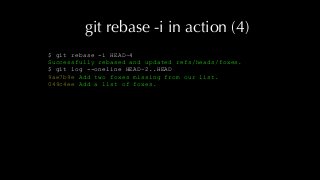
git rebase -i in action (4)
[detached HEAD 049c4ee] Add a list of foxes.
Author: Fox Fanatic <foxes@example.com>
Date: Sun May 14 17:49:06 2017 +0100
2 files changed, 27 insertions(+), 2 deletions(-)
create mode 100644 foxes.md
Successfully rebased and updated refs/heads/foxes.
$ git log --oneline HEAD~2..HEAD
9ae7b9e Add two foxes missing from our list.
049c4ee Add a list of foxes.
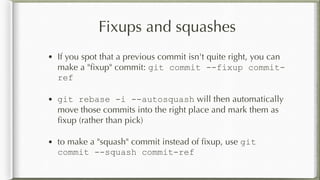
Fixups and squashes
• If you spot that a previous commit isn't quite right, you can
make a "fixup" commit: git commit --fixup commit-
ref
• git rebase -i --autosquash will then automatically
move those commits into the right place and mark them as
fixup (rather than pick)
• to make a "squash" commit instead of fixup, use git
commit --squash commit-ref
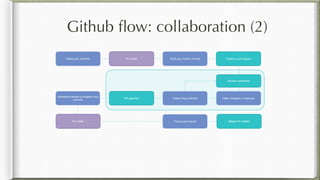
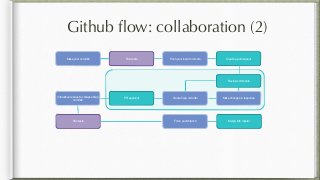
Github flow: collaboration (2)
Run tests
Push your local to remote Create a pull request
Make changes in response
Make your commits
Create fixup commitsPR approval
Interactive rebase to collapse fixup
commits
Force push branch Merge into master
Run tests
Review comments
What is a pull request?
• A set of proposed commits, with a narrative
• An opportunity for review ahead of merging to master
• A way to actively collaborative rather than just using
each others' work
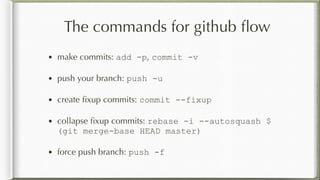
The commands for github flow
• make commits: add -p, commit -v
• push your branch: push -u
• create fixup commits: commit --fixup
• collapse fixup commits: rebase -i --autosquash $
(git merge-base HEAD master)
• force push branch: push -f
Questions?
• http://www.slideshare.net/jaylett/git-from-
the-beginning
• @jaylett
Git, from the beginning

Git, from the beginning

  • 1.
    git, from thebeginning Or, how not cut ourselves on all the shiny options
  • 2.
    What we'll cover •What git is • Core concepts in git • Github flow: collaboration (1) • The core set of git operations • Github flow: collaboration (2)
  • 3.
    What git is •A development tool • A history tool • A collaboration tool
  • 4.
    A development tool Keepknown good states as you work on a feature C1 C2 def unlock(): global.unlock() def unlock(): global.unlock() if global.errors: raise Invalid def unlock(): if global.errors: raise Invalid global.unlock()
  • 5.
    A history tool Findwhy code is the way it is, and how it changed C1 C2 def unlock(): try: sem.unlock() except: pass if global.errors: raise Invalid global.unlock() C3
  • 6.
    A collaboration tool Workwith others, build stuff together! C1 C2 C3 Well, I'm stuck. I need a function to read from the Wubstore.
  • 7.
    A collaboration tool Workwith others, build stuff together! C1 C2 C3 It's okay, I've got you. I've just finished exactly what you need. C4 C5
  • 8.
    A collaboration tool Workwith others, build stuff together! C1 C2 C3C4 C5 C6
  • 9.
    Core concepts ingit • Repository and working tree • Commits • The index • Branches • Collaborating across repositories
  • 10.
    Repository and workingtree Working tree is your files; repository is the history (in .git) my_module/ __init__.py database.py transform.py utils.py setup.py my_module/ __init__.py database.py transform.py utils.py setup.py my_module/ __init__.py database.py transform.py utils.py setup.py my_module/ __init__.py database.py transform.py utils.py setup.py my_module/ __init__.py database.py transform.py utils.py setup.py
  • 11.
    A git commit Acommit has an id (c1 here), some metadata, and a snapshot of the working tree C1 my_module/ __init__.py database.py transform.py utils.py setup.py Metadata: author(s) date message And some other boring stuff.
  • 12.
    Commits build ahistory graph Each commit has a parent C1 C2 C3 C4 C5
  • 13.
    Commits build ahistory graph Multiple commits can have the same parent C1 C2 C3 C4 C5
  • 14.
    C1 C2 C3 C4 C5 C6 Commitsbuild a history graph And we can merge these back together again
  • 15.
    The index The indexis a staging area for your next commit C1 my_module/ __init__.py database.py transform.py my_module/ __init__.py database.py transform.py utils.py Working tree
  • 16.
    The index Put changesfrom your working tree into the index C1 my_module/ __init__.py database.py transform.py my_module/ __init__.py database.py transform.py utils.py Working tree my_module/ __init__.py database.py transform.py utils.py Index (no changes)
  • 17.
    The index And turnthe index into your next commit C1 my_module/ __init__.py database.py transform.py my_module/ __init__.py database.py transform.py utils.py Working tree my_module/ __init__.py database.py transform.py utils.py C2 Index (now contains no changes) (no changes)
  • 18.
    Branches point tocommits This is not a branch! C1 C2 C3 C4 C5
  • 19.
    C1 C2 C3 C4 C5 master firstbranch second branch Branches point to commits Branches allow you to keep track of the state of multiple different pieces of work.
  • 20.
    Branches point tocommits The current branch is whatever you're working on. You can also just call this HEAD. C1 C2 C3 C4 C5 master first branch second branch HEAD
  • 21.
    Collaborating across repositories Aswell as your (local) repository, each developer will have one too my_module/ __init__.py database.py transform.py utils.py setup.py my_module/ __init__.py database.py transform.py utils.py setup.py my_module/ __init__.py database.py transform.py utils.py setup.py my_module/ __init__.py database.py transform.py utils.py setup.py my_module/ __init__.py database.py transform.py utils.py setup.py my_module/ __init__.py database.py transform.py utils.py setup.py my_module/ __init__.py database.py transform.py utils.py setup.py my_module/ __init__.py database.py transform.py utils.py setup.py My repository Alice's repository my_module/ __init__.py database.py transform.py utils.py setup.py my_module/ __init__.py database.py transform.py utils.py setup.py my_module/ __init__.py database.py transform.py utils.py setup.py my_module/ __init__.py database.py transform.py utils.py setup.py Bob's repository
  • 22.
    Collaborating across repositories Andlike our local repository, they contain commits My repository Alice's repository Bob's repository C1 C2 C1 C2 C4 C1 C2 C3
  • 23.
    Collaborating across repositories Andthey also contain branches My repository Alice's repository Bob's repository C1 C2 C1 C2 C4 C1 C2 C3 master master master bob work alice work
  • 24.
    Remotes A local repositorycan keep track of "remote" repositories My repository Alice's repository C1 C2master C5 my_work C1 C2master C3 alice_work C4
  • 25.
    Remote tracking branches Whichmeans it keeps track of the commits and branches from those remotes My repository Alice's repository C1 C2master C5 my_work C1 C2master C3 alice_work C4 C3 alice/alice_work C4
  • 26.
    Local branches andupstreams A remote tracking branch is "upstream" of the local equivalent My repository C1 C2master C5 my_work C3 alice/alice_work C4 alice_work Alice's repository C1 C2master C3 alice_work C4 Upstream
  • 27.
    Collaboration via bitbucket Everydeveloper keeps track of the branches in a central repository My repository Alice's repository C1 C2master C5 my_work C1 C2master C3 alice_work C4 C3 bitbucket/alice_work C4 Bob's repository C1 C2master C3 bitbucket/alice_work C4 Lots of branches! Bitbucket repository C5 bitbucket/my_work C5 bitbucket/my_work
  • 28.
    Github flow: collaboration(1) Run tests Push your local to remote Create a pull request Make changes in response Make your commits Create fixup commitsPR approval Collapse fixup commits with the things they fixed Force push branch Merge into master Run tests Review comments
  • 29.
    The core setof git operations • Working with remotes • Working with branches • Managing the index (and working tree) • Working with commits • Remotes and branches • Rebasing: working on the history graph
  • 30.
    Working with remotes •git clone -o remote-name remote-url makes a new local repository out of a remote, giving it a name locally (by convention we use bitbucket) • git fetch -p remote-name updates your view of a remote (fetching commits you don't have, and updating remote tracking branches)
  • 31.
    git clone inaction $ git clone -o github https://github.com/jaylett/ lists-of-living-things.git Cloning into 'lists-of-living-things'... remote: Counting objects: 34, done. remote: Compressing objects: 100% (22/22), done. remote: Total 34 (delta 12), reused 33 (delta 11), pack-reused 0 Unpacking objects: 100% (34/34), done. $ cd lists-of-living-things $ ls README.md firs.md flowers.md
  • 32.
    Working with branches •git branch tells you what loca branches there are • git branch -r tells you about remote tracking branches
  • 33.
    git branch inaction $ git branch flowers foxes fungi * master $ git branch -r github/HEAD -> github/master github/flowers github/foxes github/master
  • 34.
    Working with branches •git checkout branch-name updates the index and the files in your working tree to match the branch. HEAD will now point at branch-name, which is now your current branch. • if the branch doesn't exist, but it does exist as a remote tracking branch (as remote-name/branch-name) then a local branch is created with the remote tracking branch as its upstream
  • 35.
    git checkout inaction $ git checkout master Already on 'master' Your branch is up-to-date with 'github/master'. $ ls README.md firs.md flowers.md $ git checkout foxes Branch foxes set up to track remote branch foxes from github. Switched to a new branch 'foxes' $ ls README.md firs.md flowers.md foxes.md
  • 36.
    Working with branches •git checkout -b branch-name will make a new branch pointing at the same commit the current branch pointed at. HEAD will now point at branch-name, which is now your current branch.
  • 37.
    git checkout -bin action $ git checkout master Switched to branch 'master' Your branch is up-to-date with 'github/master'. $ ls README.md firs.md flowers.md $ git checkout -b fungi Switched to a new branch 'fungi' $ ls README.md firs.md flowers.md $ git status On branch fungi nothing to commit, working tree clean
  • 38.
    Working with branches •git show-branch branch1 branch2 will give an overview of which commits are in the branches you specify. A lot of IDEs and graphical tools (eg gitx on macOS) will provide a similar view.
  • 39.
    git show-branch inaction $ git show-branch master foxes * [master] Flesh out our list of firs. ! [foxes] fixup! Add a list of foxes. -- + [foxes] fixup! Add a list of foxes. + [foxes^] fixup! Add a list of foxes. + [foxes~2] Add two foxes missing from our list. + [foxes~3] Add a list of foxes. * [master] Flesh out our list of firs. *+ [foxes~4] Add some more firs.
  • 40.
    Working with branches •git merge --ff-only branch-name will move your current branch forward so it points at the same commit as branch-name. If it cannot (because there's no forward route through the commit graph) it will give an error. C1 C2 C3 C4 C5 master bitbucket/master
  • 41.
    git merge --ff-onlyin action (1) $ git checkout master Switched to branch 'master' Your branch is up-to-date with 'github/master'. $ git remote add james https://github.com/jaylett/lists-of- living-things-2.git $ git fetch -p james remote: Counting objects: 3, done. remote: Compressing objects: 100% (3/3), done. remote: Total 3 (delta 1), reused 2 (delta 0), pack-reused 0 Unpacking objects: 100% (3/3), done. From https://github.com/jaylett/lists-of-living-things-2 * [new branch] flowers -> james/flowers * [new branch] foxes -> james/foxes * [new branch] master -> james/master
  • 42.
    git merge --ff-onlyin action (2) $ git merge --ff-only james/master Updating c64f496..7b774eb Fast-forward firs.md | 4 ++++ 1 file changed, 4 insertions(+) $ git diff github/master diff --git a/firs.md b/firs.md index ed982db..4ee5697 100644 --- a/firs.md +++ b/firs.md @@ -29,3 +29,7 @@ * Noble fir * Red fir + +## Bracteata + + * Bristlecone fir
  • 43.
    Working with branches •git merge branch-name will create a merge commit so that your current branch contains all the changes on branch-name, back to their common parent. This will update your current branch pointer, and hence also move HEAD. (If it can, it will simply move your current branch and HEAD to point at branch- name, as with git merge --ff-only.)
  • 44.
    git merge inaction $ git checkout master Already on 'master' Your branch is up-to-date with 'github/master'. $ git merge flowers Merge made by the 'recursive' strategy. flowers.md | 16 ++++++++++++++++ 1 file changed, 16 insertions(+) $ git show -s HEAD commit 89f4241540a9479c2f9687becef69583dae0729e Merge: c64f496 8a34f24 Author: James Aylett <james@tartarus.org> Date: Sun May 14 18:59:35 2017 +0100 Merge branch 'flowers'
  • 45.
    Managing the index(and working tree) • git diff shows the differences between the working tree and the index • git diff --cached shows the differences between the index and the last commit • You can include a list of filenames to restrict to just those • You can include a commit or branch name (before the filenames, if any) to show the difference between that commit and either the working tree or the index • git status will summarise what's going on with the index and working tree
  • 46.
    git diff inaction $ git checkout fungi Switched to branch 'fungi' $ sed -i -e 's/flora/living things/' README.md $ git diff diff --git a/README.md b/README.md index 184968c..9163ba0 100644 --- a/README.md +++ b/README.md @@ -1,3 +1,3 @@ -# Lists of flora +# Lists of living things -Each file in this repository will be a list of some type of flora. +Each file in this repository will be a list of some type of living things.
  • 47.
    Managing the index(and working tree) • git add -p allows you to add changes into the index; it will prompt for each change in the working tree • git reset -p allows you to remove changes from the index again • git checkout -p allows you to discard changes in the working tree (once gone, lost forever!)
  • 48.
    git add -pin action $ git add -p diff --git a/README.md b/README.md index 184968c..9163ba0 100644 --- a/README.md +++ b/README.md @@ -1,3 +1,3 @@ -# Lists of flora +# Lists of living things -Each file in this repository will be a list of some type of flora. +Each file in this repository will be a list of some type of living things. Stage this hunk [y,n,q,a,d,/,s,e,?]? y
  • 49.
    git status &diff --cached in action $ git status On branch fungi Changes to be committed: (use "git reset HEAD <file>..." to unstage) modified: README.md $ git diff --cached diff --git a/README.md b/README.md index 184968c..9163ba0 100644 --- a/README.md +++ b/README.md @@ -1,3 +1,3 @@ -# Lists of flora +# Lists of living things -Each file in this repository will be a list of some type of flora. +Each file in this repository will be a list of some type of living things.
  • 50.
    git reset -pin action $ git reset -p diff --git a/README.md b/README.md index 184968c..9163ba0 100644 --- a/README.md +++ b/README.md @@ -1,3 +1,3 @@ -# Lists of flora +# Lists of living things -Each file in this repository will be a list of some type of flora. +Each file in this repository will be a list of some type of living things. Unstage this hunk [y,n,q,a,d,/,s,e,?]? y $ git status On branch fungi Changes not staged for commit: (use "git add <file>..." to update what will be committed) (use "git checkout -- <file>..." to discard changes in working directory) modified: README.md no changes added to commit (use "git add" and/or "git commit -a")
  • 51.
    git checkout -pin action $ git checkout -p diff --git a/README.md b/README.md index 184968c..9163ba0 100644 --- a/README.md +++ b/README.md @@ -1,3 +1,3 @@ -# Lists of flora +# Lists of living things -Each file in this repository will be a list of some type of flora. +Each file in this repository will be a list of some type of living things. Discard this hunk from worktree [y,n,q,a,d,/,s,e,?]? y $ git status On branch fungi nothing to commit, working tree clean
  • 52.
    Managing the index(and working tree) • If you have a new file, git add -N filename will tell git that it exists; you can then use git add -p to add the changes from the file. (You can use git add filename to do both in one go, but as you learn more about git this will become limiting, and it's worth getting into good practices early.) • git mv filename new-filename will move a file from one place to another in the working tree and tells git to track that move in the index • git rm filename removes a file from the working tree and tells git to add that removal to the index
  • 53.
    git add -Nin action $ echo -e "# List of funginn * mushroom" > fungi.md $ git add -N fungi.md $ git add -p diff --git a/fungi.md b/fungi.md index e69de29..f47e8b0 100644 --- a/fungi.md +++ b/fungi.md @@ -0,0 +1,3 @@ +# List of fungi + + * mushroom Stage this hunk [y,n,q,a,d,/,e,?]? y
  • 54.
    Working with commits:looking • git diff commit-ref1 commit-ref2 will show the differences between two different commits • git diff -w commit-ref1 commit-ref2 ignores whitespace changes • git show commit-ref will show a summary of the commit, including its metadata and changes to previous
  • 55.
    git diff inaction $ git diff HEAD^ HEAD diff --git a/firs.md b/firs.md index de0db27..ed982db 100644 --- a/firs.md +++ b/firs.md @@ -1,7 +1,31 @@ # Firs - * Balsam fir +## Abies + + * Silver fir + * Sicilian fir + * Bulgarian fir + * Greek fir + * Nordmann fir + * Turkish fir + * Spanish fir + * Moroccan fir + * Algerian fir + * Syrian fir + +## Balsamea + * Fraser fir + * Balsam fir + * Subalpine fir + * Corkbark fir + * Siberian fir
  • 56.
    git show inaction $ git show HEAD commit c64f496f779ac1d5f079e824aa5d66dbbb94fdaf Author: James Aylett <james@tartarus.org> Date: Sun May 14 17:44:43 2017 +0100 Flesh out our list of firs. Apparently firs come in different types! I probably haven't found all of them, but this is a better list. diff --git a/firs.md b/firs.md index de0db27..ed982db 100644 --- a/firs.md +++ b/firs.md @@ -1,7 +1,31 @@ # Firs - * Balsam fir +## Abies + + * Silver fir + * Sicilian fir + * Bulgarian fir + * Greek fir + * Nordmann fir + * Turkish fir + * Spanish fir + * Moroccan fir + * Algerian fir
  • 57.
    Working with commits:making • Make a commit from the index (it will open an editor for the commit message): git commit -v • Do not use git commit -m ever. Various online tutorials tell you to. Ignore them: it will prevent you writing good commit messages.
  • 58.
    git commit -vin action (1) $ sed -i -e 's/flora/living things/' README.md $ git add -p diff --git a/README.md b/README.md index 184968c..9163ba0 100644 --- a/README.md +++ b/README.md @@ -1,3 +1,3 @@ -# Lists of flora +# Lists of living things -Each file in this repository will be a list of some type of flora. +Each file in this repository will be a list of some type of living things. Stage this hunk [y,n,q,a,d,/,s,e,?]? y
  • 59.
    git commit -vin action (2) # Please enter the commit message for your changes. Lines starting # with '#' will be ignored, and an empty message aborts the commit. # On branch fungi # Changes to be committed: # modified: README.md # new file: fungi.md # # ------------------------ >8 ------------------------ # Do not touch the line above. # Everything below will be removed. diff --git a/README.md b/README.md index 184968c..9163ba0 100644 --- a/README.md +++ b/README.md @@ -1,3 +1,3 @@ -# Lists of flora +# Lists of living things -Each file in this repository will be a list of some type of flora. +Each file in this repository will be a list of some type of living things. diff --git a/fungi.md b/fungi.md new file mode 100644 index 0000000..f47e8b0 --- /dev/null +++ b/fungi.md @@ -0,0 +1,3 @@ +# List of fungi +
  • 60.
    git commit -vin action (3) $ git commit -v Here, git waits for you to edit the commit message and save it [fungi cfcd7f5] Add mushrooms. 2 files changed, 5 insertions(+), 2 deletions(-) create mode 100644 fungi.md $ git show -s commit cfcd7f5b02ea6008faf7235f1c3b2561ed50180f Author: James Aylett <james@tartarus.org> Date: Sun May 14 19:27:43 2017 +0100 Add mushrooms.
  • 61.
    Working with commits:unmaking • git reset --soft HEAD^ will undo a commit you just made, returning those changes to the index
  • 62.
    git reset --softin action $ git show --oneline -s HEAD cfcd7f5 Add mushrooms. $ git reset --soft HEAD^ $ git status On branch fungi Changes to be committed: (use "git reset HEAD <file>..." to unstage) modified: README.md new file: fungi.md $ git show --oneline -s HEAD c64f496 Flesh out our list of firs.
  • 63.
    Working with commits:unmaking • git reset --mixed commit-ref will undo all commits back to the given commit or branch, leaving the changes in the working tree. • git reset --hard commit-ref will undo all changes back to the given commit or branch. This is how you throw away changes.
  • 64.
    Remotes and branches •Push your commits up to a remote for the first time: git push -u remote-name branch-name • After that, you can just do git push
  • 65.
    git push -uin action $ git commit -v [fungi 283cf75] Add mushrooms. 2 files changed, 5 insertions(+), 2 deletions(-) create mode 100644 fungi.md $ git push -u james fungi Counting objects: 4, done. Delta compression using up to 24 threads. Compressing objects: 100% (3/3), done. Writing objects: 100% (4/4), 451 bytes | 0 bytes/s, done. Total 4 (delta 0), reused 0 (delta 0) To github.com:jaylett/lists-of-living-things-2.git * [new branch] fungi -> fungi Branch fungi set up to track remote branch fungi from james
  • 66.
    git push in(boring) action $ git push Everything up-to-date
  • 67.
    Rebasing: working onthe history graph Rebasing is crazy powerful. We'll just look at some very simple uses. • reword messages • reorder commits • collapse commits
  • 68.
    Interactive rebase You startan interactive rebase session with: git rebase -i commit-ref which will drop into an editor with a list of every commit between commit-ref and HEAD. You can re-order the commits, and also change the action to be taken for each.
  • 69.
    Interactive rebase actions •pick will just recreate the commit • reword lets you edit the commit message first • fixup collapses the changes into the previous commit • squash is like fixup, but allows you to edit the commit message afters
  • 70.
    git rebase -iin action (1) $ git checkout foxes Switched to branch 'foxes' Your branch is up-to-date with 'github/foxes'. $ git log --oneline HEAD~4..HEAD bb3f285 fixup! Add a list of foxes. 74ee814 fixup! Add a list of foxes. 8ec86e7 Add two foxes missing from our list. f1923f9 Add a list of foxes. $ git rebase -i HEAD~4 git now opens an editor with the commit & action list
  • 71.
    git rebase -iin action (2) pick f1923f9 Add a list of foxes. pick 8ec86e7 Add two foxes missing from our list. pick 74ee814 fixup! Add a list of foxes. pick bb3f285 fixup! Add a list of foxes. # Rebase 9e096f3..bb3f285 onto 9e096f3 (4 commands) # # Commands: # p, pick = use commit # r, reword = use commit, but edit the commit message # e, edit = use commit, but stop for amending # s, squash = use commit, but meld into previous commit # f, fixup = like "squash", but discard this commit's log message # x, exec = run command (the rest of the line) using shell # d, drop = remove commit # # These lines can be re-ordered; they are executed from top to bottom. # # If you remove a line here THAT COMMIT WILL BE LOST. # # However, if you remove everything, the rebase will be aborted. # # Note that empty commits are commented out
  • 72.
    git rebase -iin action (3) pick f1923f9 Add a list of foxes. fixup 74ee814 fixup! Add a list of foxes. fixup bb3f285 fixup! Add a list of foxes. pick 8ec86e7 Add two foxes missing from our list. # Rebase 9e096f3..bb3f285 onto 9e096f3 (4 commands) # # Commands: # p, pick = use commit # r, reword = use commit, but edit the commit message # e, edit = use commit, but stop for amending # s, squash = use commit, but meld into previous commit # f, fixup = like "squash", but discard this commit's log message # x, exec = run command (the rest of the line) using shell # d, drop = remove commit # # These lines can be re-ordered; they are executed from top to bottom. # # If you remove a line here THAT COMMIT WILL BE LOST. # # However, if you remove everything, the rebase will be aborted. # # Note that empty commits are commented out
  • 73.
    git rebase -iin action (4) [detached HEAD 049c4ee] Add a list of foxes. Author: Fox Fanatic <foxes@example.com> Date: Sun May 14 17:49:06 2017 +0100 2 files changed, 27 insertions(+), 2 deletions(-) create mode 100644 foxes.md Successfully rebased and updated refs/heads/foxes. $ git log --oneline HEAD~2..HEAD 9ae7b9e Add two foxes missing from our list. 049c4ee Add a list of foxes.
  • 74.
    Fixups and squashes •If you spot that a previous commit isn't quite right, you can make a "fixup" commit: git commit --fixup commit- ref • git rebase -i --autosquash will then automatically move those commits into the right place and mark them as fixup (rather than pick) • to make a "squash" commit instead of fixup, use git commit --squash commit-ref
  • 75.
    Github flow: collaboration(2) Run tests Push your local to remote Create a pull request Make changes in response Make your commits Create fixup commitsPR approval Interactive rebase to collapse fixup commits Force push branch Merge into master Run tests Review comments
  • 76.
    What is apull request? • A set of proposed commits, with a narrative • An opportunity for review ahead of merging to master • A way to actively collaborative rather than just using each others' work
  • 77.
    The commands forgithub flow • make commits: add -p, commit -v • push your branch: push -u • create fixup commits: commit --fixup • collapse fixup commits: rebase -i --autosquash $ (git merge-base HEAD master) • force push branch: push -f
  • 78.