How GIT Works Internally
SeongJae Park <sj38.park@gmail.com>
Nice To Meet You
SeongJae Park
sj38.park@gmail.com
Git
DVCS(Distributed Version Control System)
http://git-scm.com/images/logos/downloads/Git-Logo-2Color.png
Git
DVCS(Distributed Version Control System)
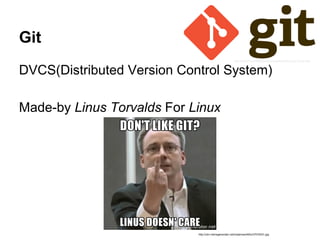
Made-by Linus Torvalds For Linux
http://git-scm.com/images/logos/downloads/Git-Logo-2Color.png
http://cdn.memegenerator.net/instances/400x/37078331.jpg
Git
Many Projects Use Git Because It’s Awesome
http://blog.appliedis.com/wp-content/uploads/2013/11/android1.png
http://upload.wikimedia.org/wikipedia/en/4/40/Octocat,_a_Mascot_of_Github.jpg
http://upload.wikimedia.org/wikipedia/commons/thumb/3/35/Tux.svg/512px-Tux.svg.png
http://git-scm.com/images/logos/downloads/Git-Logo-2Color.png
Git
Hard To Learn
Confusing For CVCS Users
Push? Pull? Fetch? Rebase? HEAD???
http://www.quickmeme.com/img/fd/fd09e17b3393b2ea1cd7e52af1ad7c77f3c2d7a83e9f47d4b90ba3af52dde329.jpg
http://git-scm.com/images/logos/downloads/Git-Logo-2Color.png
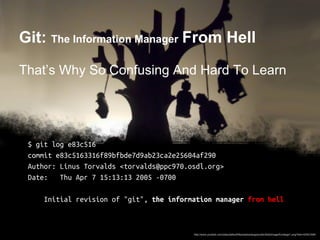
Git: The Information Manager From Hell
http://www.youblob.com/sites/default/files/styles/large/public/field/image/frontlego1.png?itok=XA5CXt84
Git: The Information Manager From Hell
$ git log e83c516
commit e83c5163316f89bfbde7d9ab23ca2e25604af290
Author: Linus Torvalds <torvalds@ppc970.osdl.org>
Date: Thu Apr 7 15:13:13 2005 -0700
Initial revision of "git", the information manager from hell
http://www.youblob.com/sites/default/files/styles/large/public/field/image/frontlego1.png?itok=XA5CXt84
Git: The Information Manager From Hell
That’s Why So Confusing And Hard To Learn
$ git log e83c516
commit e83c5163316f89bfbde7d9ab23ca2e25604af290
Author: Linus Torvalds <torvalds@ppc970.osdl.org>
Date: Thu Apr 7 15:13:13 2005 -0700
Initial revision of "git", the information manager from hell
http://www.youblob.com/sites/default/files/styles/large/public/field/image/frontlego1.png?itok=XA5CXt84
This Time, We Will...
See How Git Works From The Scratch
https://lh4.googleusercontent.com/gBpfuABUjSNi2RagtJrGi8TW-pmtgak_0qtGOGubihvKH-5-umreO9C
wJgjX2kaA9E7RkLwtEwiDnoMtOgm4iMJ0IWhvXlzlKL1kNVUYWuNa-gLRtRoyNjkVYg
This Time, We Will...
See How Git Works From The Scratch
Just For Fun
...Or To Be Friend Of Git
https://lh4.googleusercontent.com/gBpfuABUjSNi2RagtJrGi8TW-pmtgak_0qtGOGubihvKH-5-umreO9C
wJgjX2kaA9E7RkLwtEwiDnoMtOgm4iMJ0IWhvXlzlKL1kNVUYWuNa-gLRtRoyNjkVYg
This Time, We Will...
See How Git Works From The Scratch
Just For Fun
...Or To Be Friend Of Git
Forget About The
Complicated Commands
This Time
https://lh4.googleusercontent.com/gBpfuABUjSNi2RagtJrGi8TW-pmtgak_0qtGOGubihvKH-5-umreO9C
wJgjX2kaA9E7RkLwtEwiDnoMtOgm4iMJ0IWhvXlzlKL1kNVUYWuNa-gLRtRoyNjkVYg
In Short,
Git Is A Content-Addressable Storage System
http://www.juliagiff.com/wp-content/uploads/2014/03/tld
r_trollcat.jpg
In Short,
Git Is A Content-Addressable Storage System
Blob, Tree, Commit, Reference. That’s It =3
http://www.juliagiff.com/wp-content/uploads/2014/03/tld
r_trollcat.jpg
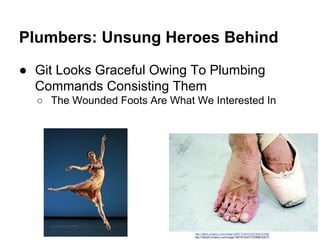
Plumbers: Unsung Heroes Behind
● Git Looks Graceful Owing To Plumbing
Commands Consisting Them
http://cfile4.uf.tistory.com/image/182FF7244CFDDFB33CC999
http://cfile29.uf.tistory.com/image/18574F224CFDD89B163073
Plumbers: Unsung Heroes Behind
● Git Looks Graceful Owing To Plumbing
Commands Consisting Them
○ The Wounded Foots Are What We Interested In
http://cfile4.uf.tistory.com/image/182FF7244CFDDFB33CC999
http://cfile29.uf.tistory.com/image/18574F224CFDD89B163073
Again, From The Scratch
VCS? Why? How?
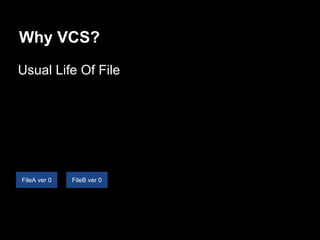
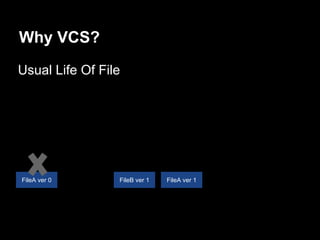
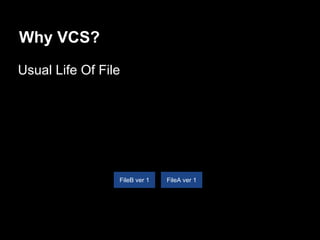
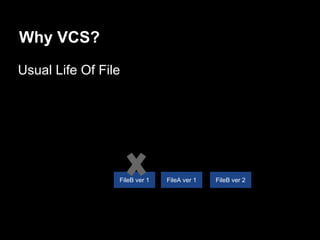
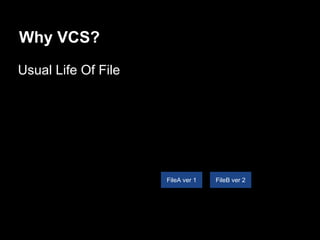
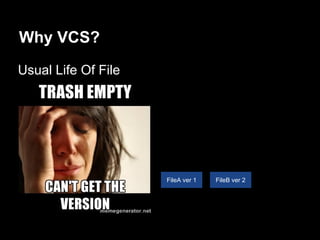
Why VCS?
Usual Life Of File
FileA ver 0 FileB ver 0
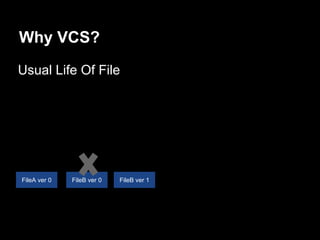
Why VCS?
Usual Life Of File
FileA ver 0 FileB ver 1FileB ver 0
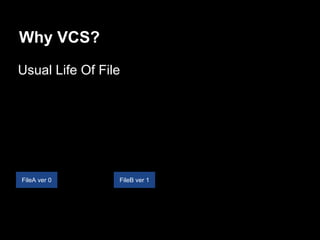
Why VCS?
Usual Life Of File
FileA ver 0 FileB ver 1
Why VCS?
Usual Life Of File
FileB ver 1 FileA ver 1FileA ver 0
Why VCS?
Usual Life Of File
FileB ver 1 FileA ver 1
Why VCS?
Usual Life Of File
FileB ver 2FileA ver 1FileB ver 1
Why VCS?
Usual Life Of File
FileB ver 2FileA ver 1
Why VCS?
Usual Life Of File
FileB ver 2FileA ver 1
We Need Version Control System
VCS Would...
Record Every Changes Safely, Efficiently
We Need Version Control System
VCS Would...
Record Every Changes Safely, Efficiently
Able To Check Out Any Version
We Need Version Control System
VCS Would...
Record Every Changes Safely, Efficiently
Able To Check Out Any Version
Easy To Read History
Brute-force Idea
Version Control Using File System
Brute-force Idea
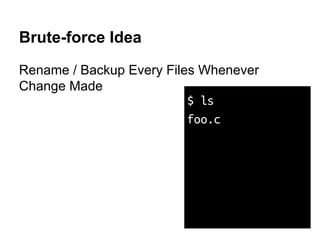
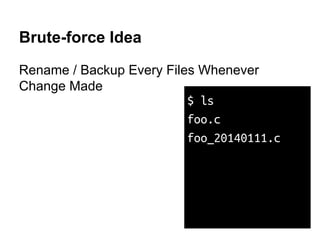
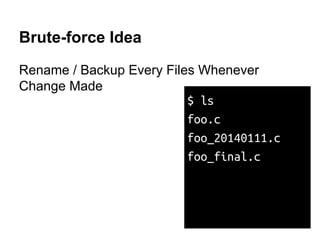
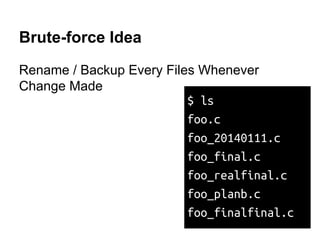
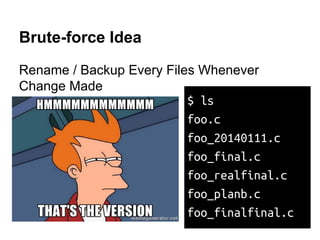
Rename / Backup Every Files Whenever
Change Made
Brute-force Idea
Rename / Backup Every Files Whenever
Change Made
$ ls
foo.c
Brute-force Idea
Rename / Backup Every Files Whenever
Change Made
$ ls
foo.c
foo_20140111.c
Brute-force Idea
Rename / Backup Every Files Whenever
Change Made
$ ls
foo.c
foo_20140111.c
foo_final.c
Brute-force Idea
Rename / Backup Every Files Whenever
Change Made
$ ls
foo.c
foo_20140111.c
foo_final.c
foo_realfinal.c
foo_planb.c
foo_finalfinal.c
Brute-force Idea
Rename / Backup Every Files Whenever
Change Made
$ ls
foo.c
foo_20140111.c
foo_final.c
foo_realfinal.c
foo_planb.c
foo_finalfinal.c
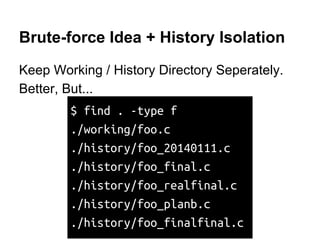
Brute-force Idea + History Isolation
Keep Working / History Directory Seperately.
Brute-force Idea + History Isolation
Keep Working / History Directory Seperately.
Better, But...
$ find . -type f
./working/foo.c
./history/foo_20140111.c
./history/foo_final.c
./history/foo_realfinal.c
./history/foo_planb.c
./history/foo_finalfinal.c
TODOs From Version Control Using FS
Use Storage Space-Efficiently
TODOs From Version Control Using FS
Use Storage Space-Efficiently
Easy History Searching
Mission #1:
Store History Space-Efficiently
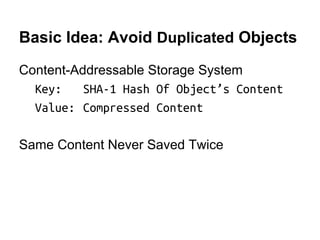
Basic Idea: Avoid Duplicated Objects
Content-Addressable Storage System
Basic Idea: Avoid Duplicated Objects
Content-Addressable Storage System
Key: SHA-1 Hash Of Object’s Content
Value: Compressed Content
Basic Idea: Avoid Duplicated Objects
Content-Addressable Storage System
Key: SHA-1 Hash Of Object’s Content
Value: Compressed Content
Same Content Never Saved Twice
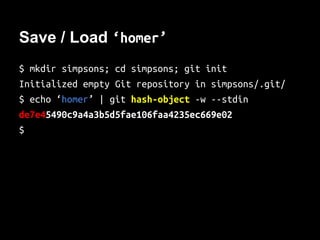
Save / Load ‘homer’
$ mkdir simpsons; cd simpsons; git init
Initialized empty Git repository in simpsons/.git/
$ echo ‘homer’ | git hash-object -w --stdin
4aa0bfa07f1680c50a1567ecc37bc3b6aa567b8f
$
Save / Load ‘homer’
$ mkdir simpsons; cd simpsons; git init
Initialized empty Git repository in simpsons/.git/
$ echo ‘homer’ | git hash-object -w --stdin
4aa0bfa07f1680c50a1567ecc37bc3b6aa567b8f
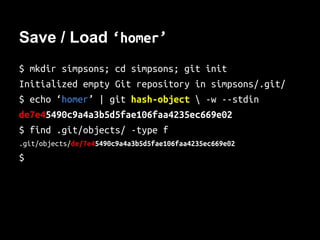
$ find .git/objects/ -type f
.git/objects/4a/a0bfa07f1680c50a1567ecc37bc3b6aa567b8f
$
Save / Load ‘homer’
$ mkdir simpsons; cd simpsons; git init
Initialized empty Git repository in simpsons/.git/
$ echo ‘homer’ | git hash-object -w --stdin
4aa0bfa07f1680c50a1567ecc37bc3b6aa567b8f
$ find .git/objects/ -type f
.git/objects/4a/a0bfa07f1680c50a1567ecc37bc3b6aa567b8f
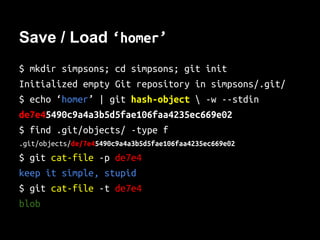
$ git cat-file -p 4aa0b
homer
$ git cat-file -t 4aa0b
blob
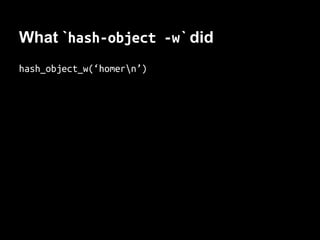
What `hash-object -w` did
hash_object_w(‘homern’)
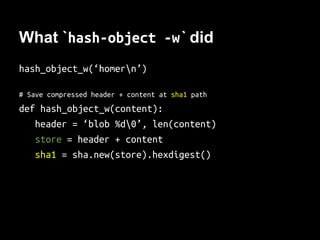
What `hash-object -w` did
hash_object_w(‘homern’)
# Save compressed header + content at sha1 path
def hash_object_w(content):
header = ‘blob %d0’ % len(content)
store = header + content
sha1 = sha.new(store).hexdigest()
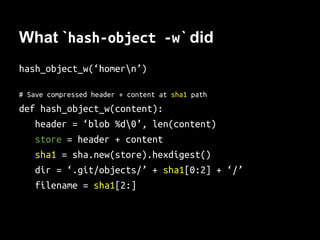
What `hash-object -w` did
hash_object_w(‘homern’)
# Save compressed header + content at sha1 path
def hash_object_w(content):
header = ‘blob %d0’ % len(content)
store = header + content
sha1 = sha.new(store).hexdigest()
dir = ‘.git/objects/’ + sha1[0:2] + ‘/’
filename = sha1[2:]
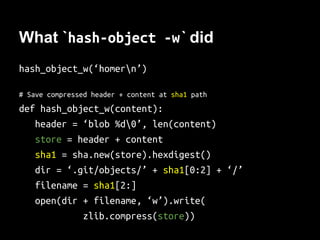
What `hash-object -w` did
hash_object_w(‘homern’)
# Save compressed header + content at sha1 path
def hash_object_w(content):
header = ‘blob %d0’ % len(content)
store = header + content
sha1 = sha.new(store).hexdigest()
dir = ‘.git/objects/’ + sha1[0:2] + ‘/’
filename = sha1[2:]
open(dir + filename, ‘w’).write(
zlib.compress(store))
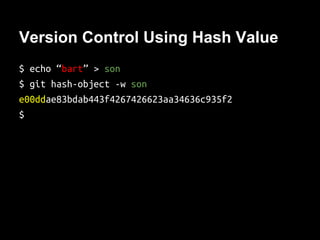
Version Control Using Hash Value
$ echo “bart” > son
$ git hash-object -w son
e00ddae83bdab443f4267426623aa34636c935f2
$
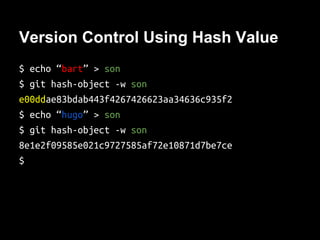
Version Control Using Hash Value
$ echo “bart” > son
$ git hash-object -w son
e00ddae83bdab443f4267426623aa34636c935f2
$ echo “hugo” > son
$ git hash-object -w son
8e1e2f09585e021c9727585af72e10871d7be7ce
$
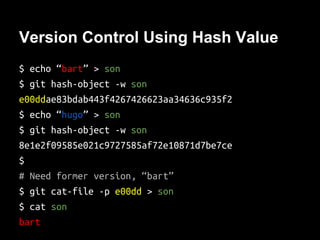
Version Control Using Hash Value
$ echo “bart” > son
$ git hash-object -w son
e00ddae83bdab443f4267426623aa34636c935f2
$ echo “hugo” > son
$ git hash-object -w son
8e1e2f09585e021c9727585af72e10871d7be7ce
$
# Need former version, “bart”
$ git cat-file -p e00dd > son
$ cat son
bart
TODOs From Version Control Using FS
Use Storage Space-Efficiently
Easy History Searching
Version Control Using Hash Value
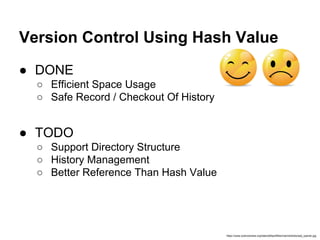
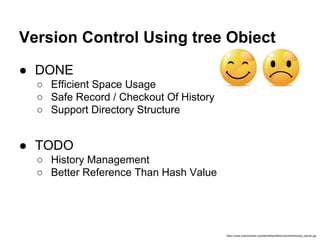
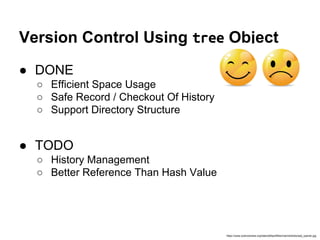
● DONE
○ Efficient Space Usage
○ Safe Record / Checkout Of History
https://www.sciencenews.org/sites/default/files/main/articles/sad_opener.jpg
Version Control Using Hash Value
● DONE
○ Efficient Space Usage
○ Safe Record / Checkout Of History
● TODO
○ Support Directory Structure
○ History Management
○ Better Reference Than Hash Value
https://www.sciencenews.org/sites/default/files/main/articles/sad_opener.jpg
WAIT!
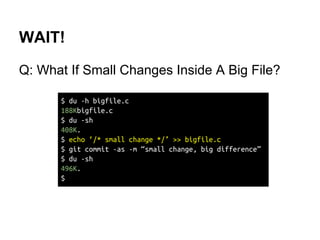
Q: What If Small Changes Inside A Big File?
WAIT!
Q: What If Small Changes Inside A Big File?
$ du -h bigfile.c
188Kbigfile.c
$ du -sh
408K.
$ echo ‘/* small change */’ >> bigfile.c
$ git commit -as -m “small change, big difference”
$ du -sh
496K.
$
WAIT!
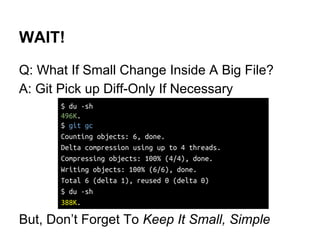
Q: What If Small Change Inside A Big File?
A: Git Pick up Diff-Only If Necessary
But, Don’t Forget To Keep It Small, Simple
$ du -sh
496K.
$ git gc
Counting objects: 6, done.
Delta compression using up to 4 threads.
Compressing objects: 100% (4/4), done.
Writing objects: 100% (6/6), done.
Total 6 (delta 1), reused 0 (delta 0)
$ du -sh
388K.
Mission #2:
Store History Of Directories
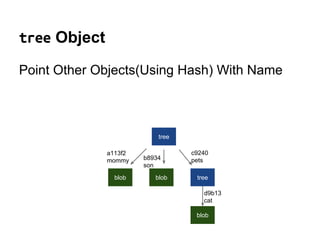
tree Object
Point Other Objects(Using Hash) With Name
tree Object
Point Other Objects(Using Hash) With Name
tree
blob blob tree
blob
a113f2
mommy b8934
son
c9240
pets
d9b13
cat
tree Object
Point Other Objects(Using Hash) With Name
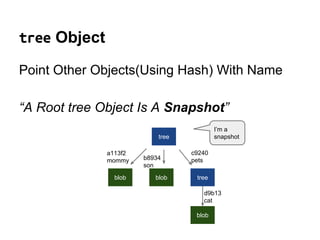
“A Root tree Object Is A Snapshot”
tree
blob blob tree
blob
a113f2
mommy b8934
son
c9240
pets
d9b13
cat
I’m a
snapshot
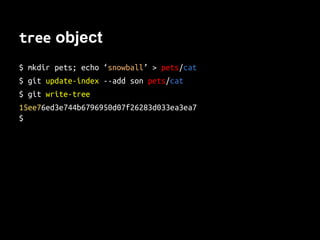
tree object
$ mkdir pets; echo ‘snowball’ > pets/cat
$ git update-index --add son pets/cat
$ git write-tree
15ee76ed3e744b6796950d07f26283d033ea3ea7
$
tree object
$ mkdir pets; echo ‘snowball’ > pets/cat
$ git update-index --add son pets/cat
$ git write-tree
15ee76ed3e744b6796950d07f26283d033ea3ea7
$ git cat-file -p 15ee7
040000 tree 85ab72cf1946dc56392718a1aafb3c6f66c02072 pets
100644 blob 8e1e2f09585e021c9727585af72e10871d7be7ce son
$
tree object
$ mkdir pets; echo ‘snowball’ > pets/cat
$ git update-index --add son pets/cat
$ git write-tree
15ee76ed3e744b6796950d07f26283d033ea3ea7
$ git cat-file -p 15ee7
040000 tree 85ab72cf1946dc56392718a1aafb3c6f66c02072 pets
100644 blob 8e1e2f09585e021c9727585af72e10871d7be7ce son
$ git cat-file -p 85ab7
100644 blob 6a1f952e1baedcb3db93a3ea5e3389e5a87941e9 cat
$ git cat-file -p 6a1f9
snowball
$
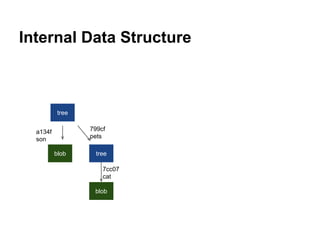
Internal Data Structure
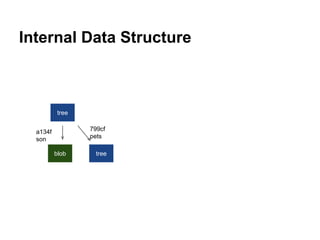
tree
blob tree
8e1e2
son
85ab7
pets
Internal Data Structure
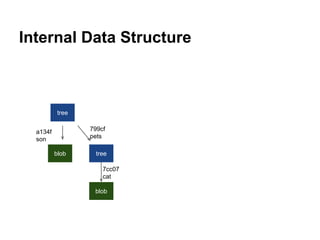
tree
blob tree
blob
6a1f9
cat
8e1e2
son
85ab7
pets
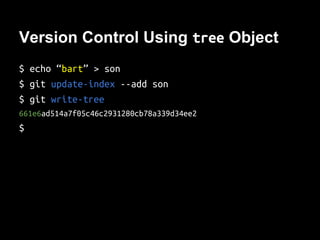
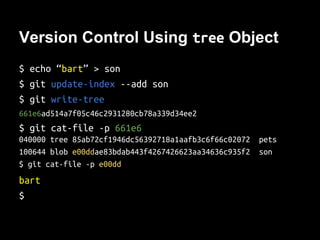
Version Control Using tree Object
$ echo “bart” > son
$ git update-index --add son
$ git write-tree
661e6ad514a7f05c46c2931280cb78a339d34ee2
$
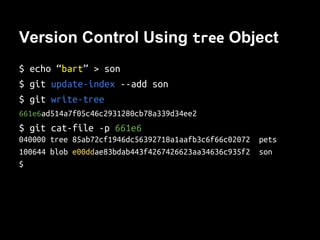
Version Control Using tree Object
$ echo “bart” > son
$ git update-index --add son
$ git write-tree
661e6ad514a7f05c46c2931280cb78a339d34ee2
$ git cat-file -p 661e6
040000 tree 85ab72cf1946dc56392718a1aafb3c6f66c02072 pets
100644 blob e00ddae83bdab443f4267426623aa34636c935f2 son
$
Version Control Using tree Object
$ echo “bart” > son
$ git update-index --add son
$ git write-tree
661e6ad514a7f05c46c2931280cb78a339d34ee2
$ git cat-file -p 661e6
040000 tree 85ab72cf1946dc56392718a1aafb3c6f66c02072 pets
100644 blob e00ddae83bdab443f4267426623aa34636c935f2 son
$ git cat-file -p e00dd
bart
$
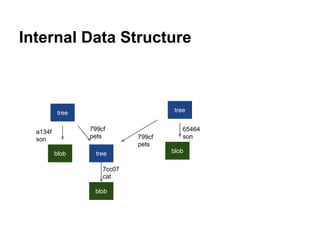
Internal Data Structure
tree
blob tree
blob
8e1e2
son
85ab7
pets
6a1f9
cat
Internal Data Structure
tree
blob tree
blob
tree
blob
e00dd
son85ab7
pets
8e1e2
son
85ab7
pets
6a1f9
cat
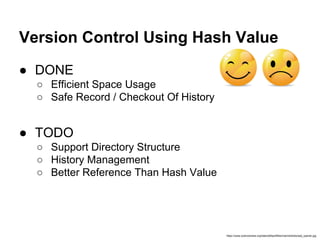
Version Control Using Hash Value
● DONE
○ Efficient Space Usage
○ Safe Record / Checkout Of History
● TODO
○ Support Directory Structure
○ History Management
○ Better Reference Than Hash Value
https://www.sciencenews.org/sites/default/files/main/articles/sad_opener.jpg
Version Control Using tree Object
● DONE
○ Efficient Space Usage
○ Safe Record / Checkout Of History
○ Support Directory Structure
● TODO
○ History Management
○ Better Reference Than Hash Value
https://www.sciencenews.org/sites/default/files/main/articles/sad_opener.jpg
Mission #3:
Commit Message
commit Object
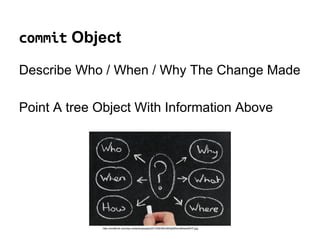
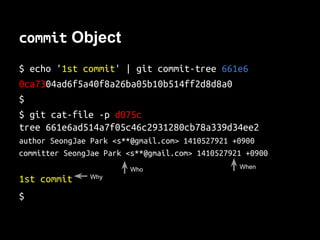
Describe Who / When / Why The Change Made
http://modthink.com/wp-content/uploads/2013/05/WhoWhatWhenWhereWHY.jpg
commit Object
Describe Who / When / Why The Change Made
Point A tree Object With Information Above
http://modthink.com/wp-content/uploads/2013/05/WhoWhatWhenWhereWHY.jpg
commit Object
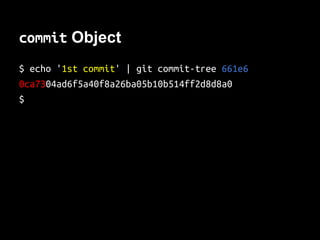
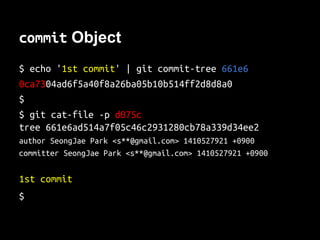
$ echo '1st commit' | git commit-tree 661e6
0ca7304ad6f5a40f8a26ba05b10b514ff2d8d8a0
$
commit Object
$ echo '1st commit' | git commit-tree 661e6
0ca7304ad6f5a40f8a26ba05b10b514ff2d8d8a0
$
$ git cat-file -p d075c
tree 661e6ad514a7f05c46c2931280cb78a339d34ee2
author SeongJae Park <s**@gmail.com> 1410527921 +0900
committer SeongJae Park <s**@gmail.com> 1410527921 +0900
1st commit
$
commit Object
$ echo '1st commit' | git commit-tree 661e6
0ca7304ad6f5a40f8a26ba05b10b514ff2d8d8a0
$
$ git cat-file -p d075c
tree 661e6ad514a7f05c46c2931280cb78a339d34ee2
author SeongJae Park <s**@gmail.com> 1410527921 +0900
committer SeongJae Park <s**@gmail.com> 1410527921 +0900
1st commit
$
Who When
Why
Version Control Using commit Object
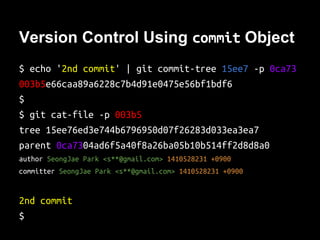
$ echo '2nd commit' | git commit-tree 15ee7 -p 0ca73
003b5e66caa89a6228c7b4d91e0475e56bf1bdf6
$
$ git cat-file -p 003b5
tree 15ee76ed3e744b6796950d07f26283d033ea3ea7
parent 0ca7304ad6f5a40f8a26ba05b10b514ff2d8d8a0
author SeongJae Park <s**@gmail.com> 1410528231 +0900
committer SeongJae Park <s**@gmail.com> 1410528231 +0900
2nd commit
$
Internal Data Structure
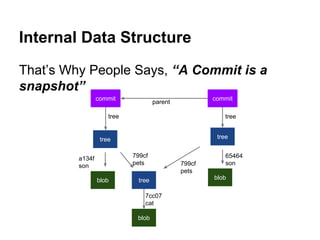
That’s Why People Says, “A Commit is a
snapshot”
tree
blob tree
blob
tree
blob
commit commit
tree
parent
tree
85ab7
pets
8e1e2
son
85ab7
pets
6a1f9
cat
e00dd
son
Version Control Using tree Object
● DONE
○ Efficient Space Usage
○ Safe Record / Checkout Of History
○ Support Directory Structure
● TODO
○ History Management
○ Better Reference Than Hash Value
https://www.sciencenews.org/sites/default/files/main/articles/sad_opener.jpg
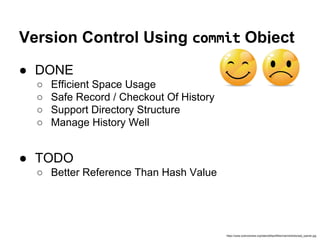
Version Control Using commit Object
● DONE
○ Efficient Space Usage
○ Safe Record / Checkout Of History
○ Support Directory Structure
○ Manage History Well
● TODO
○ Better Reference Than Hash Value
https://www.sciencenews.org/sites/default/files/main/articles/sad_opener.jpg
Mission #4:
Human Readable Name
Git References
File With Human-Readable Name
Git References
File With Human-Readable Name
Storing SHA-1 Value Of commit Object
Git References
File With Human-Readable Name
Storing SHA-1 Value Of commit Object
Resides In .git/refs/
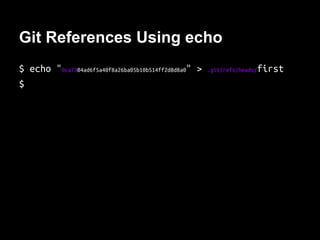
Git References Using echo
$ echo "0ca7304ad6f5a40f8a26ba05b10b514ff2d8d8a0" > .git/refs/heads/first
$
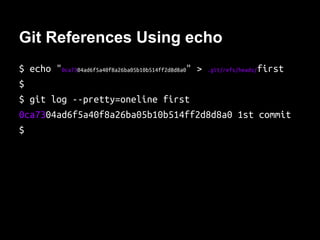
Git References Using echo
$ echo "0ca7304ad6f5a40f8a26ba05b10b514ff2d8d8a0" > .git/refs/heads/first
$
$ git log --pretty=oneline first
0ca7304ad6f5a40f8a26ba05b10b514ff2d8d8a0 1st commit
$
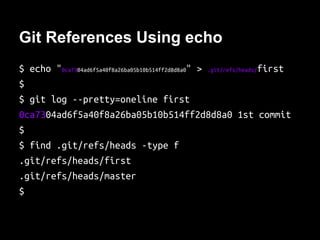
Git References Using echo
$ echo "0ca7304ad6f5a40f8a26ba05b10b514ff2d8d8a0" > .git/refs/heads/first
$
$ git log --pretty=oneline first
0ca7304ad6f5a40f8a26ba05b10b514ff2d8d8a0 1st commit
$
$ find .git/refs/heads -type f
.git/refs/heads/first
.git/refs/heads/master
$
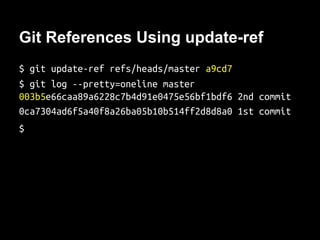
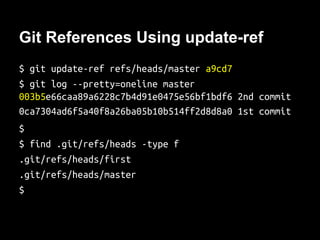
Git References Using update-ref
$ git update-ref refs/heads/master 003b5
$ git log --pretty=oneline master
003b5e66caa89a6228c7b4d91e0475e56bf1bdf6 2nd commit
0ca7304ad6f5a40f8a26ba05b10b514ff2d8d8a0 1st commit
$
Git References Using update-ref
$ git update-ref refs/heads/master 003b5
$ git log --pretty=oneline master
003b5e66caa89a6228c7b4d91e0475e56bf1bdf6 2nd commit
0ca7304ad6f5a40f8a26ba05b10b514ff2d8d8a0 1st commit
$
$ find .git/refs/heads -type f
.git/refs/heads/first
.git/refs/heads/master
$
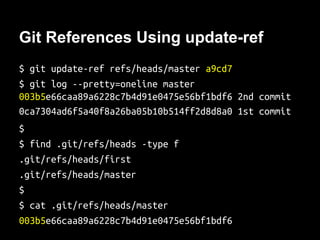
Git References Using update-ref
$ git update-ref refs/heads/master 003b5
$ git log --pretty=oneline master
003b5e66caa89a6228c7b4d91e0475e56bf1bdf6 2nd commit
0ca7304ad6f5a40f8a26ba05b10b514ff2d8d8a0 1st commit
$
$ find .git/refs/heads -type f
.git/refs/heads/first
.git/refs/heads/master
$
$ cat .git/refs/heads/master
003b5e66caa89a6228c7b4d91e0475e56bf1bdf6
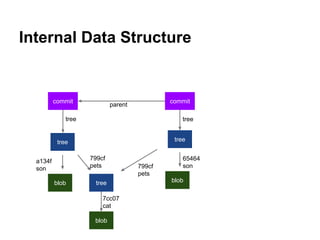
Internal Data Structure
tree
blob tree
blob
tree
blob
commit commit
tree
parent
tree
85ab7
pets
8e1e2
son
85ab7
pets
e00dd
son
6a1f9
cat
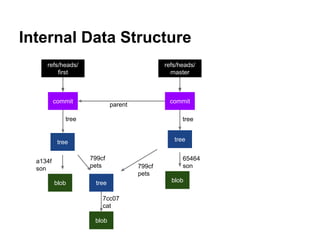
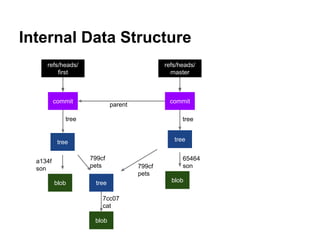
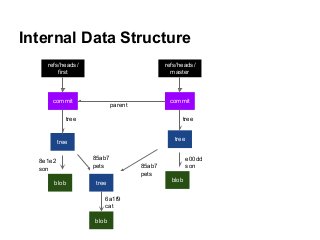
Internal Data Structure
tree
blob tree
blob
tree
blob
commit commit
tree
parent
tree
refs/heads/
master
refs/heads/
first
85ab7
pets
8e1e2
son
85ab7
pets
e00dd
son
6a1f9
cat
Version Control Using commit Object
● DONE
○ Efficient Space Usage
○ Safe Record / Checkout Of History
○ Support Directory Structure
○ Manage History Well
● TODO
○ Better Reference Than Hash Value
https://www.sciencenews.org/sites/default/files/main/articles/sad_opener.jpg
Version Control Using Reference
● DONE
○ Efficient Space Usage
○ Safe Record / Checkout Of History
○ Support Directory Structure
○ Manage History Well
○ Easy To Remember Specific Snapshot
● TODO
○ ...cooperation?
https://www.sciencenews.org/sites/default/files/main/articles/sad_opener.jpg
FAQ #1
How Git Make-up Working Directory?
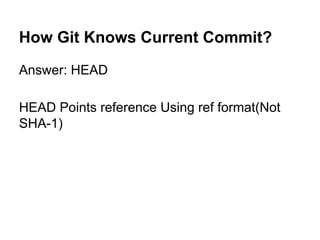
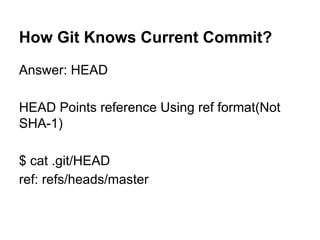
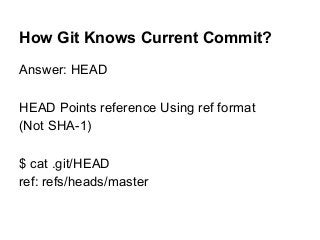
How Git Knows Current Commit?
Answer: HEAD
How Git Knows Current Commit?
Answer: HEAD
HEAD Points reference Using ref format(Not
SHA-1)
How Git Knows Current Commit?
Answer: HEAD
HEAD Points reference Using ref format
(Not SHA-1)
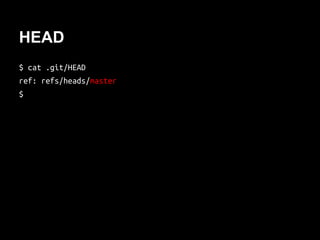
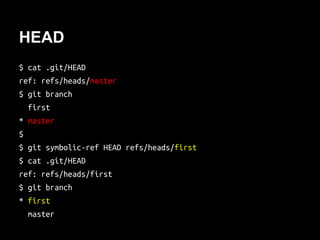
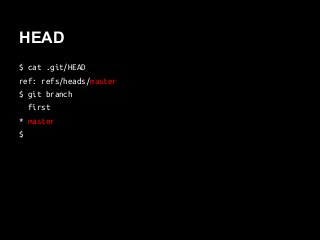
$ cat .git/HEAD
ref: refs/heads/master
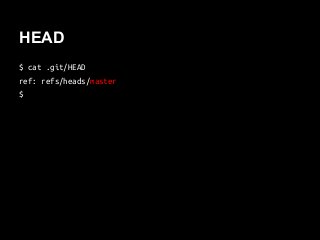
HEAD
$ cat .git/HEAD
ref: refs/heads/master
$
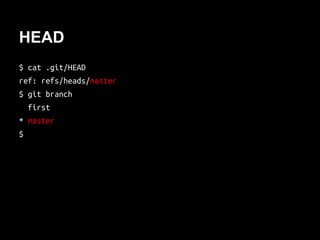
HEAD
$ cat .git/HEAD
ref: refs/heads/master
$ git branch
first
* master
$
HEAD
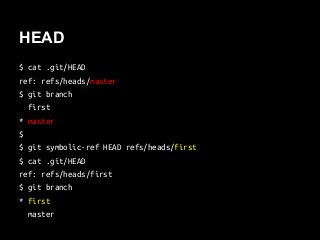
$ cat .git/HEAD
ref: refs/heads/master
$ git branch
first
* master
$
$ git symbolic-ref HEAD refs/heads/first
$ cat .git/HEAD
ref: refs/heads/first
$ git branch
* first
master
Internal Data Structure
tree
blob tree
blob
tree
blob
commit commit
tree
parent
tree
refs/heads/
master
refs/heads/
first
85ab7
pets
8e1e2
son
85ab7
pets
e00dd
son
6a1f9
cat
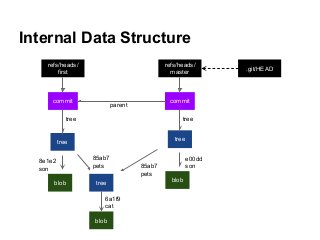
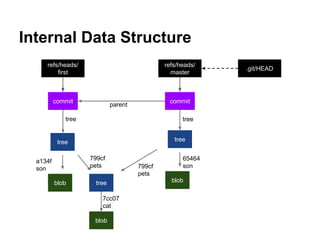
Internal Data Structure
tree
blob tree
blob
tree
blob
commit commit
tree
parent
tree
refs/heads/
master
refs/heads/
first
.git/HEAD
85ab7
pets
8e1e2
son
85ab7
pets
e00dd
son
6a1f9
cat
FAQ #2
Cloned. Now Fetch Or Pull ?
Fetch / Pull
Fetch Or Pull To Get Latest Code?
Fetch
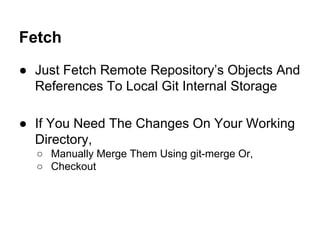
● Just Fetch Remote Repository’s Objects And
References To Local Git Internal Storage
Fetch
● Just Fetch Remote Repository’s Objects And
References To Local Git Internal Storage
● If You Need The Changes On Your Working
Directory,
Fetch
● Just Fetch Remote Repository’s Objects And
References To Local Git Internal Storage
● If You Need The Changes On Your Working
Directory,
○ Manually Merge Them Using git-merge Or,
○ Checkout
Fetch
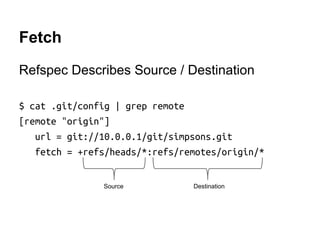
Refspec Describes Source / Destination
$ cat .git/config | grep remote -A3
[remote "origin"]
url = git://10.0.0.1/git/simpsons.git
fetch = +refs/heads/*:refs/remotes/origin/*
Source Destination
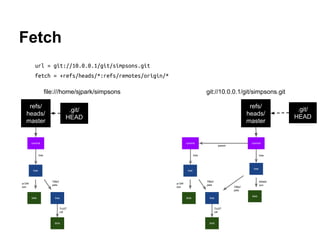
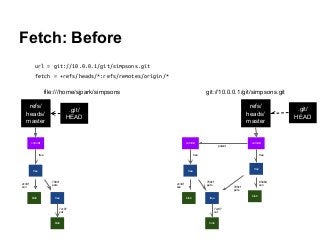
Fetch: Before
url = git://10.0.0.1/git/simpsons.git
fetch = +refs/heads/*:refs/remotes/origin/*
tree
blob tree
blob
a134f
son
799cf
pets
7cc07
cat
tree
blob
65464
son
799cf
pets
commit commit
tree
parent
tree
refs/
heads/
master
.git/
HEAD
git://10.0.0.1/git/simpsons.git
tree
blob tree
blob
a134f
son
799cf
pets
7cc07
cat
commit
tree
refs/
heads/
master
.git/
HEAD
file:///home/sjpark/simpsons
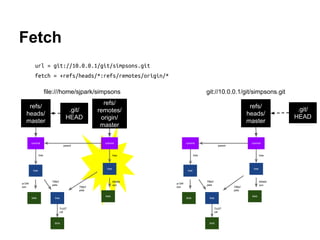
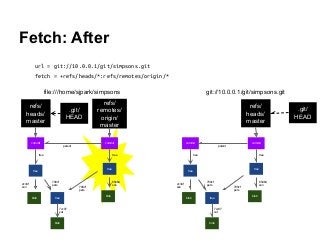
Fetch: After
url = git://10.0.0.1/git/simpsons.git
fetch = +refs/heads/*:refs/remotes/origin/*
tree
blob tree
blob
a134f
son
799cf
pets
7cc07
cat
tree
blob
65464
son
799cf
pets
commit commit
tree
parent
tree
refs/
heads/
master
.git/
HEAD
git://10.0.0.1/git/simpsons.git
tree
blob tree
blob
a134f
son
799cf
pets
7cc07
cat
tree
blob
65464
son
799cf
pets
commit commit
tree
parent
tree
refs/
remotes/
origin/
master
refs/
heads/
master
.git/
HEAD
file:///home/sjpark/simpsons
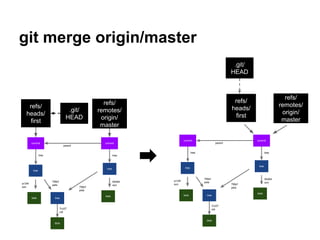
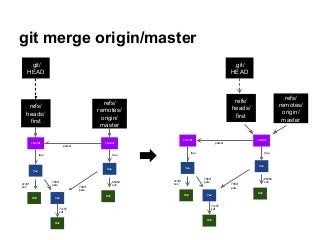
git merge origin/master
tree
blob tree
blob
a134f
son
799cf
pets
7cc07
cat
tree
blob
65464
son
799cf
pets
commit commit
tree
parent
tree
refs/
remotes/
origin/
master
refs/
heads/
first
.git/
HEAD
tree
blob tree
blob
a134f
son
799cf
pets
7cc07
cat
tree
blob
65464
son
799cf
pets
commit commit
tree
parent
tree
refs/
remotes/
origin/
master
refs/
heads/
first
.git/
HEAD
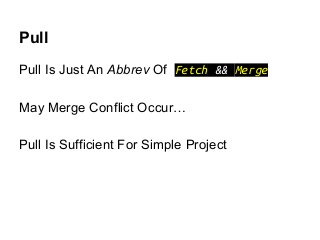
Pull
Pull Is Just An Abbrev Of Fetch && Merge
May Merge Conflict Occur…
Pull Is Sufficient For Simple Project
Wrap-up
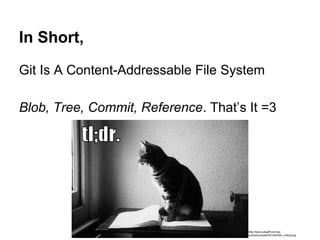
In Short,
Git Is A Content-Addressable File System
Blob, Tree, Commit, Reference. That’s It =3
http://www.juliagiff.com/wp-content/uploads/2014/03/tld
r_trollcat.jpg
Thank you :)
http://jeancharpentier.files.wordpress.com/2012/02/capture-plein-c3a9cran-01022012-230955.jpg
Slide-share
http://www.slideshare.net/SeongJaePark1/dee
p-darkside-ofgit
Latest Version Of This Slide Would Be
There
References
http://git-scm.com/book
http://www.youtube.com/watch?v=4XpnKHJAok8
http://en.wikipedia.org/wiki/The_Simpsons
This slide has been used for
Samsung Open Source CONference 2014
This work by SeongJae Park is licensed under the
Creative Commons Attribution-ShareAlike 3.0 Unported
License. To view a copy of this license, visit
http://creativecommons.org/licenses/by-sa/3.0/.

Deep dark-side of git: How git works internally

  • 1.
    How GIT WorksInternally SeongJae Park <sj38.park@gmail.com>
  • 2.
    Nice To MeetYou SeongJae Park sj38.park@gmail.com
  • 3.
    Git DVCS(Distributed Version ControlSystem) http://git-scm.com/images/logos/downloads/Git-Logo-2Color.png
  • 4.
    Git DVCS(Distributed Version ControlSystem) Made-by Linus Torvalds For Linux http://git-scm.com/images/logos/downloads/Git-Logo-2Color.png http://cdn.memegenerator.net/instances/400x/37078331.jpg
  • 5.
    Git Many Projects UseGit Because It’s Awesome http://blog.appliedis.com/wp-content/uploads/2013/11/android1.png http://upload.wikimedia.org/wikipedia/en/4/40/Octocat,_a_Mascot_of_Github.jpg http://upload.wikimedia.org/wikipedia/commons/thumb/3/35/Tux.svg/512px-Tux.svg.png http://git-scm.com/images/logos/downloads/Git-Logo-2Color.png
  • 6.
    Git Hard To Learn ConfusingFor CVCS Users Push? Pull? Fetch? Rebase? HEAD??? http://www.quickmeme.com/img/fd/fd09e17b3393b2ea1cd7e52af1ad7c77f3c2d7a83e9f47d4b90ba3af52dde329.jpg http://git-scm.com/images/logos/downloads/Git-Logo-2Color.png
  • 7.
    Git: The InformationManager From Hell http://www.youblob.com/sites/default/files/styles/large/public/field/image/frontlego1.png?itok=XA5CXt84
  • 8.
    Git: The InformationManager From Hell $ git log e83c516 commit e83c5163316f89bfbde7d9ab23ca2e25604af290 Author: Linus Torvalds <torvalds@ppc970.osdl.org> Date: Thu Apr 7 15:13:13 2005 -0700 Initial revision of "git", the information manager from hell http://www.youblob.com/sites/default/files/styles/large/public/field/image/frontlego1.png?itok=XA5CXt84
  • 9.
    Git: The InformationManager From Hell That’s Why So Confusing And Hard To Learn $ git log e83c516 commit e83c5163316f89bfbde7d9ab23ca2e25604af290 Author: Linus Torvalds <torvalds@ppc970.osdl.org> Date: Thu Apr 7 15:13:13 2005 -0700 Initial revision of "git", the information manager from hell http://www.youblob.com/sites/default/files/styles/large/public/field/image/frontlego1.png?itok=XA5CXt84
  • 10.
    This Time, WeWill... See How Git Works From The Scratch https://lh4.googleusercontent.com/gBpfuABUjSNi2RagtJrGi8TW-pmtgak_0qtGOGubihvKH-5-umreO9C wJgjX2kaA9E7RkLwtEwiDnoMtOgm4iMJ0IWhvXlzlKL1kNVUYWuNa-gLRtRoyNjkVYg
  • 11.
    This Time, WeWill... See How Git Works From The Scratch Just For Fun ...Or To Be Friend Of Git https://lh4.googleusercontent.com/gBpfuABUjSNi2RagtJrGi8TW-pmtgak_0qtGOGubihvKH-5-umreO9C wJgjX2kaA9E7RkLwtEwiDnoMtOgm4iMJ0IWhvXlzlKL1kNVUYWuNa-gLRtRoyNjkVYg
  • 12.
    This Time, WeWill... See How Git Works From The Scratch Just For Fun ...Or To Be Friend Of Git Forget About The Complicated Commands This Time https://lh4.googleusercontent.com/gBpfuABUjSNi2RagtJrGi8TW-pmtgak_0qtGOGubihvKH-5-umreO9C wJgjX2kaA9E7RkLwtEwiDnoMtOgm4iMJ0IWhvXlzlKL1kNVUYWuNa-gLRtRoyNjkVYg
  • 13.
    In Short, Git IsA Content-Addressable Storage System http://www.juliagiff.com/wp-content/uploads/2014/03/tld r_trollcat.jpg
  • 14.
    In Short, Git IsA Content-Addressable Storage System Blob, Tree, Commit, Reference. That’s It =3 http://www.juliagiff.com/wp-content/uploads/2014/03/tld r_trollcat.jpg
  • 15.
    Plumbers: Unsung HeroesBehind ● Git Looks Graceful Owing To Plumbing Commands Consisting Them http://cfile4.uf.tistory.com/image/182FF7244CFDDFB33CC999 http://cfile29.uf.tistory.com/image/18574F224CFDD89B163073
  • 16.
    Plumbers: Unsung HeroesBehind ● Git Looks Graceful Owing To Plumbing Commands Consisting Them ○ The Wounded Foots Are What We Interested In http://cfile4.uf.tistory.com/image/182FF7244CFDDFB33CC999 http://cfile29.uf.tistory.com/image/18574F224CFDD89B163073
  • 17.
    Again, From TheScratch VCS? Why? How?
  • 18.
    Why VCS? Usual LifeOf File FileA ver 0 FileB ver 0
  • 19.
    Why VCS? Usual LifeOf File FileA ver 0 FileB ver 1FileB ver 0
  • 20.
    Why VCS? Usual LifeOf File FileA ver 0 FileB ver 1
  • 21.
    Why VCS? Usual LifeOf File FileB ver 1 FileA ver 1FileA ver 0
  • 22.
    Why VCS? Usual LifeOf File FileB ver 1 FileA ver 1
  • 23.
    Why VCS? Usual LifeOf File FileB ver 2FileA ver 1FileB ver 1
  • 24.
    Why VCS? Usual LifeOf File FileB ver 2FileA ver 1
  • 25.
    Why VCS? Usual LifeOf File FileB ver 2FileA ver 1
  • 26.
    We Need VersionControl System VCS Would... Record Every Changes Safely, Efficiently
  • 27.
    We Need VersionControl System VCS Would... Record Every Changes Safely, Efficiently Able To Check Out Any Version
  • 28.
    We Need VersionControl System VCS Would... Record Every Changes Safely, Efficiently Able To Check Out Any Version Easy To Read History
  • 29.
  • 30.
    Brute-force Idea Rename /Backup Every Files Whenever Change Made
  • 31.
    Brute-force Idea Rename /Backup Every Files Whenever Change Made $ ls foo.c
  • 32.
    Brute-force Idea Rename /Backup Every Files Whenever Change Made $ ls foo.c foo_20140111.c
  • 33.
    Brute-force Idea Rename /Backup Every Files Whenever Change Made $ ls foo.c foo_20140111.c foo_final.c
  • 34.
    Brute-force Idea Rename /Backup Every Files Whenever Change Made $ ls foo.c foo_20140111.c foo_final.c foo_realfinal.c foo_planb.c foo_finalfinal.c
  • 35.
    Brute-force Idea Rename /Backup Every Files Whenever Change Made $ ls foo.c foo_20140111.c foo_final.c foo_realfinal.c foo_planb.c foo_finalfinal.c
  • 36.
    Brute-force Idea +History Isolation Keep Working / History Directory Seperately.
  • 37.
    Brute-force Idea +History Isolation Keep Working / History Directory Seperately. Better, But... $ find . -type f ./working/foo.c ./history/foo_20140111.c ./history/foo_final.c ./history/foo_realfinal.c ./history/foo_planb.c ./history/foo_finalfinal.c
  • 38.
    TODOs From VersionControl Using FS Use Storage Space-Efficiently
  • 39.
    TODOs From VersionControl Using FS Use Storage Space-Efficiently Easy History Searching
  • 40.
    Mission #1: Store HistorySpace-Efficiently
  • 41.
    Basic Idea: AvoidDuplicated Objects
  • 42.
    Basic Idea: AvoidDuplicated Objects Content-Addressable Storage System
  • 43.
    Basic Idea: AvoidDuplicated Objects Content-Addressable Storage System Key: SHA-1 Hash Of Object’s Content Value: Compressed Content
  • 44.
    Basic Idea: AvoidDuplicated Objects Content-Addressable Storage System Key: SHA-1 Hash Of Object’s Content Value: Compressed Content Same Content Never Saved Twice
  • 45.
    Save / Load‘homer’ $ mkdir simpsons; cd simpsons; git init Initialized empty Git repository in simpsons/.git/ $ echo ‘homer’ | git hash-object -w --stdin 4aa0bfa07f1680c50a1567ecc37bc3b6aa567b8f $
  • 46.
    Save / Load‘homer’ $ mkdir simpsons; cd simpsons; git init Initialized empty Git repository in simpsons/.git/ $ echo ‘homer’ | git hash-object -w --stdin 4aa0bfa07f1680c50a1567ecc37bc3b6aa567b8f $ find .git/objects/ -type f .git/objects/4a/a0bfa07f1680c50a1567ecc37bc3b6aa567b8f $
  • 47.
    Save / Load‘homer’ $ mkdir simpsons; cd simpsons; git init Initialized empty Git repository in simpsons/.git/ $ echo ‘homer’ | git hash-object -w --stdin 4aa0bfa07f1680c50a1567ecc37bc3b6aa567b8f $ find .git/objects/ -type f .git/objects/4a/a0bfa07f1680c50a1567ecc37bc3b6aa567b8f $ git cat-file -p 4aa0b homer $ git cat-file -t 4aa0b blob
  • 48.
    What `hash-object -w`did hash_object_w(‘homern’)
  • 49.
    What `hash-object -w`did hash_object_w(‘homern’) # Save compressed header + content at sha1 path def hash_object_w(content): header = ‘blob %d0’ % len(content) store = header + content sha1 = sha.new(store).hexdigest()
  • 50.
    What `hash-object -w`did hash_object_w(‘homern’) # Save compressed header + content at sha1 path def hash_object_w(content): header = ‘blob %d0’ % len(content) store = header + content sha1 = sha.new(store).hexdigest() dir = ‘.git/objects/’ + sha1[0:2] + ‘/’ filename = sha1[2:]
  • 51.
    What `hash-object -w`did hash_object_w(‘homern’) # Save compressed header + content at sha1 path def hash_object_w(content): header = ‘blob %d0’ % len(content) store = header + content sha1 = sha.new(store).hexdigest() dir = ‘.git/objects/’ + sha1[0:2] + ‘/’ filename = sha1[2:] open(dir + filename, ‘w’).write( zlib.compress(store))
  • 52.
    Version Control UsingHash Value $ echo “bart” > son $ git hash-object -w son e00ddae83bdab443f4267426623aa34636c935f2 $
  • 53.
    Version Control UsingHash Value $ echo “bart” > son $ git hash-object -w son e00ddae83bdab443f4267426623aa34636c935f2 $ echo “hugo” > son $ git hash-object -w son 8e1e2f09585e021c9727585af72e10871d7be7ce $
  • 54.
    Version Control UsingHash Value $ echo “bart” > son $ git hash-object -w son e00ddae83bdab443f4267426623aa34636c935f2 $ echo “hugo” > son $ git hash-object -w son 8e1e2f09585e021c9727585af72e10871d7be7ce $ # Need former version, “bart” $ git cat-file -p e00dd > son $ cat son bart
  • 55.
    TODOs From VersionControl Using FS Use Storage Space-Efficiently Easy History Searching
  • 56.
    Version Control UsingHash Value ● DONE ○ Efficient Space Usage ○ Safe Record / Checkout Of History https://www.sciencenews.org/sites/default/files/main/articles/sad_opener.jpg
  • 57.
    Version Control UsingHash Value ● DONE ○ Efficient Space Usage ○ Safe Record / Checkout Of History ● TODO ○ Support Directory Structure ○ History Management ○ Better Reference Than Hash Value https://www.sciencenews.org/sites/default/files/main/articles/sad_opener.jpg
  • 58.
    WAIT! Q: What IfSmall Changes Inside A Big File?
  • 59.
    WAIT! Q: What IfSmall Changes Inside A Big File? $ du -h bigfile.c 188Kbigfile.c $ du -sh 408K. $ echo ‘/* small change */’ >> bigfile.c $ git commit -as -m “small change, big difference” $ du -sh 496K. $
  • 60.
    WAIT! Q: What IfSmall Change Inside A Big File? A: Git Pick up Diff-Only If Necessary But, Don’t Forget To Keep It Small, Simple $ du -sh 496K. $ git gc Counting objects: 6, done. Delta compression using up to 4 threads. Compressing objects: 100% (4/4), done. Writing objects: 100% (6/6), done. Total 6 (delta 1), reused 0 (delta 0) $ du -sh 388K.
  • 61.
  • 62.
    tree Object Point OtherObjects(Using Hash) With Name
  • 63.
    tree Object Point OtherObjects(Using Hash) With Name tree blob blob tree blob a113f2 mommy b8934 son c9240 pets d9b13 cat
  • 64.
    tree Object Point OtherObjects(Using Hash) With Name “A Root tree Object Is A Snapshot” tree blob blob tree blob a113f2 mommy b8934 son c9240 pets d9b13 cat I’m a snapshot
  • 65.
    tree object $ mkdirpets; echo ‘snowball’ > pets/cat $ git update-index --add son pets/cat $ git write-tree 15ee76ed3e744b6796950d07f26283d033ea3ea7 $
  • 66.
    tree object $ mkdirpets; echo ‘snowball’ > pets/cat $ git update-index --add son pets/cat $ git write-tree 15ee76ed3e744b6796950d07f26283d033ea3ea7 $ git cat-file -p 15ee7 040000 tree 85ab72cf1946dc56392718a1aafb3c6f66c02072 pets 100644 blob 8e1e2f09585e021c9727585af72e10871d7be7ce son $
  • 67.
    tree object $ mkdirpets; echo ‘snowball’ > pets/cat $ git update-index --add son pets/cat $ git write-tree 15ee76ed3e744b6796950d07f26283d033ea3ea7 $ git cat-file -p 15ee7 040000 tree 85ab72cf1946dc56392718a1aafb3c6f66c02072 pets 100644 blob 8e1e2f09585e021c9727585af72e10871d7be7ce son $ git cat-file -p 85ab7 100644 blob 6a1f952e1baedcb3db93a3ea5e3389e5a87941e9 cat $ git cat-file -p 6a1f9 snowball $
  • 68.
    Internal Data Structure tree blobtree 8e1e2 son 85ab7 pets
  • 69.
    Internal Data Structure tree blobtree blob 6a1f9 cat 8e1e2 son 85ab7 pets
  • 70.
    Version Control Usingtree Object $ echo “bart” > son $ git update-index --add son $ git write-tree 661e6ad514a7f05c46c2931280cb78a339d34ee2 $
  • 71.
    Version Control Usingtree Object $ echo “bart” > son $ git update-index --add son $ git write-tree 661e6ad514a7f05c46c2931280cb78a339d34ee2 $ git cat-file -p 661e6 040000 tree 85ab72cf1946dc56392718a1aafb3c6f66c02072 pets 100644 blob e00ddae83bdab443f4267426623aa34636c935f2 son $
  • 72.
    Version Control Usingtree Object $ echo “bart” > son $ git update-index --add son $ git write-tree 661e6ad514a7f05c46c2931280cb78a339d34ee2 $ git cat-file -p 661e6 040000 tree 85ab72cf1946dc56392718a1aafb3c6f66c02072 pets 100644 blob e00ddae83bdab443f4267426623aa34636c935f2 son $ git cat-file -p e00dd bart $
  • 73.
    Internal Data Structure tree blobtree blob 8e1e2 son 85ab7 pets 6a1f9 cat
  • 74.
    Internal Data Structure tree blobtree blob tree blob e00dd son85ab7 pets 8e1e2 son 85ab7 pets 6a1f9 cat
  • 75.
    Version Control UsingHash Value ● DONE ○ Efficient Space Usage ○ Safe Record / Checkout Of History ● TODO ○ Support Directory Structure ○ History Management ○ Better Reference Than Hash Value https://www.sciencenews.org/sites/default/files/main/articles/sad_opener.jpg
  • 76.
    Version Control Usingtree Object ● DONE ○ Efficient Space Usage ○ Safe Record / Checkout Of History ○ Support Directory Structure ● TODO ○ History Management ○ Better Reference Than Hash Value https://www.sciencenews.org/sites/default/files/main/articles/sad_opener.jpg
  • 77.
  • 78.
    commit Object Describe Who/ When / Why The Change Made http://modthink.com/wp-content/uploads/2013/05/WhoWhatWhenWhereWHY.jpg
  • 79.
    commit Object Describe Who/ When / Why The Change Made Point A tree Object With Information Above http://modthink.com/wp-content/uploads/2013/05/WhoWhatWhenWhereWHY.jpg
  • 80.
    commit Object $ echo'1st commit' | git commit-tree 661e6 0ca7304ad6f5a40f8a26ba05b10b514ff2d8d8a0 $
  • 81.
    commit Object $ echo'1st commit' | git commit-tree 661e6 0ca7304ad6f5a40f8a26ba05b10b514ff2d8d8a0 $ $ git cat-file -p d075c tree 661e6ad514a7f05c46c2931280cb78a339d34ee2 author SeongJae Park <s**@gmail.com> 1410527921 +0900 committer SeongJae Park <s**@gmail.com> 1410527921 +0900 1st commit $
  • 82.
    commit Object $ echo'1st commit' | git commit-tree 661e6 0ca7304ad6f5a40f8a26ba05b10b514ff2d8d8a0 $ $ git cat-file -p d075c tree 661e6ad514a7f05c46c2931280cb78a339d34ee2 author SeongJae Park <s**@gmail.com> 1410527921 +0900 committer SeongJae Park <s**@gmail.com> 1410527921 +0900 1st commit $ Who When Why
  • 83.
    Version Control Usingcommit Object $ echo '2nd commit' | git commit-tree 15ee7 -p 0ca73 003b5e66caa89a6228c7b4d91e0475e56bf1bdf6 $ $ git cat-file -p 003b5 tree 15ee76ed3e744b6796950d07f26283d033ea3ea7 parent 0ca7304ad6f5a40f8a26ba05b10b514ff2d8d8a0 author SeongJae Park <s**@gmail.com> 1410528231 +0900 committer SeongJae Park <s**@gmail.com> 1410528231 +0900 2nd commit $
  • 84.
    Internal Data Structure That’sWhy People Says, “A Commit is a snapshot” tree blob tree blob tree blob commit commit tree parent tree 85ab7 pets 8e1e2 son 85ab7 pets 6a1f9 cat e00dd son
  • 85.
    Version Control Usingtree Object ● DONE ○ Efficient Space Usage ○ Safe Record / Checkout Of History ○ Support Directory Structure ● TODO ○ History Management ○ Better Reference Than Hash Value https://www.sciencenews.org/sites/default/files/main/articles/sad_opener.jpg
  • 86.
    Version Control Usingcommit Object ● DONE ○ Efficient Space Usage ○ Safe Record / Checkout Of History ○ Support Directory Structure ○ Manage History Well ● TODO ○ Better Reference Than Hash Value https://www.sciencenews.org/sites/default/files/main/articles/sad_opener.jpg
  • 87.
  • 88.
    Git References File WithHuman-Readable Name
  • 89.
    Git References File WithHuman-Readable Name Storing SHA-1 Value Of commit Object
  • 90.
    Git References File WithHuman-Readable Name Storing SHA-1 Value Of commit Object Resides In .git/refs/
  • 91.
    Git References Usingecho $ echo "0ca7304ad6f5a40f8a26ba05b10b514ff2d8d8a0" > .git/refs/heads/first $
  • 92.
    Git References Usingecho $ echo "0ca7304ad6f5a40f8a26ba05b10b514ff2d8d8a0" > .git/refs/heads/first $ $ git log --pretty=oneline first 0ca7304ad6f5a40f8a26ba05b10b514ff2d8d8a0 1st commit $
  • 93.
    Git References Usingecho $ echo "0ca7304ad6f5a40f8a26ba05b10b514ff2d8d8a0" > .git/refs/heads/first $ $ git log --pretty=oneline first 0ca7304ad6f5a40f8a26ba05b10b514ff2d8d8a0 1st commit $ $ find .git/refs/heads -type f .git/refs/heads/first .git/refs/heads/master $
  • 94.
    Git References Usingupdate-ref $ git update-ref refs/heads/master 003b5 $ git log --pretty=oneline master 003b5e66caa89a6228c7b4d91e0475e56bf1bdf6 2nd commit 0ca7304ad6f5a40f8a26ba05b10b514ff2d8d8a0 1st commit $
  • 95.
    Git References Usingupdate-ref $ git update-ref refs/heads/master 003b5 $ git log --pretty=oneline master 003b5e66caa89a6228c7b4d91e0475e56bf1bdf6 2nd commit 0ca7304ad6f5a40f8a26ba05b10b514ff2d8d8a0 1st commit $ $ find .git/refs/heads -type f .git/refs/heads/first .git/refs/heads/master $
  • 96.
    Git References Usingupdate-ref $ git update-ref refs/heads/master 003b5 $ git log --pretty=oneline master 003b5e66caa89a6228c7b4d91e0475e56bf1bdf6 2nd commit 0ca7304ad6f5a40f8a26ba05b10b514ff2d8d8a0 1st commit $ $ find .git/refs/heads -type f .git/refs/heads/first .git/refs/heads/master $ $ cat .git/refs/heads/master 003b5e66caa89a6228c7b4d91e0475e56bf1bdf6
  • 97.
    Internal Data Structure tree blobtree blob tree blob commit commit tree parent tree 85ab7 pets 8e1e2 son 85ab7 pets e00dd son 6a1f9 cat
  • 98.
    Internal Data Structure tree blobtree blob tree blob commit commit tree parent tree refs/heads/ master refs/heads/ first 85ab7 pets 8e1e2 son 85ab7 pets e00dd son 6a1f9 cat
  • 99.
    Version Control Usingcommit Object ● DONE ○ Efficient Space Usage ○ Safe Record / Checkout Of History ○ Support Directory Structure ○ Manage History Well ● TODO ○ Better Reference Than Hash Value https://www.sciencenews.org/sites/default/files/main/articles/sad_opener.jpg
  • 100.
    Version Control UsingReference ● DONE ○ Efficient Space Usage ○ Safe Record / Checkout Of History ○ Support Directory Structure ○ Manage History Well ○ Easy To Remember Specific Snapshot ● TODO ○ ...cooperation? https://www.sciencenews.org/sites/default/files/main/articles/sad_opener.jpg
  • 101.
    FAQ #1 How GitMake-up Working Directory?
  • 102.
    How Git KnowsCurrent Commit? Answer: HEAD
  • 103.
    How Git KnowsCurrent Commit? Answer: HEAD HEAD Points reference Using ref format(Not SHA-1)
  • 104.
    How Git KnowsCurrent Commit? Answer: HEAD HEAD Points reference Using ref format (Not SHA-1) $ cat .git/HEAD ref: refs/heads/master
  • 105.
    HEAD $ cat .git/HEAD ref:refs/heads/master $
  • 106.
    HEAD $ cat .git/HEAD ref:refs/heads/master $ git branch first * master $
  • 107.
    HEAD $ cat .git/HEAD ref:refs/heads/master $ git branch first * master $ $ git symbolic-ref HEAD refs/heads/first $ cat .git/HEAD ref: refs/heads/first $ git branch * first master
  • 108.
    Internal Data Structure tree blobtree blob tree blob commit commit tree parent tree refs/heads/ master refs/heads/ first 85ab7 pets 8e1e2 son 85ab7 pets e00dd son 6a1f9 cat
  • 109.
    Internal Data Structure tree blobtree blob tree blob commit commit tree parent tree refs/heads/ master refs/heads/ first .git/HEAD 85ab7 pets 8e1e2 son 85ab7 pets e00dd son 6a1f9 cat
  • 110.
    FAQ #2 Cloned. NowFetch Or Pull ?
  • 111.
    Fetch / Pull FetchOr Pull To Get Latest Code?
  • 112.
    Fetch ● Just FetchRemote Repository’s Objects And References To Local Git Internal Storage
  • 113.
    Fetch ● Just FetchRemote Repository’s Objects And References To Local Git Internal Storage ● If You Need The Changes On Your Working Directory,
  • 114.
    Fetch ● Just FetchRemote Repository’s Objects And References To Local Git Internal Storage ● If You Need The Changes On Your Working Directory, ○ Manually Merge Them Using git-merge Or, ○ Checkout
  • 115.
    Fetch Refspec Describes Source/ Destination $ cat .git/config | grep remote -A3 [remote "origin"] url = git://10.0.0.1/git/simpsons.git fetch = +refs/heads/*:refs/remotes/origin/* Source Destination
  • 116.
    Fetch: Before url =git://10.0.0.1/git/simpsons.git fetch = +refs/heads/*:refs/remotes/origin/* tree blob tree blob a134f son 799cf pets 7cc07 cat tree blob 65464 son 799cf pets commit commit tree parent tree refs/ heads/ master .git/ HEAD git://10.0.0.1/git/simpsons.git tree blob tree blob a134f son 799cf pets 7cc07 cat commit tree refs/ heads/ master .git/ HEAD file:///home/sjpark/simpsons
  • 117.
    Fetch: After url =git://10.0.0.1/git/simpsons.git fetch = +refs/heads/*:refs/remotes/origin/* tree blob tree blob a134f son 799cf pets 7cc07 cat tree blob 65464 son 799cf pets commit commit tree parent tree refs/ heads/ master .git/ HEAD git://10.0.0.1/git/simpsons.git tree blob tree blob a134f son 799cf pets 7cc07 cat tree blob 65464 son 799cf pets commit commit tree parent tree refs/ remotes/ origin/ master refs/ heads/ master .git/ HEAD file:///home/sjpark/simpsons
  • 118.
    git merge origin/master tree blobtree blob a134f son 799cf pets 7cc07 cat tree blob 65464 son 799cf pets commit commit tree parent tree refs/ remotes/ origin/ master refs/ heads/ first .git/ HEAD tree blob tree blob a134f son 799cf pets 7cc07 cat tree blob 65464 son 799cf pets commit commit tree parent tree refs/ remotes/ origin/ master refs/ heads/ first .git/ HEAD
  • 119.
    Pull Pull Is JustAn Abbrev Of Fetch && Merge May Merge Conflict Occur… Pull Is Sufficient For Simple Project
  • 120.
  • 121.
    In Short, Git IsA Content-Addressable File System Blob, Tree, Commit, Reference. That’s It =3 http://www.juliagiff.com/wp-content/uploads/2014/03/tld r_trollcat.jpg
  • 122.
  • 123.
  • 124.
  • 125.
    This slide hasbeen used for Samsung Open Source CONference 2014
  • 126.
    This work bySeongJae Park is licensed under the Creative Commons Attribution-ShareAlike 3.0 Unported License. To view a copy of this license, visit http://creativecommons.org/licenses/by-sa/3.0/.