Git & Github - A primer
Suryakumar Sudar, iQuanti
Git - Installation Instructions
For Linux :
sudo apt-get install git
For Windows:
https://git-scm.com/download/win
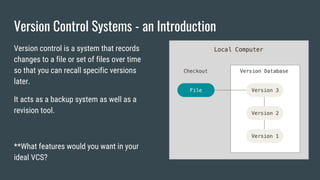
Version Control Systems - an Introduction
Version control is a system that records
changes to a file or set of files over time
so that you can recall specific versions
later.
It acts as a backup system as well as a
revision tool.
**What features would you want in your
ideal VCS?
Version Control System - Essential Functions
● Should support reversion of a project/file to a previous state
● Should support Branching/Merging
● Should aid Traceability
● Should be distributed, not centralized
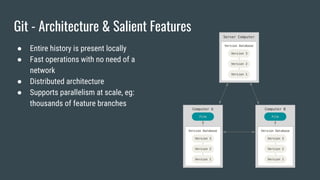
Git - Architecture & Salient Features
● Entire history is present locally
● Fast operations with no need of a
network
● Distributed architecture
● Supports parallelism at scale, eg:
thousands of feature branches
Workflow - Three States [Modified - Staged - Committed]
● Committed means that the data is safely
stored in your local database
● Modified means that you have changed
the file but have not committed it to your
database yet.
● Staged means that you have marked a
modified file in its current version to go
into your next commit snapshot
** the current working directory is referred to
as HEAD
To create a new
repository
git init
Create a new directory and execute the
command to initialize a repository
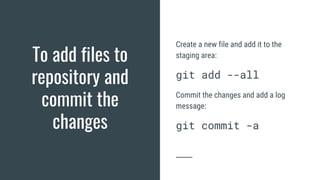
To add files to
repository and
commit the
changes
Create a new file and add it to the
staging area:
git add --all
Commit the changes and add a log
message:
git commit -a
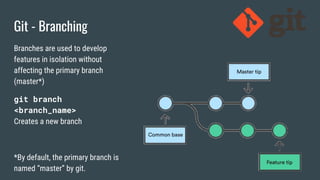
Git - Branching
Branches are used to develop
features in isolation without
affecting the primary branch
(master*)
git branch
<branch_name>
Creates a new branch
*By default, the primary branch is
named “master” by git.
To switch between
states*
*States can refer to either branches
or commits
Create a new branch from the current
state of the project:
git checkout -b <branch name>
To switch to an already existing branch:
git checkout <branch_name>
To switch to a different commit ID:
git checkout <commit_id>
To inspect a
repository
Lists commit history with additional
information including author, commit ID
and log message:
git log
Check the status of working directory
and the staging area:
git status
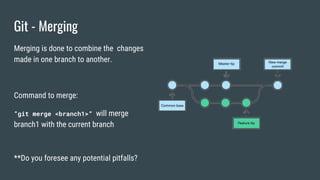
Git - Merging
Merging is done to combine the changes
made in one branch to another.
Command to merge:
“git merge <branch1>“ will merge
branch1 with the current branch
**Do you foresee any potential pitfalls?
Merge conflicts and resolution
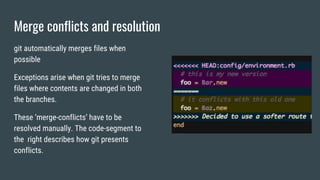
git automatically merges files when
possible
Exceptions arise when git tries to merge
files where contents are changed in both
the branches.
These ‘merge-conflicts’ have to be
resolved manually. The code-segment to
the right describes how git presents
conflicts.
Git remotes and Github
● Remotes refer to servers which host repositories
● Companies which provide such service (Remotes): Github, Bitbucket, AWS CodeCommit
etc..
● As convention, we refer to the primary remote as ‘origin’. This is purely conventional
and there is no specific importance attached to the term ‘origin’.
Add/List remotes of
a repository
Add a remote to an existing repository:
git remote add <remote_name>
<remote_URL>
Eg: git remote add origin
https://github.com/user/repo.git
List remotes of a repository:
git remote -v
Working with
remotes
To download/clone a repository:
git clone <github_URL>
To push changes from local to remote:
git push
To pull changes from remote to local:
git pull [will merge local
branch with remote]
Additional Tips
● Commit often
● Branch whenever required
● Decide upon a workflow with your team
● Always pull before you push code to
remote
● Write meaningful commit messages
● “git stash” and “git stash pop” to
save intermediate changes
● “git reset HEAD --hard” to reset
local changes
● Never push sensitive keys/credentials
to a public repository
References and further reading
● https://git-scm.com/book/en/v2/Getting-Started-About-Version-Control
● https://in.udacity.com/course/how-to-use-git-and-github--ud775
● https://www.atlassian.com/git/tutorials/learn-git-with-bitbucket-cloud
● https://github.com/pluralsight/git-internals-pdf
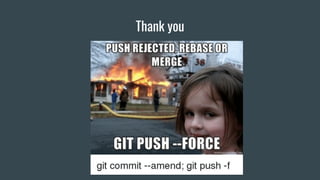
Thank you

Git and Github - A primer

  • 1.
    Git & Github- A primer Suryakumar Sudar, iQuanti
  • 2.
    Git - InstallationInstructions For Linux : sudo apt-get install git For Windows: https://git-scm.com/download/win
  • 3.
    Version Control Systems- an Introduction Version control is a system that records changes to a file or set of files over time so that you can recall specific versions later. It acts as a backup system as well as a revision tool. **What features would you want in your ideal VCS?
  • 4.
    Version Control System- Essential Functions ● Should support reversion of a project/file to a previous state ● Should support Branching/Merging ● Should aid Traceability ● Should be distributed, not centralized
  • 5.
    Git - Architecture& Salient Features ● Entire history is present locally ● Fast operations with no need of a network ● Distributed architecture ● Supports parallelism at scale, eg: thousands of feature branches
  • 6.
    Workflow - ThreeStates [Modified - Staged - Committed] ● Committed means that the data is safely stored in your local database ● Modified means that you have changed the file but have not committed it to your database yet. ● Staged means that you have marked a modified file in its current version to go into your next commit snapshot ** the current working directory is referred to as HEAD
  • 7.
    To create anew repository git init Create a new directory and execute the command to initialize a repository
  • 8.
    To add filesto repository and commit the changes Create a new file and add it to the staging area: git add --all Commit the changes and add a log message: git commit -a
  • 9.
    Git - Branching Branchesare used to develop features in isolation without affecting the primary branch (master*) git branch <branch_name> Creates a new branch *By default, the primary branch is named “master” by git.
  • 10.
    To switch between states* *Statescan refer to either branches or commits Create a new branch from the current state of the project: git checkout -b <branch name> To switch to an already existing branch: git checkout <branch_name> To switch to a different commit ID: git checkout <commit_id>
  • 11.
    To inspect a repository Listscommit history with additional information including author, commit ID and log message: git log Check the status of working directory and the staging area: git status
  • 12.
    Git - Merging Mergingis done to combine the changes made in one branch to another. Command to merge: “git merge <branch1>“ will merge branch1 with the current branch **Do you foresee any potential pitfalls?
  • 13.
    Merge conflicts andresolution git automatically merges files when possible Exceptions arise when git tries to merge files where contents are changed in both the branches. These ‘merge-conflicts’ have to be resolved manually. The code-segment to the right describes how git presents conflicts.
  • 14.
    Git remotes andGithub ● Remotes refer to servers which host repositories ● Companies which provide such service (Remotes): Github, Bitbucket, AWS CodeCommit etc.. ● As convention, we refer to the primary remote as ‘origin’. This is purely conventional and there is no specific importance attached to the term ‘origin’.
  • 15.
    Add/List remotes of arepository Add a remote to an existing repository: git remote add <remote_name> <remote_URL> Eg: git remote add origin https://github.com/user/repo.git List remotes of a repository: git remote -v
  • 16.
    Working with remotes To download/clonea repository: git clone <github_URL> To push changes from local to remote: git push To pull changes from remote to local: git pull [will merge local branch with remote]
  • 17.
    Additional Tips ● Commitoften ● Branch whenever required ● Decide upon a workflow with your team ● Always pull before you push code to remote ● Write meaningful commit messages ● “git stash” and “git stash pop” to save intermediate changes ● “git reset HEAD --hard” to reset local changes ● Never push sensitive keys/credentials to a public repository
  • 18.
    References and furtherreading ● https://git-scm.com/book/en/v2/Getting-Started-About-Version-Control ● https://in.udacity.com/course/how-to-use-git-and-github--ud775 ● https://www.atlassian.com/git/tutorials/learn-git-with-bitbucket-cloud ● https://github.com/pluralsight/git-internals-pdf
  • 19.