Intro to Git and GitHub
Boston Code Camp 2018
Andrew Babiec
2018-04-07
What is Git?
Distributed Version Control System
 Version Control System: track changes to source code: who, what, why, when
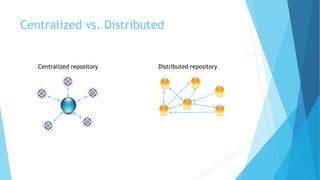
Centralized vs. Distributed
Centralized repository Distributed repository
Git - Distributed Version Control System
Git Repository (repo/project)
 Entire collection of files and folders, along with full history
Characteristics
 Local & offline - Entire timeline/history of changes
 Snapshots, not deltas
 Changes are always additions
File history - snapshots in time called commits
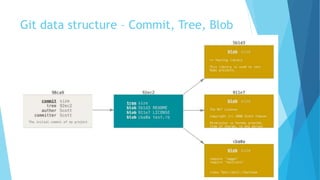
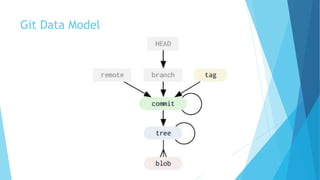
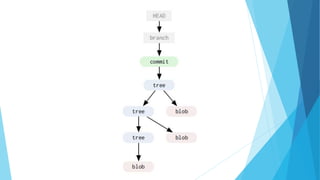
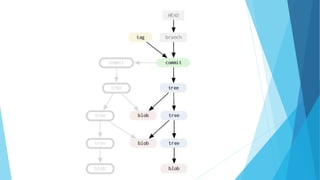
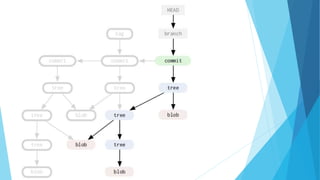
Git data structure – Commit, Tree, Blob
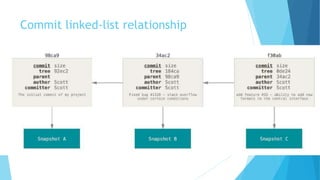
Commit linked-list relationship
Git Branches
Exist at the repository level
 A branch applies to the entire repository
 Unlike most centralized version control tools where branches exist inside the
repository
 Default branch is ‘Master’
 Can be local or remote
Exceptionally lightweight
 Implemented as a pointer to a commit in the graph
 Exist only in the local repository until they’re explicitly shared
 Encourages feature branching
Checkout – switch branch
Git Data Model
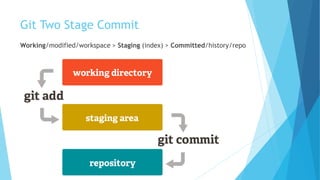
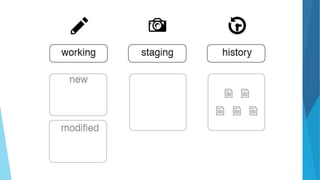
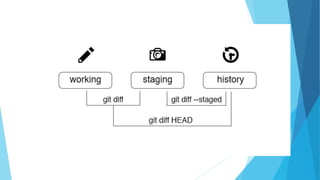
Git Two Stage Commit
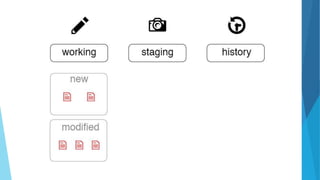
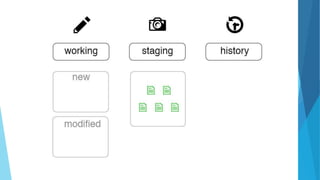
Working/modified/workspace > Staging (index) > Committed/history/repo
Git File States
Files exist in 1 of 4 states
 Untracked, Modified, Staged or Committed
 An untracked file is one that is not currently part of the version controlled
directory
Use git commands for adding, moving, renaming and
removing/deleting files
 git add
 git mv (move and rename)
 git rm (remove)
Git repo/project data
Git stores 3 copies of a project on your workstation.
 One copy is your own repository with your own commit history.
 The second copy is your working copy where you are editing and building.
 State can be Working or Staged
 The third copy is your local "cached" copy of a remote repository.
Git saves space by storing file contents as unique, compressed blobs
identified by a hash
Git Remotes
Remotes - remote repository (internet or local network or
local)
 Origin - default name for remote cloned from
 Merge Conflicts: local & remote
Commands
 Fetch - get changes from remote, updates remote-tracking branch
 Pull - combination of git fetch & git merge, updates current local branch
 Push - push changes to remote
Git Commands
 init, clone
 add, mv, rm, reset, clean
 checkout, commit
 status, log, show, grep, reflog
 branch, merge, diff, rebase, tag
 fetch, pull, push
 config, remote
Git Workflows
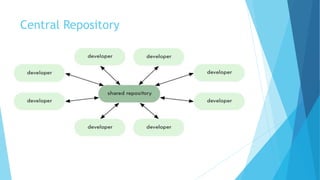
Central Repository
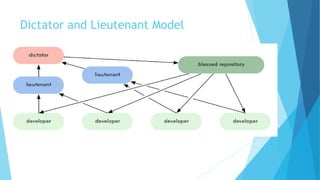
Dictator and Lieutenant Model
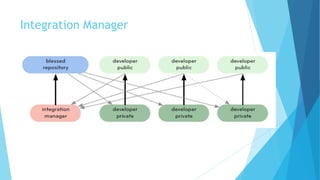
Integration Manager
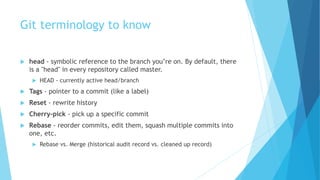
Git terminology to know
 head - symbolic reference to the branch you’re on. By default, there
is a "head" in every repository called master.
 HEAD - currently active head/branch
 Tags - pointer to a commit (like a label)
 Reset - rewrite history
 Cherry-pick - pick up a specific commit
 Rebase - reorder commits, edit them, squash multiple commits into
one, etc.
 Rebase vs. Merge (historical audit record vs. cleaned up record)
Git Rebase warning:
Do not rebase commits that
exist outside your repository.
GitHub
Github
Online Service/Collaboration Platform
 Core function is an online git service
 Adds: issues, pull requests, code review, orgs & teams, pages, etc.
Enhancements on top of Git
 Fork - copy of another repository (clone)
 Pull Request (PR) – code review & approval step
Github Flow
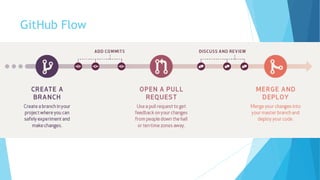
 Create Branch, Add Commits, Open PR, Discuss & Review, Merge & Deploy
GitHub Flow

Intro to Git and Github

  • 1.
    Intro to Gitand GitHub Boston Code Camp 2018 Andrew Babiec 2018-04-07
  • 3.
    What is Git? DistributedVersion Control System  Version Control System: track changes to source code: who, what, why, when
  • 4.
    Centralized vs. Distributed Centralizedrepository Distributed repository
  • 5.
    Git - DistributedVersion Control System Git Repository (repo/project)  Entire collection of files and folders, along with full history Characteristics  Local & offline - Entire timeline/history of changes  Snapshots, not deltas  Changes are always additions File history - snapshots in time called commits
  • 6.
    Git data structure– Commit, Tree, Blob
  • 7.
  • 8.
    Git Branches Exist atthe repository level  A branch applies to the entire repository  Unlike most centralized version control tools where branches exist inside the repository  Default branch is ‘Master’  Can be local or remote Exceptionally lightweight  Implemented as a pointer to a commit in the graph  Exist only in the local repository until they’re explicitly shared  Encourages feature branching Checkout – switch branch
  • 9.
  • 13.
    Git Two StageCommit Working/modified/workspace > Staging (index) > Committed/history/repo
  • 14.
    Git File States Filesexist in 1 of 4 states  Untracked, Modified, Staged or Committed  An untracked file is one that is not currently part of the version controlled directory Use git commands for adding, moving, renaming and removing/deleting files  git add  git mv (move and rename)  git rm (remove)
  • 19.
    Git repo/project data Gitstores 3 copies of a project on your workstation.  One copy is your own repository with your own commit history.  The second copy is your working copy where you are editing and building.  State can be Working or Staged  The third copy is your local "cached" copy of a remote repository. Git saves space by storing file contents as unique, compressed blobs identified by a hash
  • 20.
    Git Remotes Remotes -remote repository (internet or local network or local)  Origin - default name for remote cloned from  Merge Conflicts: local & remote Commands  Fetch - get changes from remote, updates remote-tracking branch  Pull - combination of git fetch & git merge, updates current local branch  Push - push changes to remote
  • 21.
    Git Commands  init,clone  add, mv, rm, reset, clean  checkout, commit  status, log, show, grep, reflog  branch, merge, diff, rebase, tag  fetch, pull, push  config, remote
  • 23.
  • 24.
  • 25.
  • 26.
  • 27.
    Git terminology toknow  head - symbolic reference to the branch you’re on. By default, there is a "head" in every repository called master.  HEAD - currently active head/branch  Tags - pointer to a commit (like a label)  Reset - rewrite history  Cherry-pick - pick up a specific commit  Rebase - reorder commits, edit them, squash multiple commits into one, etc.  Rebase vs. Merge (historical audit record vs. cleaned up record)
  • 28.
    Git Rebase warning: Donot rebase commits that exist outside your repository.
  • 29.
  • 30.
    Github Online Service/Collaboration Platform Core function is an online git service  Adds: issues, pull requests, code review, orgs & teams, pages, etc. Enhancements on top of Git  Fork - copy of another repository (clone)  Pull Request (PR) – code review & approval step Github Flow  Create Branch, Add Commits, Open PR, Discuss & Review, Merge & Deploy
  • 31.