Seminar on Git (Version control system)
Anuj
2BA20IS006
Objectives
• Version Control
• Git , Git repository
• Git vs Github
• Setup git environment
• Create a git repository ( adding file, adding folder)
• Checkout different version/ignore files…
• Git tools
2
3
Why Version Control?
Collaboration Versioning Rolling Back Understanding
4
Scenario : Multiple students are doing a project together
Question: Why not Google drive & One drive ????
source code management vs file storage management
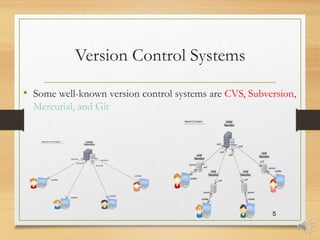
Version Control Systems
• Some well-known version control systems are CVS, Subversion,
Mercurial, and Git
5
Why Git?
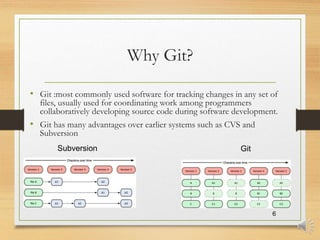
• Git :most commonly used software for tracking changes in any set of
files, usually used for coordinating work among programmers
collaboratively developing source code during software development.
• Git has many advantages over earlier systems such as CVS and
Subversion
6
Subversion Git
Git History
• Came out of Linux development community
• Linus Torvalds, 2005
• Initial goals:
 Speed
 Support for non-linear development (thousands of parallel branches)
 Fully distributed
 Able to handle large projects like Linux efficiently
 Global Information Tracker (acronym name) 7
What is Github?
• GitHub was developed by Chris Wanstrath, P. J. Hyett, Tom Preston-Werner and Scott
Chacon using Ruby on Rails, and started in February 2008
• It is a subsidiary of Microsoft, which acquired the company in 2018 for $7.5 billion
• GitHub.com is a site for online storage of Git repositories.
• You can get free space for open source projects or you can pay for private projects.
Question: Do I have to use Github in order to use Git?
Answer: No!
• you can use Git completely locally for your own purposes, or
• you or someone else could set up a server to share files, or
• you could share a repo with users on the same file system.
8
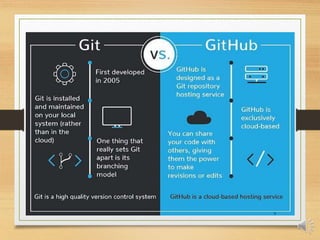
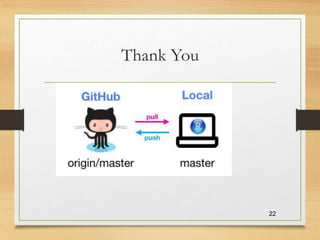
Git vs GitHub
9
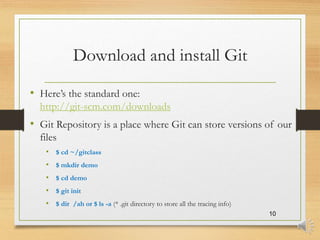
Download and install Git
• Here’s the standard one:
http://git-scm.com/downloads
• Git Repository is a place where Git can store versions of our
files
• $ cd ~/gitclass
• $ mkdir demo
• $ cd demo
• $ git init
• $ dir /ah or $ ls -a (* .git directory to store all the tracing info)
10
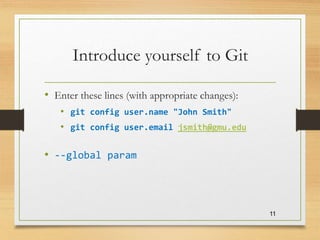
Introduce yourself to Git
• Enter these lines (with appropriate changes):
• git config user.name "John Smith"
• git config user.email jsmith@gmu.edu
• --global param
11
Git Command
12
command description
git clone url [dir] copy a git repository so you can add to it
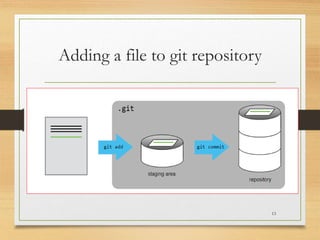
git add files adds file contents to the staging area
git commit records a snapshot of the staging area
git status view the status of your files in the
working directory and staging area
git diff shows diff of what is staged and what is
modified but unstaged
git help [command] get help info about a particular command
git pull fetch from a remote repo and try to
merge into the current branch
git push push your new branches and data to a
remote repository
others: init, reset, branch, checkout, merge, log, tag
Adding a file to git repository
13
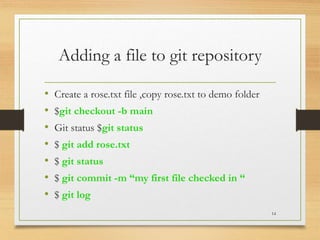
Adding a file to git repository
• Create a rose.txt file ,copy rose.txt to demo folder
• $git checkout -b main
• Git status $git status
• $ git add rose.txt
• $ git status
• $ git commit -m “my first file checked in “
• $ git log
14
Continue…
• Change rose.txt file
• $git status
• $git diff
• $git commit -a –m “new message….”
15
Adding new folder
• $mkdir poem
• copy two text files to that poem folder
• $git add poem
16
git diff HEAD~1 mars.txt
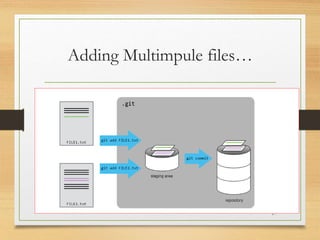
Adding Multimpule files…
17
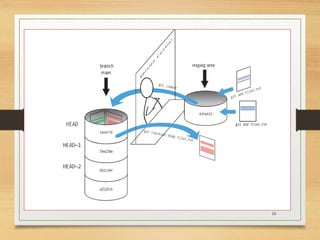
18
Checking previous version
19
• $ git diff HEAD~1 rose.txt
• $git checkout HEAD~1 rose.txt
• $git checkout HEAD rose.txt
Ignoring Things
• Configure Git to ignore specific files.
• Explain why ignoring files can be useful.
• Copy results folder with files
• Create .gitignore file
• Add
*.dat
results/
20
Git Tools
21
Windows Git Clients:
•Sourcetree
•GitHub for Windows .
•Tortoise Git
Mac Git Clients:
•GitUp
•GitBox
•Git-Xdev
Thank You
22

Git is a distributed version control system .

  • 1.
    Seminar on Git(Version control system) Anuj 2BA20IS006
  • 2.
    Objectives • Version Control •Git , Git repository • Git vs Github • Setup git environment • Create a git repository ( adding file, adding folder) • Checkout different version/ignore files… • Git tools 2
  • 3.
  • 4.
    Why Version Control? CollaborationVersioning Rolling Back Understanding 4 Scenario : Multiple students are doing a project together Question: Why not Google drive & One drive ???? source code management vs file storage management
  • 5.
    Version Control Systems •Some well-known version control systems are CVS, Subversion, Mercurial, and Git 5
  • 6.
    Why Git? • Git:most commonly used software for tracking changes in any set of files, usually used for coordinating work among programmers collaboratively developing source code during software development. • Git has many advantages over earlier systems such as CVS and Subversion 6 Subversion Git
  • 7.
    Git History • Cameout of Linux development community • Linus Torvalds, 2005 • Initial goals:  Speed  Support for non-linear development (thousands of parallel branches)  Fully distributed  Able to handle large projects like Linux efficiently  Global Information Tracker (acronym name) 7
  • 8.
    What is Github? •GitHub was developed by Chris Wanstrath, P. J. Hyett, Tom Preston-Werner and Scott Chacon using Ruby on Rails, and started in February 2008 • It is a subsidiary of Microsoft, which acquired the company in 2018 for $7.5 billion • GitHub.com is a site for online storage of Git repositories. • You can get free space for open source projects or you can pay for private projects. Question: Do I have to use Github in order to use Git? Answer: No! • you can use Git completely locally for your own purposes, or • you or someone else could set up a server to share files, or • you could share a repo with users on the same file system. 8
  • 9.
  • 10.
    Download and installGit • Here’s the standard one: http://git-scm.com/downloads • Git Repository is a place where Git can store versions of our files • $ cd ~/gitclass • $ mkdir demo • $ cd demo • $ git init • $ dir /ah or $ ls -a (* .git directory to store all the tracing info) 10
  • 11.
    Introduce yourself toGit • Enter these lines (with appropriate changes): • git config user.name "John Smith" • git config user.email jsmith@gmu.edu • --global param 11
  • 12.
    Git Command 12 command description gitclone url [dir] copy a git repository so you can add to it git add files adds file contents to the staging area git commit records a snapshot of the staging area git status view the status of your files in the working directory and staging area git diff shows diff of what is staged and what is modified but unstaged git help [command] get help info about a particular command git pull fetch from a remote repo and try to merge into the current branch git push push your new branches and data to a remote repository others: init, reset, branch, checkout, merge, log, tag
  • 13.
    Adding a fileto git repository 13
  • 14.
    Adding a fileto git repository • Create a rose.txt file ,copy rose.txt to demo folder • $git checkout -b main • Git status $git status • $ git add rose.txt • $ git status • $ git commit -m “my first file checked in “ • $ git log 14
  • 15.
    Continue… • Change rose.txtfile • $git status • $git diff • $git commit -a –m “new message….” 15
  • 16.
    Adding new folder •$mkdir poem • copy two text files to that poem folder • $git add poem 16 git diff HEAD~1 mars.txt
  • 17.
  • 18.
  • 19.
    Checking previous version 19 •$ git diff HEAD~1 rose.txt • $git checkout HEAD~1 rose.txt • $git checkout HEAD rose.txt
  • 20.
    Ignoring Things • ConfigureGit to ignore specific files. • Explain why ignoring files can be useful. • Copy results folder with files • Create .gitignore file • Add *.dat results/ 20
  • 21.
    Git Tools 21 Windows GitClients: •Sourcetree •GitHub for Windows . •Tortoise Git Mac Git Clients: •GitUp •GitBox •Git-Xdev
  • 22.