Presented By Organized By
Prabal Tyagi Rajeev Singh
Topics
• What is Git? How it is different from Github
• Difference between Git and other versioning systems
• Setting up Git on windows, mac and linux OS
• Setting up of Github Repository
• Git Commands
• GUI based tools for Git(SourceTree, Git GUI etc)
What is Git? How it is different from Github
Git is a free and open source distributed version control system , a tool
to manage your source code history.
Github is a hosting service for Git repositories, which offers all of the
distributed revision control and source code management (SCM)
functionality of Git as well as adding its own features like wikis, task
management, and bug tracking and feature requests for every project.
In brief, Git is the tool, and
Github is the service for projects that use Git.
You do not need GitHub to use Git.
Git = Local (on your computer), GitHub = Remote (web).
Github allows you to:
Share your repositories with others.
Access other user's repositories.
Store remote copies of your repositories (github servers) as backup of
your local copies.
Difference between Git and other
versioning systems
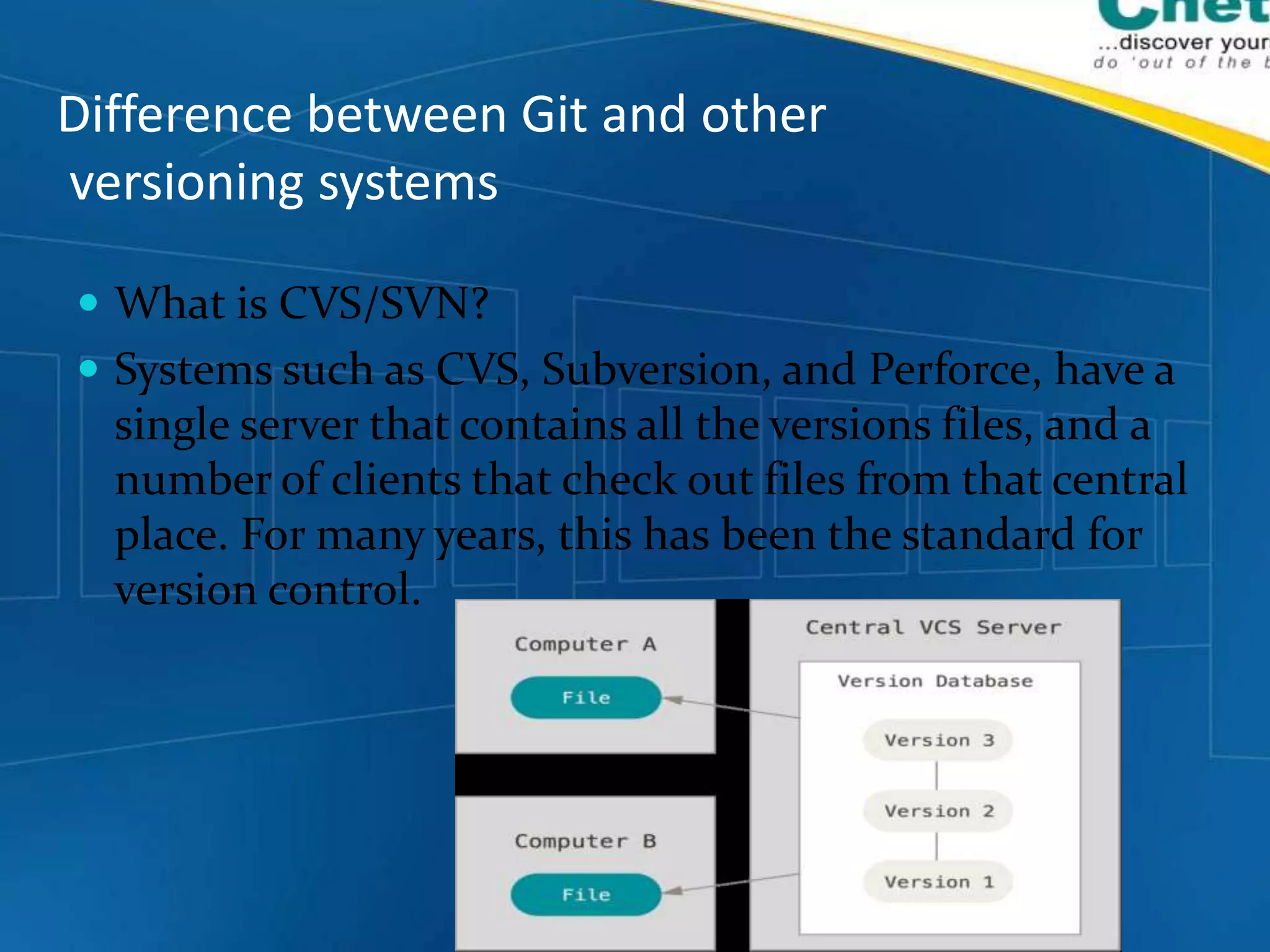
 What is CVS/SVN?
 Systems such as CVS, Subversion, and Perforce, have a
single server that contains all the versions files, and a
number of clients that check out files from that central
place. For many years, this has been the standard for
version control.
Drawbacks of CVS/SVN
If the server goes down for an hour, then during that hour
nobody can collaborate at all or save versioned changes to
anything they’re working on. If the hard disk the central
database is on becomes corrupted, and proper backups
haven’t been kept, you lose absolutely everything – the
entire history of the project except whatever
single snapshots people happen to have on their local
machines.
Advantages of Git
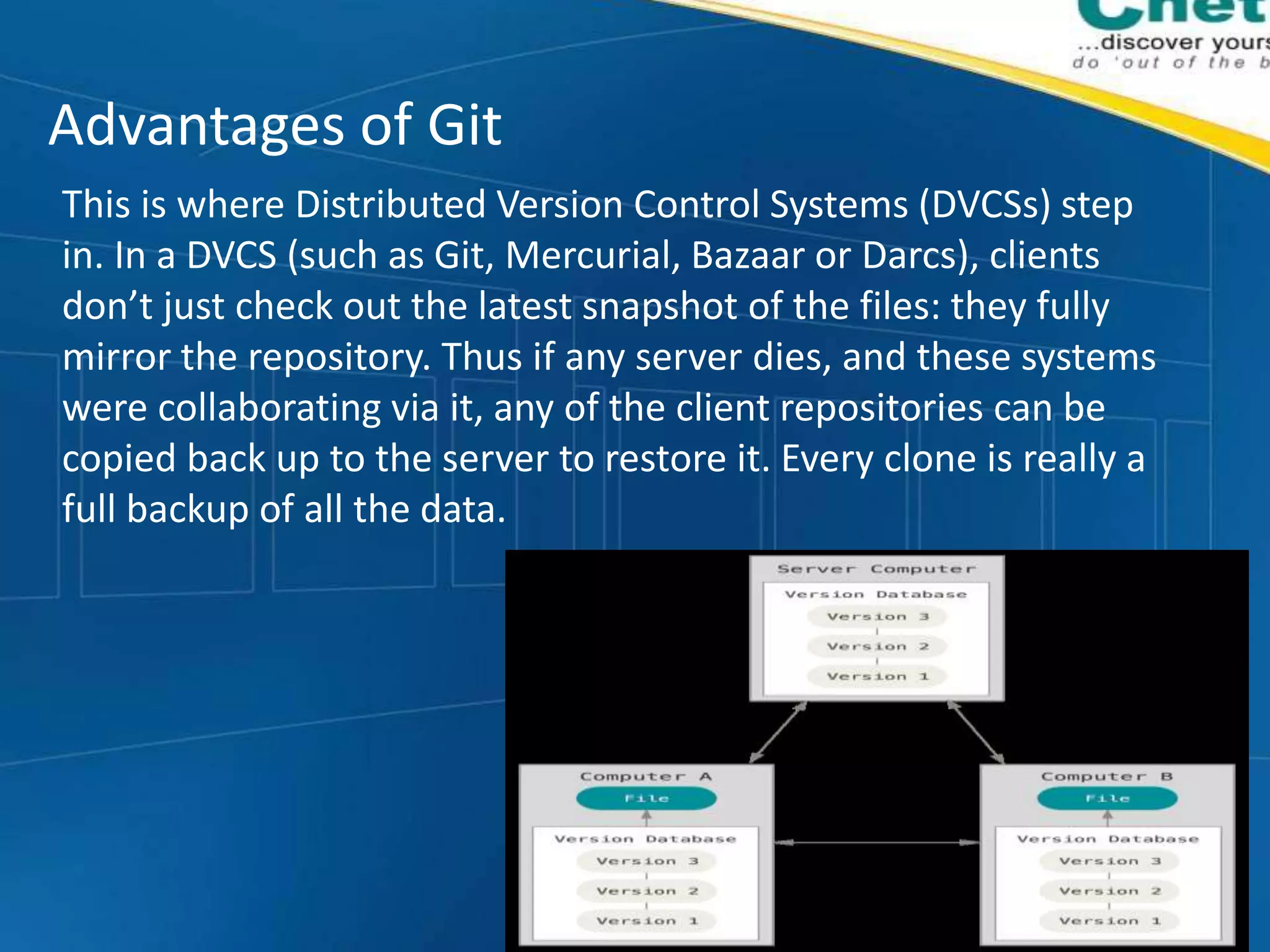
This is where Distributed Version Control Systems (DVCSs) step
in. In a DVCS (such as Git, Mercurial, Bazaar or Darcs), clients
don’t just check out the latest snapshot of the files: they fully
mirror the repository. Thus if any server dies, and these systems
were collaborating via it, any of the client repositories can be
copied back up to the server to restore it. Every clone is really a
full backup of all the data.
Setting up Git on windows and mac
The most official build is available for download on the Git
website. Just go to http://git-cm.com/download/ where
you can find for setup tools for windows, mac, linux and for
other OS as well.
This will provide git command line tools with Git bash, Git
cmd and Git GUI.
Also you can use through Github windows tools which are
available at https://desktop.github.com/ for both windows
and mac.
Setting up of Git Repository
You can setup git repository in two ways
The first way takes an existing project or directory and imports it into Git. The
second clones an existing Git repository from another server.
Initializing a Repository in an Existing Directory
If you’re starting to track an existing project in Git, you need to go to the
project’s directory and type $ git init.
 This creates a new subdirectory named .git that contains all of your
necessary repository files – a Git repository skeleton. At this point, nothing
in your project is tracked yet.
Now, if you want to start version-controlling existing files (as opposed to an
empty directory), you should probably begin tracking those files and do an
initial commit.
 $ git add *.c
 $ git add LICENSE
 $ git commit -m 'initial project version
Cloning existing repositories
 If you want to get a copy of an existing Git repository – for
example, a project you’d like to contribute to – the command is:
git clone
e.g. $ git clone https://github.com/prabaltyagi/GithubTesting.git
This command will clone the existing remote repository to the user
directory of your system. To clone to a specific folder
Git clone <urlToYourRepo> <Path on your system>
Thank You
Git Training

Git Training

  • 1.
    Presented By OrganizedBy Prabal Tyagi Rajeev Singh
  • 2.
    Topics • What isGit? How it is different from Github • Difference between Git and other versioning systems • Setting up Git on windows, mac and linux OS • Setting up of Github Repository • Git Commands • GUI based tools for Git(SourceTree, Git GUI etc)
  • 3.
    What is Git?How it is different from Github Git is a free and open source distributed version control system , a tool to manage your source code history. Github is a hosting service for Git repositories, which offers all of the distributed revision control and source code management (SCM) functionality of Git as well as adding its own features like wikis, task management, and bug tracking and feature requests for every project. In brief, Git is the tool, and Github is the service for projects that use Git. You do not need GitHub to use Git. Git = Local (on your computer), GitHub = Remote (web). Github allows you to: Share your repositories with others. Access other user's repositories. Store remote copies of your repositories (github servers) as backup of your local copies.
  • 4.
    Difference between Gitand other versioning systems  What is CVS/SVN?  Systems such as CVS, Subversion, and Perforce, have a single server that contains all the versions files, and a number of clients that check out files from that central place. For many years, this has been the standard for version control.
  • 5.
    Drawbacks of CVS/SVN Ifthe server goes down for an hour, then during that hour nobody can collaborate at all or save versioned changes to anything they’re working on. If the hard disk the central database is on becomes corrupted, and proper backups haven’t been kept, you lose absolutely everything – the entire history of the project except whatever single snapshots people happen to have on their local machines.
  • 6.
    Advantages of Git Thisis where Distributed Version Control Systems (DVCSs) step in. In a DVCS (such as Git, Mercurial, Bazaar or Darcs), clients don’t just check out the latest snapshot of the files: they fully mirror the repository. Thus if any server dies, and these systems were collaborating via it, any of the client repositories can be copied back up to the server to restore it. Every clone is really a full backup of all the data.
  • 7.
    Setting up Giton windows and mac The most official build is available for download on the Git website. Just go to http://git-cm.com/download/ where you can find for setup tools for windows, mac, linux and for other OS as well. This will provide git command line tools with Git bash, Git cmd and Git GUI. Also you can use through Github windows tools which are available at https://desktop.github.com/ for both windows and mac.
  • 8.
    Setting up ofGit Repository You can setup git repository in two ways The first way takes an existing project or directory and imports it into Git. The second clones an existing Git repository from another server. Initializing a Repository in an Existing Directory If you’re starting to track an existing project in Git, you need to go to the project’s directory and type $ git init.  This creates a new subdirectory named .git that contains all of your necessary repository files – a Git repository skeleton. At this point, nothing in your project is tracked yet. Now, if you want to start version-controlling existing files (as opposed to an empty directory), you should probably begin tracking those files and do an initial commit.  $ git add *.c  $ git add LICENSE  $ git commit -m 'initial project version
  • 9.
    Cloning existing repositories If you want to get a copy of an existing Git repository – for example, a project you’d like to contribute to – the command is: git clone e.g. $ git clone https://github.com/prabaltyagi/GithubTesting.git This command will clone the existing remote repository to the user directory of your system. To clone to a specific folder Git clone <urlToYourRepo> <Path on your system>
  • 10.