






Modernize
Solutions with
SharePoint & the
Power Platform
Jonathan Schultz
BadgerPoint Solutions
Agenda
What is “Modern”?
Why Modernize?
How to Modernize
What Could Go Wrong?
Modern?
• Tools, Not Sites
• User Friendly Lists & Libraries
• Communication Sites, not Publishing Sites
• Hub Sites, not Subsites
• Apps, not Forms
• Teams, not Skype
Why Modernize?
• Turn Static Intranets into Intelligent Workspaces
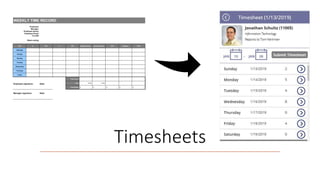
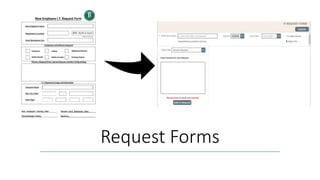
• Transform Physical/Digital Forms into Mobile Apps
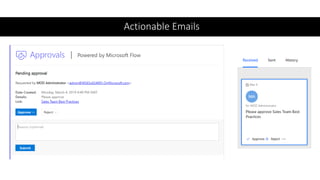
• Actionable Approvals vs. Unmanaged Requests
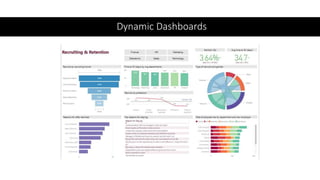
• Convert Monthly Reports to Dynamic Dashboards
This Photo by Unknown Author is licensed under CC BY-NC
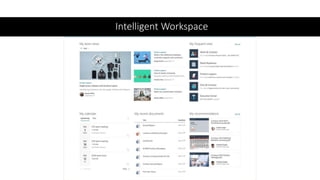
Intelligent Workspace
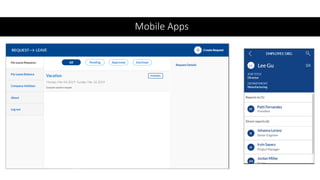
Mobile Apps
Actionable Emails
Dynamic Dashboards
Timesheets
Request Forms
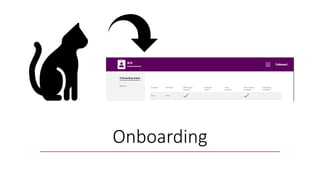
Onboarding
Planning &
Design
• Pilot and Expand
• Release Early and Often
• Subsites to Hubs
• Modernization Scanner -
https://docs.microsoft.com/en-
us/sharepoint/dev/transform/mod
ernize-scanner
• Staffing…
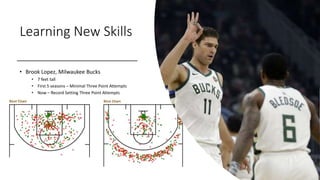
Learning New Skills
• Brook Lopez, Milwaukee Bucks
• 7 feet tall
• First 5 seasons – Minimal Three Point Attempts
• Now – Record Setting Three Point Attempts
“SharePoint” Roles
• System Engineers Need to Adapt
• No Servers to Maintain
• Plenty to Monitor and Configure
• Developers need to Adapt
• No Server-Side APIs
• No Master Pages to Change
• PowerShell is Important
• Rise of the Citizen Developer
• Use Logic, Not Code
• Must understand basics (data structures,
authentication, etc.)
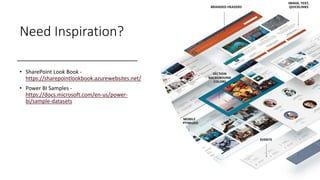
Need Inspiration?
• SharePoint Look Book -
https://sharepointlookbook.azurewebsites.net/
• Power BI Samples -
https://docs.microsoft.com/en-us/power-
bi/sample-datasets
Tools
SharePoint PowerApps
Flow Power BI
Modernization
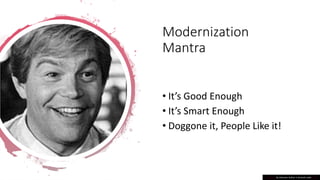
Mantra
• It’s Good Enough
• It’s Smart Enough
• Doggone it, People Like it!
This Photo by Unknown Author is licensed under CC BY
How to Get Started
• Templates
• PowerApps
• Flow
• Custom Solutions
• PowerApps -
https://github.com/SharePoint/sp-
powerapps-
solutions/tree/master/solutions
• SPFX Web Parts -
https://github.com/SharePoint/sp-dev-
fx-webparts/tree/master/samples
• SPFX Extensions -
https://github.com/SharePoint/sp-dev-
fx-extensions/tree/master/samples
Got a Classic?
• Is it Safe?
• Is Maintenance
Adding Up?
• Is it Performing?
What Could Go
Wrong?
This Photo by Unknown Author is licensed under CC BY-SA
“Service”
Accounts
• Problem
• Many connectors in Flow rely
on a user account to connect
to different Office 365
resources, like SharePoint.
• Flows are owned by user
accounts and shared with
other accounts.
• Solutions
• License a “service” account
and use it to build and
manage Flows.
• Use multiple accounts if you
need to divide into smaller
sections for security.
Branding • Problem
• Traditional methods of
updating the master page to
produce a specific look in
SharePoint is no longer
available.
• Solutions
• Use an application
extension to insert CSS to
the page and use CSS or
SASS to find and style
components (warning,
some risk as Microsoft
updates system).
• Use the options available
and wait for enhancements
(mega menu, headers,
footers, etc.)
Hero Web
Part
• Problem
• Hero web part in SharePoint
looks good but cannot use
dynamic data sources to pull in
information.
• Solutions
• Embrace the flexibility of
the Hero web part and train
people how to use it.
• Build a custom SPFX web
part to pull in data and
format the output in a
similar manner.
Calendars • Problem
• There is no modern calendar
web part.
• Solutions
• Use an Iframe to embed a
classic page in a modern
page.
• Use the sample code from
Github to build a modern
web part using the
FullCalendar.io framework.
• Use the Events web part to
display the information in a
new way.
(Un)responsive
Apps
• Problem
• PowerApps are based on a
tablet or phone layout and are
not responsive.
• Solutions
• Build two PowerApps and
optimize each for the
targeted device.
Search • Problem
• Modern search is less
configurable than previous
versions of SharePoint.
• Solutions
• Continue to use classic
SharePoint search pages.
• Monitor the Office 365
roadmap for future
enhancements.
• Consider Microsoft Search
for a Bing/Office 365 mash-
up.
3rd Party
Products
• Problem
• Vendor states that
solution works with
SharePoint Online
• Solutions
• Clarify if solution
works on modern
sites
• Test on modern sites
PDF Viewer • Problem
• The PowerApps PDF
viewer won’t display
PDF documents stored
in SharePoint
• Solutions
• Use Flow (or a custom
service) to proxy the
requests
“If there was a problem
Yo, I'll solve it”
- Robert Matthew Van Winkle
Modernization
Mantra
• It’s Good Enough
• It’s Smart Enough
• Doggone it, People Like it!
This Photo by Unknown Author is licensed under CC BY
Thank You!

Modernize Solutions with SharePoint & the Power Platform

  • 1.
    Modernize Solutions with SharePoint &the Power Platform Jonathan Schultz BadgerPoint Solutions
  • 2.
    Agenda What is “Modern”? WhyModernize? How to Modernize What Could Go Wrong?
  • 3.
    Modern? • Tools, NotSites • User Friendly Lists & Libraries • Communication Sites, not Publishing Sites • Hub Sites, not Subsites • Apps, not Forms • Teams, not Skype
  • 4.
    Why Modernize? • TurnStatic Intranets into Intelligent Workspaces • Transform Physical/Digital Forms into Mobile Apps • Actionable Approvals vs. Unmanaged Requests • Convert Monthly Reports to Dynamic Dashboards This Photo by Unknown Author is licensed under CC BY-NC
  • 5.
  • 6.
  • 7.
  • 8.
  • 9.
  • 10.
  • 11.
  • 12.
    Planning & Design • Pilotand Expand • Release Early and Often • Subsites to Hubs • Modernization Scanner - https://docs.microsoft.com/en- us/sharepoint/dev/transform/mod ernize-scanner • Staffing…
  • 13.
    Learning New Skills •Brook Lopez, Milwaukee Bucks • 7 feet tall • First 5 seasons – Minimal Three Point Attempts • Now – Record Setting Three Point Attempts
  • 14.
    “SharePoint” Roles • SystemEngineers Need to Adapt • No Servers to Maintain • Plenty to Monitor and Configure • Developers need to Adapt • No Server-Side APIs • No Master Pages to Change • PowerShell is Important • Rise of the Citizen Developer • Use Logic, Not Code • Must understand basics (data structures, authentication, etc.)
  • 15.
    Need Inspiration? • SharePointLook Book - https://sharepointlookbook.azurewebsites.net/ • Power BI Samples - https://docs.microsoft.com/en-us/power- bi/sample-datasets
  • 16.
  • 17.
    Modernization Mantra • It’s GoodEnough • It’s Smart Enough • Doggone it, People Like it! This Photo by Unknown Author is licensed under CC BY
  • 18.
    How to GetStarted • Templates • PowerApps • Flow • Custom Solutions • PowerApps - https://github.com/SharePoint/sp- powerapps- solutions/tree/master/solutions • SPFX Web Parts - https://github.com/SharePoint/sp-dev- fx-webparts/tree/master/samples • SPFX Extensions - https://github.com/SharePoint/sp-dev- fx-extensions/tree/master/samples
  • 19.
    Got a Classic? •Is it Safe? • Is Maintenance Adding Up? • Is it Performing?
  • 20.
    What Could Go Wrong? ThisPhoto by Unknown Author is licensed under CC BY-SA
  • 21.
    “Service” Accounts • Problem • Manyconnectors in Flow rely on a user account to connect to different Office 365 resources, like SharePoint. • Flows are owned by user accounts and shared with other accounts. • Solutions • License a “service” account and use it to build and manage Flows. • Use multiple accounts if you need to divide into smaller sections for security.
  • 22.
    Branding • Problem •Traditional methods of updating the master page to produce a specific look in SharePoint is no longer available. • Solutions • Use an application extension to insert CSS to the page and use CSS or SASS to find and style components (warning, some risk as Microsoft updates system). • Use the options available and wait for enhancements (mega menu, headers, footers, etc.)
  • 23.
    Hero Web Part • Problem •Hero web part in SharePoint looks good but cannot use dynamic data sources to pull in information. • Solutions • Embrace the flexibility of the Hero web part and train people how to use it. • Build a custom SPFX web part to pull in data and format the output in a similar manner.
  • 24.
    Calendars • Problem •There is no modern calendar web part. • Solutions • Use an Iframe to embed a classic page in a modern page. • Use the sample code from Github to build a modern web part using the FullCalendar.io framework. • Use the Events web part to display the information in a new way.
  • 25.
    (Un)responsive Apps • Problem • PowerAppsare based on a tablet or phone layout and are not responsive. • Solutions • Build two PowerApps and optimize each for the targeted device.
  • 26.
    Search • Problem •Modern search is less configurable than previous versions of SharePoint. • Solutions • Continue to use classic SharePoint search pages. • Monitor the Office 365 roadmap for future enhancements. • Consider Microsoft Search for a Bing/Office 365 mash- up.
  • 27.
    3rd Party Products • Problem •Vendor states that solution works with SharePoint Online • Solutions • Clarify if solution works on modern sites • Test on modern sites
  • 28.
    PDF Viewer •Problem • The PowerApps PDF viewer won’t display PDF documents stored in SharePoint • Solutions • Use Flow (or a custom service) to proxy the requests
  • 29.
    “If there wasa problem Yo, I'll solve it” - Robert Matthew Van Winkle
  • 30.
    Modernization Mantra • It’s GoodEnough • It’s Smart Enough • Doggone it, People Like it! This Photo by Unknown Author is licensed under CC BY
  • 31.