
Getting Started With HDR
Photography

Stanton Champion
@spchampion

spchampion@gmail.com

flickr.com/spchampion

500px.com/spchampion

stantonchampion.com
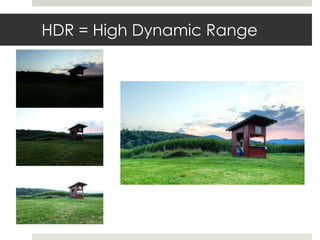
HDR = High Dynamic Range
Why High Dynamic Range
 Your camera captures a range of light for an
  exposure, but it has limits

 If your subject is outside this limited light
  range, your camera can’t capture it
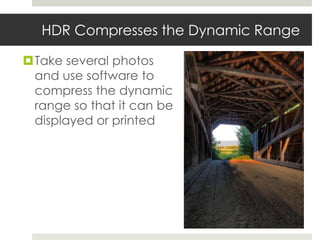
HDR Compresses the Dynamic Range

Take several photos
 and use software to
 compress the dynamic
 range so that it can be
 displayed or printed
What Do You Need?

You:
 Basic knowledge of photography
   Controlling Exposure
   Shutter
   ISO
   Aperture
   Histogram

 An Imagination
What Do You Need?

Digital Camera:
 Anything with manual exposure control

 RAW support is preferable (but not required)
   JPGs are not ideal for HDR, but usable in a pinch

 Exposure bracketing is nice to have
What Do You Need?

Software:
 HDR software
     Photomatix (most popular)
     HDR Efex Pro
     Photoshop
     Topaz Adjust

 A DAM like Lightroom, Aperture, or Capture
  One is very helpful

 Photoshop is very nice to have for post-editing
Take 1* or more photos of a subject

 * - Yes, you can do HDR with just 1 photo.
      Topaz Adjust is a great tool for this.


                            theo0023 on Flickr
Typically, take 3 – 7 photos of the
  same scene
 Each photo has a different exposure

 Minimize camera movement between exposures
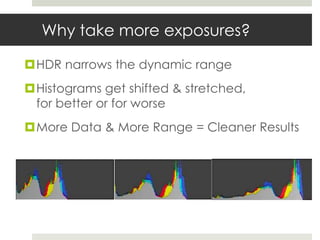
Why take more exposures?

HDR narrows the dynamic range
Histograms get shifted & stretched,
 for better or for worse
More Data & More Range = Cleaner Results
Avoid movement in the frame
between or during your exposures

Movement can create an effect called
 “ghosting” which is often unattractive


                        Bandit Queen on Flickr
Editing

Download the photos from your camera
  Tagging
  Categorization

Do not edit and crop yet
Editing

 Apply Lens Correction and Noise Reduction
  to all photos
 Need the photos to be similar for HDR
  transformation
 Do not apply any other edits!
   Cropping
   Sharpening
   Color tweaking
   Cleanup
   Etc.
Export to HDR Application

Convert to TIFF and import all photos into
 your HDR app
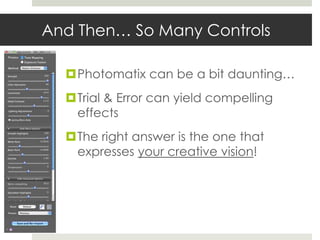
And Then… So Many Controls

  Photomatix can be a bit daunting…
  Trial & Error can yield compelling
   effects
  The right answer is the one that
   expresses your creative vision!
Use Available Presets


 Try different presets to learn the controls
 Great way to artistically explore a photo
More Help Getting Started

Process controls the HDR develop mode
  Tone Mapping can be more surreal
  Exposure Fusion is a little tamer
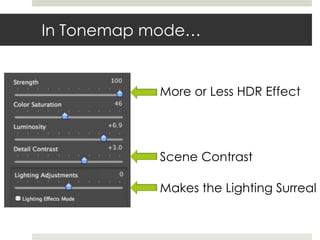
In Tonemap mode…


           More or Less HDR Effect


           Scene Contrast

           Makes the Lighting Surreal
Cleanup Afterwards

Use Photoshop to Cleanup
 Remove ghosting
 Remove HDR artifacts
Now You Can Edit:
 Cropping
 Color Tweaking
 Noise Reduction
 Sharpening
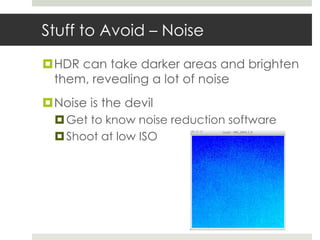
Stuff to Avoid – Noise

HDR can take darker areas and brighten
 them, revealing a lot of noise
Noise is the devil
   Get to know noise reduction software
   Shoot at low ISO
Stuff to Avoid – Halos
 Don’t push contrast so much that dark objects
  develop “halos” against bright backgrounds


                         AdamSelwood on Flickr
Stuff to Avoid – Contrast Inversion

   Bright stuff becomes dark & dark stuff
    becomes bright

                                        Sunlit clouds are
                                        darker than the
                                        stones


Alexandre Buisse & Luminous Landscape
Resources – Stuck in Customs

Trey Ratcliff
   Full time HDR photographer
   Fantastic HDR tutorials

http://www.stuckincustoms.com/
Resources – Farbspiel’s HDR
  Cookbook
Klauss Herrmann
http://farbspiel-photo.com/learn/hdr-
 cookbook
Questions?

Getting Started with HDR Photography

  • 1.
    Getting Started WithHDR Photography Stanton Champion @spchampion spchampion@gmail.com flickr.com/spchampion 500px.com/spchampion stantonchampion.com
  • 2.
    HDR = HighDynamic Range
  • 3.
    Why High DynamicRange  Your camera captures a range of light for an exposure, but it has limits  If your subject is outside this limited light range, your camera can’t capture it
  • 4.
    HDR Compresses theDynamic Range Take several photos and use software to compress the dynamic range so that it can be displayed or printed
  • 5.
    What Do YouNeed? You:  Basic knowledge of photography  Controlling Exposure  Shutter  ISO  Aperture  Histogram  An Imagination
  • 6.
    What Do YouNeed? Digital Camera:  Anything with manual exposure control  RAW support is preferable (but not required)  JPGs are not ideal for HDR, but usable in a pinch  Exposure bracketing is nice to have
  • 7.
    What Do YouNeed? Software:  HDR software  Photomatix (most popular)  HDR Efex Pro  Photoshop  Topaz Adjust  A DAM like Lightroom, Aperture, or Capture One is very helpful  Photoshop is very nice to have for post-editing
  • 8.
    Take 1* ormore photos of a subject * - Yes, you can do HDR with just 1 photo. Topaz Adjust is a great tool for this. theo0023 on Flickr
  • 9.
    Typically, take 3– 7 photos of the same scene  Each photo has a different exposure  Minimize camera movement between exposures
  • 10.
    Why take moreexposures? HDR narrows the dynamic range Histograms get shifted & stretched, for better or for worse More Data & More Range = Cleaner Results
  • 11.
    Avoid movement inthe frame between or during your exposures Movement can create an effect called “ghosting” which is often unattractive Bandit Queen on Flickr
  • 12.
    Editing Download the photosfrom your camera  Tagging  Categorization Do not edit and crop yet
  • 13.
    Editing  Apply LensCorrection and Noise Reduction to all photos  Need the photos to be similar for HDR transformation  Do not apply any other edits!  Cropping  Sharpening  Color tweaking  Cleanup  Etc.
  • 14.
    Export to HDRApplication Convert to TIFF and import all photos into your HDR app
  • 15.
    And Then… SoMany Controls Photomatix can be a bit daunting… Trial & Error can yield compelling effects The right answer is the one that expresses your creative vision!
  • 16.
    Use Available Presets Try different presets to learn the controls  Great way to artistically explore a photo
  • 17.
    More Help GettingStarted Process controls the HDR develop mode  Tone Mapping can be more surreal  Exposure Fusion is a little tamer
  • 18.
    In Tonemap mode… More or Less HDR Effect Scene Contrast Makes the Lighting Surreal
  • 19.
    Cleanup Afterwards Use Photoshopto Cleanup Remove ghosting Remove HDR artifacts Now You Can Edit: Cropping Color Tweaking Noise Reduction Sharpening
  • 20.
    Stuff to Avoid– Noise HDR can take darker areas and brighten them, revealing a lot of noise Noise is the devil  Get to know noise reduction software  Shoot at low ISO
  • 21.
    Stuff to Avoid– Halos  Don’t push contrast so much that dark objects develop “halos” against bright backgrounds AdamSelwood on Flickr
  • 22.
    Stuff to Avoid– Contrast Inversion Bright stuff becomes dark & dark stuff becomes bright Sunlit clouds are darker than the stones Alexandre Buisse & Luminous Landscape
  • 23.
    Resources – Stuckin Customs Trey Ratcliff  Full time HDR photographer  Fantastic HDR tutorials http://www.stuckincustoms.com/
  • 24.
    Resources – Farbspiel’sHDR Cookbook Klauss Herrmann http://farbspiel-photo.com/learn/hdr- cookbook
  • 25.

Editor's Notes

  • #10 Use a tripod or hold carefully!