© 2016 Renesas Electronics Corporation. All rights reserved.
Ziyuan Chen, Senior Applications Engineer
Getting Started with
e2Studio the New Eclipse-
based IDE from Renesas
Renesas Taiwan One-day Workshop
© 2015 Renesas Electronics Corporation. All rights reserved. Page 2
© 2016 Renesas Electronics Corporation. All rights reserved.
Presentation Goals
 In one development, an engineer can face having to use several tools to create their embedded project
 Let’s explore what e2Studio is, what it does, and how it can!
Page 3
© 2016 Renesas Electronics Corporation. All rights reserved.
Agenda
 Lecture Presentation Recap
 Highlight e2Studio feature for lab use
 Start Lab work
 Q&A
Page 4
© 2016 Renesas Electronics Corporation. All rights reserved.
e2Studio IDE and Editor Features
Page 5
© 2016 Renesas Electronics Corporation. All rights reserved.
Supported Families, Compilers, and Debuggers
Supported Families
 RX, RL78, RZ/A1, RZ/T1, SH2, SH2-A.
 Supported debuggers
 Renesas E1/E20 and E2 Lite (new).
 Segger J-Link.
 IECUBE (RL78).
 3rd Party Supported Tools
 KPIT GNU Compilers.
 IAR build plugins.
 Green Hills build plugins.
Page 6
© 2016 Renesas Electronics Corporation. All rights reserved.
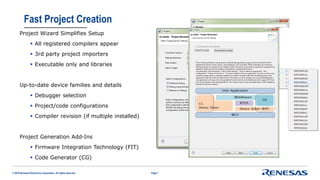
Fast Project Creation
Project Wizard Simplifies Setup
 All registered compilers appear
 3rd party project importers
 Executable only and libraries
Up-to-date device families and details
 Debugger selection
 Project/code configurations
 Compiler revision (if multiple installed)
Project Generation Add-Ins
 Firmware Integration Technology (FIT)
 Code Generator (CG)
Page 7
© 2016 Renesas Electronics Corporation. All rights reserved.
Renesas Code Generator Plug-in
Automatically creates sample drivers for
 Clocks
 MCU peripheral functions
 Startup code
Straightforward function selection
 Pin mapping and assignment
 CPU clock configuration
 Peripheral block setup
 Interrupt configuration
 User-area code block
Re-configurable at any time during development
Page 8
© 2016 Renesas Electronics Corporation. All rights reserved.
Powerful Editor Functions
Fully configurable
 Syntax Coloring
 Code Templates and formatting
 Spell Checking
Coding assistance
 Code completion
 Jump to Declare
 Hover descriptions
Usage Features
 Split file editing
 Shift-click code navigation
Page 9
© 2016 Renesas Electronics Corporation. All rights reserved.
Quick Project Import/Export
Wizard-based import or export existing projects
Export Highlights
 Selective inclusion of directories and source
 Integrated archiver for .ZIP or .TAR
Import Highlights
 Bring in projects from other IDEs (e.g IAR)
 RX and SH HEW project import into e2Studio
Page 10
© 2016 Renesas Electronics Corporation. All rights reserved.
e2Studio Debug Features
Page 11
© 2016 Renesas Electronics Corporation. All rights reserved.
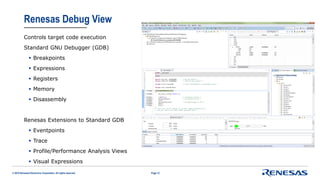
Renesas Debug View
Controls target code execution
Standard GNU Debugger (GDB)
 Breakpoints
 Expressions
 Registers
 Memory
 Disassembly
Renesas Extensions to Standard GDB
 Eventpoints
 Trace
 Profile/Performance Analysis Views
 Visual Expressions
Page 12
© 2016 Renesas Electronics Corporation. All rights reserved.
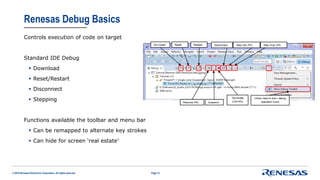
Renesas Debug Basics
Controls execution of code on target
Standard IDE Debug
 Download
 Reset/Restart
 Disconnect
 Stepping
Functions available the toolbar and menu bar
 Can be remapped to alternate key strokes
 Can hide for screen ‘real estate’
Page 13
© 2016 Renesas Electronics Corporation. All rights reserved.
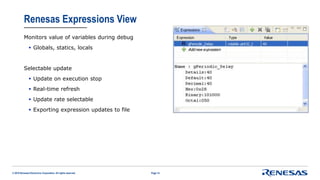
Renesas Expressions View
Monitors value of variables during debug
 Globals, statics, locals
Selectable update
 Update on execution stop
 Real-time refresh
 Update rate selectable
 Exporting expression updates to file
Page 14
© 2016 Renesas Electronics Corporation. All rights reserved.
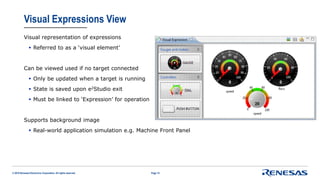
Visual Expressions View
Visual representation of expressions
 Referred to as a ‘visual element’
Can be viewed used if no target connected
 Only be updated when a target is running
 State is saved upon e2Studio exit
 Must be linked to ‘Expression’ for operation
Supports background image
 Real-world application simulation e.g. Machine Front Panel
Page 15
© 2016 Renesas Electronics Corporation. All rights reserved.
Lab Time!!
Page 16
© 2016 Renesas Electronics Corporation. All rights reserved.
Your First Projects: Blink an LED from scratch
Page 17
 Create new project in e2studio
 Examine project creation features
 Explore editor features
 Build and start a debug session
 Create quick peripheral code with project generators
 Use project import features
 Implement:
 Expressions view
 MCU registers
 Even more
t [s]
0 2 4 6 8 10
Port 17
RTC
IR
RTC
IR
RTC
IR
RTC
IR
RTC
IR
ONOFF ONOFF ONOFF
LED0
status
…
…
© 2016 Renesas Electronics Corporation. All rights reserved.
Summary
Page 18
© 2016 Renesas Electronics Corporation. All rights reserved.
Summary
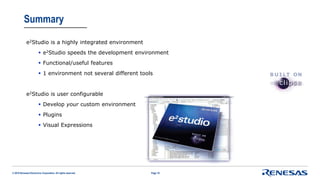
e2Studio is a highly integrated environment
 e2Studio speeds the development environment
 Functional/useful features
 1 environment not several different tools
e2Studio is user configurable
 Develop your custom environment
 Plugins
 Visual Expressions
Page 19
© 2016 Renesas Electronics Corporation. All rights reserved.
Questions?
Page 20

getting started with e2studio

  • 1.
    © 2016 RenesasElectronics Corporation. All rights reserved. Ziyuan Chen, Senior Applications Engineer Getting Started with e2Studio the New Eclipse- based IDE from Renesas Renesas Taiwan One-day Workshop
  • 2.
    © 2015 RenesasElectronics Corporation. All rights reserved. Page 2
  • 3.
    © 2016 RenesasElectronics Corporation. All rights reserved. Presentation Goals  In one development, an engineer can face having to use several tools to create their embedded project  Let’s explore what e2Studio is, what it does, and how it can! Page 3
  • 4.
    © 2016 RenesasElectronics Corporation. All rights reserved. Agenda  Lecture Presentation Recap  Highlight e2Studio feature for lab use  Start Lab work  Q&A Page 4
  • 5.
    © 2016 RenesasElectronics Corporation. All rights reserved. e2Studio IDE and Editor Features Page 5
  • 6.
    © 2016 RenesasElectronics Corporation. All rights reserved. Supported Families, Compilers, and Debuggers Supported Families  RX, RL78, RZ/A1, RZ/T1, SH2, SH2-A.  Supported debuggers  Renesas E1/E20 and E2 Lite (new).  Segger J-Link.  IECUBE (RL78).  3rd Party Supported Tools  KPIT GNU Compilers.  IAR build plugins.  Green Hills build plugins. Page 6
  • 7.
    © 2016 RenesasElectronics Corporation. All rights reserved. Fast Project Creation Project Wizard Simplifies Setup  All registered compilers appear  3rd party project importers  Executable only and libraries Up-to-date device families and details  Debugger selection  Project/code configurations  Compiler revision (if multiple installed) Project Generation Add-Ins  Firmware Integration Technology (FIT)  Code Generator (CG) Page 7
  • 8.
    © 2016 RenesasElectronics Corporation. All rights reserved. Renesas Code Generator Plug-in Automatically creates sample drivers for  Clocks  MCU peripheral functions  Startup code Straightforward function selection  Pin mapping and assignment  CPU clock configuration  Peripheral block setup  Interrupt configuration  User-area code block Re-configurable at any time during development Page 8
  • 9.
    © 2016 RenesasElectronics Corporation. All rights reserved. Powerful Editor Functions Fully configurable  Syntax Coloring  Code Templates and formatting  Spell Checking Coding assistance  Code completion  Jump to Declare  Hover descriptions Usage Features  Split file editing  Shift-click code navigation Page 9
  • 10.
    © 2016 RenesasElectronics Corporation. All rights reserved. Quick Project Import/Export Wizard-based import or export existing projects Export Highlights  Selective inclusion of directories and source  Integrated archiver for .ZIP or .TAR Import Highlights  Bring in projects from other IDEs (e.g IAR)  RX and SH HEW project import into e2Studio Page 10
  • 11.
    © 2016 RenesasElectronics Corporation. All rights reserved. e2Studio Debug Features Page 11
  • 12.
    © 2016 RenesasElectronics Corporation. All rights reserved. Renesas Debug View Controls target code execution Standard GNU Debugger (GDB)  Breakpoints  Expressions  Registers  Memory  Disassembly Renesas Extensions to Standard GDB  Eventpoints  Trace  Profile/Performance Analysis Views  Visual Expressions Page 12
  • 13.
    © 2016 RenesasElectronics Corporation. All rights reserved. Renesas Debug Basics Controls execution of code on target Standard IDE Debug  Download  Reset/Restart  Disconnect  Stepping Functions available the toolbar and menu bar  Can be remapped to alternate key strokes  Can hide for screen ‘real estate’ Page 13
  • 14.
    © 2016 RenesasElectronics Corporation. All rights reserved. Renesas Expressions View Monitors value of variables during debug  Globals, statics, locals Selectable update  Update on execution stop  Real-time refresh  Update rate selectable  Exporting expression updates to file Page 14
  • 15.
    © 2016 RenesasElectronics Corporation. All rights reserved. Visual Expressions View Visual representation of expressions  Referred to as a ‘visual element’ Can be viewed used if no target connected  Only be updated when a target is running  State is saved upon e2Studio exit  Must be linked to ‘Expression’ for operation Supports background image  Real-world application simulation e.g. Machine Front Panel Page 15
  • 16.
    © 2016 RenesasElectronics Corporation. All rights reserved. Lab Time!! Page 16
  • 17.
    © 2016 RenesasElectronics Corporation. All rights reserved. Your First Projects: Blink an LED from scratch Page 17  Create new project in e2studio  Examine project creation features  Explore editor features  Build and start a debug session  Create quick peripheral code with project generators  Use project import features  Implement:  Expressions view  MCU registers  Even more t [s] 0 2 4 6 8 10 Port 17 RTC IR RTC IR RTC IR RTC IR RTC IR ONOFF ONOFF ONOFF LED0 status … …
  • 18.
    © 2016 RenesasElectronics Corporation. All rights reserved. Summary Page 18
  • 19.
    © 2016 RenesasElectronics Corporation. All rights reserved. Summary e2Studio is a highly integrated environment  e2Studio speeds the development environment  Functional/useful features  1 environment not several different tools e2Studio is user configurable  Develop your custom environment  Plugins  Visual Expressions Page 19
  • 20.
    © 2016 RenesasElectronics Corporation. All rights reserved. Questions? Page 20