Getting Started with CSS
Objectives
Assess style rules
Create an embedded style sheet
Implement an ID selector
Implement a class selector
Use multiple selectors
HTML 5 and CSS 3 – Illustrated Complete 2
Objectives (continued)
Create an external style sheet
Link to an external style sheet
Add a comment to a style sheet
Debug and validate CSS code
HTML 5 and CSS 3 – Illustrated Complete 3
Assess Style Rules
CSS (Cascading Style Sheets): adds
style information to elements defined
in HTML code
Style rules: lines or blocks of CSS
code that specify the presentation of
web page elements
Declarations: basic building block of
CSS, includes a property name and a
value, e.g. text-align: center
HTML 5 and CSS 3 – Illustrated Complete 4
Assess Style Rules
(continued)
Style rules contain two main parts
 Selectors: identify the HTML elements to
which the rule applies
 Declarations: specify CSS property to
apply to the selector and value to assign
to the property
• Each declaration (property: value) ends with
a semicolon
• All declarations surrounded by curly braces
HTML 5 and CSS 3 – Illustrated Complete 5
Assess Style Rules
(continued)
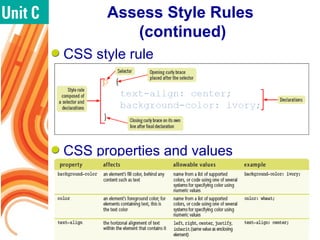
CSS style rule
CSS properties and values
HTML 5 and CSS 3 – Illustrated Complete 6
Create an Embedded
Style Sheet
Embedded Style Sheet: CSS code
inserted in the head element of an
HTML document
 Most straightforward method for affecting
the presentation of a single web page
 Generally used only with a single web
page
 Labor intensive to update embedded
styles if added to lots of web pages
HTML 5 and CSS 3 – Illustrated Complete 7
Create an Embedded
Style Sheet (continued)
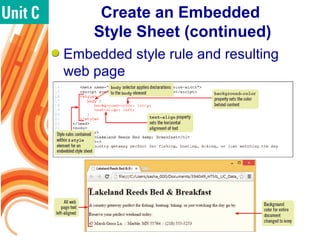
Embedded style rule and resulting
web page
HTML 5 and CSS 3 – Illustrated Complete 8
Implement an ID Selector
id selector: affects the presentation of
a specific HTML element
Add id attribute to opening tag of an
HTML element to give it a unique
value
• e.g., <p id=“name”> John Smith </p>
Use # and id value to create CSS id
selector for a style rule
• e.g., #name {text-align: right;}
HTML 5 and CSS 3 – Illustrated Complete 9
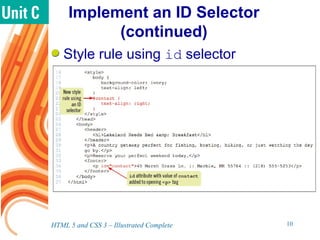
Implement an ID Selector
(continued)
Style rule using id selector
HTML 5 and CSS 3 – Illustrated Complete 10
Implement an ID Selector
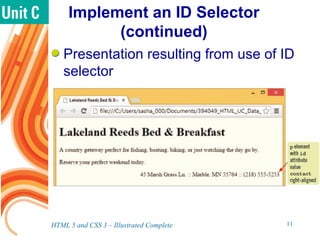
(continued)
Presentation resulting from use of ID
selector
HTML 5 and CSS 3 – Illustrated Complete 11
Implement a Class Selector
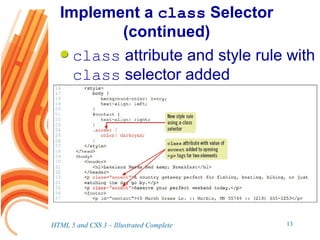
class attribute: can be assigned to
multiple HTML elements
class selector: creates a style rule
based on values assigned to the class
attribute
 Allows style rule to be applied to
unlimited number of separate elements
 Consists of period followed by class
attribute value; e.g. .accent
HTML 5 and CSS 3 – Illustrated Complete 12
Implement a class Selector
(continued)
class attribute and style rule with
class selector added
HTML 5 and CSS 3 – Illustrated Complete 13
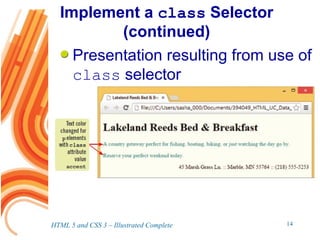
Implement a class Selector
(continued)
Presentation resulting from use of
class selector
HTML 5 and CSS 3 – Illustrated Complete 14
Use Multiple Selectors
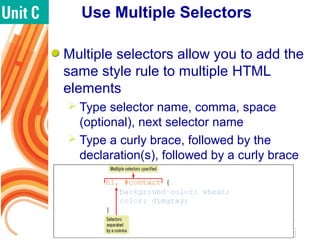
Multiple selectors allow you to add the
same style rule to multiple HTML
elements
 Type selector name, comma, space
(optional), next selector name
 Type a curly brace, followed by the
declaration(s), followed by a curly brace
HTML 5 and CSS 3 – Illustrated Complete 15
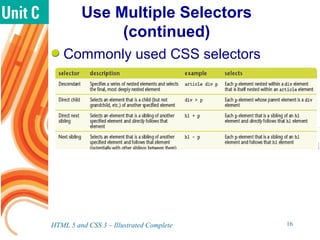
Use Multiple Selectors
(continued)
Commonly used CSS selectors
HTML 5 and CSS 3 – Illustrated Complete 16
Create an External
Style Sheet
External style sheet: separate file
containing style information
 Suitable for maintaining a consistent
style in large websites
 Prevents need to implement style
changes on each page of website
 Changes made to external style sheet
are reflected in all web pages linked to
that style sheet
 Can be linked to multiple HTML pages
HTML 5 and CSS 3 – Illustrated Complete 17
Create an External
Style Sheet (continued)
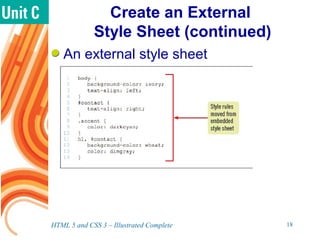
An external style sheet
HTML 5 and CSS 3 – Illustrated Complete 18
Link to an External
Style Sheet
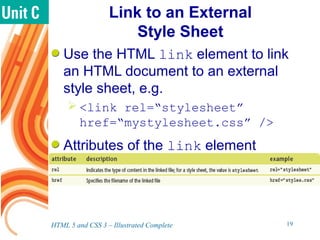
Use the HTML link element to link
an HTML document to an external
style sheet, e.g.
 <link rel=“stylesheet”
href=“mystylesheet.css” />
Attributes of the link element
HTML 5 and CSS 3 – Illustrated Complete 19
Link to an External
Style Sheet (continued)
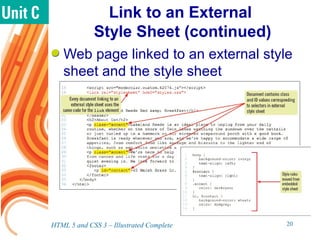
Web page linked to an external style
sheet and the style sheet
HTML 5 and CSS 3 – Illustrated Complete 20
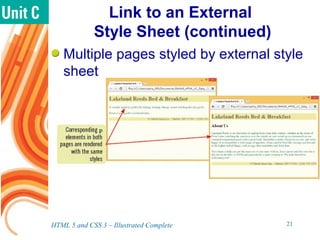
Link to an External
Style Sheet (continued)
Multiple pages styled by external style
sheet
HTML 5 and CSS 3 – Illustrated Complete 21
Add a Comment to a
Style Sheet
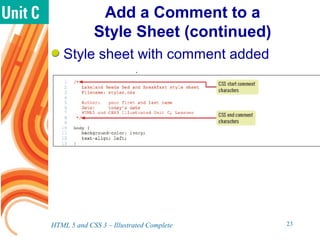
Use comments in CSS style sheet to
document the file
Syntax for style sheet comments
 /* for opening tag
 [comment text]
 */ for closing tag
Format for style sheet comments
 Can be single line
 Can be multi-line
HTML 5 and CSS 3 – Illustrated Complete 22
Add a Comment to a
Style Sheet (continued)
Style sheet with comment added
HTML 5 and CSS 3 – Illustrated Complete 23
Debug and Validate
CSS Code
Important to debug and validate CSS
code against CSS rules even when
CSS code works in browser testing
 Helps ensure compatibility of code with
different user agents
 Helps ensure that code remains usable
You can use online tools to validate
your code
HTML 5 and CSS 3 – Illustrated Complete 24
Debug and Validate
CSS Code (continued)
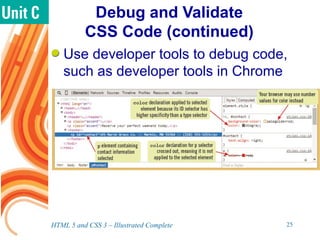
Use developer tools to debug code,
such as developer tools in Chrome
HTML 5 and CSS 3 – Illustrated Complete 25
Debug and Validate
CSS Code (continued)
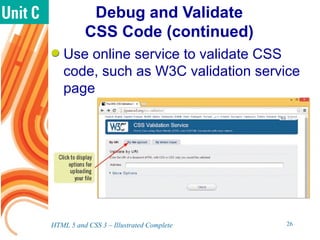
Use online service to validate CSS
code, such as W3C validation service
page
HTML 5 and CSS 3 – Illustrated Complete 26
Summary
HTML and CSS are complementary
languages
 HTML specifies the page content
 CSS indicates how the content should be
displayed
CSS uses style rules
 Selector, which identifies the HTML
element
 Declaration, which includes a property
name and a value
HTML 5 and CSS 3 – Illustrated Complete 27
Summary (continued)
Different types of selectors affect
different groups of elements
 Type selector: applies to all HTML
elements of a specific type, such as h1
 id selector: applies to a single element
having a specific unique id
 class selector: applies to elements with
a value specific to the class attribute
 Multiple selectors: applies the same
rule(s) to different elements
HTML 5 and CSS 3 – Illustrated Complete 28
Summary (continued)
Embedded style sheets are included
in the HTML code
 Suitable for single page websites
External style sheets can be linked to
multiple web pages
 All linked web pages can be changed by
changing a single style sheet
Use the link element to link a web
page to a CSS style sheet
HTML 5 and CSS 3 – Illustrated Complete 29
Summary (continued)
Use comments to document the style
sheet
 /* [comment text] */
Use developer tools to debug CSS
code
Use online validation service to
validate CSS code against CSS rules
HTML 5 and CSS 3 – Illustrated Complete 30

Getting Started with CSS

  • 1.
  • 2.
    Objectives Assess style rules Createan embedded style sheet Implement an ID selector Implement a class selector Use multiple selectors HTML 5 and CSS 3 – Illustrated Complete 2
  • 3.
    Objectives (continued) Create anexternal style sheet Link to an external style sheet Add a comment to a style sheet Debug and validate CSS code HTML 5 and CSS 3 – Illustrated Complete 3
  • 4.
    Assess Style Rules CSS(Cascading Style Sheets): adds style information to elements defined in HTML code Style rules: lines or blocks of CSS code that specify the presentation of web page elements Declarations: basic building block of CSS, includes a property name and a value, e.g. text-align: center HTML 5 and CSS 3 – Illustrated Complete 4
  • 5.
    Assess Style Rules (continued) Stylerules contain two main parts  Selectors: identify the HTML elements to which the rule applies  Declarations: specify CSS property to apply to the selector and value to assign to the property • Each declaration (property: value) ends with a semicolon • All declarations surrounded by curly braces HTML 5 and CSS 3 – Illustrated Complete 5
  • 6.
    Assess Style Rules (continued) CSSstyle rule CSS properties and values HTML 5 and CSS 3 – Illustrated Complete 6
  • 7.
    Create an Embedded StyleSheet Embedded Style Sheet: CSS code inserted in the head element of an HTML document  Most straightforward method for affecting the presentation of a single web page  Generally used only with a single web page  Labor intensive to update embedded styles if added to lots of web pages HTML 5 and CSS 3 – Illustrated Complete 7
  • 8.
    Create an Embedded StyleSheet (continued) Embedded style rule and resulting web page HTML 5 and CSS 3 – Illustrated Complete 8
  • 9.
    Implement an IDSelector id selector: affects the presentation of a specific HTML element Add id attribute to opening tag of an HTML element to give it a unique value • e.g., <p id=“name”> John Smith </p> Use # and id value to create CSS id selector for a style rule • e.g., #name {text-align: right;} HTML 5 and CSS 3 – Illustrated Complete 9
  • 10.
    Implement an IDSelector (continued) Style rule using id selector HTML 5 and CSS 3 – Illustrated Complete 10
  • 11.
    Implement an IDSelector (continued) Presentation resulting from use of ID selector HTML 5 and CSS 3 – Illustrated Complete 11
  • 12.
    Implement a ClassSelector class attribute: can be assigned to multiple HTML elements class selector: creates a style rule based on values assigned to the class attribute  Allows style rule to be applied to unlimited number of separate elements  Consists of period followed by class attribute value; e.g. .accent HTML 5 and CSS 3 – Illustrated Complete 12
  • 13.
    Implement a classSelector (continued) class attribute and style rule with class selector added HTML 5 and CSS 3 – Illustrated Complete 13
  • 14.
    Implement a classSelector (continued) Presentation resulting from use of class selector HTML 5 and CSS 3 – Illustrated Complete 14
  • 15.
    Use Multiple Selectors Multipleselectors allow you to add the same style rule to multiple HTML elements  Type selector name, comma, space (optional), next selector name  Type a curly brace, followed by the declaration(s), followed by a curly brace HTML 5 and CSS 3 – Illustrated Complete 15
  • 16.
    Use Multiple Selectors (continued) Commonlyused CSS selectors HTML 5 and CSS 3 – Illustrated Complete 16
  • 17.
    Create an External StyleSheet External style sheet: separate file containing style information  Suitable for maintaining a consistent style in large websites  Prevents need to implement style changes on each page of website  Changes made to external style sheet are reflected in all web pages linked to that style sheet  Can be linked to multiple HTML pages HTML 5 and CSS 3 – Illustrated Complete 17
  • 18.
    Create an External StyleSheet (continued) An external style sheet HTML 5 and CSS 3 – Illustrated Complete 18
  • 19.
    Link to anExternal Style Sheet Use the HTML link element to link an HTML document to an external style sheet, e.g.  <link rel=“stylesheet” href=“mystylesheet.css” /> Attributes of the link element HTML 5 and CSS 3 – Illustrated Complete 19
  • 20.
    Link to anExternal Style Sheet (continued) Web page linked to an external style sheet and the style sheet HTML 5 and CSS 3 – Illustrated Complete 20
  • 21.
    Link to anExternal Style Sheet (continued) Multiple pages styled by external style sheet HTML 5 and CSS 3 – Illustrated Complete 21
  • 22.
    Add a Commentto a Style Sheet Use comments in CSS style sheet to document the file Syntax for style sheet comments  /* for opening tag  [comment text]  */ for closing tag Format for style sheet comments  Can be single line  Can be multi-line HTML 5 and CSS 3 – Illustrated Complete 22
  • 23.
    Add a Commentto a Style Sheet (continued) Style sheet with comment added HTML 5 and CSS 3 – Illustrated Complete 23
  • 24.
    Debug and Validate CSSCode Important to debug and validate CSS code against CSS rules even when CSS code works in browser testing  Helps ensure compatibility of code with different user agents  Helps ensure that code remains usable You can use online tools to validate your code HTML 5 and CSS 3 – Illustrated Complete 24
  • 25.
    Debug and Validate CSSCode (continued) Use developer tools to debug code, such as developer tools in Chrome HTML 5 and CSS 3 – Illustrated Complete 25
  • 26.
    Debug and Validate CSSCode (continued) Use online service to validate CSS code, such as W3C validation service page HTML 5 and CSS 3 – Illustrated Complete 26
  • 27.
    Summary HTML and CSSare complementary languages  HTML specifies the page content  CSS indicates how the content should be displayed CSS uses style rules  Selector, which identifies the HTML element  Declaration, which includes a property name and a value HTML 5 and CSS 3 – Illustrated Complete 27
  • 28.
    Summary (continued) Different typesof selectors affect different groups of elements  Type selector: applies to all HTML elements of a specific type, such as h1  id selector: applies to a single element having a specific unique id  class selector: applies to elements with a value specific to the class attribute  Multiple selectors: applies the same rule(s) to different elements HTML 5 and CSS 3 – Illustrated Complete 28
  • 29.
    Summary (continued) Embedded stylesheets are included in the HTML code  Suitable for single page websites External style sheets can be linked to multiple web pages  All linked web pages can be changed by changing a single style sheet Use the link element to link a web page to a CSS style sheet HTML 5 and CSS 3 – Illustrated Complete 29
  • 30.
    Summary (continued) Use commentsto document the style sheet  /* [comment text] */ Use developer tools to debug CSS code Use online validation service to validate CSS code against CSS rules HTML 5 and CSS 3 – Illustrated Complete 30