Getting Started with Consul
Ramit Surana @ramitsurana /in/ramitsurana
Agenda
• Introduction
• Consul Architecture
• Raft Algorithm
• Comparisons
• Setup
• How to use it ?
• Bootstrapping and DNS
• Jespen Testing
• Consul on AWS
Introduction
• Tool for discovering and
configuring a variety of different
services in your infrastructure.
• Built on Golang.
• 3 basic ports:
8400 - RPC
8500 - HTTP
8600 - DNS
Features
• Service Discovery − Using either DNS or HTTP, applications can easily find the
services they depend upon.
• Health Check Status − It can provide any number of health checks. It is used
by the service discovery components to route traffic away from unhealthy
hosts.
• Key/Value Store − It can make use of Consul's hierarchical key/value store for
any number of purposes, including dynamic configuration, feature flagging,
coordination, leader election, etc.
• Multi Datacenter Deployment − Consul supports multiple datacenters. It is
used for building additional layers of abstraction to grow to multiple regions.
• Web UI − Consul provides its users a beautiful web interface using which it can
be easy to use and manage all of the features in consul.
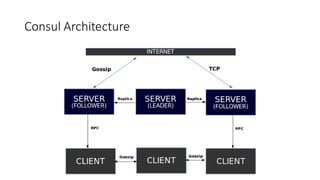
Consul Architecture
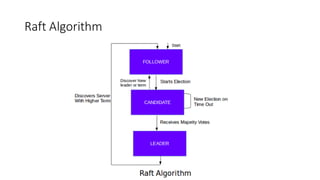
Raft Algorithm
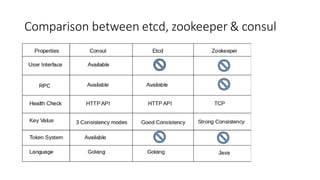
Comparison between etcd, zookeeper & consul
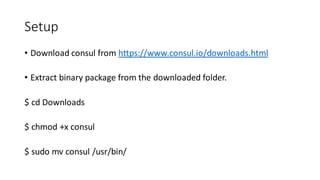
Setup
• Download consul from https://www.consul.io/downloads.html
• Extract binary package from the downloaded folder.
$ cd Downloads
$ chmod +x consul
$ sudo mv consul /usr/bin/
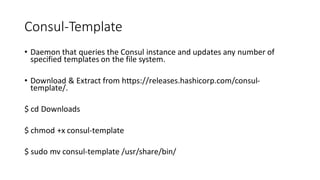
Consul-Template
• Daemon that queries the Consul instance and updates any number of
specified templates on the file system.
• Download & Extract from https://releases.hashicorp.com/consul-
template/.
$ cd Downloads
$ chmod +x consul-template
$ sudo mv consul-template /usr/share/bin/
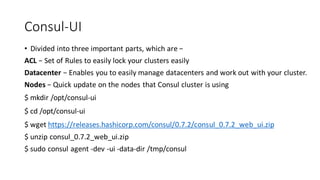
Consul-UI
• Divided into three important parts, which are −
ACL − Set of Rules to easily lock your clusters easily
Datacenter − Enables you to easily manage datacenters and work out with your cluster.
Nodes − Quick update on the nodes that Consul cluster is using
$ mkdir /opt/consul-ui
$ cd /opt/consul-ui
$ wget https://releases.hashicorp.com/consul/0.7.2/consul_0.7.2_web_ui.zip
$ unzip consul_0.7.2_web_ui.zip
$ sudo consul agent -dev -ui -data-dir /tmp/consul
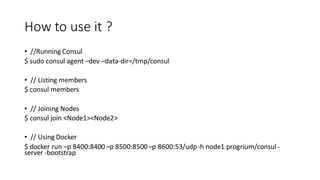
How to use it ?
• //Running Consul
$ sudo consul agent –dev –data-dir=/tmp/consul
• // Listing members
$ consul members
• // Joining Nodes
$ consul join <Node1><Node2>
• // Using Docker
$ docker run –p 8400:8400–p 8500:8500–p 8600:53/udp-h node1 progrium/consul -
server -bootstrap
How to use it ?
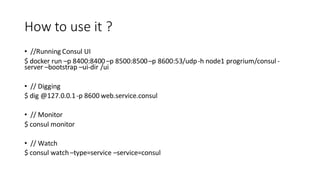
• //Running Consul UI
$ docker run –p 8400:8400–p 8500:8500–p 8600:53/udp-h node1 progrium/consul -
server –bootstrap –ui-dir /ui
• // Digging
$ dig @127.0.0.1-p 8600 web.service.consul
• // Monitor
$ consul monitor
• // Watch
$ consul watch –type=service –service=consul
How to use it ?
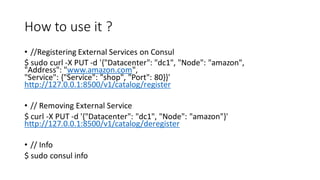
• //Registering External Services on Consul
$ sudo curl -X PUT -d '{"Datacenter": "dc1", "Node": "amazon",
"Address": "www.amazon.com",
"Service": {"Service": "shop", "Port": 80}}'
http://127.0.0.1:8500/v1/catalog/register
• // Removing External Service
$ curl -X PUT -d '{"Datacenter": "dc1", "Node": "amazon"}'
http://127.0.0.1:8500/v1/catalog/deregister
• // Info
$ sudo consul info
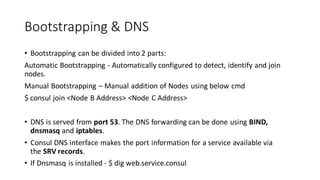
Bootstrapping & DNS
• Bootstrapping can be divided into 2 parts:
Automatic Bootstrapping - Automatically configured to detect, identify and join
nodes.
Manual Bootstrapping – Manual addition of Nodes using below cmd
$ consul join <Node B Address> <Node C Address>
• DNS is served from port 53. The DNS forwarding can be done using BIND,
dnsmasq and iptables.
• Consul DNS interface makes the port information for a service available via
the SRV records.
• If Dnsmasq is installed - $ dig web.service.consul
Jespen Testing
• Tool written to test the partial tolerance and networking in any system.
• Written in Clojure.
• Tests the system by creating some random operations on the system.
• For demo, Jepsen testing requires a huge level of cluster formation
with database systems and hence is out of scope for demo
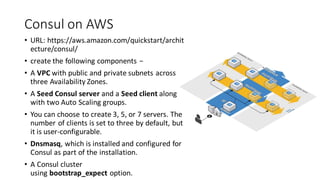
Consul on AWS
• URL: https://aws.amazon.com/quickstart/archit
ecture/consul/
• create the following components −
• A VPC with public and private subnets across
three Availability Zones.
• A Seed Consul server and a Seed client along
with two Auto Scaling groups.
• You can choose to create 3, 5, or 7 servers. The
number of clients is set to three by default, but
it is user-configurable.
• Dnsmasq, which is installed and configured for
Consul as part of the installation.
• A Consul cluster
using bootstrap_expect option.
Thank You :)

Getting Started with Consul

  • 1.
    Getting Started withConsul Ramit Surana @ramitsurana /in/ramitsurana
  • 2.
    Agenda • Introduction • ConsulArchitecture • Raft Algorithm • Comparisons • Setup • How to use it ? • Bootstrapping and DNS • Jespen Testing • Consul on AWS
  • 3.
    Introduction • Tool fordiscovering and configuring a variety of different services in your infrastructure. • Built on Golang. • 3 basic ports: 8400 - RPC 8500 - HTTP 8600 - DNS
  • 4.
    Features • Service Discovery− Using either DNS or HTTP, applications can easily find the services they depend upon. • Health Check Status − It can provide any number of health checks. It is used by the service discovery components to route traffic away from unhealthy hosts. • Key/Value Store − It can make use of Consul's hierarchical key/value store for any number of purposes, including dynamic configuration, feature flagging, coordination, leader election, etc. • Multi Datacenter Deployment − Consul supports multiple datacenters. It is used for building additional layers of abstraction to grow to multiple regions. • Web UI − Consul provides its users a beautiful web interface using which it can be easy to use and manage all of the features in consul.
  • 5.
  • 6.
  • 7.
    Comparison between etcd,zookeeper & consul
  • 8.
    Setup • Download consulfrom https://www.consul.io/downloads.html • Extract binary package from the downloaded folder. $ cd Downloads $ chmod +x consul $ sudo mv consul /usr/bin/
  • 9.
    Consul-Template • Daemon thatqueries the Consul instance and updates any number of specified templates on the file system. • Download & Extract from https://releases.hashicorp.com/consul- template/. $ cd Downloads $ chmod +x consul-template $ sudo mv consul-template /usr/share/bin/
  • 10.
    Consul-UI • Divided intothree important parts, which are − ACL − Set of Rules to easily lock your clusters easily Datacenter − Enables you to easily manage datacenters and work out with your cluster. Nodes − Quick update on the nodes that Consul cluster is using $ mkdir /opt/consul-ui $ cd /opt/consul-ui $ wget https://releases.hashicorp.com/consul/0.7.2/consul_0.7.2_web_ui.zip $ unzip consul_0.7.2_web_ui.zip $ sudo consul agent -dev -ui -data-dir /tmp/consul
  • 11.
    How to useit ? • //Running Consul $ sudo consul agent –dev –data-dir=/tmp/consul • // Listing members $ consul members • // Joining Nodes $ consul join <Node1><Node2> • // Using Docker $ docker run –p 8400:8400–p 8500:8500–p 8600:53/udp-h node1 progrium/consul - server -bootstrap
  • 12.
    How to useit ? • //Running Consul UI $ docker run –p 8400:8400–p 8500:8500–p 8600:53/udp-h node1 progrium/consul - server –bootstrap –ui-dir /ui • // Digging $ dig @127.0.0.1-p 8600 web.service.consul • // Monitor $ consul monitor • // Watch $ consul watch –type=service –service=consul
  • 13.
    How to useit ? • //Registering External Services on Consul $ sudo curl -X PUT -d '{"Datacenter": "dc1", "Node": "amazon", "Address": "www.amazon.com", "Service": {"Service": "shop", "Port": 80}}' http://127.0.0.1:8500/v1/catalog/register • // Removing External Service $ curl -X PUT -d '{"Datacenter": "dc1", "Node": "amazon"}' http://127.0.0.1:8500/v1/catalog/deregister • // Info $ sudo consul info
  • 14.
    Bootstrapping & DNS •Bootstrapping can be divided into 2 parts: Automatic Bootstrapping - Automatically configured to detect, identify and join nodes. Manual Bootstrapping – Manual addition of Nodes using below cmd $ consul join <Node B Address> <Node C Address> • DNS is served from port 53. The DNS forwarding can be done using BIND, dnsmasq and iptables. • Consul DNS interface makes the port information for a service available via the SRV records. • If Dnsmasq is installed - $ dig web.service.consul
  • 15.
    Jespen Testing • Toolwritten to test the partial tolerance and networking in any system. • Written in Clojure. • Tests the system by creating some random operations on the system. • For demo, Jepsen testing requires a huge level of cluster formation with database systems and hence is out of scope for demo
  • 16.
    Consul on AWS •URL: https://aws.amazon.com/quickstart/archit ecture/consul/ • create the following components − • A VPC with public and private subnets across three Availability Zones. • A Seed Consul server and a Seed client along with two Auto Scaling groups. • You can choose to create 3, 5, or 7 servers. The number of clients is set to three by default, but it is user-configurable. • Dnsmasq, which is installed and configured for Consul as part of the installation. • A Consul cluster using bootstrap_expect option.
  • 17.