Introduction to Consul
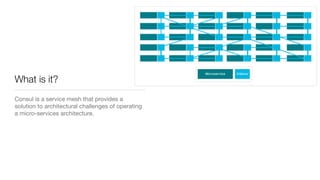
What is it?
Consul is a service mesh that provides a
solution to architectural challenges of operating
a micro-services architecture.
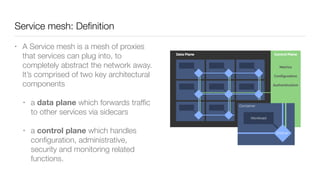
Service mesh: Definition
• A Service mesh is a mesh of proxies
that services can plug into, to
completely abstract the network away.
It’s comprised of two key architectural
components
• a data plane which forwards traffic
to other services via sidecars
• a control plane which handles
configuration, administrative,
security and monitoring related
functions.
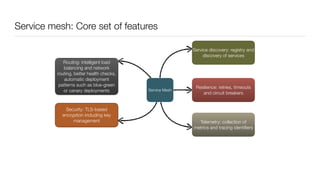
Service mesh: Core set of features
Service Mesh
Service discovery: registry and
discovery of services
Telemetry: collection of
metrics and tracing identifiers
Security: TLS-based
encryption including key
management
Routing: intelligent load
balancing and network
routing, better health checks,
automatic deployment
patterns such as blue-green
or canary deployments
Resilience: retries, timeouts
and circuit breakers
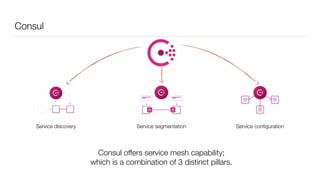
Consul
Service discovery Service segmentation Service configuration
Consul offers service mesh capability;
which is a combination of 3 distinct pillars.
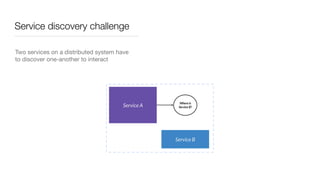
Service discovery challenge
Two services on a distributed system have
to discover one-another to interact

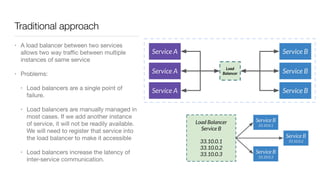
Traditional approach
• A load balancer between two services
allows two way traffic between multiple
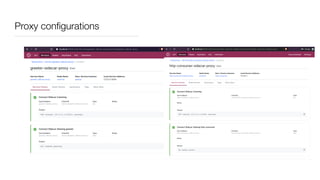
instances of same service

• Problems: 

• Load balancers are a single point of
failure. 

• Load balancers are manually managed in
most cases. If we add another instance
of service, it will not be readily available.
We will need to register that service into
the load balancer to make it accessible

• Load balancers increase the latency of
inter-service communication.
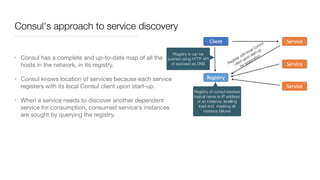
Consul's approach to service discovery
• Consul has a complete and up-to-date map of all the
hosts in the network, in its registry.

• Consul knows location of services because each service
registers with its local Consul client upon start-up. 

• When a service needs to discover another dependent
service for consumption, consumed service's instances
are sought by querying the registry.
Registry is can be
queried using HTTP API
or exposed as DNS
Registry of consul resolves
logical name to IP address
of an instance, levelling
load and masking all
instance failures
Register with local Consul
client upon start-up
for registration
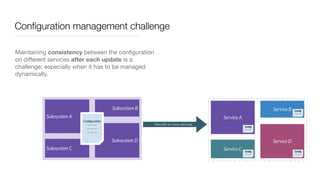
Configuration management challenge
Maintaining consistency between the configuration
on different services after each update is a
challenge; especially when it has to be managed
dynamically.

Monolith to micro services
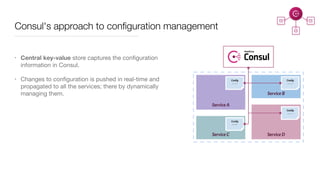
Consul's approach to configuration management
• Central key-value store captures the configuration
information in Consul.

• Changes to configuration is pushed in real-time and
propagated to all the services; there by dynamically
managing them.
Network segmentation challenge:
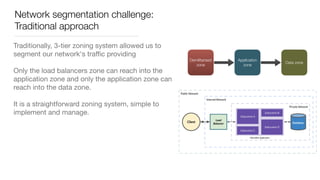
Traditional approach
Traditionally, 3-tier zoning system allowed us to
segment our network's traffic providing 

Only the load balancers zone can reach into the
application zone and only the application zone can
reach into the data zone. 

It is a straightforward zoning system, simple to
implement and manage.
Demilitarised
zone
Application
zone
Data zone
Network segmentation challenge:
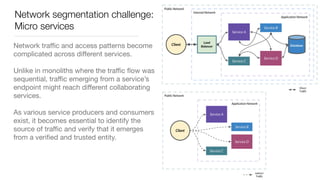
Micro services
Network traffic and access patterns become
complicated across different services.

Unlike in monoliths where the traffic flow was
sequential, traffic emerging from a service’s
endpoint might reach different collaborating
services. 

As various service producers and consumers
exist, it becomes essential to identify the
source of traffic and verify that it emerges
from a verified and trusted entity.
Network segmentation challenge:
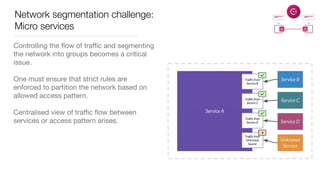
Micro services
Controlling the flow of traffic and segmenting
the network into groups becomes a critical
issue.

One must ensure that strict rules are
enforced to partition the network based on
allowed access pattern.

Centralised view of traffic flow between
services or access pattern arises.
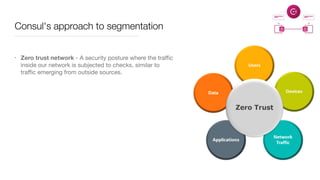
Consul's approach to segmentation
• Zero trust network - A security posture where the traffic
inside our network is subjected to checks, similar to
traffic emerging from outside sources.
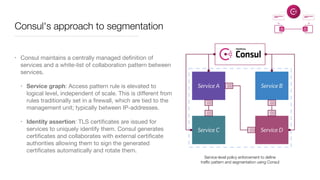
Consul's approach to segmentation
• Consul maintains a centrally managed definition of
services and a white-list of collaboration pattern between
services.

• Service graph: Access pattern rule is elevated to
logical level, independent of scale. This is different from
rules traditionally set in a firewall, which are tied to the
management unit; typically between IP-addresses. 

• Identity assertion: TLS certificates are issued for
services to uniquely identify them. Consul generates
certificates and collaborates with external certificate
authorities allowing them to sign the generated
certificates automatically and rotate them.
Service-level policy enforcement to define
traffic pattern and segmentation using Consul
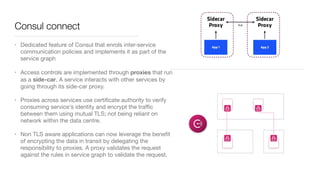
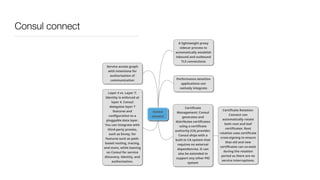
Consul connect
• Dedicated feature of Consul that enrols inter-service
communication policies and implements it as part of the
service graph

• Access controls are implemented through proxies that run
as a side-car. A service interacts with other services by
going through its side-car proxy. 

• Proxies across services use certificate authority to verify
consuming service's identity and encrypt the traffic
between them using mutual TLS; not being reliant on
network within the data centre. 

• Non TLS aware applications can now leverage the benefit
of encrypting the data in transit by delegating the
responsibility to proxies. A proxy validates the request
against the rules in service graph to validate the request.
Consul connect
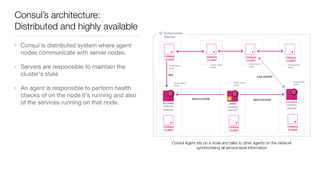
Consul’s architecture:
Distributed and highly available
• Consul is distributed system where agent
nodes communicate with server nodes.

• Servers are responsible to maintain the
cluster's state 

• An agent is responsible to perform health
checks of on the node it's running and also
of the services running on that node.
Consul Agent sits on a node and talks to other agents on the network
synchronising all service-level information
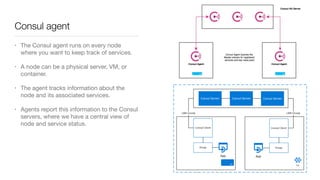
Consul agent
• The Consul agent runs on every node
where you want to keep track of services. 

• A node can be a physical server, VM, or
container. 

• The agent tracks information about the
node and its associated services. 

• Agents report this information to the Consul
servers, where we have a central view of
node and service status.
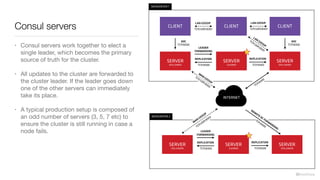
Consul servers
• Consul servers work together to elect a
single leader, which becomes the primary
source of truth for the cluster. 

• All updates to the cluster are forwarded to
the cluster leader. If the leader goes down
one of the other servers can immediately
take its place.

• A typical production setup is composed of
an odd number of servers (3, 5, 7 etc) to
ensure the cluster is still running in case a
node fails.
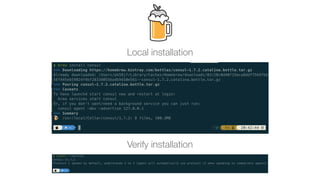
Local installation
Verify installation
Development mode, server and client agents
• Consul is a static binary written in Go.
• Following sections demonstrate Consul in development mode; which must NOT be used in
production. Development node contains single node, which is treated as a server by default.
• In production one would run each Consul agent in either in server or client mode.
• Each Consul datacenter must have at least one server, which is responsible for maintaining
Consul's state. In order to make sure that Consul's state is preserved even if a server fails, one
should always run either three or five servers in production.
• Non-server agents run in client mode. A client is a lightweight process that registers services,
runs health checks, and forwards queries to servers. A client must be running on every node in
the Consul datacenter that runs services, since clients are the source of truth about service
health
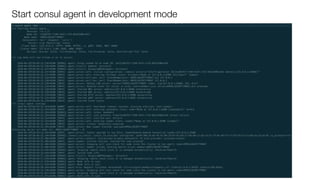
Start consul agent in development mode
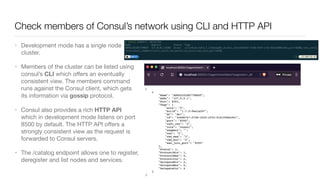
Check members of Consul’s network using CLI and HTTP API
• Development mode has a single node
cluster. 

• Members of the cluster can be listed using
consul’s CLI which offers an eventually
consistent view. The members command
runs against the Consul client, which gets
its information via gossip protocol.  

• Consul also provides a rich HTTP API
which in development mode listens on port
8500 by default. The HTTP API offers a
strongly consistent view as the request is
forwarded to Consul servers.

• The /catalog endpoint allows one to register,
deregister and list nodes and services.
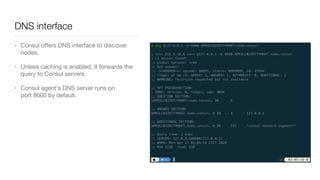
DNS interface
• Consul offers DNS interface to discover
nodes. 

• Unless caching is enabled, it forwards the
query to Consul servers.

• Consul agent's DNS server runs on
port 8600 by default. 
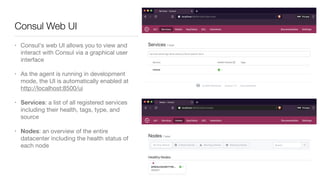
• Consul's web UI allows you to view and
interact with Consul via a graphical user
interface

• As the agent is running in development
mode, the UI is automatically enabled at
http://localhost:8500/ui

• Services: a list of all registered services
including their health, tags, type, and
source

• Nodes: an overview of the entire
datacenter including the health status of
each node
Consul Web UI
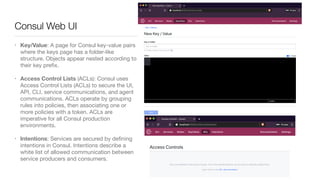
• Key/Value: A page for Consul key-value pairs
where the keys page has a folder-like
structure. Objects appear nested according to
their key prefix.

• Access Control Lists (ACLs): Consul uses
Access Control Lists (ACLs) to secure the UI,
API, CLI, service communications, and agent
communications. ACLs operate by grouping
rules into policies, then associating one or
more policies with a token. ACLs are
imperative for all Consul production
environments. 

• Intentions: Services are secured by defining
intentions in Consul. Intentions describe a
white list of allowed communication between
service producers and consumers.
Consul Web UI
Services
Register a Service with health check 

Use service discovery to query the service
Service: HTTP Echo
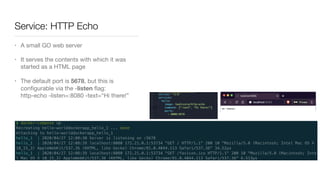
• A small GO web server

• It serves the contents with which it was
started as a HTML page

• The default port is 5678, but this is
configurable via the -listen flag:

http-echo -listen=:8080 -text=“Hi there!”
Define a service in consul
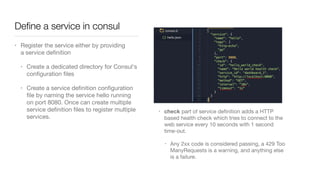
• Register the service either by providing
a service definition

• Create a dedicated directory for Consul's
configuration files

• Create a service definition configuration
file by naming the service hello running
on port 8080. Once can create multiple
service definition files to register multiple
services.
• check part of service definition adds a HTTP
based health check which tries to connect to the
web service every 10 seconds with 1 second
time-out.

• Any 2xx code is considered passing, a 429 Too
ManyRequests is a warning, and anything else
is a failure.
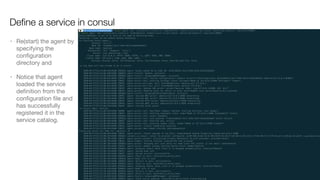
• Re(start) the agent by
specifying the
configuration
directory and 

• Notice that agent
loaded the service
definition from the
configuration file and
has successfully
registered it in the
service catalog.
Define a service in consul
Consul UI
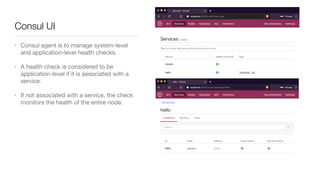
• Consul agent is to manage system-level
and application-level health checks. 

• A health check is considered to be
application-level if it is associated with a
service.

• If not associated with a service, the check
monitors the health of the entire node.
Query the service using HTTP API
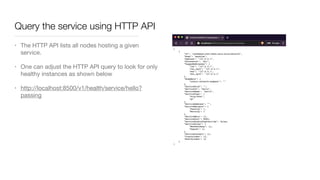
• The HTTP API lists all nodes hosting a given
service.

• One can adjust the HTTP API query to look for only
healthy instances as shown below 

• http://localhost:8500/v1/health/service/hello?
passing
Query the service using DNS
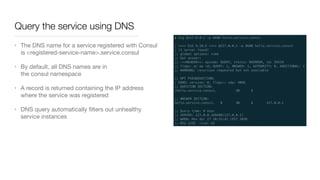
• The DNS name for a service registered with Consul
is <registered-service-name>.service.consul

• By default, all DNS names are in
the consul namespace

• A record is returned containing the IP address
where the service was registered

• DNS query automatically filters out unhealthy
service instances
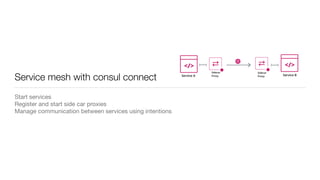
Service mesh with consul connect
Start services

Register and start side car proxies

Manage communication between services using intentions
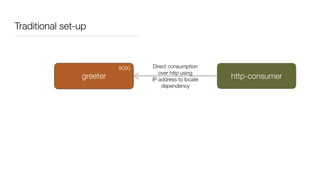
Traditional set-up
greeter http-consumer
Direct consumption
over http using
IP address to locate
dependency
9090
8080
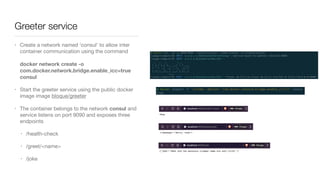
Greeter service
• Create a network named ‘consul’ to allow inter
container communication using the command


docker network create -o
com.docker.network.bridge.enable_icc=true
consul

• Start the greeter service using the public docker
image image bloque/greeter

• The container belongs to the network consul and
service listens on port 9090 and exposes three
endpoints 

• /health-check

• /greet/<name>

• /joke
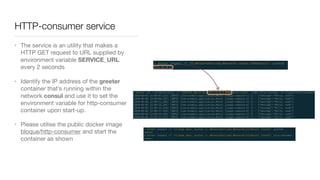
HTTP-consumer service
• The service is an utility that makes a
HTTP GET request to URL supplied by
environment variable SERVICE_URL
every 2 seconds

• Identify the IP address of the greeter
container that’s running within the
network consul and use it to set the
environment variable for http-consumer
container upon start-up.

• Please utilise the public docker image
bloque/http-consumer and start the
container as shown
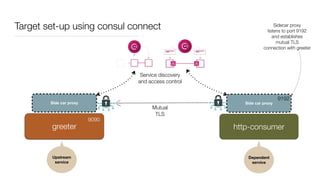
Target set-up using consul connect
Side car proxy Side car proxy
greeter http-consumer
Mutual
TLS
Upstream 

service
Dependent 

service
Service discovery
and access control
9090
9192
Sidecar proxy
listens to port 9192
and establishes
mutual TLS
connection with greeter
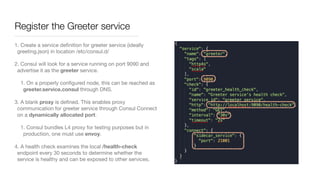
Register the Greeter service
1. Create a service definition for greeter service (ideally
greeting.json) in location /etc/consul.d/ 

2. Consul will look for a service running on port 9090 and
advertise it as the greeter service. 

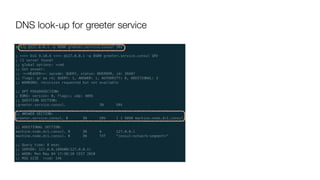
1. On a properly configured node, this can be reached as
greeter.service.consul through DNS.

3. A blank proxy is defined. This enables proxy
communication for greeter service through Consul Connect
on a dynamically allocated port.

1. Consul bundles L4 proxy for testing purposes but in
production, one must use envoy.

4. A health check examines the local /health-check
endpoint every 30 seconds to determine whether the
service is healthy and can be exposed to other services.
DNS look-up for greeter service
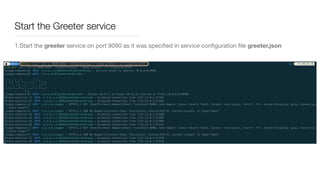
Start the Greeter service
1.Start the greeter service on port 9090 as it was specified in service configuration file greeter.json
Start the proxy for Greeter service
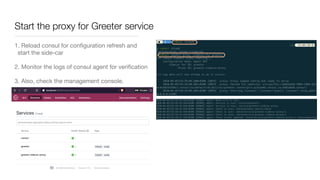
1. Reload consul for configuration refresh and
start the side-car

2. Monitor the logs of consul agent for verification

3. Also, check the management console.
Register the dependent ‘http-consumer’ service with its proxy
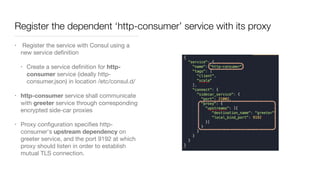
• Register the service with Consul using a
new service definition

• Create a service definition for http-
consumer service (ideally http-
consumer.json) in location /etc/consul.d/ 

• http-consumer service shall communicate
with greeter service through corresponding
encrypted side-car proxies

• Proxy configuration specifies http-
consumer's upstream dependency on
greeter service, and the port 9192 at which
proxy should listen in order to establish
mutual TLS connection.
Register the dependent ‘http-consumer’ service with its proxy
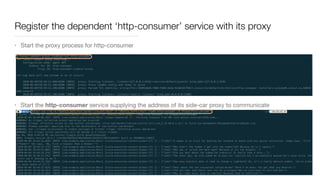
• Start the proxy process for http-consumer
• Start the http-consumer service supplying the address of its side-car proxy to communicate
Result
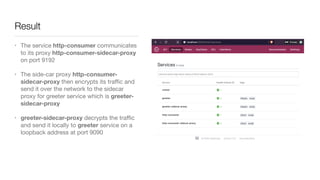
• The service http-consumer communicates
to its proxy http-consumer-sidecar-proxy
on port 9192

• The side-car proxy http-consumer-
sidecar-proxy then encrypts its traffic and
send it over the network to the sidecar
proxy for greeter service which is greeter-
sidecar-proxy 

• greeter-sidecar-proxy decrypts the traffic
and send it locally to greeter service on a
loopback address at port 9090
Proxy configurations
Intentions
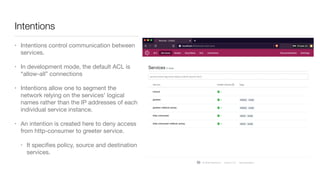
• Intentions control communication between
services. 

• In development mode, the default ACL is
“allow-all” connections

• Intentions allow one to segment the
network relying on the services' logical
names rather than the IP addresses of each
individual service instance. 

• An intention is created here to deny access
from http-consumer to greeter service. 

• It specifies policy, source and destination
services.
Intentions
Key-value store
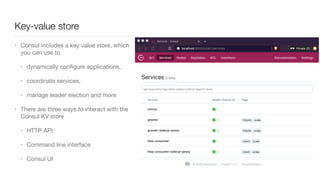
• Consul includes a key value store, which
you can use to 

• dynamically configure applications, 

• coordinate services, 

• manage leader election and more 

• There are three ways to interact with the
Consul KV store

• HTTP API 

• Command line interface

• Consul UI
Key-value store via CLI
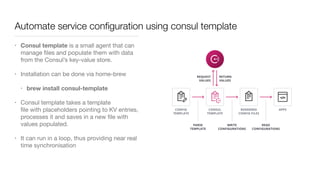
Automate service configuration using consul template
• Consul template is a small agent that can
manage files and populate them with data
from the Consul’s key-value store.

• Installation can be done via home-brew 

• brew install consul-template
• Consul template takes a template
file with placeholders pointing to KV entries,
processes it and saves in a new file with
values populated. 

• It can run in a loop, thus providing near real
time synchronisation
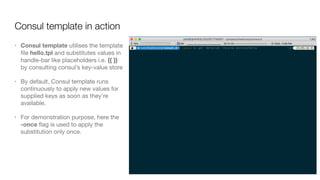
Consul template in action
• Consul template utilises the template
file hello.tpl and substitutes values in
handle-bar like placeholders i.e. {{ }}
by consulting consul’s key-value store

• By default, Consul template runs
continuously to apply new values for
supplied keys as soon as they’re
available. 

• For demonstration purpose, here the
-once flag is used to apply the
substitution only once.
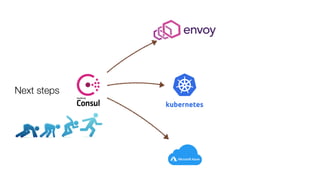
Next steps

Introduction to Consul

  • 1.
  • 2.
    What is it? Consulis a service mesh that provides a solution to architectural challenges of operating a micro-services architecture.
  • 3.
    Service mesh: Definition •A Service mesh is a mesh of proxies that services can plug into, to completely abstract the network away. It’s comprised of two key architectural components • a data plane which forwards traffic to other services via sidecars • a control plane which handles configuration, administrative, security and monitoring related functions.
  • 4.
    Service mesh: Coreset of features Service Mesh Service discovery: registry and discovery of services Telemetry: collection of metrics and tracing identifiers Security: TLS-based encryption including key management Routing: intelligent load balancing and network routing, better health checks, automatic deployment patterns such as blue-green or canary deployments Resilience: retries, timeouts and circuit breakers
  • 5.
    Consul Service discovery Servicesegmentation Service configuration Consul offers service mesh capability; which is a combination of 3 distinct pillars.
  • 6.
    Service discovery challenge Twoservices on a distributed system have to discover one-another to interact

  • 7.
    Traditional approach • Aload balancer between two services allows two way traffic between multiple instances of same service • Problems: • Load balancers are a single point of failure. • Load balancers are manually managed in most cases. If we add another instance of service, it will not be readily available. We will need to register that service into the load balancer to make it accessible • Load balancers increase the latency of inter-service communication.
  • 8.
    Consul's approach toservice discovery • Consul has a complete and up-to-date map of all the hosts in the network, in its registry. • Consul knows location of services because each service registers with its local Consul client upon start-up. • When a service needs to discover another dependent service for consumption, consumed service's instances are sought by querying the registry. Registry is can be queried using HTTP API or exposed as DNS Registry of consul resolves logical name to IP address of an instance, levelling load and masking all instance failures Register with local Consul client upon start-up for registration
  • 9.
    Configuration management challenge Maintainingconsistency between the configuration on different services after each update is a challenge; especially when it has to be managed dynamically. Monolith to micro services
  • 10.
    Consul's approach toconfiguration management • Central key-value store captures the configuration information in Consul. • Changes to configuration is pushed in real-time and propagated to all the services; there by dynamically managing them.
  • 11.
    Network segmentation challenge: Traditionalapproach Traditionally, 3-tier zoning system allowed us to segment our network's traffic providing Only the load balancers zone can reach into the application zone and only the application zone can reach into the data zone. 
 It is a straightforward zoning system, simple to implement and manage. Demilitarised zone Application zone Data zone
  • 12.
    Network segmentation challenge: Microservices Network traffic and access patterns become complicated across different services. Unlike in monoliths where the traffic flow was sequential, traffic emerging from a service’s endpoint might reach different collaborating services. As various service producers and consumers exist, it becomes essential to identify the source of traffic and verify that it emerges from a verified and trusted entity.
  • 13.
    Network segmentation challenge: Microservices Controlling the flow of traffic and segmenting the network into groups becomes a critical issue. One must ensure that strict rules are enforced to partition the network based on allowed access pattern. Centralised view of traffic flow between services or access pattern arises.
  • 14.
    Consul's approach tosegmentation • Zero trust network - A security posture where the traffic inside our network is subjected to checks, similar to traffic emerging from outside sources.
  • 15.
    Consul's approach tosegmentation • Consul maintains a centrally managed definition of services and a white-list of collaboration pattern between services. • Service graph: Access pattern rule is elevated to logical level, independent of scale. This is different from rules traditionally set in a firewall, which are tied to the management unit; typically between IP-addresses. • Identity assertion: TLS certificates are issued for services to uniquely identify them. Consul generates certificates and collaborates with external certificate authorities allowing them to sign the generated certificates automatically and rotate them. Service-level policy enforcement to define traffic pattern and segmentation using Consul
  • 16.
    Consul connect • Dedicatedfeature of Consul that enrols inter-service communication policies and implements it as part of the service graph • Access controls are implemented through proxies that run as a side-car. A service interacts with other services by going through its side-car proxy. • Proxies across services use certificate authority to verify consuming service's identity and encrypt the traffic between them using mutual TLS; not being reliant on network within the data centre. • Non TLS aware applications can now leverage the benefit of encrypting the data in transit by delegating the responsibility to proxies. A proxy validates the request against the rules in service graph to validate the request.
  • 17.
  • 18.
    Consul’s architecture: Distributed andhighly available • Consul is distributed system where agent nodes communicate with server nodes. • Servers are responsible to maintain the cluster's state • An agent is responsible to perform health checks of on the node it's running and also of the services running on that node. Consul Agent sits on a node and talks to other agents on the network synchronising all service-level information
  • 19.
    Consul agent • TheConsul agent runs on every node where you want to keep track of services. • A node can be a physical server, VM, or container. • The agent tracks information about the node and its associated services. • Agents report this information to the Consul servers, where we have a central view of node and service status.
  • 20.
    Consul servers • Consulservers work together to elect a single leader, which becomes the primary source of truth for the cluster. • All updates to the cluster are forwarded to the cluster leader. If the leader goes down one of the other servers can immediately take its place. • A typical production setup is composed of an odd number of servers (3, 5, 7 etc) to ensure the cluster is still running in case a node fails.
  • 21.
  • 22.
    Development mode, serverand client agents • Consul is a static binary written in Go. • Following sections demonstrate Consul in development mode; which must NOT be used in production. Development node contains single node, which is treated as a server by default. • In production one would run each Consul agent in either in server or client mode. • Each Consul datacenter must have at least one server, which is responsible for maintaining Consul's state. In order to make sure that Consul's state is preserved even if a server fails, one should always run either three or five servers in production. • Non-server agents run in client mode. A client is a lightweight process that registers services, runs health checks, and forwards queries to servers. A client must be running on every node in the Consul datacenter that runs services, since clients are the source of truth about service health
  • 23.
    Start consul agentin development mode
  • 24.
    Check members ofConsul’s network using CLI and HTTP API • Development mode has a single node cluster. • Members of the cluster can be listed using consul’s CLI which offers an eventually consistent view. The members command runs against the Consul client, which gets its information via gossip protocol.  • Consul also provides a rich HTTP API which in development mode listens on port 8500 by default. The HTTP API offers a strongly consistent view as the request is forwarded to Consul servers. • The /catalog endpoint allows one to register, deregister and list nodes and services.
  • 25.
    DNS interface • Consuloffers DNS interface to discover nodes. • Unless caching is enabled, it forwards the query to Consul servers. • Consul agent's DNS server runs on port 8600 by default. 
  • 26.
    • Consul's webUI allows you to view and interact with Consul via a graphical user interface • As the agent is running in development mode, the UI is automatically enabled at http://localhost:8500/ui • Services: a list of all registered services including their health, tags, type, and source • Nodes: an overview of the entire datacenter including the health status of each node Consul Web UI
  • 27.
    • Key/Value: Apage for Consul key-value pairs where the keys page has a folder-like structure. Objects appear nested according to their key prefix. • Access Control Lists (ACLs): Consul uses Access Control Lists (ACLs) to secure the UI, API, CLI, service communications, and agent communications. ACLs operate by grouping rules into policies, then associating one or more policies with a token. ACLs are imperative for all Consul production environments. • Intentions: Services are secured by defining intentions in Consul. Intentions describe a white list of allowed communication between service producers and consumers. Consul Web UI
  • 28.
    Services Register a Servicewith health check 
 Use service discovery to query the service
  • 29.
    Service: HTTP Echo •A small GO web server • It serves the contents with which it was started as a HTML page • The default port is 5678, but this is configurable via the -listen flag:
 http-echo -listen=:8080 -text=“Hi there!”
  • 30.
    Define a servicein consul • Register the service either by providing a service definition • Create a dedicated directory for Consul's configuration files • Create a service definition configuration file by naming the service hello running on port 8080. Once can create multiple service definition files to register multiple services. • check part of service definition adds a HTTP based health check which tries to connect to the web service every 10 seconds with 1 second time-out. • Any 2xx code is considered passing, a 429 Too ManyRequests is a warning, and anything else is a failure.
  • 31.
    • Re(start) theagent by specifying the configuration directory and • Notice that agent loaded the service definition from the configuration file and has successfully registered it in the service catalog. Define a service in consul
  • 32.
    Consul UI • Consulagent is to manage system-level and application-level health checks.  • A health check is considered to be application-level if it is associated with a service. • If not associated with a service, the check monitors the health of the entire node.
  • 33.
    Query the serviceusing HTTP API • The HTTP API lists all nodes hosting a given service. • One can adjust the HTTP API query to look for only healthy instances as shown below • http://localhost:8500/v1/health/service/hello? passing
  • 34.
    Query the serviceusing DNS • The DNS name for a service registered with Consul is <registered-service-name>.service.consul • By default, all DNS names are in the consul namespace • A record is returned containing the IP address where the service was registered • DNS query automatically filters out unhealthy service instances
  • 35.
    Service mesh withconsul connect Start services
 Register and start side car proxies Manage communication between services using intentions
  • 36.
    Traditional set-up greeter http-consumer Directconsumption over http using IP address to locate dependency 9090 8080
  • 37.
    Greeter service • Createa network named ‘consul’ to allow inter container communication using the command
 
 docker network create -o com.docker.network.bridge.enable_icc=true consul • Start the greeter service using the public docker image image bloque/greeter • The container belongs to the network consul and service listens on port 9090 and exposes three endpoints • /health-check • /greet/<name> • /joke
  • 38.
    HTTP-consumer service • Theservice is an utility that makes a HTTP GET request to URL supplied by environment variable SERVICE_URL every 2 seconds • Identify the IP address of the greeter container that’s running within the network consul and use it to set the environment variable for http-consumer container upon start-up. • Please utilise the public docker image bloque/http-consumer and start the container as shown
  • 39.
    Target set-up usingconsul connect Side car proxy Side car proxy greeter http-consumer Mutual TLS Upstream 
 service Dependent 
 service Service discovery and access control 9090 9192 Sidecar proxy listens to port 9192 and establishes mutual TLS connection with greeter
  • 40.
    Register the Greeterservice 1. Create a service definition for greeter service (ideally greeting.json) in location /etc/consul.d/ 2. Consul will look for a service running on port 9090 and advertise it as the greeter service. 1. On a properly configured node, this can be reached as greeter.service.consul through DNS. 3. A blank proxy is defined. This enables proxy communication for greeter service through Consul Connect on a dynamically allocated port. 1. Consul bundles L4 proxy for testing purposes but in production, one must use envoy. 4. A health check examines the local /health-check endpoint every 30 seconds to determine whether the service is healthy and can be exposed to other services.
  • 41.
    DNS look-up forgreeter service
  • 42.
    Start the Greeterservice 1.Start the greeter service on port 9090 as it was specified in service configuration file greeter.json
  • 43.
    Start the proxyfor Greeter service 1. Reload consul for configuration refresh and start the side-car 2. Monitor the logs of consul agent for verification 3. Also, check the management console.
  • 44.
    Register the dependent‘http-consumer’ service with its proxy • Register the service with Consul using a new service definition • Create a service definition for http- consumer service (ideally http- consumer.json) in location /etc/consul.d/ • http-consumer service shall communicate with greeter service through corresponding encrypted side-car proxies • Proxy configuration specifies http- consumer's upstream dependency on greeter service, and the port 9192 at which proxy should listen in order to establish mutual TLS connection.
  • 45.
    Register the dependent‘http-consumer’ service with its proxy • Start the proxy process for http-consumer • Start the http-consumer service supplying the address of its side-car proxy to communicate
  • 46.
    Result • The servicehttp-consumer communicates to its proxy http-consumer-sidecar-proxy on port 9192 • The side-car proxy http-consumer- sidecar-proxy then encrypts its traffic and send it over the network to the sidecar proxy for greeter service which is greeter- sidecar-proxy • greeter-sidecar-proxy decrypts the traffic and send it locally to greeter service on a loopback address at port 9090
  • 47.
  • 48.
    Intentions • Intentions controlcommunication between services. • In development mode, the default ACL is “allow-all” connections • Intentions allow one to segment the network relying on the services' logical names rather than the IP addresses of each individual service instance.  • An intention is created here to deny access from http-consumer to greeter service. • It specifies policy, source and destination services.
  • 49.
  • 50.
    Key-value store • Consulincludes a key value store, which you can use to • dynamically configure applications, • coordinate services, • manage leader election and more • There are three ways to interact with the Consul KV store • HTTP API • Command line interface • Consul UI
  • 51.
  • 52.
    Automate service configurationusing consul template • Consul template is a small agent that can manage files and populate them with data from the Consul’s key-value store. • Installation can be done via home-brew • brew install consul-template • Consul template takes a template file with placeholders pointing to KV entries, processes it and saves in a new file with values populated. • It can run in a loop, thus providing near real time synchronisation
  • 53.
    Consul template inaction • Consul template utilises the template file hello.tpl and substitutes values in handle-bar like placeholders i.e. {{ }} by consulting consul’s key-value store • By default, Consul template runs continuously to apply new values for supplied keys as soon as they’re available. • For demonstration purpose, here the -once flag is used to apply the substitution only once.
  • 54.