JSON
Date : 10-Mar-2017 By:
Sabarinath Gnanasekar
Insights:
• What is JSON?
• Comparisons with XML
• Data Types
• Syntax
• Usage
• Demo
JSON is..
• A lightweight text based data-interchange format .
• Completely language independent.
• Based on a subset of the JavaScript Programming Language.
• Easy to understand, manipulate and generate by humans and machines.
• Straightforward syntax
JSON is NOT…
• Overly Complex
• A “document” format
• A markup language
• A programming language
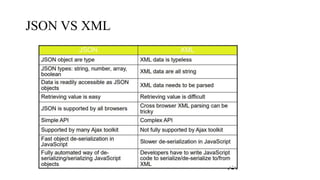
JSON VS XML
Knocks against JSON
• Lack of namespaces
• No inherit validation (XML has DTD and templates, but there is JSONlint)
• Not extensible
• It’s basically just not XML
Data Types
• Strings
oSequence of 0 or more Unicode characters
oWrapped in "double quotes“
oBackslash escapement
• Numbers
oInteger
oReal
oScientific
oNo octal or hex
oNo None or Infinity – Use null instead.
• Booleans & Null
o Booleans: true or false
o Null: A value that specifies nothing or no value.
• Objects & Arrays
oObjects: Unordered key/value pairs wrapped in { }
oArrays: Ordered key/value pairs wrapped in [ ]
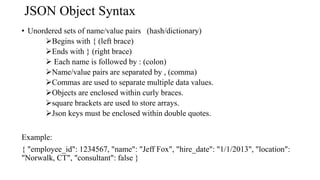
JSON Object Syntax
• Unordered sets of name/value pairs (hash/dictionary)
Begins with { (left brace)
Ends with } (right brace)
 Each name is followed by : (colon)
Name/value pairs are separated by , (comma)
Commas are used to separate multiple data values.
Objects are enclosed within curly braces.
square brackets are used to store arrays.
Json keys must be enclosed within double quotes.
Example:
{ "employee_id": 1234567, "name": "Jeff Fox", "hire_date": "1/1/2013", "location":
"Norwalk, CT", "consultant": false }
Arrays in JSON
• An ordered collection of values
oBegins with [ (left bracket)
o Ends with ] (right bracket)
oName/value pairs are separated by , (comma)
Example:
{ "employee_id": 1236937, "name": "Jeff Fox", "hire_date": "1/1/2013", "location":
"Norwalk, CT", "consultant": false, "random_nums": [ 24,65,12,94 ] }
How & When to use JSON
• Transfer data to and from a server(ex: Browser, mobile Apps)
• Perform asynchronous data calls without requiring a page refresh
• Working with data stores
• Compile and save form or user data for local storage
Demo
https://gsabarinath91@bitbucket.org/gsabarinath91/serialisation.git

Json

  • 1.
    JSON Date : 10-Mar-2017By: Sabarinath Gnanasekar
  • 2.
    Insights: • What isJSON? • Comparisons with XML • Data Types • Syntax • Usage • Demo
  • 3.
    JSON is.. • Alightweight text based data-interchange format . • Completely language independent. • Based on a subset of the JavaScript Programming Language. • Easy to understand, manipulate and generate by humans and machines. • Straightforward syntax
  • 4.
    JSON is NOT… •Overly Complex • A “document” format • A markup language • A programming language
  • 5.
  • 6.
    Knocks against JSON •Lack of namespaces • No inherit validation (XML has DTD and templates, but there is JSONlint) • Not extensible • It’s basically just not XML
  • 7.
    Data Types • Strings oSequenceof 0 or more Unicode characters oWrapped in "double quotes“ oBackslash escapement • Numbers oInteger oReal oScientific oNo octal or hex oNo None or Infinity – Use null instead.
  • 8.
    • Booleans &Null o Booleans: true or false o Null: A value that specifies nothing or no value. • Objects & Arrays oObjects: Unordered key/value pairs wrapped in { } oArrays: Ordered key/value pairs wrapped in [ ]
  • 9.
    JSON Object Syntax •Unordered sets of name/value pairs (hash/dictionary) Begins with { (left brace) Ends with } (right brace)  Each name is followed by : (colon) Name/value pairs are separated by , (comma) Commas are used to separate multiple data values. Objects are enclosed within curly braces. square brackets are used to store arrays. Json keys must be enclosed within double quotes. Example: { "employee_id": 1234567, "name": "Jeff Fox", "hire_date": "1/1/2013", "location": "Norwalk, CT", "consultant": false }
  • 10.
    Arrays in JSON •An ordered collection of values oBegins with [ (left bracket) o Ends with ] (right bracket) oName/value pairs are separated by , (comma) Example: { "employee_id": 1236937, "name": "Jeff Fox", "hire_date": "1/1/2013", "location": "Norwalk, CT", "consultant": false, "random_nums": [ 24,65,12,94 ] }
  • 11.
    How & Whento use JSON • Transfer data to and from a server(ex: Browser, mobile Apps) • Perform asynchronous data calls without requiring a page refresh • Working with data stores • Compile and save form or user data for local storage
  • 12.